
Three types of tenants are supported in OceanBase AI Database: the system tenant, user tenants, and Meta tenants. Each user tenant has a corresponding Meta tenant.
OceanBase AI Database configures a Meta tenant for each user tenant to manage the private data of the user tenant and use the resources of the user tenant. This avoids issues such as the system tenant becoming bloated and insufficient resource isolation.
Root Service undertakes a large amount of management work for OceanBase AI Database, including cluster management, tenant management, resource management, load balancing, daily major compaction scheduling, and migration and replication. Root Service provides these capabilities based on the system tenant. The system tenant is a database instance used internally by OceanBase AI Database to process public cluster tasks.
Introduction to tenant types
System tenant
The system tenant is the default tenant created in a cluster and has the same lifecycle as the cluster. It manages the lifecycles of the cluster and all user tenants in the cluster. The system tenant has only one log stream (log stream 1) and supports only single-point writes. It does not support scaling. You can create user tables in the system tenant. All user tables and system tables are served by log stream 1. The data of the system tenant is private to the cluster and does not support physical backup or restore.
Application systems access OceanBase AI Database from the system tenant. The client parses the configuration file of the application system and obtains the IP address list of the system tenant from the Config Server. Then, the client accesses the system tenant to obtain the metadata level by level and finally connects to the target tenant. The capacity of the system tenant is a major stability challenge. When a large number of application systems restart at the same time, a traffic peak of connection requests is generated, which quickly exhausts the worker threads of the system tenant and causes connection establishment failures between the application systems and target tenants. The system tenant does not support horizontal scaling. You can perform vertical scaling on the system tenant or adjust cluster parameters.
Although the multi-replica mechanism ensures that the system tenant can tolerate failures of a minority of nodes, the system tenant is still a single point of failure in the cluster. If the system tenant becomes abnormal due to a kernel bug, the service availability of the OceanBase AI Database cluster is affected, causing connection establishment failures on clients and management exceptions in the cluster. Therefore, the stability of the system tenant is essential to the stability of the OceanBase AI Database cluster. The system provides a detection mechanism to detect exceptions of the system tenant and recover services by forcibly switching the leader by using O&M commands. You can also use an external admin tool to forcibly switch services. After the new leader takes over, isolate the original abnormal server.
Notice
The system tenant is designed for cluster and tenant management and does not provide a complete set of database features. It is not recommended for production or business testing scenarios.
User tenant
In contrast to the system tenant, a user tenant is created by a user and provides complete database features. The service capabilities of a user tenant can be horizontally scaled to multiple machines, and the user tenant supports dynamic scaling. Log streams are automatically created and deleted based on user configurations. The data of a user tenant, such as schema data, user table data, and transaction data, requires stronger data protection and higher availability. Cross-cluster physical synchronization and physical backup and recovery are supported.
For more information about user tenants, see User tenant introduction.
Meta tenant
A Meta tenant is a tenant managed internally by OceanBase AI Database. When a user tenant is created, a corresponding Meta tenant is created, and their lifecycles are consistent. The Meta tenant stores and manages the private data of the user tenant. This data does not require cross-cluster physical synchronization or physical backup and recovery, such as parameters, location information, replica information, log stream status, backup and recovery information, and major compaction information. You cannot log in to a Meta tenant. Regular users can query the data in a Meta tenant only from views in the system tenant. A Meta tenant has no independent Units. When you create a tenant, resources are reserved for the Meta tenant by default, and these resources are deducted from the resources of the user tenant.
User tenants and Meta tenants are related concepts. Simply put, a user tenant stores data related to users, including tables created by users and some system tables, and this data requires physical backup and recovery. A Meta tenant stores the private data of a tenant that supports the running of the user tenant. A tenant restored from physical backup data has its own Meta tenant, so this data does not need to be backed up. The system tenant is similar to a Meta tenant. It stores private data of the cluster that supports the running of the cluster and does not require physical backup.
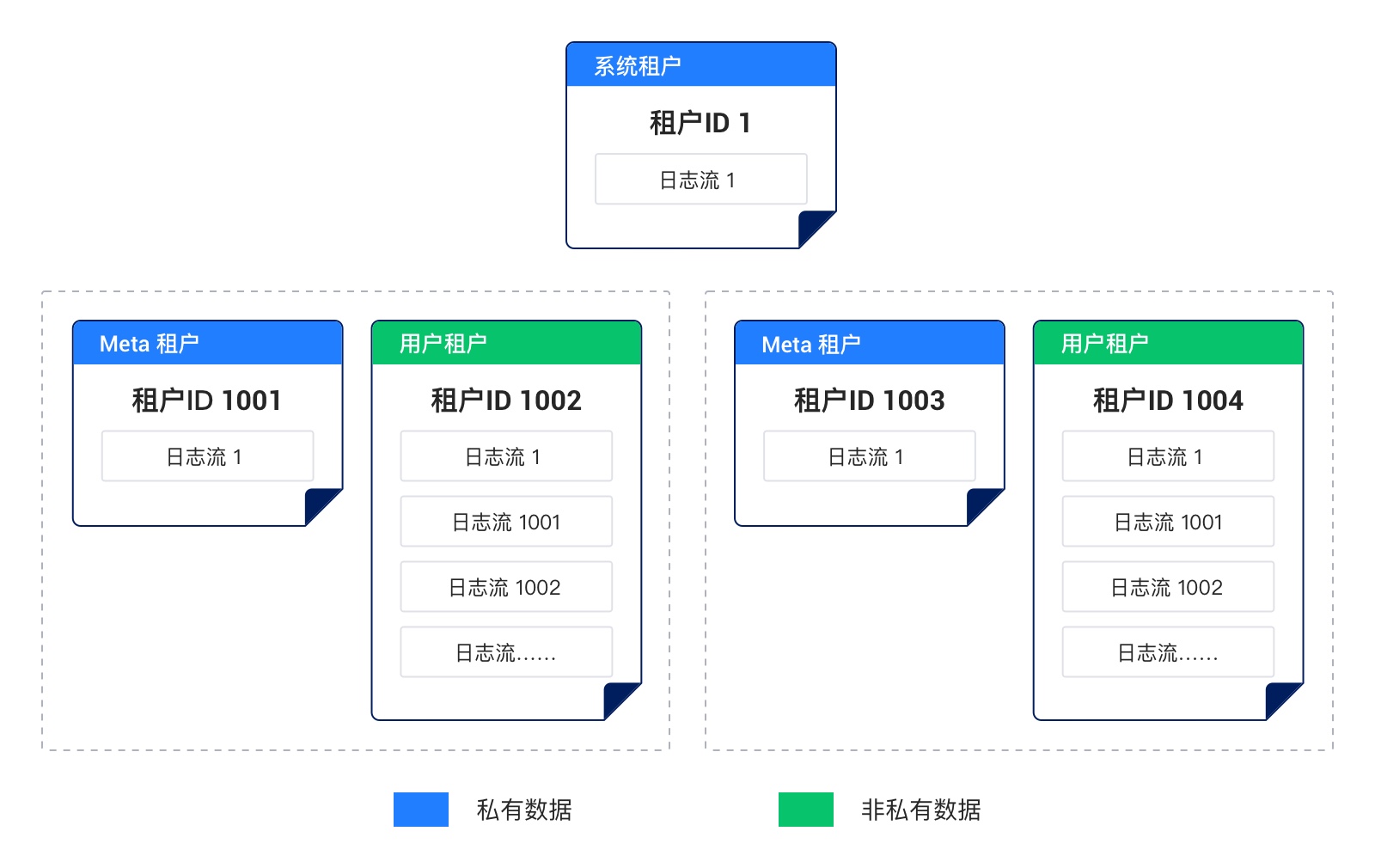
As shown in the preceding figure:
- A tenant is an instance in OceanBase AI Database that exclusively occupies part of the physical resources, similar to a Docker container in a cloud environment.
- The system tenant is the default tenant created for a cluster and has the same lifecycle as the cluster. It manages the lifecycles of the cluster and all user tenants.
- A user tenant is created by a user. One user tenant corresponds to one Meta tenant, and they have the same lifecycle.
- Private data refers to the data that supports the running of a cluster or user tenant. Each cluster or tenant has its own data, and this data does not require physical backup.
- Non-private data refers to user data, including tables created by users and some system tables, and this data requires physical backup.
- The system tenant and a Meta tenant have only one log stream (log stream 1) and do not support horizontal scaling.
- A user tenant supports dynamic creation and deletion of log streams and supports horizontal scaling.
Query tenant information
Run the following statement in the system tenant to query the DBA_OB_TENANTS view for information about all tenants. TENANT_TYPE indicates the tenant type: SYS indicates the system tenant, META indicates a Meta tenant, and USER indicates a user tenant. The tenant with ID 1 is the system tenant. Among tenants whose IDs are greater than 1000, an even ID indicates a user tenant and an odd ID indicates a Meta tenant. The ID of a user tenant is 1 greater than that of its corresponding Meta tenant.
Here is an example:
obclient(root@sys)[oceanbase]> SELECT TENANT_ID, TENANT_NAME, TENANT_TYPE, CREATE_TIME, PRIMARY_ZONE, LOCALITY, COMPATIBILITY_MODE, STATUS FROM oceanbase.DBA_OB_TENANTS;
The query result is as follows:
+-----------+-------------+-------------+----------------------------+--------------+---------------+--------------------+--------+
| TENANT_ID | TENANT_NAME | TENANT_TYPE | CREATE_TIME                | PRIMARY_ZONE | LOCALITY      | COMPATIBILITY_MODE | STATUS |
+-----------+-------------+-------------+----------------------------+--------------+---------------+--------------------+--------+
|         1 | sys         | SYS         | 2026-07-30 22:46:33.423528 | RANDOM       | FULL{1}@zone1 | MYSQL              | NORMAL |
|      1001 | META$1002   | META        | 2026-07-30 22:53:38.415525 | RANDOM       | FULL{1}@zone1 | MYSQL              | NORMAL |
|      1002 | mysql123    | USER        | 2026-07-30 22:53:38.421560 | RANDOM       | FULL{1}@zone1 | MYSQL              | NORMAL |
+-----------+-------------+-------------+----------------------------+--------------+---------------+--------------------+--------+
3 rows in set
Differences between tenant types
The following table compares the key characteristics of the three types of tenants from the user perspective.
Comparison item |
System tenant |
User tenant |
Meta tenant |
|---|---|---|---|
Tenant ID (TENANT_ID) |
1 | Minimum value: 1002 | Minimum value: 1001 Relationship with the user tenant ID: Meta tenant ID + 1 = User tenant ID |
Tenant type (TENANT_TYPE) |
SYS | USER | META |
| Tenant naming rule | SYS | The name consists of letters, digits, and underscores (_). | The format is META${user_tenant_id}. For example, if the user tenant ID is 1002, the Meta tenant name is META$1002. |
| Data property | Private cluster data | Non-private tenant data | Private tenant data |
| Scalability | Horizontal scaling is not supported. Only one log stream is supported. | Horizontal scaling is supported, and the tenant can be dynamically scaled up and down. | Horizontal scaling is not supported. Only one log stream is supported. |
| Tenant O&M |
|
|
|
| External data access interface | Views in the system tenant. |
|
You cannot log in to a Meta tenant. To view the data of a Meta tenant, access it from a user tenant or the system tenant.
|