
DataX is an open-source version of Alibaba Cloud DataWorks Data Integration. It is an offline data synchronization tool widely used within Alibaba Group. DataX enables efficient data synchronization between various heterogeneous data sources, including MySQL, Oracle, SQL Server, PostgreSQL, Hadoop Distributed File System (HDFS), Hive, ADS, HBase, Tablestore (OTS), MaxCompute (formerly known as ODPS), Hologres, Distributed Relational Database Service (DRDS), and OceanBase.
Framework design
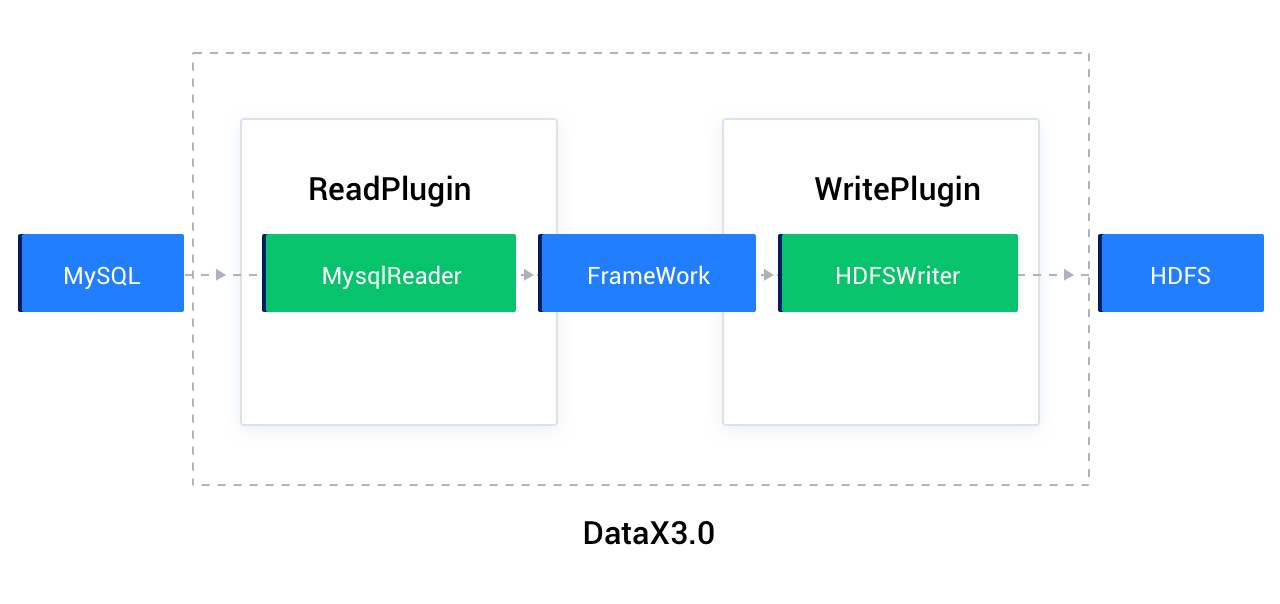
As an offline data synchronization framework, DataX is built using the "Framework + Plugin" model. Data source reading and writing are abstracted into Reader/Writer plugins, which are integrated into the overall synchronization framework.
The Reader acts as the data collection module, responsible for fetching data from the data source and sending it to the Framework.
The Writer acts as the data writing module, continuously retrieving data from the Framework and writing it to the destination.
The Framework connects the Reader and Writer, serving as their data transmission channel and handling core technical issues such as buffering, flow control, concurrency, and data conversion.
DataX migrates data in the form of tasks. Each task processes only one table. Each task has a configuration file in JSON format, which contains two sections: reader and writer. reader and writer correspond to the database reader and writer plugins supported by DataX, respectively. For example, when you migrate table data from a MySQL database to OceanBase AI Database, the MySQL mysqlreader plugin and the OceanBase AI Database oceanbasev10writer plugin are used to read data from the MySQL database and write the data to OceanBase AI Database, respectively. The following sections describe the mysqlreader and oceanbasev10writer plugins.
mysqlreader plugin
The mysqlreader plugin reads data from a MySQL database. It connects to a remote MySQL database through JDBC and executes the corresponding SQL statements to select data from the MySQL database.
mysqlreader connects to a remote MySQL database through JDBC, generates a query statement based on the configured information, and sends the statement to the remote MySQL database. The remote MySQL database assembles the execution result of the SQL statement into an abstract dataset by using the custom data types of DataX and passes the dataset to the downstream writer for processing.
For detailed feature and parameter descriptions, refer to the official documentation: mysqlreader plugin.
oceanbasev10writer plugin
The oceanbasev10writer plugin writes data to the destination table in OceanBase AI Database. It connects to a remote OceanBase AI Database from a Java client (MySQL JDBC or OceanBase Client) by using OBProxy and executes the corresponding INSERT statement to write the data to OceanBase AI Database. The data is committed to the database in batches.
oceanbasev10writer uses the DataX framework to obtain the protocol data generated by the reader and then generates an INSERT statement. If a primary key or unique key conflict occurs when data is written, a user tenant of OceanBase AI Database can update all fields in the table by using the REPLACE mode. For performance purposes, the batch write mode is used. A write request is initiated only when the number of rows reaches the specified threshold.
DataX configuration file
The following is an example configuration file:
{
  "job": {
    "content": [
      {
        "reader": {
          "name": "streamreader",
          "parameter": {
            "sliceRecordCount": 10,
            "column": [
              {
                "type": "long",
                "value": "10"
              },
              {
                "type": "string",
                "value": "hello, hello world - DataX"
              }
            ]
          }
        },
        "writer": {
          "name": "streamwriter",
          "parameter": {
            "encoding": "UTF-8",
            "print": true
          }
        }
      }
    ],
    "setting": {
      "speed": {
        "channel": 2
       }
    }
  }
}
Notice
DataX migrates only the data of a table. Therefore, you must create the schema of the table in the destination database in advance.
Place the JSON configuration file in the job directory of DataX or in a custom path. Run the following command:
$bin/datax.py job/stream2stream.json
The output is as follows:
<.....>

2021-08-26 11:06:09.217 [job-0] INFO  JobContainer - PerfTrace not enable!
2021-08-26 11:06:09.218 [job-0] INFO  StandAloneJobContainerCommunicator - Total 20 records, 380 bytes | Speed 38B/s, 2 records/s | Error 0 records, 0 bytes |  All Task WaitWriterTime 0.000s |  All Task WaitReaderTime 0.000s | Percentage 100.00%
2021-08-26 11:06:09.223 [job-0] INFO  JobContainer -
Task start time                    : 2021-08-26 11:05:59
Task End Time                    : 2021-08-26 11:06:09
Total task time                    :                 10s
Average Task Traffic                    :               38 B/s
Record Write Speed                    :              2rec/s
Total Records Read                    :                  20
Total Read/Write Failures            :                   0
After DataX executes a task, it generates a simple task report that covers the preceding average traffic, write speed, and total number of read/write failures.
You can specify the speed and error record limit in the setting section of the job object.
"setting": {
            "speed": {
                "channel": 10
            },
            "errorLimit": {
                "record": 10,
                "percentage": 0.1
            }
        }
The parameters are described as follows:
errorLimit: The number of error records that are tolerated. If the number of error records exceeds this limit, the task is interrupted and exits.channel: The concurrency level. In theory, a higher concurrency level results in better migration performance. However, in practice, you must also consider the read load at the source, network transmission performance, and write performance at the target.
Prepare the environment
Download the .tar package from http://datax-opensource.oss-cn-hangzhou.aliyuncs.com/datax.tar.gz.
Decompress the installation package:
tar zxvf datax.tar.gz
cd datax
The directory structure is as follows:
$tree -L 1 --filelimit 30
.
├── bin
├── conf
├── job
├── lib
├── log
├── log_perf
├── plugin
├── script
└── tmp
The following table describes the directories in the installation package.
Directory name |
Description |
|---|---|
| bin | The directory where the executable file is located. The datax.py file in this directory is the startup script of DataX tasks. |
| conf | The log configuration directory. This directory stores the DataX configuration files that are not related to tasks. |
| lib | The directory where the libraries required for running are located. The global .jar files required for the running of DataX are stored in this directory. |
| job | This directory contains a job configuration file used to test and verify the DataX installation. |
| log | The log directory. This directory stores the running logs of DataX tasks. By default, when DataX runs, logs are output to the standard output and written to the log directory. |
| plugin | The directory where the plugin files are located. The data source plugins supported by DataX are stored in this directory. |
Use DataX to migrate data from a MySQL database to OceanBase AI Database
When you migrate data from a MySQL database to OceanBase AI Database, if the source and destination databases cannot concurrently connect to the DataX server, you can export the data as CSV files and then import the CSV files to the destination database. If the source and destination databases can concurrently connect to the DataX server, you can use DataX to directly migrate data from the source to the destination.
Example: Migrate the data of the tpccdb.bmsql_order table in a MySQL database to the tpcc.bmsql_order table in a user tenant of OceanBase AI Database.
Content of the myjob.json configuration file is as follows:
{
    "job": {
        "setting": {
            "speed": {
                "channel": 4
            },
            "errorLimit": {
                "record": 0,
                "percentage": 0.1
            }
        },
        "content": [
            {
                "reader": {
                    "name": "mysqlreader",
                    "parameter": {
                        "username": "tpcc",
                        "password": "********",
                        "column": ["*"],
                        "connection": [
                            {
                                "table": ["bmsql_order"],
                                "jdbcUrl": ["jdbc:mysql://127.0.0.1:3306/tpccdb?useUnicode=true&characterEncoding=utf8"]
                            }
                        ]
                    }
                },
                "writer": {
                    "name": "oceanbasev10writer",
                    "parameter": {
                        "obWriteMode": "insert",
                        "column": ["*"],
                        "preSql": ["truncate table bmsql_order"],
                        "connection": [
                            {
                                "jdbcUrl": "jdbc:oceanbase://127.0.0.1:2883/tpcc?",
                                "table": ["bmsql_order"]
                            }
                        ],
                        "username": "tpcc",
                        "password":"********",
                        "writerThreadCount":10,
                        "batchSize": 1000,
                        "memstoreThreshold": "0.9"
                    }
                }
            }
        ]
    }
}
The following table describes the parameters.
Parameter |
Description |
|---|---|
| name | The name of the reader or writer plugin for connecting to the database. The MySQL reader plugin is mysqlreader, and the OceanBase AI Database writer plugin is oceanbasev10writer. For more information about the reader and writer plugins, see DataX data source guide. |
| jdbcUrl | The JDBC URL of the database to which you want to connect. The value is a JSON array and multiple URLs can be entered for a database. You need to enter at least one JDBC URL in the JSON array. The value must be in compliance with the official MySQL format. You can also specify a configuration property in the URL. For more information, see Configuration Properties in the MySQL documentation.
Note
|
| username | The username for logging on to the database.
|
| password | The password of the specified username required to log in to the database.
|
| table | The tables to be synchronized. The value is a JSON array and multiple tables can be specified at the same time. When you specify multiple tables, make sure that they use the same schema structure. The mysqlreader plugin does not verify whether the specified tables belong to the same logical table.
NoteThe table string must be included in the
|
| column | The set of column names to synchronize from the configured table, described as a JSON array. It is not recommended to configure columns as ['*'], because this configuration will change when the table structure changes. It is recommended to specify column names. Column pruning is supported, meaning you can choose which columns to export. Column reordering is also supported, meaning columns can be exported in a different order than the table schema. You can specify constants in the MySQL SQL format: ["id", "`table`", "1", "'bazhen.csy'", "null", "to_char(a + 1)", "2.3" , "true"].
Note
|
| where | The filter condition. The mysqlreader plugin assembles the specified column, table, and WHERE clause into an SQL statement. Then, it extracts data based on this SQL statement. To synchronize data of the current day, you can specify the WHERE clause as gmt_create > $bizdate.
NoticeYou cannot set the
|
After configuring the job file, run the job by using the following command:
python datax.py ../job/myjob.json
References
For more information about the open source code of DataX, see DataX.