
OceanBase AI Database consists of two components, OBServer and LogService, and currently supports two deployment modes: separate deployment and mixed deployment.
- Separate deployment: OBServer and LogService are deployed on different machines, and the two components scale independently.
- Mixed deployment: OBServer and LogService are deployed on the same machine, and the two components can still scale independently.
In other words, a single physical machine can host both an observer process and a logservice process at the same time, or it can host only an observer process or only a logservice process.
LogService must be deployed in 3 replicas, which requires at least three nodes. OBServer can be deployed in either 1 replica or 2 replicas. Therefore, based on the number of OBServer replicas, deployment can also be divided into single-replica deployment and two-replica deployment.
Note
For OceanBase AI Database, deploying only two replicas of the compute layer (OBServer) is sufficient to achieve the same high availability and disaster recovery capability as the traditional three-replica architecture, while significantly reducing both storage cost and compute resource consumption. Increasing the number of replicas (for example, to three or more) does not bring additional availability benefits, but instead increases unnecessary compute and storage overhead. Therefore, it is recommended to configure the number of compute-layer (OBServer) replicas to either one or two; three or more replicas are not recommended.
You can choose the appropriate deployment plan based on your business requirements and the two aspects described above.
Deployment Plan |
Solution |
Typical scenarios |
|---|---|---|
| Single replica | OBServer and LogService fully mixed | Suitable for small clusters with high compute resource requirements for OBServer |
| Single replica | OBServer and LogService partially mixed | Suitable for scenarios with limited business machine resources |
| Single replica | OBServer and LogService separately deploye | Suitable for large clusters that require dedicated resources |
| Two replicas | OBServer and LogService partially mixed | Can provide data center-level disaster recovery. |
Single-replica OBServer deployment plan
Mode 1: OBServer and LogService fully mixed
LogService is deployed in 3 replicas, while OBServer is deployed in 1 replica. OBServer can be deployed on all LogService zones to maximize resource utilization. This mode is suitable for small clusters with high compute resource requirements for OBServer. The deployment architecture is as follows.
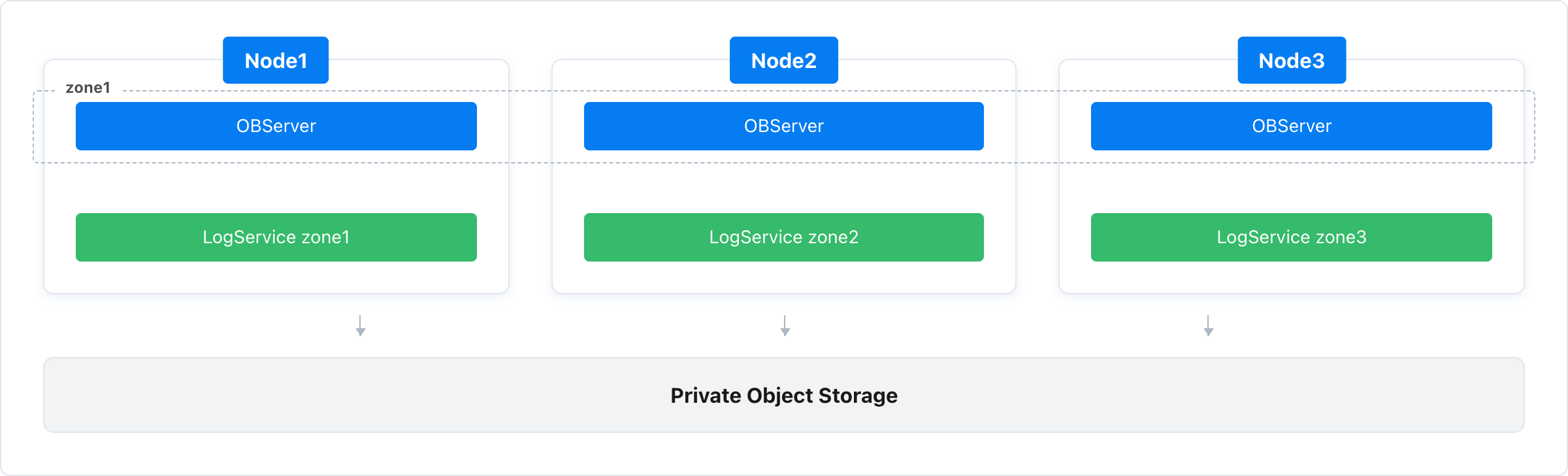
- observer: zone1@Node1, Node2, Node3
- logservice: zone1@Node1; zone2@Node2; zone3@Node3
Mode 2: OBServer and LogService partially mixed
LogService is deployed in 3 replicas, while OBServer is deployed in 1 replica. Among the three LogService zones, you can choose one zone (for example, zone3) to host only LogService, so that smaller machines can be assigned to that zone. This mode is suitable for scenarios with limited business machine resources. The deployment architecture is as follows.
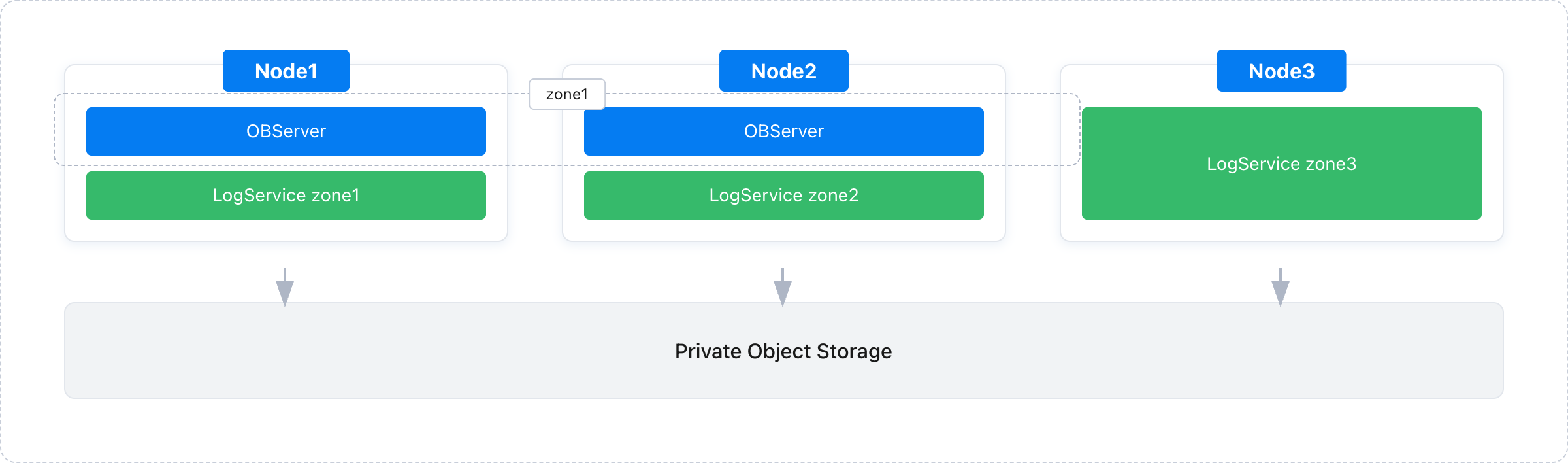
- observer: zone1@Node1, Node2
- logservice: zone1@Node1; zone2@Node2; zone3@Node3
Mode 3: OBServer and LogService separately deployed
LogService is deployed in 3 replicas, while OBServer is deployed in 1 replica. If OBServer requires a relatively large number of nodes, you can also deploy both OBServer and LogService on dedicated machines. This mode is suitable for large clusters that require dedicated resources. The deployment architecture is as follows.
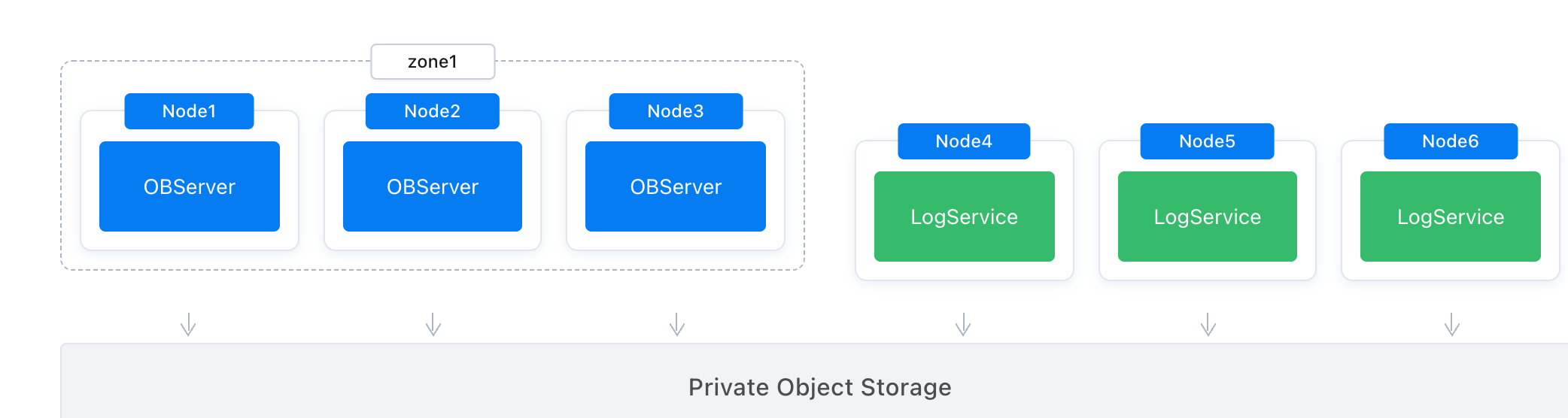
- observer: zone1@Node1, Node2, Node3
- logservice: zone1@Node4; zone2@Node5; zone3@Node6
Two-replica OBServer deployment plan
LogService is deployed in 3 replicas, while OBServer is deployed in 2 replicas. Among the three LogService zones, OBServer is deployed in two zones, and the third zone hosts only LogService. In this way, when OBServer scales out, LogService resources can also be scaled out accordingly. This architecture enables data center-level disaster recovery for OBServer. The deployment architecture is as follows.
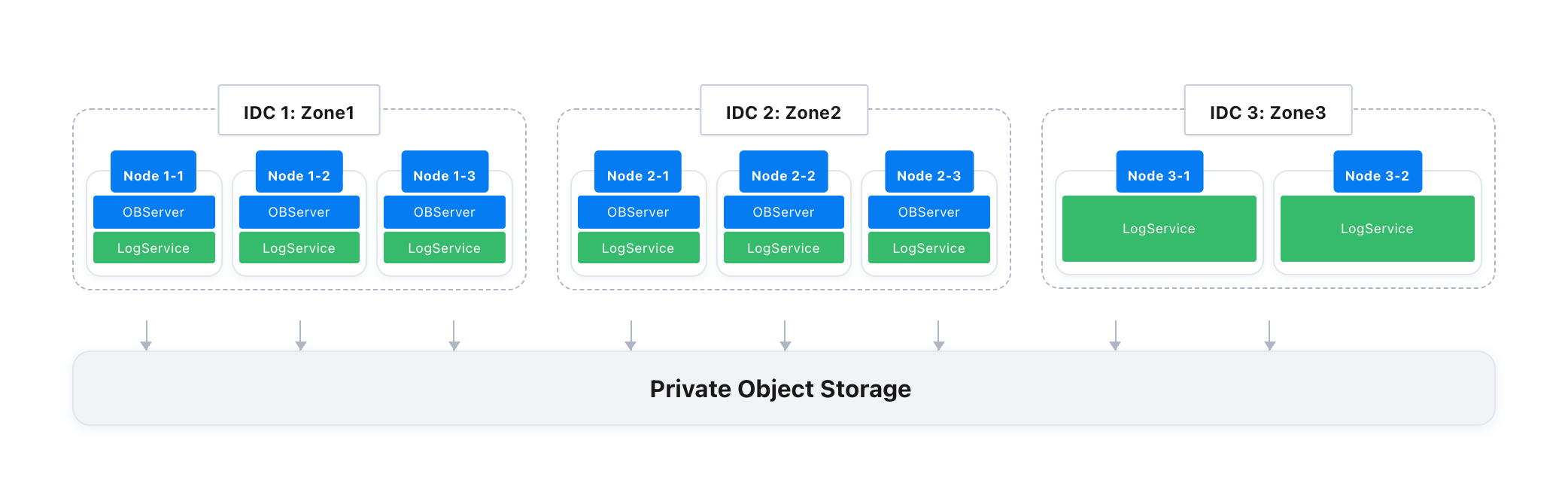
- observer: zone1@Node1-1, Node1-2, Node1-3; zone2@Node2-1, Node2-2, Node2-3
- logservice: zone1@Node1-1, Node1-2, Node1-3; zone2@Node2-1, Node2-2, Node2-3; zone3@Node3-1,Node3-2