
This topic describes how to build an application using the Spring Batch framework and OceanBase AI Database. It also covers the use of the application for fundamental database operations, including table creation, data insertion, and data query.
 Download the java-oceanbase-springbatch sample project
Prerequisites
- You have installed OceanBase AI Database.
- You have installed Java Development Kit (JDK) 1.8 and Maven.
- You have installed IntelliJ IDEA.
Note
The tool used to run the sample code in this topic is IntelliJ IDEA 2021.3.2 (Community Edition). You can also choose a tool that suits your personal preference to run the sample code.
Procedure
Note
The procedure described in this topic is based on the Windows environment. If you are using a different operating system or compiler, the steps may vary slightly.
- Obtain the connection string for OceanBase AI Database.
- Import the
java-oceanbase-springbatchproject into IntelliJ IDEA. - Modify the database connection information in the
java-oceanbase-springbatchproject. - Run the
java-oceanbase-springbatchproject.
Step 1: Obtain the OceanBase AI Database connection string
Contact the deployment personnel or administrator of OceanBase AI Database to obtain the corresponding database connection string.
obclient -hxx.xx.xx.xx -P2883 -uroot@sys#cluster -p**** -AFill in the corresponding information in the URL below based on the deployed OceanBase AI Database.
Note
This URL information is required in the
application.propertiesfile.jdbc:oceanbase://host:port/schema_name?user=$user_name&password=$password&characterEncoding=utf-8Parameter description:
host: The IP address for connecting to OceanBase AI Database. For an ODP connection, this is an ODP address; for a direct connection, this is the IP address of an OBServer node.port: The port for connecting to OceanBase AI Database. For an ODP connection, the default port is2883, which can be customized during ODP deployment. For a direct connection, the default port is2881, which can be customized during OceanBase AI Database deployment.schema_name: The name of the schema to access.user_name: Specified using the-uparameter, in the format user@tenant#cluster_name or username@SERVICE:service_name. When using the user@tenant#cluster_name format, the default tenant issysand the administrator user isroot. The cluster name can be omitted when directly connecting to the database, but is required for an ODP connection.password: The account password.characterEncoding: The character encoding.
For more information about URL parameters, see Database URL.
Step 2: Import the java-oceanbase-springbatch project into IntelliJ IDEA
Start IntelliJ IDEA and choose File > Open....

In the Open File or Project window that appears, select the corresponding project file and click OK to import it.
IntelliJ IDEA automatically recognizes the various files in the project. In the Project tool window, you can view the project's directory structure, file list, module list, dependencies, and other information. The Project tool window is usually located on the far left side of the IntelliJ IDEA interface and is open by default. If the Project tool window is closed, you can reopen it by clicking View > Tool Windows > Project in the menu bar or using the shortcut key Alt + 1.
Note
When you import a project in IntelliJ IDEA, it automatically detects the pom.xml file in the project, downloads the required dependency libraries based on the dependencies described in the file, and adds them to the project.
View the project.
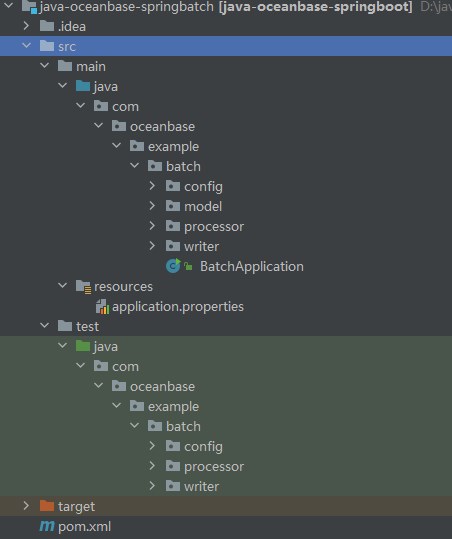
Step 3: Modify the database connection information in the java-oceanbase-springbatch project
Modify the database connection information in the application.properties file based on the information obtained in Step 1: Obtain the OceanBase AI Database connection string.
Here is a connection information example:
- The name of the database driver is
com.mysql.cj.jdbc.Driver. - The IP address of the OBServer node is
10.10.10.1. - The access port is 2881.
- The name of the schema to be accessed is
test. - The tenant account is
root@mysql001.mysql001is a user tenant created in OceanBase AI Database, androotis the username of themysql001tenant. - The password is
******.
The sample code is as follows:
spring.datasource.driver-class-name=com.mysql.cj.jdbc.Driver
spring.datasource.url=jdbc:oceanbase://10.10.10.1:2881/test?characterEncoding=utf-8
spring.datasource.username=root@mysql001
spring.datasource.password=******

spring.jpa.show-sql=true
spring.jpa.hibernate.ddl-auto=update

spring.batch.job.enabled=false

logging.level.org.springframework=INFO
logging.level.com.example=DEBUG
Step 4: Run the java-oceanbase-springbatch project
Run the
AddDescPeopleWriterTest.javafile.- Locate the
AddDescPeopleWriterTest.javafile in the project structure under src > test > java. - In the tool menu bar, select Run > Run... > AddDescPeopleWriterTest.testWrite, or directly click the green triangle in the upper-right corner to run it.
- View the project's log information and output results through IDEA's console.
Data in the people_desc table: PeopleDESC [name=John, age=25, desc=This is John with age 25] PeopleDESC [name=Alice, age=30, desc=This is Alice with age 30] Batch Job execution completed.- Locate the
Run the
AddPeopleWriterTest.javafile.- Locate the
AddPeopleWriterTest.javafile in the project structure under src > test > java. - In the tool menu bar, select Run > Run... > AddPeopleWriterTest.testWrite, or directly click the green triangle in the upper-right corner to run it.
- View the project's log information and output results through IDEA's console.
Data in the people table: People [name=zhangsan, age=27] People [name=lisi, age=35] Batch Job execution completed.- Locate the
Project code
Click java-oceanbase-springbatch to download the project code, which is a compressed file named java-oceanbase-springbatch.
After decompressing it, you will get a folder named java-oceanbase-springbatch. The directory structure is as follows:
│  pom.xml
│
├─.idea
│
├─src
│  ├─main
│  │  ├─java
│  │  │  └─com
│  │  │      └─oceanbase
│  │  │          └─example
│  │  │              └─batch
│  │  │                  │──BatchApplication.java
│  │  │                  │
│  │  │                  ├─config
│  │  │                  │   └─BatchConfig.java
│  │  │                  │
│  │  │                  ├─model
│  │  │                  │   ├─People.java
│  │  │                  │   └─PeopleDESC.java
│  │  │                  │
│  │  │                  ├─processor
│  │  │                  │   └─AddPeopleDescProcessor.java
│  │  │                  │
│  │  │                  └─writer
│  │  │                      ├─AddDescPeopleWriter.java
│  │  │                      └─AddPeopleWriter.java
│  │  │
│  │  └─resources
│  │      └─application.properties
│  │
│  └─test
│      └─java
│          └─com
│              └─oceanbase
│                  └─example
│                      └─batch
│                          ├─config
│                          │   └─BatchConfigTest.java
│                          │
│                          ├─processor
│                          │   └─AddPeopleDescProcessorTest.java
│                          │
│                          └─writer
│                              ├─AddDescPeopleWriterTest.java
│                              └─AddPeopleWriterTest.java
│
└─target
The files and directories are described as follows:
pom.xml: The configuration file for the Maven project, containing information such as dependencies, plugins, and builds..idea: A directory used by the IDE (Integrated Development Environment) to store project-related configuration information.src: Typically denotes the directory that holds the source code of the project.main: The directory for storing the main source code and resource files.java: The directory for storing Java source code.com.oceanbase.example.batch: The package name.BatchApplication.java: The entry class of the application, containing the main method.config: The folder for configuration classes, containing the application's configuration classes.BatchConfig.java: The application's configuration class, used to configure some properties and behaviors of the application.model: The folder for model classes, containing the application's data model classes.People.java: A personnel data model class.PeopleDESC.java: A personnel DESC data model class.processor: The folder for processor classes, containing the application's processor classes.AddPeopleDescProcessor.java: A processor class for adding personnel DESC information.writer: The folder for writer classes, containing the application's writer classes.AddDescPeopleWriter.java: A writer class for writing personnel DESC information.AddPeopleWriter.java: A writer class for writing personnel information.resources: The resource folder, containing the application's configuration files and other static resource files.application.properties: The application's configuration file, used to configure application properties.test: The directory for storing test code and resource files.BatchConfigTest.java: The test class for the application's configuration class.AddPeopleDescProcessorTest.java: The test class for the add-personnel-DESC processor.AddDescPeopleWriterTest.java: The test class for the writer that writes personnel DESC information.AddPeopleWriterTest.java: The test class for the writer that writes personnel information.target: The directory for storing compiled class files, JAR packages, and other files.
Code in pom.xml
Note
If you just want to verify the example, use the default code without modification. You can also modify the pom.xml file according to your needs as described below.
The content of the pom.xml configuration file is as follows:
The document declaration statement.
Declares that this file is an XML file, using XML version
1.0and character encodingUTF-8.The sample code is as follows:
<?xml version="1.0" encoding="UTF-8"?>Configure namespaces and the POM model version.
xmlns: the default XML namespace for the POM, which is set tohttp://maven.apache.org/POM/4.0.0.xmlns:xsi: the XML namespace for XML elements prefixed withxsi, which is set tohttp://www.w3.org/2001/XMLSchema-instance.xsi:schemaLocation: the location of an XML schema definition (XSD) file. The value consists of two parts: the default XML namespace (http://maven.apache.org/POM/4.0.0) and the URI of the XSD file (https://maven.apache.org/xsd/maven-4.0.0.xsd).<modelVersion>: the POM model version used by the POM file, which is set to4.0.0.
The sample code is as follows:
 <project xmlns="http://maven.apache.org/POM/4.0.0" xmlns:xsi="http://www.w3.org/2001/XMLSchema-instance"
         xsi:schemaLocation="http://maven.apache.org/POM/4.0.0 https://maven.apache.org/xsd/maven-4.0.0.xsd">
     <modelVersion>4.0.0</modelVersion>
</project>
Configure parent project information.
<groupId>: the ID of the parent project group, which is set toorg.springframework.boot.<artifactId>: the name of the parent project, which is set tospring-boot-starter-parent.<version>: the version of the parent project, which is set to2.7.11.<relativePath>: an empty path for the parent project.
The sample code is as follows:
 <parent>
     <groupId>org.springframework.boot</groupId>
     <artifactId>spring-boot-starter-parent</artifactId>
     <version>2.7.11</version>
     <relativePath/>
 </parent>
Configure basic information.
<groupId>: the ID of the project group, which is set tocom.oceanbase.<artifactId>: the name of the project, which is set tojava-oceanbase-springboot.<version>: the version of the project, which is set to0.0.1-SNAPSHOT.<description>: the project information, which is set toDemo project for Spring Batch.
The sample code is as follows:
 <groupId>com.oceanbase</groupId>
 <artifactId>java-oceanbase-springboot</artifactId>
 <version>0.0.1-SNAPSHOT</version>
 <name>java-oceanbase-springbatch</name>
 <description>Demo project for Spring Batch</description>
Configure the Java version.
Specify to use Java 1.8 for the project.
The sample code is as follows:
  <properties>
      <java.version>1.8</java.version>
  </properties>
Configure core dependencies.
Define a dependency named
spring-boot-starterthat belongs to theorg.springframework.bootgroup. This dependency contains default features provided by Spring Boot, such as web, data processing, security, and testing.The sample code is as follows:
<dependency>
    <groupId>org.springframework.boot</groupId>
    <artifactId>spring-boot-starter</artifactId>
</dependency>
Define a dependency named
spring-boot-starter-jdbcthat belongs to theorg.springframework.bootgroup. This dependency contains Java Database Connectivity (JDBC) features provided by Spring Boot, such as connection pool and data source configuration.The sample code is as follows:
<dependency>
    <groupId>org.springframework.boot</groupId>
    <artifactId>spring-boot-starter-jdbc</artifactId>
</dependency>
Define a dependency named
spring-boot-starter-testthat belongs to theorg.springframework.bootgroup. This dependency takes effect in thetestscope and provides test frameworks and tools of Spring Boot, such as JUnit, Mockito, and Hamcrest.The sample code is as follows:
<dependency>
    <groupId>org.springframework.boot</groupId>
    <artifactId>spring-boot-starter-test</artifactId>
    <scope>test</scope>
</dependency>
Define a dependency named
oceanbase-clientthat belongs to thecom.oceanbasegroup and whose version is2.4.12. With this dependency, you can use the features of OceanBase Command-Line Client (OBClient), such as connections, queries, and transactions.The sample code is as follows:
    <dependency>
        <groupId>com.oceanbase</groupId>
        <artifactId>oceanbase-client</artifactId>
        <version>2.4.12</version>
    </dependency>
Define a dependency named
spring-boot-starter-batchthat belongs to theorg.springframework.bootgroup. This dependency contains the batch processing feature provided by Spring Boot.The sample code is as follows:
<dependency>
    <groupId>org.springframework.boot</groupId>
    <artifactId>spring-boot-starter-batch</artifactId>
</dependency>
Define a dependency named
spring-boot-starter-data-jpathat belongs to theorg.springframework.bootgroup. This dependency contains necessary dependencies and configurations for Java Persistence API (JPA)-based data accesses, and is a Spring Boot starter.The sample code is as follows:
<dependency>
    <groupId>org.springframework.boot</groupId>
    <artifactId>spring-boot-starter-data-jpa</artifactId>
</dependency>
Define a dependency named
tomcat-jdbcthat belongs to theorg.apache.tomcatgroup. This dependency allows the application to use JDBC connection pool features provided by Tomcat, including connection pool configuration, connection acquisition and release, and connection management.The sample code is as follows:
<dependency>
    <groupId>org.apache.tomcat</groupId>
    <artifactId>tomcat-jdbc</artifactId>
</dependency>
Define a dependency named
junitthat belongs to thejunitgroup and whose version is4.10and effective scope istest. This dependency allows the application to use JUnit.The sample code is as follows:
<dependency>
    <groupId>junit</groupId>
    <artifactId>junit</artifactId>
    <version>4.10</version>
    <scope>test</scope>
</dependency>
Define a dependency named
javax.activation-apithat belongs to thejavax.activationgroup and whose version is1.2.0. This dependency provides the Java Activation Framework (JAF) API.The sample code is as follows:
<dependency>
    <groupId>javax.activation</groupId>
    <artifactId>javax.activation-api</artifactId>
    <version>1.2.0</version>
</dependency>
Define a dependency named
jakarta.persistence-apithat belongs to thejakarta.persistencegroup and whose version is2.2.3. This dependency provides the Jakarta Persistence API. The sample code is as follows:<dependency> <groupId>jakarta.persistence</groupId> <artifactId>jakarta.persistence-api</artifactId> <version>2.2.3</version> </dependency>
Configure the Maven plugin.
Define a plugin named
spring-boot-maven-pluginthat belongs to theorg.springframework.bootgroup. This plugin can be used to package Spring Boot applications as executable JAR packages or WAR packages, or directly run Spring Boot applications.The sample code is as follows:
<build> <plugins> <plugin> <groupId>org.springframework.boot</groupId> <artifactId>spring-boot-maven-plugin</artifactId> </plugin> </plugins> </build>
Code in application.properties
The application.properties file contains database connection configurations, such as the database driver, URL, username, and password. It also contains configurations related to JPA, Spring Batch, and the log level.
Configure the database connection.
spring.datasource.driver-class-name: the database driver used to establish a connection with OceanBase AI Database, which is set tocom.mysql.cj.jdbc.Driver.spring.datasource.url: the URL for connecting to the database.spring.datasource.username: the username for connecting to the database.spring.datasource.password: the password for connecting to the database.
The sample code is as follows:
spring.datasource.driver-class-name=com.mysql.cj.jdbc.Driver spring.datasource.url=jdbc:oceanbase://host:port/schema_name?characterEncoding=utf-8 spring.datasource.username=user_name spring.datasource.password=******Configure the JPA.
spring.jpa.show-sql: specifies whether to display SQL statements in logs. The valuetruehere indicates that SQL statements are displayed in logs.spring.jpa.hibernate.ddl-auto: the DDL operation performed by Hibernate. The valueupdatehere indicates that Hibernate automatically updates the database schema when the application starts.
The sample code is as follows:
spring.jpa.show-sql=true spring.jpa.hibernate.ddl-auto=updateConfigure Spring Batch.
spring.batch.job.enabled: specifies whether to enable Spring Batch jobs. The valuefalsehere indicates that Spring Batch jobs are disabled.The sample code is as follows:
spring.batch.job.enabled=falseNote
In Spring Batch, the
spring.batch.job.enabledproperty controls the execution behavior of batch processing jobs.spring.batch.job.enabled=true(default): Indicates that all defined batch processing jobs are automatically run when the Spring Boot application starts. This means Spring Batch automatically discovers and executes all defined jobs upon application startup.spring.batch.job.enabled=false: Indicates that automatic execution of batch processing jobs is disabled. This is typically used in development or test environments, or when you want to manually control job execution. After setting it tofalse, jobs will not be automatically executed upon application startup. You can trigger jobs manually through other methods (such as REST interfaces or the command line).
spring.batch.job.enabled=falsehelps you avoid automatic job execution at application startup, providing greater flexibility to control when batch processing jobs are executed.Configure the log level.
logging.level.org.springframework: the log level of the Spring framework, which is set toINFO.logging.level.com.example: the log level for the custom code of the application, which is set toDEBUG.
The sample code is as follows:
logging.level.org.springframework=INFO logging.level.com.example=DEBUG
Code in BatchApplication.java
The BatchApplication.java file is the entry point for the Spring Boot application.
The code in the BatchApplication.java file mainly consists of the following parts:
Reference other classes and interfaces.
Declare this file to contain the following interfaces and classes:
SpringApplicationclass: launches a Spring Boot application.SpringBootApplicationannotation: marks the class as the entry to the Spring Boot application.
The sample code is as follows:
import org.springframework.boot.SpringApplication; import org.springframework.boot.autoconfigure.SpringBootApplication;Define the
BatchApplicationclass.Use the
@SpringBootApplicationannotation to mark theBatchApplicationclass as the entry point of a Spring Boot application. Define a staticmainmethod in theBatchApplicationclass as the application's entry point. In this method, use theSpringApplication.runmethod to start the Spring Boot application. Also define a method namedrunBatchJobto run the batch processing job.The sample code is as follows:
@SpringBootApplication public class BatchApplication { public static void main(String[] args) { SpringApplication.run(BatchApplication.class, args); } public void runBatchJob() { } }
Code in BatchConfig.java
The BatchConfig.java file is used to configure components such as the steps, readers, processors, and writers for a batch processing job.
The code in the BatchConfig.java file mainly consists of the following parts:
References to other classes and interfaces.
Declare that this file contains the following interfaces and classes:
Peopleclass: used to store personnel information read from the database.PeopleDESCclass: used to store descriptive information after converting or processing personnel information.AddPeopleDescProcessorclass: implements theItemProcessorinterface and converts the readPeopleobjects intoPeopleDESCobjects.AddDescPeopleWriterclass: implements theItemWriterinterface and writesPeopleDESCobjects to the target location.Jobinterface: represents a batch processing job.Stepinterface: represents a step within a job.EnableBatchProcessingannotation: a Spring Batch configuration annotation used to enable and configure Spring Batch processing features.JobBuilderFactoryclass: used to create and configure jobs.StepBuilderFactoryclass: used to create and configure steps.RunIdIncrementerclass: an auto-incrementer for the Spring Batch run ID (Run ID), used to increase the run ID each time a job is executed.ItemProcessorinterface: used to process or convert the read items.ItemReaderinterface: used to read items from a data source.ItemWriterinterface: used to write processed or converted items to a specified target location.JdbcCursorItemReaderclass: used to read data from the database and return a cursor result set.Autowiredannotation: used for dependency injection.Beanannotation: used to create and configure beans.ComponentScanannotation: used to specify the package or class for component scanning.Configurationannotation: used to mark a class as a configuration class.EnableAutoConfigurationannotation: used to enable automatic configuration for Spring Boot.SpringBootApplicationannotation: used to mark this class as the entry point of a Spring Boot application.DataSourceinterface: used to represent a database connection.
The sample code is as follows:
import com.oceanbase.example.batch.model.People; import com.oceanbase.example.batch.model.PeopleDESC; import com.oceanbase.example.batch.processor.AddPeopleDescProcessor; import com.oceanbase.example.batch.writer.AddDescPeopleWriter; import org.springframework.batch.core.Job; import org.springframework.batch.core.Step; import org.springframework.batch.core.configuration.annotation.EnableBatchProcessing; import org.springframework.batch.core.configuration.annotation.JobBuilderFactory; import org.springframework.batch.core.configuration.annotation.StepBuilderFactory; import org.springframework.batch.core.launch.support.RunIdIncrementer; import org.springframework.batch.item.ItemProcessor; import org.springframework.batch.item.ItemReader; import org.springframework.batch.item.ItemWriter; import org.springframework.batch.item.database.JdbcCursorItemReader; import org.springframework.beans.factory.annotation.Autowired; import org.springframework.boot.autoconfigure.EnableAutoConfiguration; import org.springframework.boot.autoconfigure.SpringBootApplication; import org.springframework.context.annotation.Bean; import org.springframework.context.annotation.ComponentScan; import org.springframework.context.annotation.Configuration; import org.springframework.jdbc.core.BeanPropertyRowMapper; import javax.sql.DataSource;Define the
BatchConfigclass.This is a simple Spring Batch job. It defines how data is read, processed, and written, and encapsulates these steps into a job. Using Spring Batch annotations and auto-configuration, you can create corresponding component instances through various
@Beanmethods in the configuration class, and use these components instep1to complete data reading, processing, and writing.- The
@Configurationannotation indicates that this class is a configuration class. - The
@EnableBatchProcessingannotation enables Spring Batch's processing features. It automatically creates necessarybeans, such asJobRepositoryandJobLauncher. - The
@SpringBootApplicationannotation is used for the main class of a Spring Boot application and serves as the application's startup point. - The
@ComponentScanannotation specifies the package for component scanning, telling Spring to scan and register all components in this package and its subpackages. - The
@EnableAutoConfigurationannotation enables automatic configuration for the Spring Boot application infrastructure.
The sample code is as follows:
@Configuration @EnableBatchProcessing @SpringBootApplication @ComponentScan("com.oceanbase.example.batch.writer") @EnableAutoConfiguration public class BatchConfig { }Define the
@Autowiredannotation.Use the
@Autowiredannotation to injectJobBuilderFactory,StepBuilderFactory, andDataSourceinto the member variables of theBatchConfigclass.JobBuilderFactoryis a factory class for creating and configuring jobs,StepBuilderFactoryis a factory class for creating and configuring steps, andDataSourceis an interface for obtaining database connections.The sample code is as follows:
@Autowired private JobBuilderFactory jobBuilderFactory; @Autowired private StepBuilderFactory stepBuilderFactory; @Autowired private DataSource dataSource;Define the
@Beanannotation.Use the
@Beanannotation to define several methods for creating readers, processors, writers, steps, and jobs for the batch processing job.The
peopleReadermethod creates an instance of theItemReadercomponent, which usesJdbcCursorItemReaderto readPeopleobject data from the database. Set the data sourcedataSource, configure theRowMapperto map database rows toPeopleobjects, and set the SQL query statement toSELECT * FROM people.The
addPeopleDescProcessormethod creates an instance of theItemProcessorcomponent, which usesAddPeopleDescProcessorto processPeopleobjects and returns them asPeopleDESCobjects.The
addDescPeopleWritermethod creates an instance of theItemWritercomponent, which usesAddDescPeopleWriterto writePeopleDESCobjects to the target location.The
step1method creates an instance of theStepcomponent with the namestep1. Obtain the step builder throughstepBuilderFactory.get, set the reader as theItemReadercomponent, set the processor as theItemProcessorcomponent, set the writer as theItemWritercomponent, set thechunksize to10, and finally callbuildto construct and return the configuredStep.The
importJobmethod creates an instance of theJobcomponent with the nameimportJob. Obtain the job builder throughjobBuilderFactory.get, set the incrementer asRunIdIncrementer, set the initial step of the job'sflowasStep, and finally callbuildto construct and return the configuredJob.The sample code is as follows:
@Bean public ItemReader<People> peopleReader() { JdbcCursorItemReader<People> reader = new JdbcCursorItemReader<>(); reader.setDataSource((javax.sql.DataSource) dataSource); reader.setRowMapper(new BeanPropertyRowMapper<>(People.class)); reader.setSql("SELECT * FROM people"); return reader; } @Bean public ItemProcessor<People, PeopleDESC> addPeopleDescProcessor() { return new AddPeopleDescProcessor(); } @Bean public ItemWriter<PeopleDESC> addDescPeopleWriter() { return new AddDescPeopleWriter(); } @Bean public Step step1(ItemReader<People> reader, ItemProcessor<People, PeopleDESC> processor, ItemWriter<PeopleDESC> writer) { return stepBuilderFactory.get("step1") .<People, PeopleDESC>chunk(10) .reader(reader) .processor(processor) .writer(writer) .build(); } @Bean public Job importJob(Step step1) { return jobBuilderFactory.get("importJob") .incrementer(new RunIdIncrementer()) .flow(step1) .end() .build(); }
- The
Code in People.java
The People.java file defines a data model for the People class, representing a person's information. This class includes two private member variables name and age, along with their corresponding getter and setter methods. Finally, the toString method is overridden to print the object's information. Here, name represents the person's name, and age represents the person's age. The values of these attributes can be obtained and set using the getter and setter methods.
The purpose of this class is to provide a way to store and pass data for input and output in the batch processing program. In batch processing read and write operations, People objects are used to store data, set data using the setter method, and retrieve data using the getter method.
The sample code is as follows:
public class People {
private String name;
private int age;
// getters and setters
public String getName() {
return name;
}
public void setName(String name) {
this.name = name;
}
public int getAge() {
return age;
}
public void setAge(int age) {
this.age = age;
}
@Override
public String toString() {
return "People [name=" + name + ", age=" + age + "]";
}
// Getters and setters
}
Code in PeopleDESC.java
The PeopleDESC.java file defines a data model for the PeopleDESC class, representing personnel information. The PeopleDESC class has four attributes: name, age, desc, and id, representing a person's name, age, description, and identifier, respectively. This class includes corresponding getter and setter methods to access and set the values of these attributes. The toString method is overridden to return a string representation of the class, including the name, age, and description.
Similar to the People class, the PeopleDESC class is also used to store and pass data in the input and output of the batch processing program.
The sample code is as follows:
public class PeopleDESC {
private String name;
private int age;
private String desc;
private int id;
public String getName() {
return name;
}
public void setName(String name) {
this.name = name;
}
public int getAge() {
return age;
}
public void setAge(int age) {
this.age = age;
}
public String getDesc() {
return desc;
}
public void setDesc(String desc) {
this.desc = desc;
}
public int getId() {
return id;
}
public void setId(int id) {
this.id = id;
}
@Override
public String toString() {
return "PeopleDESC [name=" + name + ", age=" + age + ", desc=" + desc + "]";
}
}
Code in AddPeopleDescProcessor.java
The AddPeopleDescProcessor.java file defines a class named AddPeopleDescProcessor, implementing the ItemProcessor interface, to convert People objects into PeopleDESC objects.
The code in the AddPeopleDescProcessor.java file mainly includes the following parts:
References to other classes and interfaces.
Declare that this file contains the following interfaces and classes:
Peopleclass: Stores personnel information read from the database.PeopleDESCclass: Stores descriptive information obtained by converting or processing personnel information.ItemProcessorinterface: Processes or converts the read items.
The sample code is as follows:
import com.oceanbase.example.batch.model.People; import com.oceanbase.example.batch.model.PeopleDESC; import org.springframework.batch.item.ItemProcessor;Define the
AddPeopleDescProcessorclass.The
AddPeopleDescProcessorclass implements theItemProcessorinterface. It convertsPeopleobjects intoPeopleDESCobjects, implementing the processing logic for input data during batch processing.In the
processmethod of this class, first create aPeopleDESCobject nameddesc. Then, obtain the attributes (nameandage) of thePeopleobject through theitemparameter and set these attributes to thedescobject. Also, assign a value to thedescattribute of thedescobject. The assignment logic generates a descriptive string based on the attributes of thePeopleobject. Finally, return the processedPeopleDESCobject.The sample code is as follows:
public class AddPeopleDescProcessor implements ItemProcessor<People, PeopleDESC> { @Override public PeopleDESC process(People item) throws Exception { PeopleDESC desc = new PeopleDESC(); desc.setName(item.getName()); desc.setAge(item.getAge()); desc.setDesc("This is " + item.getName() + " with age " + item.getAge()); return desc; } }
Code in AddDescPeopleWriter.java
The AddDescPeopleWriter.java file implements the ItemWriter interface and defines the AddDescPeopleWriter class, which writes People objects to a database.
The code in the AddDescPeopleWriter.java file consists of the following main parts:
References to other classes and interfaces.
Declare that this file contains the following interfaces and classes:
PeopleDESCclass: stores description information obtained by converting or processing personnel information.ItemWriterinterface: writes processed or converted items to a specified target location.Autowiredannotation: enables dependency injection.JdbcTemplateclass: provides methods for executing SQL statements.Listinterface: operates on query result sets.
The sample code is as follows:
import com.oceanbase.example.batch.model.PeopleDESC; import org.springframework.batch.item.ItemWriter; import org.springframework.beans.factory.annotation.Autowired; import org.springframework.jdbc.core.JdbcTemplate; import java.util.List;Definition of the
AddDescPeopleWriterclass.Use the
@Autowiredannotation to automatically inject aJdbcTemplateinstance, which is used to perform database operations when writing data.The sample code is as follows:
@Autowired private JdbcTemplate jdbcTemplate;In the
writemethod, iterate through the passedList<? extends PeopleDESC>and retrieve eachPeopleDESCobject. First, execute the SQL statementDROP TABLE people_descto drop any existing table namedpeople_desc. Then, execute the SQL statementCREATE TABLE people_desc (id INT PRIMARY KEY, name VARCHAR2(255), age INT, description VARCHAR2(255))to create a table namedpeople_descwith four columns:id,name,age, anddescription. Next, use the SQL statementINSERT INTO people_desc (id, name, age, description) VALUES (?, ?, ?, ?)to insert the attribute values of eachPeopleDESCobject into thepeople_desctable.The sample code is as follows:
@Override public void write(List<? extends PeopleDESC> items) throws Exception { // Delete any existing tables first. jdbcTemplate.execute("DROP TABLE people_desc"); // CREATE TABLE Statement String createTableSql = "CREATE TABLE people_desc (id INT PRIMARY KEY, name VARCHAR2(255), age INT, description VARCHAR2(255))"; jdbcTemplate.execute(createTableSql); for (PeopleDESC item : items) { String sql = "INSERT INTO people_desc (id, name, age, description) VALUES (?, ?, ?, ?)"; jdbcTemplate.update(sql, item.getId(), item.getName(), item.getAge(), item.getDesc()); } }
Code in AddPeopleWriter.java
The AddPeopleWriter.java file implements the ItemWriter interface and defines the AddPeopleWriter class, which writes PeopleDESC objects to a database.
The code in the AddPeopleWriter.java file consists of the following main parts:
References to other classes and interfaces.
Declare that this file contains the following interfaces and classes:
Peopleclass: stores personnel information read from the database.ItemWriterinterface: writes processed or converted items to a specified target location.Autowiredannotation: enables dependency injection.JdbcTemplateclass: provides methods for executing SQL statements.Componentannotation: marks this class as a Spring component.Listinterface: operates on query result sets.
The sample code is as follows:
import com.oceanbase.example.batch.model.People; import org.springframework.batch.item.ItemWriter; import org.springframework.beans.factory.annotation.Autowired; import org.springframework.jdbc.core.JdbcTemplate; import org.springframework.stereotype.Component; import java.util.List;Define the
AddPeopleWriterclass.Use the
@Autowiredannotation to automatically inject aJdbcTemplateinstance for performing database operations during data writes.The sample code is as follows:
@Autowired private JdbcTemplate jdbcTemplate;In the
writemethod, iterate through the passedList<? extends People>and extract eachPeopleobject. First, execute the SQL statementDROP TABLE peopleto drop any existing table namedpeople. Then, execute the SQL statementCREATE TABLE people (name VARCHAR2(255), age INT)to create a table namedpeoplewith two columns:nameandage. Next, use the SQL statementINSERT INTO people (name, age) VALUES (?, ?)to insert the attribute values of eachPeopleobject into thepeopletable.The sample code is as follows:
@Override public void write(List<? extends People> items) throws Exception { // Delete any existing tables first. jdbcTemplate.execute("DROP TABLE people"); // CREATE TABLE Statement String createTableSql = "CREATE TABLE people (name VARCHAR2(255), age INT)"; jdbcTemplate.execute(createTableSql); for (People item : items) { String sql = "INSERT INTO people (name, age) VALUES (?, ?)"; jdbcTemplate.update(sql, item.getName(), item.getAge()); } }
Code in BatchConfigTest.java
The BatchConfigTest.java file is a test class using JUnit to test job configurations in Spring Batch.
The code in the BatchConfigTest.java file mainly includes the following parts:
References to other classes and interfaces.
Declare that this file contains the following interfaces and classes:
- The
Assertclass: used to assert test results. - The
Testannotation: used to mark test methods. - The
RunWithannotation: used to specify the test runner. - The
Jobinterface: represents a batch processing job. - The
JobExecutionclass: represents the execution of a batch processing job. - The
JobParametersclass: represents the parameters of a batch processing job. - The
JobParametersBuilderclass: used to build parameters for a batch processing job. - The
JobLauncherinterface: used to start a batch processing job. - The
Autowiredannotation: used for dependency injection. - The
SpringBootTestannotation: used to specify the test class as a Spring Boot test. - The
SpringRunnerclass: used to specify the test runner as SpringRunner.
The sample code is as follows:
import org.junit.Assert; import org.junit.jupiter.api.Test; import org.junit.runner.RunWith; import org.springframework.batch.core.Job; import org.springframework.batch.core.JobExecution; import org.springframework.batch.core.JobParameters; import org.springframework.batch.core.JobParametersBuilder; import org.springframework.batch.core.launch.JobLauncher; import org.springframework.beans.factory.annotation.Autowired; import org.springframework.boot.test.context.SpringBootTest; import org.springframework.test.context.junit4.SpringRunner; import javax.batch.runtime.BatchStatus; import java.util.UUID;- The
Define the
BatchConfigTestclass.Using the
SpringBootTestannotation and theSpringRunnerrunner allows for integrated testing of Spring Boot. In thetestJobmethod, use theJobLauncherTestUtilsutility class to start a batch processing job and use assertions to verify the job's execution status.Use the
@Autowiredannotation to automatically inject an instance ofJobLauncherTestUtils.The sample code is as follows:
@Autowired private JobLauncherTestUtils jobLauncherTestUtils;Annotate the
testJobmethod with the@Testannotation to mark it as a test method. In this method, first create aJobParametersobject, then use thejobLauncherTestUtils.launchJobmethod to start the batch processing job, and use theAssert.assertEqualsmethod to assert that the job execution status isCOMPLETED.The sample code is as follows:
@Test public void testJob() throws Exception { JobParameters jobParameters = new JobParametersBuilder() .addString("jobParam", "paramValue") .toJobParameters(); JobExecution jobExecution = jobLauncherTestUtils.launchJob(jobParameters); Assert.assertEquals(BatchStatus.COMPLETED, jobExecution.getStatus()); }Use the
@Autowiredannotation to automatically inject an instance ofJobLauncher.The sample code is as follows:
@Autowired private JobLauncher jobLauncher;Use the
@Autowiredannotation to automatically inject an instance ofJob.The sample code is as follows:
@Autowired private Job job;Define an inner class named
JobLauncherTestUtilsto assist in starting batch processing jobs. In this class, define alaunchJobmethod for starting a batch processing job. In this method, use thejobLauncher.runmethod to start the job and return the job execution result.The sample code is as follows:
private class JobLauncherTestUtils { public JobExecution launchJob(JobParameters jobParameters) throws Exception { return jobLauncher.run(job, jobParameters); } }
Code in AddPeopleDescProcessorTest.java
The AddPeopleDescProcessorTest.java file is a test class that uses JUnit to test job configurations in Spring Batch.
The code in the AddPeopleDescProcessorTest.java file mainly consists of the following parts:
References to other classes and interfaces.
Declare that this file contains the following interfaces and classes:
- The
Peopleclass: used to store personnel information read from the database. - The
PeopleDESCclass: used to store descriptive information after converting or processing personnel information. - The
Assertclass: used to verify whether the expected result and the actual result in the test are consistent. - The
Testannotation: used to mark test methods. - The
RunWithannotation: used to specify the test runner. - The
Autowiredannotation: used for dependency injection. - The
SpringBootTestannotation: used to specify the test class as a Spring Boot test. - The
SpringRunnerclass: used to specify the test runner as SpringRunner.
The sample code is as follows:
import com.oceanbase.example.batch.model.People; import com.oceanbase.example.batch.model.PeopleDESC; import org.junit.Assert; import org.junit.jupiter.api.Test; import org.junit.runner.RunWith; import org.springframework.beans.factory.annotation.Autowired; import org.springframework.boot.test.context.SpringBootTest; import org.springframework.test.context.junit4.SpringRunner;- The
Definition of the
AddPeopleDescProcessorTestclass.Perform integrated testing for Spring Boot by using the
SpringBootTestannotation and theSpringRunnerrunner.Use the
@Autowiredannotation to automatically inject an instance ofAddPeopleDescProcessor.The sample code is as follows:
@Autowired private AddPeopleDescProcessor processor;Use the
@Testannotation to mark thetestProcessmethod as a test method. In this method, first create aPeopleobject, then use theprocessor.processmethod to process this object, and assign the result to aPeopleDESCobject.The sample code is as follows:
@Test public void testProcess() throws Exception { People people = new People(); people.setName("John"); people.setAge(25); PeopleDESC desc = processor.process(people); }
Code in AddDescPeopleWriterTest.java
The AddDescPeopleWriterTest.java file is a test class that uses JUnit to test the write logic of AddDescPeopleWriter.
The code in the AddDescPeopleWriterTest.java file mainly consists of the following parts:
References to other classes and interfaces.
Declare that this file contains the following interfaces and classes:
- The
PeopleDESCclass: used to store descriptive information after converting or processing personnel information. Assertclass: used to assert test results.Testannotation: used to mark a test method.RunWithannotation: used to specify the test runner.Autowiredannotation: used for dependency injection.SpringBootTestannotation: used to specify that the test class is a Spring Boot test.JdbcTemplateclass: provides methods for executing SQL statements.SpringRunnerclass: used to specify the test runner as SpringRunner.ArrayListclass, used to create an empty list.Listinterface: used to operate on query result sets.
The sample code is as follows:
import com.oceanbase.example.batch.model.PeopleDESC; import org.junit.Assert; import org.junit.jupiter.api.Test; import org.junit.runner.RunWith; import org.springframework.beans.factory.annotation.Autowired; import org.springframework.boot.test.context.SpringBootTest; import org.springframework.jdbc.core.JdbcTemplate; import org.springframework.test.context.junit4.SpringRunner; import java.util.ArrayList; import java.util.List;- The
Define the
AddDescPeopleWriterTestclass.Use the
SpringBootTestannotation and theSpringRunnerrunner to perform integrated testing for Spring Boot.Inject instances using
@Autowired. Use the@Autowiredannotation to automatically inject instances ofAddPeopleDescProcessorandJdbcTemplate.The sample code is as follows:
@Autowired private AddDescPeopleWriter writer; @Autowired private JdbcTemplate jdbcTemplate;Use
@Testto test data insertion and output. Use the@Testannotation to mark thetestWritemethod as a test method. In this method, first create an emptypeopleDescListlist and add twoPeopleDESCobjects to it. Then use thewriter.writemethod to write the data in the list to the database. Next, usejdbcTemplateto execute a query statement, retrieve data from thepeople_desctable, and use assertion statements to verify the correctness of the data. Finally, output the query result to the console and print information indicating the job has completed.Insert data into the
people_desctable. First, create an emptyPeopleDESCobject list namedpeopleDescList. Then create twoPeopleDESCobjects nameddesc1anddesc2, and set their attribute values respectively. Adddesc1anddesc2to thepeopleDescListlist. Next, call thewritemethod ofwriterto write the objects inpeopleDescListto thepeople_desctable in the database. Then useJdbcTemplateto execute a query statementSELECT COUNT(*) FROM people_descto get the number of records in thepeople_desctable and assign the result to the variablecount. Finally, use theAssert.assertEqualsmethod to assert whether the value ofcountequals2.The sample code is as follows:
List<PeopleDESC> peopleDescList = new ArrayList<>(); PeopleDESC desc1 = new PeopleDESC(); desc1.setId(1); desc1.setName("John"); desc1.setAge(25); desc1.setDesc("This is John with age 25"); peopleDescList.add(desc1); PeopleDESC desc2 = new PeopleDESC(); desc2.setId(2); desc2.setName("Alice"); desc2.setAge(30); desc2.setDesc("This is Alice with age 30"); peopleDescList.add(desc2); writer.write(peopleDescList); String selectSql = "SELECT COUNT(*) FROM people_desc"; int count = jdbcTemplate.queryForObject(selectSql, Integer.class); Assert.assertEquals(2, count);Output data from the
people_desctable. First, useJdbcTemplateto execute a query statementSELECT * FROM people_descand process the query result using alambdaexpression. In thelambdaexpression, use methods likers.getIntandrs.getStringto retrieve field values from the query result set and set them into a newly createdPeopleDESCobject. Add each newly createdPeopleDESCobject to a result list namedresultDesc. Then print a prompt lineData from the people_desc table:. Next, use aforloop to iterate through eachPeopleDESCobject in theresultDesclist and useSystem.out.printlnto print the content of each object. Finally, print a message indicating the job has completed.The sample code is as follows:
List<PeopleDESC> resultDesc = jdbcTemplate.query("SELECT * FROM people_desc", (rs, rowNum) -> { PeopleDESC desc = new PeopleDESC(); desc.setId(rs.getInt("id")); desc.setName(rs.getString("name")); desc.setAge(rs.getInt("age")); desc.setDesc(rs.getString("description")); return desc; }); System.out.println("Data in the people_desc table:"); for (PeopleDESC desc : resultDesc) { System.out.println(desc); } // Output information after the job is completed System.out.println("Batch Job execution completed.");
Code in AddPeopleWriterTest.java
The AddPeopleWriterTest.java file is a class for testing using JUnit, used to test the write logic of AddPeopleWriterTest.
The code in the AddPeopleWriterTest.java file mainly includes the following parts:
References to other classes and interfaces.
Declares that this file contains the following interfaces and classes:
Peopleclass: used to store personnel information read from the database.Testannotation: used to mark test methods.RunWithannotation: used to specify the test runner.Autowiredannotation: used for dependency injection.SpringBootApplicationannotation: used to mark this class as the entry point of the Spring Boot application.SpringBootTestannotation: used to specify the test class as a Spring Boot test.ComponentScanannotation: used to specify the package or class to scan for components.JdbcTemplateclass: provides methods for executing SQL statements.SpringRunnerclass: used to specify the test runner asSpringRunner.ArrayListclass, used to create an empty list.Listinterface: used to operate on query result sets.
The sample code is as follows:
import com.oceanbase.example.batch.model.People; import org.junit.jupiter.api.Test; import org.junit.runner.RunWith; import org.springframework.beans.factory.annotation.Autowired; import org.springframework.boot.autoconfigure.SpringBootApplication; import org.springframework.boot.test.context.SpringBootTest; import org.springframework.context.annotation.ComponentScan; import org.springframework.jdbc.core.JdbcTemplate; import org.springframework.test.context.junit4.SpringRunner; import java.util.ArrayList; import java.util.List;Definition of the
AddPeopleWriterTestclass.Uses the
SpringBootTestannotation and theSpringRunnerrunner to perform integrated testing with Spring Boot, and uses the@ComponentScanannotation to specify the package path to scan.Inject instances using
@Autowired. Uses the@Autowiredannotation to automatically inject instances ofaddPeopleWriterandJdbcTemplate.The sample code is as follows:
@Autowired private AddPeopleWriter addPeopleWriter; @Autowired private JdbcTemplate jdbcTemplate;Use
@Testto test data insertion and output.Insert data into the
peopletable. First, create an emptyPeopleobject list namedpeopleList. Then, create twoPeopleobjects namedperson1andperson2, and set their name and age attributes. Next, add these twoPeopleobjects to thepeopleListlist. After that, call thewritemethod ofaddPeopleWriter, passingpeopleListas a parameter to write thesePeopleobjects to the database.The sample code is as follows:
List<People> peopleList = new ArrayList<>(); People person1 = new People(); person1.setName("zhangsan"); person1.setAge(27); peopleList.add(person1); People person2 = new People(); person2.setName("lisi"); person2.setAge(35); peopleList.add(person2); addPeopleWriter.write(peopleList);Output the data from the
peopletable. First, useJdbcTemplateto execute a query statementSELECT * FROM peopleand process the query results using alambdaexpression. In thelambdaexpression, use thers.getStringandrs.getIntmethods to retrieve field values from the query result set and set them into a newly createdPeopleobject. Add each newly createdPeopleobject to a result list namedresult. Then, print a prompt lineData from the people table:. Next, use aforloop to iterate through eachPeopleobject in theresultlist and print the content of each object usingSystem.out.println. Finally, print a message indicating the job has completed.The sample code is as follows:
List<People> result = jdbcTemplate.query("SELECT * FROM people", (rs, rowNum) -> { People person = new People(); person.setName(rs.getString("name")); person.setAge(rs.getInt("age")); return person; }); System.out.println("Data in the people table:"); for (People person : result) { System.out.println(person); } // Output information after the job is completed System.out.println("Batch Job execution completed.");
Complete code examples
<?xml version="1.0" encoding="UTF-8"?>
<project xmlns="http://maven.apache.org/POM/4.0.0" xmlns:xsi="http://www.w3.org/2001/XMLSchema-instance"
xsi:schemaLocation="http://maven.apache.org/POM/4.0.0 https://maven.apache.org/xsd/maven-4.0.0.xsd">
<modelVersion>4.0.0</modelVersion>
<parent>
<groupId>org.springframework.boot</groupId>
<artifactId>spring-boot-starter-parent</artifactId>
<version>2.7.11</version>
<relativePath/> <!-- lookup parent from repository -->
</parent>
<groupId>com.oceanbase</groupId>
<artifactId>java-oceanbase-springboot</artifactId>
<version>0.0.1-SNAPSHOT</version>
<name>java-oceanbase-springbatch</name>
<description>Demo project for Spring Batch</description>
<properties>
<java.version>1.8</java.version>
</properties>
<dependencies>
<dependency>
<groupId>org.springframework.boot</groupId>
<artifactId>spring-boot-starter</artifactId>
</dependency>
<dependency>
<groupId>com.oceanbase</groupId>
<artifactId>oceanbase-client</artifactId>
<version>2.4.3</version>
</dependency>
<dependency>
<groupId>org.springframework.boot</groupId>
<artifactId>spring-boot-starter-jdbc</artifactId>
</dependency>
<dependency>
<groupId>org.springframework.boot</groupId>
<artifactId>spring-boot-starter-test</artifactId>
<scope>test</scope>
</dependency>
<dependency>
<groupId>org.springframework.boot</groupId>
<artifactId>spring-boot-starter-batch</artifactId>
</dependency>
<dependency>
<groupId>org.springframework.boot</groupId>
<artifactId>spring-boot-starter-data-jpa</artifactId>
</dependency>
<dependency>
<groupId>org.apache.tomcat</groupId>
<artifactId>tomcat-jdbc</artifactId>
</dependency>
<dependency>
<groupId>junit</groupId>
<artifactId>junit</artifactId>
<version>4.10</version>
<scope>test</scope>
</dependency>
<dependency>
<groupId>javax.activation</groupId>
<artifactId>javax.activation-api</artifactId>
<version>1.2.0</version>
</dependency>
<dependency>
    <groupId>jakarta.persistence</groupId>
    <artifactId>jakarta.persistence-api</artifactId>
    <version>2.2.3</version>
</dependency>
</dependencies>
 <build>
     <plugins>
         <plugin>
             <groupId>org.springframework.boot</groupId>
             <artifactId>spring-boot-maven-plugin</artifactId>
         </plugin>
     </plugins>
 </build>
</project>
#configuration database
spring.datasource.driver-class-name=com.mysql.cj.jdbc.Driver
spring.datasource.url=jdbc:oceanbase://host:port/schema_name?characterEncoding=utf-8
spring.datasource.username=user_name
spring.datasource.password=
# JPA
spring.jpa.show-sql=true
spring.jpa.hibernate.ddl-auto=update
# Spring Batch
spring.batch.job.enabled=false
#
logging.level.org.springframework=INFO
logging.level.com.example=DEBUG
package com.oceanbase.example.batch;
    import org.springframework.boot.SpringApplication;
    import org.springframework.boot.autoconfigure.SpringBootApplication;
    @SpringBootApplication
    public class BatchApplication {
        public static void main(String[] args) {
            SpringApplication.run(BatchApplication.class, args);
        }

        public void runBatchJob() {
        }
    }
package com.oceanbase.example.batch.config;
import com.oceanbase.example.batch.model.People;
import com.oceanbase.example.batch.model.PeopleDESC;
import com.oceanbase.example.batch.processor.AddPeopleDescProcessor;
import com.oceanbase.example.batch.writer.AddDescPeopleWriter;
import org.springframework.batch.core.Job;
import org.springframework.batch.core.Step;
import org.springframework.batch.core.configuration.annotation.EnableBatchProcessing;
import org.springframework.batch.core.configuration.annotation.JobBuilderFactory;
import org.springframework.batch.core.configuration.annotation.StepBuilderFactory;
import org.springframework.batch.core.launch.support.RunIdIncrementer;
import org.springframework.batch.item.ItemProcessor;
import org.springframework.batch.item.ItemReader;
import org.springframework.batch.item.ItemWriter;
import org.springframework.batch.item.database.JdbcCursorItemReader;
import org.springframework.beans.factory.annotation.Autowired;
import org.springframework.boot.autoconfigure.EnableAutoConfiguration;
import org.springframework.boot.autoconfigure.SpringBootApplication;
import org.springframework.context.annotation.Bean;
import org.springframework.context.annotation.ComponentScan;
import org.springframework.context.annotation.Configuration;
import org.springframework.jdbc.core.BeanPropertyRowMapper;

import javax.sql.DataSource;
//import javax.activation.DataSource;
@Configuration
@EnableBatchProcessing
@SpringBootApplication
@ComponentScan("com.oceanbase.example.batch.writer")
@EnableAutoConfiguration
public class BatchConfig {
@Autowired
private JobBuilderFactory jobBuilderFactory;

@Autowired
private StepBuilderFactory stepBuilderFactory;

@Autowired
private DataSource dataSource;// Use the default dataSource provided by Spring Boot's automatic configuration.
@Bean
public ItemReader<People> peopleReader() {
    JdbcCursorItemReader<People> reader = new JdbcCursorItemReader<>();
    reader.setDataSource((javax.sql.DataSource) dataSource);
    reader.setRowMapper(new BeanPropertyRowMapper<>(People.class));
    reader.setSql("SELECT * FROM people");
    return reader;
}

@Bean
public ItemProcessor<People, PeopleDESC> addPeopleDescProcessor() {
    return new AddPeopleDescProcessor();
}

@Bean
public ItemWriter<PeopleDESC> addDescPeopleWriter() {
    return new AddDescPeopleWriter();
}

@Bean
public Step step1(ItemReader<People> reader, ItemProcessor<People, PeopleDESC> processor,
                ItemWriter<PeopleDESC> writer) {
    return stepBuilderFactory.get("step1")
            .<People, PeopleDESC>chunk(10)
            .reader(reader)
            .processor(processor)
            .writer(writer)
            .build();
}

@Bean
public Job importJob(Step step1) {
    return jobBuilderFactory.get("importJob")
            .incrementer(new RunIdIncrementer())
            .flow(step1)
            .end()
            .build();
}
}
package com.oceanbase.example.batch.model;
    public class People {
        private String name;
        private int age;

            // getters and setters

        public String getName() {
            return name;
        }

        public void setName(String name) {
            this.name = name;
        }

        public int getAge() {
            return age;
        }

        public void setAge(int age) {
            this.age = age;
        }
        @Override
        public String toString() {
            return "People [name=" + name + ", age=" + age + "]";
        }
        // Getters and setters
    }
package com.oceanbase.example.batch.model;
    public class PeopleDESC {
        private String name;
        private int age;
        private String desc;
        private int id;

        public String getName() {
            return name;
        }

        public void setName(String name) {
            this.name = name;
        }

        public int getAge() {
            return age;
        }

        public void setAge(int age) {
            this.age = age;
        }

        public String getDesc() {
            return desc;
        }

        public void setDesc(String desc) {
            this.desc = desc;
        }

        public int getId() {
            return id;
        }

        public void setId(int id) {
            this.id = id;
        }

        @Override
        public String toString() {
            return "PeopleDESC [name=" + name + ", age=" + age + ", desc=" + desc + "]";
        }
    }
package com.oceanbase.example.batch.processor;
import com.oceanbase.example.batch.model.People;
import com.oceanbase.example.batch.model.PeopleDESC;
import org.springframework.batch.item.ItemProcessor;
public class AddPeopleDescProcessor implements ItemProcessor<People, PeopleDESC> {
    @Override
    public PeopleDESC process(People item) throws Exception {
        PeopleDESC desc = new PeopleDESC();
        desc.setName(item.getName());
        desc.setAge(item.getAge());
        desc.setDesc("This is " + item.getName() + " with age " + item.getAge());
        return desc;
    }
}
package com.oceanbase.example.batch.writer;
import com.oceanbase.example.batch.model.PeopleDESC;
import org.springframework.batch.item.ItemWriter;
import org.springframework.beans.factory.annotation.Autowired;
import org.springframework.jdbc.core.JdbcTemplate;

import java.util.List;
public class AddDescPeopleWriter implements ItemWriter<PeopleDESC> {
    @Autowired
    private JdbcTemplate jdbcTemplate;
    @Override
    public void write(List<? extends PeopleDESC> items) throws Exception {
        // Delete any existing tables first.
        jdbcTemplate.execute("DROP TABLE people_desc");
        // CREATE TABLE Statement
        String createTableSql = "CREATE TABLE people_desc (id INT PRIMARY KEY, name VARCHAR2(255), age INT, description VARCHAR2(255))";
        jdbcTemplate.execute(createTableSql);
        for (PeopleDESC item : items) {
            String sql = "INSERT INTO people_desc (id, name, age, description) VALUES (?, ?, ?, ?)";
            jdbcTemplate.update(sql, item.getId(), item.getName(), item.getAge(), item.getDesc());
        }
    }
}
package com.oceanbase.example.batch.writer;
import com.oceanbase.example.batch.model.People;
import org.springframework.batch.item.ItemWriter;
import org.springframework.beans.factory.annotation.Autowired;
import org.springframework.jdbc.core.JdbcTemplate;
import org.springframework.stereotype.Component;

import java.util.List;
@Component
public class AddPeopleWriter implements ItemWriter<People> {
    @Autowired
    private JdbcTemplate jdbcTemplate;
@Override
public void write(List<? extends People> items) throws Exception {
    // Delete any existing tables first.
    jdbcTemplate.execute("DROP TABLE people");
    // CREATE TABLE Statement
    String createTableSql = "CREATE TABLE people (name VARCHAR2(255), age INT)";
    jdbcTemplate.execute(createTableSql);
    for (People item : items) {
        String sql = "INSERT INTO people (name, age) VALUES (?, ?)";
        jdbcTemplate.update(sql, item.getName(), item.getAge());
    }
}
}
package com.oceanbase.example.batch.config;
import com.oceanbase.example.batch.writer.AddDescPeopleWriter;
import org.junit.Assert;
import org.junit.jupiter.api.Test;
import org.junit.runner.RunWith;
import org.springframework.batch.core.Job;
import org.springframework.batch.core.JobExecution;
import org.springframework.batch.core.JobParameters;
import org.springframework.batch.core.JobParametersBuilder;
import org.springframework.batch.core.launch.JobLauncher;
import org.springframework.beans.factory.annotation.Autowired;
import org.springframework.boot.test.context.SpringBootTest;
import org.springframework.test.context.junit4.SpringRunner;
import javax.annotation.Resource;
import javax.batch.runtime.BatchStatus;
import java.util.UUID;
@RunWith(SpringRunner.class)
@SpringBootTest
public class BatchConfigTest {
@Test
public void testJob() throws Exception {
JobParameters jobParameters = new JobParametersBuilder()
.addString("jobParam", UUID.randomUUID().toString())
.toJobParameters();
JobLauncherTestUtils jobLauncherTestUtils = new JobLauncherTestUtils();
JobExecution jobExecution = jobLauncherTestUtils.launchJob(jobParameters);
Assert.assertEquals(BatchStatus.COMPLETED.toString(), jobExecution.getStatus().toString());
}
@Autowired
private JobLauncher jobLauncher;
@Autowired
private Job job;
private class JobLauncherTestUtils {
    public JobExecution launchJob(JobParameters jobParameters) throws Exception {
        return jobLauncher.run(job, jobParameters);
    }
}
}
package com.oceanbase.example.batch.processor;
import com.oceanbase.example.batch.model.People;
import com.oceanbase.example.batch.model.PeopleDESC;
import org.junit.jupiter.api.Test;
import org.junit.runner.RunWith;
import org.springframework.beans.factory.annotation.Autowired;
import org.springframework.boot.test.context.SpringBootTest;
import org.springframework.test.context.junit4.SpringRunner;
@RunWith(SpringRunner.class)
@SpringBootTest
public class AddPeopleDescProcessorTest {
@Autowired
private AddPeopleDescProcessor processor;
@Test
public void testProcess() throws Exception {
People people = new People();
// people.setName("John");
// people.setAge(25);
PeopleDESC desc = processor.process(people);
// Assert.assertEquals("John", desc.getName());
// Assert.assertEquals(25, desc.getAge());
// Assert.assertEquals("This is John with age 25", desc.getDesc());
}
}
package com.oceanbase.example.batch.writer;
import com.oceanbase.example.batch.model.PeopleDESC;
import org.junit.Assert;
import org.junit.jupiter.api.Test;
import org.junit.runner.RunWith;
import org.springframework.beans.factory.annotation.Autowired;
import org.springframework.boot.test.context.SpringBootTest;
import org.springframework.jdbc.core.JdbcTemplate;
import org.springframework.test.context.junit4.SpringRunner;

import java.util.ArrayList;
import java.util.List;
@RunWith(SpringRunner.class)
@SpringBootTest
public class AddDescPeopleWriterTest {
@Autowired
private AddDescPeopleWriter writer;
@Autowired
private JdbcTemplate jdbcTemplate;
@Test
public void testWrite() throws Exception {
// Insert data into the people_desc table.
   List<PeopleDESC> peopleDescList = new ArrayList<>();
   PeopleDESC desc1 = new PeopleDESC();
   desc1.setId(1);
   desc1.setName("John");
   desc1.setAge(25);
   desc1.setDesc("This is John with age 25");
   peopleDescList.add(desc1);
   PeopleDESC desc2 = new PeopleDESC();
   desc2.setId(2);
   desc2.setName("Alice");
   desc2.setAge(30);
   desc2.setDesc("This is Alice with age 30");
   peopleDescList.add(desc2);
   writer.write(peopleDescList);

   String selectSql = "SELECT COUNT(*) FROM people_desc";
   int count = jdbcTemplate.queryForObject(selectSql, Integer.class);
   Assert.assertEquals(2, count);
// Output the data from the people_desc table.
List<PeopleDESC> resultDesc = jdbcTemplate.query("SELECT * FROM people_desc", (rs, rowNum) -> {
   PeopleDESC desc = new PeopleDESC();
   desc.setId(rs.getInt("id"));
   desc.setName(rs.getString("name"));
   desc.setAge(rs.getInt("age"));
   desc.setDesc(rs.getString("description"));
   return desc;
});

System.out.println("Data in the people_desc table:");
for (PeopleDESC desc : resultDesc) {
   System.out.println(desc);
}

// Output information after the job is completed
System.out.println("Batch Job execution completed.");
}
}
package com.oceanbase.example.batch.writer;
import com.oceanbase.example.batch.model.People;
import org.junit.jupiter.api.Test;
import org.junit.runner.RunWith;
import org.springframework.beans.factory.annotation.Autowired;
import org.springframework.boot.autoconfigure.SpringBootApplication;
import org.springframework.boot.test.context.SpringBootTest;
import org.springframework.context.annotation.ComponentScan;
import org.springframework.jdbc.core.JdbcTemplate;
import org.springframework.test.context.junit4.SpringRunner;

import java.util.ArrayList;
import java.util.List;
@RunWith(SpringRunner.class)
@SpringBootTest
@SpringBootApplication
@ComponentScan("com.oceanbase.example.batch.writer")
public class AddPeopleWriterTest {
@Autowired
private AddPeopleWriter addPeopleWriter;
@Autowired
private JdbcTemplate jdbcTemplate;
@Test
public void testWrite() throws Exception {
// Insert data into the people table
   List<People> peopleList = new ArrayList<>();
   People person1 = new People();
   person1.setName("zhangsan");
   person1.setAge(27);
   peopleList.add(person1);
   People person2 = new People();
   person2.setName("lisi");
   person2.setAge(35);
   peopleList.add(person2);
   addPeopleWriter.write(peopleList);
// Query and output the results
   List<People> result = jdbcTemplate.query("SELECT * FROM people", (rs, rowNum) -> {
       People person = new People();
       person.setName(rs.getString("name"));
       person.setAge(rs.getInt("age"));
       return person;
   });

   System.out.println("Data in the people table:");
   for (People person : result) {
       System.out.println(person);
   }

   // Output information after the job is completed
   System.out.println("Batch Job execution completed.");
}
}
References
For more information about OceanBase Connector/J, see OceanBase JDBC Driver