
This topic describes how to add a new OBProxy to an existing OBProxy cluster by using OCP.
Prerequisites
You have created an OBProxy cluster. For more information about how to create an OBProxy cluster, see Create an OBProxy cluster.
Procedure
Log in to OCP.
In the left-side navigation pane, click OBProxy.
In the cluster list, select the target OBProxy cluster to go to its Overview page.
Click Add OBProxy.

In the dialog box that appears, specify the Software Version, SQL Port, Exporter Port, Data Center, Host Type, and Host.
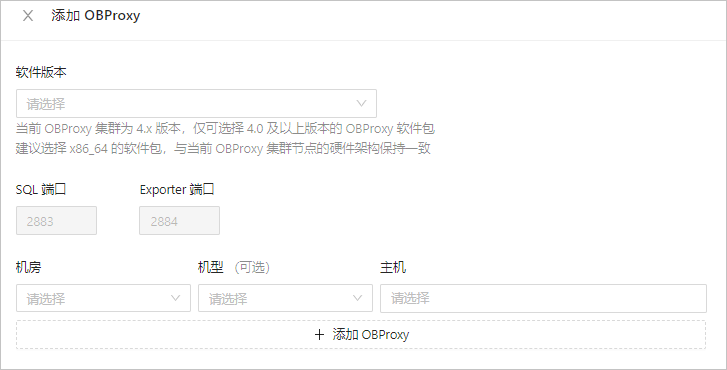
Refer to the following table to specify the parameters:
ParameterDescriptionSQL Port The default value is 2883. Exporter Port The default value is 2884. Software Version Select the version of OBProxy to install. Data Center, Host Type (Optional), Host Configure the host where OBProxy is to be deployed by setting Data Center, Host Type (Optional), and Host. Click OK.
Note
- If the OBProxy cluster is V4.0 or later, you can only select software packages of V4.0.0 or later.
- If the OBProxy cluster is V3.x or earlier, you can select software packages of V1.8.0 or later but earlier than V4.0.0.
- If no OBProxy has been created or taken over in the OBProxy cluster, you can customize the SQL port and Exporter port when adding an OBProxy. If an OBProxy already exists in the OBProxy cluster, the SQL port and Exporter port inherit the ports configured when OBProxy was deployed in the cluster and cannot be customized.