
OceanBase AI Database supports the parallel execution of various statements, which can be classified into the following main categories:
- Parallel queries
- Parallel DML
- Parallel DDL
- Parallel
LOAD DATA - Concurrent DDL
Parallel query
Key application scenarios
SELECTstatements and their subqueries- The query portion of DML statements (
INSERT,UPDATE,DELETE) - External table queries
Decision process
The execution decision for parallel queries involves two key aspects:
Whether to execute a parallel query:
- If the query uses the
PARALLELhint, the session has parallel query enabled, or theTABLEattribute specifies parallelism, parallel query will be enabled.
- If the query uses the
Determining the degree of parallelism:
- For a base table scan or index scan DFO, the degree of parallelism is determined by the
PARALLELhint, session parallel attributes, or theTABLEattribute. - If runtime detects that a DFO accesses data less than one macroblock, its runtime degree of parallelism will be locally and automatically reduced.
- The DFO degree of parallelism for intermediate nodes such as
JOINinherits from the degree of parallelism of the left child DFO of theJOIN. - Some DFOs do not allow parallel execution (for example, nodes computing
ROWNUM), and their degrees of parallelism are forcibly set to 1.
- For a base table scan or index scan DFO, the degree of parallelism is determined by the
Parallel DML
In most scenarios, Parallel DML (PDML) can significantly improve the performance of data import, update, and delete operations.
DML degree of parallelism
The degree of parallelism for DML is consistent with that of the query portion. When parallel DML is enabled, the query portion automatically enables parallelism. The read data is redistributed based on the partition locations of the table to be updated, and then multiple threads execute the DML in parallel, with each thread responsible for several partitions.
Optimal performance is typically achieved when the degree of parallelism is a multiple of the target table's number of partitions. When the degree of parallelism exceeds the number of partitions, multiple threads may process the same partition's data; when the degree of parallelism is less than the number of partitions, a single thread may process data from multiple partitions, and the partitions processed by each thread do not overlap.
- When the degree of parallelism is greater than the target table's number of partitions, it is recommended to set the degree of parallelism to an integer multiple of the partition count. Typically, the number of threads inserting data into a single partition at once should not exceed four, because beyond this value, scalability is limited, log synchronization may become a bottleneck, and there are also additional partition-level lock synchronization overheads.
- When the degree of parallelism is less than the target table's number of partitions, it is recommended that the number of partitions be an integer multiple of the degree of parallelism to avoid uneven insertion workloads.
Indexed table processing strategy
Parallel DML supports automatic maintenance of indexed tables.
- For local indexes, the storage layer automatically processes local indexes when updating the primary table via parallel DML.
- For global indexes, when using the parallel DML framework, corresponding plans are generated to maintain global indexes.
The following is the processing flow for two global indexes:
- DFO1 first handles the update of the primary table.
- DFO1 then passes the required data for Global Index 1 and Global Index 2 to DFO2, which is responsible for updating Global Index Table 1.
- Finally, DFO2 passes the required data for Global Index 2 to DFO3, which completes the update of Global Index Table 2.
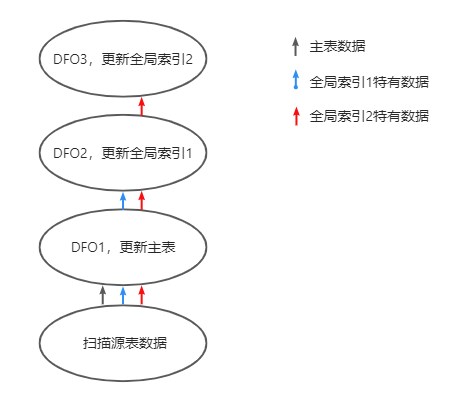
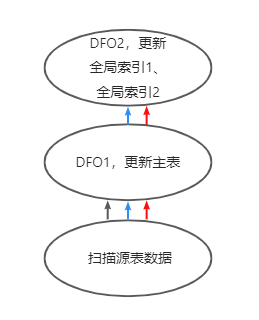
The preceding strategy applies to all INSERT, DELETE, and UPDATE statements. For MERGE statements, index maintenance operations are concentrated in a single DFO, as shown in the following figure:
- DFO1 is responsible for updating the primary table.
- DFO1 then passes the data required for Global Index 1 and Global Index 2 to DFO2, which internally completes the maintenance operations for all global indexes one by one.
Processing strategy for updating the partitioning key
For UPDATE statements, when the partitioning key of the primary table or a global index table is updated, a row movement operation is required. This involves deleting the old data from the old partition and then inserting the new data into the new partition. During row movement, the UPDATE operation is decomposed into two steps: DELETE and INSERT. That is, the UPDATE DFO involving row movement is split into two DFOs. The first DFO is responsible for DELETE, and the second DFO is responsible for INSERT. To avoid primary key conflicts, it is essential to ensure that the DELETE DFO is fully executed before starting the INSERT DFO.
Transaction processing
Parallel DML in OceanBase AI Database, like regular DML statements, fully supports transaction processing. Parallel DML statements can appear together with other query statements within the same transaction. After executing a parallel DML statement, you do not need to commit the transaction immediately; you can read the results of the DML statement in subsequent query statements.
The execution of parallel DML no longer depends on the undo_retention setting. Multi-version data is reclaimed based on the transaction version number. As long as a transaction is active, the content that can be read using the transaction's corresponding version number will not be reclaimed. However, a full data disk is an exception. In this case, multi-version data will still be forcibly reclaimed, and parallel DML will receive the OB_SNAPSHOT_DISCARDED error and automatically retry the entire SQL.
Direct load
When memory space is insufficient, parallel DML, which tends to report out-of-memory errors, will first write data to the MemTable via a direct load path, and then write it to disk through minor compactions and major compactions. Since parallel DML writes data quickly to the MemTable, when the write speed exceeds the minor compaction speed, memory usage will continue to increase, eventually leading to an out-of-memory error.
To address this issue, OceanBase AI Database's storage layer introduces the direct load feature. When parallel DML uses the direct load feature to execute INSERT statements, data is written directly to disk bypassing the MemTable, thereby avoiding out-of-memory problems and improving data import performance.
Users can enable the direct load feature using the APPEND hint. Before starting direct load, you must commit the previous transaction and set AUTOCOMMIT = 1.
DML operations that cannot be parallelized
To ensure correct DML semantics, the query part can be parallelized in the following scenarios, but the DML part cannot:
- If the target table contains a
LOCAL UNIQUE INDEX, the DML part cannot be parallelized, while the query part can still be parallelized. - The DML part of an
INSERT ON DUPLICATE KEY UPDATEstatement cannot be parallelized. - If the target table contains triggers or foreign keys, the DML part cannot be parallelized.
- If the DML statement has the
IGNOREmode enabled, the DML part cannot be parallelized. - Multi-table
INSERT ALL,UPDATE,DELETE, andMERGE INTOstatements cannot be parallelized. - Optimization for ArrayBinding batches does not support parallelism.
- DBLink does not support parallelism.
INSERT...VALUES...,INSERT UPDATE, orREPLACEstatements do not support parallelism.- Columns containing
ON UPDATE CURRENT_TIMESTAMPdo not support parallelism.
If you find that a DML statement is not executed in parallel, you can execute the EXPLAIN EXTENDED statement and view the Note field in the return result to determine the reason.
Partitioning key update
Updating the partitioning key of a partitioned table may cause data to migrate from one partition to another. Parallel DML always allows updates to the partitioning key.
Parallel DDL
All parallel DDL operations are performed through specific Parallel DML processes. For example, creating an index essentially involves creating an empty index table, then querying the index column data from the primary table in parallel, and finally inserting it into the index table in parallel. OceanBase AI Database supports parallel execution for the following DDL statements:
CREATE TABLE AS SELECTALTER TABLECREATE INDEX
Specify the degree of parallelism by using a hint
The CREATE INDEX statement supports enabling parallelism using the PARALLEL hint. For other DDL statements, parallelism can only be enabled using session variables or the TABLE PARALLEL attribute.
The syntax is as follows:
CREATE /*+ PARALLEL(3) */ INDEX IDX ON t1(c2);
Specify the degree of parallelism using session variables
All of the preceding DDL statements support specifying the degree of parallelism using session variables. After setting the degree of parallelism, all DDL statements on that session are automatically executed in parallel at that degree, and both the query and modification parts use the same degree of parallelism.
Use the SET statement to set session variables to control the degree of parallelism. Example:
-- Parallel index creation
SET _FORCE_PARALLEL_DDL_DOP = 3;
CREATE TABLE t1 (c1 INT, c2 INT, c3 INT, c4 INT);
CREATE INDEX IDX ON t1(c2);
Specify the degree of parallelism using the TABLE PARALLEL attribute
When the table involved in a DDL operation has the PARALLEL attribute, you can enable parallel DDL as follows.
Use the SET statement to set a session variable to enable parallel execution. Example:
-- Parallel index creation
SET _ENABLE_PARALLEL_DDL = 1;
CREATE TABLE t1 (c1 INT, c2 INT, c3 INT, c4 INT) PARALLEL = 3;
CREATE INDEX IDX ON t1(c2) PARALLEL = 2;
If two or more of the PARALLEL hint, FORCE SESSION PARALLEL, and table-level PARALLEL attribute are specified at the same time, they take the following priority: PARALLEL hint > FORCE SESSION PARALLEL > table-level PARALLEL attribute.
Regardless of whether parallelism is enabled for the CREATE INDEX statement, it always uses direct write (bypasses the MemTable).
Parallel LOAD DATA
The implementation of LOAD DATA is not based on parallel DML. Instead, it works by first splitting a CSV file into multiple parts using multiple threads, combining them into multiple INSERT statements, and then distributing and executing these INSERT statements with a specified degree of parallelism.
LOAD DATA /*+ parallel(2) */ infile "test.csv" INTO TABLE t1 FIELDS TERMINATED BY ',' ENCLOSED BY '"';
In the preceding statement, the PARALLEL option specifies the degree of parallelism for loading data. If the PARALLEL hint is not specified, LOAD DATA is executed in parallel by default with PARALLEL set to 4. The recommended value range for PARALLEL is from 0 to the maximum number of CPU cores of the tenant.
Concurrent DDL
Comparison between parallel DDL and concurrent DDL
The concept of parallel DDL described in the previous section refers to using multiple threads to speed up the execution of a single DDL operation, although these operations are still processed serially. In other words, multiple threads can work in parallel within a single operation, but different DDL statements cannot be executed simultaneously.
Concurrent DDL is different. It allows multiple DDL statements to be executed concurrently and independently of each other. This capability can significantly improve cluster utilization and overall DDL execution efficiency.
By making this distinction, users can better understand which strategy to adopt in specific scenarios to optimize DDL operation performance.
Concurrent DDL capability
This feature is implemented by increasing the number of DDL threads on the RootService node. It breaks down a single DDL operation into different phases and performs parallel processing on some of these phases. As a result, the RootService can process multiple non-conflicting DDL requests on its node. The number of additional DDL threads is related to the cluster scale. As the cluster and tenant scales, DDL execution performance also improves accordingly.
In OceanBase AI Database, the DDL operations that support concurrent execution are:
TRUNCATE TABLECREATE TABLE
Usage instructions and considerations
The concurrent table creation feature is automatically enabled without any additional configuration.
You can use the following SQL statement to view the current tenant version status.
SHOW PARAMETERS LIKE "compatible";
When using concurrent DDL operations, note the following considerations:
Mutual exclusion: Concurrent DDL and serial DDL are logically mutually exclusive. To achieve maximum throughput for concurrent DDL, no other serial DDL operations should be running in the cluster during concurrent DDL execution.
Node optimization: DDL requests are always executed at the RootService node. To reduce network overhead, the RootService and the tenant leader should be placed on the same node whenever possible.
Resource consumption: Improving the concurrency of concurrent DDL operations, especially table creation, will increase system load and resource consumption.
Thread requirements: The sys tenant needs sufficient thread resources to handle the increased DDL requests. To achieve maximum throughput, the sys tenant requires at least an additional 6-core CPU computing resource.
User tenant resources: User tenants also need sufficient threads to process DDL requests and write to internal tables. For optimal DDL performance, user tenants should be equipped with at least an additional 14-core CPU computing resource.
Memory and storage requirements: Since concurrent DDL, particularly parallel table creation, writes large amounts of data to internal tables in a short time, it places higher demands on storage and memory. Insufficient storage space or insufficient memory to support rapid data persistence to disk may limit write speeds, which directly affects the execution efficiency of concurrent DDL and also impacts the processing of normal business traffic.