
MCP (Model Context Protocol) is an open-source protocol introduced by Anthropic in November 2024. It enables large language models (LLMs) to interact with external tools or data sources. With MCP, users can directly instruct tools to perform actions based on the LLM's output, eliminating the need for manual execution.
OceanBase MCP Server allows LLMs to interact with OceanBase Database through the MCP protocol. It supports executing SQL statements, helping developers quickly build prototype applications.
Qoder is an AI-powered code editor that supports Windows, macOS, and Linux. This topic will guide you through integrating OceanBase MCP Server with Qoder and demonstrate how to generate a FastAPI-style RESTful API project based on the database.
Prerequisites
You have a transactional instance available in your environment, and a MySQL-compatible tenant under the instance.
You have a MySQL database and account available under the tenant, and you have granted read and write permissions to the database account. For more information, see Create an account and Create a database (MySQL only).
You have the project administrator or instance administrator role to read and write to instances in the project. If you don't have the required permissions, contact the organization administrator to grant you the permissions.
Install Python 3.11 or later and the corresponding pip. If the Python version on your machine is too low, you can use Miniconda to create a new Python 3.11 or later environment. For more information, see Miniconda installation guide.
Install the Python package manager uv.
Download and install Qoder. If you are using it for the first time, complete the account registration or login.
Step 1: Get an OceanBase Cloud connection string
Log in to the OceanBase Cloud console. On the instance list, expand the target transactional instance. Under the target tenant, choose Connect > Get Connection String.
In the dialog, select Public Network.
On the Connect via Public Network page, complete the following to generate a connection string:
(Optional) If the tenant does not have a public endpoint yet, under Step 1: Get Public Endpoint, click Get Public Endpoint. If one already exists, skip this step. After the endpoint is ready, click Next Step.
Under Step 2: Security Settings, click Add to configure the allowlist as needed, then click Next Step.
Under Step 3: Access Database, set options according to your tenant mode:
MySQL-compatible tenant: Select the database and account you created in the prerequisites, and choose MySQL CLI as the connection method. Then copy the connection string for the next section.
Oracle-compatible tenant: Select the account you created in the prerequisites, and choose OBClient as the connection method. Then copy the connection string for the next section.
Step 2: Configure OceanBase MCP Server in Qoder
Create a working directory
Manually create a Qoder working directory and open Qoder, for example, qoder-generate. The project files generated by Qoder will be saved in this directory.
Open the MCP Server configuration page
Click the user icon in the upper-left corner of Qoder, or use the shortcut key:
- For macOS, use the shortcut key:
⌘ + ⇧ + , - For Windows, use the shortcut key:
Ctrl + Shift + ,
After entering Qoder Settings, click MCP Server in the left-side navigation pane.

Add MCP Server configuration
Click Add, and enter the OceanBase MCP Server configuration. Here is an example:
{
  "mcpServers": {
    "oceanbase": {
      "command": "uvx",
      "args": [
        "--from", "oceanbase-mcp", "oceanbase_mcp_server"
      ],
      "env": {
        "OB_HOST": "***",
        "OB_PORT": "***",
        "OB_USER": "***",
        "OB_PASSWORD": "***",
        "OB_DATABASE": "***"
      }
    }
  }
}
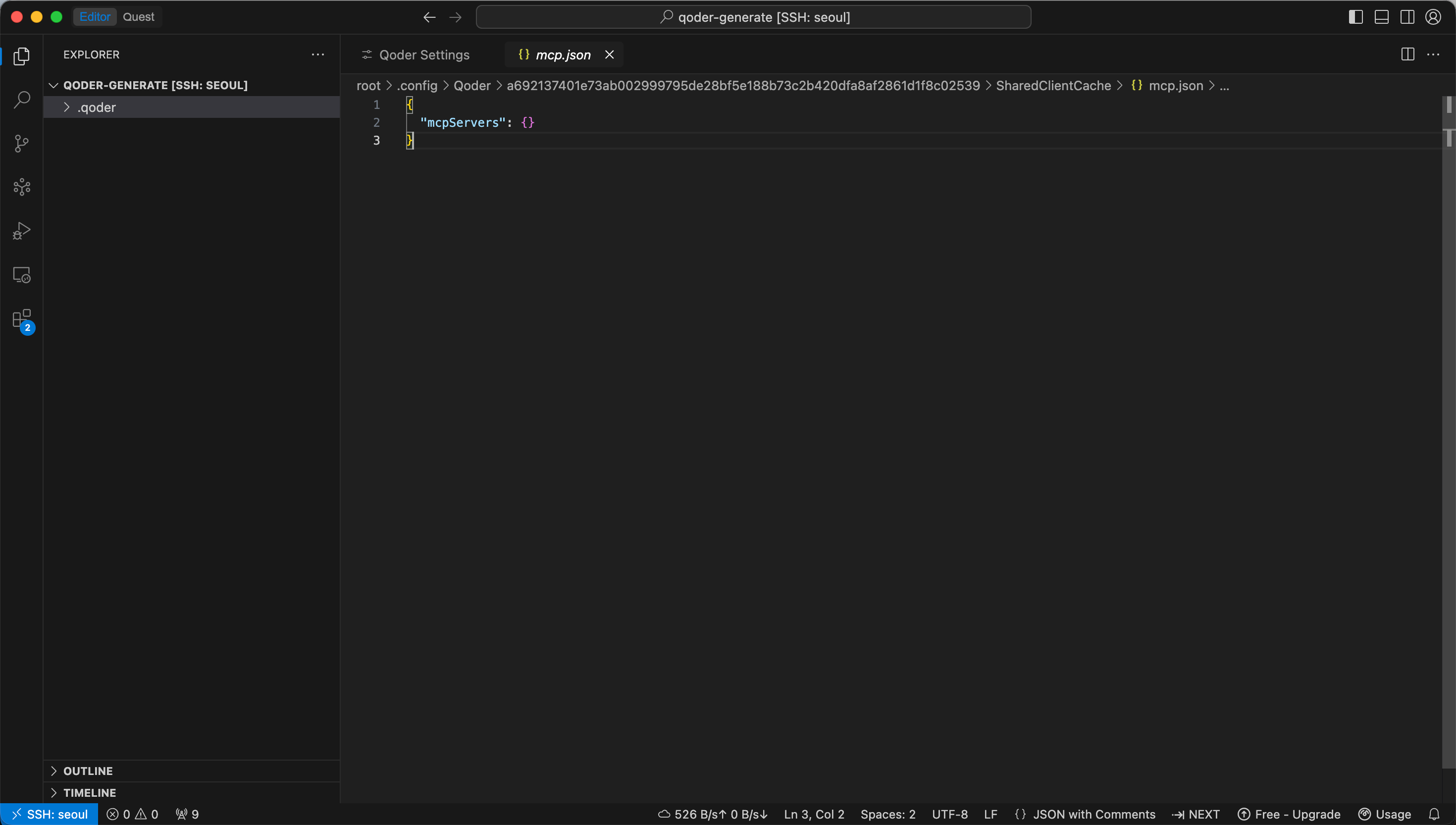
Please replace the following parameters with your own database information:
OB_HOSTOB_PORTOB_USEROB_PASSWORDOB_DATABASE
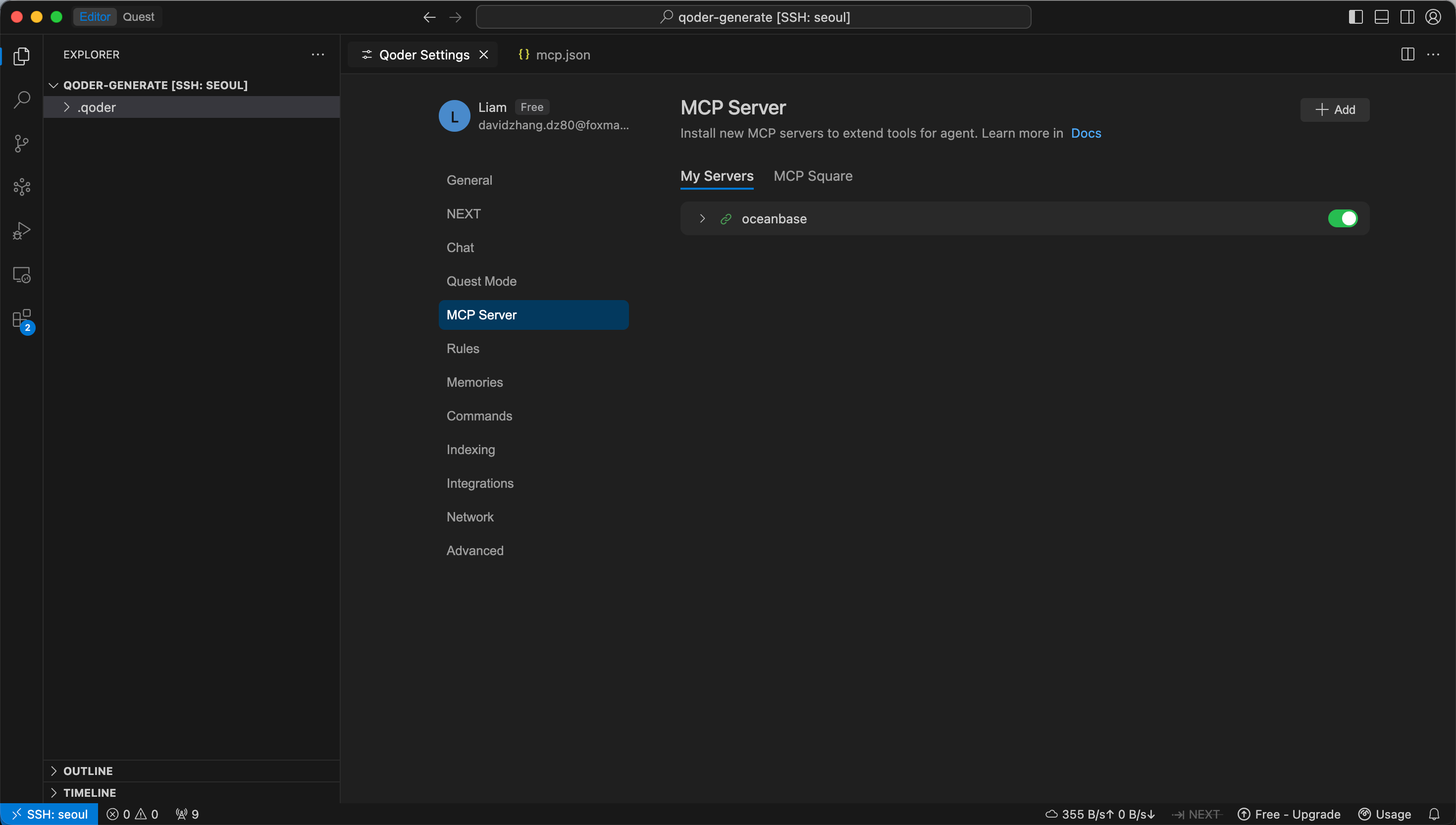
After saving, if a link icon appears in the My Servers list, the configuration is successful.
Test the MCP connection
In the Qoder dialog box, enter a prompt, for example:
test How many tables are there in the test database?
If the correct result is returned, it indicates that Qoder has successfully accessed the database through the OceanBase MCP Server.
Step 3: Generate a FastAPI project using Qoder
You can use FastAPI to quickly create a project in the RESTful API style. FastAPI is a Python web framework that allows you to build RESTful APIs quickly.
Create a sample table
In the Qoder dialog box, enter the following prompt:
Create a customer table with ID as the primary key and fields name, age, telephone, and location.
Insert test data
Continue entering the following prompt:
Insert 10 records into the customer table.
Generate RESTful API code
Enter the following prompt to let Qoder generate a FastAPI project based on the customer table:
Create a FastAPI project and generate a RESTful API based on the customer table.
After the code is generated, click Accept to accept and save the generated files.
Create a virtual environment and install dependencies
In the project directory, execute the following commands to create a virtual environment using the uv package manager and install the required dependencies:
cd fastapi_customer_api
uv venv
source .venv/bin/activate
uv pip install -r requirements.txt
Configure the database connection
In the project directory, create or update the .env file and write the database connection information:
DB_HOST=your_host
DB_PORT=3306
DB_USER=your_user
DB_PASSWORD=your_password
DB_NAME=test
Start the FastAPI service
Execute the following command to start the project (please adjust the entry file name as needed):
uvicorn main:app --reload
Verify the API
After the service is started, you can verify it in the following ways:
- Access
http://127.0.0.1:8000/docsto view the Swagger documentation. - Use
curlor Postman to call the CRUD interfaces and verify the results.
For example, to query all customers:
curl "http://127.0.0.1:8000/customers"
After completing all the above steps, you will have a FastAPI RESTful API project generated by Qoder and driven by OceanBase Database. This project can perform common operations such as adding, deleting, modifying, and querying records in the customer table.
Appendix: Complete code example of RESTful API
After the RESTful API for adding, deleting, modifying, and querying is successfully generated, the code example is as follows:
from fastapi import FastAPI, HTTPException, Depends
from pydantic import BaseModel
from typing import List, Optional
import pymysql
import os
from dotenv import load_dotenv

# Load environment variables
load_dotenv()

# Database connection configuration
DB_CONFIG = {
    'host': os.getenv('DB_HOST', 'localhost'),
    'port': int(os.getenv('DB_PORT', 2883)),
    'user': os.getenv('DB_USER', 'root'),
    'password': os.getenv('DB_PASSWORD', ''),
    'database': os.getenv('DB_NAME', 'test'),
    'charset': 'utf8mb4'
}

# Pydantic models
class CustomerBase(BaseModel):
    name: str
    age: Optional[int] = None
    telephone: Optional[str] = None
    location: Optional[str] = None

class CustomerCreate(CustomerBase):
    pass

class CustomerUpdate(BaseModel):
    name: Optional[str] = None
    age: Optional[int] = None
    telephone: Optional[str] = None
    location: Optional[str] = None

class Customer(CustomerBase):
    ID: int

    class Config:
        from_attributes = True

class Database:
    def __init__(self):
        self.connection = None

    def connect(self):
        try:
            self.connection = pymysql.connect(**DB_CONFIG)
            return self.connection
        except Exception as e:
            raise HTTPException(status_code=500, detail=f"Database connection failed: {str(e)}")

    def disconnect(self):
        if self.connection:
            self.connection.close()

    def get_db(self):
        db = self.connect()
        try:
            yield db
        finally:
            self.disconnect()

# Create FastAPI application
app = FastAPI(
    title="Customer API",
    description="RESTful API for customer management based on OceanBase Database",
    version="1.0.0"
)

# Database instance
db = Database()

# API routes
@app.get("/")
async def root():
    return {"message": "Welcome to Customer API", "version": "1.0.0"}

@app.get("/health")
async def health_check():
    try:
        connection = db.connect()
        with connection.cursor() as cursor:
            cursor.execute("SELECT 1")
            db.disconnect()
        return {"status": "healthy", "database": "connected"}
    except Exception as e:
        return {"status": "unhealthy", "database": f"error: {str(e)}"}

# Get all customers
@app.get("/customers", response_model=List[Customer])
async def get_customers(db_conn = Depends(db.get_db)):
    try:
        with db_conn.cursor() as cursor:
            cursor.execute("SELECT ID, name, age, telephone, location FROM customer")
            results = cursor.fetchall()

            customers = []
            for row in results:
                customer = Customer(
                    ID=row[0],
                    name=row[1],
                    age=row[2],
                    telephone=row[3],
                    location=row[4]
                )
                customers.append(customer)
            return customers
    except Exception as e:
        raise HTTPException(status_code=500, detail=f"Failed to query customer list: {str(e)}")

# Get customer by ID
@app.get("/customers/{customer_id}", response_model=Customer)
async def get_customer(customer_id: int, db_conn = Depends(db.get_db)):
    try:
        with db_conn.cursor() as cursor:
            cursor.execute(
                "SELECT ID, name, age, telephone, location FROM customer WHERE ID = %s",
                (customer_id,)
            )
            result = cursor.fetchone()

            if not result:
                raise HTTPException(status_code=404, detail="Customer not found")

            return Customer(
                ID=result[0],
                name=result[1],
                age=result[2],
                telephone=result[3],
                location=result[4]
            )
    except HTTPException:
        raise
    except Exception as e:
        raise HTTPException(status_code=500, detail=f"Query customer failed: {str(e)}")

# Create a new customer
@app.post("/customers", response_model=Customer)
async def create_customer(customer: CustomerCreate, db_conn = Depends(db.get_db)):
    try:
        with db_conn.cursor() as cursor:
            sql = """
                INSERT INTO customer (name, age, telephone, location)
                VALUES (%s, %s, %s, %s)
            """
            cursor.execute(sql, (
                customer.name,
                customer.age,
                customer.telephone,
                customer.location
            ))
            db_conn.commit()

            # Get the ID of the inserted record
            customer_id = cursor.lastrowid

            return Customer(
                ID=customer_id,
                name=customer.name,
                age=customer.age,
                telephone=customer.telephone,
                location=customer.location
            )
    except Exception as e:
        db_conn.rollback()
        raise HTTPException(status_code=500, detail=f"Create customer failed: {str(e)}")

# Update customer information
@app.put("/customers/{customer_id}", response_model=Customer)
async def update_customer(customer_id: int, customer: CustomerUpdate, db_conn = Depends(db.get_db)):
    try:
        # Check if the customer exists
        with db_conn.cursor() as cursor:
            cursor.execute("SELECT ID FROM customer WHERE ID = %s", (customer_id,))
            if not cursor.fetchone():
                raise HTTPException(status_code=404, detail="Customer not found")

        # Build the update statement
        update_fields = []
        values = []

        if customer.name is not None:
            update_fields.append("name = %s")
            values.append(customer.name)
        if customer.age is not None:
            update_fields.append("age = %s")
            values.append(customer.age)
        if customer.telephone is not None:
            update_fields.append("telephone = %s")
            values.append(customer.telephone)
        if customer.location is not None:
            update_fields.append("location = %s")
            values.append(customer.location)

        if not update_fields:
            raise HTTPException(status_code=400, detail="At least one field must be updated")

        values.append(customer_id)

        with db_conn.cursor() as cursor:
            sql = f"UPDATE customer SET {', '.join(update_fields)} WHERE ID = %s"
            cursor.execute(sql, values)
            db_conn.commit()

            # Return the updated customer information
            cursor.execute(
                "SELECT ID, name, age, telephone, location FROM customer WHERE ID = %s",
                (customer_id,)
            )
            result = cursor.fetchone()

            return Customer(
                ID=result[0],
                name=result[1],
                age=result[2],
                telephone=result[3],
                location=result[4]
            )
    except HTTPException:
        raise
    except Exception as e:
        db_conn.rollback()
        raise HTTPException(status_code=500, detail=f"Update customer failed: {str(e)}")

# Delete a customer
@app.delete("/customers/{customer_id}")
async def delete_customer(customer_id: int, db_conn = Depends(db.get_db)):
    try:
        with db_conn.cursor() as cursor:
            # Check if the customer exists
            cursor.execute("SELECT ID FROM customer WHERE ID = %s", (customer_id,))
            if not cursor.fetchone():
                raise HTTPException(status_code=404, detail="Customer not found")

            # Delete the customer
            cursor.execute("DELETE FROM customer WHERE ID = %s", (customer_id,))
            db_conn.commit()

            return {"message": f"Customer {customer_id} has been successfully deleted"}
    except HTTPException:
        raise
    except Exception as e:
        db_conn.rollback()
        raise HTTPException(status_code=500, detail=f"Failed to delete customer: {str(e)}")

# Search for customers
@app.get("/customers/search/", response_model=List[Customer])
async def search_customers(
    name: Optional[str] = None,
    location: Optional[str] = None,
    min_age: Optional[int] = None,
    max_age: Optional[int] = None,
    db_conn = Depends(db.get_db)
):
    try:
        # Build the query conditions
        conditions = []
        values = []

        if name:
            conditions.append("name LIKE %s")
            values.append(f"%{name}%")
        if location:
            conditions.append("location LIKE %s")
            values.append(f"%{location}%")
        if min_age is not None:
            conditions.append("age >= %s")
            values.append(min_age)
        if max_age is not None:
            conditions.append("age <= %s")
            values.append(max_age)

        # Build the SQL query
        if conditions:
            sql = f"SELECT ID, name, age, telephone, location FROM customer WHERE {' AND '.join(conditions)}"
        else:
            sql = "SELECT ID, name, age, telephone, location FROM customer"

        with db_conn.cursor() as cursor:
            cursor.execute(sql, values)
            results = cursor.fetchall()

            customers = []
            for row in results:
                customer = Customer(
                    ID=row[0],
                    name=row[1],
                    age=row[2],
                    telephone=row[3],
                    location=row[4]
                )
                customers.append(customer)
            return customers
    except Exception as e:
        raise HTTPException(status_code=500, detail=f"Failed to search for customers: {str(e)}")

if __name__ == "__main__":
    import uvicorn
    uvicorn.run(app, host="0.0.0.0", port=8000)