OceanBase
English日本語简体中文
Docs Home
Products
Integrations
Release Notes

Databases

OceanBase DatabaseOceanBase Cloud OceanBase Best Practices

Tools

OceanBase Cloud PlatformOceanBase Migration ServiceOceanBase Developer CenterOceanBase Migration AssessmentOceanBase Admin ToolOceanBase Loader and DumperOceanBase DeployerKubernetes operator for OceanBaseOceanBase Diagnostic Tool OceanBase Binlog ServiceOceanBase DataPilot

Connectors and Middleware

OceanBase Database Proxy OceanBase Connector/C OceanBase Connector/J OceanBase Connector/ODBC OceanBase Connector/NETOceanBase Command-Line Client

Databases

OceanBase DatabaseOceanBase Cloud OceanBase Best Practices

Connectors and Middleware

OceanBase Database Proxy OceanBase Connector/C OceanBase Connector/J OceanBase Connector/ODBC OceanBase Connector/NETOceanBase Command-Line Client

Tools

OceanBase Cloud PlatformOceanBase Migration ServiceOceanBase Developer CenterOceanBase Migration AssessmentOceanBase Admin ToolOceanBase Loader and DumperOceanBase DeployerKubernetes operator for OceanBaseOceanBase Diagnostic Tool OceanBase Binlog ServiceOceanBase DataPilot
OceanBase DatabaseOceanBase Cloud ToolsConnectors and MiddlewareLifecycle Support Policy

OceanBase Database

  • Overview of the ecosystem
  • ORM frameworks
    • Java
      • Spring Boot
      • Spring Batch
      • Use Spring JDBC to connect to OceanBase Database
      • Spring Data JPA
      • Hibernate
      • MyBatis
      • jOOQ
    • Python
      • Use SQLAlchemy to connect to OceanBase Database
      • Connect to OceanBase Database by using peewee
      • Use Tortoise ORM to connect to OceanBase Database
    • Go
      • Connect to OceanBase Database by using GORM
      • beego ORM
    • Rust
      • SeaORM Connection to OceanBase Database
      • Diesel Connection to OceanBase Database
    • Ruby
      • Active Record
      • Sequel Connection to OceanBase Database
      • Connect to OceanBase Database by using Ruby on Rails
    • Node.js
      • Sequelize
      • TypeORM
      • Prisma
      • Drizzle
    • C#
      • Dapper
      • SqlSugar
      • FreeSQL
    • PHP
      • Connect to OceanBase Database by using the Yii 2.0 ORM
      • Connect to OceanBase Database by using Laravel Eloquent ORM
      • CakePHP
  • Database version management
    • Liquibase
    • Flyway
  • Data integration
    • Flink
      • Apache Flink
      • Flink DirectLoad
      • Flink Connector OceanBase
    • dbt
    • SeaTunnel
    • Maxwell
    • Debezium
    • Spark Catalog
    • NiFi
    • Qlik Replicate
    • RisingWave CDC
    • Flume
    • Migrate data from SQL Server to OceanBase Database by using MySQL Workbench
  • SQL development
    • WebLogic
    • DBeaver
    • Navicat
    • DataGrip
    • TablePlus
    • DMS
  • Orchestration and scheduling
    • Airflow
    • PowerJob
    • DolphinScheduler
    • Linkis
  • Visualization tools
    • Superset
    • Excel
    • Power BI
    • Quick BI
    • Tableau
    • GuanData
    • vividime
    • DataV
    • Metabase
    • Redash
    • FineReport
  • Database management
    • NineData
    • Bytebase
    • DataHub
    • Zabbix
  • AI
    • OpenAI
    • Qwen
    • LangChain
    • LlamaIndex
    • Dify
    • n8n
    • Trae
    • SpringAI
    • Cline
    • Cursor
    • Continue
    • MCP Toolbox
    • CamelAI
    • Firecrawl
    • Hugging Face
    • Ollama
    • Google Gemini
    • Cloudflare Workers AI
    • DB GPT
    • Jina AI
    • Augment Code
    • Claude Code
    • Kiro
    • GPT4All
  • Application
    • Ghost
    • Jira
    • Seata
    • SAP Crystal Reports
  • Middleware
    • Apache Pulsar

Download PDF

Document Feedback
  1. Documentation Center
  2. OceanBase Database
  3. master

Manage OceanBase Database instances by using Bytebase

Last Updated:2026-10-13 12:46:49

Prerequisites
Procedure

Bytebase is an open-source database change management and collaboration tool. It provides both SaaS services and a self-hosted version. In this topic, a MySQL tenant of OceanBase Database is used as an example to demonstrate how to manage OceanBase instances by using Bytebase.

Prerequisites

  1. You have deployed Bytebase. For more information, see GitHub.

  2. You have obtained the connection information of the OceanBase cluster, including the instance name, IP address, port number, and username and password of the account for connection. If you need to create a user, grant privileges to the user based on the privilege requirements of Bytebase and your actual business needs. For more information, see Create a user.

Procedure

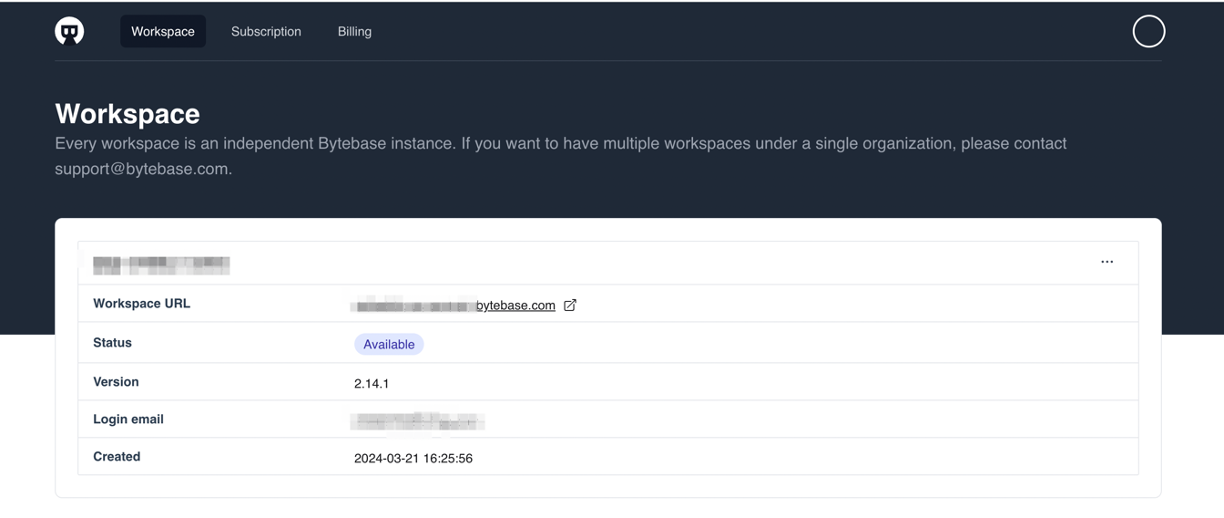
  1. Log in to the Bytebase platform, and create a workspace and enter the workspace as prompted.
  2. Click Add Instance and select OceanBase (MySQL) in the dialog box that appears.
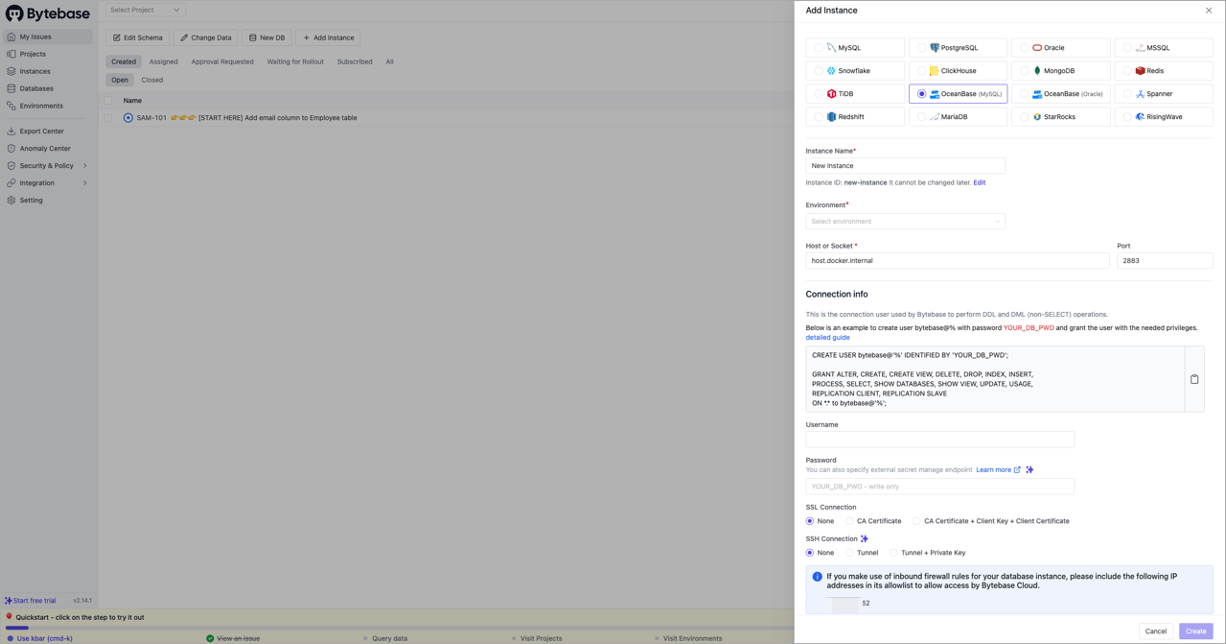
    The parameters that need to be specified are described by using the following connection string as an example:

    obclient -h10.10.10.1 -uusername@obtenant#obdemo -P2883 -p****** -c -A oceanbase
    
    Parameter
    Description
    Instance Name The name of your instance, for example, obdemo.
    Environment Select Test or Prod based on your needs.
    Host or Socket Enter the address obtained from the -h parameter in the connection string, for example, 10.10.10.1.
    Port Enter the port number obtained from the -P parameter in the connection string, for example, 2883.
    Username Enter the username obtained from the -u parameter in the connection string, for example, username@obtenant.
    Password Enter the password obtained from the -p parameter in the connection string, for example, ******.
  3. Click Test Connection. After the connection is successful, click Create.

  4. After the instance is added, you can integrate Bytebase with GitOps.

    • If you need to enable the GitOps workflow, you can integrate your code repository service, such as GitHub, GitLab, or Bitbucket Cloud, in Bytebase.
    • Configure Git repositories to store database change scripts and submit changes to the corresponding branches. Bytebase will automatically pull changes and execute the approval and release process.
  5. Manage database changes.

    • Create SQL migration scripts and submit change requests through Bytebase.
    • Participate in the review process and collaborate with other team members to review SQL changes.
    • Execute the approved changes. Bytebase will automatically apply them to the target database within the preset time window.

Previous topic

NineData
Last

Next topic

DataHub
Next
on this page
Prerequisites
Procedure