OceanBase
English日本語简体中文
Docs Home
Products
Integrations
Release Notes

Databases

OceanBase DatabaseOceanBase Cloud OceanBase Best Practices

Tools

OceanBase Cloud PlatformOceanBase Migration ServiceOceanBase Developer CenterOceanBase Migration AssessmentOceanBase Admin ToolOceanBase Loader and DumperOceanBase DeployerKubernetes operator for OceanBaseOceanBase Diagnostic Tool OceanBase Binlog Service

Connectors and Middleware

OceanBase Database Proxy OceanBase Connector/C OceanBase Connector/J OceanBase Connector/ODBC OceanBase Connector/NETOceanBase Command-Line Client

Databases

OceanBase DatabaseOceanBase Cloud OceanBase Best Practices

Connectors and Middleware

OceanBase Database Proxy OceanBase Connector/C OceanBase Connector/J OceanBase Connector/ODBC OceanBase Connector/NETOceanBase Command-Line Client

Tools

OceanBase Cloud PlatformOceanBase Migration ServiceOceanBase Developer CenterOceanBase Migration AssessmentOceanBase Admin ToolOceanBase Loader and DumperOceanBase DeployerKubernetes operator for OceanBaseOceanBase Diagnostic Tool OceanBase Binlog Service
OceanBase DatabaseOceanBase Cloud ToolsConnectors and MiddlewareLifecycle Support Policy

OceanBase Database

  • Overview of the ecosystem
  • ORM frameworks
    • Java
      • Spring Boot
      • Spring Batch
      • Use Spring JDBC to connect to OceanBase Database
      • Spring Data JPA
      • Hibernate
      • MyBatis
      • jOOQ
    • Python
      • Use SQLAlchemy to connect to OceanBase Database
      • Connect to OceanBase Database by using peewee
      • Use Tortoise ORM to connect to OceanBase Database
    • Go
      • Connect to OceanBase Database by using GORM
      • beego ORM
    • Rust
      • SeaORM Connection to OceanBase Database
      • Diesel Connection to OceanBase Database
    • Ruby
      • Active Record
      • Sequel Connection to OceanBase Database
      • Connect to OceanBase Database by using Ruby on Rails
    • Node.js
      • Sequelize
      • TypeORM
      • Prisma
      • Drizzle
    • C#
      • Dapper
      • SqlSugar
      • FreeSQL
    • PHP
      • Connect to OceanBase Database by using the Yii 2.0 ORM
      • Connect to OceanBase Database by using Laravel Eloquent ORM
      • CakePHP
  • Database version management
    • Liquibase
    • Flyway
  • Data integration
    • Flink
      • Apache Flink
      • Flink DirectLoad
      • Flink Connector OceanBase
    • dbt
    • SeaTunnel
    • Maxwell
    • Debezium
    • Spark Catalog
    • NiFi
    • Qlik Replicate
    • RisingWave CDC
    • Flume
    • Migrate data from SQL Server to OceanBase Database by using MySQL Workbench
  • SQL development
    • WebLogic
    • DBeaver
    • Navicat
    • DataGrip
    • TablePlus
    • DMS
  • Orchestration and scheduling
    • Airflow
    • PowerJob
    • DolphinScheduler
    • Linkis
  • Visualization tools
    • Superset
    • Excel
    • Power BI
    • Quick BI
    • Tableau
    • GuanData
    • vividime
    • DataV
    • Metabase
    • Redash
    • FineReport
  • Database management
    • NineData
    • Bytebase
    • DataHub
    • Zabbix
  • AI
    • OpenAI
    • Qwen
    • LangChain
    • LlamaIndex
    • Dify
    • n8n
    • Trae
    • SpringAI
    • Cline
    • Cursor
    • Continue
    • MCP Toolbox
    • CamelAI
    • Firecrawl
    • Hugging Face
    • Ollama
    • Google Gemini
    • Cloudflare Workers AI
    • DB GPT
    • Jina AI
    • Augment Code
    • Claude Code
    • Kiro
    • GPT4All
  • Application
    • Ghost
    • Jira
    • Seata
    • SAP Crystal Reports
  • Middleware
    • Apache Pulsar

Download PDF

Document Feedback
  1. Documentation Center
  2. OceanBase Database
  3. master

Integrate OceanBase MCP Server with Continue

Last Updated:2026-09-04 07:40:45

Prerequisites
Step 1: Get database connection details
Step 2: Configure the OceanBase MCP Server
Clone the OceanBase MCP Server repository
Install dependencies
Add and configure MCP servers

The Model Context Protocol (MCP) was introduced and open-sourced by Anthropic in November 2024. It lets large language models interact with external tools and data sources. With MCP, you don't have to copy model output and run it manually—the model can instruct tools to perform actions directly.

The OceanBase MCP Server uses MCP to give LLMs access to OceanBase Database so they can run SQL. With an MCP-capable client you can quickly prototype applications. The server is open source on GitHub.

Continue is an IDE extension that supports MCP Server integration. It works with Visual Studio Code and IntelliJ IDEA.

This topic shows how to integrate the OceanBase MCP Server with Continue to build a backend application quickly.

Prerequisites

  • You have deployed OceanBase Database and created a MySQL-compatible tenant.

  • You have Python 3.11 or later and pip installed. If your system Python is older, use Miniconda to create a Python 3.11+ environment.

  • You have Git installed for your OS.

  • You have the Python package manager uv installed. Verify with:

    pip install uv
    uv --version
    
  • You have installed the Continue extension in Visual Studio Code or IntelliJ IDEA.

    • After installation, click Add Models to configure the LLM API for Continue. Example configuration:
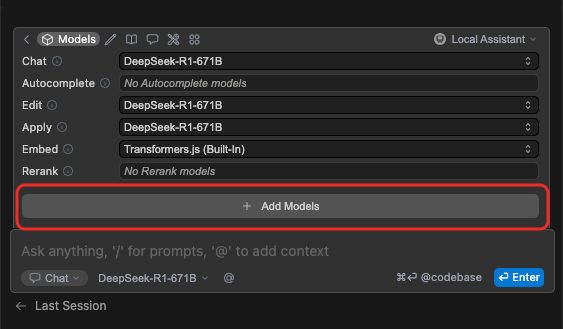
      Configure LLM API

      Example config file:

      name: Local Assistant
      version: 1.0.0
      schema: v1
      models:
          - name: DeepSeek-R1-671B
          provider: deepseek
          model: DeepSeek-R1-671B
          apiBase: *********
          apiKey: ********
      context:
          - provider: code
          - provider: docs
          - provider: diff
          - provider: terminal
          - provider: problems
          - provider: folder
          - provider: codebase
      

Step 1: Get database connection details

Obtain the database connection string from your OceanBase deployment team or administrator. For example:

obclient -h$host -P$port -u$user_name -p$password -D$database_name

Parameters:

  • $host: The IP for connecting to OceanBase. Use an ODP address when connecting via OceanBase Database Proxy (ODP), or an OBServer IP for direct connection.

  • $port: The connection port. ODP default is 2883; direct connection default is 2881. Both can be customized at deployment.

  • $database_name: The database to use.

    Notice

    The user connecting to the tenant must have CREATE, INSERT, DROP, and SELECT privileges on that database.

  • $user_name: The tenant account. ODP: username@tenant#cluster or cluster:tenant:username. Direct: username@tenant.

  • $password: The account password.

Step 2: Configure the OceanBase MCP Server

Clone the OceanBase MCP Server repository

Download the source:

git clone https://github.com/oceanbase/mcp-oceanbase.git

Change into the project directory:

cd mcp-oceanbase

Install dependencies

From the mcp-oceanbase directory:

uv venv
source .venv/bin/activate
uv pip install .

Add and configure MCP servers

  1. Click the rightmost button in the menu bar above the chat to open the MCP panel.
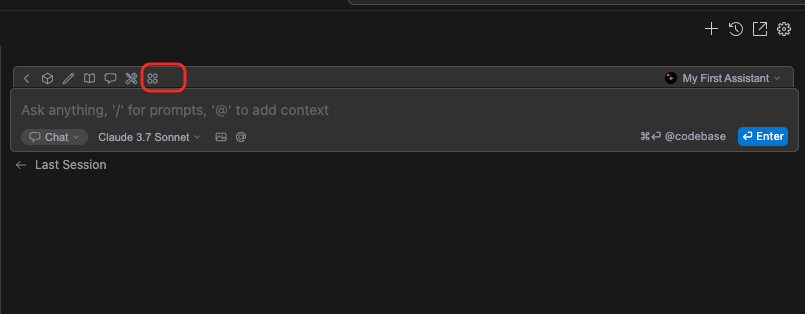
    1

  2. Click to add MCP Servers.

    Notice

    MCP is only available when Continue is in Agent mode.
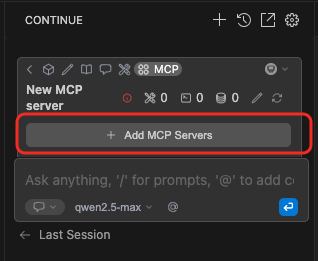
    2

  3. Enter the configuration and confirm. Replace /path/to/your/mcp-oceanbase/src/oceanbase_mcp_server with the absolute path to the oceanbase_mcp_server folder, and set OB_HOST, OB_PORT, OB_USER, OB_PASSWORD, and OB_DATABASE to your database values.

    name: OceanBase
    version: 0.0.1
    schema: v1
    mcpServers:
        - name: OceanBase
            command: uv
            args:
            - --directory
            - /path/to/your/mcp-oceanbase/src/oceanbase_mcp_server
            - run
            - oceanbase_mcp_server
        env:
            OB_HOST: "****"
            OB_PORT: "***"
            OB_USER: "***"
            OB_PASSWORD: "***"
            OB_DATABASE: "***"
    
  4. When configuration succeeds, you will see the following:
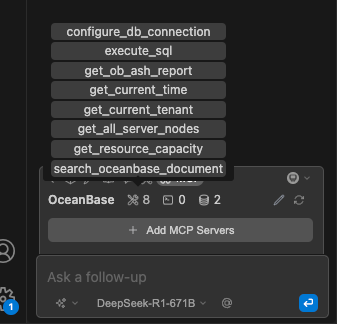
    3

Previous topic

Cursor
Last

Next topic

MCP Toolbox
Next
on this page
Prerequisites
Step 1: Get database connection details
Step 2: Configure the OceanBase MCP Server
Clone the OceanBase MCP Server repository
Install dependencies
Add and configure MCP servers