
Applicability
Spring Boot is applicable to OceanBase Database in MySQL and Oracle modes. This topic provides only an example for the MySQL mode.
This topic describes how to use the Spring Boot framework and OceanBase Database to build an application that performs basic database operations such as creating tables, inserting data, and querying data.
 Download the java-oceanbase-springboot sample project
 Prerequisites
- You have installed OceanBase Database.
- You have installed Java Development Kit (JDK) 1.8 and Maven.
- You have installed IntelliJ IDEA.
Note
In this topic, IntelliJ IDEA Community Edition 2021.3.2 is used to run the sample code. You can also choose a suitable tool as needed.
Procedure
Note
The following procedure applies to Windows. If you use another operating system or compiler, the procedure can be slightly different.
- Obtain the connection information of OceanBase Database.
- Import the
java-oceanbase-springbootproject to IntelliJ IDEA. - Modify the database connection information in the
java-oceanbase-springbootproject. - Run the
java-oceanbase-springbootproject.
Step 1: Obtain the connection information of OceanBase Database
Contact the deployment personnel or administrator of OceanBase Database to obtain the connection information.
obclient -hxx.xx.xx.xx -P2883 -uroot@sys#cluster -p**** -AEnter the URL of OceanBase Database.
Note
The URL of OceanBase Database is required in the
application.propertiesfile.jdbc:mysql://host:port/schema_name?user=$user_name&password=$password&useSSL=false&useUnicode=true&characterEncoding=utf-8The parameters are described as follows:
host: the IP address for connecting to OceanBase Database. It is the IP address of ODP for connection through ODP, or the IP address of an OBServer node for direct connection.port: the port for connecting to OceanBase Database. For connection through ODP, the default value is2883, which can be customized when ODP is deployed. For direct connection, the default value is2881, which can be customized when OceanBase Database is deployed.schema_name: the name of the schema to be accessed.user_name: the username of the account in the format of user@tenant#cluster name or username@SERVICE:service name, which is specified by the-uparameter. When the value is in the user@tenant#cluster name format, the default tenant issysand the default administrator isroot. The cluster name is not required when you directly connect to OceanBase Database, but is required when you connect to OceanBase Database through ODP.password: the password of the account.useSSL=false&useUnicode=true&characterEncoding=utf-8specifies the additional connection properties.useSSL: specifies whether to use SSL/TLS during forced connections. The default value isfalse.useUnicode: specifies whether to use the Unicode character encoding formats. The default value istrue.characterEncoding: the character encoding format for the URL of OceanBase Database. The default value isutf8.
For more information about URL parameters, see Database URL.
Step 2: Import the java-oceanbase-springboot project to IntelliJ IDEA
Start IntelliJ IDEA and choose File > Open....

In the Open File or Project window, select the project files and click OK to import the files.
IntelliJ IDEA automatically identifies various files in the project. You can view project information such as the directory structure, file list, module list, and dependencies in the Project window. Generally, the Project window is at the leftmost of the UI of IntelliJ IDEA and is opened by default. If the Project window is closed, you can choose View > Tool Windows > Project in the menu bar or press the keyboard shortcut Alt + 1 to open it.
Note
When you use IntelliJ IDEA to import a project, IntelliJ IDEA automatically detects the
pom.xmlfile in the project, downloads the required dependency libraries based on the dependencies described in the file, and adds them to the project.View the project.
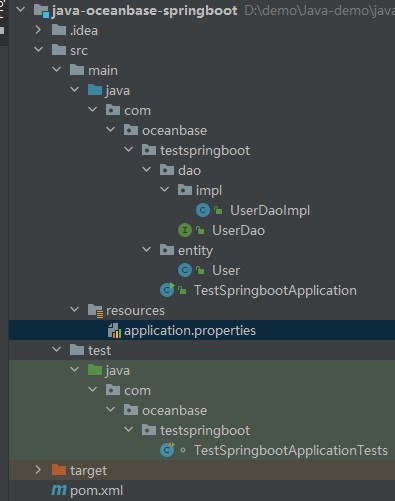
Step 3: Modify the database connection information in the java-oceanbase-springboot project
Modify the database connection information in the application.properties file based on the information obtained in Step 1: Obtain the connection information of OceanBase Database.
Here is an example:
- The name of the database driver is
com.mysql.cj.jdbc.Driver. - The IP address of the OBServer node is
10.10.10.1. - The access port is 2881.
- The name of the schema to be accessed is
test. - The tenant account is
root@mysq001.mysql001is a MySQL user tenant created in OceanBase Database, androotis the username of a user in themysql001tenant. - The password is
******.
Here is the sample code:
spring.datasource.driverClassName=com.mysql.cj.jdbc.Driver
spring.datasource.url=jdbc:mysql://10.10.10.1:2881/test?useSSL=false&useUnicode=true&characterEncoding=utf-8
spring.datasource.username=root@mysq001
spring.datasource.password=******
Step 4: Run the java-oceanbase-springboot project
Path
- Find the
TestSpringbootApplicationTests.javafile under src > test > java in the project package. - Choose Run > Run... > TestSpringbootApplicationTests in the menu bar or click the green triangle in the upper-right corner to run the project.
- View the logs and output of the project in the Console window of IntelliJ IDEA.
Result
test_springboot delete successfully!
test_springboot create successfully!
user = User{id=2, name='update'}
User{id=2, name='update'}
User{id=3, name='insert3'}
User{id=4, name='insert4'}
User{id=5, name='insert5'}
User{id=6, name='insert6'}
User{id=7, name='insert7'}
User{id=8, name='insert8'}
User{id=9, name='insert9'}
User{id=10, name='insert10'}
Project code
Click here to download the project code, which is a package named java-oceanbase-springboot.
Decompress the package to obtain a folder named java-oceanbase-springboot. The directory structure is as follows:
│--pom.xml
│
├─.idea
├─src
│  ├─main
│  │  ├─java
│  │  │  └─com
│  │  │      └─oceanbase
│  │  │          └─testspringboot
│  │  │              │--TestSpringbootApplication.java
│  │  │              │
│  │  │              ├─dao
│  │  │              │  │--UserDao.java
│  │  │              │  │
│  │  │              │  └─impl
│  │  │              │      └─--UserDaoImpl.java
│  │  │              │
│  │  │              └─entity
│  │  │                  └─--User.java
│  │  │
│  │  └─resources
│  │      └─--application.properties
│  │
│  └─test
│      └─java
│          └─com
│              └─oceanbase
│                  └─testspringboot
│                      └─--TestSpringbootApplicationTests.java
│
└─target
The files and directories are described as follows:
pom.xml: the configuration file of the Maven project, which contains the dependencies, plug-ins, and build rules of the project..idea: a directory used in an Integrated Development Environment (IDE) to store configuration information related to the project.src: a directory that stores the source code in the project.main: a directory that stores the main source code and resource files.java: a directory that stores the Java source code.com: the root directory of the Java package.oceanbase: the root directory of the project.testspringboot: the root directory of the Java package, which contains all the Java classes of the project.TestSpringbootApplication.java: the main class of the project, which contains themainmethod.dao: stores the data access object (DAO) package for accessing databases or other data storage services.UserDao.java: the user DAO that is used to add, delete, modify, and query user data.impl: the implementation directory of DAO interfaces.UserDaoImpl.java: the implementation class of the user DAO interface.entity: the entity class directory, which stores the Java classes corresponding to the database tables.User.java: the user persistent object that is mapped to fields in a user data table.resources: a directory that stores resource files, such as configuration files and SQL files.application.properties: the configuration file of the project, which defines the properties and parameters of the application.test: a directory that stores the test code and resource files.TestSpringbootApplicationTests.java: stores the Java class for testing Spring Boot.target: a directory that stores compiled class files and JAR packages.
Code in pom.xml
Note
You can retain the default code in this file for verification purposes or modify the code in the file as needed.
Perform the following steps to configure the pom.xml file:
Declare the file.
Declare the file to be an XML file that uses the XML standard 1.0 and character encoding format UTF-8.
Here is the sample code:
<?xml version="1.0" encoding="UTF-8"?>Configure namespaces and the POM version.
xmlns: the default XML namespace for the POM, which is set tohttp://maven.apache.org/POM/4.0.0.xmlns:xsi: the XML namespace for XML elements prefixed withxsi, which is set tohttp://www.w3.org/2001/XMLSchema-instance.xsi:schemaLocation: the location of an XML schema definition (XSD) file. The value consists of two parts: the default XML namespace (http://maven.apache.org/POM/4.0.0) and the URI of the XSD file (https://maven.apache.org/xsd/maven-4.0.0.xsd).<modelVersion>: the POM version used by the POM file, which is set to4.0.0.
Here is the sample code:
<project xmlns="http://maven.apache.org/POM/4.0.0" xmlns:xsi="http://www.w3.org/2001/XMLSchema-instance"
  xsi:schemaLocation="http://maven.apache.org/POM/4.0.0 https://maven.apache.org/xsd/maven-4.0.0.xsd">
 <modelVersion>4.0.0</modelVersion>
</project>
Configure parent project information.
<groupId>: the ID of the parent project group, which is set toorg.springframework.boot.<artifactId>: the name of the parent project, which is set tospring-boot-starter-parent.<version>: the version of the parent project, which is set to2.7.11.<relativePath>: an empty path for the parent project.
Here is the sample code:
 <groupId>org.springframework.boot</groupId>
 <artifactId>spring-boot-starter-parent</artifactId>
 <version>2.7.11</version>
 <relativePath/>
Configure basic information.
<groupId>: the ID of the project group, which is set tocom.oceanbase.<artifactId>: the name of the project, which is set tojava-oceanbase-springboot.<version>: the version of the project, which is set to0.0.1-SNAPSHOT.<description>: the project information, which is set toDemo project for Spring Boot.
Here is the sample code:
 <groupId>com.oceanbase</groupId>
 <artifactId>java-oceanbase-springboot</artifactId>
 <version>0.0.1-SNAPSHOT</version>
 <name>java-oceanbase-springboot</name>
 <description>Demo project for Spring Boot</description>
Configure the Java version.
Specify to use Java 1.8 for the project.
Here is the sample code:
  <properties>
      <java.version>1.8</java.version>
  </properties>
Configure core dependencies.
Define a dependency named
spring-boot-starterthat belongs to theorg.springframework.bootgroup. This dependency contains default features provided by Spring Boot, such as web, data processing, security, and testing.Here is the sample code:
<dependency>
    <groupId>org.springframework.boot</groupId>
    <artifactId>spring-boot-starter</artifactId>
</dependency>
Define a dependency named
spring-boot-starter-jdbcthat belongs to theorg.springframework.bootgroup. This dependency contains Java Database Connectivity (JDBC) features provided by Spring Boot, such as connection pool and data source configuration.Here is the sample code:
<dependency>
    <groupId>org.springframework.boot</groupId>
    <artifactId>spring-boot-starter-jdbc</artifactId>
</dependency>
Define a dependency named
spring-boot-starter-testthat belongs to theorg.springframework.bootgroup. This dependency takes effect in thetestscope and provides test frameworks and tools of Spring Boot, such as JUnit, Mockito, and Hamcrest.Here is the sample code:
<dependency>
    <groupId>org.springframework.boot</groupId>
    <artifactId>spring-boot-starter-test</artifactId>
    <scope>test</scope>
</dependency>
Define a dependency named
oceanbase-clientthat belongs to thecom.oceanbasegroup and whose version is2.4.3. With this dependency, you can use the features of OceanBase Command-Line Client (OBClient), such as connections, queries, and transactions.Here is the sample code:
    <dependencies>
    <dependency>
        <groupId>com.oceanbase</groupId>
        <artifactId>oceanbase-client</artifactId>
        <version>2.4.3</version>
    </dependency>
    </dependencies>
Configure the Maven plug-in.
Define a plug-in named
spring-boot-maven-pluginthat belongs to theorg.springframework.bootgroup. This plug-in can be used to package Spring Boot applications as executable JAR packages or WAR packages, or directly run Spring Boot applications.Here is the sample code:
 <build>
     <plugins>
         <plugin>
             <groupId>org.springframework.boot</groupId>
             <artifactId>spring-boot-maven-plugin</artifactId>
         </plugin>
     </plugins>
 </build>
Code in application.properties
The application.properties file configures the data source of the Spring Boot application by specifying the driver class name, URL, username, and password for connecting to OceanBase Database. With these configurations, the application can connect to and operate OceanBase Database.
spring.datasource.driverClassName: the database driver used to establish a connection with OceanBase Database, which is set tocom.oceanbase.jdbc.Driver.spring.datasource.url: the URL for connecting to the database.spring.datasource.username: the username for connecting to the database.spring.datasource.password: the password for connecting to the database.Here is the sample code:
spring.datasource.driverClassName=com.oceanbase.jdbc.Driver
spring.datasource.url=jdbc:mysql://host:port/schema_name?useSSL=false&useUnicode=true&characterEncoding=utf-8
spring.datasource.username=user_name
spring.datasource.password=******
Code in UserDaoImpl.java
In the UserDaoImpl.java file, a JdbcTemplate object is used to execute SQL statements that insert, delete, update, and query user data.
Perform the following steps to configure the UserDaoImpl.java file:
Reference other classes and interfaces.
Declare that the current file belongs to the
com.oceanbase.testspringboot.dao.implpackage and contains the following interfaces and classes:UserDaointerface: the interface whose methods are implemented in this file.Userclass: transmits and stores user data.Autowiredannotation: injects theJdbcTemplateobject into this class to execute SQL statements.BeanPropertyRowMapperclass: maps database query results to Java objects.JdbcTemplateclass: executes SQL statements and handles database accesses.Repositoryannotation: marks a Spring repository that is used for data access.Listinterface: operates the query result set.
Here is the sample code:
import com.oceanbase.testspringboot.dao.UserDao;
import com.oceanbase.testspringboot.entity.User;
import org.springframework.beans.factory.annotation.Autowired;
import org.springframework.jdbc.core.BeanPropertyRowMapper;
import org.springframework.jdbc.core.JdbcTemplate;
import org.springframework.stereotype.Repository;
import java.util.List;
Define the
UserDaoImplclass.Use the
Repositoryannotation to specifyuserDaoas the bean name of the class, and use theJdbcTemplateobject to execute SQL statements that insert, delete, update, and query user data.Insert user data.
Call the
insertmethod of theJdbcTemplateobject to insert the user ID and name into thetest_springboottable in the database and return a Boolean value based on the result of the insert operation.Here is the sample code:
@Autowired
    private JdbcTemplate jdbcTemplate; //Jdbc connection tool class
    @Override
    public boolean insertUser(User user) {
        String sql = "insert into test_springboot(id,name)values(?,?)";
        Object[] params = {user.getId(), user.getName()};
        return jdbcTemplate.update(sql, params) > 0;
    }
Delete user data.
Call the
deletemethod of theJdbcTemplateobject to delete user data from a table by user ID and return a Boolean value based on the result of the delete operation.Here is the sample code:
@Override
public boolean deleteById(Long id) {
    String sql = "delete from test_springboot where id=?";
    Object[] params = {id};
    return jdbcTemplate.update(sql, params) > 0;
}
Update user data.
Call the
updatemethod of theJdbcTemplateobject to update a username in thetest_springboottable by user ID, and return a Boolean value based on the result of the update operation.Here is the sample code:
@Override
public boolean updateUser(User user) {
    String sql = "update test_springboot set name=? where id=?";
    Object[] params = {user.getName(), user.getId()};
    return jdbcTemplate.update(sql, params) > 0;
}
Query user data.
Call the
JdbcTemplateobject to execute the SQL statement that queries thetest_springboottable for the user record with the specified ID, and callBeanPropertyRowMapperto map the results. Return the query result object.Here is the sample code:
@Override
public User selectUserById(Long id) {
    String sql = "select * from test_springboot where id=?";
    Object[] params = new Object[]{id};
    return jdbcTemplate.queryForObject(
            sql,
            params,
            new BeanPropertyRowMapper<>(User.class));
}
Query all user data.
Call the
querymethod of theJdbcTemplateobject to query all user data in a table, map the query results to a list of objects of theUsertype, and return the list.Here is the sample code:
@Override
public List<User> selectAllUsers() {
    String sql = "select * from test_springboot";
    return jdbcTemplate.query(sql, new BeanPropertyRowMapper<User>(User.class));
}
Code in UserDao.java
The UserDao.java file defines user data operations in the UserDao interface.
Perform the following steps to configure the UserDao.java file:
Reference other classes and interfaces.
Declare that the current file belongs to the
package com.oceanbase.testspringboot.daopackage and contains the following interfaces and classes:Userclass: transmits and stores user data.Listinterface: operates the query result set.
Here is the sample code:
import com.oceanbase.testspringboot.entity.User;
import java.util.List;
Define the
UserDaointerface.Define user data operations in the
UserDaointerface, including the insert, delete, and update operations, and the operations to query user data by user ID and query all user data.Here is the sample code:
public interface UserDao {
    boolean insertUser(User user);
    boolean deleteById(Long id);
    boolean updateUser(User user);
    User selectUserById(Long id);
    List<User> selectAllUsers();
}
Code in User.java
The User.java file defines the User class to represent user objects.
Declare the
Userobject. Declare that theUserclass contains two private fields:idandname, and provides a parameterless constructor. The application operates user data by getting and setting theidandnamefields.Here is the sample code:
private Long id;
private String name;

public User() {
}
Create a
Userobject. Define the constructor with parameters of theUserclass for creating aUserobject with the specifiedidandnamefields.Here is the sample code:
public User(Long id, String name) {
    this.id = id;
    this.name = name;
}
Get and set the
idandnamevalues. Define four methods in theUserclass to get and set the values of theidandnameattributes. ThegetIdmethod gets theidvalue. ThesetIdmethod sets theidvalue. ThegetNamemethod gets thenamevalue. ThesetNamemethod sets thenamevalue.Here is the sample code:
public Long getId() {
    return id;
}

public void setId(Long id) {
    this.id = id;
}

public String getName() {
    return name;
}

public void setName(String name) {
    this.name = name;
}
Return a string that represents the
Userobject.Override the
toStringmethod in theUserclass to return a string that represents theUserobject. Use the@Overrideannotation to override the method of the same name in the parent class. Define thetoStringmethod that returns a string representation of theUserobject. Concatenate theidandnamevalues to generate a string and return it to the caller.Here is the sample code:
@Override
public String toString() {
    return "User{" +
            "id=" + id +
            ", name='" + name + '\'' +
            '}';
}
Code in TestSpringbootApplication.java
The TestSpringbootApplication.java file launches the Spring Boot application by using the UserDao interface.
Perform the following steps to configure the TestSpringbootApplication.java file:
Define classes and interfaces.
Declare that the current file belongs to the
com.oceanbase.testspringbootpackage and contains the following interfaces and classes:SpringApplicationclass: launches a Spring Boot application.@SpringBootApplicationannotation: marks the class as the entry to the Spring Boot application.
Here is the sample code:
import org.springframework.boot.SpringApplication;
import org.springframework.boot.autoconfigure.SpringBootApplication;
Define the
TestSpringbootApplicationclass.Use the
SpringBootApplicationannotation to specify that this class is the entry class for the Spring Boot application. Call therunmethod in theSpringApplicationclass to launch the Spring Boot application.Here is the sample code:
@SpringBootApplication
public class TestSpringbootApplication {

    public static void main(String[] args) {
        SpringApplication.run(TestSpringbootApplication.class, args);
    }
}
Code in TestSpringbootApplicationTests.java
The TestSpringbootApplicationTests.java file launches the Spring Boot application by using the UserDao interface.
Perform the following steps to configure the TestSpringbootApplicationTests.java file:
Reference other classes and interfaces.
Declare that the current file belongs to the
com.oceanbase.testspringbootpackage and contains the following interfaces and classes:UserDaointerface: the interface whose methods are implemented in this file.Userclass: transmits and stores user data.Testannotation: marks a test method.Autowiredannotation: injects theJdbcTemplateobject into this class to execute SQL statements.SpringBootTestannotation: marks the class as the Spring Boot test class.JdbcTemplateclass: executes SQL statements and handles database accesses.Listinterface: operates the query result set.
Here is the sample code:
import com.oceanbase.testspringboot.dao.UserDao;
import com.oceanbase.testspringboot.entity.User;
import org.junit.jupiter.api.Test;
import org.springframework.beans.factory.annotation.Autowired;
import org.springframework.boot.test.context.SpringBootTest;
import org.springframework.jdbc.core.JdbcTemplate;
import java.util.List;
Define the
TestSpringbootApplicationTestsclass.Use the
SpringBootTestannotation to mark this class as one that tests features of the Spring Boot application. Use theUserDaoandJdbcTemplateobjects to add, delete, modify, and query user data and output the results.Define objects.
Use the
Autowiredannotation to automatically inject theUserDaoandJdbcTemplateobjects.Here is the sample code:
@Autowired
private UserDao userDao;
@Autowired
private JdbcTemplate jdbcTemplate;
Define the
contextLoadsmethod.Call the
contextLoadsmethod as a concrete implementation of the test method.Drop the
test_springboottable.Call the
jdbcTemplate.executemethod to execute the SQL statementdrop table test_springbootto drop thetest_springboottable.Here is the sample code:
try {
      jdbcTemplate.execute("drop table test_springboot");
      System.out.println("test_springboot delete successfully!");
    }
Create the
test_springboottable.Call the
jdbcTemplate.executemethod to execute the SQL statementcreate table test_springboot (id int primary key, name varchar(50))to create a table namedtest_springboot. The table contains theidandnamefields.Here is the sample code:
catch (Exception ignore) {

        } finally {
            jdbcTemplate.execute("create table test_springboot (" +
                    "id int primary key," +
                    "name varchar(50))");
            System.out.println("test_springboot create successfully!");
        }
Insert data.
Call the
userDao.insertUsermethod to insert 10 user data records into thetest_springboottable. The values of theidfield are 1 to 10, and the values ofnameare"insert" + i.Here is the sample code:
for (int i = 1; i <= 10; i++) {
    userDao.insertUser(new User((long) i, "insert" + i));
}
Delete data.
Call the
userDao.deleteByIdmethod to delete the user data record whereidis1.Here is the sample code:
userDao.deleteById(1L);Update data.
Call the
userDao.updateUsermethod to change the value ofnametoupdatein the user data record whereidis2.Here is the sample code:
userDao.updateUser(new User(2L, "update"));Query data.
Call the
userDao.selectUserByIdmethod to query the user data record whereidis2and print the result.Here is the sample code:
User user = userDao.selectUserById(2L);
System.out.println("user = " + user);
Query all user data.
Call the
userDao.selectAllUsersmethod to query all user data in thetest_springboottable and print the results.Here is the sample code:
List<User> userList = userDao.selectAllUsers();
userList.forEach(System.out::println);
Complete code
<?xml version="1.0" encoding="UTF-8"?>
<project xmlns="http://maven.apache.org/POM/4.0.0" xmlns:xsi="http://www.w3.org/2001/XMLSchema-instance"
         xsi:schemaLocation="http://maven.apache.org/POM/4.0.0 https://maven.apache.org/xsd/maven-4.0.0.xsd">
    <modelVersion>4.0.0</modelVersion>
    <parent>
        <groupId>org.springframework.boot</groupId>
        <artifactId>spring-boot-starter-parent</artifactId>
        <version>2.7.11</version>
        <relativePath/> <!-- lookup parent from repository -->
    </parent>
    <groupId>com.oceanbase</groupId>
    <artifactId>java-oceanbase-springboot</artifactId>
    <version>0.0.1-SNAPSHOT</version>
    <name>java-oceanbase-springboot</name>
    <description>Demo project for Spring Boot</description>
    <properties>
        <java.version>1.8</java.version>
    </properties>
    <dependencies>
        <dependency>
            <groupId>org.springframework.boot</groupId>
            <artifactId>spring-boot-starter</artifactId>
        </dependency>
        <dependency>
            <groupId>com.oceanbase</groupId>
            <artifactId>oceanbase-client</artifactId>
            <version>2.4.3</version>
        </dependency>
        <dependency>
            <groupId>org.springframework.boot</groupId>
            <artifactId>spring-boot-starter-jdbc</artifactId>
        </dependency>
        <dependency>
            <groupId>org.springframework.boot</groupId>
            <artifactId>spring-boot-starter-test</artifactId>
            <scope>test</scope>
        </dependency>
    </dependencies>

    <build>
        <plugins>
            <plugin>
                <groupId>org.springframework.boot</groupId>
                <artifactId>spring-boot-maven-plugin</artifactId>
            </plugin>
        </plugins>
    </build>

</project>
  spring.datasource.driverClassName=com.mysql.cj.jdbc.Driver
  spring.datasource.url=jdbc:oceanbase://host:port/schema_name?useSSL=false&useUnicode=true&characterEncoding=utf-8
  spring.datasource.username=user_name
  spring.datasource.password=******
package com.oceanbase.testspringboot.dao.impl;

import com.oceanbase.testspringboot.dao.UserDao;
import com.oceanbase.testspringboot.entity.User;
import org.springframework.beans.factory.annotation.Autowired;
import org.springframework.jdbc.core.BeanPropertyRowMapper;
import org.springframework.jdbc.core.JdbcTemplate;
import org.springframework.stereotype.Repository;

import java.util.List;

@Repository("userDao")
public class UserDaoImpl implements UserDao {
    @Autowired
    private JdbcTemplate jdbcTemplate; //Jdbc connection tool class

    @Override
    public boolean insertUser(User user) {
        String sql = "insert into test_springboot(id,name)values(?,?)";
        Object[] params = {user.getId(), user.getName()};
        return jdbcTemplate.update(sql, params) > 0;
    }

    @Override
    public boolean deleteById(Long id) {
        String sql = "delete from test_springboot where id=?";
        Object[] params = {id};
        return jdbcTemplate.update(sql, params) > 0;
    }

    @Override
    public boolean updateUser(User user) {
        String sql = "update test_springboot set name=? where id=?";
        Object[] params = {user.getName(), user.getId()};
        return jdbcTemplate.update(sql, params) > 0;
    }

    @Override
    public User selectUserById(Long id) {
        String sql = "select * from test_springboot where id=?";
        Object[] params = new Object[]{id};
        return jdbcTemplate.queryForObject(
                sql,
                params,
                new BeanPropertyRowMapper<>(User.class));
    }

    @Override
    public List<User> selectAllUsers() {
        String sql = "select * from test_springboot";
        return jdbcTemplate.query(sql, new BeanPropertyRowMapper<User>(User.class));
    }
}
package com.oceanbase.testspringboot.dao;

import com.oceanbase.testspringboot.entity.User;

import java.util.List;

public interface UserDao {
    boolean insertUser(User user);

    boolean deleteById(Long id);

    boolean updateUser(User user);

    User selectUserById(Long id);

    List<User> selectAllUsers();
}
package com.oceanbase.testspringboot.entity;

public class User {
    private Long id;
    private String name;

    public User() {
    }

    public User(Long id, String name) {
        this.id = id;
        this.name = name;
    }

    public Long getId() {
        return id;
    }

    public void setId(Long id) {
        this.id = id;
    }

    public String getName() {
        return name;
    }

    public void setName(String name) {
        this.name = name;
    }

    @Override
    public String toString() {
        return "User{" +
                "id=" + id +
                ", name='" + name + '\'' +
                '}';
    }
}
package com.oceanbase.testspringboot;

import org.springframework.boot.SpringApplication;
import org.springframework.boot.autoconfigure.SpringBootApplication;

@SpringBootApplication
public class TestSpringbootApplication {

    public static void main(String[] args) {
        SpringApplication.run(TestSpringbootApplication.class, args);
    }
}
package com.oceanbase.testspringboot;

import com.oceanbase.testspringboot.dao.UserDao;
import com.oceanbase.testspringboot.entity.User;
import org.junit.jupiter.api.Test;
import org.springframework.beans.factory.annotation.Autowired;
import org.springframework.boot.test.context.SpringBootTest;
import org.springframework.jdbc.core.JdbcTemplate;

import java.util.List;

@SpringBootTest
class TestSpringbootApplicationTests {
    @Autowired
    private UserDao userDao;
    @Autowired
    private JdbcTemplate jdbcTemplate; //Jdbc connection tool class

    @Test
    void contextLoads() {
        try {
            // Use the execute() method to execute SQL statements and delete the user table test_springboot
            jdbcTemplate.execute("drop table test_springboot");
            System.out.println("test_springboot delete successfully!");
        } catch (Exception ignore) {

        } finally {
            // Use the execute() method to execute SQL statements and create user table tests_ user
            jdbcTemplate.execute("create table test_springboot (" +
                    "id int primary key," +
                    "name varchar(50))");
            System.out.println("test_springboot create successfully!");
        }
        //UserDao userDao=new UserDaoImpl();

        //ApplicationContext ioc=new ApplicationContext("/appli");`
        //add
        for (int i = 1; i <= 10; i++) {
            userDao.insertUser(new User((long) i, "insert" + i));
        }
        //delete
        userDao.deleteById(1L);
        //update
        userDao.updateUser(new User(2L, "update"));
        //selectUserById
        User user = userDao.selectUserById(2L);
        System.out.println("user = " + user);
        //query all users
        List<User> userList = userDao.selectAllUsers();
        userList.forEach(System.out::println);
    }

}
References
For more information about OceanBase Connector/J, see OceanBase Connector/J.