
Applicability
MyBatis is applicable to OceanBase Database in MySQL and Oracle modes. This topic provides an example for the Oracle mode only.
This topic describes how to build an application by using MyBatis and OceanBase Database to perform basic operations such as table creation, data insertion, and data query.
 Download the Java OceanBase MyBatis sample project
 Prerequisites
- You have installed OceanBase Database.
- You have installed JDK 1.8 and Maven.
- You have installed IntelliJ IDEA.
Note
The code examples in this topic are run in IntelliJ IDEA 2021.3.2 (Community Edition). You can also use any other tool that you prefer to run the code examples.
Procedure
Note
The operation steps provided in this topic are based on the Windows environment. If you are using a different operating system or compiler, the steps may vary slightly.
- Obtain the connection string of OceanBase Database.
- Import the
java-oceanbase-mybatisproject into IntelliJ IDEA. - Modify the database connection information in the
java-oceanbase-mybatisproject. - Run the
java-oceanbase-mybatisproject.
Step 1: Obtain the connection string of OceanBase Database
Contact the deployment personnel or administrator of OceanBase Database to obtain the corresponding database connection string.
obclient -hxx.xx.xx.xx -P2883 -uroot@sys#cluster -p**** -AFill in the corresponding information in the URL below based on the deployed OceanBase Database.
Note
The URL information is required in the
jdbc.propertiesfile.jdbc:oceanbase://host:port/schema_name?user=$user_name&password=$passwordParameter description:
host: the IP address for connecting to OceanBase Database. For ODP connection, it is the IP address of an ODP. For direct connection, it is the IP address of an OBServer node.port: the port for connecting to OceanBase Database. For ODP connection, the default value is2883, which can be customized when ODP is deployed. For direct connection, the default value is2881, which can be customized when OceanBase Database is deployed.schema_name: the name of the schema to be accessed.user_name: specified by the-uparameter, in the user@tenant#cluster name or username@SERVICE:service name format. When the user@tenant#cluster name format is used, the default tenant issys, and the administrator user isroot. When directly connecting to the database, the cluster name can be omitted. When connecting through ODP, the cluster name must be specified.password: the password of the account.
For more information about URL parameters, see Database URL.
Step 2: Import the java-oceanbase-mybatis project into IntelliJ IDEA
Open IntelliJ IDEA and select File > Open....

In the Open File or Project window that appears, select the project file and click OK to complete the import.
IntelliJ IDEA automatically identifies various files in the project and displays the project structure, file list, module list, and dependency relationships in the Project tool window. The Project tool window is typically located on the left side of the IntelliJ IDEA interface and is usually open by default. If it is closed, you can click View > Tool Windows > Project in the menu bar or press the shortcut key Alt + 1 to reopen it.
Note
When you import a project using IntelliJ IDEA, it automatically detects the pom.xml file in the project, downloads the required dependency libraries based on the described dependencies, and adds them to the project.
View the project.
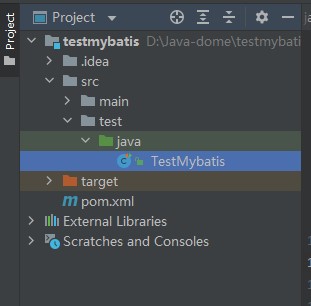
Step 3: Modify the database connection information in the java-oceanbase-mybatis project
Modify the database connection information in the jdbc.properties file based on the information obtained in Step 1: Obtain the connection string of OceanBase Database.
Here is an example:
- The name of the database driver is
com.oceanbase.jdbc.Driver. - The IP address of the OBServer node is
10.10.10.1. - The access port is 2881.
- The name of the schema to be accessed is
test. - The additional connection properties of the URL are
useServerPrepStmts=true&rewriteBatchedStatements=true. - The tenant connection account is
root@mysql001.mysql001is a MySQL tenant created in OceanBase Database, androotis the username of themysql001tenant. - The password is
******.
Here is the sample code:
jdbc.driver=com.mysql.cj.jdbc.Driver
jdbc.url=jdbc:oceanbase://10.10.10.1:2881/sys?useServerPrepStmts=true&rewriteBatchedStatements=true
jdbc.username=root@mysql001
jdbc.password=******
Step 4: Run the java-oceanbase-mybatis project
Run path
- In the project structure, go to src > test > java and find the
TestMybatis.javafile. - In the toolbar, select Run(U) > Run > TestMybatis or click the green triangle in the upper right corner to run.
- View the log information and output results in the IDEA console.
Run result
The output result of the
testUserMappermethod is as follows:User{id=2, name='update'} User{id=3, name='insert'} User{id=4, name='insert'} User{id=5, name='insert'} User{id=6, name='insert'} User{id=7, name='insert'} User{id=8, name='insert'} User{id=9, name='insert'} User{id=10, name='insert'} usersByPage = [User{id=5, name='insert'}, User{id=6, name='insert'}, User{id=7, name='insert'}]The output result of the
testSqlSessionmethod is as follows:User{id=2, name='update'} User{id=3, name='insert'} User{id=4, name='insert'} User{id=5, name='insert'} User{id=6, name='insert'} User{id=7, name='insert'} User{id=8, name='insert'} User{id=9, name='insert'} User{id=10, name='insert'}The output result of the
testAppMappermethod is as follows:App{id=2, name='update'} App{id=3, name='insert3'} App{id=4, name='insert4'} App{id=5, name='insert5'} App{id=6, name='insert6'} App{id=7, name='insert7'} App{id=8, name='insert8'} App{id=9, name='insert9'} App{id=10, name='insert10'} pageList = Page{count=true, pageNum=2, pageSize=3, startRow=3, endRow=6, total=9, pages=3, reasonable=false, pageSizeZero=true}[App{id=5, name='insert5'}, App{id=6, name='insert6'}, App{id=7, name='insert7'}]The complete output result is as follows:
User{id=2, name='update'} User{id=3, name='insert'} User{id=4, name='insert'} User{id=5, name='insert'} User{id=6, name='insert'} User{id=7, name='insert'} User{id=8, name='insert'} User{id=9, name='insert'} User{id=10, name='insert'} usersByPage = [User{id=5, name='insert'}, User{id=6, name='insert'}, User{id=7, name='insert'}] App{id=2, name='update'} App{id=3, name='insert3'} App{id=4, name='insert4'} App{id=5, name='insert5'} App{id=6, name='insert6'} App{id=7, name='insert7'} App{id=8, name='insert8'} App{id=9, name='insert9'} App{id=10, name='insert10'} pageList = Page{count=true, pageNum=2, pageSize=3, startRow=3, endRow=6, total=9, pages=3, reasonable=false, pageSizeZero=true}[App{id=5, name='insert5'}, App{id=6, name='insert6'}, App{id=7, name='insert7'}] User{id=2, name='update'} User{id=3, name='insert'} User{id=4, name='insert'} User{id=5, name='insert'} User{id=6, name='insert'} User{id=7, name='insert'} User{id=8, name='insert'} User{id=9, name='insert'} User{id=10, name='insert'}
Project code
Click java-oceanbase-mybatis to download the project code. This is a compressed package named java-oceanbase-mybatis.
After decompressing it, you will find a folder named java-oceanbase-mybatis. The directory structure is as follows:
│--pom.xml
│
├─.idea
│
├─src
│  ├─main
│  │  ├─java
│  │  │  └─com
│  │  │      └─oceanbase
│  │  │          ├─mapper
│  │  │          │------IAppMapper.java
│  │  │          │------IUserMapper.java
│  │  │          │
│  │  │          └─pojo
│  │  │              │---App.java
│  │  │              └─--User.java
│  │  │
│  │  └─resources
│  │      │--jdbc.properties
│  │      │--mybatis-config.xml
│  │      │
│  │      └─com
│  │          └─oceanbase
│  │              └─mapper
│  │                  └─---IUserMapper.xml
│  │
│  └─test
│      └─java
│          └─---TestMybatis.java
│
└─target
File description:
pom.xml: the Maven project configuration file, which contains the project dependencies, plugins, and build information..idea: the directory used in the IDE (integrated development environment) to store project-related configuration information.src: the directory that usually stores the source code of the project.main: the directory that stores the main source code and resource files.java: the directory that stores the Java source code.com: the root directory that stores the Java packages.oceanbase: the root directory of the project.mapper: the directory that stores the MyBatis Mapper interfaces and XML files.IAppMapper.java: the file that stores the application data access layer interface.IUserMapper.java: the file that stores the user data access layer interface.pojo: the directory that stores the JavaBeans or entity classes.App.java: the file that stores the application entity class.User.java: the file that stores the user entity class.resources: the directory that stores resource files, such as configuration files and SQL files.jdbc.properties: the configuration file that stores the database connection information.mybatis-config.xml: the file that stores the MyBatis configuration.IUserMapper.xml: the file that stores the XML configuration of the user data access layer.test: the directory that stores the test code and resource files.TestMybatis.java: the file that stores the Java class for testing MyBatis.target: the directory that stores the compiled Class files, Jar packages, and other files.
Introduction to the pom.xml file
Note
If you only want to verify the example, you can use the default code without any modifications. Alternatively, you can modify the pom.xml file as needed based on the following instructions.
The content of the pom.xml configuration file is as follows:
File declaration statement.
This statement declares the file as an XML file using XML version
1.0and character encodingUTF-8.Sample code:
<?xml version="1.0" encoding="UTF-8"?>Configure the namespaces and POM model version.
- Use
xmlnsto specify the POM namespace ashttp://maven.apache.org/POM/4.0.0. - Use
xmlns:xsito specify the XML namespace ashttp://www.w3.org/2001/XMLSchema-instance. - Use
xsi:schemaLocationto specify the POM namespace ashttp://maven.apache.org/POM/4.0.0and the location of the POM XSD file ashttp://maven.apache.org/xsd/maven-4.0.0.xsd. - Use the
<modelVersion>element to specify the POM model version used by the POM file as4.0.0.
Sample code:
<project xmlns="http://maven.apache.org/POM/4.0.0" xmlns:xsi="http://www.w3.org/2001/XMLSchema-instance" xsi:schemaLocation="http://maven.apache.org/POM/4.0.0 http://maven.apache.org/xsd/maven-4.0.0.xsd"> <modelVersion>4.0.0</modelVersion> </project>- Use
Configure basic information.
- Use
<groupId>to specify the project identifier ascom.oceanbase.example. - Use
<artifactId>to specify the project dependency asjava-oceanbase-mybatis. - Use
<version>to specify the project version as1.0-SNAPSHOT.
Sample code:
<groupId>com.oceanbase.example</groupId> <artifactId>java-oceanbase-mybatis</artifactId> <version>1.0-SNAPSHOT</version>- Use
Use
<build>to define the project build process.- Use
<plugins>to specify the plugins configured in the project. - Use
<plugin>to specify a plugin configured in the project. - Use
<groupId>to specify the project identifier asorg.apache.maven.plugins. - Use
<artifactId>to specify the project dependency asmaven-compiler-plugin. - Use
<configuration>to specify the parameters of the configured plugin. - Use
<source>to specify the compiler source code version as 8. - Use
<target>to specify the compiler source code version as 8.
Sample code:
<build> <plugins> <plugin> <groupId>org.apache.maven.plugins</groupId> <artifactId>maven-compiler-plugin</artifactId> <configuration> <source>8</source> <target>8</target> </configuration> </plugin> </plugins> </build>- Use
Use
<dependencies>to define the components on which the project depends.Specify the organization of the dependency as
com.oceanbase, the name asoceanbase-client, and the version as2.4.2.Sample code:
    <dependencies>
    <dependency>
        <groupId>com.oceanbase</groupId>
        <artifactId>oceanbase-client</artifactId>
        <version>2.4.2</version>
    </dependency>
    </dependencies>
Specify the test architecture of the dependency as
junit, the name asjunit, and the version as4.10.Sample code:
    <dependencies>
    <dependency>
        <groupId>junit</groupId>
        <artifactId>junit</artifactId>
        <version>4.10</version>
    </dependency>
    </dependencies>
Specify the architecture of the dependency as
org.mybatis, the name asmybatis, and the version as3.5.9.Sample code:
    <dependencies>
    <dependency>
        <groupId>org.mybatis</groupId>
        <artifactId>mybatis</artifactId>
        <version>3.5.9</version>
    </dependency>
    </dependencies>
Specify the plugin of the dependency as
com.github.pagehelper, the name aspagehelper, and the version as5.3.0.Sample code:
    <dependencies>
    <dependency>
        <groupId>com.github.pagehelper</groupId>
        <artifactId>pagehelper</artifactId>
        <version>5.3.0</version>
    </dependency>
    </dependencies>
Introduction to the jdbc.properties file
The jdbc.properties file is an attribute file used to store configuration information related to database connections, including the database URL, username, and password. The content of the code is as follows:
Note
The values of the fields in the code are directly obtained from Step 1: Obtain the OceanBase Database connection string.
jdbc.driver: the class name of the database driver program, used to load the database driver program.jdbc.url: the URL address of the database, used to specify the database to connect to.jdbc.username: the username of the database, used to verify the database connection.jdbc.password: the password of the database, used to verify the database connection.
Sample code:
jdbc.driver=com.mysql.cj.jdbc.Driver
jdbc.url=jdbc:mysql://host:port/TEST?useServerPrepStmts=true&rewriteBatchedStatements=true
jdbc.username=user_name
jdbc.password=******
Introduction to mybatis-config.xml
The mybatis-config.xml file is used to configure global properties and plugins of the MyBatis framework.
The code of the mybatis-config.xml file mainly includes the following parts:
File declaration.
This declaration indicates that the file is an XML file and that it is a MyBatis configuration file using XML version
1.0and character encodingUTF-8. The version is 3.0, the language is English, and the DTD (Document Type Definition) file provided by the MyBatis official website is used for verification.The declaration includes the following parts:
version: specifies the version of the XML file.encoding: specifies the encoding method of the XML file.DOCTYPE: declares the type as a document type declaration.configuration: specifies the document type as a MyBatis configuration file.PUBLIC: specifies the document type as a public document type.mybatis.org: indicates the official website of MyBatis.DTD Config 3.0: indicates the version number of the MyBatis configuration file.EN: indicates that the language of the document type is English.
Sample code:
<?xml version="1.0" encoding="UTF-8"?>
<!DOCTYPE configuration PUBLIC "-//mybatis.org//DTD Config 3.0//EN" "http://mybatis.org/dtd/mybatis-3-config.dtd">
Specify the path and file name of the property file to be loaded.
<properties resource="jdbc.properties"></properties>Configure global settings of MyBatis.
The content of global settings of MyBatis includes the following parts:
setting: used to configure individual settings, such as cache and logs.cacheEnabled: used to enable or disable the cache feature, set totrue.lazyLoadingEnabled: used to enable or disable the lazy loading feature, set totrue.aggressiveLazyLoading: used to enable or disable the aggressive lazy loading feature, set totrue.multipleResultSetsEnabled: used to configure whether to enable support for multiple result sets, set totrue.useColumnLabel: used to configure whether to use column labels as column names in the result set, set totrue.useGeneratedKeys: used to configure whether to use automatically generated primary keys, set totrue.autoMappingBehavior: used to configure the handling behavior of auto-mapping, set toPARTIAL.defaultExecutorType: used to configure the default executor type, set toSIMPLE.mapUnderscoreToCamelCase: used to configure whether to convert underscores in database column names to camel case in Java object property names, set totrue.localCacheScope: used to configure the scope of the local cache, set toSESSION.jdbcTypeForNull: used to configure the JDBC type to be used when handling null values, set toNULL.
Note
The child elements of the settings element are optional and can be added or removed as needed.
Sample code:
<settings>
    <!-- Enable or disable caching for global mappers. -->
    <setting name="cacheEnabled" value="true"/>
    <!-- Enable or disable lazy loading globally. When disabled, all associated objects are loaded immediately. -->
    <setting name="lazyLoadingEnabled" value="true"/>
    <!-- When enabled, objects with delayed loading properties will fully load any properties when called. Otherwise, each attribute will be loaded as needed. -->
    <setting name="aggressiveLazyLoading" value="true"/>
    <!-- Allow a single SQL statement to return multiple datasets (depending on driver compatibility) default: true -->
    <setting name="multipleResultSetsEnabled" value="true"/>
    <!-- Can column aliases be used (depending on driver compatibility) default: true -->
    <setting name="useColumnLabel" value="true"/>
    <!-- Allow JDBC to generate primary keys. Drive support is required. If set to true, this setting will force the use of the generated primary key, and some drives may not be compatible but can still be executed. default:false -->
    <setting name="useGeneratedKeys" value="true"/>
    <!-- Specify how MyBatis automatically maps the columns of the data base table NONE: Not Implicit PART: Partial FULL: All -->
    <setting name="autoMappingBehavior" value="PARTIAL"/>
    <!-- This is the default execution type (SIMPLE: simple; REUSE: executor may repeatedly use prepared statements; BATCH: executor can repeatedly execute statements and batch updates) -->
    <setting name="defaultExecutorType" value="SIMPLE"/>
    <!-- Convert fields using camel naming. -->
    <setting name="mapUnderscoreToCamelCase" value="true"/>
    <!-- Set the local cache range session: there will be data sharing statement: statement range (so there will be no data sharing) defalut: session -->
    <setting name="localCacheScope" value="SESSION"/>
    <!-- When the JDBC type is set to null, some drivers need to specify a value, default: Other, and there is no need to specify a type when inserting null values -->
    <setting name="jdbcTypeForNull" value="NULL"/>
</settings>
Configure plugins of MyBatis.
The content of plugins of MyBatis includes the following parts:
plugin: used to configure a single plugin.property: used to specify the properties of the plugin.interceptor: used to specify the implementation class of the plugin.helperDialect: used to specify the selected database.offsetAsPageNum: indicates whether to use the offset parameter as the pageNum parameter.rowBoundsWithCount: indicates whether to perform a count query.pageSizeZero: indicates whether to support queries with pageSize set to 0.reasonable: indicates whether to enable reasonable query optimization.params: indicates the mapping relationship between the parameter name and parameter value for passing pagination parameters.supportMethodsArguments: indicates whether to support using method parameters to pass pagination parameters.returnPageInfo: indicates the return value type.
Sample code:
<plugin interceptor="com.github.pagehelper.PageInterceptor">
   <!-- this parameter indicates which database to connect to -->
   <!--MySQLMode dialect<property name="helperDialect" value="mysql"/>-->
   <!--OracleMode dialect -->
   <property name="helperDialect" value="mysql"/>
   <!-- This parameter defaults to false. When set to true, the first parameter offset of RowBounds will be used as the pageNum page number, similar to the pageNum effect in startPage -->
   <property name="offsetAsPageNum" value="true"/>
   <!-- This parameter defaults to false, and when set to true, using RowBounds pagination will result in a count query -->
   <property name="rowBoundsWithCount" value="true"/>
   <!-- When set to true, if pageSize=0 or RowBounds. limit=0, all results will be queried (equivalent to not executing a pagination query, but the returned results are still of type Page) -->
   <property name="pageSizeZero" value="true"/>
   <!-- Version 3.3.0 is available - pagination parameter rationalization is disabled by default as false. When rationalization is enabled, if pageNum<1, the first page will be queried, and if pageNum>pages, the last page will be queried. Rationalization of paging parameters. When rationalization is disabled, if pageNum<1 or pageNum>pages returns empty data -->
   <property name="reasonable" value="false"/>
   <!-- Version 3.5.0 is available - In order to support the startPage (Object params) method, a 'params' parameter has been added to configure parameter mapping, which can be used to retrieve values from Map or ServletRequest. PageNum, pageSize, count, pageSizeZero, reasonable, orderBy can be configured. If mapping is not configured, the default value will be used. If you do not understand the meaning, do not copy this configuration casually -->
   <property name="params" value="pageNum=start;pageSize=limit;"/>
   <!-- Support passing paging parameters through Mapper interface parameters -->
   <property name="supportMethodsArguments" value="true"/>
   <!-- Always always returns PageInfo type, check to check if the return type is PageInfo, and none returns Page -->
   <property name="returnPageInfo" value="check"/>
</plugin>
Configure the environment of MyBatis. The content of the environment of MyBatis includes the following parts:
environment: used to configure a single environment.transactionManager: used to specify the implementation class of the transaction manager.dataSource: used to specify the implementation class of the data source.property: specifies the class name of the database driver.
Note
In other configuration elements of MyBatis, you can use
${}placeholders to reference configured data sources, transaction managers, and executors in the environment.Sample code:
<environments default="development">
    <environment id="development">
      <transactionManager type="JDBC"/>
        <dataSource type="POOLED">
            <property name="driver" value="${jdbc.driver}"/>
            <property name="url" value="${jdbc.url}"/>
            <property name="username" value="${jdbc.username}"/>
            <property name="password" value="${jdbc.password}"/>
        </dataSource>
    </environment>
</environments>
Configure the mapper of MyBatis.
The commonly used elements of the mapper of MyBatis are as follows:
- resource: used to specify the path and file name of the XML configuration file of the mapper.
- class: used to specify the fully qualified name of the Java class of the mapper.
Note
If you use an XML configuration file, you need to specify the path and file name of the XML file in the mapper element. If you use a Java interface, you need to specify the fully qualified name of the Java class in the mapper element.
Sample code:
<mappers>
  <!-- IUserMapper.xml mapping file -->
  <mapper resource="com/alipay/oceanbase/mapper/IUserMapper.xml"></mapper>
  <!-- IAppMapper mapping class -->
  <mapper class="com.oceanbase.mapper.IAppMapper"></mapper>
</mappers>
Introduction to the IUserMapper.xml file
The IUserMapper.xml file is a mapping file that defines SQL statements related to the user object. The file defines a namespace named IUserMapper to store SQL statements related to the user object.
Note
If you only want to verify the example, use the default code without any modifications. If you need to modify it, adjust it according to your specific requirements.
The IUserMapper.xml file contains the following main parts:
File declaration statements. The XML declaration part specifies the version and encoding method of the XML file. The DTD declaration part introduces the DTD file of MyBatis. Sample code:
<?xml version="1.0" encoding="UTF-8"?>
<!DOCTYPE mapper
     PUBLIC "-//mybatis.org//DTD Mapper 3.0//EN"
     "http://mybatis.org/dtd/mybatis-3-mapper.dtd">
Configure the mapping relationship with
IUserMapper.java.- Define the namespace of the
Mapperinterface to correspond with theMapperinterface in the Java code. - Create an SQL statement named
insertUserto insert a record into thetest_usertable, including theidandnamefields, with values#{id}and#{name}, respectively. TheparameterTypeattribute specifies the parameter type ascom.oceanbase.pojo.User. - Create an SQL statement named
deleteUserto delete a record from thetest_usertable based on the value of theidfield, which is#{id}. - Create an SQL statement named
updateUserto update thenamefield to#{name}in thetest_usertable based on the value of theidfield, which is#{id}. - Create an SQL statement named
selectUsersto query all user records in thetest_usertable. - Create an SQL statement named
selectUserByPageto query user objects from thetest_usertable for a specified page. This involves subqueries and therownumfield for pagination.#{pageNum}and#{pageSize}represent the current page number and the number of records per page, respectively.
Sample code:
<?xml version="1.0" encoding="UTF-8"?> <!DOCTYPE mapper PUBLIC "-//mybatis.org//DTD Mapper 3.0//EN" "http://mybatis.org/dtd/mybatis-3-mapper.dtd"> <mapper namespace="com.oceanbase.mapper.IUserMapper"> <insert id="insertUser" parameterType="com.oceanbase.pojo.User"> INSERT INTO test_user (id,name) VALUES (#{id},#{name}) </insert> <delete id="deleteUser" parameterType="long"> DELETE FROM test_user WHERE id = #{id} </delete> <update id="updateUser" parameterType="com.oceanbase.pojo.User"> UPDATE test_user SET name = #{name} WHERE id = #{id} </update> <select id="selectUsers" resultType="com.oceanbase.pojo.User"> SELECT id,name FROM test_user </select> <!-- There are two ways to paginate queries: 1. Use the pagehelper plugin; 2. Use SQL statements to paginate --> <!-- SQL statement pagination: Oracle mode does not support the limit keyword, and instead uses the unique field 'rownum'--> <select id="selectUserByPage" resultType="com.oceanbase.pojo.User"> select id,name from ( select row_.*, rownum rownum_ from ( select * from test_user ) row_ where rownum <![CDATA[ <= ]]> #{pageNum} * #{pageSize} ) where rownum_ <![CDATA[ >]]> ( #{pageNum}- 1) * #{pageSize} </select> </mapper>- Define the namespace of the
Introduction to the IAppMapper.java file
The IAppMapper.java file is used to define SQL mapping relationships.
The IAppMapper.java file contains the following main parts:
Define the
Mapperpackage.Declare the package name of the current file as
com.oceanbase.mapper. TheMapperpackage contains the following interfaces and classes:Appinterface: Represents the mapping between a database table and data read/write operations.org.apache.ibatis.annotations.*: Used to import annotation classes of MyBatis.java.util.List: Used to import theListclass from thejava.utilpackage. Sample code:
package com.oceanbase.mapper;
import com.oceanbase.pojo.App;
import org.apache.ibatis.annotations.*;
import java.util.List;
Define the
IAppMapperinterface. TheIAppMapperinterface is used to define theMapperinterface of MyBatis. TheMapperinterface is used to define SQL mapping relationships and implement database operations such as adding, deleting, modifying, and querying data. Specifically, theIAppMapperinterface defines methods for adding, deleting, modifying, and querying data in thetest_apptable, including:@Insertmethod: Used to insert data into the database.@Updatemethod: Used to update data in the database.@Deletemethod: Used to delete data from the database.@Selectmethod: Used to query data from the database.@Resultsmethod: Represents the mapping relationship of query results, used to map fields in the query results to properties of Java objects. Database operations such as adding, deleting, modifying, and querying data are as follows:
Insert data Map the App object to a record in the
test_apptable. Use#{property name}to represent the attribute values of the App object. TheIntegerreturn value represents the automatically generated ID returned after the SQL statement inserts data, which corresponds to the ID field in thetest_apptable.@Insert("insert into test_app(id,name) values(#{id},#{name})") Integer insertApp(App app);Delete data Delete data with an id equal to
#{id}from thetest_apptable.@Delete("delete from test_app where id =#{id}") Integer deleteApp(Long id);Update data Update records in the
test_apptable.@Update("update test_app set name= #{name} where id = #{id}") Integer updateApp(App user);Query and map data Query all data in the
test_apptable. Use the@Resultsand@Resultannotations to map the query results to theidandnameproperties of the App object. Return a list of App objects.@Update("update test_app set name= #{name} where id = #{id}") Integer updateApp(App user); @Results({ @Result(id = true, column = "id", property = "id"), @Result(column = "name", property = "name") }) List<App> selectApps();
Sample code:
package com.oceanbase.mapper; import com.oceanbase.pojo.App; import org.apache.ibatis.annotations.*; import java.util.List; public interface IAppMapper { @Insert("insert into test_app(id,name) values(#{id},#{name})") Integer insertApp(App app); @Delete("delete from test_app where id =#{id}") Integer deleteApp(Long id); @Update("update test_app set name= #{name} where id = #{id}") Integer updateApp(App user); @Select("select * from test_app") @Results({ @Result(id = true, column = "id", property = "id"), @Result(column = "name", property = "name") }) List<App> selectApps(); }
Introduction to the IUserMapper.java file
The IUserMapper.java file is used to define database operation methods.
The IUserMapper.java file contains the following main parts:
Reference other classes and interfaces.
Declare the interfaces and classes included in the current file:
Userclass: Represents the user object.org.apache.ibatis.annotations.Paramclass: A parameter annotation in the MyBatis framework.Listinterface: Represents a list type. Sample code:
package com.oceanbase.mapper; import com.oceanbase.pojo.User; import org.apache.ibatis.annotations.Param; import java.util.List;Define the
IUserMapperinterface.Define an interface named
IUserMapperthat includes methods for inserting, deleting, updating, and querying user data, as well as methods for paginated queries. UseJavaDoccomments and the@Paramannotation to improve code readability and maintainability. Sample code:public interface IUserMapper { Integer insertUser(User user); Integer deleteUser(Long id); Integer updateUser(User user); List<User> selectUsers(); public List<User> selectUserByPage(@Param("user") User user, @Param("pageNum") Integer pageNum, @Param("pageSize") Integer pageSize); }
App.java code
The App.java file is used to define the App application object. It contains two attributes: id and name. The class also defines access methods for the attributes, a constructor, and the toString method for converting the object to a string.
The App.java file contains the following parts:
- Define the
pojopackage. Declare the package name of the current file ascom.oceanbase.pojo. - Define the
Appclass.- Define a
Appclass that contains two private attributes,idandname, and a no-argument constructorpublic App(){}. - Define a constructor
public App(Long id, String name)that creates an application object with the specifiedidandname. - Define the
getId,setId,getName, andsetNamemethods for obtaining and setting the application name. ThesetNamemethod returns the name of the application. - Override the
toStringmethod to convert the application object to a string for output and debugging.
- Define a
Sample code:
package com.oceanbase.pojo;
public class App {
private Long id;
private String name;
public App() {
}
public App(Long id, String name) {
this.id = id;
this.name = name;
}
public Long getId() {
return id;
}
public void setId(Long id) {
this.id = id;
}
public String getName() {
return name;
}
public void setName(String name) {
this.name = name;
}
@Override
public String toString() {
return "App{" +
"id=" + id +
", name='" + name + '\'' +
'}';
}
}
User.java code
The User.java file is used to define the user object. It contains two attributes: id and name. The class also defines access methods for the attributes, a constructor, and the toString method for converting the object to a string. The creation of this class is similar to that of the App.java file.
Sample code:
package com.oceanbase.pojo;
public class User {
private Long id;
private String name;
public User() {
}
public User(Long id, String name) {
this.id = id;
this.name = name;
}
public Long getId() {
return id;
}
public void setId(Long id) {
this.id = id;
}
public String getName() {
return name;
}
public void setName(String name) {
this.name = name;
}
@Override
public String toString() {
return "User{" +
"id=" + id +
", name='" + name + '\'' +
'}';
}
}
TestMyBatis.java file
The TestMyBatis.java file shows how to use MyBatis for data operations. It tests the basic features of the MyBatis framework, the execution of SQL statements, and the calling methods of Mapper interfaces, as well as the parameters and return values of SQL statements.
Import other classes and interfaces.
The following classes and interfaces are imported:
IAppMapperinterface: defines SQL statements related to App objects.IUserMapperinterface: defines SQL statements related to User objects.Appclass: the App object, used to test the execution of SQL statements.Userclass: the User object, used to test the execution of SQL statements.PageHelperplugin: implements the page query feature.PageInfoplugin: encapsulates the results of a page query.Resourcesclass: loads the MyBatis configuration file.SqlSessionclass: executes SQL statements and manages transactions.SqlSessionFactoryclass: creates a SqlSession object.SqlSessionFactoryBuilderclass: creates a SqlSessionFactory object.org.junit.Test: the annotation of the JUnit testing framework, used to mark test methods.IOExceptionclass: represents errors in input and output operations.SQLExceptionclass: represents errors in SQL operations.Statementinterface: executes SQL statements and returns results.java.util.Listinterface: represents an ordered collection in which elements can be repeated.
Sample code:
import com.oceanbase.mapper.IAppMapper; import com.oceanbase.mapper.IUserMapper; import com.oceanbase.pojo.App; import com.oceanbase.pojo.User; import com.github.pagehelper.PageHelper; import com.github.pagehelper.PageInfo; import org.apache.ibatis.io.Resources; import org.apache.ibatis.session.SqlSession; import org.apache.ibatis.session.SqlSessionFactory; import org.apache.ibatis.session.SqlSessionFactoryBuilder; import org.junit.Test; import java.io.IOException; import java.sql.SQLException; import java.sql.Statement; import java.util.List;Define the
testUserMappermethod.The
testUserMappermethod is used to test the execution of SQL statements defined in theMapperinterface of theUserobject.- Call the
build()method of theSqlSessionFactoryBuilderclass to create aSqlSessionFactoryinstance. This instance is used to manage the creation and destruction ofSqlSessioninstances. - Call the
openSession()method of theSqlSessionFactoryclass to create aSqlSessioninstance. This instance can execute various SQL statements, including queries, inserts, updates, and deletes. - Call the
getConnection()method of theSqlSessioninstance to obtain aConnectioninstance. This instance can execute various database operations. - Call the
createStatement()method of theConnectioninstance to create aStatementinstance. Execute SQL statements in sequence. - Call the
execute()method of theStatementobject to execute an SQL statement for deleting thetest_usertable. - Call the
execute()method of theStatementobject to create atest_usertable. The table contains two fields: one isid, of typenumber(20), as the primary key; the other isname, of typevarchar2(100). - Call the
getMapper()method of theSqlSessioninstance to obtain an instance of theIUserMapperinterface. Define various database operation methods. - Use a
forloop to insert 10 records into thetest_usertable. In each loop, create a new User object, call theinsertUser()method of theMapperinterface to execute an insert operation, and store the execution result in theinsertResultvariable. - Delete, update, and query records in the
test_usertable. Finally, call theforEach()method to print the information of each user in the user list. - Create a user named
insert, call theselectUserByPage()method to query all users named "insert" in thetest_usertable, and return the user list of the specified page. The query is for the second page, with three records displayed per page. Print the user data to the console. Close theStatementandSqlSessioninstances, commit the transaction, and release resources.
Sample code:
public void testUserMapper() throws SQLException, IOException { //mybatis xml usecases SqlSessionFactory sqlSessionFactory = new SqlSessionFactoryBuilder().build(Resources.getResourceAsStream("mybatis-config.xml")); SqlSession sqlSession = sqlSessionFactory.openSession(); Statement statement = sqlSession.getConnection().createStatement(); try { statement.execute("drop table test_user"); } catch (SQLException ex) { } finally { statement.execute("create table test_user(id number(20) primary key,name varchar2(100))"); } IUserMapper mapper = sqlSession.getMapper(IUserMapper.class); //insert 10 users for (int i = 1; i <= 10; i++) { User user = new User((long) i, "insert"); Integer insertResult = mapper.insertUser(user); } //delete id==1 Integer deleteResult = mapper.deleteUser(1L); //update id==2L name=update User updateUser = new User(2L, "update"); Integer updateResult = mapper.updateUser(updateUser); //selectUsers query all List<User> userList = mapper.selectUsers(); userList.forEach(System.out::println); //selectUsersByPage: use the rownum keyword in SQL statements to manually perform pagination queries, // example: data on page 2 (3 items per page) User user = new User(); user.setName("insert"); List<User> usersByPage = mapper.selectUserByPage(user, 2, 3); System.out.println("usersByPage = " + usersByPage); statement.close(); sqlSession.commit(); sqlSession.close(); }- Call the
Define the
testSqlSessionmethod.The
testSqlSessionmethod is used to test the basic features of the SqlSession object, including executing SQL statements, committing transactions, and closing the SqlSession object.- Use the
build()method of theSqlSessionFactoryBuilderclass to create aSqlSessionFactoryinstance. This instance is used to manage the creation and destruction ofSqlSessioninstances. - Use the
openSession()method of theSqlSessionFactoryinstance to create aSqlSessioninstance. This instance can execute various SQL statements, including queries, inserts, updates, and deletes. - Use the
getConnection()method of theSqlSessioninstance to obtain aConnectioninstance. This instance can execute various database operations. - Use the
createStatement()method of theConnectioninstance to create aStatementinstance. Execute SQL statements in sequence. - Use the
execute()method of theStatementobject to execute an SQL statement to delete thetest_usertable. - Use the
execute()method of theStatementobject to create thetest_usertable. This table contains two fields:id, which is of typenumber(20)and serves as the primary key; andname, which is of typevarchar2(100). - Use a
forloop to insert 10 records into thetest_usertable. In each iteration of the loop, create a new User object, call theinsertUser()method of theMapperinterface, and execute the insert operation. The result of the insert operation is stored in theinsertResultvariable. - Use the
delete()method of thesqlSessionobject to execute the delete operation. Set the delete condition by passing in the parameter 1L. Store the result of the delete operation in thedeleteResultvariable. - Use the
sqlSessionobject to execute a database update operation. Create a User object, call theupdatemethod, and pass in the SQL statement identifier and parameter object to complete the update operation. The specific SQL statements and parameter mappings can be found in the XML configuration file of the "com.oceanbase.mapper.IUserMapper" interface. Store the result of the update operation in theupdateResultvariable. - Use the
openSession()method of theSqlSessionFactoryinstance to create aSqlSessioninstance. Execute a query operation through this instance and store the query result in theuserListvariable. Finally, use theforEachmethod to traverseuserListand output the result to the console. - Call the
statement.close()method to close theStatementobject in the database connection. Then, call thesqlSession.commit()method to commit the transaction and persist all modifications to the database. Finally, call thesqlSession.close()method to close theSqlSessionobject, release the related resources, and close the connection to the database.
Sample code:
public void testSqlSession() throws SQLException, IOException { //SqlSession usecases SqlSessionFactory sqlSessionFactory = new SqlSessionFactoryBuilder().build(Resources.getResourceAsStream("mybatis-config.xml")); SqlSession sqlSession = sqlSessionFactory.openSession(); Statement statement = sqlSession.getConnection().createStatement(); try { statement.execute("drop table test_user"); } catch (SQLException ex) { } finally { statement.execute("create table test_user(id number(20) primary key,name varchar2(100))"); } //insert for (int i = 1; i <= 10; i++) { User user = new User((long) i, "insert"); //Integer insertResult = mapper.insertUser(user); int insertResult = sqlSession.insert("com.oceanbase.mapper.IUserMapper.insertUser", user); } //delete int deleteResult = sqlSession.delete("com.oceanbase.mapper.IUserMapper.deleteUser", 1L); //update User updateUser = new User(2L, "update"); int updateResult = sqlSession.update("com.oceanbase.mapper.IUserMapper.updateUser", updateUser); //selectUsers List<User> userList = sqlSession.selectList("com.oceanbase.mapper.IUserMapper.selectUsers", null); userList.forEach(System.out::println); //System.out.println("userList = " + userList); statement.close(); sqlSession.commit(); sqlSession.close(); }- Use the
Define the
testAppMappermethod.The
testAppMappermethod is used to test the functionality of AppMapper.- Use the
build()method of theSqlSessionFactoryBuilderclass to create aSqlSessionFactoryinstance. This instance is used to manage the creation and destruction ofSqlSessioninstances. - Use the
openSession()method of theSqlSessionFactoryinstance to create aSqlSessioninstance. This instance can execute various SQL statements, including queries, inserts, updates, and deletes. - Use the
getConnection()method of theSqlSessioninstance to obtain aConnectioninstance. This instance can execute various database operations. - Use the
createStatement()method of theConnectioninstance to create aStatementinstance. Execute SQL statements in sequence. - Use the
execute()method of theStatementobject to execute an SQL statement to delete thetest_apptable. - Use the
execute()method of theStatementobject to create thetest_apptable. This table contains two fields:id, which is of typenumber(20)and serves as the primary key; andname, which is of typevarchar2(100). - Use the
getMapper()method of theSqlSessioninstance to obtain an instance of theIAppMapperinterface. Define various database operation methods. - Use a
forloop to insert 10 records into thetest_apptable. In each iteration of the loop, create a new App object, call theinsertApp()method of theMapperinterface, and execute the insert operation. The result of the insert operation is stored in theinsertResultvariable. - Use the
delete()method of themapperobject to execute the delete operation. Set the delete condition by passing in the parameter1L. Store the result of the delete operation in thedeleteResultvariable. - Use the
mapperobject to execute a database update operation. Create an App object, call theupdatemethod, and pass in the SQL statement identifier and parameter object to complete the update operation. - Create an
Appobject namedupdateAppwith anidof2Land anameof "update". - Call the
updateAppmethod of themapperobject and pass in theupdateAppobject to execute the update operation. - Call the
commitmethod of thesqlSessionobject to commit the database transaction. - Call the
selectAppsmethod of themapperobject to query all App objects. Use theforEachmethod to traverseuserListand output the result to the console. - Call the
startPagemethod of thePageHelperobject and pass in the page number and the number of records per page to set the pagination parameters. Query allAppobjects and return aListobject containing allAppobjects. - Call the
getListmethod of thePageInfoobject to obtain the list of App objects after pagination. Use theSystem.out.printlnmethod to print and output the list of App objects after pagination. - Call the
sqlSession.close()method to close theSqlSessionobject and release the related resources.
Sample code:
public void testAppMapper() throws SQLException, IOException { //mybatis annotation usecases SqlSessionFactory sqlSessionFactory = new SqlSessionFactoryBuilder().build(Resources.getResourceAsStream("mybatis-config.xml")); SqlSession sqlSession = sqlSessionFactory.openSession(); Statement statement = sqlSession.getConnection().createStatement(); try { statement.execute("drop table test_app"); } catch (SQLException ex) { } finally { statement.execute("create table test_app(id number(20) primary key,name varchar2(100))"); } IAppMapper mapper = sqlSession.getMapper(IAppMapper.class); //insert for (int i = 1; i <= 10; i++) { App app = new App((long) i, "insert" + i); Integer insertResult = mapper.insertApp(app); } //delete Integer deleteResult = mapper.deleteApp(1L); //update App updateApp = new App(2L, "update"); Integer updateResult = mapper.updateApp(updateApp); //commit sqlSession.commit(); //selectApps List<App> appList = mapper.selectApps(); appList.forEach(System.out::println); //selectbyPage //set page parameters PageHelper.startPage(2, 3); //selectApps List<App> appList1 = mapper.selectApps(); //get pageList PageInfo pageInfo = new PageInfo(appList1); List<App> pageList = pageInfo.getList(); System.out.println("pageList = " + pageList); sqlSession.close(); }- Use the
Complete code
<?xml version="1.0" encoding="UTF-8"?>
<project xmlns="http://maven.apache.org/POM/4.0.0"
xmlns:xsi="http://www.w3.org/2001/XMLSchema-instance"
xsi:schemaLocation="http://maven.apache.org/POM/4.0.0 http://maven.apache.org/xsd/maven-4.0.0.xsd">
<modelVersion>4.0.0</modelVersion>
<groupId>com.oceanbase.example</groupId>
<artifactId>java-oceanbase-mybatis</artifactId>
<version>1.0-SNAPSHOT</version>
<build>
<plugins>
<plugin>
<groupId>org.apache.maven.plugins</groupId>
<artifactId>maven-compiler-plugin</artifactId>
<configuration>
<source>8</source>
<target>8</target>
</configuration>
</plugin>
</plugins>
</build>
<dependencies>
<dependency>
<groupId>com.oceanbase</groupId>
<artifactId>oceanbase-client</artifactId>
<version>2.4.2</version>
</dependency>
<dependency>
<groupId>junit</groupId>
<artifactId>junit</artifactId>
<version>4.10</version>
</dependency>
<dependency>
<groupId>org.mybatis</groupId>
<artifactId>mybatis</artifactId>
<version>3.5.9</version>
</dependency>
<!-- pagehelper plug-in -->
<dependency>
<groupId>com.github.pagehelper</groupId>
<artifactId>pagehelper</artifactId>
<version>5.3.0</version>
</dependency>
</dependencies>
</project>
jdbc.driver=com.mysql.cj.jdbc.Driver
jdbc.url=jdbc:oceanbase://host:port/TEST?useServerPrepStmts=true&rewriteBatchedStatements=true
jdbc.username=user_name
jdbc.password=******
<?xml version="1.0" encoding="UTF-8"?>
<!DOCTYPE configuration PUBLIC "-//mybatis.org//DTD Config 3.0//EN" "http://mybatis.org/dtd/mybatis-3-config.dtd">
<configuration>
<properties resource="jdbc.properties"></properties>
<settings>
<setting name="cacheEnabled" value="true"/>
<setting name="lazyLoadingEnabled" value="true"/>
<setting name="aggressiveLazyLoading" value="true"/>
<setting name="multipleResultSetsEnabled" value="true"/>
<setting name="useColumnLabel" value="true"/>
<setting name="useGeneratedKeys" value="true"/>
<setting name="autoMappingBehavior" value="PARTIAL"/>
<setting name="defaultExecutorType" value="SIMPLE"/>
<setting name="mapUnderscoreToCamelCase" value="true"/>
<setting name="localCacheScope" value="SESSION"/>
<setting name="jdbcTypeForNull" value="NULL"/>
</settings>
<plugins>
<plugin interceptor="com.github.pagehelper.PageInterceptor">
<property name="helperDialect" value="oracle"/>
<property name="offsetAsPageNum" value="true"/>
<property name="rowBoundsWithCount" value="true"/>
<property name="pageSizeZero" value="true"/>
<property name="reasonable" value="false"/>
<property name="params" value="pageNum=start;pageSize=limit;"/>
<property name="supportMethodsArguments" value="true"/>
<property name="returnPageInfo" value="check"/>
</plugin>
</plugins>
<environments default="development">
<environment id="development">
<transactionManager type="JDBC"/>
<dataSource type="POOLED">
<property name="driver" value="${jdbc.driver}"/>
<property name="url" value="${jdbc.url}"/>
<property name="username" value="${jdbc.username}"/>
<property name="password" value="${jdbc.password}"/>
</dataSource>
</environment>
</environments>
<mappers>
<mapper resource="com/alipay/oceanbase/mapper/IUserMapper.xml"></mapper>
<mapper class="com.oceanbase.mapper.IAppMapper"></mapper>
</mappers>
</configuration>
<?xml version="1.0" encoding="UTF-8"?>
<!DOCTYPE mapper
PUBLIC "-//mybatis.org//DTD Mapper 3.0//EN"
"http://mybatis.org/dtd/mybatis-3-mapper.dtd">
<mapper namespace="com.oceanbase.mapper.IUserMapper">
<insert id="insertUser" parameterType="com.oceanbase.pojo.User">
INSERT INTO test_user (id,name) VALUES (#{id},#{name})
</insert>
<delete id="deleteUser" parameterType="long">
DELETE FROM test_user WHERE id = #{id}
</delete>
<update id="updateUser" parameterType="com.oceanbase.pojo.User">
UPDATE test_user SET name = #{name} WHERE id = #{id}
</update>
<select id="selectUsers" resultType="com.oceanbase.pojo.User">
SELECT id,name FROM test_user
</select>
<!-- There are two ways to paginate queries: 1. Use the pagehelper plugin; 2. Use SQL statements to paginate -->
<!-- SQL statement pagination: Oracle mode does not support the limit keyword, and instead uses the unique field 'rownum'-->
<select id="selectUserByPage" resultType="com.oceanbase.pojo.User">
select id,name from ( select row_.*, rownum rownum_ from ( select * from test_user ) row_ where rownum
<![CDATA[ <= ]]> #{pageNum} * #{pageSize} ) where rownum_ <![CDATA[ >]]> ( #{pageNum}- 1) * #{pageSize}
</select>
</mapper>
package com.oceanbase.mapper;
import com.oceanbase.pojo.App;
import org.apache.ibatis.annotations.*;
import java.util.List;
//using annotations
public interface IAppMapper {
@Insert("insert into test_app(id,name) values(#{id},#{name})")
Integer insertApp(App app);
@Delete("delete from test_app  where id =#{id}")
Integer deleteApp(Long id);
@Update("update test_app set name= #{name} where id = #{id}")
Integer updateApp(App user);
@Select("select * from test_app")
@Results({
@Result(id = true, column = "id", property = "id"),
@Result(column = "name", property = "name")
})
List<App> selectApps();
}
package com.oceanbase.mapper;
import com.oceanbase.pojo.User;
import org.apache.ibatis.annotations.Param;
import java.util.List;
//using XML
 public interface IUserMapper {

     Integer insertUser(User user);

     Integer deleteUser(Long id);

     Integer updateUser(User user);

     List<User> selectUsers();

     public List<User> selectUserByPage(@Param("user") User user, @Param("pageNum") Integer pageNum,
                                     @Param("pageSize") Integer pageSize);
 }
   package com.oceanbase.pojo;

   public class App {
       private Long id;
       private String name;

       public App() {
       }

       public App(Long id, String name) {
            this.id = id;
           this.name = name;
       }

       public Long getId() {
           return id;
       }

       public void setId(Long id) {
           this.id = id;
       }

       public String getName() {
           return name;
       }

       public void setName(String name) {
           this.name = name;
       }

       @Override
       public String toString() {
           return "App{" +
                   "id=" + id +
                   ", name='" + name + '\'' +
                   '}';
       }
   }
package com.oceanbase.pojo;

public class User {
    private Long id;
    private String name;

    public User() {
    }

    public User(Long id, String name) {
        this.id = id;
        this.name = name;
    }

    public Long getId() {
        return id;
    }

    public void setId(Long id) {
        this.id = id;
    }

    public String getName() {
        return name;
    }

    public void setName(String name) {
        this.name = name;
    }

    @Override
    public String toString() {
        return "User{" +
                "id=" + id +
                ", name='" + name + '\'' +
                '}';
    }
}
import com.oceanbase.mapper.IAppMapper;
import com.oceanbase.mapper.IUserMapper;
import com.oceanbase.pojo.App;
import com.oceanbase.pojo.User;
import com.github.pagehelper.PageHelper;
import com.github.pagehelper.PageInfo;
import org.apache.ibatis.io.Resources;
import org.apache.ibatis.session.SqlSession;
import org.apache.ibatis.session.SqlSessionFactory;
import org.apache.ibatis.session.SqlSessionFactoryBuilder;
import org.junit.Test;
import java.io.IOException;
import java.sql.SQLException;
import java.sql.Statement;
import java.util.List;
public class TestMybatis {
@Test
    public void testUserMapper() throws SQLException, IOException {
        //mybatis xml usecases
        SqlSessionFactory sqlSessionFactory = new SqlSessionFactoryBuilder().build(Resources.getResourceAsStream("mybatis-config.xml"));
        SqlSession sqlSession = sqlSessionFactory.openSession();
        Statement statement = sqlSession.getConnection().createStatement();
        try {
            statement.execute("drop table test_user");
        } catch (SQLException ex) {
        } finally {
            statement.execute("create table test_user(id number(20) primary key,name varchar2(100))");
        }
        IUserMapper mapper = sqlSession.getMapper(IUserMapper.class);
        //insert 10 users
        for (int i = 1; i <= 10; i++) {
            User user = new User((long) i, "insert");
            Integer insertResult = mapper.insertUser(user);
        }
        //delete id==1
        Integer deleteResult = mapper.deleteUser(1L);
        //update id==2L name=update
        User updateUser = new User(2L, "update");
        Integer updateResult = mapper.updateUser(updateUser);
        //selectUsers query all
        List<User> userList = mapper.selectUsers();
        userList.forEach(System.out::println);
        //selectUsersByPage: use the rownum keyword in SQL statements to manually perform pagination queries,
        // example: data on page 2 (3 items per page)
        User user = new User();
        user.setName("insert");
        List<User> usersByPage = mapper.selectUserByPage(user, 2, 3);
        System.out.println("usersByPage = " + usersByPage);
        statement.close();
        sqlSession.commit();
        sqlSession.close();
    }
@Test
    public void testSqlSession() throws SQLException, IOException {
        //SqlSession usecases
        SqlSessionFactory sqlSessionFactory = new SqlSessionFactoryBuilder().build(Resources.getResourceAsStream("mybatis-config.xml"));
        SqlSession sqlSession = sqlSessionFactory.openSession();
        Statement statement = sqlSession.getConnection().createStatement();
        try {
            statement.execute("drop table test_user");
        } catch (SQLException ex) {
        } finally {
            statement.execute("create table test_user(id number(20) primary key,name varchar2(100))");
        }
        //insert
        for (int i = 1; i <= 10; i++) {
            User user = new User((long) i, "insert");
            //Integer insertResult = mapper.insertUser(user);
            int insertResult = sqlSession.insert("com.oceanbase.mapper.IUserMapper.insertUser", user);
        }
        //delete
        int deleteResult = sqlSession.delete("com.oceanbase.mapper.IUserMapper.deleteUser", 1L);
        //update
        User updateUser = new User(2L, "update");
        int updateResult = sqlSession.update("com.oceanbase.mapper.IUserMapper.updateUser", updateUser);
        //selectUsers
        List<User> userList = sqlSession.selectList("com.oceanbase.mapper.IUserMapper.selectUsers", null);
        userList.forEach(System.out::println);
        //System.out.println("userList = " + userList);
        statement.close();
        sqlSession.commit();
        sqlSession.close();
    }
@Test
    public void testAppMapper() throws SQLException, IOException {
        //mybatis annotation usecases
        SqlSessionFactory sqlSessionFactory = new SqlSessionFactoryBuilder().build(Resources.getResourceAsStream("mybatis-config.xml"));
        SqlSession sqlSession = sqlSessionFactory.openSession();
        Statement statement = sqlSession.getConnection().createStatement();
        try {
            statement.execute("drop table test_app");
        } catch (SQLException ex) {
        } finally {
            statement.execute("create table test_app(id number(20) primary key,name varchar2(100))");
        }

        IAppMapper mapper = sqlSession.getMapper(IAppMapper.class);

        //insert
        for (int i = 1; i <= 10; i++) {
            App app = new App((long) i, "insert" + i);
            Integer insertResult = mapper.insertApp(app);
        }

        //delete
        Integer deleteResult = mapper.deleteApp(1L);
        //update
        App updateApp = new App(2L, "update");
        Integer updateResult = mapper.updateApp(updateApp);
        //commit
        sqlSession.commit();

        //selectApps
        List<App> appList = mapper.selectApps();
        appList.forEach(System.out::println);

        //selectbyPage
        //set page parameters
        PageHelper.startPage(2, 3);
        //selectApps
        List<App> appList1 = mapper.selectApps();
        //get pageList
        PageInfo pageInfo = new PageInfo(appList1);
        List<App> pageList = pageInfo.getList();
        System.out.println("pageList = " + pageList);

        sqlSession.close();
    }
}
References
For more information about OceanBase Connector/J, see OceanBase JDBC driver.