OceanBase
English日本語简体中文
Docs Home
Products
Integrations
Release Notes

Databases

OceanBase DatabaseOceanBase Cloud OceanBase Best Practices

Tools

OceanBase Cloud PlatformOceanBase Migration ServiceOceanBase Developer CenterOceanBase Migration AssessmentOceanBase Admin ToolOceanBase Loader and DumperOceanBase DeployerKubernetes operator for OceanBaseOceanBase Diagnostic Tool OceanBase Binlog Service

Connectors and Middleware

OceanBase Database Proxy OceanBase Connector/C OceanBase Connector/J OceanBase Connector/ODBC OceanBase Connector/NETOceanBase Command-Line Client

Databases

OceanBase DatabaseOceanBase Cloud OceanBase Best Practices

Connectors and Middleware

OceanBase Database Proxy OceanBase Connector/C OceanBase Connector/J OceanBase Connector/ODBC OceanBase Connector/NETOceanBase Command-Line Client

Tools

OceanBase Cloud PlatformOceanBase Migration ServiceOceanBase Developer CenterOceanBase Migration AssessmentOceanBase Admin ToolOceanBase Loader and DumperOceanBase DeployerKubernetes operator for OceanBaseOceanBase Diagnostic Tool OceanBase Binlog Service
OceanBase DatabaseOceanBase Cloud ToolsConnectors and MiddlewareLifecycle Support Policy

OceanBase Developer Center

V3.4.0Enterprise Edition
  • Document Overview
  • What's New
    • What's New
  • Overview
    • What is ODC?
    • Benefits
    • Architecture
    • Features
    • Limits
  • Quick Start
    • Overview
    • Install ODC
    • Log on to ODC with an account
    • Create a private connection
  • Tutorials
    • Tips on the SQL Console
    • Create a connection
    • Export data
    • Import data
    • Debug a stored procedure
    • View the performance of an SQL statement
  • User Guide (Web ODC)
    • Log on to ODC
      • Log on to ODC with an account
      • Change the password
    • ODC homepage
    • Connect to a database
      • Create a private connection
      • Manage private connections
    • Public resource management
      • Overview
      • Quick start
      • Resource permissions
        • Manage public connections
        • Manage resource groups
        • Manage roles
        • Manage users
      • Task process management
      • Manage operation records
      • Data desensitization management
      • System settings
    • Use the workspace
      • Overview
      • SQL window
      • Anonymous block window
      • Command-line window
      • Stored scripts
      • Snippet
    • Use tools
      • Data export and import
        • Overview
        • Export and import formats
        • Batch export and import
        • Single table export and import
      • Data mocking
      • Database changes
    • Recycle bin
    • View operation records
    • Task management
      • Overview
      • Import tasks
      • Export tasks
      • Data mocking tasks
      • Database change tasks
      • Permission application tasks
    • Session management
    • Database objects
      • Table objects
        • Overview
        • Create a table
        • Table list
        • Manage table attributes
        • Manage table data
      • View objects
        • Overview
        • Create a view
        • Manage views
      • Function objects
        • Overview
        • Create a function
        • Manage functions
      • Stored procedure objects
        • Overview
        • Create a stored procedure
        • Manage stored procedures
      • Sequence objects
        • Overview
        • Create a sequence
        • Manage sequences
      • Package objects
        • Overview
        • Create a program package
        • Manage program packages
      • Trigger objects
        • Overview
        • Create a trigger
        • Manage triggers
      • Type objects
        • Overview
        • Create a type
        • Manage types
      • Synonym objects
        • Overview
        • Create a synonym
        • Manage synonyms
    • Help center
  • User Guide (Client ODC)
    • Install ODC
    • ODC homepage
    • Connect to a database
      • Establish a connection
      • Manage connections
    • Use the workspace
      • Overview
      • SQL window
      • Anonymous block window
      • Command-line window
      • Stored scripts
      • Snippet
    • Use tools
      • Data export and import
        • Overview
        • Export and import formats
        • Batch export and import
        • Single table export and import
      • Data mocking
      • Asynchronous execution
    • Recycle bin
    • View operation records
    • Task management
      • Overview
      • Import tasks
      • Export tasks
      • Data mocking tasks
      • Database Change
    • Session management
    • Database objects
      • Table objects
        • Overview
        • Create a table
        • Table list
        • Manage table attributes
        • Manage table data
      • View objects
        • Overview
        • Create a view
        • Manage views
      • Function objects
        • Overview
        • Create a function
        • Manage functions
      • Stored procedure objects
        • Overview
        • Create a stored procedure
        • Manage stored procedures
      • Sequence objects
        • Overview
        • Create a sequence
        • Manage sequences
      • Package objects
        • Overview
        • Create a program package
        • Manage program packages
      • Trigger objects
        • Overview
        • Create a trigger
        • Manage triggers
      • Type objects
        • Overview
        • Create a type
        • Manage types
      • Synonym objects
        • Overview
        • Create a synonym
        • Manage synonyms
    • Help center
  • Deployment Guide
    • Deployment overview
    • Preparations before deployment
    • Deploy a single ODC node
      • Deployment process
      • Load and run an ODC image
    • Deploy ODC in high availability mode
      • Deployment process
      • Load and run an ODC image
      • Deploy SSL certificate
      • Deploy the NGINX proxy
      • Configure certificate trust
    • Deployment verification
  • Upgrade Guide
    • Overview
    • Preparations before upgrade
    • Upgrade single-node ODC
      • Upgrade process
      • Stop ODC of the earlier version
      • Load and run an ODC image
    • Upgrade high-availability
      • Upgrade process
      • Stop ODC of the earlier version
      • Load and run an ODC image
      • Upgrade NGINX image
    • Upgrade verification
    • Rollback after upgrade failed
  • FAQ

Download PDF

Document Feedback
  1. Documentation Center
  2. OceanBase Developer Center
  3. V3.4.0

Export tasks

Last Updated:2026-09-04 08:15:22

Task list
Task details
Task logs

After you create a batch or single table export task in OceanBase Developer Center (ODC), you can view the task in the task list on the Import tab of the Task Center page.

On the management page of the database connection, click Task in the navigation bar on the top of the page to go to the Task Center page. Click Export to display the task list.

Note

ODC allows you to run up to three export tasks in parallel, while subsequent tasks wait in the queue.

Task list
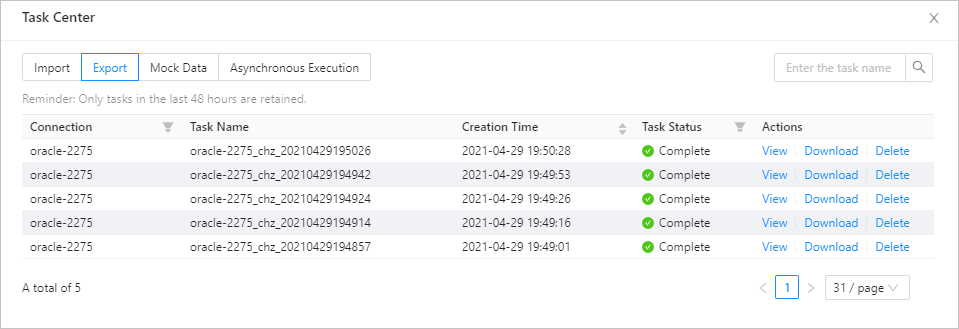
Image 625On the Export tab, the task list displays the tasks created in the recent 48 hours. The list displays the following information. You can filter and sort the tasks based on the information.

  • Connection: the name of the database connection to which the task belongs.

  • Task Name: the name of the task that you specified when you created the task.

  • Creation Time: the date and time when the task was created.

  • Task Status: the current status of the task. Valid values: Running , Aborted , Completed , and Failed . ODC provides different management actions for tasks in different states.

  • Actions: This column provides task management options, such as View , Download , Retry , Abort , and Delete .

Action
Description
View Click this button to go to the task details page to view the task information and task logs.
Download Click this button to download the exported file to your local device when the task is completed.
Retry Click this button to restart the task when the task fails.
Abort Click this button to abort a task that is not completed.
Delete Click this button to delete the task from the task list when the task is aborted, completed, or failed.

Task details

Click View in the Actions column of the row where the target task is located. The task details panel appears. Click Task Information in the upper-right corner of the panel to view the basic task information, information about the exported files, and information about the exported objects.

  • Basic task information: displays information such as Task Name , Connection Name , Mode Name , Task Type , Creation Time , Retry Limit , and Retry Time .

  • Information about exported files: displays information that you specified when you created the import task, such as Export Content , Data Format , Encoding Standard , Export Data Settings , Export Schema Settings, Task Error Handling Method , and Sys Tenant Account Settings .

  • Information about exported objects: displays the data export progress of the selected object, including

    information such as Object Name , Object Type , Schema Processing Status , Total Record Number , Processed Data Entries , and Data Processing Status .

Task logs

Click View in the Actions column of the row where the target task is located. The task details panel appears. Click Task Logs in the upper-right corner of the panel to view the alert logs and all logs of the task.

  • All Logs: displays the full information of all task logs, including INFO , ERROR , and WARN logs.

  • Alert Logs: Alert logs include the ERROR and WARN logs of the task. If the task failed, you can view alert logs to learn of the error information.

Previous topic

Import tasks
Last

Next topic

Data mocking tasks
Next
on this page
Task list
Task details
Task logs