OceanBase
English日本語简体中文
Docs Home
Products
Integrations
Release Notes

Databases

OceanBase DatabaseOceanBase Cloud OceanBase Best Practices

Tools

OceanBase Cloud PlatformOceanBase Migration ServiceOceanBase Developer CenterOceanBase Migration AssessmentOceanBase Admin ToolOceanBase Loader and DumperOceanBase DeployerKubernetes operator for OceanBaseOceanBase Diagnostic Tool OceanBase Binlog Service

Connectors and Middleware

OceanBase Database Proxy OceanBase Connector/C OceanBase Connector/J OceanBase Connector/ODBC OceanBase Connector/NETOceanBase Command-Line Client

Databases

OceanBase DatabaseOceanBase Cloud OceanBase Best Practices

Connectors and Middleware

OceanBase Database Proxy OceanBase Connector/C OceanBase Connector/J OceanBase Connector/ODBC OceanBase Connector/NETOceanBase Command-Line Client

Tools

OceanBase Cloud PlatformOceanBase Migration ServiceOceanBase Developer CenterOceanBase Migration AssessmentOceanBase Admin ToolOceanBase Loader and DumperOceanBase DeployerKubernetes operator for OceanBaseOceanBase Diagnostic Tool OceanBase Binlog Service
OceanBase DatabaseOceanBase Cloud ToolsConnectors and MiddlewareLifecycle Support Policy

OceanBase Developer Center

V4.4.3
  • Topics Overview
  • Overview
    • What is ODC?
    • Features
    • Architecture
    • Limitations
    • ODC console
  • Quick Start
    • Client ODC
      • Overview
      • Install Client ODC
      • Use Client ODC
    • Web ODC
      • Overview
      • Deploy Web ODC
      • Use Web ODC
  • Data Source Management
    • Create a data source
    • Data sources and project collaboration
    • Database O&M
      • Session management
      • Global variable management
      • Recycle bin management
  • SQL Development
    • Edit and execute SQL statements
    • Perform PL compilation and debugging
    • Use the command-line window
    • Edit and export the result set
    • Execution analysis
    • Generate test data
    • System settings
    • Intelligent SQL development
    • Common features
    • Database objects
      • Table objects
        • Overview
        • Create a table
      • View objects
        • Overview
        • Create a view
        • Manage views
      • Materialized view objects
        • Overview
        • Create a materialized view
        • Manage materialized views
      • Function objects
        • Overview
        • Create a function
        • Manage functions
      • Stored procedure objects
        • Overview
        • Create a stored procedure
        • Manage stored procedures
      • Sequence objects
        • Overview
        • Create a sequence
        • Manage sequences
      • Package objects
        • Overview
        • Create a program package
        • Manage program packages
      • Trigger objects
        • Overview
        • Create a trigger
        • Manage triggers
      • Type objects
        • Overview
        • Create a type
        • Manage types
      • Synonym objects
        • Overview
        • Create a synonym
        • Manage synonyms
      • External resource objects
        • External resources
        • Create an external resource
        • Manage external resources
  • Database Change Risk Management
    • Project collaborative management
      • Project management
      • Manage databases
      • Manage logical databases
      • Add object storage files
      • Manage project members
      • Desensitize data
      • Notification management
        • Overview
        • View notification records
        • Manage notification channels
          • Create a notification channel
          • View, edit, and delete a notification channel
          • Configure a custom channel
        • Manage notification rules
    • Manage user permissions
      • Users and roles
      • Automatic authorization
      • Apply for project permissions
      • Apply for database permissions
      • Apply table/view permissions
    • Security standards
      • Environment configuration
        • SQL check specifications
        • SQL window specification
      • Risk Management
        • Overview
        • Manage risk identification rules
        • Manage approval processes
      • Desensitization algorithms
      • Operation audit
  • Ticket Management
    • Import schemas and data
    • Export schemas and data
    • Database change management
    • Manage changes to logical databases
    • Batch database change management
    • Online schema changes
    • Synchronize shadow tables
    • Schema comparison
  • Data Lifecycle Management
    • Data archiving
    • Data cleanup
    • Manage partitioning plans
      • Manage partitioning plans
      • Set partitioning strategies
      • Examples of partitioning strategies
    • SQL Plan
  • System Integration
    • Login integration
    • Approval integration
    • SQL approval integration
    • Bastion host integration
    • Integrate with LLMs
  • Deployment Guide
    • Deployment overview
    • Preparations before deployment
    • Deploy ODC in single-node mode
    • Deploy ODC in high-availability mode
    • Deployment verification
  • Upgrade Guide
    • Upgrade Overview
    • Preparations for upgrade
    • Update single-node ODC
    • Update high-avaliability ODC
    • Upgrade verification
    • Rollback after upgrade failed
  • Best Practices
    • Tips for SQL development
    • Explore ODC team workspaces
    • Understanding real-time SQL diagnostics for OceanBase AP
    • OceanBase historical database solutions
    • ODC SQL check for automatic identification of high-risk operations
    • Integration with ODC enterprise-level account system
    • Manage and modify sharded databases and tables via ODC
    • Data masking and control practices
    • Enterprise-level control and collaboration: Safeguard every database change
  • Troubleshooting
    • ODC troubleshooting process
    • Collect message
      • View the runtime environment and version information
      • View web ODC logs
      • View client ODC logs
      • View end-to-end ODC-related logs
      • View ODC MetaDB data
      • Query the index status in OceanBase Database V4.x
      • Query the index status in OceanBase Database V1.4.x to V3.2.x
      • Collect JVM runtime information
      • Use tcpdump to capture packets
    • FAQ
      • Installation of client ODC
      • Web ODC deployment and startup
      • Connection Information
      • Command-line window
      • DDL statement display
  • Release Notes
    • V4.4
      • ODC V4.4.0
      • ODC V4.4.1
      • ODC V4.4.2
      • ODC V4.4.3
    • V4.3
      • ODC V4.3.4
      • ODC V4.3.3
      • ODC V4.3.2
      • ODC V4.3.1
      • ODC V4.3.0
    • V4.2
      • ODC V4.2.4
      • ODC V4.2.3
      • ODC V4.2.2
      • ODC V4.2.1
      • ODC V4.2.0
    • V4.1
      • ODC V4.1.3
      • ODC V4.1.2
      • ODC V4.1.1
      • ODC V4.1.0
    • V4.0
      • ODC V4.0.2
      • ODC V4.0.0
    • V3.4
      • ODC V3.4.0
    • V3.3
      • ODC V3.3.3
      • ODC V3.3.2
      • ODC V3.3.1
      • ODC V3.3.0
    • V3.2
      • ODC V3.2.3
      • ODC V3.2.2
      • ODC V3.2.1
      • ODC V3.2.0

Download PDF

Document Feedback
  1. Documentation Center
  2. OceanBase Developer Center
  3. V4.4.3

Integration with ODC enterprise-level account system

Last Updated:2026-09-03 09:11:30

Background information
Scenarios
Rapid integration with enterprise account systems
Create an SSO application
Configure external integration
Log in with a third party account
Set automatic authorization rules for accounts
References

Background information

To ensure the security and reliability of database development, the control capabilities of database development tools are crucial. Establishing a comprehensive account system helps development teams achieve complete control and supervision of database development tools, effectively preventing various data security issues.

Thanks to the powerful scalability of distributed databases, data volume and the number of database instances are growing rapidly, and industry practitioners are multiplying as well. However, different roles are not growing proportionally. DBAs need to manage an expanding number of collaborators, which places higher demands on the account management systems of database development tools. Particularly for large-scale team collaboration scenarios, enterprises typically already have established employee account permission systems, and as a database development tool, the key challenges become how to quickly integrate with existing account systems, and how to implement automated account permission control for different accounts and personnel across different departments

Scenarios

With the modernization of management systems, more and more enterprises are building their own account systems to manage team members. An account system can control and monitor all enterprise applications through single sign-on (SSO) based on certain authentication and authorization protocols. Well-known account systems include those of GitHub, GitLab, Google, CAS, and DingTalk. By using a unified account system, enterprises break down barriers between different applications and allow users to log in to all enterprise applications with the same account.

With the release of ODC V4.2.0, the SSO integration capability is optimized at the product level. Now, a DBA can integrate an SSO system within less than three minutes.

Rapid integration with enterprise account systems

Taking GitHub's OAuth2 service as an example, ODC actually supports integration with any SSO service that complies with standard OAuth2 protocol, OIDC protocol, LDAP, and SAML protocol.

Create an SSO application

  1. Create an SSO application on GitHub.

    1. Go to the developer settings.

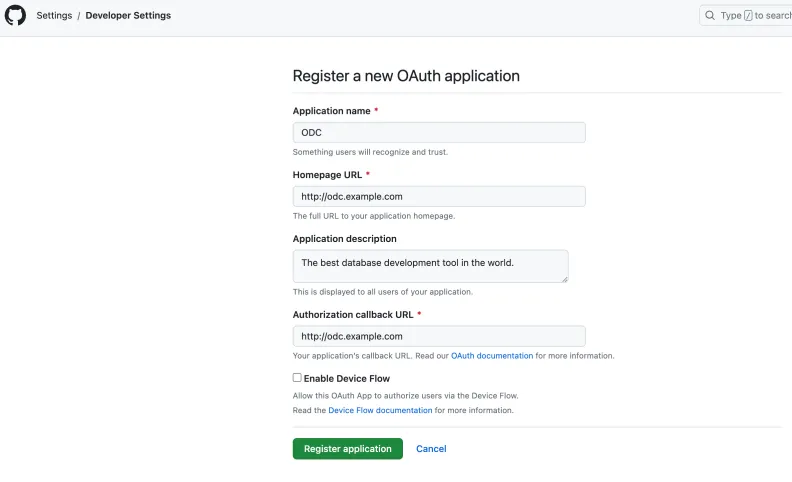
      Log in to the GitHub account > Click the avatar in the upper-right corner > Settings > In the left-side navigation pane, select Developer settings > OAuth Apps > Click New OAuth App.

    2. Configure the application information.

      Application name: Enter the application name. Homepage URL: Enter the homepage URL of the application. Application description: Enter the application description. Authorization callback URL: Enter the OAuth callback URL.
      1

    3. Obtain the credentials after the application is created. Record the generated client ID and client secret for use in the OAuth process.

      Note

      For different services, refer to their corresponding SSO configuration documentation.

      2

Configure external integration

  1. Log in to Web ODC.

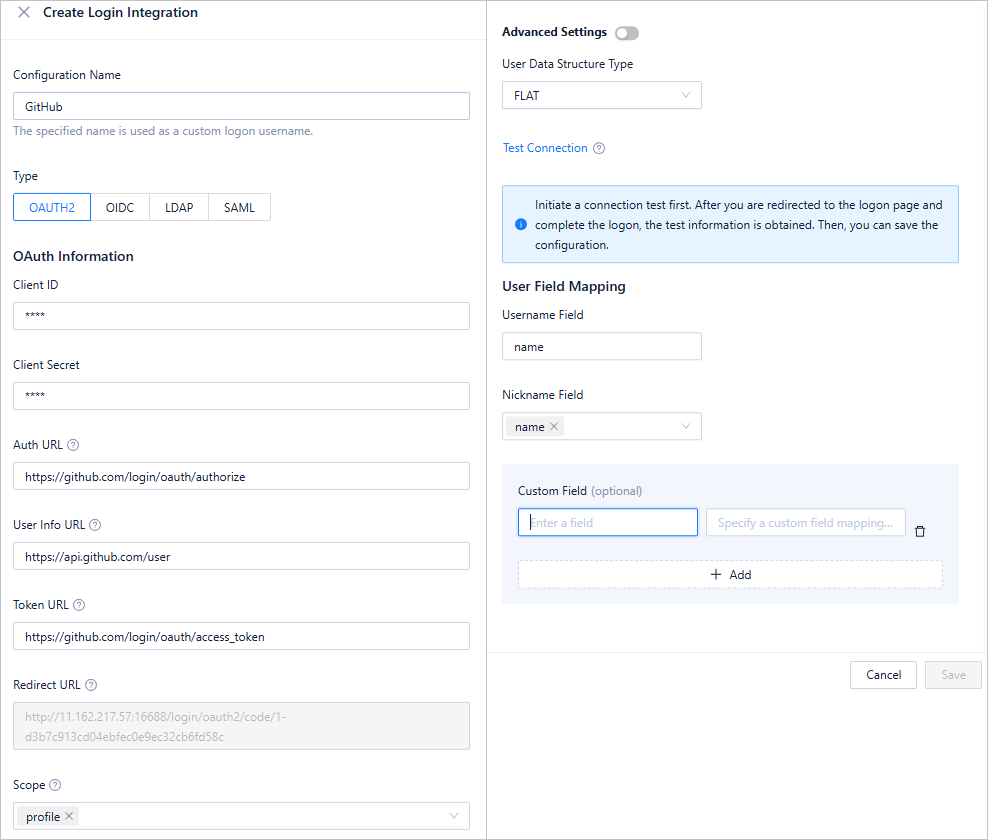
  2. In the left-side navigation pane, choose External Integration > Login Integration > Create Login Integration.

  3. On the Create Login Integration page, configure the corresponding parameters.

    To adapt a wide variety of SSO services, ODC has made many compatibility configurations for OAUTH2 and OIDC. For more information, see Login integration.
    3

  4. After you configure ODC, click Test Connection to obtain the login information of the current user.

    You can configure user field mappings to specify how ODC's username and nickname are obtained from the SSO account system. In addition, external integration allows you to configure custom user information fields. By parsing the JSON path, you can obtain the required fields.

Log in with a third party account

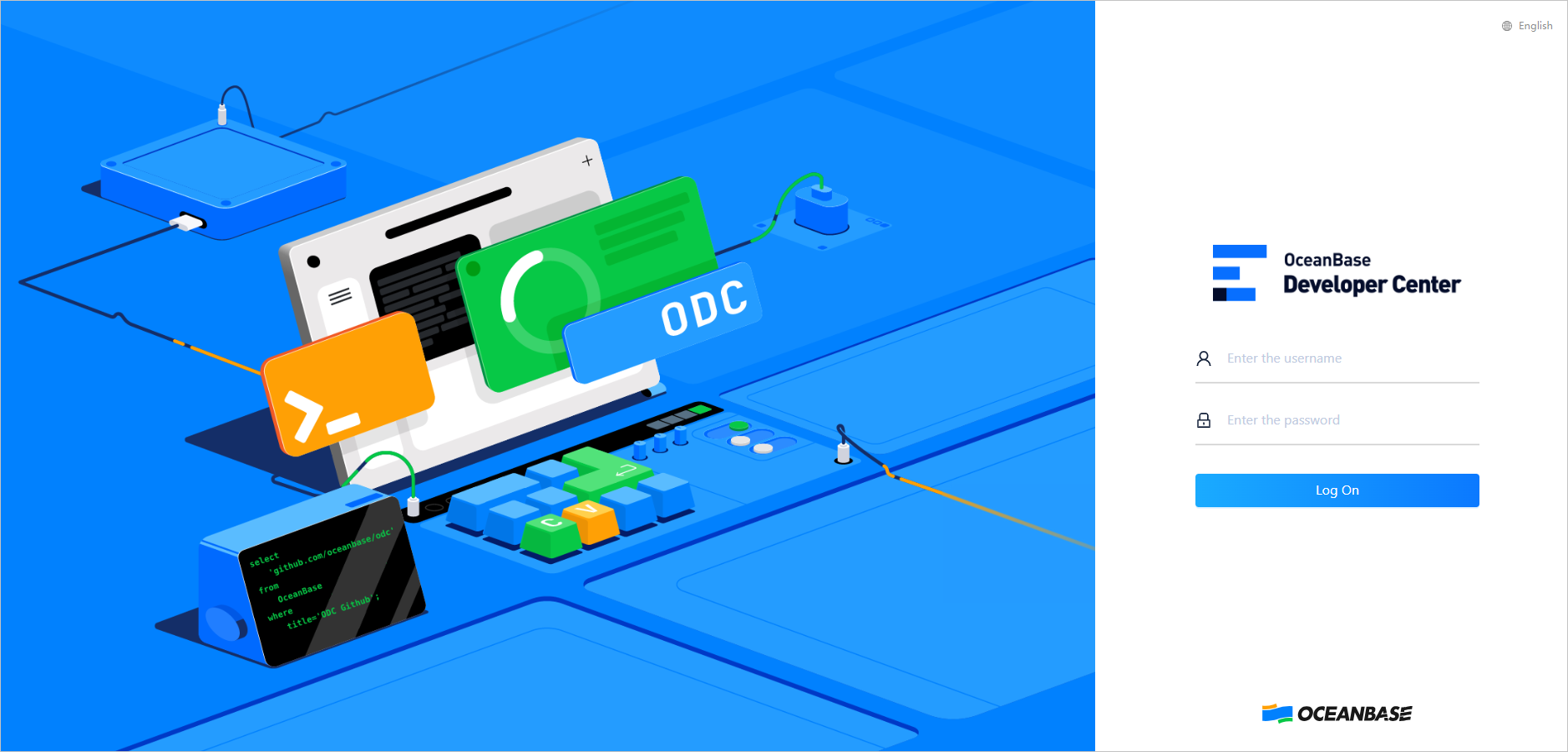
After the configuration is saved, go back to the login page, where you can use a GitHub account to log in to ODC.

  1. Go to the ODC login page and enter the GitHub account and password.
    4

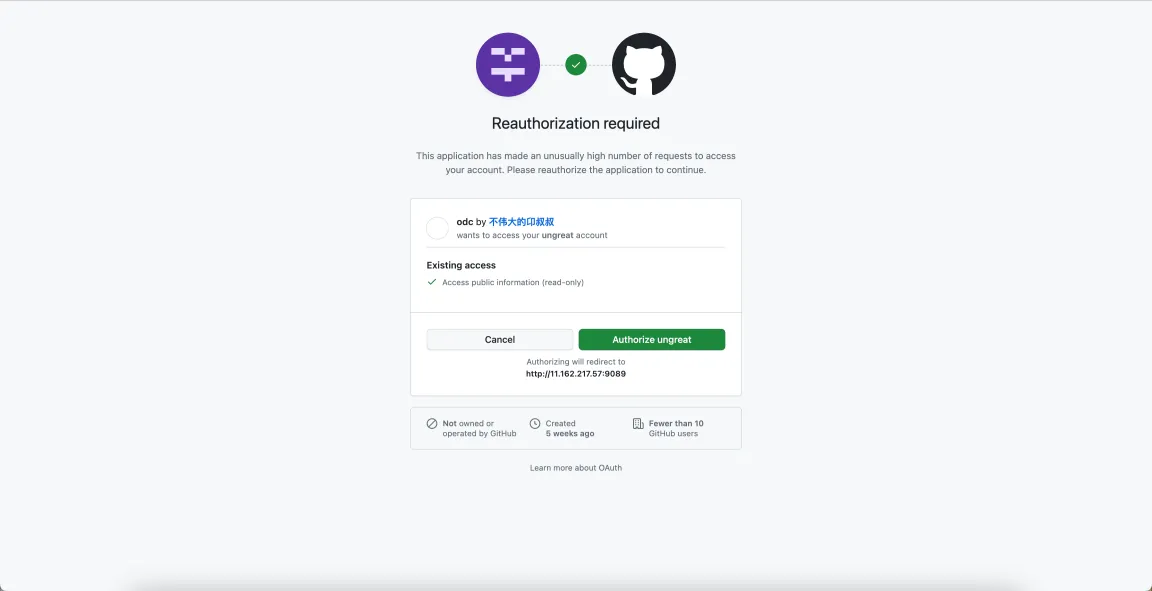
  2. On the authorization page, confirm the authorization information.
    5

  3. After login, you will see the following page.

    6

Set automatic authorization rules for accounts

SSO integration alone only addresses account creation and login — the foundational step in establishing an account system. The most critical aspect is automatically managing associated permissions and resources based on created accounts, ensuring that whenever personnel login information changes, the corresponding access control privileges are automatically updated accordingly.

With the release of ODC V4.2.0, the automatic authorization feature has been enhanced. Specifically, events such as login success, user creation, and user modification are added for existing users. When these events are triggered, user attributes can be directly evaluated to determine whether to grant specific permissions. For example, you can compare the workspace, company name, and other fields configured in the example with the corresponding user attribute. In the same enterprise, these fields are more likely to indicate department, job level, and role information. DBAs can configure automatic authorization rules based on the fields in the account system of their enterprises.

  1. After you integrate OAuth2 into ODC and log in to ODC, you can log in to the Web version of ODC through a third party.

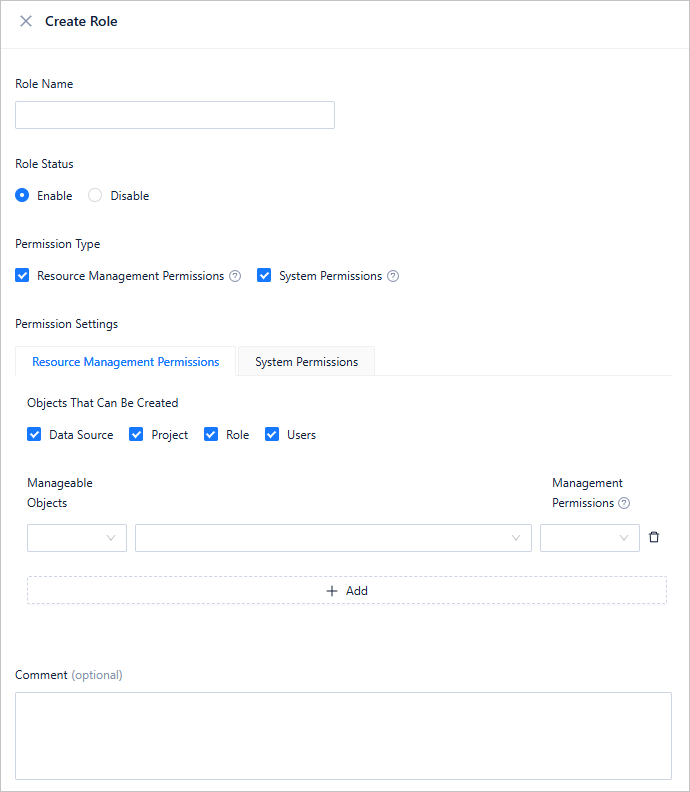
  2. In the left-side navigation pane, choose User Permissions > Authorization Rules > Create Rule. For more information, see Automatic authorization.
    7

  3. After the automatic authorization rules are obtained, when the corresponding events are triggered and the matching rules are met, the users will be granted the corresponding privileges. All these privileges will be automatically granted to the users when they log in, achieving automatic management of all account privileges after the DBA configures the rules, and therefore forming a closed loop from account integration to privilege granting.

References

  • Login integration

Previous topic

ODC SQL check for automatic identification of high-risk operations
Last

Next topic

Manage and modify sharded databases and tables via ODC
Next
on this page
Background information
Scenarios
Rapid integration with enterprise account systems
Create an SSO application
Configure external integration
Log in with a third party account
Set automatic authorization rules for accounts
References