
Data import refers to the process of writing external data into an internal table of OceanBase Database. The data may be located in external storage such as local paths, object storage, or HDFS, or it may come from other databases.
When choosing an import solution, it is recommended to first determine the import method (who reads the files and what SQL/tools are used for writing), and then confirm the location of the data and network accessibility.
The architecture of the data import solution in OceanBase Database is shown below:
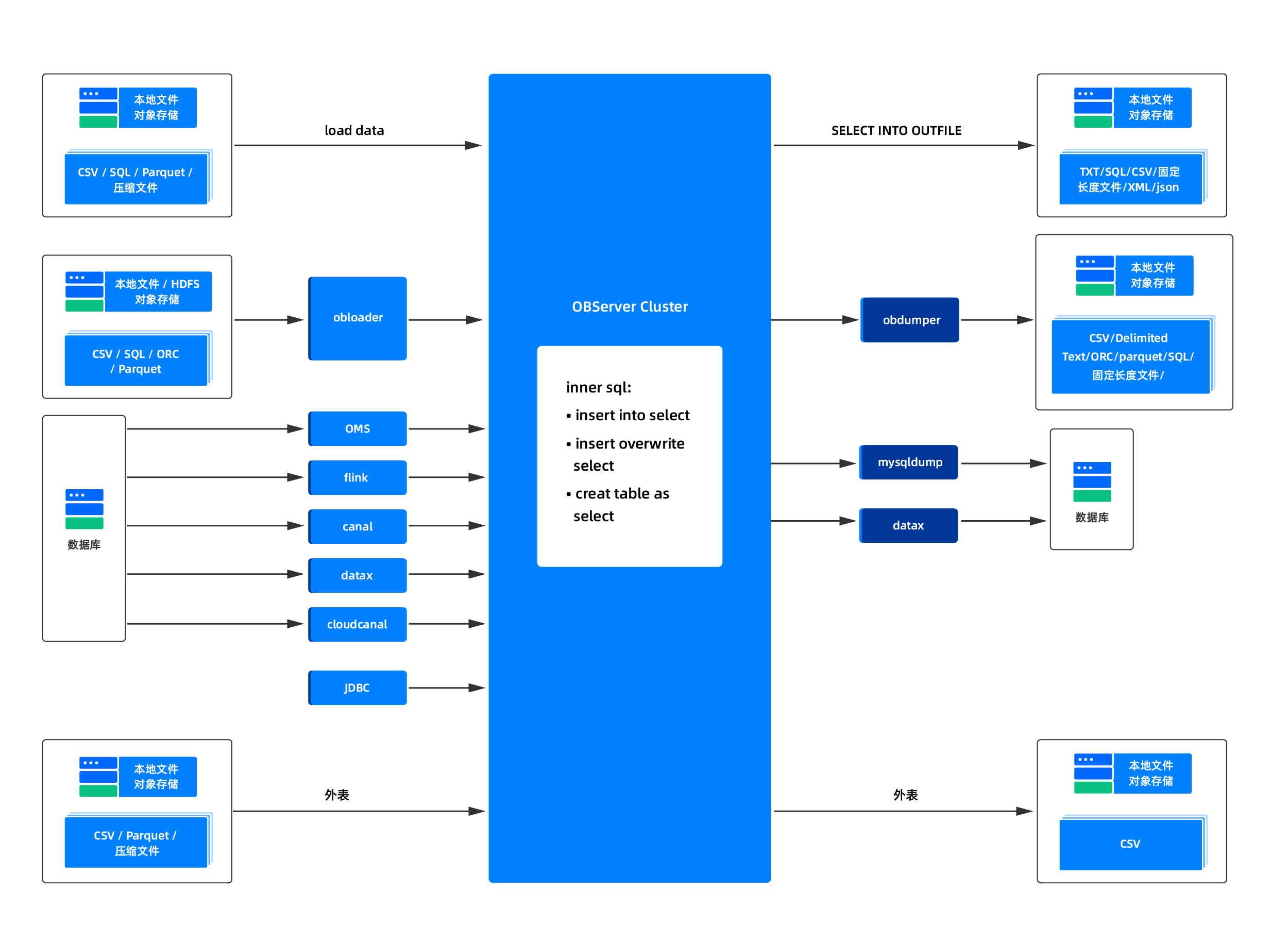
Import methods
When writing data from a file or a readable external path to an internal table, you can first choose from the following three methods in most scenarios. They correspond to different execution entry points, rather than being classified by data source type.
Import method |
Data location |
Application scenarios |
More reading |
|---|---|---|---|
| LOAD DATA FROM FILES | Object storage URLs and external file paths readable by the server | It is suitable for large-scale file import, parallel loading of multiple files, and scenarios where files do not need to be copied to the local disk of the OBServer first. | LOAD DATA FROM FILES |
| LOAD DATA INFILE | Server-side paths accessible to OBServer processes | Suitable for scenarios where the file is already locally mounted or shared on the node. | LOAD DATA INFILE |
| LOAD DATA LOCAL INFILE | Local files on the client | Suitable for small to medium batch processing, test and validation, or scenarios where files are stored only locally on the client. | LOAD DATA LOCAL INFILE |
| INSERT INTO ... SELECT FROM FILES | External files readable on the query side | It is suitable for scenarios where column mapping, filtering, expression evaluation, and other transformations need to be performed within SQL statements. | INSERT INTO SELECT FROM FILES |
| INSERT INTO ... SELECT (internal table / external table) | Internal tables, external tables, or other query results | Suitable for scenarios such as analytical result backfilling and data exchange between internal and external tables. | Import data by using the INSERT INTO SELECT statement from an external table |
| CREATE TABLE AS SELECT (CTAS) | Create a table from the result of a SELECT statement while loading data |
Suitable for scenarios where table creation and data loading are completed simultaneously. | Import data by using CREATE TABLE AS SELECT |
| Import with tools | Files held by clients, jump servers, or isolated networks | Suitable for scenarios with limited network bandwidth, import pipelines requiring dedicated tool protocols, or batch import task orchestration. | Import data by using obloader |
What is direct load
OceanBase supports enabling direct load for some import statements to shorten the regular write path, reduce hot write pressure on the SQL layer and MemTable, thereby improving throughput for large-scale loading.
Through direct load technology, OceanBase Database skips intermediate steps and writes data directly to SSTables, while reducing resource consumption (CPU, memory), and supporting efficient full or incremental data import.
Notice
It is not recommended to perform upgrades during the execution of a direct load task, as this may cause the task to fail.
Technical architecture

Traditional import path (blue path):
Client -> SQL parsing -> Transaction processing -> MemTable -> Minor/Major compaction -> SSTable
Disadvantages: Long path, high resource consumption, limited write speed.
Direct load path (green path):
Client -> Type conversion -> Primary key sorting (optional) -> Direct write to Major SSTable (full) or Mini SSTable (incremental)
Advantages:
- Skips intermediate modules such as SQL, transactions, and MemTables, reducing resource consumption.
- Data is written directly to underlying storage, avoiding the overhead of multiple major compactions.
Core mechanisms of direct load
Skip intermediate layers: Bypass SQL parsing, transactions, and MemTables to write directly to SSTables.
Type conversion and sorting:
- Data type conversion (e.g., converting CSV to OceanBase table format).
- Sorting by primary key (required for full import to ensure the order of the Major SSTable).
Conceptually, direct load is an import execution mode, not an independent data source or separate syntax category.
That is to say, users typically do not first choose "direct load" and then select syntax; instead, they first choose an import method such as LOAD DATA, INSERT INTO SELECT, CREATE TABLE AS SELECT, or obloader based on business requirements, and then determine whether these paths are suitable for direct load execution under current conditions.
When hints such as APPEND and DIRECT(...) are enabled, or when relying on the tenant-level parameter default_load_mode, the optimizer and execution engine will determine whether direct load mode can be used based on conditions such as statement type, execution plan, parallelism capability, and object constraints.
Application scenarios
Data migration and synchronization: A large volume of data in various formats often needs to be migrated from different data sources to OceanBase Database. The performance of traditional SQL interfaces may not meet timeliness requirements.
Traditional ETL: After data is extracted and transformed at the source, a large amount of data typically needs to be loaded to the target within a short time. Direct load technology improves data import performance, so the efficiency of the data loading phase can also be enhanced.
Loading data from text files or other data sources: Direct load technology can also be used to improve data loading efficiency.
Relationship between direct load and import syntax
A common misconception when understanding direct load is that it is parallel to syntaxes like LOAD DATA, INSERT INTO SELECT, and CTAS. Instead, it represents the relationship between execution modes and the syntaxes they support.
You can think of it this way:
- Statements like
LOAD DATA,INSERT INTO SELECT, andCREATE TABLE AS SELECTdefine "how to read data and write it to the target table". - Direct load defines "whether to use a more efficient writing method for these statements when certain conditions are met".
Therefore, the same import statement may have different execution methods under different conditions:
- A statement might be executed using the regular insertion method in different OceanBase versions due to version-specific behavior differences.
- Under the premise of meeting hints, parameters, parallel capabilities, and object limitations, a statement may also follow the direct load path.
For example:
LOAD DATAis more suitable for file import scenarios. Whether to use direct load depends on specific hints, modes, and execution conditions.- Whether
INSERT INTO ... SELECT ...can use direct load often depends on prerequisites such as parallel DML (PDML). For details, see Parallel DML. CREATE TABLE AS SELECTcan also execute with direct load when loading data while creating a table, provided the conditions are met.
Typical statements that support direct load
The following table shows the relationship between common import statements and direct load.
Statement type |
Relationship with direct load |
|---|---|
LOAD DATA |
In the FROM FILES form, it can be combined with APPEND, DIRECT(...), parallel(N), and other methods. |
INSERT INTO ... SELECT ... |
You can use the direct load path when conditions such as parallel DML are met. This usually requires combining it with enable_parallel_dml, parallel(N), DIRECT(...), and other options. |
CREATE TABLE AS SELECT |
In scenarios where you create a table and load data simultaneously, you can combine APPEND, DIRECT(...), parallel(N), and other methods to evaluate the direct load capability. |
| Tool import (such as obloader) | Whether to use a loading path equivalent to direct load depends on the tool version, parameter configuration, and the tool's internal implementation. |
Full direct load and incremental direct load
Direct load can generally be divided into full direct load and incremental direct load.
Full direct load
- Full direct load is used to directly write a complete dataset into the database's data files in one operation. This method bypasses the SQL layer interfaces, directly allocates space in the data files, and inserts data, thereby improving data import efficiency.
- Full direct load is typically used for database initialization, data migration, or when a large amount of data needs to be loaded quickly.
Incremental direct load
- Incremental direct load is used to directly write newly added data into the database's data files without going through the SQL interface, especially when a large amount of data already exists. This method bypasses the SQL layer's data processing and directly writes new data into the data files, improving data write efficiency.
- Incremental direct load is typically used in high-throughput data write scenarios, such as large-scale real-time data collection or log writing.
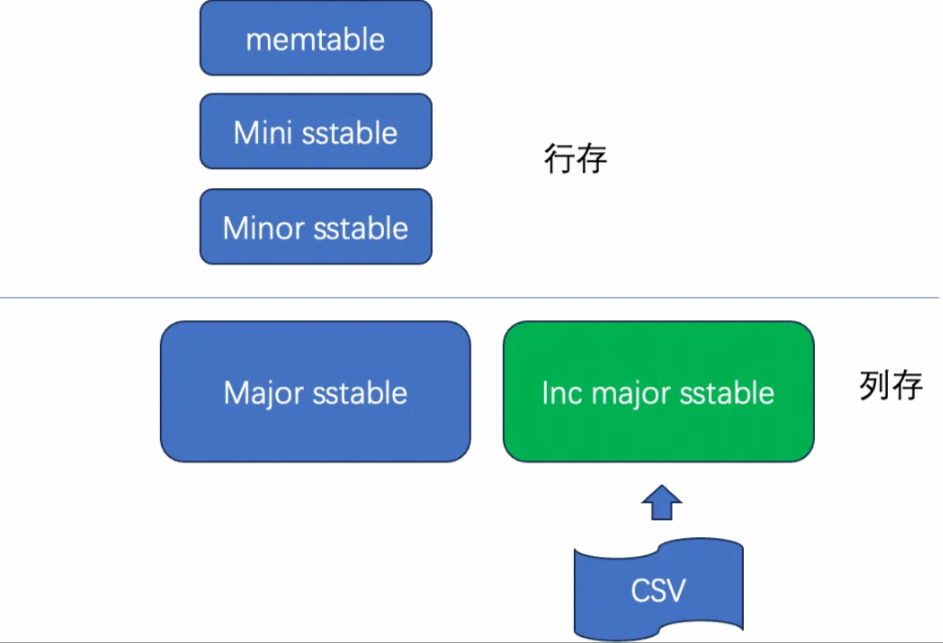
To understand the difference between the two, you can consider the write path in relation to OceanBase's LSM-Tree storage layer. OceanBase's storage layer mainly includes:
- MemTable: A write structure in memory that supports high-concurrency updates.
- Mini SSTable: A disk structure formed by the minor compaction of a MemTable.
- Major SSTable: A stable data file formed after major compaction, suitable for efficient queries.
In regular imports, data typically goes through a more complete transaction write and minor compaction pipeline. In direct load, the execution engine tries to shorten this path to improve large-scale loading efficiency. The main differences between full direct load and incremental direct load lie in the target write format, conflict handling method, and applicable scenarios.
Schematic diagram of full import:

Schematic diagram of incremental import (only non-conflicting data is shown):
Dimension |
Full direct load |
Incremental direct load |
|---|---|---|
| Trigger scenario | Initialize loading, perform a full overwrite, or build a baseline. | Append in batches, partially update, or continue loading on top of existing data. |
| Import process | Data is written to the baseline direction after necessary conversions are completed, making it suitable for full batch loading. | After the data undergoes the necessary transformations, you must determine the write path based on the existing data and conflict resolution. |
| Write position | The write traffic is mainly directed to the major SSTable. | Data without conflicts and data with conflicts may follow different write paths. |
| Performance characteristics | High throughput, suitable for large-scale bulk loading. | It depends more on data distribution and the conflict ratio. Performance degrades when there are many conflicts. |
| Locking mechanism | Locks the specified table or partition. | Locks the specified table or partition. |
| Query performance | The query performance is better after loading. | Queries on non-conflicting data have optimal performance; for conflicting data, the performance needs to be evaluated in conjunction with the subsequent write path. |
Considerations
Considerations for full direct load
When using full direct load, note the following direct load capability limitations and notes:
OceanBase Database supports direct load of LOB data types starting from version V4.3.0.
A table lock is acquired during direct load, preventing other data writes to the table. The table remains read-only throughout the process.
Full direct load is suitable for the initial import of large tables, data migration of 10 GB to TB levels, and scenarios where CPU and memory resources are not particularly abundant. This is because the execution path of direct load is shorter, which can save CPU overhead.
During the import process, two write operation statements cannot be executed simultaneously (i.e., one table cannot be written to at a time). This is because a table lock is acquired at the beginning of the import, and only read operations are allowed throughout the import.
Trigger usage is not supported.
Tables containing generated columns are not supported (some indexes create hidden generated columns, for example, KEY idx_c2 (c2(16)) GLOBAL).
Liboblog and flashback queries are not supported.
When using the
LOAD DATAstatement orINSERT INTO SELECTstatement with specified partition direct load, note that the target table cannot be a replicated table and must not contain auto-increment columns, identity columns, or Global Indexes.For V4.3.5, starting from V4.3.5 BP1, full direct load has the following changes:
- If the last partition of the target table is a Hash/Key partition, partition-level direct load is supported.
- When the session-level variable foreign_key_checks is set to False, foreign key constraint validation is skipped during direct load.
For usage restrictions specific to each import statement (which differ from the direct load capability limitations listed above), refer to:
- For using
LOAD DATAto perform direct load, see LOAD DATA syntax (MySQL-compatible mode) for syntax and statement-level usage restrictions. - For using
INSERT INTO SELECTto perform direct load, see INSERT syntax (MySQL-compatible mode) for syntax and statement-level usage restrictions.
Considerations for incremental direct load
OceanBase Database optimized incremental direct load in version V4.6.0. The new incremental direct load strategy divides data into two parts: the portion that conflicts with the existing data's primary key is written to a Mini SSTable (incremental SSTable), while the non-conflicting portion is written to another Major SSTable (baseline SSTable). This allows the new incremental direct load strategy to perform multiple imports for datasets with few conflicting data records without degrading query performance.
When using incremental direct load, in addition to the general limitations mentioned above for full direct load, note the following incremental direct load capability limitations:
- Tables with foreign keys do not support incremental direct load.
- Tables with
GLOBALindexes do not support incremental direct load. - Tables with constraints do not support incremental direct load.
- Tables without a primary key that have more than one unique
LOCALindex do not support incremental direct load. - Tables with a primary key and a unique index do not support incremental direct load.
When using LOAD DATA or INSERT INTO SELECT to perform incremental direct load, refer to the statement-level usage restrictions in LOAD DATA syntax (MySQL-compatible mode) and INSERT syntax (MySQL-compatible mode) respectively.
Considerations
When using direct load, note the following general considerations (applicable to both full and incremental loads):
Incremental direct load triggers a minor compaction. For small data volumes that can be imported within minutes, incremental direct load is not recommended.
Incremental direct load supports target tables with non-unique local indexes.
For V4.3.5, starting from V4.3.5 BP1, incremental direct load has the following changes:
- If the last partition of the target table is a HASH or KEY partition, partition-level direct load is supported.
- Only heap tables with one local unique index are supported. If the target table has multiple local unique indexes or a global unique index, the import operation will fail.
- In
LOAD DATA/INSERT INTO SELECTstatements, if multiple import tasks have overlapping partitions, parallel partition import is not supported; if there are no overlapping partitions, parallel partition import is supported. - When the session-level variable foreign_key_checks is set to False, foreign key constraint validation is skipped during direct load.
Note
This section describes the general considerations for the direct load capability. To learn about usage restrictions for specific SQL statements, refer to their respective syntax documents: LOAD DATA syntax, INSERT syntax.
References
- Data transfer overview
- Data migration overview
- LOAD DATA FROM FILES
- LOAD DATA INFILE
- LOAD DATA LOCAL INFILE
- INSERT INTO SELECT FROM FILES
- Import by using INSERT INTO SELECT from external tables
- Import by using CREATE TABLE AS SELECT
- Import data by using obloader
For complete SQL statement references: