OceanBase
English日本語简体中文
Docs Home
Products
Integrations
Release Notes

Databases

OceanBase DatabaseOceanBase Cloud OceanBase Best Practices

Tools

OceanBase Cloud PlatformOceanBase Migration ServiceOceanBase Developer CenterOceanBase Migration AssessmentOceanBase Admin ToolOceanBase Loader and DumperOceanBase DeployerKubernetes operator for OceanBaseOceanBase Diagnostic Tool OceanBase Binlog Service

Connectors and Middleware

OceanBase Database Proxy OceanBase Connector/C OceanBase Connector/J OceanBase Connector/ODBC OceanBase Connector/NETOceanBase Command-Line Client

Databases

OceanBase DatabaseOceanBase Cloud OceanBase Best Practices

Connectors and Middleware

OceanBase Database Proxy OceanBase Connector/C OceanBase Connector/J OceanBase Connector/ODBC OceanBase Connector/NETOceanBase Command-Line Client

Tools

OceanBase Cloud PlatformOceanBase Migration ServiceOceanBase Developer CenterOceanBase Migration AssessmentOceanBase Admin ToolOceanBase Loader and DumperOceanBase DeployerKubernetes operator for OceanBaseOceanBase Diagnostic Tool OceanBase Binlog Service
OceanBase DatabaseOceanBase Cloud ToolsConnectors and MiddlewareLifecycle Support Policy

OceanBase Migration Service

V3.3.1Community Edition
  • Product updates
  • Product Introduction
    • What is OMS Community Edition?
    • Architecture
      • Overview
      • Hierarchical functional system
      • Basic components
    • Limits
    • Terms
  • Deployment Guide
    • Overview
    • System requirements
    • Resource configuration specifications
    • Prepare the environment
    • Deploy a time-series database (Optional)
    • Deploy OMS Community Edition on a single node
    • Deploy OMS Community Edition on multiple nodes in a single region
    • Deploy OMS Community Edition on multiple nodes in multiple regions
    • Check the deployment
    • Scale out OMS Community Edition
  • User Guide
    • OMS Community Edition console
      • Log on to the OMS Community Edition console
      • Overview
      • User center
        • Configure user information
        • Change your logon password
        • Log off
    • Users and privileges
      • Create a database user
      • User privileges
      • Enable binlogs for the MySQL database
    • Manage data sources
      • Add a data source
        • Add an OceanBase Community Edition data source
        • Add a MySQL data source
        • Add a TiDB data source
        • Add a Kafka data source
        • Add a RocketMQ data source
      • View data source information
      • Copy a data source
      • Edit a data source
      • Delete a data source
    • Data migration
      • Overview
      • Supported DDL operations for incremental migration and limits
      • Create a data migration project
        • Create a project to migrate data from a MySQL database to OceanBase database Community Edition
        • Create a project to migrate data from OceanBase database Community Edition to a MySQL database
        • Migrate data within OceanBase database Community Edition
        • Create an active-active disaster recovery project in OceanBase database Community Edition
        • Create a project to migrate data from a TiDB database to OceanBase database Community Edition
      • Manage data migration projects
        • View details of a data migration project
        • Start, pause, and resume a data migration project
        • Release a data migration project
        • Delete a data migration project
        • Use tags to manage data migration projects
        • Download and import the settings of migration objects
      • Configure matching rules for migration objects
    • Data synchronization
      • Overview
      • Data formats
      • Create a data synchronization project
        • Create a project to synchronize data from an OceanBase database Community Edition to a Kafka instance
        • Create a project to synchronize data from an OceanBase database Community Edition to a RocketMQ instance
      • Manage data synchronization projects
        • View details of a data synchronization project
        • Start, pause, and resume a data synchronization project
        • Release and delete a data synchronization project
        • Use tags to manage data synchronization projects
        • Download and import the settings of synchronization objects
    • OPS & Monitoring
      • Go to the overview page
      • Server
        • View server information
        • Update the quota
        • View server logs
        • Paths of component logs
      • Components
        • Store
          • Create a store
          • View details of a store
          • Update the configurations of a store
          • Start and pause a store
          • Destroy a store
        • Connector
          • View details about a connector
          • Start and pause a connector
          • Migrate a connector
          • Update the configurations of a connector
          • Batch O&M
          • Delete a connector
        • JDBCWriter
          • View details of a JDBCWriter
          • Start and pause a JDBCWriter
          • Migrate a JDBCWriter
          • Update the configurations of a JDBCWriter
          • Batch O&M
          • Delete a JDBCWriter
        • Checker
          • View details of a checker
          • Start and pause a checker
          • Rerun and recover a checker
          • Update the configurations of a checker
          • Delete a checker
      • O&M ticket
        • View details of an O&M ticket
        • Skip a ticket or sub-ticket
        • Retry a ticket or sub-ticket
      • Component parameters
        • Store parameters
          • Parameters of a MySQL store
          • Parameters of an OceanBase store
        • Connector parameters
          • Parameters of a destination RocketMQ instance
          • Parameters of a DataflowSink instance
          • Parameters of a destination Kafka instance
          • Parameters of a source database in full migration
          • Parameters for intermediate-layer synchronization
        • JDBCWriter parameters
        • Checker parameters
    • System management
      • User management
      • Alert center
        • View project alerts
        • View system alerts
        • Manage alert settings
      • Associate with OCP
      • System Parameters
        • Modify system parameters
        • Modify HA configurations
  • Alert Reference
    • oms_host_down
    • oms_host_down_migrate_resource
    • oms_host_threshold
    • oms_migration_failed
    • oms_migration_delay
    • oms_sync_failed
    • oms_sync_status_inconsistent
    • oms_sync_delay
  • API Reference
    • Obtain the status of a migration project
    • Obtain the status of a synchronization project
  • Upgrade Guide
    • Overview
    • Upgrade OMS Community Edition in single-node deployment mode
    • Upgrade OMS Community Edition in multi-node deployment mode
    • FAQ

Download PDF

Document Feedback
  1. Documentation Center
  2. OceanBase Migration Service
  3. V3.3.1

What is OMS Community Edition?

Last Updated:2026-09-04 08:14:02

Introduction
Features
Benefits
Application scenarios
In-service data migration
Real-time data synchronization

Introduction

OceanBase Migration Service (OMS) Community Edition is a service that supports data interaction between OceanBase Community Edition and homogeneous or heterogeneous data sources. It supports online data migration and real-time synchronization of incremental data.

OMS Community Edition provides a visualized and centralized management platform. You can migrate data with simple configurations. OMS Community Edition aims to help you achieve real-time data migration and synchronization from homogeneous or heterogeneous data sources to OceanBase Community Edition at a low cost and low risk.

Features

OMS supports data migration and synchronization.

  • Data migration: Data migration is an one-off task. After the migration is completed, the project resources can be released. This feature is intended for full and incremental data migration between two relational data sources to ensure data consistency between the source and destination databases. With this feature, you can migrate inventory data from the source database to the destination database and maintain real-time synchronization of incremental data from the source database to the destination database.

    Data migration projects are the basic unit of the data migration feature of OMS Community Edition. When you create a migration project, you can specify the migration level, which ranges from table to database. For more information about the project types and migration types supported in data migration, see Data migration.

  • Data synchronization: Data synchronization is a continuous operation. After a data synchronization project is created, data will be synchronized continuously to ensure consistency between the source and destination databases as well as the real-time flow of data of key business systems. With this feature, you can implement real-time data synchronization between OceanBase Community Edition and Kafka or RocketMQ instances. For more information, see Data synchronization.

Benefits

  • Support for multiple sources

    OMS Community Edition supports real-time data transmission between OceanBase Community Edition and different types of data sources, such as MySQL, TiDB, Kafka, and RocketMQ, and supports data migration between MySQL tenants of OceanBase Community Edition. The features that OMS Community Edition provides vary with the types of source and destination data sources.

  • Real-time data migration without interrupting or affecting applications

    You can use OMS Community Edition to seamlessly migrate data to OceanBase Community Edition without interrupting services. After you switch to OceanBase Community Edition, all changed data in OceanBase Community Edition will be synchronized to the original source database in real time.

    OMS Community Edition minimizes the risks of business migration and helps enterprises build data architectures with high availability and reliability.

  • High-performance, secure, and reliable data migration

    OMS Community Edition can replicate large amounts of data between IT infrastructures in real time with second-level latency. Therefore, OMS Community Edition can be applied in multiple scenarios, such as data migration, emergency systems, real-time data synchronization, and database upgrade.

    OMS Community Edition can run data migration and synchronization tasks without affecting or interrupting your business applications, while ensuring data integrity and transaction consistency. OMS supports full migration at a speed of 100 MB/s and delivers a transaction processing performance of 200,000 transactions per second (TPS), and a data synchronization performance of 50,000 requests per second (RPS). OMS provides a high-availability deployment architecture as well as stable and reliable transmission channels for data migration and real-time synchronization.

  • One-stop interaction

    OMS allows you to manage data migration throughout its whole lifecycle. You can create, configure, and monitor data migration projects on the visual management page.

  • Multiple data consistency checks

    OMS provides multiple data consistency checks to ensure data quality. It displays differences in data to help you fix errors.

  • Easy data migration to OceanBase Community Edition

    OMS Community Edition supports the features of every version of OceanBase Community Edition. It collects and converts database objects and supports data migration without interrupting the services of the source database.

Application scenarios

In-service data migration
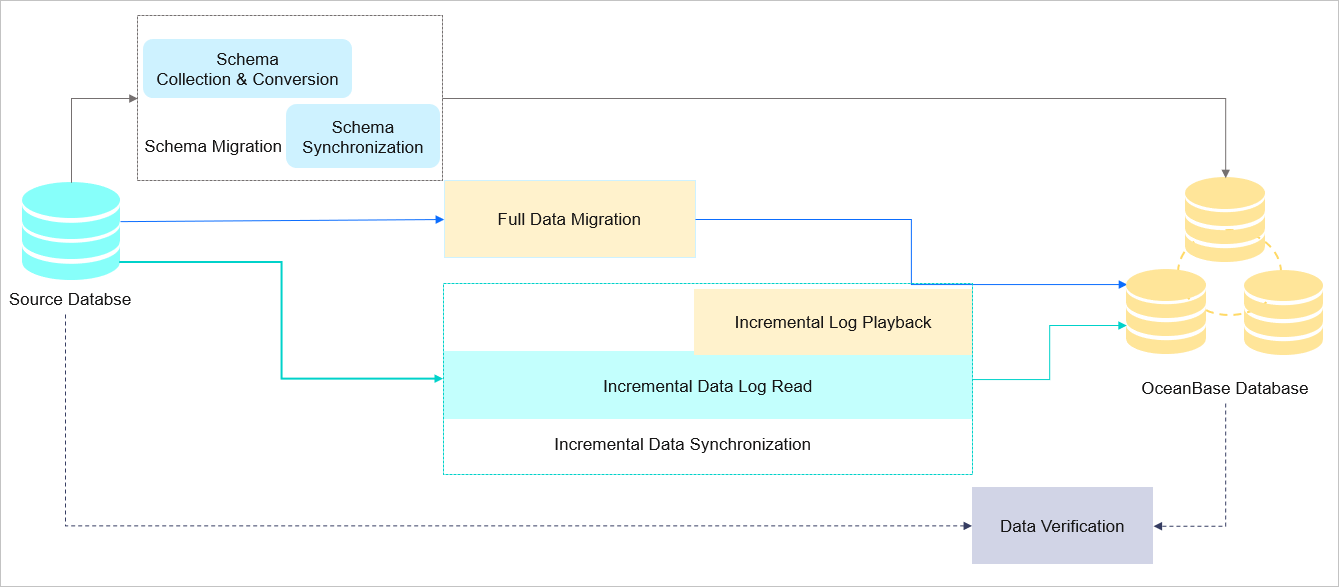
image.png

In traditional database migration solutions, data is usually migrated during downtime to ensure the migration stability and data consistency. During the downtime, data writes to the source database must be temporarily stopped. The business database can be switched only after the migration is completed and the data consistency is verified.

The downtime duration varies according to the business data volume and network conditions. In case of a massive volume of business data, the downtime may last several days, greatly affecting the business.

OMS Community Edition supports in-service data migration, ensuring service continuity of the source database during the migration and minimizing the impact of data migration on the business. During schema migration, full data migration, and incremental data migration, the full data and incremental data in the source database are synchronized to the sink database in real time. After the data verification succeeds, the business can be handed over from the source database to the sink database.

Real-time data synchronization

OMS Community Edition can synchronize incremental data from OceanBase Community Edition and other databases to message queues of self-managed instances such as Kafka and RocketMQ instances in real time. This improves the message processing capability and extends the business application in monitoring data aggregation, streaming data processing, online/offline analysis, and other big data fields.

OMS Community Edition supports real-time data synchronization between OceanBase Community Edition and self-managed data sources such as Kafka instances. We recommend that you use OMS Community Edition in cloud business intelligence (BI), real-time data warehouse construction, data querying, report distribution, and other business scenarios.

Previous topic

Product updates
Last

Next topic

Overview
Next
on this page
Introduction
Features
Benefits
Application scenarios
In-service data migration
Real-time data synchronization