OceanBase
English日本語简体中文
Docs Home
Products
Integrations
Release Notes

Databases

OceanBase DatabaseOceanBase Cloud OceanBase Best Practices

Tools

OceanBase Cloud PlatformOceanBase Migration ServiceOceanBase Developer CenterOceanBase Migration AssessmentOceanBase Admin ToolOceanBase Loader and DumperOceanBase DeployerKubernetes operator for OceanBaseOceanBase Diagnostic Tool OceanBase Binlog Service

Connectors and Middleware

OceanBase Database Proxy OceanBase Connector/C OceanBase Connector/J OceanBase Connector/ODBC OceanBase Connector/NETOceanBase Command-Line Client

Databases

OceanBase DatabaseOceanBase Cloud OceanBase Best Practices

Connectors and Middleware

OceanBase Database Proxy OceanBase Connector/C OceanBase Connector/J OceanBase Connector/ODBC OceanBase Connector/NETOceanBase Command-Line Client

Tools

OceanBase Cloud PlatformOceanBase Migration ServiceOceanBase Developer CenterOceanBase Migration AssessmentOceanBase Admin ToolOceanBase Loader and DumperOceanBase DeployerKubernetes operator for OceanBaseOceanBase Diagnostic Tool OceanBase Binlog Service
OceanBase DatabaseOceanBase Cloud ToolsConnectors and MiddlewareLifecycle Support Policy

OceanBase Migration Service

V3.3.1Community Edition
  • Product updates
  • Product Introduction
    • What is OMS Community Edition?
    • Architecture
      • Overview
      • Hierarchical functional system
      • Basic components
    • Limits
    • Terms
  • Deployment Guide
    • Overview
    • System requirements
    • Resource configuration specifications
    • Prepare the environment
    • Deploy a time-series database (Optional)
    • Deploy OMS Community Edition on a single node
    • Deploy OMS Community Edition on multiple nodes in a single region
    • Deploy OMS Community Edition on multiple nodes in multiple regions
    • Check the deployment
    • Scale out OMS Community Edition
  • User Guide
    • OMS Community Edition console
      • Log on to the OMS Community Edition console
      • Overview
      • User center
        • Configure user information
        • Change your logon password
        • Log off
    • Users and privileges
      • Create a database user
      • User privileges
      • Enable binlogs for the MySQL database
    • Manage data sources
      • Add a data source
        • Add an OceanBase Community Edition data source
        • Add a MySQL data source
        • Add a TiDB data source
        • Add a Kafka data source
        • Add a RocketMQ data source
      • View data source information
      • Copy a data source
      • Edit a data source
      • Delete a data source
    • Data migration
      • Overview
      • Supported DDL operations for incremental migration and limits
      • Create a data migration project
        • Create a project to migrate data from a MySQL database to OceanBase database Community Edition
        • Create a project to migrate data from OceanBase database Community Edition to a MySQL database
        • Migrate data within OceanBase database Community Edition
        • Create an active-active disaster recovery project in OceanBase database Community Edition
        • Create a project to migrate data from a TiDB database to OceanBase database Community Edition
      • Manage data migration projects
        • View details of a data migration project
        • Start, pause, and resume a data migration project
        • Release a data migration project
        • Delete a data migration project
        • Use tags to manage data migration projects
        • Download and import the settings of migration objects
      • Configure matching rules for migration objects
    • Data synchronization
      • Overview
      • Data formats
      • Create a data synchronization project
        • Create a project to synchronize data from an OceanBase database Community Edition to a Kafka instance
        • Create a project to synchronize data from an OceanBase database Community Edition to a RocketMQ instance
      • Manage data synchronization projects
        • View details of a data synchronization project
        • Start, pause, and resume a data synchronization project
        • Release and delete a data synchronization project
        • Use tags to manage data synchronization projects
        • Download and import the settings of synchronization objects
    • OPS & Monitoring
      • Go to the overview page
      • Server
        • View server information
        • Update the quota
        • View server logs
        • Paths of component logs
      • Components
        • Store
          • Create a store
          • View details of a store
          • Update the configurations of a store
          • Start and pause a store
          • Destroy a store
        • Connector
          • View details about a connector
          • Start and pause a connector
          • Migrate a connector
          • Update the configurations of a connector
          • Batch O&M
          • Delete a connector
        • JDBCWriter
          • View details of a JDBCWriter
          • Start and pause a JDBCWriter
          • Migrate a JDBCWriter
          • Update the configurations of a JDBCWriter
          • Batch O&M
          • Delete a JDBCWriter
        • Checker
          • View details of a checker
          • Start and pause a checker
          • Rerun and recover a checker
          • Update the configurations of a checker
          • Delete a checker
      • O&M ticket
        • View details of an O&M ticket
        • Skip a ticket or sub-ticket
        • Retry a ticket or sub-ticket
      • Component parameters
        • Store parameters
          • Parameters of a MySQL store
          • Parameters of an OceanBase store
        • Connector parameters
          • Parameters of a destination RocketMQ instance
          • Parameters of a DataflowSink instance
          • Parameters of a destination Kafka instance
          • Parameters of a source database in full migration
          • Parameters for intermediate-layer synchronization
        • JDBCWriter parameters
        • Checker parameters
    • System management
      • User management
      • Alert center
        • View project alerts
        • View system alerts
        • Manage alert settings
      • Associate with OCP
      • System Parameters
        • Modify system parameters
        • Modify HA configurations
  • Alert Reference
    • oms_host_down
    • oms_host_down_migrate_resource
    • oms_host_threshold
    • oms_migration_failed
    • oms_migration_delay
    • oms_sync_failed
    • oms_sync_status_inconsistent
    • oms_sync_delay
  • API Reference
    • Obtain the status of a migration project
    • Obtain the status of a synchronization project
  • Upgrade Guide
    • Overview
    • Upgrade OMS Community Edition in single-node deployment mode
    • Upgrade OMS Community Edition in multi-node deployment mode
    • FAQ

Download PDF

Document Feedback
  1. Documentation Center
  2. OceanBase Migration Service
  3. V3.3.1

FAQ

Last Updated:2026-09-04 08:14:02

What versions of OMS Community Edition can be upgraded to V3.3.1-CE?
Must I back up the original database before the upgrade?
How can I control the interval for pulling data from the Store component?
If I modify the parameters of some processes before the upgrade, do the parameters exist after the upgrade?
What do I do to resolve configuration compatibility issues when I upgrade OMS Community Edition V3.2.2-CE to V3.3.1-CE?
Method 1: Modify the configuration
Method 2: Re-create the project

This topic describes the frequently asked questions about updating OceanBase Migration Service (OMS) Community Edition.

What versions of OMS Community Edition can be upgraded to V3.3.1-CE?

OMS Community Edition support upgrade only from the previous version. The upgrade path is V3.2.2-CE > V3.3.0-CE > V3.3.1-CE.

Must I back up the original database before the upgrade?

We recommend that you back up the original database before you start the upgrade. The backup of the original database is a fail-safe measure in the upgrade process. Once the upgrade fails, you can start the original OMS Community Edition container.

If you do not back up the original database, make sure that the name of the new database is the same as that of the original database. In addition, you cannot roll back to the original database if the upgrade fails.

How can I control the interval for pulling data from the Store component?

You can enable high availability (HA) to automatically create a new store. The prerequisite for automatic store creation is that the number of stores under the subtopic does not exceed the value of the subtopicStoreNumberThreshold parameter of ha.config. By default, the number of stores under a subtopic is 5.

  1. Log on to the OMS Community Edition console.

  2. In the left-side navigation pane, choose System Management > System Parameters.

  3. On the System Parameters page, find ha.config and click the edit icon in the Value column.

  4. In the Modify Value dialog box, set enable to true to enable HA.

  5. Set the perceiveStoreClientCheckpoint parameter to true to enable data pulling from the Store component for downstream component.

    If you set perceiveStoreClientCheckpoint to false, you need to set the refetchStoreIntervalMin parameter to the desired value. This parameter specifies the time interval, in minutes, for pulling data from the Store component.

    For example, if the tasks monitored in the original container are all executed in real time, you plans to stop the original container at 4:00 pm and the upgrade is expected to complete at 5:00 pm, we recommend that you set the refetchStoreIntervalMin parameter to 90 minutes. This interval is the sum of a 60-minute period (between the container stop time and the upgrade end time) and a 30-minute redundant period (based on the business traffic).

If I modify the parameters of some processes before the upgrade, do the parameters exist after the upgrade?

  • If you modify the parameters of the JDBCWriter, Connector, or Checker component, the modified parameters still exist after the upgrade succeeds.

  • If you modify the parameters of the Store component, such as a whitelist-related parameter, the subtopic configuration is updated accordingly, and the modified parameters still exist after the upgrade succeeds.

What do I do to resolve configuration compatibility issues when I upgrade OMS Community Edition V3.2.2-CE to V3.3.1-CE?

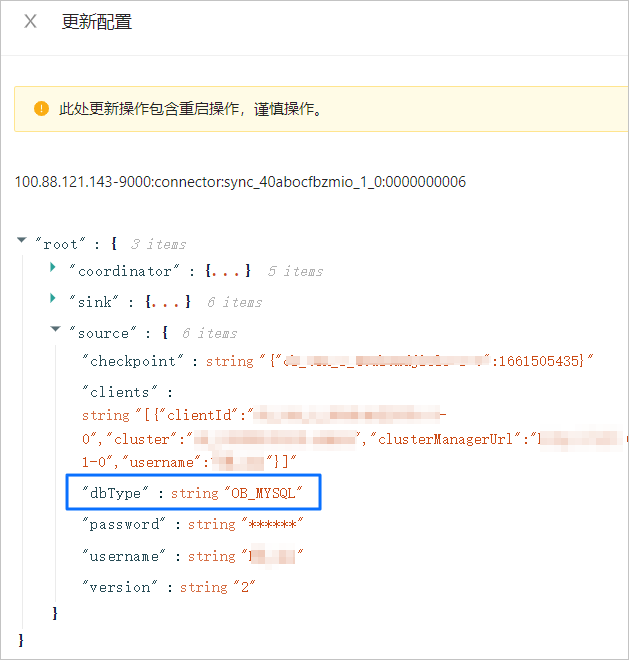
If you do not add the dbType parameter before the upgrade, the data synchronization projects cannot run. You can choose one of the following methods to fix the issue after the upgrade.

Notice:

If you use OMS Community Edition V3.3.0-CE and it contains data synchronization projects created by using OMS Community Edition V3.2.2-CE, the preceding issue may occur. You can fix it by using the same methods.

You can check whether the dbType or db_type parameter exists in the Source configuration file of the Connector component. If any of the two parameters exists, no fix is required.

Method 1: Modify the configuration

  1. Log on to the OMS Community Edition console.

  2. In the left-side navigation pane, choose OPS & Monitoring > Component > Connector.

  3. On the Connector tab, click Update in the Actions column of the target connector.

  4. In the Update Configurations dialog box, hover the pointer over the blank area on the right side of the source field and click + to add the dbType parameter.

    Update Connector

    Notice:

    If the checkpoint parameter is not specified, you need to specify the corresponding information.

  5. After the configuration is completed, click Update.

Method 2: Re-create the project

  1. Log on to the OMS Community Edition console.

  2. In the left-side navigation pane, click Data Synchronization.

  3. On the Synchronization Projects page, click Clone in the Actions column of the project.

  4. Configure information about the cloned project and change the synchronization start timestamp to a timestamp before the upgrade.

  5. After the configuration is completed, start the data synchronization project and make sure that it runs normally.

  6. Delete the previous data synchronization project.

Previous topic

Upgrade OMS Community Edition in multi-node deployment mode
Last
on this page
What versions of OMS Community Edition can be upgraded to V3.3.1-CE?
Must I back up the original database before the upgrade?
How can I control the interval for pulling data from the Store component?
If I modify the parameters of some processes before the upgrade, do the parameters exist after the upgrade?
What do I do to resolve configuration compatibility issues when I upgrade OMS Community Edition V3.2.2-CE to V3.3.1-CE?
Method 1: Modify the configuration
Method 2: Re-create the project