OceanBase
English日本語简体中文
Docs Home
Products
Integrations
Release Notes

Databases

OceanBase DatabaseOceanBase Cloud OceanBase Best Practices

Tools

OceanBase Cloud PlatformOceanBase Migration ServiceOceanBase Developer CenterOceanBase Migration AssessmentOceanBase Admin ToolOceanBase Loader and DumperOceanBase DeployerKubernetes operator for OceanBaseOceanBase Diagnostic Tool OceanBase Binlog Service

Connectors and Middleware

OceanBase Database Proxy OceanBase Connector/C OceanBase Connector/J OceanBase Connector/ODBC OceanBase Connector/NETOceanBase Command-Line Client

Databases

OceanBase DatabaseOceanBase Cloud OceanBase Best Practices

Connectors and Middleware

OceanBase Database Proxy OceanBase Connector/C OceanBase Connector/J OceanBase Connector/ODBC OceanBase Connector/NETOceanBase Command-Line Client

Tools

OceanBase Cloud PlatformOceanBase Migration ServiceOceanBase Developer CenterOceanBase Migration AssessmentOceanBase Admin ToolOceanBase Loader and DumperOceanBase DeployerKubernetes operator for OceanBaseOceanBase Diagnostic Tool OceanBase Binlog Service
OceanBase DatabaseOceanBase Cloud ToolsConnectors and MiddlewareLifecycle Support Policy

OceanBase Database

KV - V4.3.5
  • OBKV overview
  • Architecture
  • OBKV-Table
    • Introduction to OBKV-Table
      • Overview
      • OBKV-Table operation types
      • Core features of OBKV-Table
      • Differences between replace and insert_or_update
      • Supported value types
      • OBKV-Table data models
    • Use the OBKV-Table Java client
      • Java development guide for OBKV-Table
      • Prepare for development with OBKV-Table
      • Use the OBKV-Table Java client to connect to a cluster
      • Set client parameters
      • Supported client interfaces
      • Use the OBKV-Table Java client
    • Use the OBKV-Table GO client
      • Use the OBKV-Table Go client to connect to a cluster
      • Overview of the Go client
      • Individual API operations
      • Batch operations
      • About queries
      • Aggregation API
      • Filters
    • FAQ
  • OBKV-HBase
    • Overview
    • OBKV-HBase core features
    • Compatibility with HBase
    • Deployment
    • Application development with OBKV-HBase
      • Overview of OBKV-HBase application development
      • Data model
      • Data model design
      • Connect to a cluster using the OBKV-HBase client
      • Migrate HBase business code to OBKV-HBase
      • Data operation examples
      • Delete expired data
    • OBKV-HBase migration guide
    • OBKV-HBase management
      • Overview
      • High availability
      • Security and permissions
      • Monitoring metrics
    • Performance test
    • OBKV-HBase integrations
      • Flink
        • Synchronize data to OBKV-HBase by using Flink
    • Views
    • FAQ

Download PDF

Document Feedback
  1. Documentation Center
  2. OceanBase Database
  3. KV
  4. V4.3.5

Use the OBKV-Table Java client to connect to a cluster

Last Updated:2026-09-29 10:40:08

Introduction to the client
Preparations
Import maven obkv-table-client dependencies
What to do next

OBKV-Table is an access pattern for the OBServer node introduced by OceanBase Database for the NoSQL scenario. This topic briefly describes how to use the ob_table_client_java client to call interfaces.

Introduction to the client

Generally, at the application layer, OBServer nodes can be accessed through two modes: OBKV-Table and SQL, corresponding to the NoSQL and SQL modes, respectively.

In the NoSQL mode, the Java client ob_table_client_java communicates with OBServer nodes through the RPC protocol. Meanwhile, the client supports a diverse range of operation functions, which can generally meet the requirements of most scenarios.

Compared with the SQL mode, OBKV-Table does not involve complex parsing of SQL syntax and semantics, or the generation of execution plans. However, it offers nearly equal transaction and storage capabilities as the SQL mode, making it relatively simple to use. The overall process diagram is as follows:
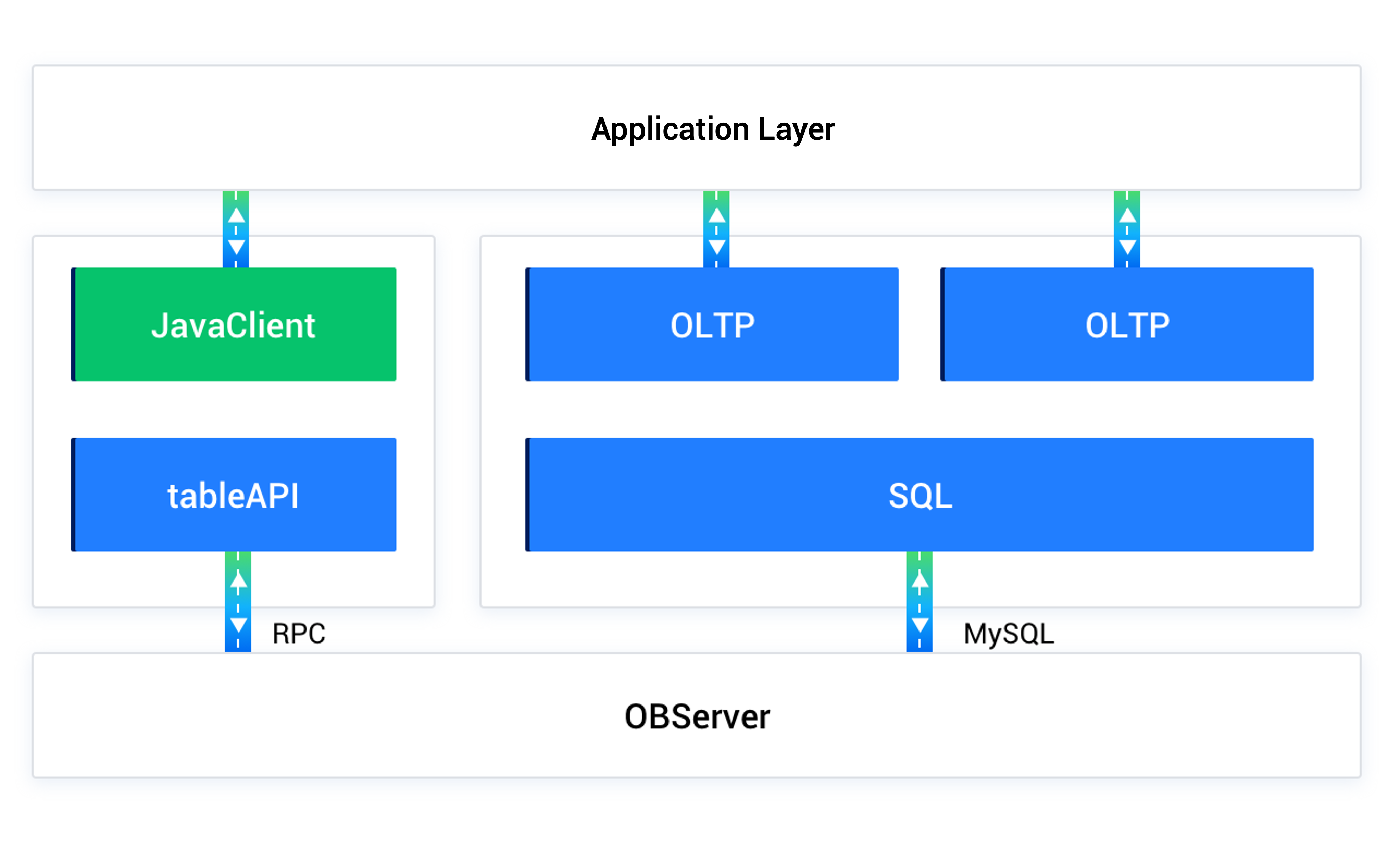
Workflow of the OBKV-Table client

Preparations

Before using the OBKV-Table client to connect to the OBKV-Table cluster for data processing, ensure that you have completed the following work:

  • Deployed an OceanBase cluster. For supported deployment plans, deployment methods, and detailed deployment procedures, see Deployment overview.

  • Created a MySQL tenant. For detailed instructions on creating a tenant, refer to Create a tenant.

  • Created a database. For detailed instructions on creating a database, refer to Create a database.

  • Created an OBKV-Table data table. For detailed instructions on creating an OBKV-Table data table, refer to OBKV-Table data models.

Below is a table creation example:

CREATE TABLE IF NOT EXISTS `test_varchar_table_00` (
    `c1` varchar(20) NOT NULL,
    `c2` varchar(20) DEFAULT NULL,
    `c3` varchar(20) DEFAULT NULL,
    PRIMARY KEY (`c1`)
);

Import maven obkv-table-client dependencies

Log in to the obkv-table-client-java repository, download the latest client, and add it to the pom.xml file.

What to do next

  • Depending on requirements, you can configure relevant parameters for the client. For detailed information about the parameters, refer to Set client parameters.

  • Utilize the client to operate on data through the supported interfaces. For detailed information about the interfaces, refer to Supported client interfaces.

  • For more information about how to use the client, see Use the OBKV-Table Java client.

Previous topic

Prepare for development with OBKV-Table
Last

Next topic

Set client parameters
Next
on this page
Introduction to the client
Preparations
Import maven obkv-table-client dependencies
What to do next