OceanBase
English日本語简体中文
ドキュメントホーム
製品
エコシステム
リリース

データベース

OceanBase CloudOceanBaseデータベース

データベース

OceanBase CloudOceanBaseデータベース

OceanBaseデータベース

KV - V4.4.2
  • OBKVの概要
  • OBKVのアーキテクチャ
  • OBKV-Table
    • OBKV-Table概要
      • OBKV-Tableの概要
      • OBKV-Tableのコア機能
      • OBKV-Tableデプロイの概要
    • シンプルなKey-Valueストレージのクイックスタート(Java)
    • OBKV-Table Javaクライアントを使ったアプリケーション開発
      • OBKV-Table Java開発ガイド
      • OBKV-Table開発の準備
      • OBKV-Table Javaクライアントを使用してクラスタに接続する
      • OBKV-Table操作例
        • OBKV-Tableへのデータ書き込み
        • OBKV-Tableによるデータのクエリ
        • OBKV-Tableでのデータ更新
        • OBKV-Tableによるデータの削除
      • OBKV-Table Javaクライアントのパラメータ設定
    • OBKV-Table管理
      • OBKV-Table管理の概要
      • OBKV-Tableの高可用性
      • OBKV-Tableのセキュリティ権限
      • OBKV-Tableモニタリングメトリクス
    • OBKV-Tableリファレンス
      • OBKV-Tableのデータモデル
      • OBKV-Tableの操作タイプ
      • OBKV-Tableがサポートするデータ型
      • OBKV-Table全文インデックス
      • OBKV-Tableのグローバルインデックスの使用範囲と例
      • OBKV-Tableの期限切れデータ削除
      • OBKV-Tableのグループコミット
      • OBKV-Tableの弱い整合性読み取りと最寄りデータセンターからの読み取り
      • OBKV-Table関連ビュー
    • OBKV-Table よくある質問
  • OBKV-HBase
    • OBKV-HBaseの概要
    • OBKV-HBaseのコア機能
    • OBKV-HBaseのデプロイ
    • OBKV-HBaseによるアプリケーション開発
      • OBKV-HBase アプリケーション開発の概要
      • OBKV-HBase Javaクライアントを使用したクラスタへの接続
      • HBaseの業務コードをOBKV-HBaseに移行する
      • OBKV-HBase データ操作の例
    • OBKV-HBase 移行ガイド
    • OBKV-HBase管理
      • OBKV-HBase管理の概要
      • OBKV-HBaseの高可用性
      • OBKV-HBaseのセキュリティ権限
      • OBKV-HBaseモニタリングメトリクス
    • OBKV-HBaseクエリの最適化
    • OBKV-HBaseの性能テスト
    • OBKV-HBaseリファレンス
      • OBKV-HBaseデータモデル
      • OBKV-HBaseのデータスキーマ
      • HBaseとの互換インターフェース
      • HBaseと互換性のあるフィルター
      • OBKV-HBaseの自動パーティション分割
      • OBKV-HBaseにおける期限切れデータの削除
      • OBKV-HBaseの弱い整合性読み取りと最寄りデータセンターからの読み取り
      • OBKV-HBase関連ビュー
    • OBKV-HBaseエコシステム統合
      • Flink連携
        • Flinkコネクタを使用してOBKV-HBaseにデータを同期する
        • ネイティブFlinkによるOBKV-HBaseへのアクセス
      • HiveによるOBKV-HBaseへのアクセス
      • SparkによるOBKV-HBaseへのアクセス
  • OBKVリリースノート
    • OBKV Enterprise版

PDF をダウンロード

このページには現在中国語/日本語版がなく、英語版を表示しています。
ドキュメントフィードバック
  1. ドキュメントセンター
  2. OceanBaseデータベース
  3. KV
  4. V4.4.2

Use the OBKV-Table Java client to connect to a cluster

最終更新:2026-09-29 10:40:08

Introduction to the client
Preparations
Import maven obkv-table-client dependencies
What to do next

OBKV-Table is an access pattern for the OBServer node introduced by OceanBase Database for the NoSQL scenario. This topic briefly describes how to use the ob_table_client_java client to call interfaces.

Introduction to the client

Generally, at the application layer, OBServer nodes can be accessed through two modes: OBKV-Table and SQL, corresponding to the NoSQL and SQL modes, respectively.

In the NoSQL mode, the Java client ob_table_client_java communicates with OBServer nodes through the RPC protocol. Meanwhile, the client supports a diverse range of operation functions, which can generally meet the requirements of most scenarios.

Compared with the SQL mode, OBKV-Table does not involve complex parsing of SQL syntax and semantics, or the generation of execution plans. However, it offers nearly equal transaction and storage capabilities as the SQL mode, making it relatively simple to use. The overall process diagram is as follows:
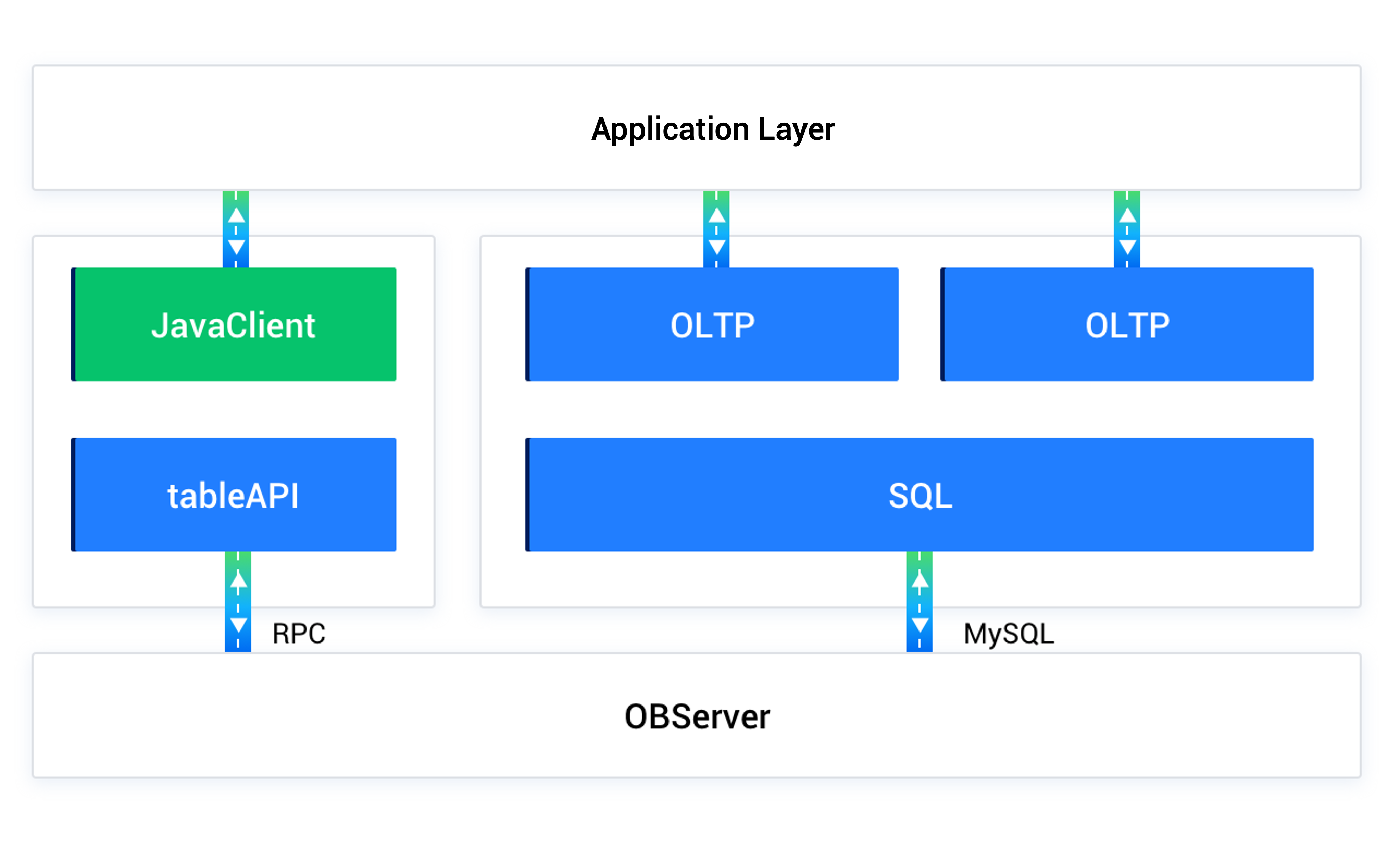
Workflow of the OBKV-Table client

Preparations

Before using the OBKV-Table client to connect to the OBKV-Table cluster for data processing, ensure that you have completed the following work:

  • Deployed an OceanBase cluster. For supported deployment plans, deployment methods, and detailed deployment procedures, see Deployment overview.

  • Created a MySQL tenant. For detailed instructions on creating a tenant, refer to Create a tenant.

  • Created a database. For detailed instructions on creating a database, refer to Create a database.

  • Created an OBKV-Table data table. For detailed instructions on creating an OBKV-Table data table, refer to OBKV-Table data models.

Below is a table creation example:

CREATE TABLE IF NOT EXISTS `test_varchar_table_00` (
    `c1` varchar(20) NOT NULL,
    `c2` varchar(20) DEFAULT NULL,
    `c3` varchar(20) DEFAULT NULL,
    PRIMARY KEY (`c1`)
);

Import maven obkv-table-client dependencies

Log in to the obkv-table-client-java repository, download the latest client, and add it to the pom.xml file.

What to do next

  • Depending on requirements, you can configure relevant parameters for the client. For detailed information about the parameters, refer to Set client parameters.

  • Utilize the client to operate on data through the supported interfaces. For detailed information about the interfaces, refer to Supported client interfaces.

  • For more information about how to use the client, see Use the OBKV-Table Java client.

次のトピック

OBKVの概要
次へ
このページの内容
Introduction to the client
Preparations
Import maven obkv-table-client dependencies
What to do next