
This topic describes the general issues that may occur when you use TableAPI, including their causes and solutions.
General issues in using the IDEA tool
ObTableClient Jar package missing
Exception in thread "main" java.lang.NoClassDefFoundError: com/alipay/oceanbase/rpc/ObTableClient
 at com.oceanbase.example.KVClient.initial(KVClient.java:46)
 at com.oceanbase.example.SimpleKVDemo.main(SimpleKVDemo.java:25)
Caused by: java.lang.ClassNotFoundException: com.alipay.oceanbase.rpc.ObTableClient
 at java.net.URLClassLoader.findClass(URLClassLoader.java:382)
 at java.lang.ClassLoader.loadClass(ClassLoader.java:418)
 at sun.misc.Launcher$AppClassLoader.loadClass(Launcher.java:355)
 at java.lang.ClassLoader.loadClass(ClassLoader.java:351)
 ... 2 more

Process finished with exit code 1
Cause
The
obkv-table-clientdependency package specified in thepom.xmlproject file is missing. The possible cause is that the dependency package is not downloaded to the local mvn repository. The complete path of the client jar package is as follows:~/.m2/repository/com/oceanbase/obkv-table-client/0.1.0/obkv-table-client-0.1.0.jarSolution
You can check whether the address of the local repository is configured in IDEA based on the following figure:
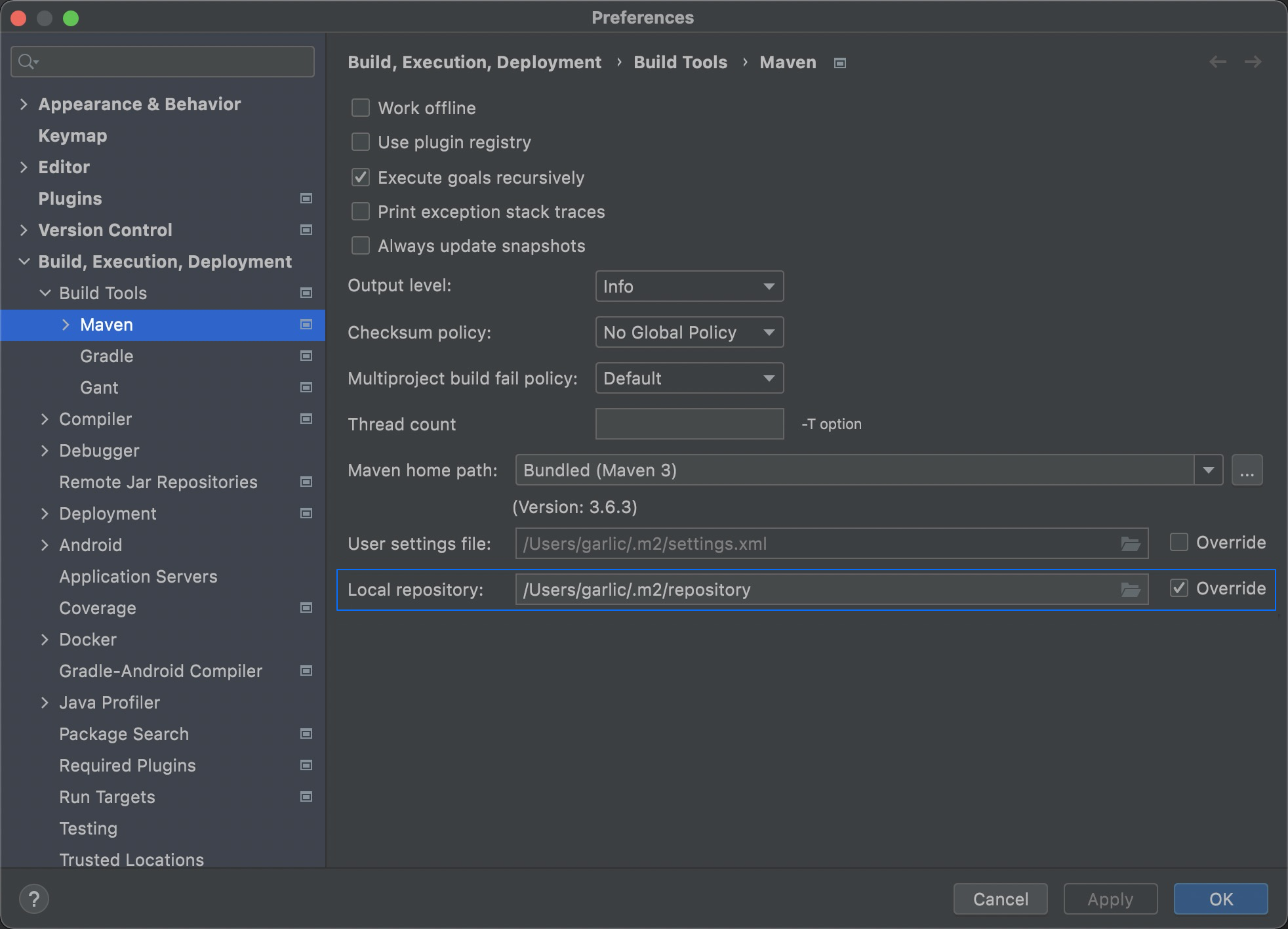
Java client initialization failed
SLF4J: Failed to load class "org.slf4j.impl.StaticLoggerBinder".
SLF4J: Defaulting to no-operation (NOP) logger implementation
SLF4J: See https://www.slf4j.org/codes.html#StaticLoggerBinder for further details.
Sofa-Middleware-Log:WARN [oceanbase-table-client] No log util is usable, Default app logger will be used.
... ...
Caused by: com.mysql.jdbc.exceptions.jdbc4.MySQLSyntaxErrorException: Access denied for user 'proxyro'@'xxx.xxx.xxx.xxx' (using password: YES)
 at sun.reflect.NativeConstructorAccessorImpl.newInstance0(Native Method)
 at sun.reflect.NativeConstructorAccessorImpl.newInstance(NativeConstructorAccessorImpl.java:62)
 at sun.reflect.DelegatingConstructorAccessorImpl.newInstance(DelegatingConstructorAccessorImpl.java:45)
 at java.lang.reflect.Constructor.newInstance(Constructor.java:423)
  ... ...
Cause
In the example, no password is set for the proxyro user. That is, no password is set for the user specified by the
setSysUserNamefunction during client initialization.obTableClient.setSysUserName("proxyro@sys"); // e.g. proxyro@sys obTableClient.setSysPassword("proxyro@passwd");Solution
You can log in to the OceanBase cluster by using OBClient or a MySQL client, and then run the following command to set a password for the proxyro user. For more information, see Connect to an OceanBase tenant by using OBClient and Connect to an OceanBase tenant by using a MySQL client.
grant select on oceanbase.* to proxyro identified by 'xxx';
// 'xxx' is the password.
Database empty
java.lang.IllegalArgumentException: database is empty. url=http://ip:port/services?Action=ObRootServiceInfo&User_ID=admin&UID=admin&ObRegion=ocp
 at com.alipay.oceanbase.rpc.ObTableClient.setParamURL(ObTableClient.java:1396)
 at com.oceanbase.example.KVClient.initial(KVClient.java:48)
 at com.oceanbase.example.SimpleKVDemo.main(SimpleKVDemo.java:25)
fail to init KV client, java.lang.IllegalArgumentException: database is empty. url=http://ip:port/services?Action=ObRootServiceInfo&User_ID=admin&UID=admin&ObRegion=ocp
Cause
No database is specified in the input URL of the
setParamURLfunction when the Java client is initialized.Solution
You can specify the database to access in the URL.
obTableClient.setParamURL("http://ip:port/services?Action=ObRootServiceInfo&User_ID=xxx&UID=xxx&ObRegion=xxx&database=test");
Table does not exist
com.alipay.oceanbase.rpc.exception.ObTableNotExistException: table not exist: kv_table
 at com.alipay.oceanbase.rpc.location.LocationUtil.getTableEntryFromResultSet(LocationUtil.java:622)
 at com.alipay.oceanbase.rpc.location.LocationUtil.getTableEntryFromRemote(LocationUtil.java:384)
 at com.alipay.oceanbase.rpc.location.LocationUtil.access$200(LocationUtil.java:50)
 at com.alipay.oceanbase.rpc.location.LocationUtil$1$1.execute(LocationUtil.java:313)
 at com.alipay.oceanbase.rpc.location.LocationUtil$1$1.execute(LocationUtil.java:309)
 at com.alipay.oceanbase.rpc.location.LocationUtil.callTableEntryRefresh(LocationUtil.java:264)
 at com.alipay.oceanbase.rpc.location.LocationUtil.access$300(LocationUtil.java:50)
 at com.alipay.oceanbase.rpc.location.LocationUtil$1.execute(LocationUtil.java:308)
 at com.alipay.oceanbase.rpc.location.LocationUtil$1.execute(LocationUtil.java:305)
 at com.alipay.oceanbase.rpc.location.LocationUtil.callTableEntryRefreshWithPriority(LocationUtil.java:133)
 at com.alipay.oceanbase.rpc.location.LocationUtil.loadTableEntryWithPriority(LocationUtil.java:304)
 at com.alipay.oceanbase.rpc.ObTableClient.refreshTableEntry(ObTableClient.java:753)
 at com.alipay.oceanbase.rpc.ObTableClient.getOrRefreshTableEntry(ObTableClient.java:702)
 at com.alipay.oceanbase.rpc.ObTableClient.getTable(ObTableClient.java:839)
 at com.alipay.oceanbase.rpc.ObTableClient.execute(ObTableClient.java:424)
 at com.alipay.oceanbase.rpc.ObTableClient.execute(ObTableClient.java:400)
 at com.alipay.oceanbase.rpc.ObTableClient.insert(ObTableClient.java:1060)
 at com.alipay.oceanbase.rpc.table.AbstractTable.insert(AbstractTable.java:52)
 at com.oceanbase.example.KVClient.put(KVClient.java:81)
 at com.oceanbase.example.SimpleKVDemo.main(SimpleKVDemo.java:40)
fail to put kv data, com.alipay.oceanbase.rpc.exception.ObTableNotExistException: table not exist: kv_table
Cause
The
kv_tabletable does not exist in the database specified by setParamURL.Notice
kv_table is for reference only. The actual table name will be different.
Solution
Ensure that the table being operated by the client API exists in the database specified by setParamURL.
General issues in command line-based development
Dependency packages such as sofa cannot be found
$mvn compile -e
[INFO] Error stacktraces are turned on.
[INFO] Scanning for projects...
[INFO]
[INFO] ------------------------------------------------------------------------
[INFO] Building simple-kv-demo 1.0-SNAPSHOT
[INFO] ------------------------------------------------------------------------
[WARNING] The POM for com.oceanbase:obkv-table-client:jar:0.1.0 is invalid, transitive dependencies (if any) will not be available, enable debug logging for more details
[INFO]
[INFO] --- maven-resources-plugin:2.6:resources (default-resources) @ simple-kv-demo ---
[WARNING] Using platform encoding (UTF-8 actually) to copy filtered resources, i.e. build is platform dependent!
[INFO] skip non existing resourceDirectory /home/admin/github/obkv-table-client-java/example/simple-kv-demo/src/main/resources
[INFO]
[INFO] --- maven-compiler-plugin:3.1:compile (default-compile) @ simple-kv-demo ---
[INFO] Changes detected - recompiling the module!
[WARNING] File encoding has not been set, using platform encoding UTF-8, i.e. build is platform dependent!
[INFO] Compiling 3 source files to /home/admin/github/obkv-table-client-java/example/simple-kv-demo/target/classes
[INFO] -------------------------------------------------------------
[ERROR] COMPILATION ERROR :
[INFO] -------------------------------------------------------------
[ERROR] /home/admin/github/obkv-table-client-java/example/simple-kv-demo/src/main/java/com/oceanbase/example/LoggerFactory.java:[21,35] package com.alipay.sofa.common.code does not exist
[ERROR] /home/admin/github/obkv-table-client-java/example/simple-kv-demo/src/main/java/com/oceanbase/example/LoggerFactory.java:[22,34] package com.alipay.sofa.common.log does not exist
[ERROR] /home/admin/github/obkv-table-client-java/example/simple-kv-demo/src/main/java/com/oceanbase/example/LoggerFactory.java:[23,17] package org.slf4j does not exist
[ERROR] /home/admin/github/obkv-table-client-java/example/simple-kv-demo/src/main/java/com/oceanbase/example/LoggerFactory.java:[28,19] cannot find symbol
  symbol:   class LogCode2Description
  location: class com.oceanbase.example.LoggerFactory
[ERROR] /home/admin/github/obkv-table-client-java/example/simple-kv-demo/src/main/java/com/oceanbase/example/LoggerFactory.java:[31,19] cannot find symbol
  symbol:   class Logger
  location: class com.oceanbase.example.LoggerFactory
[ERROR] /home/admin/github/obkv-table-client-java/example/simple-kv-demo/src/main/java/com/oceanbase/example/LoggerFactory.java:[38,19] cannot find symbol
  symbol:   class Logger
  location: class com.oceanbase.example.LoggerFactory
[ERROR] /home/admin/github/obkv-table-client-java/example/simple-kv-demo/src/main/java/com/oceanbase/example/LoggerFactory.java:[28,45] cannot find symbol
  symbol:   variable LogCode2Description
  location: class com.oceanbase.example.LoggerFactory
[ERROR] /home/admin/github/obkv-table-client-java/example/simple-kv-demo/src/main/java/com/oceanbase/example/LoggerFactory.java:[35,16] cannot find symbol
  symbol:   variable LoggerSpaceManager
  location: class com.oceanbase.example.LoggerFactory

org.apache.maven.lifecycle.LifecycleExecutionException: Failed to execute goal org.apache.maven.plugins:maven-compiler-plugin:3.1:compile (default-compile) on project simple-kv-demo: Compilation failure
    at org.apache.maven.lifecycle.internal.MojoE
Cause
The jar package that
pom.xmldepends on in the local path is not of the latest version.Solution
Clear the local mvn repository package that the project depends on, and perform compilation again.
mvn dependency:purge-local-repository
Considerations
If you directly use the demo project on the official website of GitHub for debugging, package all dependencies of the demo project before execution. To package all dependencies, you must modify the pom.xml file of the demo project.
Take obkv-table-client-java/example/simple-kv-demo as an example, add the following content to the pom.xml file:
<build>
  <plugins>
    <plugin>
      <groupId>org.apache.maven.plugins</groupId>
        <artifactId>maven-assembly-plugin</artifactId>
                <version>2.4.1</version>
                <configuration>
                    <descriptorRefs>
                        <descriptorRef>jar-with-dependencies</descriptorRef>
                    </descriptorRefs>
                    <archive>
                        <manifest>
                            <mainClass>com.oceanbase.example.SimpleKVDemo</mainClass>
                        </manifest>
                    </archive>
                </configuration>
                <executions>
                    <execution>
                        <id>make-assembly</id>
                        <phase>package</phase>
          <goals>
            <goal>single</goal>
          </goals>
        </execution>
      </executions>
    </plugin>
  </plugins>
</build>
Compile the package again after modification:
mvn clean package
Run the following command:
java -cp ./target/simple-kv-demo-1.0-SNAPSHOT-jar-with-dependencies.jar com.oceanbase.example.SimpleKVDemo
Note
For more information about demo projects, see example.