
OBKV-Table provides an interface for manipulating data within table models. Under the hood, OBKV-Table defines a set of standardized interaction protocols between the client and the database server. This guide aims to offer a comprehensive explanation of the implementation principles of OBKV-Table.
Working process of OBKV-Table
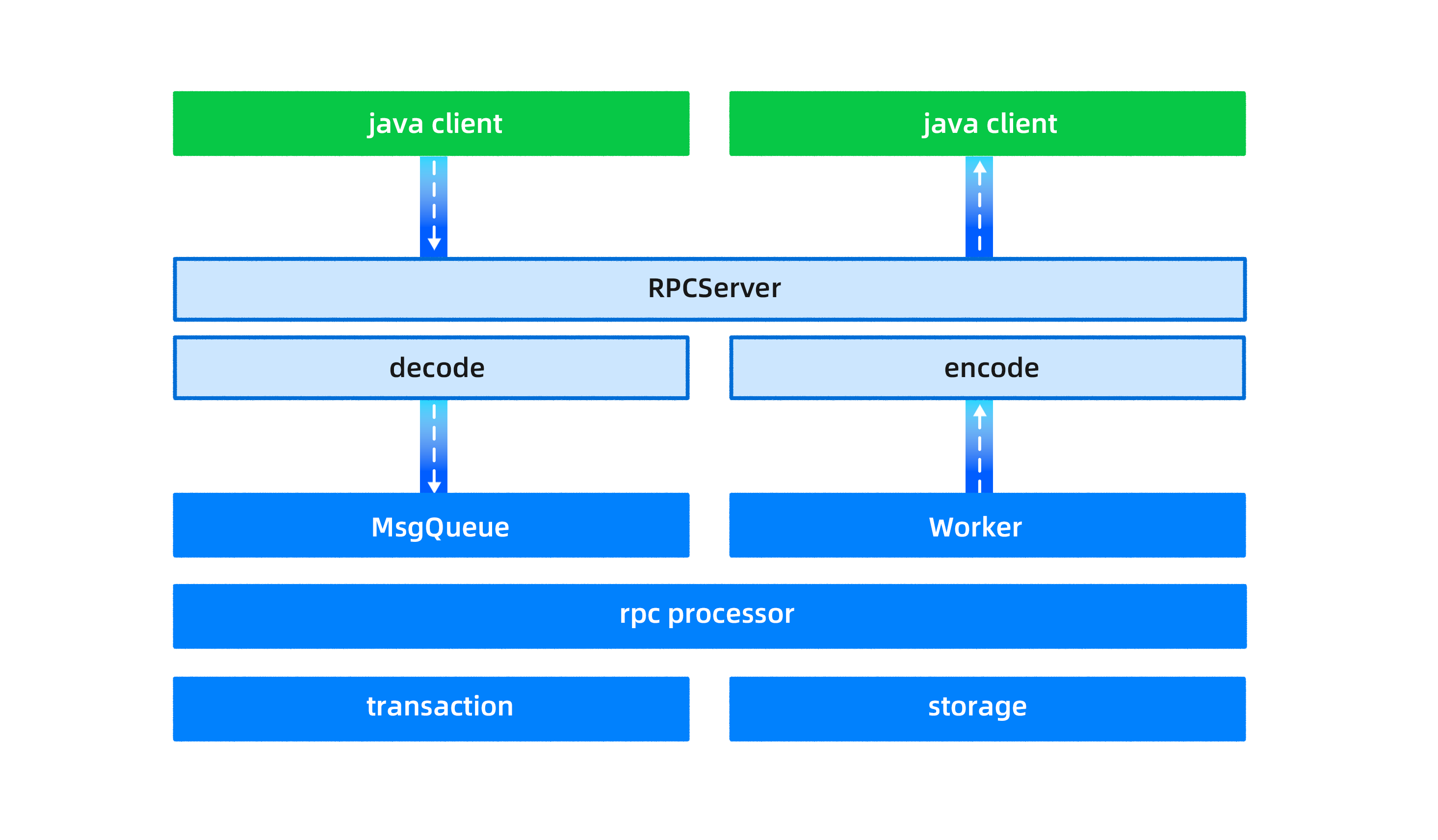
The working process of OBKV-Table involves the client, RPC framework, and an OBServer node, as shown in the following figure. These three parts are described in the following sections.
Client
OceanBase Database is a distributed database in which each table, or even different partitions of the same table, may be stored on different servers. This means that in order to read or write table data, you must first determine the location of the table or partition where the data is stored.
Specifically, for OBKV-Table, the OBServer node does not perform routing forwarding and only executes commands locally. Any routing errors could lead to unintended data being read or written. As a result, in each operation, the client first computes the specific partition id based on the table name and rowkey. Then, using the partition ID, it determines the specific location of the OBServer node to execute the command, and subsequently sends the request to the corresponding OBServer node.
In addition to providing basic read and write functionality, the client also plays a crucial role in calculating routes.
RPC framework
OBKV-Table uses a custom RPC protocol of OceanBase Database for communication, which follows the standard request-response model.
Different requests are independent of each other, and the server concurrently processes multiple requests. Multiple TCP connections can be established between the same client and server. This model is encapsulated by using libeasy.
The libeasy package contains the package header and data of the OceanBase RPC package. After the data is passed through the RPC layer to the server, it needs to be parsed by the decode module to analyze the data packet, and finally, the server extracts the message type and data body from the request package.
OBServer node
An OBServer node processes OBKV-Table requests from the client by using the producer-consumer model. The maximum number of concurrent messages a client can send depends on the queue length and the OBServer node's processing speed.
When the OBServer node receives a client request, an independent thread places the request message into a message queue, and a worker thread retrieves and processes the message from the queue.
To differentiate between message types, the OBServer node uses a priority queue, enabling hierarchical processing of different message types (MySQL, RPC, etc.). This ensures that high-priority requests are not "starved" due to timeouts.
Furthermore, OBKV-Table and OceanBase SQL use the same transaction framework and storage engine. The storage engine employs a two-level partitioned table and LSM tree, supporting various combinations of hash and range partitioning. This setup addresses partition hotspots and machine hotspots through automatic range partitioning and load balancing, all transparent to the user.
Note
Currently, OBKV-Table does not support cross-partition transactions.
Comparison with OceanBase SQL mode
The table API provided by OBKV-Table seamlessly integrates with and can be used alongside OceanBase SQL. Below, we outline the advantages and disadvantages of OBKV-Table when compared with the SQL mode.
Advantages:
- OBKV-Table is designed based on a distributed storage layer, bringing shorter data access paths and better performance for equivalent functionality. Its simpler semantics make it easier to optimize, leading to more predictable performance.
- Batch operations have more flexible and efficient semantics when compared with the SQL mode. For example, a multi-get operation can select different columns for different rows.
- The API interface is straightforward, providing entity semantics directly without the need for complex ER mappings.
- It uses a simple RPC protocol, eliminating the need for reconnection that is typical with traditional JDBC/ODBC interfaces. It is also largely unrestricted by connection numbers (though currently limited by the RPC framework).
Disadvantages:
- The query functionality of OBKV-Table does not match that of the SQL mode, offering limited features such as get, scan, and limit. For aggregation and sorting features, the SQL mode should be used.
- OBKV-Table does not provide interactive transactions or complex transaction capabilities. Unlike traditional relational databases, OceanBase Database itself operates as a feature-rich NewSQL relational database, where the consideration for using OBKV-Table is not solely based on its high scalability and availability.
- OBKV-Table does not support global indexes and therefore cannot operate on tables related to global indexes.