
OceanBase Database can handle scenarios with mixed workloads. Based on a distributed architecture of peer nodes, it is capable of supporting high-concurrency, scalable OLTP tasks, while also performing parallel computing for OLAP tasks within the same data engine using the MPP architecture, eliminating the need to maintain two separate datasets.
In OceanBase Database, you can not only perform parallel analysis directly on large volumes of online business data, but also leverage its Parallel DML (PDML) capability to quickly and securely execute large batch-write transactions concurrently. All of this is achieved while strictly guaranteeing transaction consistency.
Below, we will manually run the TPC-H benchmark to demonstrate the features and usage of OceanBase Database in operational OLAP scenarios. TPC-H is an industry-standard benchmark for decision support business. It evaluates the analytical and decision support capabilities of a database system through a series of complex queries executed on large datasets. For more information, visit the official TPC website. (On May 20, 2021, OceanBase Database set a new world record in TPC-H with a score of 15.26 million QphH, becoming the only database to simultaneously break both TPC-C and TPC-H records, proving its ability to handle both online transaction and real-time analytics workloads. For details, see TPC-H Result)
Manually perform the TPC-H test
The following content describes how to manually perform the TPC-H test step by step using the official TPC-H tool. Manual testing can help you better understand OceanBase Database, especially the parameter settings.
Optimize the environment
Optimize OceanBase Database.
Execute the following statements in the system tenant (
systenant) to configure the relevant parameters.# Adjust the memory allocated to the sys tenant to provide more resources for the test tenant, and adjust it dynamically based on the actual environment. ALTER SYSTEM SET system_memory='15g'; ALTER RESOURCE UNIT sys_unit_config memory_size ='15G'; # Tuning parameters ALTER SYSTEM SET trace_log_slow_query_watermark='100s'; ALTER SYSTEM SET enable_sql_operator_dump=True; ALTER SYSTEM SET _hash_area_size='3g'; ALTER SYSTEM SET memstore_limit_percentage=50; ALTER SYSTEM SET enable_rebalance=False; ALTER SYSTEM SET memory_chunk_cache_size='0'; ALTER SYSTEM SET major_compact_trigger=5; ALTER SYSTEM SET cache_wash_threshold='30g'; # Adjust the log level and retention count ALTER SYSTEM SET syslog_level='ERROR'; ALTER SYSTEM SET max_syslog_file_count=100; ALTER SYSTEM SET enable_syslog_recycle='True';Configure the tenant settings.
Execute the following statements in the test tenant (user tenant) to configure the relevant parameters.
# Set global parameters
SET GLOBAL ob_sql_work_area_percentage=80;
SET GLOBAL optimizer_use_sql_plan_baselines = true;
SET GLOBAL optimizer_capture_sql_plan_baselines = true;
ALTER SYSTEM SET ob_enable_batched_multi_statement='true';
# Set these parameters at the tenant level to prevent transaction timeouts.
SET GLOBAL ob_query_timeout=36000000000;
SET GLOBAL ob_trx_timeout=36000000000;
SET GLOBAL max_allowed_packet=67108864;
SET GLOBAL secure_file_priv="";
/*
We recommend that you set parallel_server_target to 10 times the number of CPU cores allocated to the test tenant, multiplied by the number of servers, and then multiplied by 0.8.
If the unit configuration used by the test tenant is: `CREATE RESOURCE UNIT $unit_name max_cpu 26;`
Then the value is 26*10*3*0.8=624
*/
SET GLOBAL parallel_servers_target=624;
After optimizing the parameter settings, restart the cluster.
Install the TPC-H Tool
Download the TPC-H Tool. For more information, see TPC-H Tool download page.
After downloading, extract the file and navigate to the extracted TPC-H directory.
[wieck@localhost ~] $ unzip 7e965ead-8844-4efa-a275-34e35f8ab89b-tpc-h-tool.zip
[wieck@localhost ~] $ cd TPC-H_Tools_v3.0.0
Copy
Makefile.suite.[wieck@localhost TPC-H_Tools_v3.0.0] $ cd dbgen/ [wieck@localhost dbgen] $ cp Makefile.suite MakefileModify the definitions of parameters such as CC, DATABASE, MACHINE, and WORKLOAD in the
Makefilefile.CC = gcc # Current values for DATABASE are: INFORMIX, DB2, TDAT (Teradata) # SQLSERVER, SYBASE, ORACLE, VECTORWISE # Current values for MACHINE are: ATT, DOS, HP, IBM, ICL, MVS, # SGI, SUN, U2200, VMS, LINUX, WIN32 # Current values for WORKLOAD are: TPCH DATABASE= MYSQL MACHINE = LINUX WORKLOAD = TPCHModify the
tpcd.hfile and add new macro definitions.#ifdef MYSQL #define GEN_QUERY_PLAN "" #define START_TRAN "START TRANSACTION" #define END_TRAN "COMMIT" #define SET_OUTPUT "" #define SET_ROWCOUNT "limit %d;\n" #define SET_DBASE "use %s;\n" #endifCompile the files.
make
Generate data
You can generate 10G, 100G, or 1T of TPC-H data based on your actual environment. This example generates 100G of data.
./dbgen -s 100
mkdir tpch100
mv *.tbl tpch100
Generate query SQL
Note
You can follow the steps below in this section to generate and adjust the query SQL, or directly use the query SQL provided on [GitHub](https://github.com/oceanbase/obdeploy/tree/master/plugins/tpch/3.1.0/queries).
If you choose to use the query SQL from GitHub, you need to modify the cpu_num in the SQL statements to the actual concurrency number.
Copy the
qgenanddists.dssfiles to thequeriesdirectory.cp qgen queries cp dists.dss queriesCreate a
gen.shscript in thequeriesdirectory to generate the query SQL.#!/usr/bin/bash export DSS_QUERY=dists.dss for i in {1..22} do ./qgen -d $i -s 100 > db"$i".sql doneExecute the
gen.shscript.chmod +x gen.sh ./gen.shAdjust the query SQL.
dos2unix *
For the adjusted query SQL, refer to GitHub. You need to modify the cpu_num in the SQL statements provided by GitHub to the actual concurrency number. It is recommended that the concurrency number be set equal to the total number of available CPUs for optimal performance.
You can use the following command under the sys tenant to view the total number of available CPUs for a tenant.
select sum(max_cpu) from DBA_OB_UNITS ;
Taking q1 as an example, the modified SQL statement is as follows:
select /*+    parallel(96) */   ---Increase parallel concurrency
   l_returnflag,
   l_linestatus,
   sum(l_quantity) as sum_qty,
   sum(l_extendedprice) as sum_base_price,
   sum(l_extendedprice * (1 - l_discount)) as sum_disc_price,
   sum(l_extendedprice * (1 - l_discount) * (1 + l_tax)) as sum_charge,
   avg(l_quantity) as avg_qty,
   avg(l_extendedprice) as avg_price,
   avg(l_discount) as avg_disc,
   count(*) as count_order
from
   lineitem
where
   l_shipdate <= date '1998-12-01' - interval '90' day
group by
   l_returnflag,
   l_linestatus
order by
   l_returnflag,
   l_linestatus;
Create a table
Create the table schema file create_tpch_mysql_table_part.ddl.
create tablegroup if not exists tpch_tg_100g_lineitem_order_group binding true partition by key 1 partitions 192;
create tablegroup if not exists tpch_tg_100g_partsupp_part binding true partition by key 1 partitions 192;

drop database if exists $db_name;
create database $db_name;
use $db_name;

    create table lineitem (
       l_orderkey bigint not null,
       l_partkey bigint not null,
       l_suppkey bigint not null,
       l_linenumber bigint not null,
       l_quantity bigint not null,
       l_extendedprice bigint not null,
       l_discount bigint not null,
       l_tax bigint not null,
       l_returnflag char(1) default null,
       l_linestatus char(1) default null,
       l_shipdate date not null,
       l_commitdate date default null,
       l_receiptdate date default null,
       l_shipinstruct char(25) default null,
       l_shipmode char(10) default null,
       l_comment varchar(44) default null,
       primary key(l_orderkey, l_linenumber))
       tablegroup = tpch_tg_100g_lineitem_order_group
       partition by key (l_orderkey) partitions 192;
    create index I_L_ORDERKEY on lineitem(l_orderkey) local;
    create index I_L_SHIPDATE on lineitem(l_shipdate) local;

    create table orders (
       o_orderkey bigint not null,
       o_custkey bigint not null,
       o_orderstatus char(1) default null,
       o_totalprice bigint default null,
       o_orderdate date not null,
       o_orderpriority char(15) default null,
       o_clerk char(15) default null,
       o_shippriority bigint default null,
       o_comment varchar(79) default null,
       primary key (o_orderkey))
       tablegroup = tpch_tg_100g_lineitem_order_group
       partition by key(o_orderkey) partitions 192;
    create index I_O_ORDERDATE on orders(o_orderdate) local;


    create table partsupp (
       ps_partkey bigint not null,
       ps_suppkey bigint not null,
       ps_availqty bigint default null,
       ps_supplycost bigint default null,
       ps_comment varchar(199) default null,
       primary key (ps_partkey, ps_suppkey))
       tablegroup tpch_tg_100g_partsupp_part
       partition by key(ps_partkey) partitions 192;


    create table part (
       p_partkey bigint not null,
       p_name varchar(55) default null,
       p_mfgr char(25) default null,
       p_brand char(10) default null,
       p_type varchar(25) default null,
       p_size bigint default null,
       p_container char(10) default null,
       p_retailprice bigint default null,
       p_comment varchar(23) default null,
       primary key (p_partkey))
       tablegroup tpch_tg_100g_partsupp_part
       partition by key(p_partkey) partitions 192;


   create table customer (
       c_custkey bigint not null,
       c_name varchar(25) default null,
       c_address varchar(40) default null,
       c_nationkey bigint default null,
       c_phone char(15) default null,
       c_acctbal bigint default null,
       c_mktsegment char(10) default null,
       c_comment varchar(117) default null,
       primary key (c_custkey))
       partition by key(c_custkey) partitions 192;

   create table supplier (
       s_suppkey bigint not null,
       s_name char(25) default null,
       s_address varchar(40) default null,
       s_nationkey bigint default null,
       s_phone char(15) default null,
       s_acctbal bigint default null,
       s_comment varchar(101) default null,
       primary key (s_suppkey)
     ) partition by key(s_suppkey) partitions 192;


   create table nation (
       n_nationkey bigint not null,
       n_name char(25) default null,
       n_regionkey bigint default null,
       n_comment varchar(152) default null,
       primary key (n_nationkey));

   create table region (
       r_regionkey bigint not null,
       r_name char(25) default null,
       r_comment varchar(152) default null,
       primary key (r_regionkey));
Load data
You can write your own script based on the data and SQL generated in the previous steps. Example operations for loading data are as follows:
Create a directory for the loading script.
mkdir load
cd load
cp ../dss.ri  ../dss.ddl ./
Create the
load.pyscript.$cat load.py #/usr/bin/evn python #-*- encoding:utf-8 -*- import os import sys import time import commands hostname='$host_ip' # Note: Please enter the IP address of a server where an observer, such as observer A, resides. port='$host_port' # The port number of observer A. tenant='$tenant_name' # The name of the tenant. user='$user' # Username password='******' # The password. data_path='$path' # Note: Please specify the directory where the tbl files are located on the server hosting Observer A. db_name='$db_name' # The name of the database. # Create a table cmd_str='obclient -h%s -P%s -u%s@%s -p%s -D%s < create_tpch_mysql_table_part.ddl'%(hostname,port,user,tenant,password,db_name) result = commands.getstatusoutput(cmd_str) print result cmd_str='obclient -h%s -P%s -u%s@%s -p%s -D%s -e "show tables;" '%(hostname,port,user,tenant,password,db_name) result = commands.getstatusoutput(cmd_str) print result cmd_str=""" obclient -h%s -P%s -u%s@%s -p%s -c -D%s -e "load data /*+ parallel(80) */ infile '%s/customer.tbl' into table customer fields terminated by '|';" """ %(hostname,port,user,tenant,password,db_name,data_path) result = commands.getstatusoutput(cmd_str) print result cmd_str=""" obclient -h%s -P%s -u%s@%s -p%s -c -D%s -e "load data /*+ parallel(80) */ infile '%s/lineitem.tbl' into table lineitem fields terminated by '|';" """ %(hostname,port,user,tenant,password,db_name,data_path) result = commands.getstatusoutput(cmd_str) print result cmd_str=""" obclient -h%s -P%s -u%s@%s -p%s -c -D%s -e "load data /*+ parallel(80) */ infile '%s/nation.tbl' into table nation fields terminated by '|';" """ %(hostname,port,user,tenant,password,db_name,data_path) result = commands.getstatusoutput(cmd_str) print result cmd_str=""" obclient -h%s -P%s -u%s@%s -p%s -c -D%s -e "load data /*+ parallel(80) */ infile '%s/orders.tbl' into table orders fields terminated by '|';" """ %(hostname,port,user,tenant,password,db_name,data_path) result = commands.getstatusoutput(cmd_str) print result cmd_str=""" obclient -h%s -P%s -u%s@%s -p%s -D%s -e "load data /*+ parallel(80) */ infile '%s/partsupp.tbl' into table partsupp fields terminated by '|';" """ %(hostname,port,user,tenant,password,db_name,data_path) result = commands.getstatusoutput(cmd_str) print result cmd_str=""" obclient -h%s -P%s -u%s@%s -p%s -c -D%s -e "load data /*+ parallel(80) */ infile '%s/part.tbl' into table part fields terminated by '|';" """ %(hostname,port,user,tenant,password,db_name,data_path) result = commands.getstatusoutput(cmd_str) print result cmd_str=""" obclient -h%s -P%s -u%s@%s -p%s -c -D%s -e "load data /*+ parallel(80) */ infile '%s/region.tbl' into table region fields terminated by '|';" """ %(hostname,port,user,tenant,password,db_name,data_path) result = commands.getstatusoutput(cmd_str) print result cmd_str=""" obclient -h%s -P%s -u%s@%s -p%s -c -D%s -e "load data /*+ parallel(80) */ infile '%s/supplier.tbl' into table supplier fields terminated by '|';" """ %(hostname,port,user,tenant,password,db_name,data_path) result = commands.getstatusoutput(cmd_str) print resultLoad the data.
Notice
To load data, you need to install the OBClient client.
$ python load.py
(0,'')
(0, 'obclient: [Warning] Using a password on the command line interface can be insecure.\nTABLE_NAME\nT1\nLINEITEM\nORDERS\nPARTSUPP\nPART\nCUSTOMER\nSUPPLIER\nNATION\nREGION')
(0, 'obclient: [Warning] Using a password on the command line interface can be insecure.')
(0, 'obclient: [Warning] Using a password on the command line interface can be insecure.')
(0, 'obclient: [Warning] Using a password on the command line interface can be insecure.')
(0, 'obclient: [Warning] Using a password on the command line interface can be insecure.')
(0, 'obclient: [Warning] Using a password on the command line interface can be insecure.')
(0, 'obclient: [Warning] Using a password on the command line interface can be insecure.')
(0, 'obclient: [Warning] Using a password on the command line interface can be insecure.')
Perform a major compaction.
A major compaction merges the SSTables and MemTables of the current major version with the full static data of the previous major version, making storage layer statistics more accurate and execution plans more stable.
Notice
To perform a major compaction, log in to the sys tenant of the OceanBase cluster as the
rootuser.MySQL [(none)]> USE oceanbase Database changed MySQL [oceanbase]> ALTER SYSTEM MAJOR FREEZE; Query OK, 0 rows affectedCheck whether the major compaction is complete.
MySQL [oceanbase]> SELECT FROZEN_SCN, LAST_SCN FROM oceanbase.CDB_OB_MAJOR_COMPACTION;
+---------------------+---------------------+
| FROZEN_SCN          | LAST_SCN            |
+---------------------+---------------------+
| 1667239201167716767 | 1667239201167716767 |
| 1667239200111919300 | 1667239200111919300 |
| 1667239201167452168 | 1667239201167452168 |
| 1667239201168053124 | 1667239201168053124 |
| 1667239201167520213 | 1667239201167520213 |
+---------------------+---------------------+
Note
The major compaction is complete when all
FROZEN_SCNvalues equal their correspondingLAST_SCNvalues.
Test
You can write your own script based on the data and SQL generated in the preceding steps. Example test operations are as follows:
Write the test script
tpch.shin thequeriesdirectory.#!/bin/bash TPCH_TEST="obclient -h $host_ip -P $host_port -utpch_100g_part@tpch_mysql -D tpch_100g_part -ptest -c" # Run a warmup. for i in {1..22} do sql1="source db${i}.sql" echo $sql1| $TPCH_TEST >db${i}.log || ret=1 done # Run the formal test. for i in {1..22} do starttime=`date +%s%N` echo `date '+[%Y-%m-%d %H:%M:%S]'` "BEGIN Q${i}" sql1="source db${i}.sql" echo $sql1| $TPCH_TEST >db${i}.log || ret=1 stoptime=`date +%s%N` costtime=`echo $stoptime $starttime | awk '{printf "%0.2f\n", ($1 - $2) / 1000000000}'` echo `date '+[%Y-%m-%d %H:%M:%S]'` "END,COST ${costtime}s" doneExecute the test script.
sh tpch.sh
FAQ
Data import failed. The error message is as follows:
ERROR 1017 (HY000) at line 1: File not existThe
tblfile must be placed in a directory on the machine where the connected OceanBase Database resides, because data loading requires local import.Error occurred while viewing data. The error message is as follows:
ERROR 4624 (HY000): No memory or reach tenant memory limitInsufficient memory. It is recommended to increase the tenant memory.
Error occurred during data import. The error message is as follows:
ERROR 1227 (42501) at line 1: Access deniedYou need to grant access privileges to the user. Run the following command to grant the privilege:
grant file on *.* to tpch_100g_part;An error occurred when running dos2unix * to adjust the query SQL. The error message is as follows:
-bash: dos2unix: command not foundYou need to install dos2unix. Run the following command to install it:
yum install -y dos2unix
Manually experience Operational OLAP
Through the previous steps, we have obtained a TPCH test environment. Now, let's manually execute queries to see OceanBase Database's capabilities and features in OLAP. First, log in to the database using OBClient. If you haven't installed OBClient, you can also use the mysql client.
obclient -h127.0.0.1 -P2881 -uroot@test -Dtest -A -p -c
Before you begin, you need to set the degree of parallelism based on the configuration of your OceanBase cluster and tenant. It is recommended that the specific value does not exceed twice the number of CPU cores configured for the current tenant. For example, if your tenant's maximum CPU configuration is 8, it is suggested to set the degree of parallelism to 16 here:
MySQL [test]> SET GLOBAL parallel_servers_target=16;
Query OK, 0 rows affected

MySQL [test]> SET GLOBAL parallel_max_servers=16;
Query OK, 0 rows affected
OceanBase Database is compatible with most internal MySQL views. We can use the following query to view the size of tables in the current environment:
MySQL [test]> SELECT table_name, table_rows, CONCAT(ROUND(data_length/(1024*1024*1024),2),' GB')  table_size FROM information_schema.TABLES WHERE table_schema = 'test' order by table_rows desc;
+------------+------------+------------+
| table_name | table_rows | table_size |
+------------+------------+------------+
| lineitem   |    6001215 | 0.37 GB    |
| orders     |    1500000 | 0.08 GB    |
| partsupp   |     800000 | 0.04 GB    |
| part       |     200000 | 0.01 GB    |
| customer   |     150000 | 0.01 GB    |
| supplier   |      10000 | 0.00 GB    |
| nation     |         25 | 0.00 GB    |
| region     |          5 | 0.00 GB    |
+------------+------------+------------+
8 rows in set
Next, we will use Q1 from the TPC-H test to experience OceanBase Database's query capabilities. The Q1 query summarizes and analyzes information such as prices, discounts, shipments, and quantities for various goods within a specified time period on the largest lineitem table. This query reads all table data and performs calculations such as partitioning, sorting, and aggregation.
Execute the query without enabling concurrent execution
First, execute the query with concurrent execution disabled by default:
select
 l_returnflag,
 l_linestatus,
 sum(l_quantity) as sum_qty,
 sum(l_extendedprice) as sum_base_price,
 sum(l_extendedprice * (1 - l_discount)) as sum_disc_price,
 sum(l_extendedprice * (1 - l_discount) * (1 + l_tax)) as sum_charge,
 avg(l_quantity) as avg_qty,
 avg(l_extendedprice) as avg_price,
 avg(l_discount) as avg_disc,
 count(*) as count_order
from
 lineitem
where
 l_shipdate <= date '1998-12-01' - interval '90' day
group by
 l_returnflag,
 l_linestatus
order by
 l_returnflag,
 l_linestatus;
In the test environment of this example, the execution result is as follows:
+--------------+--------------+----------+----------------+----------------+--------------+---------+------------+----------+-------------+
| l_returnflag | l_linestatus | sum_qty  | sum_base_price | sum_disc_price | sum_charge   | avg_qty | avg_price  | avg_disc | count_order |
+--------------+--------------+----------+----------------+----------------+--------------+---------+------------+----------+-------------+
| A            | F            | 37734107 |    56586577106 |    56586577106 |  56586577106 | 25.5220 | 38273.1451 |   0.0000 |     1478493 |
| N            | F            |   991417 |     1487505208 |     1487505208 |   1487505208 | 25.5165 | 38284.4806 |   0.0000 |       38854 |
| N            | O            | 74476040 |   111701776272 |   111701776272 | 111701776272 | 25.5022 | 38249.1339 |   0.0000 |     2920374 |
| R            | F            | 37719753 |    56568064200 |    56568064200 |  56568064200 | 25.5058 | 38250.8701 |   0.0000 |     1478870 |
+--------------+--------------+----------+----------------+----------------+--------------+---------+------------+----------+-------------+
4 rows in set (6.791 sec)
Enable concurrent execution
OceanBase Database's Operational OLAP capability is based on a single set of data and an execution engine, eliminating the need for heterogeneous data synchronization and maintenance. Below, we add a parallel hint and execute the statement again with a degree of parallelism of 8:
select /*+parallel(8) */
 l_returnflag,
 l_linestatus,
 sum(l_quantity) as sum_qty,
 sum(l_extendedprice) as sum_base_price,
 sum(l_extendedprice * (1 - l_discount)) as sum_disc_price,
 sum(l_extendedprice * (1 - l_discount) * (1 + l_tax)) as sum_charge,
 avg(l_quantity) as avg_qty,
 avg(l_extendedprice) as avg_price,
 avg(l_discount) as avg_disc,
 count(*) as count_order
from
 lineitem
where
 l_shipdate <= date '1998-12-01' - interval '90' day
group by
 l_returnflag,
 l_linestatus
order by
 l_returnflag,
 l_linestatus;
In the same environment and dataset, the execution result is as follows:
+--------------+--------------+----------+----------------+----------------+--------------+---------+------------+----------+-------------+
| l_returnflag | l_linestatus | sum_qty  | sum_base_price | sum_disc_price | sum_charge   | avg_qty | avg_price  | avg_disc | count_order |
+--------------+--------------+----------+----------------+----------------+--------------+---------+------------+----------+-------------+
| A            | F            | 37734107 |    56586577106 |    56586577106 |  56586577106 | 25.5220 | 38273.1451 |   0.0000 |     1478493 |
| N            | F            |   991417 |     1487505208 |     1487505208 |   1487505208 | 25.5165 | 38284.4806 |   0.0000 |       38854 |
| N            | O            | 74476040 |   111701776272 |   111701776272 | 111701776272 | 25.5022 | 38249.1339 |   0.0000 |     2920374 |
| R            | F            | 37719753 |    56568064200 |    56568064200 |  56568064200 | 25.5058 | 38250.8701 |   0.0000 |     1478870 |
+--------------+--------------+----------+----------------+----------------+--------------+---------+------------+----------+-------------+
4 rows in set (1.197 sec)
As you can see, compared to the default execution time without concurrency, the speed improves by nearly 6 times under parallel execution. If we use the EXPLAIN command to view the execution plan, we can also see the degree of parallelism displayed (line 18, operator 1, dop=8):
===============================================================
|ID|OPERATOR                      |NAME    |EST. ROWS|COST    |
---------------------------------------------------------------
|0 |PX COORDINATOR MERGE SORT     |        |6        |13507125|
|1 | EXCHANGE OUT DISTR           |:EX10001|6        |13507124|
|2 |  SORT                        |        |6        |13507124|
|3 |   HASH GROUP BY              |        |6        |13507107|
|4 |    EXCHANGE IN DISTR         |        |6        |8379337 |
|5 |     EXCHANGE OUT DISTR (HASH)|:EX10000|6        |8379335 |
|6 |      HASH GROUP BY           |        |6        |8379335 |
|7 |       PX BLOCK ITERATOR      |        |5939712  |3251565 |
|8 |        TABLE SCAN            |lineitem|5939712  |3251565 |
===============================================================

Outputs & filters:
-------------------------------------
  0 - output([lineitem.l_returnflag], [lineitem.l_linestatus], [T_FUN_SUM(T_FUN_SUM(lineitem.l_quantity))], [T_FUN_SUM(T_FUN_SUM(lineitem.l_extendedprice))], [T_FUN_SUM(T_FUN_SUM(lineitem.l_extendedprice * 1 - lineitem.l_discount))], [T_FUN_SUM(T_FUN_SUM(lineitem.l_extendedprice * 1 - lineitem.l_discount * 1 + lineitem.l_tax))], [T_FUN_SUM(T_FUN_SUM(lineitem.l_quantity)) / cast(T_FUN_COUNT_SUM(T_FUN_COUNT(lineitem.l_quantity)), DECIMAL(20, 0))], [T_FUN_SUM(T_FUN_SUM(lineitem.l_extendedprice)) / cast(T_FUN_COUNT_SUM(T_FUN_COUNT(lineitem.l_extendedprice)), DECIMAL(20, 0))], [T_FUN_SUM(T_FUN_SUM(lineitem.l_discount)) / cast(T_FUN_COUNT_SUM(T_FUN_COUNT(lineitem.l_discount)), DECIMAL(20, 0))], [T_FUN_COUNT_SUM(T_FUN_COUNT(*))]), filter(nil), sort_keys([lineitem.l_returnflag, ASC], [lineitem.l_linestatus, ASC])
  1 - output([lineitem.l_returnflag], [lineitem.l_linestatus], [T_FUN_SUM(T_FUN_SUM(lineitem.l_quantity))], [T_FUN_SUM(T_FUN_SUM(lineitem.l_extendedprice))], [T_FUN_SUM(T_FUN_SUM(lineitem.l_extendedprice * 1 - lineitem.l_discount))], [T_FUN_SUM(T_FUN_SUM(lineitem.l_extendedprice * 1 - lineitem.l_discount * 1 + lineitem.l_tax))], [T_FUN_COUNT_SUM(T_FUN_COUNT(*))], [T_FUN_SUM(T_FUN_SUM(lineitem.l_quantity)) / cast(T_FUN_COUNT_SUM(T_FUN_COUNT(lineitem.l_quantity)), DECIMAL(20, 0))], [T_FUN_SUM(T_FUN_SUM(lineitem.l_extendedprice)) / cast(T_FUN_COUNT_SUM(T_FUN_COUNT(lineitem.l_extendedprice)), DECIMAL(20, 0))], [T_FUN_SUM(T_FUN_SUM(lineitem.l_discount)) / cast(T_FUN_COUNT_SUM(T_FUN_COUNT(lineitem.l_discount)), DECIMAL(20, 0))]), filter(nil), dop=8
  2 - output([lineitem.l_returnflag], [lineitem.l_linestatus], [T_FUN_SUM(T_FUN_SUM(lineitem.l_quantity))], [T_FUN_SUM(T_FUN_SUM(lineitem.l_extendedprice))], [T_FUN_SUM(T_FUN_SUM(lineitem.l_extendedprice * 1 - lineitem.l_discount))], [T_FUN_SUM(T_FUN_SUM(lineitem.l_extendedprice * 1 - lineitem.l_discount * 1 + lineitem.l_tax))], [T_FUN_COUNT_SUM(T_FUN_COUNT(*))], [T_FUN_SUM(T_FUN_SUM(lineitem.l_quantity)) / cast(T_FUN_COUNT_SUM(T_FUN_COUNT(lineitem.l_quantity)), DECIMAL(20, 0))], [T_FUN_SUM(T_FUN_SUM(lineitem.l_extendedprice)) / cast(T_FUN_COUNT_SUM(T_FUN_COUNT(lineitem.l_extendedprice)), DECIMAL(20, 0))], [T_FUN_SUM(T_FUN_SUM(lineitem.l_discount)) / cast(T_FUN_COUNT_SUM(T_FUN_COUNT(lineitem.l_discount)), DECIMAL(20, 0))]), filter(nil), sort_keys([lineitem.l_returnflag, ASC], [lineitem.l_linestatus, ASC])
  3 - output([lineitem.l_returnflag], [lineitem.l_linestatus], [T_FUN_SUM(T_FUN_SUM(lineitem.l_quantity))], [T_FUN_SUM(T_FUN_SUM(lineitem.l_extendedprice))], [T_FUN_SUM(T_FUN_SUM(lineitem.l_extendedprice * 1 - lineitem.l_discount))], [T_FUN_SUM(T_FUN_SUM(lineitem.l_extendedprice * 1 - lineitem.l_discount * 1 + lineitem.l_tax))], [T_FUN_COUNT_SUM(T_FUN_COUNT(lineitem.l_quantity))], [T_FUN_COUNT_SUM(T_FUN_COUNT(lineitem.l_extendedprice))], [T_FUN_SUM(T_FUN_SUM(lineitem.l_discount))], [T_FUN_COUNT_SUM(T_FUN_COUNT(lineitem.l_discount))], [T_FUN_COUNT_SUM(T_FUN_COUNT(*))]), filter(nil),
      group([lineitem.l_returnflag], [lineitem.l_linestatus]), agg_func([T_FUN_SUM(T_FUN_SUM(lineitem.l_quantity))], [T_FUN_SUM(T_FUN_SUM(lineitem.l_extendedprice))], [T_FUN_SUM(T_FUN_SUM(lineitem.l_extendedprice * 1 - lineitem.l_discount))], [T_FUN_SUM(T_FUN_SUM(lineitem.l_extendedprice * 1 - lineitem.l_discount * 1 + lineitem.l_tax))], [T_FUN_COUNT_SUM(T_FUN_COUNT(*))], [T_FUN_COUNT_SUM(T_FUN_COUNT(lineitem.l_quantity))], [T_FUN_COUNT_SUM(T_FUN_COUNT(lineitem.l_extendedprice))], [T_FUN_SUM(T_FUN_SUM(lineitem.l_discount))], [T_FUN_COUNT_SUM(T_FUN_COUNT(lineitem.l_discount))])
  4 - output([lineitem.l_returnflag], [lineitem.l_linestatus], [T_FUN_SUM(lineitem.l_quantity)], [T_FUN_SUM(lineitem.l_extendedprice)], [T_FUN_SUM(lineitem.l_extendedprice * 1 - lineitem.l_discount)], [T_FUN_SUM(lineitem.l_extendedprice * 1 - lineitem.l_discount * 1 + lineitem.l_tax)], [T_FUN_COUNT(lineitem.l_quantity)], [T_FUN_COUNT(lineitem.l_extendedprice)], [T_FUN_SUM(lineitem.l_discount)], [T_FUN_COUNT(lineitem.l_discount)], [T_FUN_COUNT(*)]), filter(nil)
  5 - (#keys=2, [lineitem.l_returnflag], [lineitem.l_linestatus]), output([lineitem.l_returnflag], [lineitem.l_linestatus], [T_FUN_SUM(lineitem.l_quantity)], [T_FUN_SUM(lineitem.l_extendedprice)], [T_FUN_SUM(lineitem.l_extendedprice * 1 - lineitem.l_discount)], [T_FUN_SUM(lineitem.l_extendedprice * 1 - lineitem.l_discount * 1 + lineitem.l_tax)], [T_FUN_COUNT(lineitem.l_quantity)], [T_FUN_COUNT(lineitem.l_extendedprice)], [T_FUN_SUM(lineitem.l_discount)], [T_FUN_COUNT(lineitem.l_discount)], [T_FUN_COUNT(*)]), filter(nil), dop=8
  6 - output([lineitem.l_returnflag], [lineitem.l_linestatus], [T_FUN_SUM(lineitem.l_quantity)], [T_FUN_SUM(lineitem.l_extendedprice)], [T_FUN_SUM(lineitem.l_extendedprice * 1 - lineitem.l_discount)], [T_FUN_SUM(lineitem.l_extendedprice * 1 - lineitem.l_discount * 1 + lineitem.l_tax)], [T_FUN_COUNT(lineitem.l_quantity)], [T_FUN_COUNT(lineitem.l_extendedprice)], [T_FUN_SUM(lineitem.l_discount)], [T_FUN_COUNT(lineitem.l_discount)], [T_FUN_COUNT(*)]), filter(nil),
      group([lineitem.l_returnflag], [lineitem.l_linestatus]), agg_func([T_FUN_SUM(lineitem.l_quantity)], [T_FUN_SUM(lineitem.l_extendedprice)], [T_FUN_SUM(lineitem.l_extendedprice * 1 - lineitem.l_discount)], [T_FUN_SUM(lineitem.l_extendedprice * 1 - lineitem.l_discount * 1 + lineitem.l_tax)], [T_FUN_COUNT(*)], [T_FUN_COUNT(lineitem.l_quantity)], [T_FUN_COUNT(lineitem.l_extendedprice)], [T_FUN_SUM(lineitem.l_discount)], [T_FUN_COUNT(lineitem.l_discount)])
  7 - output([lineitem.l_returnflag], [lineitem.l_linestatus], [lineitem.l_quantity], [lineitem.l_extendedprice], [lineitem.l_discount], [lineitem.l_extendedprice * 1 - lineitem.l_discount], [lineitem.l_extendedprice * 1 - lineitem.l_discount * 1 + lineitem.l_tax]), filter(nil)
  8 - output([lineitem.l_returnflag], [lineitem.l_linestatus], [lineitem.l_quantity], [lineitem.l_extendedprice], [lineitem.l_discount], [lineitem.l_extendedprice * 1 - lineitem.l_discount], [lineitem.l_extendedprice * 1 - lineitem.l_discount * 1 + lineitem.l_tax]), filter([lineitem.l_shipdate <= ?]),
      access([lineitem.l_shipdate], [lineitem.l_returnflag], [lineitem.l_linestatus], [lineitem.l_quantity], [lineitem.l_extendedprice], [lineitem.l_discount], [lineitem.l_tax]), partitions(p[0-15])
The examples in this document use a single-node environment deployment. It is worth noting that the most significant feature of OceanBase Database's parallel execution framework is its ability to perform analytical queries on large datasets concurrently across multiple nodes. For example, a table containing hundreds of millions of rows distributed across multiple OceanBase Database nodes can be analyzed using a distributed parallel execution plan generated by OceanBase Database's distributed execution framework, leveraging resources from multiple nodes. Therefore, it offers excellent scalability, and parallel settings can also be configured at multiple levels, including SQL, session, and table.
Automatically perform TPCH testing using the obd tool
Applicability
This content applies only to OceanBase Database Community Edition. OceanBase Database Enterprise Edition does not currently support the use of obd.
In addition to using the dataset generation tool provided on the official TPC website for TPC-H testing, you can also use obd to conveniently perform tasks such as dataset generation, table creation, and data import, while automatically executing the 22 SQL queries. Before using obd for TPC-H testing, you need to install the obtpch component on the node where OceanBase and obd are deployed:
sudo yum install obtpch
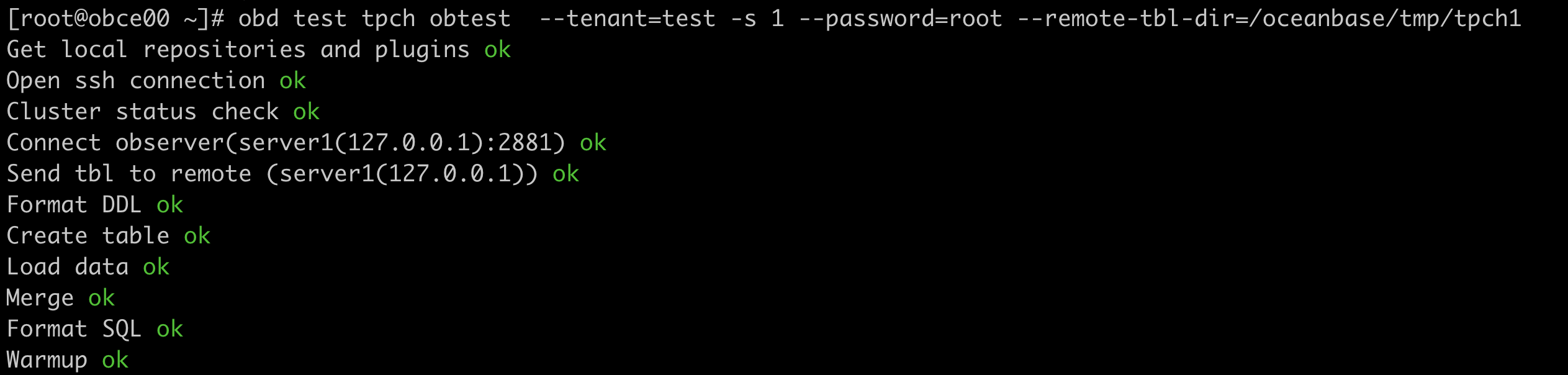
After completion, you can start a TPC-H test with a dataset size of 1 GB using the following command. The entire process includes dataset generation, schema import, and automatic test execution. This topic assumes that your test environment deployment is consistent with the steps in Quick start with OceanBase Database Community Edition. If there are differences, such as cluster name, password, or installation directory, please adjust accordingly.
Notice
Ensure your disk space is sufficient to accommodate the dataset files to prevent system exceptions due to full disk space.
In this example, we use the /tmp directory for testing.
cd /tmp
obd test tpch obtest --tenant=test -s 1 --password='******' --remote-tbl-dir=/tmp/tpch1
After executing the above command, obd starts the process, and you can see each step as it progresses:

After data import is complete, obd automatically executes the 22 SQL queries and prints the execution time for each query along with the total time.