OceanBase
English日本語简体中文
Docs Home
Products
Integrations
Release Notes

Databases

OceanBase DatabaseOceanBase Cloud OceanBase Best Practices

Tools

OceanBase Cloud PlatformOceanBase Migration ServiceOceanBase Developer CenterOceanBase Migration AssessmentOceanBase Admin ToolOceanBase Loader and DumperOceanBase DeployerKubernetes operator for OceanBaseOceanBase Diagnostic Tool OceanBase Binlog Service

Connectors and Middleware

OceanBase Database Proxy OceanBase Connector/C OceanBase Connector/J OceanBase Connector/ODBC OceanBase Connector/NETOceanBase Command-Line Client

Databases

OceanBase DatabaseOceanBase Cloud OceanBase Best Practices

Connectors and Middleware

OceanBase Database Proxy OceanBase Connector/C OceanBase Connector/J OceanBase Connector/ODBC OceanBase Connector/NETOceanBase Command-Line Client

Tools

OceanBase Cloud PlatformOceanBase Migration ServiceOceanBase Developer CenterOceanBase Migration AssessmentOceanBase Admin ToolOceanBase Loader and DumperOceanBase DeployerKubernetes operator for OceanBaseOceanBase Diagnostic Tool OceanBase Binlog Service
OceanBase DatabaseOceanBase Cloud ToolsConnectors and MiddlewareLifecycle Support Policy

OceanBase Cloud

  • Product Updates & Announcements
    • What's new
      • Release notes for 2026
      • Release notes for 2025
      • Release notes for 2024
      • Release history
    • Product announcements
      • Notice of underlying component upgrades for OceanBase Cloud database proxy clusters on Alibaba Cloud
      • AI Service Model Launch and Delisting Notice
      • Data development module deprecation notice
      • Optimization of Backup and Restore commercialization strategy
      • Database proxy billing update
      • AWS instance pricing adjustment
      • Billing notice for limited-time free OMS instances
      • Notice of cross-AZ data transfer billing adjustments (OceanBase Cloud on AWS)
  • Product Introduction
    • Overview
    • Management mode and scenarios
    • Core features
      • High availability with cross-cloud active-active architecture
      • High availability with cross-cloud primary-standby databases
      • Multi-layer online scaling and on-demand adjustment
    • Deployment modes
    • Product specifications
    • Product billing
      • Overview
      • Instance billing
        • Alibaba Cloud instance billing
        • Huawei Cloud instance billing
        • AWS instance billing
        • Google Cloud instance billing
        • Azure instance billing
      • Backup and restore billing
      • SQL audit billing
      • Migrations billing
      • Database proxy billing
      • Binlog service billing
      • Read-only replica billing
      • AI model billing
    • Supported database versions
  • Get Started
    • Quick start with Flagship Edition
    • Create a Flagship Edition cluster instance
    • Create a tenant
    • Use the database
  • Work with DBaaS Instances
    • Work with flagship edition instances
      • Overview
      • Create an instance
        • Overview
        • Create via OceanBase Cloud official website
        • Create via AWS Marketplace
        • Create via GCP Marketplace
        • Create via Huawei Cloud Marketplace
        • Create via Alibaba Cloud Marketplace
        • Create via Azure Marketplace
      • Connect to an instance
        • Configure network connection
          • Overview
          • Connect using a public IP address
          • Connect using Azure Private Link
          • Connect using Google Cloud Private Service Connect
          • Connect using Huawei Cloud VPC Endpoint
          • Connect using a Huawei Cloud peering connection
          • Connect using AWS PrivateLink
          • Connect using AWS VPC peering
          • Connect using Alibaba Cloud VPC
        • MySQL compatible mode
          • Connect with clients
            • Connect to OceanBase Cloud by using Client ODC
            • Connect to OceanBase Cloud by using a MySQL client
            • Connect to OceanBase Cloud by using OBClient
          • Connect with drivers
            • Java
              • Connect to OceanBase Cloud using SpringBoot
              • SpringBatch sample application for connecting to OceanBase Cloud
              • spring-jdbc
              • SpringDataJPA sample application for connecting to OceanBase Cloud
              • Hibernate application development with OceanBase Cloud
              • Sample program for connecting to OceanBase Cloud
              • connector-j
              • Use TestContainers to connect to and use OceanBase Cloud
            • Python
              • Connect to OceanBase Cloud using mysqlclient
              • Connect to OceanBase Cloud using PyMySQL
              • Use the MySQL-connector-python driver to connect to and use OceanBase Cloud
              • Use SQLAlchemy to connect to an OceanBase Cloud database
              • Connect to an OceanBase Cloud database using Django
              • Connect to an OceanBase Cloud database by using peewee
            • C
              • Use MySQL Connector/C to connect to OceanBase Cloud
            • Go
              • Connect to OceanBase Cloud using the Go-SQL-Driver/MySQL driver
              • Connect to OceanBase Cloud using GORM
            • PHP
              • Use the EXT driver to connect to OceanBase Cloud
              • Connect to OceanBase Cloud by using the MySQLi driver
              • Use the PDO driver to connect to OceanBase Cloud
            • Rust
              • Rust application example for connecting to OceanBase Cloud
              • SeaORM example for connecting to OceanBase Cloud
            • Ruby
              • ActiveRecord sample application for OceanBase Cloud
              • Connect to OceanBase Cloud by using mysql2
              • Connect to OceanBase Cloud by using Sequel
          • Use database connection pool
            • Database connection pool configuration
            • Connect to OceanBase Cloud by using a Tomcat connection pool
            • Connect to OceanBase Cloud by using a C3P0 connection pool
            • Connect to OceanBase Cloud by using a Proxool connection pool
            • Connect to OceanBase Cloud by using a HikariCP connection pool
            • Connect to OceanBase Cloud by using a DBCP connection pool
            • Connect to OceanBase Cloud by using Commons Pool
            • Connect to OceanBase Cloud by using a Druid connection pool
        • Oracle compatible mode
          • Connect with clients
            • Connect to OceanBase Cloud by using OBClient
            • Connect to OceanBase Cloud by using Client ODC
          • Connect with drivers
            • Java
              • Connect to OceanBase Cloud using OceanBase Connector/J
              • Connect to OceanBase Cloud by using Spring Boot
              • SpringBatch application example for connecting to OceanBase Cloud
              • Connect to OceanBase Cloud using Spring JDBC
              • Connect to OceanBase Cloud by using Spring Data JPA
              • Connect to OceanBase Cloud by using Hibernate
              • Use MyBatis to connect to OceanBase Cloud
              • Use JFinal to connect to OceanBase Cloud
            • Python
              • Python Driver for Oracle Mode
            • C/C++
              • Connect to OceanBase Cloud using OceanBase Connector/C
              • Connect to OceanBase Cloud using OceanBase Connector/ODBC
              • Use SqlSugar to connect to OceanBase Cloud
          • Use database connection pool
            • Database connection pool configuration
            • Sample program that uses a Tomcat connection pool to connect to OceanBase Cloud
            • C3P0 connection pool connects to OceanBase Cloud
            • Connect to OceanBase Cloud using Proxool connection pool
            • Sample program that uses HikariCP to connect to OceanBase Cloud
            • Use DBCP connection pool to connect to OceanBase Cloud
            • Connect to OceanBase Cloud by using Commons Pool
            • Connect to OceanBase Cloud by using a Druid connection pool
        • KV compatible mode
          • Connect to a cluster by using the OBKV-HBase client
      • Developer guide
        • MySQL compatible mode
          • Plan database objects
            • Create a database
            • Create a table group
            • Create a table
            • Create an index
            • Create an external table
          • Write data
            • Insert data
            • Update data
            • Delete data
            • Replace data
            • Generate test data in batches
          • Read data
            • Single-table queries
            • Join tables
              • INNER JOIN queries
              • FULL JOIN queries
              • LEFT JOIN queries
              • RIGHT JOIN queries
              • Subqueries
              • Lateral derived tables
            • Use operators and functions in queries
              • Use arithmetic operators in queries
              • Use numerical functions in queries
              • Use string concatenation operators in queries
              • Use string functions in queries
              • Use datetime functions in queries
              • Use aggregate functions in queries
              • Use NULL-related functions in queries
              • Use the CASE conditional operator in queries
              • Use the SELECT ... FOR UPDATE statement to lock query results
              • Use the SELECT ... LOCK IN SHARE MODE statement to lock query results
            • Use a DBLink in queries
            • Set operations
          • Manage transactions
            • Overview
            • Start a transaction
            • Savepoints
              • Mark a savepoint
              • Roll back a transaction to a savepoint
              • Release a savepoint
            • Commit a transaction
            • Roll back a transaction
        • Oracle compatible mode
          • Plan database objects
            • Create a table group
            • Create a table
            • Create an index
            • Create an external table
          • Write data
            • Insert data
            • Update data
            • Delete data
            • Replace data
            • Generate test data in batches
          • Read data
            • Single-table queries
            • Join tables
              • INNER JOIN queries
              • FULL JOIN queries
              • LEFT JOIN queries
              • RIGHT JOIN queries
              • Subqueries
              • Lateral derived tables
            • Use operators and functions in queries
              • Use arithmetic operators in queries
              • Use numerical functions in queries
              • Use string concatenation operators in queries
              • Use string functions in queries
              • Use datetime functions in queries
              • Use aggregate functions in queries
              • Use CASE functions in queries
            • Use a DBLink in queries
            • Set operations
          • Manage transactions
            • Overview
            • Start a transaction
            • Savepoints
              • Mark a savepoint
              • Roll back a transaction to a savepoint
            • Commit a transaction
            • Roll back a transaction
        • KV compatible mode
          • OBKV-Table Java development guide
          • Table data operation examples
            • Insert data with OBKV-Table
            • Query data with OBKV-Table
            • Update data with OBKV-Table
            • Delete data with OBKV-Table
          • Table Java development
            • Connect to an instance by using the OBKV-Table Java client
          • HBase data operation examples
            • OBKV-HBase application development overview
            • OBKV-HBase data operation examples
      • Manage instances
        • Manage instances
          • View the instance list
          • Instance workbench overview
          • Stop and start instances
          • Unit migration
        • Manage tenants
          • Tenant overview
          • Create a tenant
          • Modify tenant specifications
          • Modify tenant names
          • Add an endpoint
          • Resource isolation
            • Overview
            • Manage resource groups
              • Create a resource group
              • View a resource group
              • Edit a resource group
              • Delete a resource group
            • Manage isolation rules
              • Create an isolation rule
              • View isolation rules
              • Edit an isolation rule
              • Delete a quarantine rule
          • Modify primary zone
          • Modify the maximum number of connections for a tenant proxy
          • Enable the AI function built-in AI models
          • Monitor tenant performance
            • Overview
            • View performance and SQL monitoring details
            • View transaction monitoring details
            • View storage and cache monitoring details
            • View Binlog service monitoring
            • Customize a monitoring dashboard for a tenant
          • Diagnostics
            • View performance monitoring data
            • Real-time diagnostics
              • SQL diagnostics
                • Top SQL
                • Slow SQL
                • Suspicious SQL
                • High-risk SQL
                • SQL details
              • Session management
                • Session management
              • Optimization management
                • Manage active outlines
                • View optimization history
              • SQL audit
          • Manage tenant parameters
            • Manage tenant parameters
            • Parameters for tenants
            • Parameter template overview
          • Delete a tenant
          • Manage databases and accounts
            • Create accounts
            • Manage accounts
            • Create a database (MySQL compatible mode)
            • Manage databases (MySQL compatible mode)
        • Monitor instance performance
          • Overview
          • Monitor the performance of databases in an instance
          • Monitor multidimensional metrics of an instance
          • Monitor the performance of hosts in an instance
          • Monitor database proxy
          • Monitor database proxy hosts
          • Monitor cross-cloud network performance
          • Customize a monitoring dashboard for an instance
        • Manage major compactions
          • Initiate a major compaction
          • View compaction records
          • Update time for compactions
        • Manage instance parameters
          • Manage parameters
          • Parameters for cluster instances
        • Change instance configurations
          • Set compute auto-scaling
          • Set storage auto-scaling
          • View history of configuration changes
          • Change configuration
          • Switch the deployment mode
        • Manage standby instances
          • Overview
          • Create a standby instance
          • Create a cross-cloud standby instance
          • Primary-standby instance workspace
          • Configure a primary-standby synchronization strategy
          • Configure global endpoint
          • Enable automatic forwarding of standby write requests
          • Primary-standby instance switchover
          • Initiate failover
          • Detach a standby instance
          • Release a standby instance
        • Release an instance
        • Database proxy
          • Overview
          • Manage database proxy
          • Direct load
        • Manage alerts
          • Overview
          • Manage alert rules
            • Create an alert rule
            • View an alert rule
            • Edit an alert rule
            • Delete an alert rule
          • View alert history
          • Manage alert templates
            • Create an alert template
            • View an alert template
            • Edit an alert template
            • Copy an alert rule template
            • Delete an alert template
          • Manage muting rules
            • Create an alert muting rule
            • View an alert muting rule
            • Edit an alert muting rule
            • Delete an alert muting rule
          • Manage alert notification templates
            • Create an alert notification template
            • View an alert notification template
            • Edit an alert notification template
            • Copy an alert notification template
            • Delete an alert notification template
          • Manage alert contacts
            • Add an alert contact
            • Add an alert contact group
            • View an alert contact
            • Edit an alert contact
            • Delete an alert contact
            • Obtain a webhook URL
          • Monitoring metrics for alerts
        • Backup and restore
          • Overview
          • Backup strategy
          • Initiate a backup immediately
          • Data backup
          • Initiate a restore
          • Data restore
          • Restore data from the instance recycle bin
        • Diagnostics
          • View performance monitoring data
          • Capacity diagnostics
          • One-click diagnostics
            • Initiate one-click diagnostics
            • View one-click diagnostic report
              • Exceptions
              • Real-time diagnostics
              • Optimization suggestions
              • Capacity management
              • Security management
          • Real-time diagnostics
            • SQL diagnostics
              • Top SQL
              • Slow SQL
              • Suspicious SQL
              • High-risk SQL
              • SQL details
              • SQL monitoring metrics list
            • Session management
              • Session management
            • Request analysis
              • Request analysis
          • Root cause diagnostics
            • Exception handling
            • Enable system autonomy
          • SQL audit
          • Materialized view analysis
          • Optimization center
            • Optimization suggestions
            • Manage active outlines
            • SQL review
            • View the optimization history
        • Manage read-only replicas
          • Overview
          • Instance read-only replicas
            • Add a read-only replica to an instance
            • View read-only replicas of an instance
            • Manage read-only replicas of an instance
            • Delete a read-only replica of an instance
          • Tenant read-only replicas
            • Add a read-only replica to a tenant
            • View read-only replicas of a tenant
            • Manage read-only replicas of a tenant
            • Delete a read-only replica of a tenant
        • Manage tags
        • Manage JVM-dependent services
      • Data source management
        • Overview of data source management
        • Manage data sources
        • User privileges
          • User privileges for compatibility assessment
          • User privileges for data migration
          • User privileges for performance assessment
          • User privileges for data archiving
          • User privileges for data cleanup
        • Connect via private network
          • AWS
          • Huawei Cloud
          • Alibaba Cloud
          • Azure
          • Private IP address segments
        • Connect via public network
          • AWS
          • Huawei Cloud
          • Alibaba Cloud
          • Azure
      • Data lifecycle management
        • Archive data
        • Clean up data
      • Manage recycle bin
        • Instance recycle bin
        • Manage databases and tables in recycle bin
          • Overview
          • Instance-level recycle bin
          • Tenant-level recycle bin
    • Work with transactional instances
      • Overview
      • Create an instance
        • Overview
        • Create via OceanBase Cloud official website
        • Create via AWS Marketplace
        • Create via GCP Marketplace
        • Create via Huawei Cloud Marketplace
        • Create via Alibaba Cloud Marketplace
        • Create via Azure Marketplace
      • Connect to an instance
        • MySQL compatible mode
          • Overview
          • Get connection string
            • Overview
            • Connect to a database by using AWS PrivateLink
            • Access the database by using an Azure private network connection
            • Connect using AWS VPC peering
            • Connect using Google Cloud Private Service Connect
            • Connect using Huawei Cloud VPC Endpoint
            • Connect using Alibaba Cloud VPC
            • Connect using a public IP address
            • Connect using a Huawei Cloud peering connection
          • Connect with clients
            • Connect to OceanBase Cloud by using Client ODC
            • Connect to OceanBase Cloud by using a MySQL client
            • Connect to OceanBase Cloud by using OBClient
          • Connect with drivers
            • Java
              • Connect to OceanBase Cloud using SpringBoot
              • SpringBatch sample application for connecting to OceanBase Cloud
              • spring-jdbc
              • SpringDataJPA sample application for connecting to OceanBase Cloud
              • Hibernate application development with OceanBase Cloud
              • Sample program for connecting to OceanBase Cloud
              • connector-j
              • Use TestContainers to connect to and use OceanBase Cloud
            • Python
              • Connect to OceanBase Cloud using mysqlclient
              • Connect to OceanBase Cloud using PyMySQL
              • Use the MySQL-connector-python driver to connect to and use OceanBase Cloud
              • Use SQLAlchemy to connect to an OceanBase Cloud database
              • Connect to an OceanBase Cloud database using Django
              • Connect to an OceanBase Cloud database by using peewee
            • C
              • Use MySQL Connector/C to connect to OceanBase Cloud
            • Go
              • Connect to OceanBase Cloud using the Go-SQL-Driver/MySQL driver
              • Connect to OceanBase Cloud using GORM
            • PHP
              • Use the EXT driver to connect to OceanBase Cloud
              • Connect to OceanBase Cloud by using the MySQLi driver
              • Use the PDO driver to connect to OceanBase Cloud
            • Rust
              • Rust application example for connecting to OceanBase Cloud
              • SeaORM example for connecting to OceanBase Cloud
            • ruby
              • ActiveRecord sample application for OceanBase Cloud
              • Connect to OceanBase Cloud by using mysql2
              • Connect to OceanBase Cloud by using Sequel
          • Use database connection pool
            • Database connection pool configuration
            • Connect to OceanBase Cloud by using a Tomcat connection pool
            • Connect to OceanBase Cloud by using a C3P0 connection pool
            • Connect to OceanBase Cloud by using a Proxool connection pool
            • Connect to OceanBase Cloud by using a HikariCP connection pool
            • Connect to OceanBase Cloud by using a DBCP connection pool
            • Connect to OceanBase Cloud by using Commons Pool
            • Connect to OceanBase Cloud by using a Druid connection pool
        • Oracle compatible mode
          • Overview
          • Get connection string
            • Overview
            • Connect to a database by using AWS PrivateLink
            • Access a database by using an Azure private network connection
            • Connect using AWS VPC peering
            • Connect using Google Cloud Private Service Connect
            • Connect using Huawei Cloud VPC Endpoint
            • Connect using a public IP address
          • Connect with clients
            • Connect to OceanBase Cloud by using OBClient
            • Connect to OceanBase Cloud by using Client ODC
          • Connect with drivers
            • Java
              • Connect to OceanBase Cloud using OceanBase Connector/J
              • Connect to OceanBase Cloud by using Spring Boot
              • SpringBatch application example for connecting to OceanBase Cloud
              • Connect to OceanBase Cloud using Spring JDBC
              • Connect to OceanBase Cloud by using Spring Data JPA
              • Connect to OceanBase Cloud by using Hibernate
              • Use MyBatis to connect to OceanBase Cloud
              • Use JFinal to connect to OceanBase Cloud
            • Python
              • Python Driver for Oracle Mode
            • C
              • Connect to OceanBase Cloud using OceanBase Connector/C
              • Connect to OceanBase Cloud using OceanBase Connector/ODBC
              • Use SqlSugar to connect to OceanBase Cloud
          • Use database connection pool
            • Database connection pool configuration
            • Sample program that uses a Tomcat connection pool to connect to OceanBase Cloud
            • C3P0 connection pool connects to OceanBase Cloud
            • Connect to OceanBase Cloud using Proxool connection pool
            • Sample program that uses HikariCP to connect to OceanBase Cloud
            • Use DBCP connection pool to connect to OceanBase Cloud
            • Connect to OceanBase Cloud by using Commons Pool
            • Connect to OceanBase Cloud by using a Druid connection pool
      • Developer guide
        • MySQL compatible mode
          • Plan database objects
            • Create a database
            • Create a table group
            • Create a table
            • Create an index
            • Create an external table
          • Write data
            • Insert data
            • Update data
            • Delete data
            • Replace data
            • Generate test data in batches
          • Read data
            • Single-table queries
            • Join tables
              • INNER JOIN queries
              • FULL JOIN queries
              • LEFT JOIN queries
              • RIGHT JOIN queries
              • Subqueries
              • Lateral derived tables
            • Use operators and functions in queries
              • Use arithmetic operators in queries
              • Use numerical functions in queries
              • Use string concatenation operators in queries
              • Use string functions in queries
              • Use datetime functions in queries
              • Use type conversion functions in queries
              • Use aggregate functions in queries
              • Use NULL-related functions in queries
              • Use the CASE conditional operator in queries
              • Use the SELECT ... FOR UPDATE statement to lock query results
              • Use the SELECT ... LOCK IN SHARE MODE statement to lock query results
            • Use a DBLink in queries
            • Set operations
          • Manage transactions
            • Overview
            • Start a transaction
            • Savepoints
              • Mark a savepoint
              • Roll back a transaction to a savepoint
              • Release a savepoint
            • Commit a transaction
            • Roll back a transaction
        • Oracle compatible mode
          • Plan database objects
            • Create a table group
            • Create a table
            • Create an index
            • Create an external table
          • Write data
            • Insert data
            • Update data
            • Delete data
            • Replace data
            • Generate test data in batches
          • Read data
            • Single-table queries
            • Join tables
              • INNER JOIN queries
              • FULL JOIN queries
              • LEFT JOIN queries
              • RIGHT JOIN queries
              • Subqueries
              • Lateral derived tables
            • Use operators and functions in queries
              • Use arithmetic operators in queries
              • Use numerical functions in queries
              • Use string concatenation operators in queries
              • Use string functions in queries
              • Use datetime functions in queries
              • Use type conversion functions in queries
              • Use aggregate functions in queries
              • Use NULL-related functions in queries
              • Use CASE functions in queries
              • Use the SELECT ... FOR UPDATE statement to lock query results
            • Use a DBLink in queries
            • Set operations
          • Manage transactions
            • Overview
            • Start a transaction
            • Savepoints
              • Mark a savepoint
              • Roll back a transaction to a savepoint
            • Commit a transaction
            • Roll back a transaction
      • Manage instances
        • Manage instances
          • View the instance list
          • Instance overview
          • Stop and restart instances
          • Unit migration
        • Manage tenants
          • Tenant overview
          • Create a tenant
          • Modify tenant specifications
          • Modify tenant names
          • Add an endpoint
          • Resource isolation
            • Overview
            • Manage resource groups
              • Create a resource group
              • View a resource group
              • Edit a resource group
              • Delete a resource group
            • Manage isolation rules
              • Create an isolation rule
              • View isolation rules
              • Edit an isolation rule
              • Delete a quarantine rule
          • Modify primary zone
          • Modify the maximum number of connections for a tenant proxy
          • Enable the AI function built-in AI models
          • Monitor tenant performance
            • Overview
            • View performance and SQL monitoring details
            • View transaction monitoring details
            • View storage and cache monitoring details
            • View Binlog service monitoring
            • Customize a monitoring dashboard for a tenant
          • Diagnostics
            • Real-time diagnostics
              • SQL diagnostics
                • Top SQL
                • Slow SQL
                • Suspicious SQL
                • High-risk SQL
              • SQL audit
          • Manage tenant parameters
            • Manage tenant parameters
            • Parameters for tenants
            • Parameter template overview
          • Delete a tenant
          • Manage databases and accounts
            • Create accounts
            • Manage accounts
            • Create a database (MySQL compatible mode)
            • Manage databases (MySQL compatible mode)
        • Monitor instance performance
          • Overview
          • Monitor the performance of databases in an instance
          • Monitor multidimensional metrics of an instance
          • Monitor the performance of hosts in an instance
          • Monitor database proxy
          • Monitor database proxy hosts
          • Monitor cross-cloud network performance
          • Customize a monitoring dashboard for an instance
        • Manage major compactions
          • Initiate a major compaction
          • View compaction records
          • Update time for compactions
        • Manage instance parameters
          • Manage parameters
          • Parameters for cluster instances
        • Change instance configurations
          • Set storage auto-scaling
          • View history of configuration changes
          • Change configuration
          • Switch the deployment mode
        • Manage standby instances
          • Overview
          • Create a standby instance
          • Create a cross-cloud standby instance
          • View details of primary and standby instances
          • Configure global endpoint
          • Enable automatic forwarding for write requests of standby databases
          • Primary-standby instance switchover
          • Initiate failover
          • Detach a standby instance
          • Release a standby instance
        • Release an instance
        • Database proxy
          • Overview
          • Manage database proxy
          • Direct load
        • Manage alerts
          • Overview
          • Manage alert rules
            • Create an alert rule
            • View an alert rule
            • Edit an alert rule
            • Delete an alert rule
          • View alert history
          • Manage alert templates
            • Create a trigger condition template
            • View an alert template
            • Edit an alert template
            • Copy an alert rule template
            • Delete an alert template
          • Manage muting rules
            • Create an alert muting rule
            • View an alert muting rule
            • Edit an alert muting rule
            • Delete an alert muting rule
          • Manage alert notification templates
            • Create an alert notification template
            • View an alert notification template
            • Edit an alert notification template
            • Copy an alert notification template
            • Delete an alert notification template
          • Manage alert contacts
            • Add an alert contact
            • Add an alert contact group
            • View an alert contact
            • Edit an alert contact
            • Delete an alert contact
            • Obtain a webhook URL
          • Monitoring metrics for alerts
        • Backup and restore
          • Overview
          • Backup strategy
          • Initiate a backup immediately
          • Data backup
          • Initiate a restore
          • Data restore
          • Restore data from the instance recycle bin
        • Diagnostics
          • View performance monitoring data
          • Capacity diagnostics
          • One-click diagnostics
            • Initiate one-click diagnostics
            • View one-click diagnostic report
              • Exceptions
              • Real-time diagnostics
              • Optimization suggestions
              • Capacity management
              • Security management
          • Real-time diagnostics
            • SQL diagnostics
              • Top SQL
              • Slow SQL
              • Suspicious SQL
              • High-risk SQL
              • SQL details
              • SQL monitoring metrics list
            • Session management
              • Session management
            • Request analysis
              • Request analysis
          • Root cause diagnostics
            • Exception handling
            • Enable system autonomy
          • SQL audit
          • Materialized view analysis
          • Optimization center
            • Optimization suggestions
            • Manage active outlines
            • SQL review
            • View the optimization history
        • Manage read-only replicas
          • Overview
          • Instance read-only replicas
            • Add a read-only replica to an instance
            • View read-only replicas of an instance
            • Manage read-only replicas of an instance
            • Delete a read-only replica of an instance
          • Tenant read-only replicas
            • Add a read-only replica to a tenant
            • View read-only replicas of a tenant
            • Manage read-only replicas of a tenant
            • Delete a read-only replica of a tenant
        • Manage tags
        • Manage JVM-dependent services
      • Data source management
        • Connect via private network
          • Google Cloud
        • Connect via public network
          • Google Cloud
      • Overview of data source management
      • Data lifecycle management
        • Overview
        • Archive data
        • Clean up data
        • Data archiving configurations
      • Manage recycle Bin
        • Instance recycle bin
        • Manage databases and tables in recycle bin
          • Overview
          • Instance-level recycle bin
          • Tenant-level recycle bin
    • Work with analytical instances
      • Overview
      • Core features
      • Connect to an instance
        • Overview
        • Get connection string
          • Overview
          • Connect using AWS PrivateLink
          • Connect using Huawei Cloud VPC Endpoint
          • Connect using a public IP address
        • Connect with clients
          • Connect to OceanBase Cloud by using Client ODC
          • Connect to OceanBase Cloud by using a MySQL client
          • Connect to OceanBase Cloud by using OBClient
        • Connect with drivers
          • Java
            • Connect to OceanBase Cloud by using Spring Boot
            • Connect to OceanBase Cloud by using Spring Batch
            • Connect to OceanBase Cloud by using Spring Data JDBC
            • Connect to OceanBase Cloud by using Spring Data JPA
            • Connect to OceanBase Cloud by using Hibernate
            • Connect to OceanBase Cloud by using MyBatis
            • Connect to OceanBase Cloud using MySQL Connector/J
          • Python
            • Connect to OceanBase Cloud by using mysqlclient
            • Connect to OceanBase Cloud by using PyMySQL
            • Connect to OceanBase Cloud using MySQL Connector/Python
          • C
            • Connect to OceanBase Cloud using MySQL Connector/C
          • Go
            • Connect to OceanBase Cloud using Go-SQL-Driver/MySQL
          • PHP
            • Connect to OceanBase Cloud using PHP
        • Use database connection pool
          • Database connection pool configuration
          • Connect to OceanBase Cloud by using a Tomcat connection pool
          • Connect to OceanBase Cloud by using a C3P0 connection pool
          • Connect to OceanBase Cloud by using a Proxool connection pool
          • Connect to OceanBase Cloud by using a HikariCP connection pool
          • Connect to OceanBase Cloud by using a DBCP connection pool
          • Connect to OceanBase Cloud by using Commons Pool
          • Connect to OceanBase Cloud by using a Druid connection pool
      • Create an instance
      • Data table design
        • Table overview
        • Best practices
          • Unit 1: Best practices for optimizing storage structures and query performance
          • Unit 2: Best practices for creating special indexes
      • Export data
      • OceanBase data processing
      • Query acceleration
        • Statistics
        • Materialized views for query acceleration
        • Select a query parallelism level
      • Manage instances
        • Instance overview
        • Change configuration
        • Set storage auto-scaling
        • Modify primary zone
        • Manage parameters
        • Backup and restore
          • Backup overview
          • Backup strategies
          • Immediate backup
          • Data Backup
          • Initiate restore
          • Data restore
        • Monitor instance performance
          • Overview
          • Monitor the performance of databases in an instance
          • Monitor the performance of hosts in an instance
        • Manage major compactions
          • Initiate a major compaction
          • View compaction records
          • Update time for compactions
        • Database proxy
          • Overview
          • Manage database proxy
          • Direct load
        • Manage alerts
          • Overview
          • Manage alert rules
            • Create an alert rule
            • View an alert rule
            • Edit an alert rule
            • Delete an alert rule
          • View alert history
          • Manage alert templates
            • Create a trigger condition template
            • View an alert template
            • Edit an alert template
            • Copy an alert template
            • Delete an alert template
          • Manage muting rules
            • Create an alert muting rule
            • View an alert muting rule
            • Edit an alert muting rule
            • Delete an alert muting rule
          • Manage alert notification templates
            • Create an alert notification template
            • View an alert notification template
            • Edit an alert notification template
            • Copy an alert notification template
            • Delete an alert notification template
          • Manage alert contacts
            • Add an alert contact
            • Add an alert contact group
            • View an alert contact
            • Edit an alert contact
            • Delete an alert contact
            • Obtain a webhook URL
          • Monitoring metrics for alerts
        • Diagnostics
          • View performance monitoring data
          • Capacity diagnostics
          • Real-time diagnostics
            • SQL diagnostics
              • Top SQL
              • Slow SQL
              • Suspicious SQL
              • High-risk SQL
              • SQL details
              • SQL monitoring metrics list
            • Session management
              • Session management
            • Optimization management
              • Manage active outlines
              • View the optimization history
            • Request analysis
              • Request analysis
        • Stop and restart instances
        • Release instances
        • Manage databases and accounts
          • Create and manage accounts
          • Create a database
          • Manage databases
        • Manage tags
      • Overview of data source management
      • Data lifecycle management
        • Archive data
        • Clean up data
      • Performance diagnosis and tuning
        • Use the DBMS_XPLAN package for performance diagnostics
        • Use the GV$SQL_PLAN_MONITOR view for performance analysis
        • Views related to AP performance analysis
      • Performance testing
      • Product integration
      • Manage recycle Bin
        • View instance recycle bin
        • Manage databases and tables in recycle bin
          • Overview
          • Instance recycle bin
    • Work with Key-Value instances
      • Try out Key-Value instances
        • Create an instance
        • Create a tenant
        • Create an account for a database user
        • OBKV HBase data operation examples
      • Use Table model
        • Create an instance
        • Manage instances
          • Manage instances
            • View the instance list
            • Instance overview
            • Stop and restart instances
            • Release an instance
          • Manage tenants
            • Create a tenant
            • Modify tenant specifications
            • Modify tenant names
            • Delete a tenant
            • Tenant overview
            • Resource isolation
              • Overview
              • Manage resource groups
                • Create a resource group
                • View a resource group
                • Edit a resource group
                • Delete a resource group
              • Manage isolation rules
                • Create an isolation rule
                • View isolation rules
                • Edit an isolation rule
                • Delete a quarantine rule
            • Monitor tenant performance
              • Overview
              • View performance and SQL monitoring details
              • View transaction monitoring details
              • View storage and cache monitoring details
              • OBKV-Table
              • Customize a monitoring dashboard for a tenant
            • Diagnostics
              • Top SQL
            • Manage tenant parameters
              • Manage tenant parameters
              • Parameters for tenants
            • Manage databases and accounts
              • Create and manage accounts
              • Create a database
              • Manage databases
            • Modify primary zone
          • Monitor instance performance
            • Overview
            • Monitor the performance of databases in an instance
            • Monitor multi-dimensional metrics of an instance
            • Monitor the performance of hosts in a cluster
            • Customize monitoring dashboards for an instance
          • Manage major compactions
            • Initiate major compactions
            • View compaction records
            • Update time for compactions
          • Manage instance parameters
            • Parameter management overview
            • Parameters for cluster instances
          • Change instance configurations
            • Set storage auto-scaling
            • View history of configuration changes
            • Change configuration
            • Switch the deployment mode
          • Database proxy
            • Overview
            • Manage database proxy
          • Manage alerts
            • Overview
            • Manage alert rules
              • Create an alert rule
              • View an alert rule
              • Edit an alert rule
              • Delete an alert rule
            • View alert history
            • Manage alert templates
              • Trigger condition template management
              • Create an alert template
              • View an alert template
              • Edit an alert template
              • Copy an alert template
              • Delete an alert template
            • Manage muting rules
              • Create an alert muting rule
              • View an alert muting rule
              • Edit an alert muting rule
              • Delete an alert muting rule
            • Manage alert contacts
              • Add an alert contact
              • Add an alert contact group
              • View an alert contact
              • Edit an alert contact
              • Delete an alert contact
              • Obtain a webhook URL
            • Monitoring metrics for alerts
          • Backup and restore
            • Backup overview
            • Backup strategies
            • Immediate backup
            • Data backup
            • Initiate restore
            • Data restore
          • Diagnostics
            • View performance monitoring data
            • Top SQL
            • Capacity diagnostics
            • Request analysis
          • Manage recycle Bin
            • View instance recycle bin
            • Manage databases and tables in recycle bin
              • Overview
              • Instance-level recycle bin
              • Tenant-level recycle bin
          • Manage tags
      • Use HBase model
        • OBKV-HBase Overview
        • Create an instance
        • Develop in HBase model
          • Connect to an instance by using the OBKV-HBase client
        • Manage instances
          • Manage instances
            • View the instance list
            • Instance overview
            • Stop and restart instances
            • Release an instance
          • Manage tenants
            • Create a tenant
            • Modify tenant specifications
            • Modify tenant names
            • Delete a tenant
            • Tenant overview
            • Resource isolation
              • Overview
              • Manage resource groups
                • Create a resource group
                • View a resource group
                • Edit a resource group
                • Delete a resource group
              • Manage isolation rules
                • Create an isolation rule
                • View isolation rules
                • Edit an isolation rule
                • Delete a quarantine rule
            • Monitor tenant performance
              • Overview
              • View performance and SQL monitoring details
              • View transaction monitoring details
              • View storage and cache monitoring details
              • OBKV-HBase
              • Customize a monitoring dashboard for a tenant
            • Diagnostics
              • Top SQL
            • Manage tenant parameters
              • Manage tenant parameters
              • Parameters for tenants
            • Manage databases and accounts
              • Create and manage accounts
              • Create a database
              • Manage databases
            • Modify primary zone
          • Monitor instance performance
            • Overview
            • Monitor the performance of databases in an instance
            • Monitor multi-dimensional metrics of an instance
            • Monitor the performance of hosts in a cluster
            • Customize monitoring dashboards for an instance
          • Manage major compactions
            • Initiate major compactions
            • View compaction records
            • Update time for compactions
          • Manage instance parameters
            • Parameter management overview
            • Parameters for cluster instances
          • Change instance configurations
            • Set storage auto-scaling
            • View history of configuration changes
            • Change configuration
            • Switch the deployment mode
          • Database proxy
            • Overview
            • Manage database proxy
          • Manage alerts
            • Overview
            • Manage alert rules
              • Create an alert rule
              • View an alert rule
              • Edit an alert rule
              • Delete an alert rule
            • View alert history
            • Manage alert templates
              • Trigger condition template management
              • Create an alert template
              • View an alert template
              • Edit an alert template
              • Copy an alert template
              • Delete an alert template
            • Manage muting rules
              • Create an alert muting rule
              • View an alert muting rule
              • Edit an alert muting rule
              • Delete an alert muting rule
            • Manage alert contacts
              • Add an alert contact
              • Add an alert contact group
              • View an alert contact
              • Edit an alert contact
              • Delete an alert contact
              • Obtain a webhook URL
            • Monitoring metrics for alerts
          • Backup and restore
            • Backup overview
            • Backup strategies
            • Immediate backup
            • Data backup
            • Initiate restore
            • Data restore
          • Diagnostics
            • View performance monitoring data
            • Top SQL
            • Capacity diagnostics
            • Request analysis
          • Manage recycle Bin
            • View instance recycle bin
            • Manage databases and tables in recycle bin
              • Overview
              • Instance-level recycle bin
              • Tenant-level recycle bin
          • Manage tags
        • Overview of data source management
        • Performance test
      • Connect Key-Value instances
        • Overview
        • Connect using Huawei Cloud VPC Endpoint
        • Connect using a public IP address
  • AI Features
    • AI services
      • Overview of AI service
      • Quick start
      • Manage AI API keys
      • Use AI models
      • Use Claude Code with OceanBase MaaS
      • Use Codex CLI and Codex App with OceanBase MaaS
      • Use the memory feature
      • AI APIs
        • Access guide
        • AI service APIs
          • AI API list
          • Anthropic compatible APIs
            • List Anthropic models
            • Create a message
            • Create a message (default base URL)
          • OpenAI compatible APIs
            • List models
            • Create chat completion
            • Create embedding
            • Rerank
            • Reranks
            • Create response
          • Vertex AI compatible APIs
            • Generate content
            • Stream generate content
          • Image and video generation APIs
            • Create an image generation task
            • Create a video generation task
            • Retrieve task status
          • Image model APIs
            • gpt-image-2 text-to-image
            • gpt-image-2 image editing
            • gemini-3-pro-image text-to-image
            • gemini-3-pro-image image-to-image / image editing
          • OpenAI compatible batches and files APIs
            • Upload file
            • List files
            • Retrieve file
            • Delete file
            • Get file content
            • Get file content (POST)
            • Create batch
            • List batches
            • openai-compatible-apis
            • Retrieve batch (POST)
            • Cancel batch
          • Memory APIs
            • listSpaces - Paginated list of memory spaces
            • createSpace - Create a memory space
            • getSpace - Get details of a specified memory space
            • updateSpace - Update the name and description of a space
            • deleteSpace - Delete a space
            • extractMemories - Extract memories from dialogue messages
            • listMemories - List memories in a space
            • addMemory - Add a memory directly
            • getMemory - Retrieve a single memory
            • updateMemory - Update a single memory
            • deleteMemory - Delete a single memory
            • distillMemory - Distill experiences from conversations
            • searchExperiences - Search for experiences
            • getExperience - Retrieve a single experience
            • deleteExperience - Delete a single experience
            • feedbackExperiences - Submit feedback on experiences
            • setExperienceObsolescence - Set the obsolete status of an experience
            • combinedSearch - Combined search for memories and experiences
      • Built-in models
    • OceanBase OAgent
      • What is OceanBase OAgent?
      • Quick start with OceanBase OAgent
      • Configure a channel
      • Set skills
      • View OceanBase OAgent token usage
  • Migrations
    • Data migration and import solutions
    • Data assessment and migration quick start
    • Assess compatibility
      • Overview
      • Perform online assessment
      • Perform offline assessment
      • Manage compatibility assessment tasks
        • View a compatibility assessment task
        • View and download a compatibility assessment report
        • Stop a compatibility assessment task
        • Delete a compatibility assessment task
      • Obtain files for upload
      • Configure PrivateLink
      • Add an IP address to an allowlist
    • Data source management
      • Create a data source
      • Manage data sources
      • User privileges
        • User privileges for compatibility assessment
        • User privileges for data migration
        • User privileges for performance assessment
        • User privileges for data archiving
        • User privileges for data cleanup
      • Connect via private network
        • AWS
        • Huawei Cloud
        • Alibaba Cloud
        • Azure
        • Private IP address range
      • Connect via public network
        • AWS
        • Huawei Cloud
        • Alibaba Cloud
        • Azure
      • Connect via VPC peering
        • Configure an AWS data service peering connection
        • Configure a Huawei Cloud data service peering connection
        • Configure an Alibaba Cloud data service peering connection
        • Configure a Google Cloud data service peering connection
    • Migrate data
      • Overview
      • Migrations specification
      • Purchase a data migration instance
      • Migrate data from a MySQL database to the MySQL-compatible mode of OceanBase Database
      • Migrate data from OceanBase Database in MySQL-compatible mode to a MySQL database
      • Data migration between tenants of OceanBase Database in the same compatibility mode
      • Migrate data between OceanBase database tenants of different compatibility modes
      • Migrate data from an Oracle database to an Oracle-compatible tenant of OceanBase Database
      • Migrate data from an Oracle-compatible tenant of OceanBase Database to an Oracle database
      • Configure a two-way synchronization task
      • Migrate data from OceanBase Database to Kafka
      • Migrate data from a TiDB database to the MySQL-compatible mode of OceanBase Database
      • Migrate incremental data from OceanBase Database in MySQL-compatible mode to TiDB Database
      • Migrate data from a PostgreSQL database to OceanBase Database
      • Migrate incremental data from OceanBase Database to PostgreSQL Database
      • Migrate data from a Lindorm/HBase database to the HBase API compatible mode of OceanBase Database
      • Migrate incremental data from OceanBase Database in HBase API compatibility mode to a Lindorm/HBase database
      • Migrate data from OceanBase Database to RocketMQ
      • Migrate data from OceanBase Database to DataHub
      • Migrate data from OceanBase Database in MySQL mode to ADB
      • Migrate data from PolarDB-X 2.0 to OceanBase Database in MySQL mode
      • Manage data migration tasks
        • View details of a data migration task
        • Rename a data migration task
        • View and modify migration objects
        • View and modify migration parameters
        • Configure alert monitoring
        • Manage data migration tasks by using tags
        • Intelligent diagnosis
        • Start, stop, and resume a data migration task
        • Clone a data migration task
        • Terminate and release a data migration task
      • Features
        • Custom DML/DDL configurations
        • DDL synchronization scope
        • Use SQL conditions to filter data
        • Rename a migration object
        • Set an incremental synchronization timestamp
        • Instructions on schema migration
        • Configure and modify matching rules
        • Wildcard rules
        • Import migration objects
        • Download conflict data
        • Change a topic
        • Column filtering
        • Data formats
        • Partition settings
      • Authorize an Alibaba Cloud account
      • SQL statements for querying table objects
      • Online DDL tools
      • Create a trigger
      • Modify the log level of a self-managed PostgreSQL instance
      • Supported DDL statements for synchronization and their limitations
        • DDL synchronization from Aurora MySQL DB clusters to MySQL-compatible tenants of OceanBase Database
        • DDL synchronization from MySQL-compatible tenants of OceanBase Database to Aurora MySQL DB clusters
        • DDL synchronization between MySQL-compatible tenants of OceanBase Database
        • DDL synchronization from Oracle databases to Oracle-compatible tenants of OceanBase Database
        • DDL synchronization from Oracle-compatible tenants of OceanBase Database to Oracle databases
        • DDL synchronization between Oracle-compatible tenants of OceanBase Database
        • DDL synchronization from OceanBase databases to Kafka instances
    • Data subscription
      • Create a data subscription task
      • Manage data subscription tasks
        • View details of a data subscription task
        • Configure subscription information
        • Modify the name of a data subscription task
        • View and modify subscription objects
        • View data subscription parameters
        • Set up data subscription alerts
        • Start, stop, and resume data subscription tasks
        • Clone a data subscription task
        • Release a data subscription task
      • Manage private connections for data subscriptions
      • Configure consumer subscription
      • Message formats
    • Data validation
      • Overview
      • Create a data validation task
      • Manage data validation tasks
        • View details of a data validation task
        • View and modify validation objects
        • View and modify validation parameters
        • Manage data validation tasks with tags
        • Start, pause, and resume data validation tasks
        • Clone a data validation task
        • Release a data validation task
      • Features
        • Import validation objects
        • Rename the validation object
        • Filter objects by using SQL conditions
        • Configure the matching rules for the validation object
    • Assess performance
      • Overview
      • Obtain traffic files from a database instance
      • Create a full performance assessment task
      • Create an SQL file parsing task
      • Create an SQL file replay task
      • Manage performance assessment tasks
        • View the details of a performance assessment task
        • View a performance assessment report
        • Retry and stop a performance assessment task
        • Delete a performance assessment task
      • Obtain a database instance
      • Create an access key
    • Import data
      • Import data
      • Direct load
      • Supported file formats and encoding formats for Data Import
      • Sample data introduction
    • Binlog service
      • Overview
      • Purchase the Binlog service
      • Manage Binlog service
        • View details of the Binlog service
        • Change configuration
        • Modify the auto-scaling strategy for storage space
        • Modify the elasticity strategy for compute units
        • Disable the Binlog service
    • Upgrade assistant
  • Security
    • OceanBase Cloud account settings
      • Manage personal account information
      • Multi-factor authentication
      • Organization authentication
        • Enable organization authentication
        • Configure IdP
      • Manage AccessKeys
      • Time zone settings
      • Manage cloud marketplace accounts
      • Account audit
    • Organizations and projects
      • Overview
      • Manage organization information
      • Project management
        • Manage projects
        • Cross-project bidirectional authorization
        • AI settings
        • Manage object storage configurations
        • Subscribe to project messages
      • Manage members
      • Permissions for roles
      • Cost management
        • Overview
        • Cost details
        • Manage cost units
      • Operation audit
    • Database accounts and privileges
      • Account privileges
      • Authorize cloud vendor accounts
      • AWS KMS key management
      • Support access control
    • Security and encryption
      • Set allowlist groups
      • SSL encryption
      • Transparent Data Encryption (TDE)
    • Monitoring dashboard
    • Events
    • Support plans
      • Overview of OceanBase Cloud support plans
      • Subscribe to and manage support plans
  • SQL Console
    • Overview
    • Access SQL Console
    • SQL editing and execution
    • PL compilation
    • Result set editing
    • Execution analysis
    • Database object management
      • Create a table
      • Create a view
      • Create a function
      • Create a stored procedure
      • Create a program package
      • Create a trigger
      • Create a type
      • Create a sequence
      • Create a synonym
    • Session variable management
    • Functional keys in SQL Console
    • Intelligent SQL development
  • Integrations
    • Overview
    • Schema evolution
      • Liquibase
      • Flyway
    • Data ingestion
      • Canal
      • dbt
      • Debezium
      • Flink
      • Glue
      • Informatica Cloud
      • Kafka
      • Maxwell
      • SeaTunnel
      • DataWorks
      • NiFi
    • SQL development
      • DataGrip
      • DBeaver
      • Navicat
      • TablePlus
    • Orchestration
      • DolphinScheduler
      • Linkis
      • Airflow
    • Visualization
      • Grafana
      • Power BI
      • Quick BI
      • Superset
      • Tableau
    • Observability
      • Datadog
      • Prometheus
    • Database management
      • Bytebase
    • AI
      • LlamaIndex
      • Dify
      • LangChain
      • Tongyi Qianwen
      • OpenAI
      • n8n
      • Trae
      • SpringAI
      • Cline
      • Cursor
      • Continue
      • Toolbox
      • CamelAI
      • Firecrawl
      • Hugging Face
      • Ollama
      • Google Gemini
      • Cloudflare Workers AI
      • Qoder
      • OpenCode
      • Claude Code
      • GitHub Copilot
      • Codex
      • Jina AI
      • Augment Code
      • Claude Code
      • Kiro
    • Development tools
      • Cloudflare Workers
      • Vercel
  • Best practices
    • Best practices for achieving high availability through cross-cloud active-active deployment
    • High availability through cross-cloud primary-standby databases (1:1)
    • High availability through cross-cloud primary-standby databases (1:n)
    • High host CPU usage
    • Best practices for read/write splitting in OceanBase Cloud
    • Best practices for migrating data from AWS RDS to OceanBase Cloud
  • References
    • System architecture
    • System management
    • Database object management
    • Database design and specification constraints
    • SQL reference
    • System views
    • Parameters and system variables
    • Error codes
    • Performance tuning
    • Open API References
      • Overview of Open APIs
      • Service endpoints
      • Using API
      • Open APIs
        • Cluster management
          • DescribeInstances
          • DescribeInstance
          • CreateInstance
          • DeleteInstance
          • ModifyInstanceName
          • describe-node-options
          • StopCluster
          • StartCluster
          • ModifyInstanceSpec
          • DescribeInstanceTopology
          • DescribeReadonlyInstances
          • CreateReadonlyInstance
          • ModifyReadonlyInstanceSpec
          • ModifyReadonlyInstanceDiskSize
          • ModifyReadonlyInstanceNodeNum
          • DeleteReadonlyInstance
          • DescribeInstanceAvailableRoZones
          • DescribeInstanceParameters
          • UpdateInstanceParameters
          • DescribeInstanceParametersHistory
          • ModifyInstanceTagList
          • ModifyInstanceNodeNum
          • DescribeInstanceAnomalyEvents
          • DescribeOasClusterAnomalySqlList
          • DescribeOasClusterSlowSQLList
          • DescribeInstanceSqlAuditServiceInfo - Query SQL Audit Service Information
          • DescribeProxyClusterForInstance - Query ODP clusters associated with an instance
          • SwitchoverInstance - Perform a primary/standby switchover
        • Tenant management
          • DescribeTenants
          • DescribeTenant - Query Information of a Specified Tenant in a Specified Cluster
          • CreateTenants
          • DeleteTenants
          • ModifyTenantName
          • ModifyTenant
          • ModifyTenantUserDescription
          • ModifyTenantUserStatus
          • GetTenantCreateConstraints
          • ModifyTenantPrimaryZone
          • GetTenantCreateCpuConstraints
          • GetTenantCreateMemConstraints
          • GetTenantModifyCpuConstraints
          • GetTenantModifyMemConstraints
          • CreateTenantSecurityIpGroup
          • DescribeTenantSecurityIpGroups
          • ModifyTenantSecurityIpGroup
          • DeleteTenantSecurityIpGroup
          • DescribeTenantPrivateLink
          • DeletePrivatelinkConnection
          • CreatePrivatelinkService
          • ConnectPrivatelinkService
          • AddPrivatelinkServiceUser
          • BatchKillProcessList
          • DescribeProcessStatsComposition
          • DescribeTenantAddressInfo - Query Tenant Address Information
          • DescribeTenantAvailableRoZones
          • ModifyTenantReadonlyReplica
          • DescribeTenantParameters
          • UpdateTenantParameters
          • DescribeTenantParametersHistory
          • ModifyTenantTagList
          • CreateReadonlyPrivatelink
          • CreateReadwritePrivatelink
          • DescribeTenantPublicAddress - Query Tenant Public IP Address
          • DescribeTenantSqlAuditServiceInfo - Query SQL Audit Service Information for a Tenant
        • Tenant user management
          • CreateTenantUser
          • DescribeTenantUsers
          • DeleteTenantUsers
          • ModifyTenantUserPassword
          • ModifyTenantUserRoles
        • Database management
          • CreateDatabase
          • DescribeDatabases
          • DeleteDatabases
          • ModifyDatabaseUserRoles
          • DescribeTableSchema
        • Backup and restore
          • DescribeDataBackupSet
          • DescribeRestorableTenants
          • ModifyBackupStrategy
          • CreateTenantRestoreTask
          • CreateDataBackupTask
          • DescribeOneDataBackupSet
          • CreateBackupSetDownloadLink - Create a backup set download link
          • DeleteBackupSetDownloadTask - Delete a backup set download task
          • DescribeBackupSetDownloadLink - Query a backup set download link
          • DescribeBackupStrategy - Query backup strategy
        • Database proxy management
          • CreateTenantAddress
          • CreateTenantSingleTunnelSLBAddress
          • DeleteTenantAddress
          • DescribeTenantAddress
          • ModifyOdpClusterSpec
          • ModifyTenantAddressPort
          • ModifyTenantAddressDomainPrefix
          • ConfirmPrivatelinkConnection
          • DescribeTenantAddressInfo
        • Data source management
          • ListDataSources - List data sources
          • CreateDataSource - Create a data source
          • DeleteDataSource - Delete a data source
        • OMS project management
          • DescribeProject - Query project details
          • CreateProject - Create a project
          • DeleteProject - Delete a project
          • DescribeProjectSteps - Query project steps
          • StartProject - Start a project
          • StopProject - Stop a project
          • ResumeProject - Resume a project
          • ReleaseProject - Release project resources
          • UpdateProjectConfig - Update project configuration
          • ListProjectModifyRecords - List project modification records
          • CreateProjectModifyRecords - Create modification records (add or remove tables)
          • CancelProjectModifyRecord - Cancel a modification record
          • RetryProjectModifyRecords - Retry a modification
          • StopProjectModifyRecords - Terminate a modification
          • GetModifyRecord - Query modification record details
          • DescribeTransferMapping - Query transfer object mappings
        • Monitoring management
          • DescribeTenantMetrics
          • DescribeMetricsData
          • CreatePrometheusIntegration - Create a Prometheus Monitoring Integration
          • DeletePrometheusIntegration - Delete Prometheus Monitoring Integration
          • ListPrometheusIntegration - Query Prometheus Monitoring Integration List
          • DescribeNodeMetrics
        • Diagnostic management
          • DescribeOasTopSQLList
          • DescribeOasAnomalySQLList
          • DescribeOasSlowSQLList
          • DescribeOasSQLText
          • DescribeSqlAudits
          • DescribeOutlineBinding
          • DescribeSampleSqlRawTexts
          • DescribeSQLTuningAdvices
          • DescribeOasSlowSQLSamples
          • DescribeOasSQLTrends
          • DescribeOasSQLPlanGroup
          • DescribeRcaRecord
          • DescribeTopSQLComparision
          • DescribeSessionStatsGroupBySqlId
          • DescribeIndexes
          • DescribeOasHighRiskSQL
        • Security management
          • CreateSecurityIpGroup
          • DescribeInstanceSSL
          • ModifyInstanceSSL
          • DescribeTenantEncryption
          • ModifyTenantEncryption
          • ModifySecurityIps
          • DeleteSecurityIpGroup
          • DescribeTenantSecurityConfigs
          • DescribeInstanceSecurityConfigs
        • Tag management
          • DescribeTags
          • CreateTags
          • UpdateTag
          • DeleteTag
        • Historical event management
          • DescribeOperationEvents
        • AI service management
          • CreateAIServiceAPIKey
          • DeleteAIServiceAPIKey
          • ListAIServiceAPIKeys
      • Open API FAQ
      • Differences between ApsaraDB for OceanBase APIs and OceanBase Cloud APIs
    • Download OBClient
      • Download OBClient
      • Download OceanBase Connector/J
      • Download client ODC
      • Download OceanBase Connector/ODBC
      • Download OBClient Libs
    • Performance Tests
      • OLTP performance test: Sysbench benchmark
      • OLAP performance test: TPC-H benchmark
      • OLTP performance test: TPC-C benchmark
    • Metrics References
      • Cluster database
      • Cluster hosts
      • Binlog service
      • Cross-cloud network channel connection
      • Performance and SQL
      • Transactions
      • Storage and caching
      • Proxy database
      • Proxy host
    • ODC User Guide
      • What is ODC?
        • What is ODC?
        • Limitations
      • Quick start
        • Client ODC
          • Overview
          • Install Client ODC
          • Use Client ODC
        • Web ODC
          • Overview
          • Use Web ODC
      • Data source management
        • Create a data source
        • Data sources and project collaboration
        • Database O&M
          • Session management
          • Global variable management
          • Recycle bin management
      • SQL development
        • Edit and execute SQL statements
        • Perform PL compilation and debugging
        • Edit and export the result set of an SQL statement
        • Execution analysis
        • Generate test data
        • System settings
        • Database objects
          • Table objects
            • Overview
            • Create a table
          • View objects
            • Overview
            • Create a view
            • Manage views
          • Materialized view objects
            • Overview
            • Create a materialized view
            • Manage materialized views
          • Function objects
            • Overview
            • Create a function
            • Manage functions
          • Stored procedure objects
            • Overview
            • Create a stored procedure
            • Manage stored procedures
          • Sequence objects
            • Overview
            • Create a sequence
            • Manage sequences
          • Package objects
            • Overview
            • Create a program package
            • Manage program packages
          • Trigger objects
            • Overview
            • Create a trigger
            • Manage triggers
          • Type objects
            • Overview
            • Create a type
            • Manage types
          • Synonym objects
            • Overview
            • Create a synonym
            • Manage synonyms
      • Import and export
        • Import schemas and data
        • Export schemas and data
      • Database change management
        • User permission management
          • Users and roles
          • Automatic authorization
          • User permission management
        • Project collaboration management
        • Risk levels, risk identification rules, and approval processes
        • SQL check specifications
        • SQL window specification
        • Database change management
        • Batch database change management
        • Online schema changes
        • Synchronize shadow tables
        • Schema comparison
      • Data lifecycle management
        • Partitioning plan management
          • Manage partitioning plans
          • Set partitioning strategies
          • Examples
        • SQL plan task
      • Data desensitization and auditing
        • Desensitize data
        • Operation records
      • Notification management
        • Overview
        • View notification records
        • Manage notification channel
          • Create a notification channel
          • View, edit, and delete a notification channel
          • Configure a custom channel
        • Manage notification rules
      • Best practices
        • Tips for SQL development
        • Explore ODC team workspaces
        • Understanding real-time SQL diagnostics for OceanBase AP
        • OceanBase historical database solutions
        • ODC SQL check for automatic identification of high-risk operations
        • Manage and modify sharded databases and tables via ODC
        • Data masking and control practices
        • Enterprise-level control and collaboration: Safeguard every database change
    • Data development
      • Overview
      • Workspace management
      • Worksheet management
      • Compute node pool management
      • Workflow management
      • Dashboard management
      • Manage Git repositories
      • SQL development
        • SQL editing and execution
        • Result set editing
        • Execution analysis
        • Database object management
          • Create a table
          • Create a view
          • Create a function
          • Create a stored procedure
        • Session variable management
        • Git integration
      • Sample datasets
      • Data development terms
  • Manage Billing
    • Access billing
    • View bills
      • View orders
    • View monthly bills
    • View payment details
    • Manage AI service billing
      • Usage monitoring
      • View API key records
      • Rate limits & quotas
    • Payment method
      • Use vouchers for payment
    • View invoices
  • Legal Agreements
    • OceanBase Cloud Services Agreement
    • AI Service Addendum
    • Service Level Agreement
    • OceanBase Data Processing Addendum
    • Service Level Agreement for OceanBase Cloud Migration Service
    • Historical agreements
      • Service Level Agreement for OceanBase Cloud Migration Service (Released March 20, 2026)

Download PDF

Document Feedback
  1. Documentation Center
  2. OceanBase Cloud

High availability with cross-cloud active-active architecture

Last Updated:2026-09-22 03:22:12

Overview
Implementation
Cross-cloud deployment
Active-active synchronization links

OceanBase Cloud achieves high availability through a cross-cloud active-active architecture, ensuring continuous and stable services even in the face of failures.

Overview

OceanBase Cloud supports deploying identical data and services across different cloud vendors. Each cloud environment remains active, handling business requests while maintaining data consistency using real-time synchronization.

In the event of a failure in one cloud environment, the other seamlessly takes over all traffic, ensuring uninterrupted services. This architecture not only enhances fault tolerance but also reduces reliance on a single cloud vendor, improving overall system reliability and stability.

The cross-cloud active-active replication capability consists of two major components: cross-cloud deployment and active-active synchronization links.

Implementation

Cross-cloud deployment
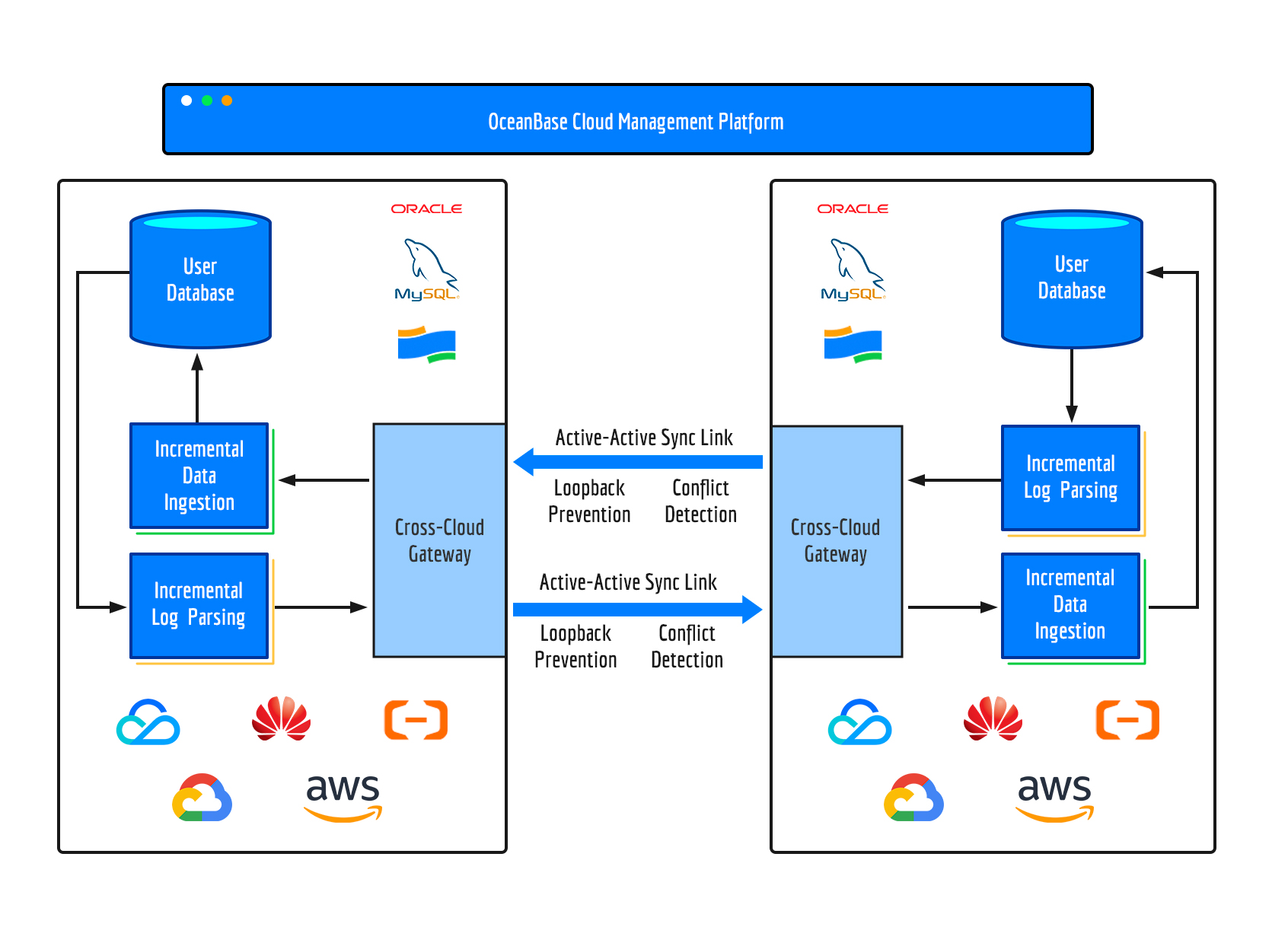
Cross-cloud deployment requires connecting different clouds using specialized network solutions (e.g., dedicated lines, public networks, or cloud enterprise networks). This introduces challenges such as network complexity, the impact of bandwidth and latency on performance, and data transmission security. OceanBase Cloud addresses these challenges through the following optimizations:

  1. Cloud gateway service automation

    OceanBase Cloud automates cross-cloud networking using a built-in gateway service. You only need to specify the source and target cloud vendors and regions. The system automatically determines the necessary network services based on the cloud properties and handles network construction, monitoring, and maintenance behind the scenes, ensuring a seamless experience without impacting your business network.

  2. Localized transmission components

    Cross-cloud network traffic and latency directly affect data transmission performance. To address this, OceanBase Cloud deploys log parsing components on the source cloud and data writing components on the target cloud. This architecture filters unnecessary data at the source while minimizing latency issues during data writing on the target, thereby enhancing transmission performance.

  3. Encrypted data transmission

    OceanBase Cloud ensures transmission security using AES-128-GCM encryption, a widely adopted standard used by major cloud vendors like Google Cloud and AWS. Session keys between gateways are transmitted via secure private network tunnels and are periodically rotated to maintain data security during cross-cloud transfers.

Active-active synchronization links

For disaster recovery scenarios, active-active solutions are increasingly favored over traditional backup-restore or primary-secondary clusters. In an active-active setup, both data centers handle read and write requests simultaneously. To ensure data consistency across both sides, real-time bidirectional synchronization is required.

OceanBase Cloud supports bidirectional synchronization between heterogeneous databases, including MySQL, Oracle, and OceanBase Database, ensuring stability and consistency through mechanisms like loopback prevention and conflict detection.

  1. Loopback prevention

    When data is written to one side, database logs are recorded and parsed for synchronization to the other side. This process may inadvertently create infinite loops as synchronized data is logged and re-synchronized back.

    To prevent this, OceanBase Cloud implements database-specific loopback prevention:

    • MySQL and Oracle: Transaction tables record synchronized data during incremental writes. Before log parsing, the system checks if the data exists in the transaction table. If yes, it discards the data; otherwise, it proceeds with synchronization.
    • OceanBase: Synchronization components assign unique thread IDs to data writes. During log parsing, the system automatically discards data marked with these thread IDs, preventing loopback issues.
  2. Conflict detection

    Active-active setups require businesses to avoid simultaneous writes or updates to the same record (unique key) in both data centers. Such scenarios can lead to data conflicts, where updates from both sides overwrite each other.

    OceanBase Cloud’s active-active replication links provide real-time conflict detection. Based on your configuration, the system can:

    • Overwrite the target data,
    • Ignore the conflict and retain the target data,
    • Preserve the conflict data for analysis.

    Additionally, OceanBase Cloud records all conflicting data, allowing you to download and analyze it for identifying root causes and improving business logic to minimize future conflicts.

Previous topic

Management mode and scenarios
Last

Next topic

High availability with cross-cloud primary-standby databases
Next
on this page
Overview
Implementation
Cross-cloud deployment
Active-active synchronization links