
This topic describes how to use OceanBase Migration Service (OMS) to migrate data from a TiDB database to a MySQL-compatible tenant of OceanBase Database, which can be a physical data source, a public cloud OceanBase data source, or a standalone data source.
Background information
You can create a data migration task in the OMS console to seamlessly migrate the existing business data and incremental data from a TiDB database to a MySQL-compatible tenant of OceanBase Database through schema migration, full migration, and incremental synchronization.
TiDB is an integrated distributed database that supports hybrid transactional and analytical processing (HTAP). You must deploy a TiCDC cluster and a Kafka cluster to synchronize incremental data from a TiDB database to a MySQL-compatible tenant of OceanBase Database.
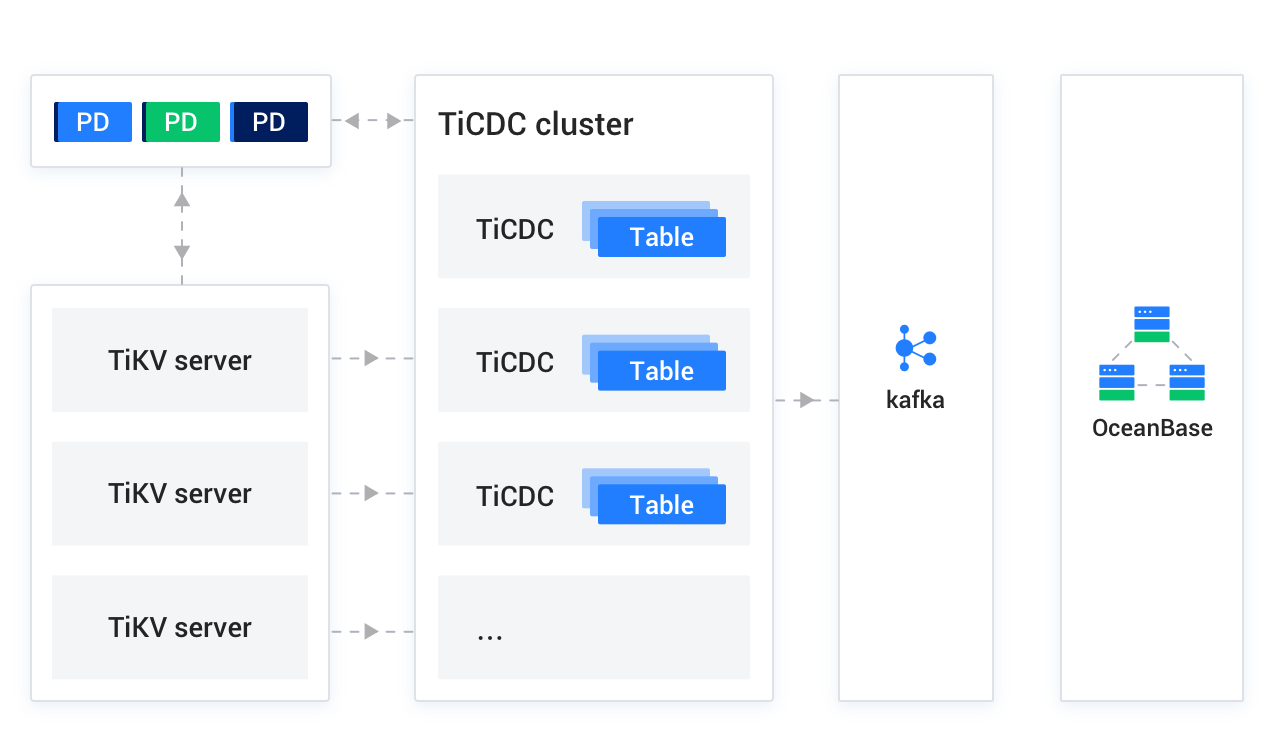
TiCDC is an incremental data synchronization tool for TiDB and provides high availability by using a placement driver (PD) cluster, which is the scheduling module of the TiDB cluster and usually consists of three PD nodes. TiKV Server is a TiKV node in the TiDB cluster. TiKV Server sends data changes in change logs to the TiCDC cluster. TiCDC runs multiple TiCDC processes to obtain and process data from TiKV nodes, and then synchronizes the data to the Kafka cluster. The Kafka cluster saves the incremental logs of the TiDB database that are converted by TiCDC. During incremental data synchronization, OMS obtains the corresponding data from the Kafka cluster and migrates the data to the MySQL-compatible tenant of OceanBase Database in real time. If you create a TiDB data source without binding it to a Kafka data source, you cannot perform incremental synchronization.
Prerequisites
You have created dedicated database users in the source TiDB database and the target MySQL-compatible tenant of OceanBase Database for data migration and granted the required privileges to the users. For more information, see Create a database user.
Limitations
Limitations on the source database:
Do not perform DDL operations that modify database or table schemas during schema migration or full migration. Otherwise, the data migration task may be interrupted.
At present, OMS supports TiDB 4.x, 5.4, 6.x, and 7.x.
OMS does not support triggers in the target database. If triggers exist in the target database, the data migration may fail.
When you use OMS to migrate data from a TiDB database to a MySQL-compatible tenant of OceanBase Database, DDL synchronization is not supported.
OMS does not support the migration of tables without primary keys or data with spaces from a TiDB database to a MySQL-compatible tenant of OceanBase Database.
Data source identifiers and user accounts must be globally unique in OMS.
OMS supports the migration of only objects whose database name, table name, and column name are ASCII-encoded and do not contain special characters. The special characters are line breaks, spaces, and the following characters:
. | " ' ` ( ) = ; / & \.OMS supports only the TiCDC Open Protocol. If you use an unsupported protocol, a Java Database Connectivity (JDBC) connector exception occurs, and an error that indicates a null pointer is returned.
When you use OMS to synchronize data from a TiCDC instance to a Kafka instance, you must set the
enable-old-valueparameter totrue. Otherwise, the format of data synchronization messages may be invalid. For more information, see Task configuration file.If you select TiCDC as the incremental synchronization method, you must refer to TiDB official documentation to clarify the usage limitations. Otherwise, data inconsistency may occur.
Considerations
If the source database contains foreign keys with the same name, an error occurs during schema migration. In this case, you can rename the foreign keys to resume the task.
If the UTF-8 character set is used in the source database, we recommend that you use a compatible character set, such as UTF-8 or UTF-16, in the target database to avoid garbled characters.
In a task for reverse increment from a TiDB database to a MySQL-compatible tenant of OceanBase Database of a version earlier than V3.2.x, if the source table is a multi-partition table with a global unique index and you update the values of the partitioning key of the table, data may be lost during migration.
Do not write data to the topic synchronously used by TiCDC. Otherwise, a JDBC connector exception may occur and a null pointer error may be returned.
Check whether the migration precision of OMS for fields of data types such as DECIMAL, FLOAT, and DOUBLE is as expected. If the precision of the target field type is lower than that of the source field type, the value with a higher precision may be truncated. This may result in data inconsistency between the source and target fields.
If you change the unique index in the target database, you must restart the Incr-Sync component. Otherwise, the data in the source and target databases may be inconsistent.
If the clocks between nodes or between the client and the server are out of synchronization, the latency may be inaccurate during incremental synchronization or reverse increment.
For example, if the clock is earlier than the standard time, the latency can be negative. If the clock is later than the standard time, the latency can be positive.
Take note of the following considerations if you want to perform data merge migration:
We recommend that you configure the mappings between the source and target databases by specifying matching rules.
We recommend that you manually create schemas in the target database. If you use OMS to create schemas, skip failed objects in the schema migration step.
A difference between the source and target table schemas may result in data consistency. Some known scenarios are described as follows:
When you manually create a table schema in the target database, if the data types of any columns are not supported by OMS, implicit data type conversion may occur in the target database, which causes inconsistent column types between the source and target databases.
If the length of a column in the target database is shorter than that in the source database, the data of this column may be automatically truncated, which causes data inconsistency between the source and target databases.
If you select only Incremental Synchronization when you create the data migration task, OMS requires that the archive logs in the source database be retained for more than 48 hours.
If you select Full Migration and Incremental Synchronization when you create the data migration task, OMS requires that the archive logs in the source database be retained for at least seven days. Otherwise, the data migration task may fail or the data in the source and target databases may be inconsistent because OMS cannot obtain incremental logs.
If the source and target table objects differ only in capitalization of their names, the data migration result may not be as expected because the object names in the source or target database are case-insensitive.
Data type mappings
TiDB database |
MySQL-compatible tenant of OceanBase Database |
|---|---|
| INTEGER | INTEGER |
| TINYINT | TINYINT |
| MEDIUMINT | MEDIUMINT |
| BIGINT | BIGINT |
| SMALLINT | SMALLINT |
| DECIMAL | DECIMAL |
| NUMERIC | NUMERIC |
| FLOAT | FLOAT |
| REAL | REAL |
| DOUBLE PRECISION | DOUBLE PRECISION |
| BIT | BIT |
| CHAR | CHAR |
| VARCHAR | VARCHAR |
| BINARY | BINARY |
| VARBINARY | VARBINARY |
| BLOB | BLOB |
| TEXT | TEXT |
| ENUM | ENUM |
| SET | SET |
| DATE | DATE |
| DATETIME | DATETIME |
| TIMESTAMP | TIMESTAMP |
| TIME | TIME |
| YEAR | YEAR |
Procedure
Create a data migration task.
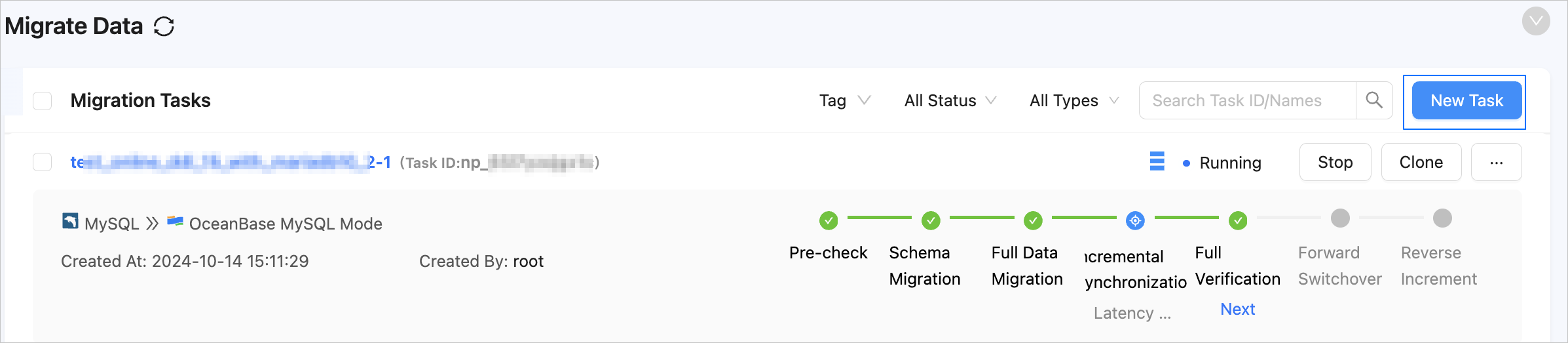
Log in to the OMS console.
In the left-side navigation pane, click Data Migration.
On the Data Migration page, click Create Task in the upper-right corner.
On the Create Task page, specify the name of the migration task.
We recommend that you set it to a combination of digits and letters. It must not contain any spaces and cannot exceed 64 characters in length.
Notice
The task name must be a unique identifier in the OMS system.
In the Select Source and Target step, configure the parameters.
 ParameterDescription
Source If you have created a TiDB data source, select it from the drop-down list. If not, click New Data Source in the drop-down list and create one in the dialog box that appears on the right. For more information, see Create a TiDB data source.
Notice
If the source TiDB database is not bound to a valid Kafka data source or topic, incremental synchronization is not supported.Target If you have created a data source for the MySQL-compatible tenant of OceanBase Database, which can be a physical data source, a public cloud OceanBase data source, or a standalone data source, select it from the drop-down list. If not, click New Data Source in the drop-down list and create one in the dialog box that appears on the right. For more information about the parameters, see Create a physical OceanBase data source, Create a public cloud OceanBase data source, or Create a standalone OceanBase data source. Tag (Optional) Click the text box and select a tag from the drop-down list. You can also click Manage Tags to create, modify, and delete tags. For more information, see Use tags to manage data migration tasks. Click Next. In the Select Migration Type step, specify the migration types for the migration task.
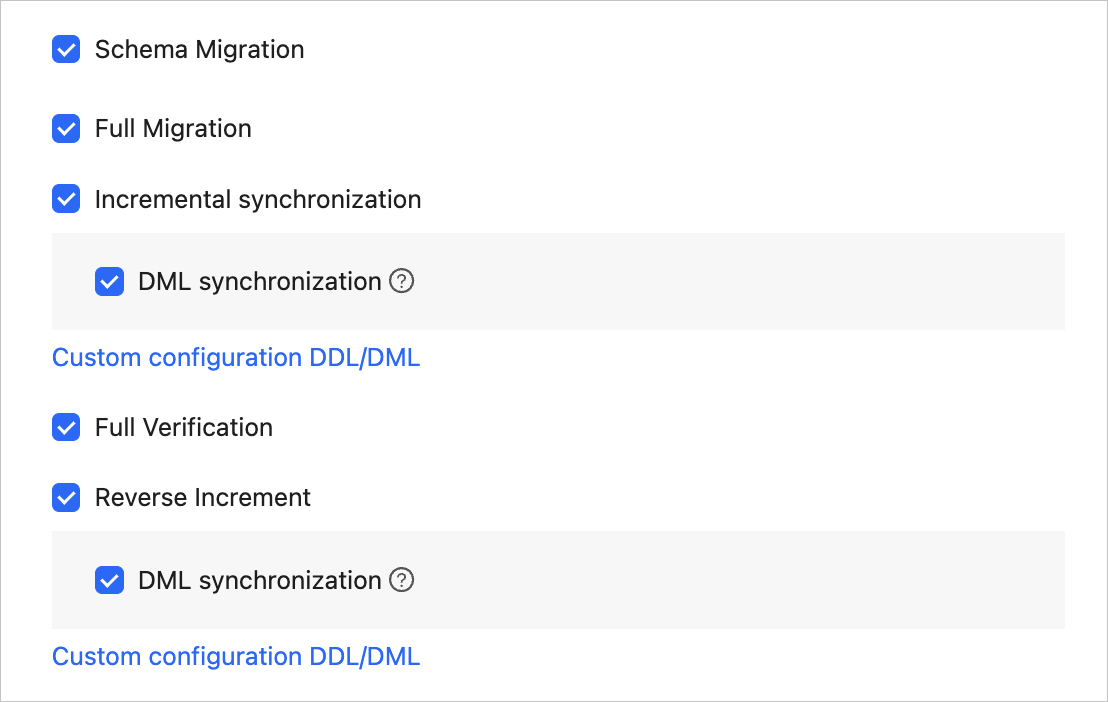
Options for Migration Type are Schema Migration, Full Migration, Incremental Synchronization, Full Verification, and Reverse Increment.
Migration typeDescriptionSchema migration The definitions of data objects, such as tables, indexes, constraints, comments, and views, are migrated from the source database to the target database. Temporary tables are automatically filtered out. Full migration After a full migration task is started, OMS migrates existing data of tables in the source database to corresponding tables in the target database. If you select Full Migration, we recommend that you use the ANALYZEstatement to collect the statistics of the TiDB database before data migration.Incremental synchronization Changed data in the source database is synchronized to the corresponding tables in the target database after an incremental synchronization task starts. Supported data changes are data addition, modification, and deletion.
Options for DML synchronization in the Incremental Synchronization section includeINSERT,DELETE, andUPDATE. Select the options based on your business needs. For more information, see Configure DDL/DML synchronization. If you create a TiDB data source without binding it to a Kafka data source, you cannot select Incremental Synchronization.Full verification After the full migration and incremental synchronization are completed, OMS automatically initiates a full verification task to verify the data tables in the source and target databases. - If you select Full Verification, we recommend that you collect the statistics of the TiDB database and the MySQL-compatible tenant of OceanBase Database before full verification. For more information about how to collect statistics of a MySQL-compatible tenant of OceanBase Database, see Manual statistics collection.
- If you have selected Incremental Synchronization but did not select all DML statements in the DML synchronization section, OMS does not support full verification.
Reverse increment When a reverse increment task starts, OMS migrates the data changed in the target database after the business switchover back to the source database in real time.
Generally, incremental synchronization configurations are reused for reverse increment. You can also customize the configurations for reverse increment as needed. You cannot select Reverse Increment in the following cases:- Multi-table aggregation is enabled.
- Multiple source schemas map to the same target schema.
(Optional) Click Next.
If you have selected Reverse Increment without configuring the related parameters for the target MySQL-compatible tenant of OceanBase Database, the Add Data Source Information dialog box appears, prompting you to configure related parameters. For more information about the parameters, see Create a physical OceanBase data source, Create a public cloud OceanBase data source, or Create a standalone OceanBase data source.
After you configure the parameters, click Test connectivity. After the test succeeds, click Save.
Click Next. In the Select Migration Objects step, specify the migration objects for the migration task.
You can select Specify Objects or Match by Rule to specify the migration objects. The following procedure describes how to specify migration objects by using the Specify Objects option. For information about the procedure for specifying migration objects by using the Match by Rule option, see Configure matching rules.
Notice
The name of a table to be migrated, as well as the names of columns in the table, must not contain Chinese characters.
If a database or table name contains double dollar signs ("$$"), you cannot create the migration task.
OMS automatically filters out unsupported objects. For information about the SQL statements for querying objects, see SQL statements for querying database objects.

In the Select Migration Objects section, select Specify Objects.
In the Source Object(s) list, select the objects to be migrated. You can select tables and views of one or more databases as the migration objects.
Click > to add the selected objects to the Target Object(s) list.
OMS also allows you to import objects by using text, rename objects, set row filters, view column information, and remove a single object or all objects to be migrated.
OperationDescriptionImport objects - In the Target Object(s) list, click Import Objects in the upper-right corner.
- In the dialog box that appears, click Save.
Notice
This operation will overwrite previous selections. Proceed with caution. - In the Import Objects dialog box, import the objects to be migrated.
You can import CSV files to rename databases/tables. For more information, see Download and import the settings of migration objects. - Click Validate.
- After the validation succeeds, click OK.
Rename objects OMS allows you to rename migration objects. For more information, see Rename a migration or synchronization object. Configure settings OMS allows you to filter rows by using WHEREconditions. For more information, see Use SQL conditions to filter data.
You can also view column information of the migration objects in the View Column section.Remove one or all objects OMS allows you to remove a single object or all objects to be migrated to the target database during data mapping. - To remove a single migration object:
In the Target Object(s) list, move the pointer over the target object and click Remove. - To remove all migration objects:
In the Target Object(s) list, click Remove All in the upper-right corner. In the dialog box that appears, click OK.
Click Next. In the Migration Options step, configure the parameters.
Full migration
The following parameters are displayed only if you have selected Full Migration in the Select Migration Type step.
 ParameterDescription
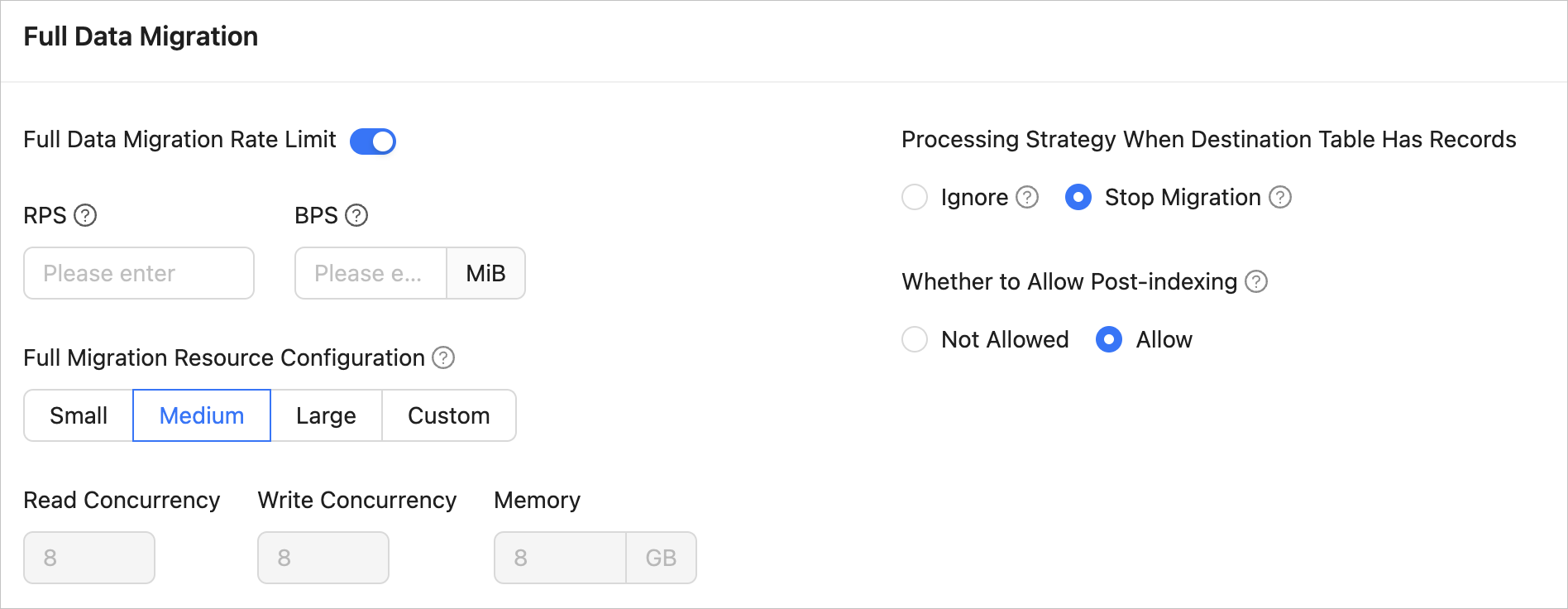
Full Migration Rate Limit You can choose whether to limit the full migration rate as needed. If you choose to limit the full migration rate, you must specify the records per second (RPS) and bytes per second (BPS). The RPS specifies the maximum number of data rows migrated to the target database per second during full migration, and the BPS specifies the maximum amount of data in bytes migrated to the target database per second during full migration. Note
The RPS and BPS values specified here are only for throttling. The actual full migration performance is subject to factors such as the settings of the source and target databases and the instance specifications.
Full Migration Resource Configuration You can select Small, Medium, or Large to use the corresponding default values of Read Concurrency, Write Concurrency, and Memory. You can also customize the resource configurations for full migration. By setting the resource configuration for the Full-Import component, you can limit the resource consumption of a task in the full migration phase. Notice
In the case of custom configurations, the minimum value is
1, and only integers are supported.Handle Non-empty Tables in Target Database Valid values: Ignore and Stop Migration. - If you select Ignore, when the data to be inserted conflicts with the existing data of a target table, OMS retains the existing data and records the conflict data.
Notice
If you select Ignore, data is pulled in IN mode for full verification. In this case, the scenario where the target table contains more data than the source table cannot be verified, and the verification efficiency will be decreased.
- If you select Stop Migration and a target table contains data, an error is returned during full migration, indicating that the migration is not allowed. In this case, you must clear the data in the target table before you can continue with the migration.
Notice
After an error is returned, if you click Resume in the dialog box, OMS ignores this error and continues to migrate data. Proceed with caution.
Post-Indexing Specifies whether to create indexes after the full migration is completed. Post-indexing can shorten the time required for full migration. For more information about the considerations on post-indexing, see the description below. Notice
This feature is supported only if you have selected both Schema Migration and Full Migration on the Select Migration Type page.
- Only non-unique key indexes can be created after the migration is completed.
- OceanBase Database V1.x does not support the post-indexing feature.
If post-indexing is allowed, we recommend that you adjust the parameters based on the hardware conditions of your OceanBase Database and the current business traffic.
If you use OceanBase Database V4.x, adjust the following parameters of the
systenant and business tenants by using a CLI client.Adjust the parameters of the
systenant// `parallel_servers_target` specifies the queuing conditions for parallel queries on each server. // To maximize performance, we recommend that you set this parameter to a value greater than, for example, 1.5 times, the number of physical CPU cores. In addition, make sure that the value does not exceed 64, to prevent database kernels from contending for locks. set global parallel_servers_target = 64;Adjust the parameters of a business tenant
// Specify the limit on the file memory buffer size.
alter system set _temporary_file_io_area_size = '10' tenant = 'xxx';
// Disable throttling in V4.x.
alter system set sys_bkgd_net_percentage = 100;
If you use OceanBase Database V2.x or V3.x, adjust the following parameters of the
systenant by using a CLI client.// `parallel_servers_target` specifies the queuing conditions for parallel queries on each server. // To maximize performance, we recommend that you set this parameter to a value greater than, for example, 1.5 times, the number of physical CPU cores. In addition, make sure that the value does not exceed 64, to prevent database kernels from contending for locks. set global parallel_servers_target = 64; // `data_copy_concurrency` specifies the maximum number of concurrent data migration and replication tasks allowed in the system. alter system set data_copy_concurrency = 200;
- If you select Ignore, when the data to be inserted conflicts with the existing data of a target table, OMS retains the existing data and records the conflict data.
Incremental synchronization
The following parameters are displayed only if you have selected Incremental Synchronization in the Select Migration Type step.
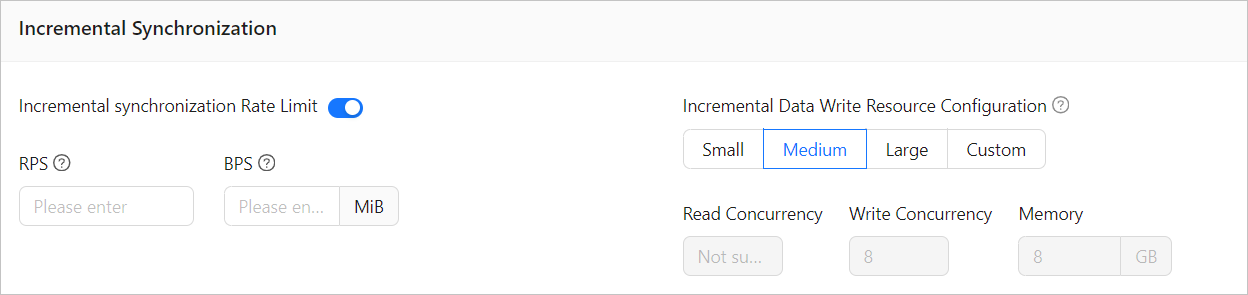 ParameterDescription
Incremental Synchronization Rate Limit You can choose whether to limit the incremental synchronization rate as needed. If you choose to limit the incremental synchronization rate, you must specify the records per second (RPS) and bytes per second (BPS). The RPS specifies the maximum number of data rows synchronized to the target database per second during incremental synchronization, and the BPS specifies the maximum amount of data in bytes synchronized to the target database per second during incremental synchronization. Note
The RPS and BPS values specified here are only for throttling. The actual incremental synchronization performance is subject to factors such as the settings of the source and target databases and the instance specifications.
Incremental Data Write Resource Configuration You can select Small, Medium, or Large to use the corresponding default values of Write Concurrency and Memory. You can also customize the resource configurations for incremental data writes. By setting the resource configuration for the Incr-Sync component, you can limit the resource consumption of a task in data writes in the incremental synchronization stage. Notice
In the case of custom configurations, the minimum value is
1, and only integers are supported.Incremental Synchronization Start Timestamp - If you have selected Full Migration as the migration type, this parameter is not displayed.
- If you have selected Incremental Synchronization but not Full Migration, specify a point in time after which the data is to be synchronized. The default value is the current system time. For more information, see Set an incremental synchronization timestamp.
Reverse increment
The following parameters are displayed only if you have selected Reverse Increment in the Select Migration Type step. The parameters for reverse increment are consistent with those for incremental synchronization. You can select Reuse Incremental Synchronization Configuration in the upper-right corner.
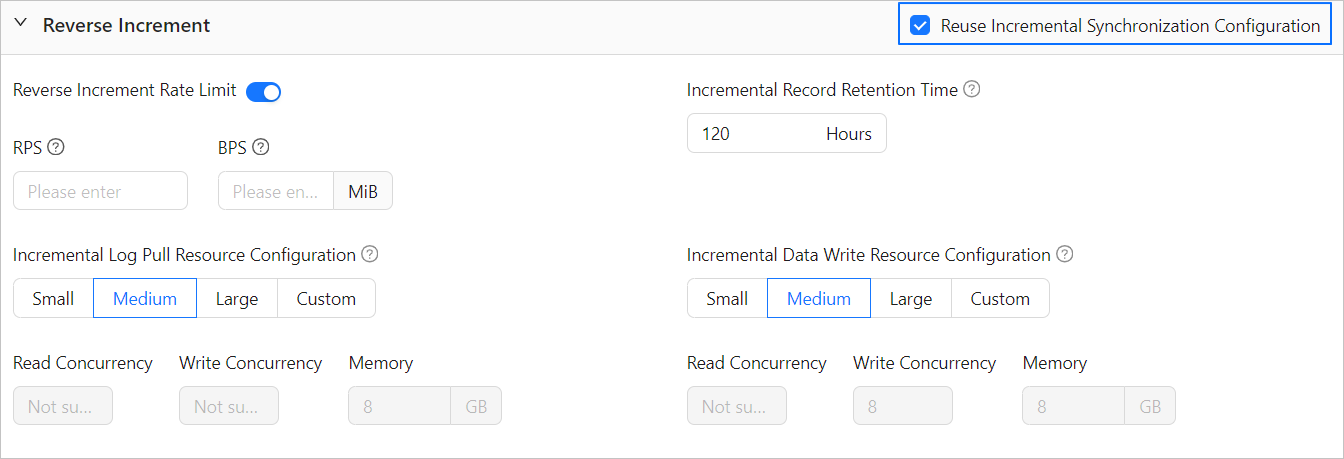
In reverse increment from a TiDB database to a MySQL-compatible tenant of OceanBase Database, you must also configure the following parameters.
ParameterDescriptionIncremental Log Pull Resource Configuration You can select Small, Medium, or Large to use the corresponding default value of Memory. You can also customize the resource configurations for incremental log pull. By setting the resource configuration for the Store component, you can limit the resource consumption of a task in log pull in the incremental synchronization stage. Notice
In the case of custom configurations, the minimum value is
1, and only integers are supported.Incremental Record Retention Time The duration that incremental parsed files are cached in OMS. A longer retention period results in more disk space occupied by the Store component. Full verification
The following parameters are displayed only if you have selected Full Verification in the Select Migration Type step.
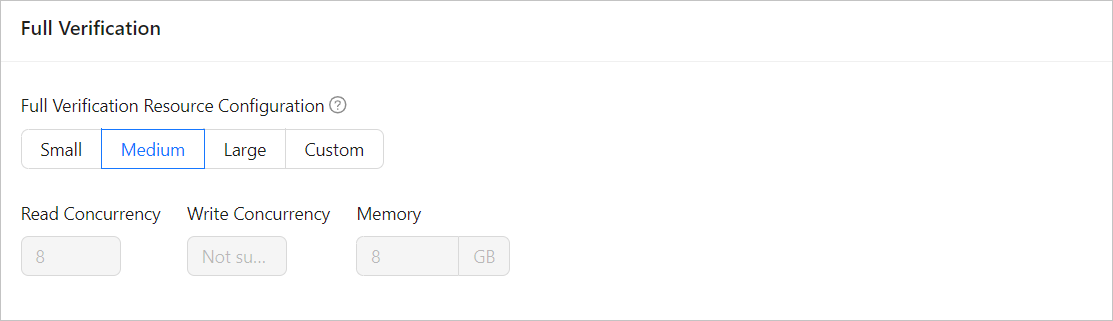 ParameterDescription
Full Verification Resource Configuration You can select Small, Medium, or Large to use the corresponding default values of Read Concurrency and Memory. You can also customize the resource configurations for full verification. By setting the resource configuration for the Full-Verification component, you can limit the resource consumption of a task in the full verification phase. Notice
In the case of custom configurations, the minimum value is
1, and only integers are supported.Advanced options
This section is displayed only if the target is a MySQL-compatible tenant of OceanBase Database V4.3.0 or later and you have selected Schema Migration in the Select Migration Type step.
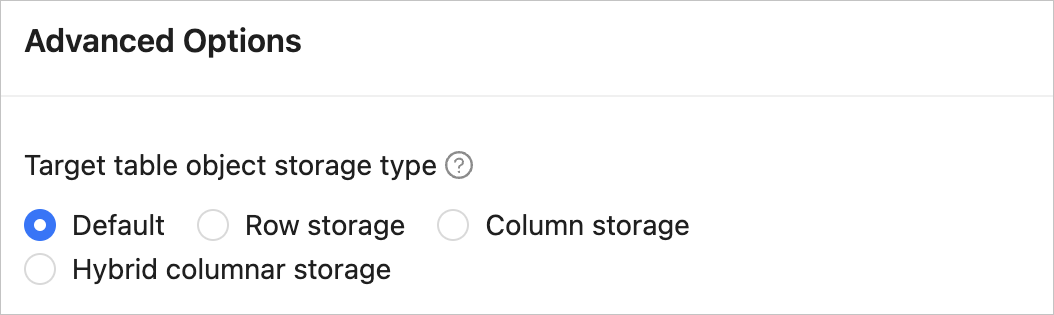
This parameter specifies the storage type for target table objects during schema migration or incremental synchronization. The storage types supported for target table objects are Default, Row Storage, Column Storage, and Hybrid Row-Column Storage. For more information, see default_table_store_format.
Note
The value Default means that other parameters are automatically set based on the parameter configurations of the target database. Table objects in schema migration and new table objects created by incremental DDL statements are written to corresponding schemas based on the specified storage type.
If the parameter settings on the page cannot meet your requirements, you can click Parameter Configuration in the lower part of the page to configure more specific settings. You can also reference an existing task or component template.
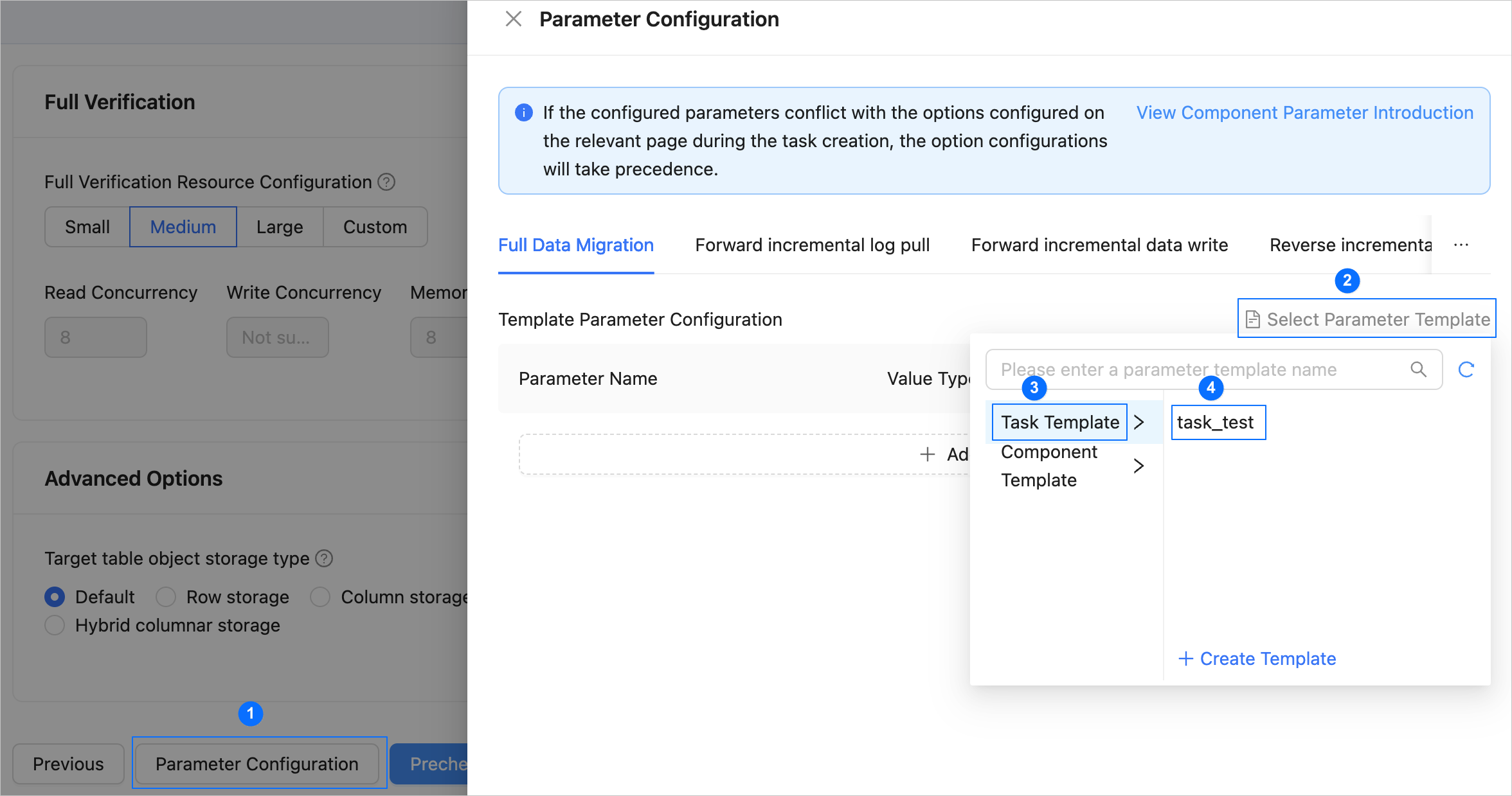
Click Precheck to start a precheck on the data migration task.
During the precheck, OMS checks the read and write privileges of the database users and the network connectivity of the databases. A data migration task can be started only after it passes all check items. If an error is returned during the precheck, you can perform the following operations:
Identify and troubleshoot the issue and then perform the precheck again.
Click Skip in the Actions column of a failed precheck item. In the dialog box that prompts the consequences of the operation, click OK.
Click Start Task. If you do not need to start the task now, click Save to go to the details page of the task. You can start the task later as needed.
OMS allows you to modify the migration objects when the data migration task is running. For more information, see View and modify migration objects. After the data migration task is started, it is executed based on the selected migration types. For more information, see the View migration details section in View details of a data migration task.