OceanBase
English日本語简体中文
Docs Home
Products
Integrations
Release Notes

Databases

OceanBase DatabaseOceanBase Cloud OceanBase Best Practices

Tools

OceanBase Cloud PlatformOceanBase Migration ServiceOceanBase Developer CenterOceanBase Migration AssessmentOceanBase Admin ToolOceanBase Loader and DumperOceanBase DeployerKubernetes operator for OceanBaseOceanBase Diagnostic Tool OceanBase Binlog Service

Connectors and Middleware

OceanBase Database Proxy OceanBase Connector/C OceanBase Connector/J OceanBase Connector/ODBC OceanBase Connector/NETOceanBase Command-Line Client

Databases

OceanBase DatabaseOceanBase Cloud OceanBase Best Practices

Connectors and Middleware

OceanBase Database Proxy OceanBase Connector/C OceanBase Connector/J OceanBase Connector/ODBC OceanBase Connector/NETOceanBase Command-Line Client

Tools

OceanBase Cloud PlatformOceanBase Migration ServiceOceanBase Developer CenterOceanBase Migration AssessmentOceanBase Admin ToolOceanBase Loader and DumperOceanBase DeployerKubernetes operator for OceanBaseOceanBase Diagnostic Tool OceanBase Binlog Service
OceanBase DatabaseOceanBase Cloud ToolsConnectors and MiddlewareLifecycle Support Policy

OceanBase Migration Service

V4.2.5Enterprise Edition
  • OMS Documentation
  • OMS Introduction
    • What is OMS?
    • Terms
    • OMS HA
    • Principles of Store
    • Principles of Full-Import and Incr-Sync
    • Data verification principles
    • Architecture
      • Overview
      • Hierarchical functional system
      • Basic components
    • OMS Oracle full data migration design and impact
    • Limitations
  • Quick Start
    • Data migration process
    • Data synchronization process
  • Deploy OMS
    • Deployment types
    • System and network requirements
    • Memory and disk requirements
    • Environment preparations
    • Deploy OMS on a single node
    • Deploy OMS on multiple nodes in a single region
    • Deploy OMS on multiple nodes in multiple regions
    • Scale out
    • Check the deployment
    • Deploy a time-series database (Optional)
  • OMS console
    • Log in to the OMS console
    • Overview
    • User center
      • Configure user information
      • Change your login password
      • Log out
  • Data migration
    • Overview
    • Migrate data from a MySQL database to a MySQL-compatible tenant of OceanBase Database
    • Migrate data from a MySQL-compatible tenant of OceanBase Database to a MySQL database
    • Migrate data from an Oracle database to a MySQL-compatible tenant of OceanBase Database
    • Migrate data from an Oracle-compatible tenant of OceanBase Database to an Oracle database
    • Migrate data from an Oracle database to an Oracle-compatible tenant of OceanBase Database
    • Migrate data from a DB2 LUW database to an Oracle-compatible tenant of OceanBase Database
    • Migrate data from an Oracle-compatible tenant of OceanBase Database to a DB2 LUW database
    • Migrate data from a DB2 LUW database to a MySQL-compatible tenant of OceanBase Database
    • Migrate data from a MySQL-compatible tenant of OceanBase Database to a DB2 LUW database
    • Migrate data within OceanBase Database
    • Create an active-active disaster recovery task in OceanBase Database
    • Migrate data from a TiDB database to a MySQL-compatible tenant of OceanBase Database
    • Migrate data from a PostgreSQL database to a MySQL-compatible tenant of OceanBase Database
    • Migrate data from a PolarDB-X 1.0 database to a MySQL-compatible tenant of OceanBase Database
    • Migrate incremental data from an Oracle-compatible tenant of OceanBase Database to a MySQL database
    • Manage data migration tasks
      • View details of a data migration task
      • Rename a data migration task
      • View and modify migration objects
      • Use tags to Manage data migration tasks
      • Perform batch operations on data migration tasks
      • Download and import settings of migration objects
      • View and modify the parameter configurations of a data migration task
      • Start and pause a data migration task
      • End and delete a data migration task
    • Supported DDL operations and limits for synchronization
      • Synchronize DDL operations from a MySQL database to a MySQL-compatible tenant of OceanBase Database
        • Overview
        • CREATE TABLE
          • Create a table
          • Create a column
          • Create an index or a constraint
          • Create partitions
        • Data type conversion
        • ALTER TABLE
          • Modify a table
          • Operations on columns
          • Operations on constraints and indexes
          • Operations on partitions
        • TRUNCATE TABLE
        • RENAME TABLE
        • DROP TABLE
        • CREATE INDEX
        • DROP INDEX
        • DDL incompatibilities between a MySQL database and a MySQL-compatible tenant of OceanBase Database
          • Overview
          • Incompatibilities of the CREATE TABLE statement
            • Incompatibilities of CREATE TABLE
            • Column types that are supported to create indexes or constraints
          • Incompatibilities of the ALTER TABLE statement
            • Incompatibilities of ALTER TABLE
            • Change the type of a constrained column
            • Change the type of an unconstrained column
            • Change the length of a constrained column
            • Change the length of an unconstrained column
            • Delete a constrained column
          • Incompatibilities of DROP INDEX operations
      • Synchronize DDL operations from a MySQL-compatible tenant of OceanBase Database to a MySQL database
      • DDL operations for synchronizing data from an Oracle database to an Oracle-compatible tenant of OceanBase Database
        • Overview of DDL synchronization from Oracle to OceanBase Database Oracle compatible mode
        • CREATE TABLE
          • Overview
          • Create a relational table
            • Create a relational table
            • Define columns of a relational table
          • Virtual columns
          • Regular columns
          • Create partitions
            • Overview
            • Partitioning
            • Subpartitioning
            • Composite partitioning
            • User-defined partitioning
            • Subpartition templates
          • Constraints
            • Overview
            • Inline constraints
            • Out-of-line constraints
        • CREATE INDEX
          • Overview
          • Normal indexes
        • ALTER TABLE
          • Modify tables
          • Modify, drop, and add table attributes
          • Column attribute management
            • Modify, drop, and add column attributes
            • Rename a column
            • Add columns and column attributes
            • Modify column attributes
            • Drop columns
          • Modify, drop, and add constraints
          • Partition management
            • Modify, drop, and add partitions
            • Drop a partition
            • Drop subpartitions
            • Add partitions and subpartitions
            • Modify partitions
            • Truncate partitions
        • DROP TABLE
        • RENAME OBJECT
        • TRUNCATE TABLE
        • DROP INDEX
        • DDL incompatibilities between an Oracle database and an Oracle-compatible tenant of OceanBase Database
          • Overview
          • Incompatibilities of CREATE TABLE
          • Incompatibilities in table modification operations
            • Incompatibilities of ALTER TABLE
            • Change the type of a constrained column
            • Change the type of an unconstrained column
            • Change the length of a constrained column
            • Change the length of an unconstrained column
      • Synchronize DDL operations from the Oracle compatible mode of OceanBase Database to an Oracle database
      • Synchronize DDL operations from a DB2 LUW database to an Oracle-compatible tenant of OceanBase Database
      • Synchronize DDL operations from the Oracle compatible mode of OceanBase Database to a DB2 LUW database
      • Synchronize DDL operations from a DB2 LUW database to a MySQL-compatible tenant of OceanBase Database
      • Synchronize DDL operations from a MySQL-compatible tenant of OceanBase Database to a DB2 LUW database
      • DDL synchronization between MySQL-compatible tenants of OceanBase Database
      • DDL synchronization between Oracle-compatible tenants of OceanBase Database
  • Data synchronization
    • Overview
    • Synchronize data from OceanBase Database to a Kafka instance
    • Synchronize data from OceanBase Database to a RocketMQ instance
    • Synchronize data from OceanBase Database to a DataHub instance
    • Synchronize data from an ODP logical table to a physical table in a MySQL-compatible tenant of OceanBase Database
    • Synchronize data from an ODP logical table to a DataHub instance
    • Synchronize data from an IDB logical table to a MySQL-compatible tenant of OceanBase Database
    • Synchronize data from an IDB logical table to a DataHub instance
    • Synchronize data from a MySQL database to a DataHub instance
    • Synchronize data from an Oracle database to a DataHub instance
    • Manage data synchronization tasks
      • View details of a data synchronization task
      • Change the name of a data synchronization task
      • View and modify synchronization objects
      • Use tags to Manage data synchronization tasks
      • Perform batch operations on data synchronization tasks
      • Download and import the settings of synchronization objects
      • View and modify the parameter configurations of a data synchronization task
      • Start and pause a data synchronization task
      • End and delete a data synchronization task
  • Create and manage data sources
    • Create data sources
      • Create an OceanBase data source
        • Create a physical OceanBase data source
        • Create an ODP data source
        • Create an IDB data source
        • Create a public cloud OceanBase data source
        • Create a standalone OceanBase data source
      • Create a MySQL data source
      • Create an Oracle data source
      • Create a TiDB data source
      • Create a Kafka data source
      • Create a RocketMQ data source
      • Create a DataHub data source
      • Create a DB2 LUW data source
      • Create a PostgreSQL data source
      • Create a PolarDB-X 1.0 data source
    • Manage data sources
      • View data source information
      • Copy a data source
      • Edit a data source
      • Delete a data source
    • Create a database user
    • User privileges
    • Enable binlogs for the MySQL database
    • Minimum privileges required when an Oracle database serves as the source
  • OPS & Monitoring
    • O&M overview
    • Go to the overview page
    • Server
      • View server information
      • Update the quota
      • View server logs
    • Components
      • Store
        • Create a store
        • View details of a store
        • Update the configurations of a store
        • Start and pause a store
        • Delete a store
      • Incr-Sync
        • View details of an Incr-Sync component
        • Start and pause an Incr-Sync component
        • Migrate an Incr-Sync component
        • Update the configurations of an Incr-Sync component
        • Batch O&M
        • Delete an Incr-Sync component
      • Full-Import
        • View details of a Full-Import component
        • Pause a Full-Import component
        • Rerun and resume a Full-Import component
        • Update the configurations of a Full-Import component
        • Delete a Full-Import component
      • Full-Verification
        • View details of a Full-Verification component
        • Pause a Full-Verification component
        • Rerun and resume a Full-Verification component
        • Update the configurations of a Full-Verification component
        • Delete a Full-Verification component
    • O&M Task
      • View O&M tasks
      • Skip a task or subtask
      • Retry a task or subtask
    • Parameter Template
      • Overview
      • Task Template
        • Create a task template
        • View and edit task templates
        • Copy and export a task template
        • Delete a task template
      • Component Template
        • Create a component template
        • View and edit component templates
        • Copy and export a component template
        • Delete a component template
      • Component parameters
        • Store parameters
        • Incr-Sync parameters
        • Full-Import Parameters
        • Full-Verification parameters
        • CM parameters
        • Supervisor parameters
  • System management
    • Permission Management
      • Overview
      • Manage users
      • Manage departments
    • Alert center
      • View task alerts
      • View system alerts
      • Manage alert settings
    • Associate with OCP
    • System parameters
      • Modify system parameters
      • Modify HA configurations
      • oblogproxy parameters
    • Manage access keys
    • Operation audit
  • Troubleshooting Guide
    • Manage OMS services
    • OMS logs
    • Component O&M
      • O&M operations for the Supervisor component
      • CLI-based O&M for the Connector component
      • O&M operations for the Store component
    • Component tuning
      • Incr-Sync/Full-Import tuning
      • Oracle store tuning
    • Set throttling
    • Store performance diagnostics
  • Reference Guide
    • Features
      • Configure DDL/DML synchronization
      • Supported DDL operations for synchronization
      • Rename a migration or synchronization object
      • Use SQL conditions to filter data
      • Set an incremental synchronization timestamp
      • Configure matching rules
      • Wildcard patterns supported for matching rules
      • Hidden column mechanisms
      • Instructions on schema migration
      • Create and update a heartbeat table
      • Change the topic
      • Column filtering
      • Data formats
    • API Reference
      • Overview
      • CreateProject
      • StartProject
      • StopProject
      • ResumeProject
      • ReleaseProject
      • DeleteProject
      • ListProjects
      • DescribeProject
      • DescribeProjectSteps
      • DescribeProjectStepMetric
      • DescribeProjectProgress
      • DescribeProjectComponents
      • ListProjectFullVerifyResult
      • StartProjectsByLabel
      • StopProjectsByLabel
      • CreateMysqlDataSource
      • CreateOceanBaseDataSource
      • CreateOceanBaseODPDataSource
      • CreatePolarDBDataSource
      • ListDataSource
      • CreateLabel
      • ListAllLabels
      • DeleteDataSource
      • CreateProjectModifyRecords
      • ListProjectModifyRecords
      • StopProjectModifyRecords
      • RetryProjectModifyRecords
      • CancelProjectModifyRecord
      • SubmitPreCheck
      • GetPreCheckResult
      • UpdateProjectConfig
    • Alert Reference
      • oms_host_down
      • oms_host_down_migrate_resource
      • oms_host_threshold
      • oms_migration_failed
      • oms_migration_delay
      • oms_sync_failed
      • oms_sync_status_inconsistent
      • oms_sync_delay
    • SSO
      • Integrate the OIDC protocol to OMS to implement SSO
      • Integrate the SAML 2.0 protocol to OMS to implement SSO
    • OMS error codes
    • SQL statements for querying database objects
    • Create a trigger
    • Change the log level for a PostgreSQL instance
    • Online DDL tools
    • Supplemental logging in Oracle Database
  • Upgrade Guide
    • Overview
    • Upgrade OMS in single-node deployment mode
    • Upgrade OMS in multi-node deployment mode
    • FAQ
  • FAQ
    • General O&M
      • How do I modify the resource quotas of an OMS container?
      • How do I troubleshoot the OMS server down issue?
      • Deploy InfluxDB for OMS
      • Increase the disk space of the OMS host
    • Task diagnostics
      • How do I troubleshoot common problems with Oracle Store?
      • How do I perform performance tuning for Oracle Store?
      • What do I do when Oracle Store reports an error at the isUpdatePK stack?
      • What do I do when a store does not have data of the timestamp requested by the downstream?
      • What do I do when OceanBase Store failed to access an OceanBase cluster through RPC?
      • How do I use LogMiner to pull data from an Oracle database?
    • OPS & monitoring
      • What are the alert rules?
    • Data synchronization
      • FAQ about synchronization to a message queue
        • What are the strategies for ensuring the message order in incremental data synchronization to Kafka
    • Data migration
      • User privileges
        • What privileges do I need to grant to a user during data migration to or from an Oracle database?
      • Full migration
        • How do I query the ID of a checker?
        • How do I query log files of the Checker component of OMS?
        • How do I query the verification result files of the Checker component of OMS?
        • What do I do if the destination table does not exist?
        • What can I do when the full migration failed due to LOB fields?
        • What do I do if garbled characters cannot be written into OceanBase Database V3.1.2?
      • Incremental synchronization
        • How do I skip DDL statements?
        • How do I migrate an Oracle database object whose name exceeds 30 bytes in length?
        • How do I update whitelists and blacklists?
        • What are the application scope and limits of ETL?
    • Installation and deployment
      • How do I upgrade Store?
  • Release Note
    • V4.2
      • OMS V4.2.5
      • OMS V4.2.4
      • OMS V4.2.3
      • OMS V4.2.2
      • OMS V4.2.1
      • OMS V4.2.0
    • V4.1
      • OMS V4.1.0
    • V4.0
      • OMS V4.0.2
      • OMS V4.0.1
    • V3.4
      • OMS V3.4.0
    • V3.3
      • OMS V3.3.1
      • OMS V3.3.0
    • V3.2
      • OMS V3.2.2
      • OMS V3.2.1
    • V3.1
      • OMS V3.1.0
    • V2.1
      • OMS V2.1.2
      • OMS V2.1.0

Download PDF

Document Feedback
  1. Documentation Center
  2. OceanBase Migration Service
  3. V4.2.5

Create a database user

Last Updated:2026-09-04 08:13:48

OceanBase data source
Create an OceanBase Database user
Create a DRC user
Create a sys tenant user
Create the __oceanbase_inner_drc_user user
Oracle data source
MySQL data source
PostgreSQL data source
DB2 LUW data source
TiDB data source
PolarDB-X 1.0 data source

Before you use the data migration and synchronization features of OceanBase Migration Service (OMS), create a dedicated database user for the data migration or synchronization task in the source and destination databases, and grant the corresponding privileges to the user.

OceanBase data source

Create an OceanBase Database user

The OceanBase Database user created here is used to fill in the Database Username field when you create an OceanBase data source (including physical data sources, logical data sources, and public cloud data sources). For example, you can fill in OMSTEST as the database username.
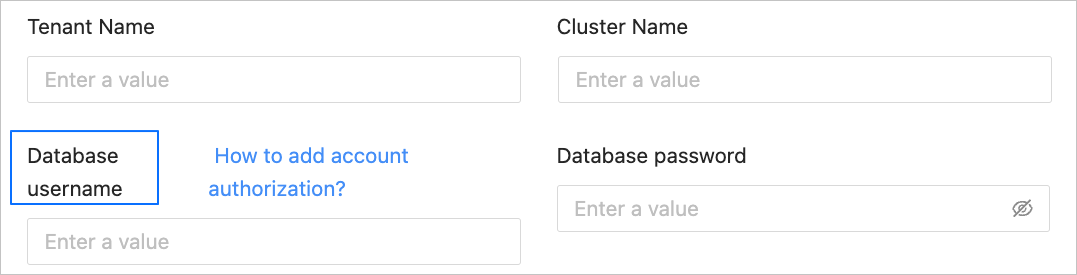
create-user11-en

  1. Log in to the OceanBase Database as a system administrator.

  2. Create a user in the source business tenant for data migration or synchronization.

    • OceanBase Database in MySQL compatible mode

      CREATE USER '<user_name>' IDENTIFIED BY '<password>';
      
    • OceanBase Database in Oracle compatible mode

      CREATE USER '<user_name>' IDENTIFIED BY <password>;
      
  3. Use the GRANT statement to grant privileges to the created database user. For more information, see User privileges.

Create a DRC user

If you need to read incremental log data and database object structure information from the OceanBase Database, create a DRC user in the source sys tenant.

The DRC user created here is used to fill in the Advanced Options field when you create an OceanBase data source (including physical data sources and logical data sources). For example, you can fill in user01 as the DRC username.
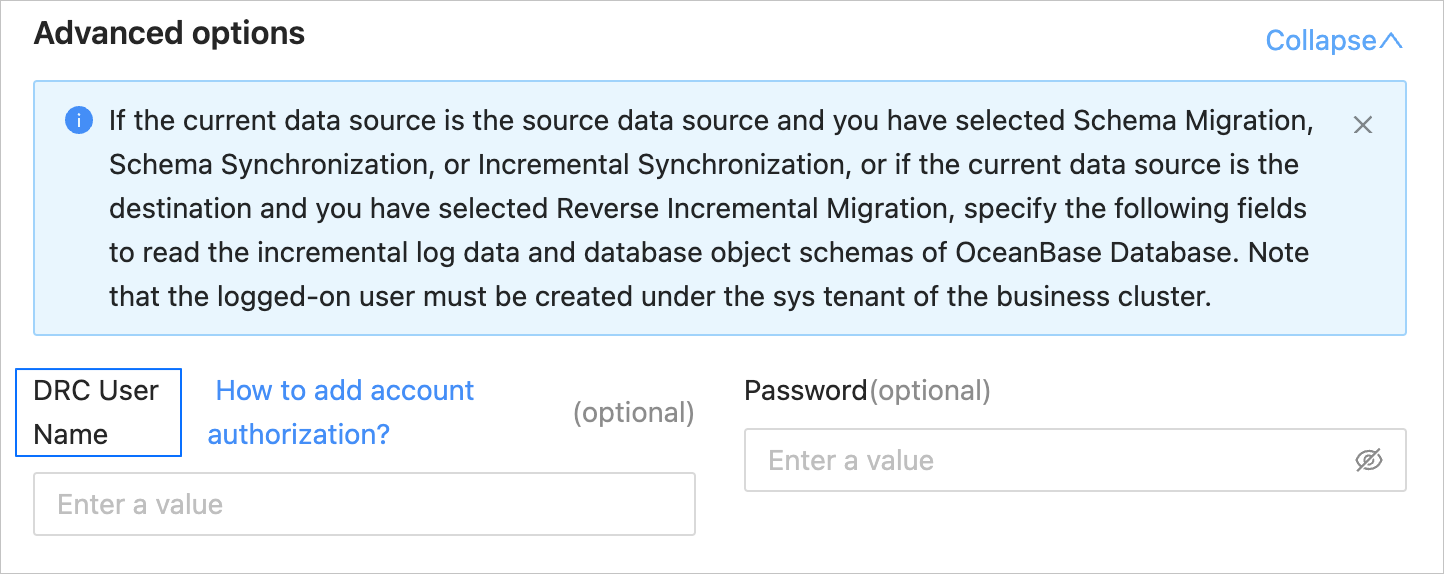
create-user9-en

CREATE USER <drc_user> IDENTIFIED BY '<drc_password>';
GRANT SELECT ON *.* TO <drc_user>;

Create a sys tenant user

The user created in the sys tenant is used to fill in the Advanced Options field when you create an OceanBase public cloud data source and the OceanBase cluster version is earlier than V4.2.0. For example, you can fill in user02 as the sys tenant username.
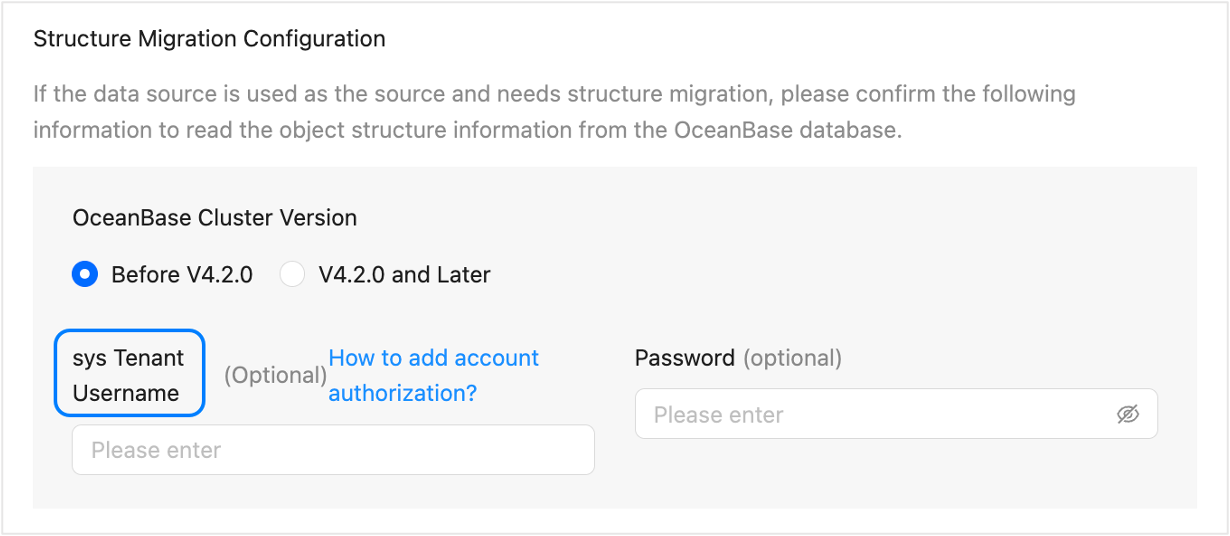
create-user10-en

CREATE USER <drc_user> IDENTIFIED BY '<drc_password>';
GRANT SELECT ON *.* TO <drc_user>;

Create the __oceanbase_inner_drc_user user

If you need to migrate a table without a primary key, create a user and grant privileges to it before you execute a data migration task.

  • If the source is an OceanBase database in MySQL compatible mode, create the __oceanbase_inner_drc_user user in the source business tenant.

    This user is used to specify the password of the __oceanbase_inner_drc_user user when you create an OceanBase data source of the Tenant Type of MySQL.
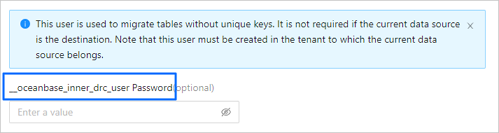
    create-user2-en

    • Create a user

      CREATE USER __oceanbase_inner_drc_user IDENTIFIED BY '<password>';
      
    • Grant privileges

      GRANT SELECT ON *.* TO __oceanbase_inner_drc_user;
      
  • If the source is an OceanBase database in Oracle compatible mode, create the __OCEANBASE_INNER_DRC_USER user in the source business tenant.

    This user is used to specify the password of the __OCEANBASE_INNER_DRC_USER user when you create an OceanBase data source of the Tenant Type of Oracle.
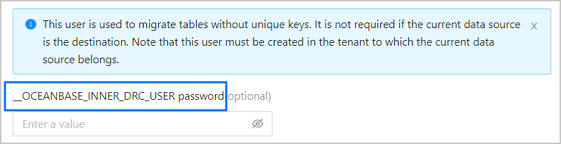
    create-user3-en

    • Create a user

      CREATE USER '__OCEANBASE_INNER_DRC_USER' IDENTIFIED BY <your_password>;
      
    • Grant privileges

      OceanBase Database version
      Grant statement
      Earlier than V2.2.77 GRANT CREATE SESSION TO '__OCEANBASE_INNER_DRC_USER';
      GRANT SELECT ON *.* TO '__OCEANBASE_INNER_DRC_USER';
      V2.2.77 and later versions GRANT CREATE SESSION TO '__OCEANBASE_INNER_DRC_USER';
      GRANT SELECT ANY DICTIONARY TO '__OCEANBASE_INNER_DRC_USER';
      You can grant the SELECT privilege on the migration database and table by using the following two methods:
      • Grant the system privilege
        GRANT SELECT ANY TABLE TO '__OCEANBASE_INNER_DRC_USER';
      • Grant the object privilege (you can grant the privilege only to specific database and table objects).
        GRANT SELECT ON <schema>.<table> TO '__OCEANBASE_INNER_DRC_USER';

Oracle data source

The Oracle database user created here is used for the Database Username field when you create an Oracle data source.
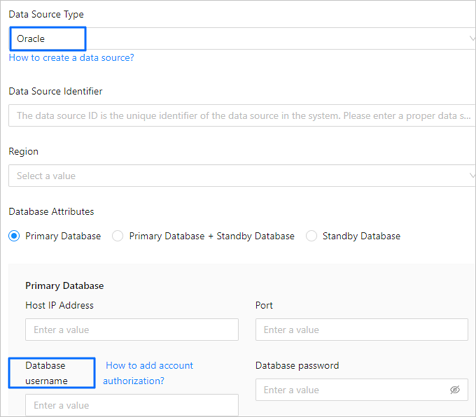
create-user5-en

  1. Log in to the Oracle database.

  2. Create a user for data migration or synchronization.

    CREATE USER <user_name> IDENTIFIED BY "<password>";
    
  3. Use the GRANT statement to grant privileges to the database user. For more information, see User privileges.

MySQL data source

The MySQL database user created here is used for the Database Username field when you create a MySQL data source.
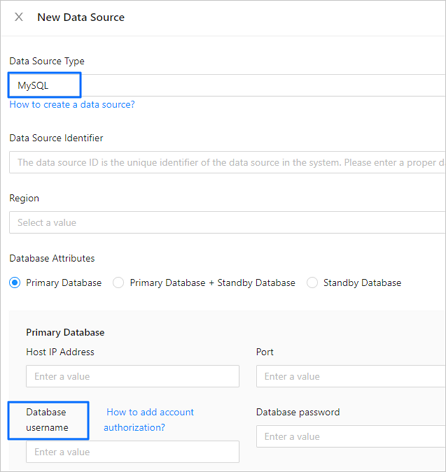
create-user4-en

  1. Log in to the MySQL database.

  2. Use the CREATE USER statement to create a new user.

    CREATE USER '<user_name>'@'<host_name>' IDENTIFIED BY '<user_password>';
    
    Parameter
    Description
    user_name The name of the user to be created.
    host_name The host that allows the user to log in. If the user can log in from any host, use a percent sign (%).
    user_password The password of the user to be created.

    For example, create a user named test who can log in to the MySQL database from any host, and set the login password to password.

    CREATE USER 'test'@'%' IDENTIFIED BY 'password';
    
  3. Use the GRANT statement to grant privileges to the created database user. For more information, see User privileges.

PostgreSQL data source

The PostgreSQL database user created here is used to fill in the Database Username field when you create a PostgreSQL data source.
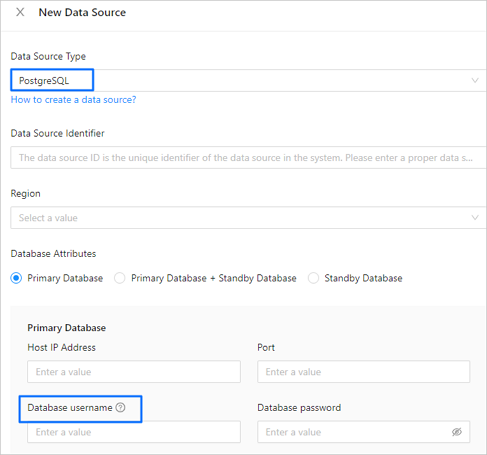
create-user7-en

  1. Log in to the PostgreSQL database.

  2. Create a user in the PostgreSQL database for data migration or synchronization.

    CREATE USER <user_name>  ENCRYPTED PASSWORD '<password>';
    
  3. Use the GRANT statement to grant privileges to the created database user. For more information, see User privileges.

DB2 LUW data source

The DB2 LUW database user created here is used to fill in the Database Username field when you create a DB2 LUW data source.

In DB2 LUW (Linux/UNIX/Windows), the database system does not support directly creating a database user by using SQL statements. If you need to create a DB2 LUW database user, you must first create a system user or group and then grant privileges to the user.

  1. Create a user group in the operating system.

    groupadd <user_group_name>
    
  2. Create a system user and specify the user group to which the user belongs.

    useradd -g <user_group_name> <user_name>
    
  3. Set a login password for the new user.

    passwd <user_name>
    
  4. Grant privileges to the database user. For more information, see User privileges.

TiDB data source

The TiDB database user created here is used to fill in the Database Username field when you create a TiDB data source.
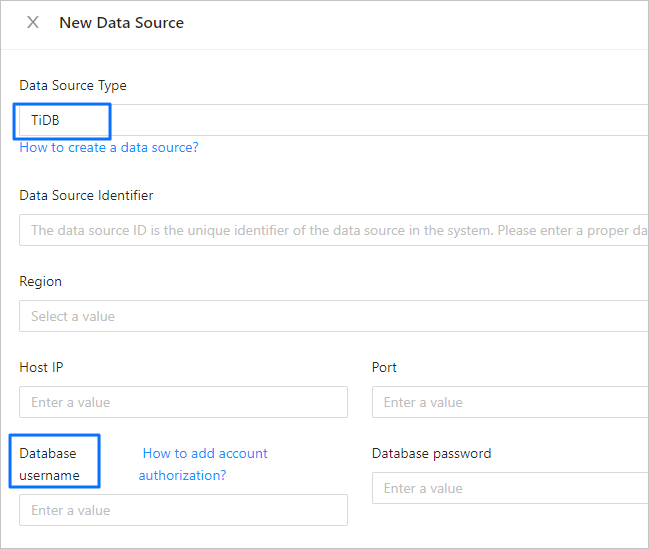
create-user8-en

  1. Log in to the TiDB database.

  2. Create a user in the TiDB database for data migration or synchronization.

    CREATE USER '<user_name>'@'<host_name>' IDENTIFIED BY '<password>';
    
    Parameter
    Description
    user_name The name of the user to be created.
    host_name The host that allows the account to log in. If the account is allowed to log in from any host, use the percent sign (%).
    password The password of the user to be created.
  3. Use the GRANT statement to grant privileges to the created database user. For more information, see User privileges.

PolarDB-X 1.0 data source

The PolarDB-X 1.0 database user created here is used to fill in the Account field when you create a PolarDB-X 1.0 data source.
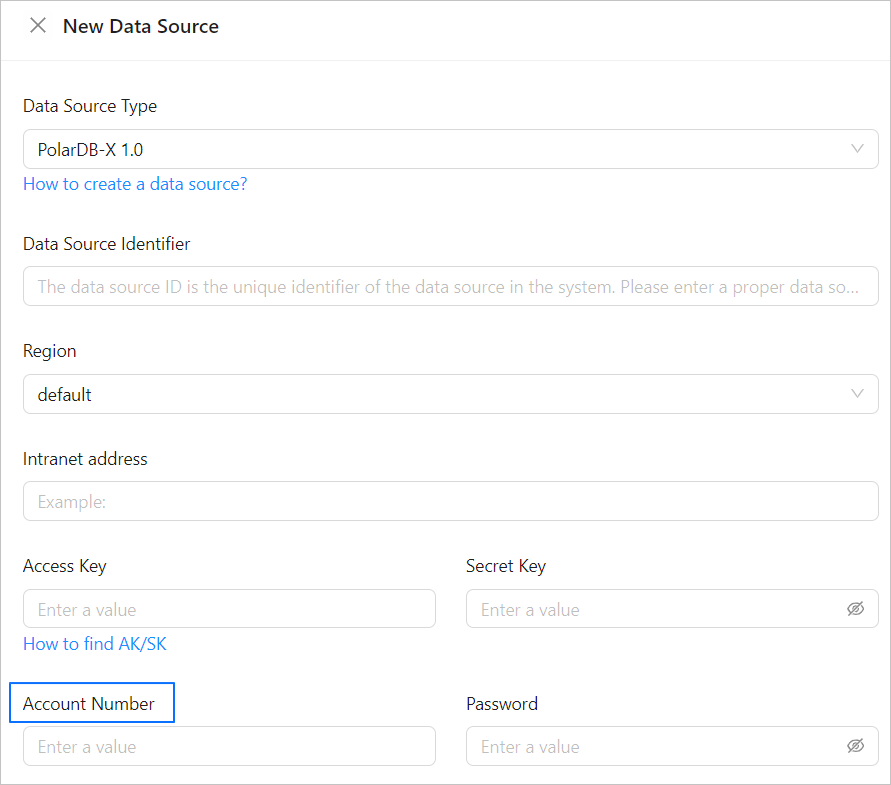
oms4-en

  1. Log in to the Apsara Stack console.

  2. In the top navigation bar, choose Product > Database > PolarDB-X 1.0.

  3. In the Instances section of the target organization, click the name of the PolarDB-X 1.0 instance to go to the instance's basic information page.
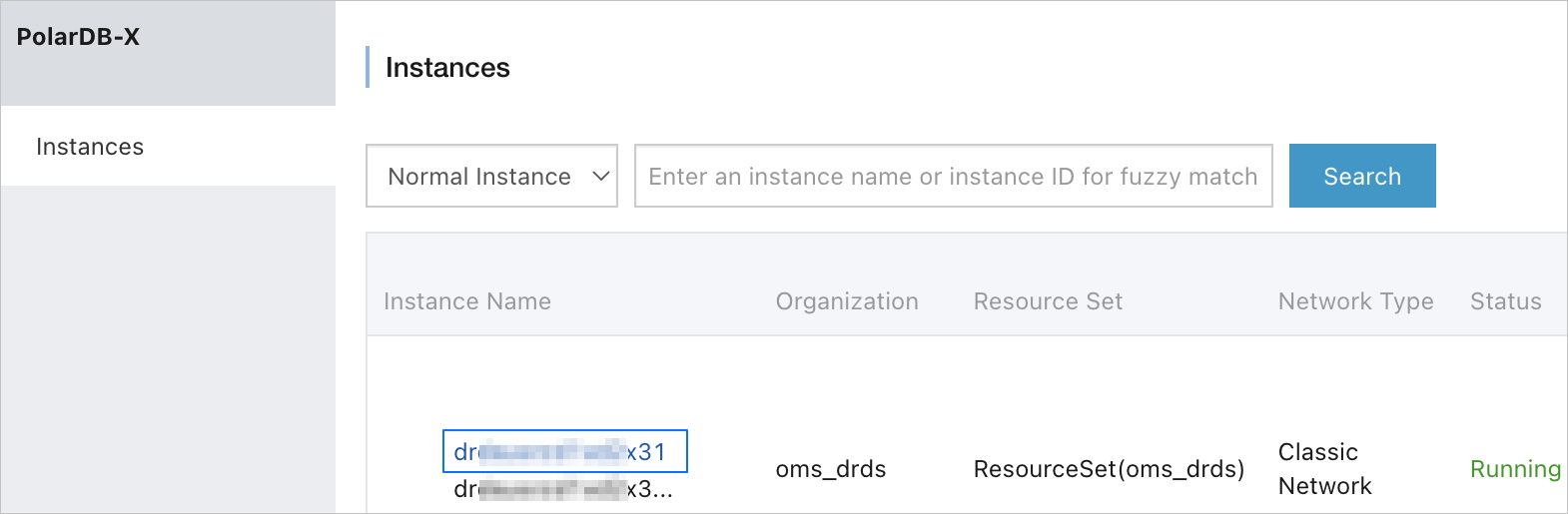
    oms5-en

  4. In the left-side navigation pane, choose Configuration and Management > Account Management.

    Note

    After a database is created, a high-level account is created by default. The password of the account is the same as that of the database. You can use the account directly, or create a regular account as needed.

  5. On the Account Management page, click Create Account.

    oms6-en

  6. In the Create Account dialog box, configure the parameters.
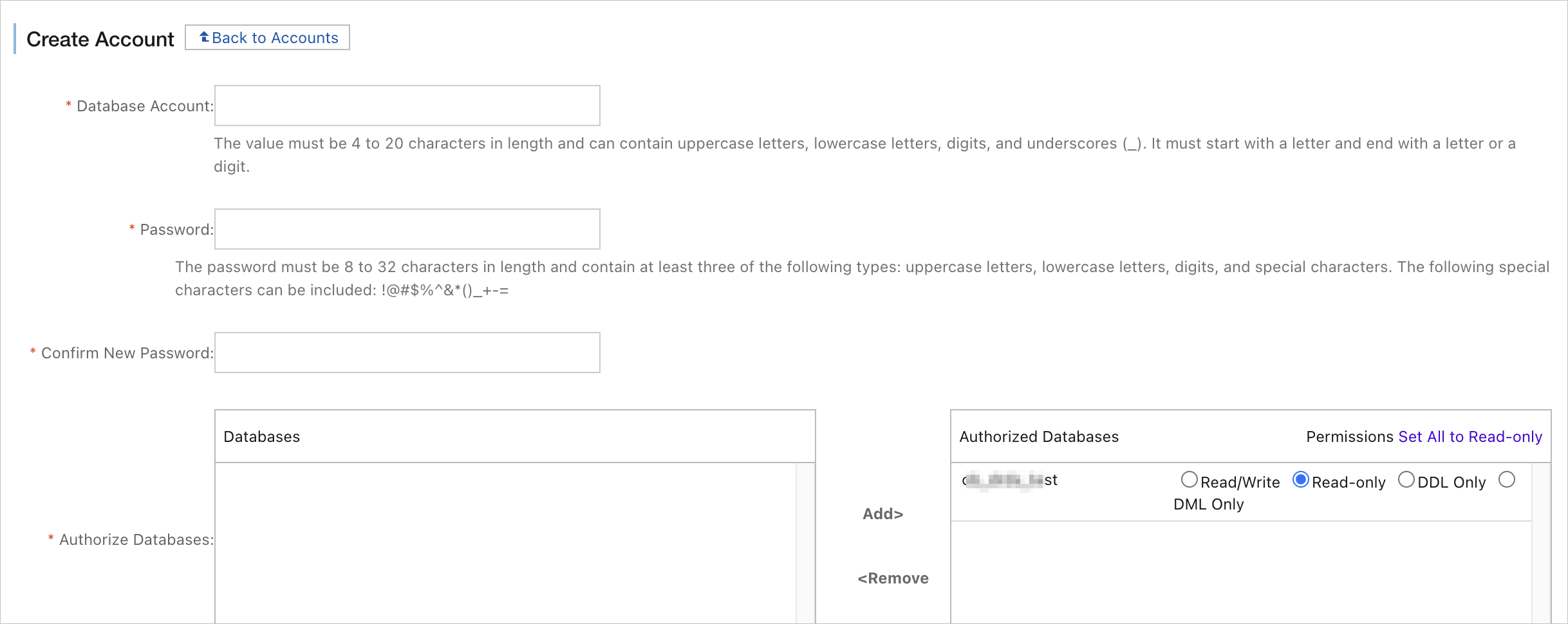
    oms7-en

    Parameter
    Description
    Database Account The database account must be 4 to 20 characters in length and can contain uppercase letters, lowercase letters, digits, and underscores. It must start with a letter and end with a letter or a digit.
    New Password We recommend that you use a password that contains three of the following types of characters: uppercase letters, lowercase letters, digits, and special characters (!@#$%^&*()_+-=). The password must be 8 to 32 characters in length.
    Confirm New Password Enter the new password again for confirmation.
    Authorize Database In the Database List section, select the name of the database to be authorized, click Authorize, and add it to the Authorized Databases section to set the permissions.

    Note

    A regular account of a PolarDB-X 1.0 instance must have at least the Read-only permission in each stage of data migration.

  7. Click OK.

Previous topic

Delete a data source
Last

Next topic

User privileges
Next
on this page
OceanBase data source
Create an OceanBase Database user
Create a DRC user
Create a sys tenant user
Create the __oceanbase_inner_drc_user user
Oracle data source
MySQL data source
PostgreSQL data source
DB2 LUW data source
TiDB data source
PolarDB-X 1.0 data source