
Troubleshooting approach
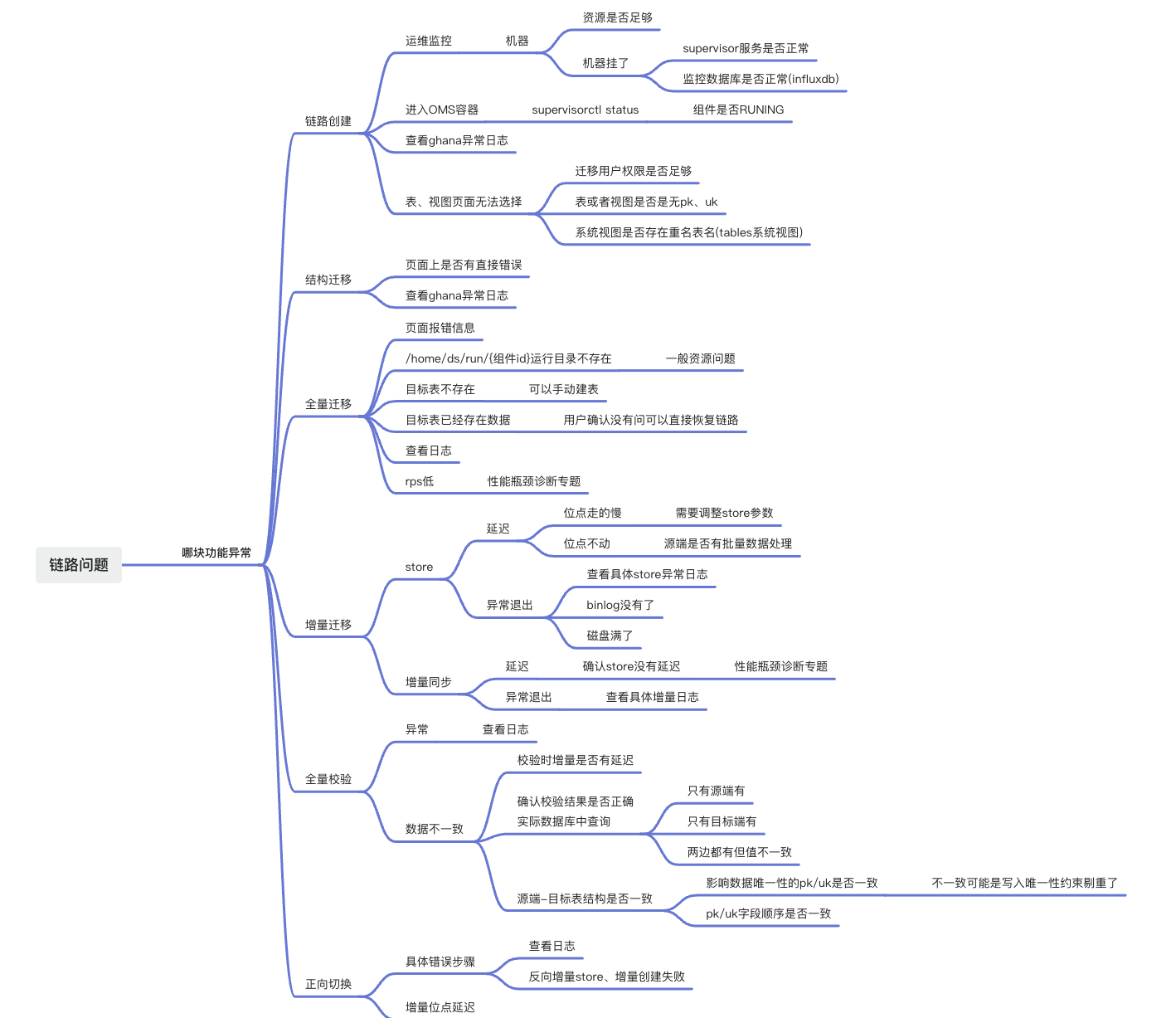
When an error occurs in the OMS Community Edition, first check whether the error is caused by the usage restrictions mentioned in the official documentation. The following figure shows the overall troubleshooting approach for data migration or data synchronization tasks in the OMS Community Edition.
Product features, components, and log locations
Note
All log files are automatically archived and compressed. Use the timestamps to identify the relevant log file when viewing logs.
Schema migration
Type |
Description |
|---|---|
| Component | Ghana |
| Log directory | /home/admin/logs/ghana/Ghana |
| Structure conversion logs (invoked by DBCat component) | dbcat.log |
| General error logs | common-error.log |
| General output logs | common-default.log |
| Some query logs | check_query.log |
| Task step logs | oms-step.log |
| Background scheduling logs | oms-scheduler.log |
Full migration
Type |
Description |
|---|---|
| Component | Connector |
| Log directory | /home/ds/run/{Component ID}/logs |
| Error logs | error.log |
| Program execution logs | connector.log |
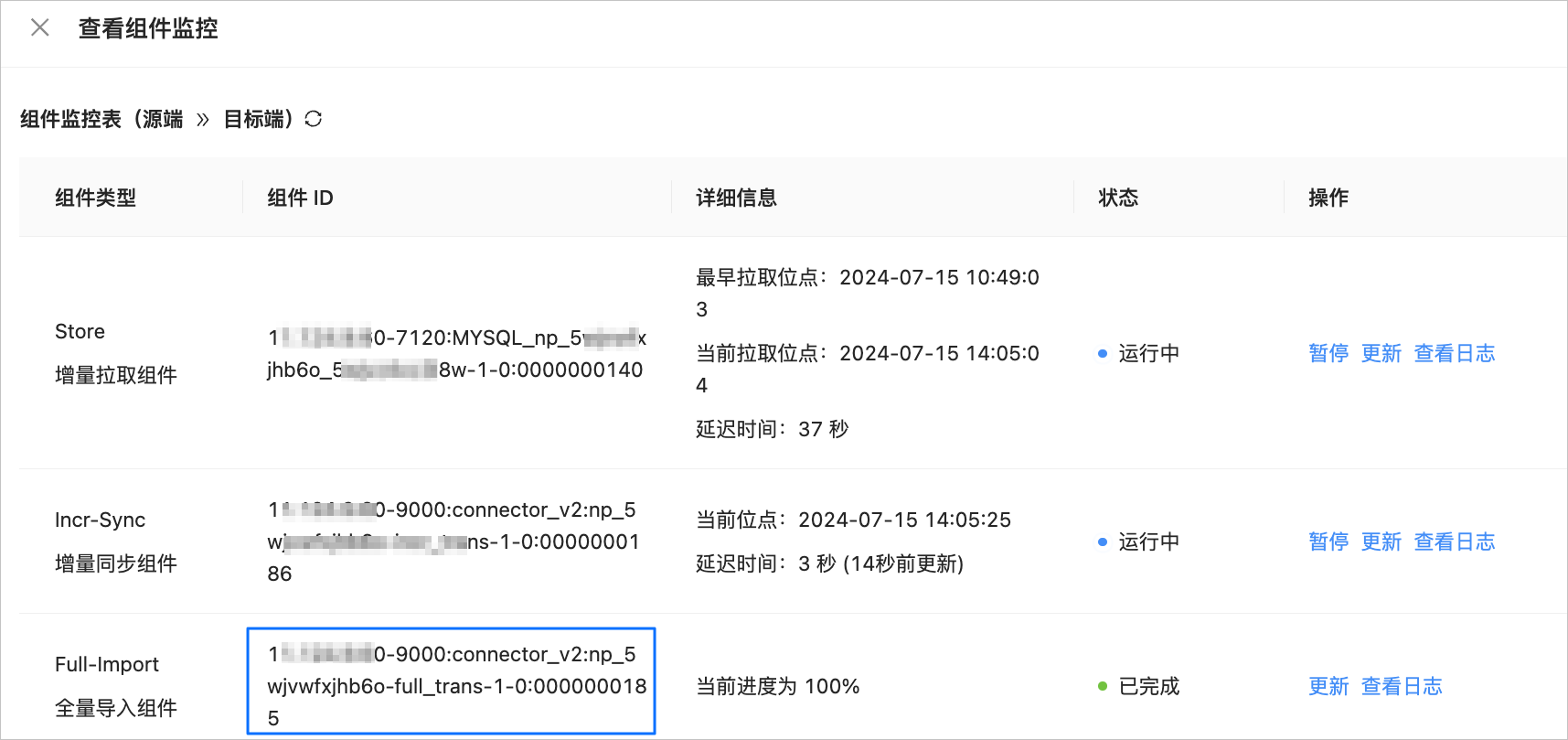
To view the component ID, perform the following steps:
Log in to the OMS Community Edition console.
In the left-side navigation pane, click Data Migration.
On the Data Migration page, click the name of the target data migration task to go to its details page.
Click View Component Monitoring in the upper-right corner.

In the View Component Monitoring dialog box, view the Component ID of the Full-Import component for full migration.
Incremental synchronization
Incremental pull component Store
Type |
Description |
|---|---|
| Component | Store |
| Log directory | /home/ds/store/store{port}/log |
| obstore (source database is V3.x) | liboblog.log |
| obstore (source database is V4.x) | libobcdc.log |
| mysqlstore (Java-based xlog) | connector/connector.log |
To view store{port}, perform the following steps:
Log in to the OMS Community Edition console.
In the left-side navigation pane, click Data Migration.
On the Data Migration page, click the name of the target data migration task to go to its details page.
Click View Component Monitoring in the upper-right corner.
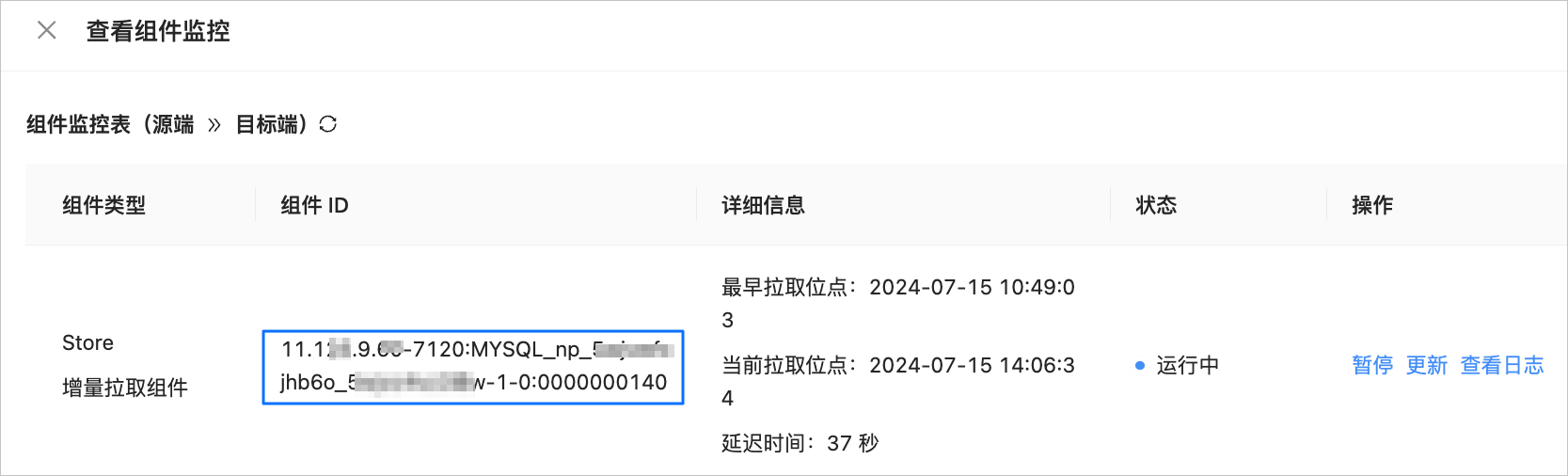
In the View Component Monitoring dialog box, view the Component ID of the Store component for incremental log pulling.
The component ID is in the {ip}-{port}:{subtopic}:{seq} format. You can obtain the {port} of the Store component from the component ID.
Incremental synchronization component Incr-Sync
Type |
Description |
|---|---|
| Component | Incr-Sync |
| Log directory | /home/ds/run/{Component ID}/logs |
| Error logs | error.log |
| Program execution logs | connector.log |
| Incremental source data (only primary keys) | msg/connector_source_msg.log |
| Incremental sink data (only primary keys) | msg/connector_sink_msg.log |
| Incremental filtered data | msg/connector_filter_msg.log |
Full verification
Type |
Description |
|---|---|
| Component | Full-Verification |
| Log directory | /home/ds/run/{Component ID}/logs |
| Error logs | error.log |
| Program execution logs | task.log |
| Verification result file directory | /home/ds/run/{Component ID}/verify/{subid}/ |
| Inconsistent data and reasons | /home/ds/run/{Component ID}/verify/{subid}/{schema}/diff/{table_name}.diff |
| Corrective SQL files that can be executed on the target side | /home/ds/run/{Component ID}/verify/{subid}/{schema}/sql/{table_name}.sql |
{subid}: starts from 1 and increments by 1 each time a verification is performed.
Forward switch
The forward switch is performed in the control component. If you select reverse incremental synchronization, the system creates a reverse Store and reverse incremental synchronization components.
Type |
Description |
|---|---|
| Component | Ghana |
| Log directory | /home/admin/logs/ghana/Ghana |
| General error logs | common-error.log |
| General output logs | common-default.log |
| Link step logs | oms-step.log |
| Background scheduling logs | oms-scheduler.log |
Reverse incremental synchronization
The only difference is the naming of the component ID. The reverse incremental synchronization component ID contains the reverse keyword.
Control components
Component |
Description |
|---|---|
| oms_console | The Ghana component, whose log directory is /home/admin/logs/ghana/Ghana. |
| oms_drc_cm | The CM component, whose log directory is /home/admin/logs/cm. |
| oms_drc_supervisor | The Supervisor component, whose log directory is /home/admin/logs/supervisor. |
Installation issues
Log in to the OMS Community Edition container and check whether the OMS Community Edition components are working properly. If any component is not working properly, check the relevant logs.
supervisorctl status
During the installation phase, the following issues may occur:
The port is occupied.
The permissions of the metadata database provided to OMS Community Edition are incorrect.
The Docker environment on some operating systems may display file permissions as
???, preventing the service from starting. In this case, install OMS Community Edition on a different operating system.The user system is cgroup2, causing the OMS Community Edition machine to be in an abnormal state. OMS V4.2.4 and later versions resolve this issue.
Full/incremental migration performance tuning
For more information, see Full migration and incremental synchronization performance tuning.
Concurrency, JVM memory, and number of records per shard
This section provides solutions to most performance issues.
Issue |
Solution |
|---|---|
| Concurrency | Set the source concurrency by using source.workerNum and the destination concurrency by using sink.workerNum. During full migration, the source and destination concurrency values are usually the same. You do not need to configure source concurrency for incremental synchronization.The concurrency is related to the number of CPU cores and can be set to at most four times the number of CPU cores. You must also check whether other migration tasks are running on the same server. |
| JVM memory | coordinator.connectorJvmParam. Adjust -Xms8g (initial heap size), -Xmx8g (maximum heap size), and -Xmn4g (young generation size). Follow these rules:
|
| Number of records per shard | source.sliceBatchSize, default value is 600.For large tables, 10000 is usually sufficient. If you set a very large value, it will consume a lot of memory. You can decide whether to modify it based on the slice_queue in logs/msg/metrics.log. If it is 0, you need to increase the number of records per shard. This is because the Source Worker thread will pull shards from slice_queue. If slice_queue is 0, it means there are no shards, and the Source Worker thread will wait idly. |
Full migration usually requires index creation to improve efficiency. For OceanBase Database as the target database, you can configure the index creation concurrency using the ob.parallel parameter in the struct.transfer.config system parameter.
Incremental synchronization
Transaction shard: source.splitThreshold. When bulk operations cause incremental delays, you can adjust this parameter. The default value is 128. For INSERT operations, a higher value is better, up to a maximum of 512. For UPDATE and DELETE operations, a lower value is better, with a minimum of 1.
metrics.log analysis
Identify the bottleneck
The data flow is: slice shard -> source reads from the source -> dispatcher distributes data -> sink writes to the target.
If
slice_queueis greater than 0, the bottleneck is not here. Ifslice_queueis 0, it indicates slow sharding. Increasesource.sliceBatchSizeto increase the number of records per shard. In multi-table scenarios, you can also increasesource.sliceWorkerNumto add shard worker threads.If
source_worker_numis less thansource_worker_num_all, the bottleneck is not in the source reading.If
sink_worker_numis less thansink_worker_num_all, the bottleneck is not in the sink writing.If
dispatcher.ready_execute_batch_sizeis 0, there is no bottleneck in writing. Ifready_execute_batch_sizeis greater than 0, the writing is slow.If
dispatcher.wait_dispatch_record_sizeis 0, data dispatch is not a bottleneck. Ifwait_dispatch_record_sizeis greater than 0, OMS is experiencing a bottleneck when calculating the destination partition for each record. Backlogs are common for partitioned tables because partition calculation is time-consuming. In Direct Load scenarios, you can disable partition calculation by settingsink.enablePartitionBucket=false. Hotspot data may also cause a backlog. For more information, see Suspected hotspot issues.If the JVM memory is insufficient, full GC may occur, significantly reducing efficiency and causing database disconnection errors that are easy to misinterpret. You can log in to the OMS Community Edition container to check the GC status of the process.
If the source is performing bulk operations, it is recommended to control the bulk operation traffic.
su - ds
ps -ef|grep "Component ID"

/opt/alibaba/java/bin/jstat -gcutil {pid} 1s
S0     S1     E      O      M     CCS    YGC     YGCT    FGC    FGCT     GCT
0.00  18.27  64.08   0.90  97.11  93.45      7    0.374     0    0.000    0.374
0.00  18.27  64.08   0.90  97.11  93.45      7    0.374     0    0.000    0.374
If FGC keeps increasing, it indicates that the JVM memory needs to be increased.
{
    "jvm": {
        "JVM": "{\"heapMemoryMax\":7782,\"heapMemoryInit\":8192,\"heapMemoryUsed\":1072,\"heapMemoryCommitted\":7782,\"noHeapMemoryMax\":0,\"noHeapMemoryInit\":2,\"noHeapMemoryUsed\":78,\"noHeapMemoryCommitted\":83,\"gcInfoList\":[{\"name\":\"ParNew\",\"count\":6,\"costMs\":770},{\"name\":\"ConcurrentMarkSweep\",\"count\":1,\"costMs\":362}],\"threadCount\":34}"
    },
    "dataflow": {
        "slice_queue": 0
    },
    "os": {
        "OS": "{\"cpu\":0.5210029306414848,\"sysCpu\":62.941847206385404}"
    },
    "sink": {
        "sink_worker_num": 0,
        "ob_watermark_detect_times": 231,
        "sink_request_time": 198.43,
        "source_iops": 0.0,
        "sink_total_transaction": 2384.0,
        "ob_exceed_mem_high_watermark_times": 0,
        "sink_total_record": 23383.0,
        "paused_time_ms": 0.0,
        "sink_commit_time": 3363.16,
        "sink_worker_num_all": 8,
        "shardTime": 0.0,
        "sink_total_bytes": 8739678.0,
        "sink_delay": 1717642529661,
        "paused_total_time_ms": 0.0,
        "ob_free_memory": 92,
        "rps": 41.42,
        "tps": 3.1,
        "ob_exceed_cpu_high_watermark_times": 0,
        "iops": 3921.59,
        "sinkSlowRoutes": "",
        "sink_execute_time": 17.25,
        "ob_free_cpu": -1
    },
    "source": {
        "source_read_time": 0.0,
        "source_rps": 0.0,
        "source_slice_time": 0.0,
        "source_worker_num_all": 8,
        "source_worker_num": 0
    },
    "dispatcher": {
        "wait_dispatch_record_size": 0,
        "ready_execute_batch_size": 0
    },
    "frame": {
        "SourceTaskManager.createdSourceSize": 0,
        "queue_slot1.batchAccumulate": 0,
        "frame.throttle.throttle_memory_remain": "2.14748365E9",
        "queue_slot1.batchCount": 3715.0,
        "queue_slot1.tps": 0.0
    }
}
Incremental delay - Hotspot issue
For more information, see the Hotspot issue section.
Full verification data issues
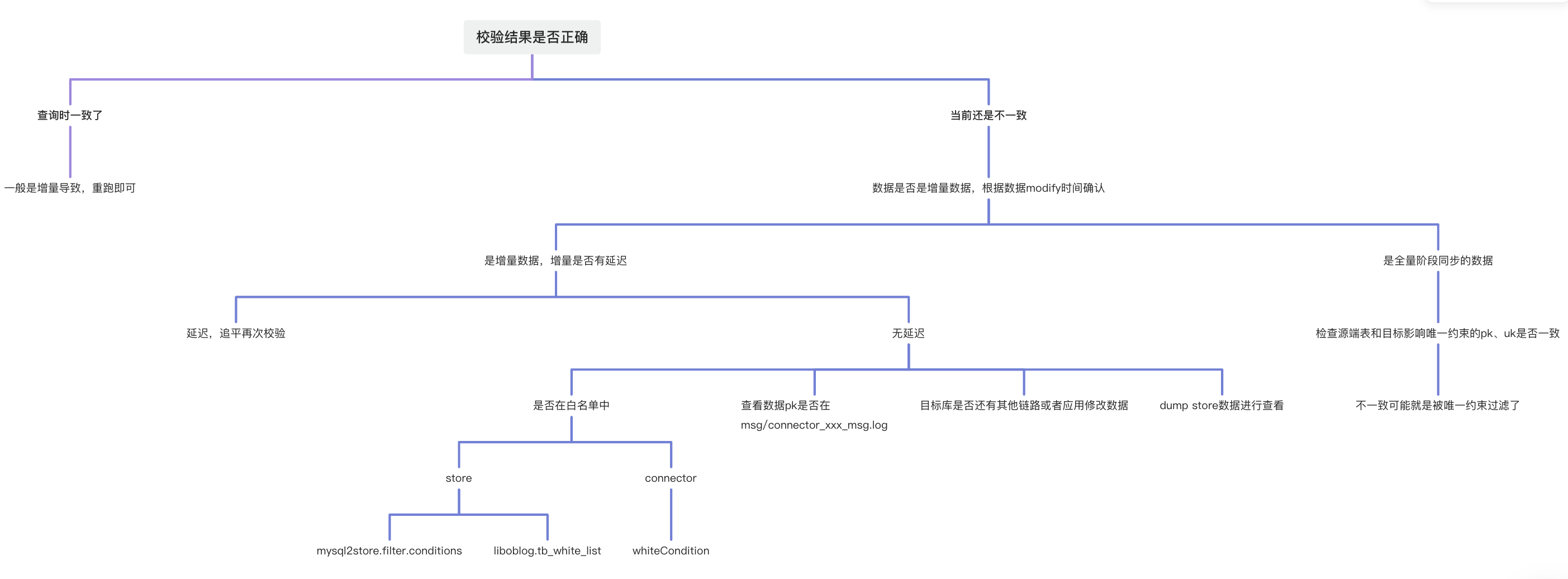
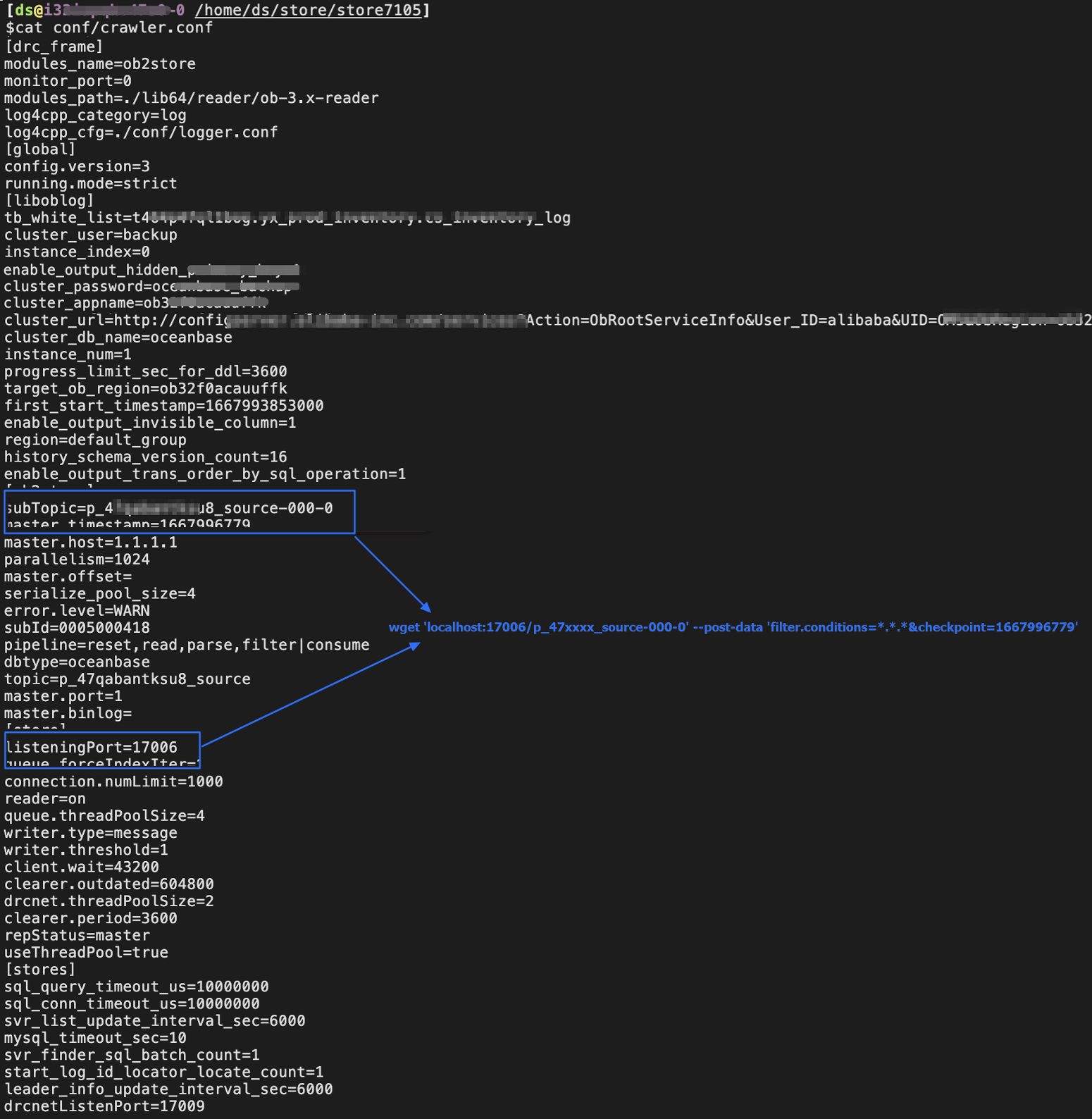
How to dump data from Store
#checkpoint is a Unix timestamp
#17006 and p_47qaxxxu8_source-000-0 are shown in the image below
#You can locate specific data based on the table name, time, and field content
wget 'localhost:17006/p_47qaxxxsu8_source-000-0' --post-data 'filter.conditions=*.*.*&checkpoint=1667996779'
Typical use cases and features
Multi-table aggregation
When you migrate data from multiple tables in a source database to a single table or partitioned table in a destination database, you can use the following example:
-- Source tables, primary key ID, and unique key (UK) field uk_id
CREATE TABLE test_01(id bigint not null AUTO_INCREMENT,uk_id bigint not null,...);
CREATE TABLE test_02(id bigint not null AUTO_INCREMENT,uk_id bigint not null,...);

-- Destination table
CREATE TABLE test(id_new bigint not null AUTO_INCREMENT,uk_id bigint not null,...,
                 PRIMARY KEY (id_new,uk_id),
                 unique key(uk_id))
PARTITION BY HASH(uk_id)
PARTITIONS 4
;
Common issues include:
When you create a data migration task, the source tables are renamed in batches.
You can use Matching Rules to configure this.
You can also use the configuration
src_schema.test_*=dst_schema.test.
The ID field in the source database is an auto-increment field and is duplicated in multiple tables. In the destination table, the new field name is used as the auto-increment primary key.
The ID field in the source tables does not need to be migrated to the destination table. The id_new field in the destination table is a new auto-increment column.
When you perform a full migration, you need to set the parameter
sink.ignoreRedunantColumnsReplicate=true. The ID field will be ignored during the full migration.When you perform an incremental synchronization, you need to set
sink.ignoreRedunantColumnsReplicate=trueto ignore the ID field.
The destination table is a partitioned table. In OceanBase Database, the primary key (PK) field must include the partitioning field. How can you verify the data?
When you perform a full verification, set
task.sourceMasterSection.matchAllColumn=false. The ID field in the source table will not be involved in the verification. In this case, the source table must have a unique key (UK) that cannot be NULL. Otherwise, the verification cannot be performed.For full verification, configure
inmodmode by settingfilter.verify.inmod.tables=.*;.*;.*. For more information, see Full-Verification component parameters.
OceanBase Database without a primary key - Hidden columns
When OceanBase Database Community Edition is the source, OMS Community Edition uses the hidden column __pk_increment as the primary key when migrating tables that are not managed by middleware and do not have primary keys. During schema migration, OMS Community Edition adds an OMS_PK_INCRMT column to the destination table.
If you have performed a forward switch, the
OMS_PK_INCRMTcolumn will eventually be deleted.If you have not performed a forward switch and the destination database will be used as the source database for the next task, an exception will occur. In this case, you need to manually delete the
OMS_PK_INCRMTcolumn to avoid the exception.
OceanBase Direct Load
In addition to the commonly used concurrency parameter, you can also set the sink.serverParallel parameter for direct load performance. The default value is 8. This parameter affects the number of working threads and concurrency used by OceanBase Database for direct load tasks.
Reverse incremental migration
If you want to have rollback capabilities or use the original database as a standby database, we recommend that you select Reverse Incremental Migration when creating a data migration task. Additionally, if MySQL is used as the source database (for example, MySQL to OceanBase Database), you need to manually create the omstxndb transaction database in MySQL. If you do not create this transaction database, an exception will occur with the message omstxndb database does not exist.
Disaster recovery with dual-active
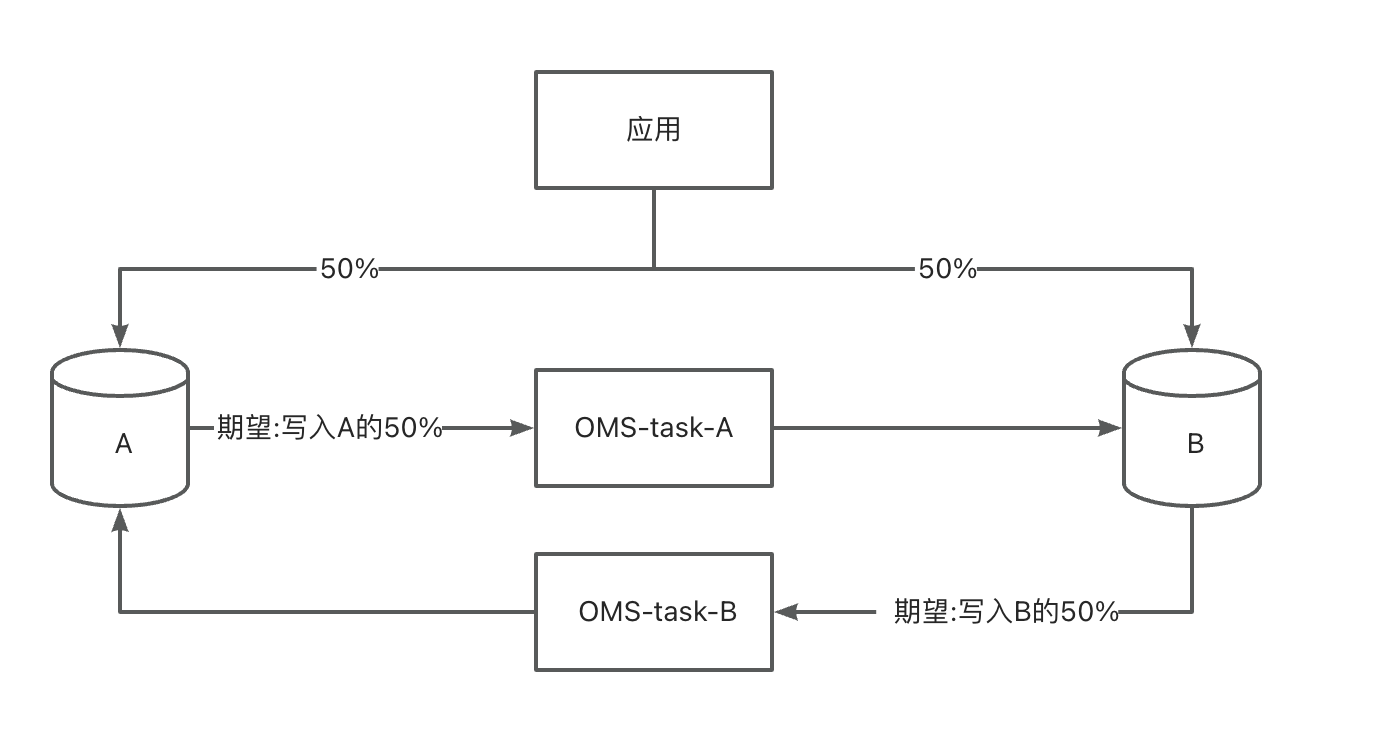
If your application requires dual writes or a phased switchover, you can use the active-active disaster recovery feature of OMS Community Edition. This feature supports MySQL-to-OceanBase Database Community Edition and OceanBase Database Community Edition-to-OceanBase Database Community Edition scenarios. OMS Community Edition automatically configures parameters that prevent replication loops. In an active-active disaster recovery scenario, every table must have a primary key (PK) or unique key (UK).
There are two databases, A and B.
The application writes data to database A and database B according to certain rules.
In non-dual-write mode, data written to database A will not be written to database B, and data written to database B will not be written to database A.
Database A and database B must retain all data from the application.
Full verification
There are two modes for full verification:
Default mode: Both the source and destination databases use shard range queries.
Inmod mode: The source database uses shard range queries, and the destination database uses the primary key (PK) or unique key (UK) from the source database to query the destination data. The configuration parameter is
filter.verify.inmod.tables.Here are some examples:
To configure all tables in the current task to use inmod verification:
filter.verify.inmod.tables=.*;.*;.*To configure the T1 table in the D1 database to use inmod verification:
filter.verify.inmod.tables=D1;T1;.*To configure the T1 and T2 tables in the D1 database to use inmod verification:
filter.verify.inmod.tables=D1;T1;.*|D1;T2;.*To configure the T1 and T2 tables in the D1 database and the T3 and T4 tables in the D2 database to use inmod verification:
filter.verify.inmod.tables=D1;T1;.*|D1;T2;.*|D2;T3;.*|D2;T4;.*
System views used by OMS Community Edition when you select a table or view when you create a task
MySQL
System tables
Table/View |
Description |
|---|---|
| information_schema.SCHEMATA | Schema information |
| information_schema.tables | Table information |
| information_schema.columns | Field information |
| information_schema.STATISTICS | Index information |
SQL query
SET TIME_ZONE='%s';
SET sql_mode='';
SET names 'utf8mb4';
SET foreign_key_checks = off;
SELECT version();
SELECT 1;
-- Query all schemas
SELECT CATALOG_NAME, SCHEMA_NAME, DEFAULT_CHARACTER_SET_NAME, DEFAULT_COLLATION_NAME, SQL_PATH
FROM `information_schema`.`SCHEMATA`
-- Query all tables
SELECT NULL,TABLE_SCHEMA,TABLE_NAME,TABLE_ROWS, TABLE_COLLATION, ENGINE
FROM information_schema.tables WHERE TABLE_TYPE='BASE TABLE' AND TABLE_SCHEMA NOT IN('mysql','information_schema','performance_schema')
-- Query the database engine information of the table
SELECT `ENGINE` FROM `information_schema`.`tables` WHERE TABLE_SCHEMA = '%s' AND TABLE_NAME = '%s'
-- Query the character set of the table
SELECT TABLE_COLLATION FROM information_schema.tables WHERE TABLE_SCHEMA = '%s' AND TABLE_NAME = '%s'
-- Query field information
SELECT `COLUMN_NAME` ,upper(`COLUMN_TYPE`) ,`CHARACTER_MAXIMUM_LENGTH` ,`NUMERIC_PRECISION`,`NUMERIC_SCALE`
FROM information_schema.columns WHERE table_schema=? AND table_name=? ORDER BY ORDINAL_POSITION ASC
-- Query all views
SELECT TABLE_NAME, TABLE_SCHEMA, VIEW_DEFINITION FROM information_schema.views
WHERE TABLE_SCHEMA IN ('xx');
-- Records after 5.7
-- Only query normal columns, excluding generated columns
SELECT `COLUMN_NAME` ,upper(`COLUMN_TYPE`) ,`CHARACTER_MAXIMUM_LENGTH` ,`NUMERIC_PRECISION`,`NUMERIC_SCALE`
FROM information_schema.columns WHERE table_schema=? AND table_name=? AND (GENERATION_EXPRESSION='' or GENERATION_EXPRESSION is null) ORDER BY ORDINAL_POSITION ASC
-- Indexes
SELECT INDEX_NAME,NON_UNIQUE,SEQ_IN_INDEX,COLUMN_NAME,SUB_PART FROM information_schema.STATISTICS WHERE table_schema=? AND table_name=?
AND concat(index_schema,'.',index_name) NOT IN (
SELECT concat(index_schema,'.',index_name) FROM information_schema.STATISTICS
WHERE table_schema=? AND table_name=? AND upper(nullable)='YES')
ORDER BY INDEX_NAME ASC, SEQ_IN_INDEX ASC
-- Query partitions
SELECT TABLE_SCHEMA, TABLE_NAME,PARTITION_NAME,SUBPARTITION_NAME,PARTITION_METHOD,PARTITION_EXPRESSION,SUBPARTITION_METHOD,SUBPARTITION_EXPRESSION
FROM information_schema.PARTITIONS
-- View constraints
SELECT  REFERENCED_TABLE_SCHEMA, REFERENCED_TABLE_NAME, TABLE_SCHEMA, TABLE_NAME, CONSTRAINT_NAME,REFERENCED_COLUMN_NAME, COLUMN_NAME FROM information_schema.KEY_COLUMN_USAGE
MySQL tenant of OceanBase Database
System tables
Table/view |
Description |
|---|---|
| information_schema.SCHEMATA | Schema information |
| information_schema.tables | Table information |
| information_schema.columns | Field information |
| information_schema.STATISTICS | Index information |
| information_schema.PARTITIONS | Partition information |
| oceanbase.gv$memstore | Memory usage information |
| oceanbase.gv$sysstat | CPU usage information |
| oceanbase.gv$table | tableid |
| oceanbase.__tenant_virtual_table_index | Index |
| The following system tables are required for macroblock slicing. | |
| oceanbase.__all_tenant | Tenant information |
| oceanbase.__all_database | Database information for versions earlier than 20200 |
| oceanbase.__all_table | Table information for versions earlier than 20200 |
| oceanbase.__all_part | Partition information for versions earlier than 20200 |
| oceanbase.__all_meta_table | Metadata information of tables for versions earlier than 20200 |
| oceanbase.__all_virtual_database | Database information for versions later than 20200 |
| oceanbase.__all_virtual_table | Table information for versions later than 20200 |
| oceanbase.__all_virtual_proxy_partition | Partition information for versions later than 20200 |
| oceanbase.__all_meta_table | Metadata information of tables for versions later than 20200 |
| oceanbase.__all_virtual_partition_item | Subpartition information |
| oceanbase.__all_virtual_partition_sstable_macro_info | Macroblock information table |
Note
Macroblock information is queried in the sys tenant.
SQL query
-- Query all schemas
SELECT CATALOG_NAME, SCHEMA_NAME, DEFAULT_CHARACTER_SET_NAME, DEFAULT_COLLATION_NAME, SQL_PATH
FROM `information_schema`.`SCHEMATA`
-- Query all tables
SELECT NULL,TABLE_SCHEMA,TABLE_NAME,TABLE_ROWS, TABLE_COLLATION, ENGINE
FROM information_schema.tables WHERE TABLE_TYPE='BASE TABLE' AND TABLE_SCHEMA NOT IN('mysql','information_schema','performance_schema')
-- Query the database engine information of the table
SELECT `ENGINE` FROM `information_schema`.`tables` WHERE TABLE_SCHEMA = '%s' AND TABLE_NAME = '%s'
-- Query the character set of the table
SELECT TABLE_COLLATION FROM information_schema.tables WHERE TABLE_SCHEMA = '%s' AND TABLE_NAME = '%s'
-- Query the column information
SELECT `COLUMN_NAME` ,upper(`COLUMN_TYPE`) ,`CHARACTER_MAXIMUM_LENGTH` ,`NUMERIC_PRECISION`,`NUMERIC_SCALE`
FROM information_schema.columns WHERE table_schema=? AND table_name=? ORDER BY ORDINAL_POSITION ASC
-- Query the records after 5.7
-- Query only the normal columns, excluding generated columns
SELECT `COLUMN_NAME` ,upper(`COLUMN_TYPE`) ,`CHARACTER_MAXIMUM_LENGTH` ,`NUMERIC_PRECISION`,`NUMERIC_SCALE`
FROM information_schema.columns WHERE table_schema=? AND table_name=? AND (GENERATION_EXPRESSION='' or GENERATION_EXPRESSION is null) ORDER BY ORDINAL_POSITION ASC
-- Query the index information
SELECT INDEX_NAME,NON_UNIQUE,SEQ_IN_INDEX,COLUMN_NAME,SUB_PART FROM information_schema.STATISTICS WHERE table_schema=? AND table_name=?
AND concat(index_schema,'.',index_name) NOT IN (
SELECT concat(index_schema,'.',index_name) FROM information_schema.STATISTICS
WHERE table_schema=? AND table_name=? AND upper(nullable)='YES')
ORDER BY INDEX_NAME ASC, SEQ_IN_INDEX ASC
-- Query the partition information
SELECT PARTITION_NAME,SUBPARTITION_NAME FROM information_schema.PARTITIONS WHERE TABLE_SCHEMA='{}' AND TABLE_NAME='{}'
-- Query the partition expression
SELECT DISTINCT PARTITION_EXPRESSION,SUBPARTITION_EXPRESSION FROM information_schema.PARTITIONS WHERE TABLE_SCHEMA=? AND TABLE_NAME=?
-- The following SQL queries the macro block information from the __all_virtual_partition_sstable_macro_info table.
-- Query the tenant information
SELECT tenant_id FROM oceanbase.__all_tenant WHERE tenant_name = '%s'
-- Query the index information of the table
SELECT  key_name, NON_UNIQUE,SEQ_IN_INDEX,COLUMN_NAME,`null` nullable FROM oceanbase.__tenant_virtual_table_index WHERE table_id = ?
-- Query the table ID
-- For versions before 20200
SELECT %s b.table_id FROM oceanbase.__all_database a, oceanbase.__all_table b WHERE a.database_id = b.database_id AND a.tenant_id = %d AND a.database_name = '%s' AND b.table_name = '%s'
-- For versions after 20200
SELECT %s b.table_id FROM oceanbase.__all_virtual_database a, oceanbase.__all_virtual_table b WHERE a.database_id = b.database_id AND a.tenant_id = %d AND a.database_name = '%s' AND b.table_name = '%s'
-- Query the partition information
-- For versions before 20200
SELECT %s part_id,part_name FROM oceanbase.__all_part WHERE table_id = %d AND part_name IS NOT NULL AND part_name<>''
-- For versions after 20200
SELECT %s part_id,part_name FROM oceanbase.__all_virtual_proxy_partition WHERE table_id = %d AND part_name IS NOT NULL AND part_name<>''
-- Query the subpartition information
SELECT %s partition_id,case when subpart_name is null then concat(part_name,'sp',subpart_id) ELSE subpart_name END subpart_name FROM oceanbase.__all_virtual_partition_item WHERE table_id = %d AND partition_level>1
-- Query the table ID
SELECT table_id FROM oceanbase.gv$table WHERE database_name=? AND table_name=?
-- Query the macro block information. store_type=1 indicates normal data, and store_type=4 indicates data that is being dumped.
-- For versions before 20200
SELECT %s partition_id OMS_PARTITION_ID,data_seq OMS_DATA_SEQ,macro_range OMS_MACRO_RANGE,row_count OMS_ROW_COUNT FROM oceanbase.__all_virtual_partition_sstable_macro_info
WHERE tenant_id=%d AND table_id = %d AND store_type=1 AND macro_range NOT LIKE '%%]always true' AND macro_range<>'(MIN ; MAX]' AND macro_range LIKE '%%]'
AND (svr_ip,svr_port,partition_id) IN (SELECT svr_ip, svr_port,partition_id FROM oceanbase.__all_meta_table
WHERE tenant_id=%d AND table_id = %d AND ROLE = 1)
ORDER BY partition_id,data_seq
--Versions after 20200
SELECT %s partition_id OMS_PARTITION_ID,data_seq OMS_DATA_SEQ,macro_range OMS_MACRO_RANGE,row_count OMS_ROW_COUNT FROM oceanbase.__all_virtual_partition_sstable_macro_info
WHERE tenant_id=%d AND table_id = %d AND store_type=1 AND macro_range NOT LIKE '%%]always true' AND macro_range<>'(MIN ; MAX]' AND macro_range LIKE '%%]'
AND (svr_ip,svr_port,partition_id) IN (SELECT svr_ip, svr_port,partition_id FROM oceanbase.__all_virtual_meta_table
WHERE tenant_id=%d AND table_id = %d AND ROLE = 1)
ORDER BY partition_id,data_seq
-- Explosion-proof memory
SELECT /*+query_timeout(5000000)*/ total, freeze_trigger,mem_limit FROM oceanbase.gv$memstore
--Explosion-proof CPU
SELECT min(100-round(cpu_usage.value * 100 / cpu_limit.value)) cpu_free_percent
FROM oceanbase.gv$sysstat cpu_usage, oceanbase.gv$sysstat cpu_limit
WHERE cpu_usage.name = 'cpu usage' AND cpu_limit.name = 'max cpus'
AND cpu_usage.svr_ip = cpu_limit.svr_ip