OceanBase
English日本語简体中文
Docs Home
Products
Integrations
Release Notes

Databases

OceanBase DatabaseOceanBase Cloud OceanBase Best Practices

Tools

OceanBase Cloud PlatformOceanBase Migration ServiceOceanBase Developer CenterOceanBase Migration AssessmentOceanBase Admin ToolOceanBase Loader and DumperOceanBase DeployerKubernetes operator for OceanBaseOceanBase Diagnostic Tool OceanBase Binlog ServiceOceanBase DataPilot

Connectors and Middleware

OceanBase Database Proxy OceanBase Connector/C OceanBase Connector/J OceanBase Connector/ODBC OceanBase Connector/NETOceanBase Command-Line Client

Databases

OceanBase DatabaseOceanBase Cloud OceanBase Best Practices

Connectors and Middleware

OceanBase Database Proxy OceanBase Connector/C OceanBase Connector/J OceanBase Connector/ODBC OceanBase Connector/NETOceanBase Command-Line Client

Tools

OceanBase Cloud PlatformOceanBase Migration ServiceOceanBase Developer CenterOceanBase Migration AssessmentOceanBase Admin ToolOceanBase Loader and DumperOceanBase DeployerKubernetes operator for OceanBaseOceanBase Diagnostic Tool OceanBase Binlog ServiceOceanBase DataPilot
OceanBase DatabaseOceanBase Cloud ToolsConnectors and MiddlewareLifecycle Support Policy

OceanBase Database

SQL - V4.2.1
  • What is OceanBase Database
    • Overview
    • Differences between the Enterprise Edition and the Community Edition
    • System architecture
    • Compatibility with Oracle
      • Overview
      • SQL data types
      • Built-in functions
      • System views
    • Compatibility with MySQL
    • Limitations
  • Get Started
    • Quick start with OceanBase Database Community Edition
    • Learn OceanBase SQL
      • Before you begin
      • Basic SQL operations (MySQL mode)
      • Basic SQL operations (Oracle mode)
    • Build a sample application (MySQL mode)
      • Build a Python application
      • Build a Java application
      • Build a C application
      • Build a Go application
    • Build a sample application (Oracle mode)
      • Build a Java application
      • Build a C application
    • Try out advanced features of OceanBase Database
      • Scalable OLTP
        • Run the TPC-C benchmark in OceanBase Database
        • Try out the hot row update capability of OceanBase Database
      • Try out operational OLAP
      • Try out parallel import and data compression
      • Try out the multi-tenant feature
    • Video tutorials
  • Develop
    • Develop applications (MySQL mode)
      • Connect to OceanBase Database
        • Overview
        • Connect to an OceanBase Database tenant by using the mysql client
        • Connect to an OceanBase Database tenant by using OBClient
        • Connect to OceanBase Database by using ODC
        • Use database connection pool
          • Database connection pool configuration
          • Connect to OceanBase Database by using a Tomcat connection pool
          • c3p0
          • Proxool
          • HikariCP
          • DBCP
          • Commons Pool
          • Druid
      • Sample applications
        • Java
          • Spring Boot
          • Spring Batch
          • Spring Data JDBC
          • Spring Data JPA
          • Hibernate
          • MyBatis
        • Python
          • mysqlclient
          • PyMySQL
        • Go
          • Go-SQL-Driver/MySQL
          • GORM
      • Plan database objects
        • Create a database
        • Create a table group
        • Create a table
        • Create an index
        • Create an external table
      • Write data
        • Insert data
        • Update data
        • Delete data
        • Replace data
      • Read data
        • Single-table queries
        • Join tables
          • INNER JOIN queries
          • FULL JOIN queries
          • LEFT JOIN queries
          • RIGHT JOIN queries
          • Subqueries
        • Use operators and functions in queries
          • Use arithmetic operators in queries
          • Use numerical functions in queries
          • Use string concatenation operators in queries
          • Use string functions in queries
          • Use datetime functions in queries
          • Use type conversion functions in queries
          • Use aggregate functions in queries
          • Use NULL-related functions in queries
          • Use the CASE conditional operator in queries
          • Use the SELECT ... FOR UPDATE statement to lock query results
          • Use the SELECT ... LOCK IN SHARE MODE statement to lock query results
        • Use a DBLink in queries
        • Set operations
      • Transactions
        • Overview
        • Start a transaction
        • Savepoints
          • Mark a savepoint
          • Roll back a transaction to a savepoint
          • Release a savepoint
        • Commit a transaction
        • Roll back a transaction
      • Application errors
        • Troubleshooting guidelines
          • About error codes
          • Error handling specifications for MySQL-compatible applications
        • Common errors and troubleshooting practices
          • Disconnected from the server, with ERROR 2013 reported
          • Idle transaction timed out, with ERROR 6002 reported
          • Transaction timed out, with ERROR 4012 reported
          • User locked, with ERROR 3118 reported
          • Incorrect user password, with ERROR 1045 reported
          • Table already exists, with ERROR 1050 reported
          • Table does not exist, with ERROR 1146 reported
          • Duplicate data inserted, with ERROR 1062 reported
          • ERROR 1215 reported in foreign key addition
          • Data truncated while being inserted, with ERROR 1265 reported
    • Develop applications (Oracle mode)
      • Connect to OceanBase Database
        • Overview
        • Connect to an OceanBase Database tenant by using OBClient
        • Connect to OceanBase Database by using ODC
        • Use database connection pool
          • Database connection pool configuration
          • Tomcat
          • c3p0
          • Proxool
          • HikariCP
          • DBCP
          • Commons Pool
          • Druid
      • Sample applications
        • Java
          • OceanBase Connector/J
          • Spring Boot
          • Spring Batch
          • Spring Data JDBC
          • Spring Data JPA
          • Hibernate
          • MyBatis
          • JFinal
        • C/C++
          • OceanBase Connector/C
          • OceanBase Connector/ODBC
          • SqlSugar
      • Plan database objects
        • Create a table group
        • Create a table
        • Create an index
        • Create an external table
      • Write data
        • Insert data
        • Update data
        • Delete data
        • Replace data
      • Read data
        • Single-table queries
        • Join tables
          • INNER JOIN queries
          • FULL JOIN queries
          • LEFT JOIN queries
          • RIGHT JOIN queries
          • Subqueries
        • Use operators and functions in queries
          • Use arithmetic operators in queries
          • Use numerical functions in queries
          • Use string concatenation operators in queries
          • Use string functions in queries
          • Use datetime functions in queries
          • Use type conversion functions in queries
          • Use aggregate functions in queries
          • Use NULL-related functions in queries
          • Use CASE functions in queries
          • Use the SELECT...FOR UPDATE statement to lock query results
        • Use a DBLink in queries
        • Set operations
      • Transactions
        • Overview
        • Start a transaction
        • Savepoints
          • Mark a savepoint
          • Roll back a transaction to a savepoint
        • Commit a transaction
        • Roll back a transaction
      • Application errors
        • Troubleshooting guidelines
          • About error codes
          • Error handling specifications for Oracle-compatible applications
        • Common errors and troubleshooting practices
          • Idle transaction timed out, with Error ORA-24761 reported
          • Transaction timed out, with Error ORA-00600 reported
          • User locked, with ERROR 3118 reported
          • Incorrect user password, with ERROR 1045 reported
          • Table already exists, with Error ORA-00955 reported
          • Table does not exist, with Error ORA-04043 reported
          • Duplicate data inserted, with Error ORA-00001 reported
          • Error ORA-00600 reported in foreign key addition
          • Inconsistent data types, with Error ORA-00932 reported
  • Deploy
    • Overview
    • HA deployment solutions for OceanBase clusters
    • Deploy OceanBase Database Enterprise Edition
      • Deployment process
      • Before deployment
        • Prepare servers
        • Configure servers
        • Prepare installation packages
        • Deploy OAT
      • Deploy through GUI
        • Configure deployment environment using OAT
          • Add a server
        • Deploy OCP
          • Overview
          • Upload installation packages
          • Create MetaDB
          • Deploy OCP
        • Deploy OceanBase clusters using OCP
          • Add a server to the resource pool
          • Deploy a standalone OceanBase database by using OCP
          • Deploy a two-replica OceanBase cluster with the arbitration service by using OCP
          • Deploy a single-replica OceanBase cluster by using OCP
          • Deploy a three-replica OceanBase cluster by using OCP
        • (Optional) Deploy ODP
      • Deploy through CLI
        • Configure deployment environment
          • Initialize an OBServer node by using oatcli
          • (Optional) Configure the clock source
        • Deploy OceanBase clusters using CLI
          • Deploy a standalone OceanBase database by using the CLI
          • Deploy a two-replica OceanBase cluster with the arbitration service by using the CLI
          • Deploy a single-replica OceanBase cluster by using the CLI
          • Deploy a three-replica OceanBase cluster by using the CLI
        • (Optional) Deploy ODP
    • Deploy OceanBase Database Community Edition
      • Overview
      • Deploy locally
        • Software and hardware requirements
        • Before deployment
          • (Optional) Check resources
          • (Optional) Set password-free SSH logon
          • (Optional) Configure the clock source
          • (Optional) Perform disk planning
          • (Optional) Configure limits.conf
          • (Optional) Configure sysctl.conf
          • (Optional) Disable the firewall and SELinux
          • (Optional) Create a user
        • Deploy through GUI
          • Deploy an OceanBase cluster through the GUI of OBD
          • Deploy an OceanBase cluster through the GUI of OCP
        • Deploy OceanBase Database in a production environment by using the CLI
      • Deploy OceanBase Database in a Kubernetes cluster
    • Clear an OceanBase cluster
  • Migrate
    • Overview
    • Migrate from MySQL databases to OceanBase Database
      • Use OMS to migrate data from a MySQL database to a MySQL tenant of OceanBase Database
      • Use mydumper and myloader to migrate data from a MySQL database to OceanBase Database
      • Use DBCAT to migrate schemas from a MySQL database to OceanBase Database
      • Use DataX to migrate table data from a MySQL database to OceanBase Database
      • Use CloudCanal to migrate data from a MySQL database to OceanBase Database
      • Use Canal to synchronize data from a MySQL database to OceanBase Database
      • Use Flink CDC to synchronize data from a MySQL database to OceanBase Database
      • Use ChunJun to migrate data from a MySQL database to OceanBase Database
    • Migrate from OceanBase Database to MySQL databases
      • Use OMS to migrate data from a MySQL tenant of OceanBase Database to a MySQL database
      • Use OMS to migrate incremental data from an Oracle tenant of OceanBase Database to a MySQL database
      • Use DBCAT to migrate schemas from OceanBase Database to a MySQL database
      • Use DataX to migrate table data from OceanBase Database to a MySQL database
      • Use Canal to synchronize data from OceanBase Database to a MySQL database
      • Use CloudCanal to migrate data from OceanBase Database to a MySQL database
      • Use Flink CDC to migrate data from OceanBase Database to a MySQL database
      • Use ChunJun to migrate data from OceanBase Database to a MySQL database
    • Migrate from Oracle databases to OceanBase Database
      • Use OMS to migrate data from an Oracle database to a MySQL tenant of OceanBase Database
      • Use OMS to migrate data from an Oracle database to an Oracle tenant of OceanBase Database
      • Use DBCAT to migrate schemas from an Oracle database to OceanBase Database
      • Use DataX to migrate table data from an Oracle database to OceanBase Database
    • Migrate from OceanBase Database to Oracle databases
      • Use OMS to migrate data from an Oracle tenant of OceanBase Database to an Oracle database
      • Use DBCAT to migrate schemas from OceanBase Database to an Oracle database
      • Use DataX to migrate table data from OceanBase Database to an Oracle database
    • Migrate from DB2 databases to OceanBase Database
      • Use OMS to migrate data from a DB2 LUW database to a MySQL tenant of OceanBase Database
      • Use OMS to migrate data from a DB2 LUW database to an Oracle tenant of OceanBase Database
      • Use DBCAT to migrate table schemas from a DB2 LUW database to OceanBase Database
    • Migrate from OceanBase Database to DB2 databases
      • Use OMS to migrate data from a MySQL tenant of OceanBase Database to a DB2 LUW database
      • Use OMS to migrate data from an Oracle tenant of OceanBase Database to a DB2 LUW database
    • Migrate from TiDB databases to OceanBase Database
      • Use OMS to migrate data from a TiDB database to a MySQL tenant of OceanBase Database
    • Migrate from PostgreSQL databases to OceanBase Database
      • Use OMS to migrate data from a PostgreSQL database to a MySQL tenant of OceanBase Database
    • Migrate from CSV files to OceanBase Database
      • Use DataX to migrate CSV files to OceanBase Database
      • Import data by using the LOAD DATA statement
    • Import data from SQL files to OceanBase Database
    • Migrate data between OceanBase Database
      • Use OMS to migrate data from an OceanBase Database tenant to another of the same type
      • Use OMS to migrate data from an OceanBase Database tenant to another of the same type in active-active disaster recovery scenarios
      • Use OBLOADER & OBDUMPER to migrate data between MySQL tenants in OceanBase Database
      • Use OBLOADER & OBDUMPER to migrate data from a MySQL tenant to an Oracle tenant in OceanBase Database
      • Use OBLOADER & OBDUMPER to migrate data between Oracle tenants in OceanBase Database
      • Use OBLOADER & OBDUMPER to migrate data from an Oracle tenant to a MySQL tenant in OceanBase Database
    • Migrate data using SQL statements
      • Migrate data between tables
      • Migrate resource units
      • Export data by using OUTFILE statements
    • Bypass import
      • Overview
      • Import data in bypass mode by using the LOAD DATA statement
      • Import data in bypass mode by using the INSERT INTO SELECT statement
  • Manage
    • Log on to an OceanBase Database tenant
    • Manage clusters
      • Overview
      • Cluster parameters
      • Common cluster operations
        • View a zone
        • View a node
        • Restart a node
        • Add a node
        • Delete a node
        • Isolate a node
        • Replace a node
        • Start a zone
        • Add a zone
        • Delete a zone
        • Modify a zone
        • Isolate a zone
        • View cluster parameters
        • Modify cluster parameters
        • Online upgrade from standalone deployment to distributed deployment
        • Upgrade clusters
          • Upgrade OceanBase Database Enterprise Edition
            • Overview
            • Upgrade the arbitration service
            • Upgrade an OceanBase cluster
            • Check upgrade results
          • Upgrade OceanBase Database Community Edition
            • Upgrade OceanBase Database by using OBD
      • Troubleshoot common problems
        • Failures of a minority of nodes
        • Failures of the majority of nodes
    • Manage tenants
      • Tenant introduction
      • Tenant capacity
      • Tenant types
      • User tenant introduction
      • Tenant system variables
      • Common tenant operations
        • Create a tenant
        • Resource isolation
          • Resource isolation overview
          • Manage resource isolation (Oracle mode)
            • Configure cgroups
            • Calibrate the disk performance
            • Configure user-level resource isolation
            • Configure SQL statement-level resource isolation
            • Update a resource management plan config
            • Delete a resource management plan config
            • Delete a resource management plan
            • Delete a resource group
            • Clear cgroup configurations
          • Manage resource isolation (MySQL mode)
            • Configure cgroups
            • Configure user-level resource isolation
            • Calibrate the disk performance
            • Configure SQL statement-level resource isolation
            • Update a resource management plan config
            • Delete a resource management plan config
            • Delete a resource management plan
            • Delete a resource group
            • Clear cgroup configurations
        • View tenant and resource information
        • View and set the tenant allowlist
        • View tenant system variables
        • Modify system variables of a tenant
        • Scale in/out
          • Introduction to scaling in/out
          • Modify the unit configs for a tenant
          • Modify the number of resource units for a tenant
          • Modify the number of primary zones for a tenant
        • Modify attributes of a resource pool
        • Modify attributes of a tenant
        • Lock and unlock a tenant
        • Drop a tenant
        • Recover a tenant
        • Rename a tenant
        • Manage resource pools
          • View resource pool information
          • Allocate a resource pool to a tenant
          • Remove resource pools from a tenant
          • Merge and split resource pools
          • Drop a resource pool
        • Manage unit configs
          • Query unit configs
          • Modify unit configs
          • Drop unit configs
    • Manage replicas
      • Overview
      • Replica distribution
        • Locality
        • Common locality operations
          • View locality
          • Modify locality
          • Add replicas
          • Remove replicas
          • Adjust the distribution of replicas
          • View the locality change history
          • Migrate units
      • Traffic distribution
      • Data distribution
    • High availability
      • High availability overview
      • Multi-replica disaster recovery
        • Data link introduction
        • ODP high availability
        • Database-level high availability
        • Disaster recovery architecture and levels
      • Physical standby database disaster recovery
        • Overview
        • Limitations
        • Create a standby tenant
          • Preparations
          • Create an empty standby tenant
          • Create a standby tenant by using the backup and recovery feature
          • Create a standby tenant by using the BACKUP DATABASE PLUS ARCHIVELOG feature
        • Log transmission service
          • Overview
          • Configure log transmission service
            • Specify a log restore source
            • Set the log recovery endpoint
          • View log restore source information
          • View the log synchronization progress
          • Pause or resume log synchronization
          • Optimize the log synchronization performance
          • Set the log synchronization bandwidth limit
          • Set log synchronization compression
        • Log storage service
        • Switch roles
          • Overview of tenant roles
          • Switchover
          • Failover
        • Drop primary and standby tenants
      • Arbitration high availability
        • Overview
        • Enable the arbitration service for a tenant
        • Disable the arbitration service for a tenant
        • Modify the log stream downgrade control time
        • Replace the arbitration service for a cluster
        • Remove the arbitration service for a cluster
        • Clear residual cluster information
      • Manage recycle bin
        • Overview
        • Enable or disable the recycle bin
        • View objects in the recycle bin
        • Restore objects from the recycle bin
        • Purge the recycle bin
      • Flashback queries
    • Security and permissions
      • Overview
      • Identification and authentication
        • MySQL mode
          • Identity authentication
          • Password complexity
          • Logon failure processing
        • Oracle mode
          • Identity authentication
          • Password complexity
          • Logon failure processing
      • Access control
        • Overview
        • Users and permissions
          • Overview
          • MySQL mode
            • Create a user
            • Privilege types in MySQL mode
            • Grant privileges
            • Privilege delegation
            • View user privileges
            • Modify user privileges
            • Lock or unlock a user
            • Drop a user
          • Oracle mode
            • Privilege types in Oracle mode
            • Create a user
            • Grant direct privileges
            • Privilege delegation
            • Manage roles
              • Overview
              • Create a role
              • Grant a role to another role
              • Grant a role to a user
              • Activate or deactivate roles for a user
              • View roles
              • Modify a role
              • Revoke a role
              • Drop a role
            • Grant indirect privileges
            • Query user privileges
            • Modify user privileges
            • Lock or unlock a user
            • Drop a user
        • Network security access control
        • RPC connection authentication
        • Row-level access control
      • Data transmission encryption
        • Overview
        • OBServer transmission encryption
        • ODP transmission encryption
      • Transparent data encryption
        • Transparent data encryption test report
        • Overview
        • MySQL mode
          • Enable transparent data encryption for new tables
          • Enable transparent data encryption for existing tables
          • Decrypt a table
        • Oracle mode
          • Enable transparent data encryption for new tables
          • Enable transparent data encryption for existing tables
          • Decrypt a table
      • Security audit
        • Overview
        • Enable security audit
        • Set and view audit rules
        • View audit records
        • Audit user logon operations
        • Audit user operations
        • Audit specified database objects
    • Backup and restore
      • Introduction to physical backup and restore
      • Deploy NFS
      • Log archive
        • Overview
        • Preparations
        • Enable ARCHIVELOG
        • Disable ARCHIVELOG
        • View information about pieces
        • View the archiving progress
        • View the archiving history
        • View the archiving parameter settings
        • Change the log archive destination
        • Views related to log archiving
      • Data backup
        • Preparations
        • Initiate a full data backup job
        • Initiate an incremental data backup job
        • Stop a backup job
        • View the data backup progress
        • View the data backup history
        • View data backup parameter settings
        • Change the backup destination
        • Views related to data backup
      • Clear backup data
        • Automatically clean up expired backup data
        • Stop backup cleanup
        • Query the backup cleanup progress
        • Query the backup cleanup history
        • Backup cleanup parameter
        • Views related to backup cleanup
      • Restore data
        • Preparations
        • Perform physical restore
        • Cancel physical restore
        • View the physical restore progress
        • View physical restore results
        • Upgrade a tenant after restore
        • Convert a standby tenant into primary tenant
        • Replay logs to a standby tenant
        • Parameters related to physical restore
        • Views related to physical restore
      • Restore by table
        • Preparations
        • Perform table restore
        • Cancel table restore
        • View the table restore progress
        • View the table restore result
        • Parameters related to table restore
        • Views related to table restore
    • Monitor
      • Overview
      • Metrics
        • System monitoring
          • Overview
          • Metrics
          • Wait events
          • Latch events
        • SQL monitoring
          • Overview
          • SQL audit
          • Execution plans
      • Cases
    • Logs
      • Overview
      • Log levels
      • Log stability
      • Log control
      • Log metrics
      • View logs
        • Search for the logs of a specific SQL request
        • Query the log of a previous SQL request by using the SQL Trace feature
    • Daily inspection
      • Overview
      • Check cluster parameters
      • Check the host status
      • Check tenant resource usage
      • Check cluster resource usage
      • Check the OBServer node status
      • Check the NTP offset
      • Deadlock detection
      • End-to-end tracing
        • Overview
        • Process
        • Methods
        • Show end-to-end tracing information
    • Performance tuning
      • Overview
      • Identify bottlenecks on the data link
      • Identify bottlenecks within components
        • ODP performance bottlenecks
        • ODP performance analysis
        • OBServer performance bottlenecks
          • Overview
          • Non-optimal plan
            • Non-optimal plans
            • Buffer tables
            • Cardinality
          • Hard parsing
          • Capacity issues
          • Internal wait events
      • SQL tuning
        • SQL tuning system
        • Execution plan optimization
          • Statistical information and row estimation
            • Overview
            • Statistical information
              • Overview
              • Collect statistical information
                • Overview
                • Manually collect statistics
                • Automatic statistics collection
              • Query statistics
              • Manage statistical information
                • Overview
                • Delete and set statistics
                • Import and export statistics
                • Lock statistics
                • Query historical versions of statistics and roll back to a specified version
                • Configure statistics collection strategies
            • Row estimation
              • Overview
              • Row estimation based on the selectivity
              • Row estimation based on the storage layer
            • Use statistical information and row estimation
          • Plan management
            • Plan cache
            • Disadvantages of the plan cache and countermeasures
            • Views related to the plan cache
          • Index selection
            • Overview
            • Reduce row reads
            • Avoid table access by index primary key
            • Avoid sorting
          • Join order and join algorithm
            • Joins
            • Join algorithm
              • Nested loop joins
              • Hash joins
              • Merge joins
              • Common business issues
            • Join types
            • Join order
          • Order and limit optimization
            • Overview
            • SORT assignment and optimization
            • Optimization in ORDER BY + LIMIT scenarios
        • Business logic optimization
          • SQL specifications
          • Schema specifications
        • Locate and analyze slow queries I
        • Locate and analyze slow queries II
        • Typical scenarios and cases
    • Troubleshooting
      • Overview
      • Bootstrap
      • Storage
        • Minor compaction and major compaction
        • Memory-related errors
        • Migration, replication, and rebuild tasks
      • Election
        • Election
        • Leader switchover exceptions
        • Absence of the leader
      • Transaction
        • Transaction-related errors
        • Transaction rollbacks
        • Long-running transactions
        • Suspended transactions
        • Idle transactions
      • Log synchronization-related errors
      • Physical standby database
        • Log synchronization stuck for the physical standby database
        • Switchover failures
      • Backup and restore
        • Data backup failures
        • Physical restore failures
    • Emergency response
      • Emergency response overview
      • Analysis, diagnosis, and decision-making procedure
      • Common emergency problem handling
        • Hardware issues
          • Node failure
          • Network failure
          • ODP failure
          • Other hardware and network issues
        • Capacity issues
          • Exceptions of SQL queries
          • Node disk I/O high
          • Node network card overload
          • Tenant memory full
          • obproxy thread exhaustion
          • Node clog disk full
          • Node data disk full
          • Tenant request queue backlog
        • Other cluster issues
          • sys tenant or RootService exceptions
          • Insufficiency or leakage of system memory
  • OBKV
    • Overview
    • Architecture
    • OBKV-Table
      • OBKV-Table
        • Overview
        • OBKV-Table operation types
        • Differences between replace and insert_or_update
        • Supported value types
        • OBKV-Table data models
      • Use the OBKV-Table Java client
        • Use the OBKV-Table Java client to connect to a cluster
        • Set client parameters
        • Supported client interfaces
        • Use the OBKV-Table Java client
      • Use the OBKV-Table GO client
        • Use the OBKV-Table Go client to connect to a cluster
        • Overview of the Go client
        • Individual API operations
        • Batch operations
        • About queries
        • Aggregation API
        • Filters
      • Delete expired data
      • FAQ
    • OBKV-HBase
      • Overview
      • Core features
      • Compatibility with HBase
      • Deployment
      • Use OBKV-HBase
        • Overview
        • Data model
        • Data model design
        • Connect to a cluster by using the OBKV-HBase client
        • Data operation examples
        • Delete expired data
      • OBKV-HBase management
        • Overview
        • High availability
        • Security and permissions
        • Monitoring metrics
      • Performance test
      • OBKV-HBase integration
        • Synchronize data to OBKV-HBase by using Flink
      • Views
      • FAQ
    • RPC message compression
  • Reference
    • System principles
      • Architecture of OceanBase Database
      • Development of OceanBase Database
      • Multi-tenant architecture
        • Overview
        • Compatibility modes
        • Tenants
        • Tenants and resource management
          • Tenant resource management
          • Multi-tenant resource isolation
          • Resource unit balancing
      • Database objects
        • Oracle mode
          • Introduction
            • Overview
            • Database object types
            • Database object storage
            • Dependencies between database objects
          • Tables
            • Overview
            • Data type
              • Overview
              • Character data types
              • Numeric data types
              • Datetime data types
              • ROWID data types
              • LOB data types
              • Format model
                • Overview
                • Number format models
                • Datetime format models
              • Multi-model data types
            • Integrity constraints
            • Table storage
            • Table compression
            • Partitioned table
            • Tables with and without a primary key
            • Temporary tables
          • Indexes
            • About indexes
            • Local and global indexes
            • Unique and non-unique indexes
            • Use indexes
            • Index storage
          • Partitions
            • Overview
            • Partitioning keys
            • Partitioning types
            • Partitioned indexes
          • Views
            • Overview
            • View categorization
            • OceanBase-specific views
            • Oracle-compatible views
            • Data operations in views
            • Data access from views
            • Updatable views
          • Other objects
            • Sequences
            • Synonyms
          • System views
            • Dictionary views
            • Performance views
          • Data integrity
            • Overview
            • Integrity constraint type
              • Overview
              • NOT NULL constraints
              • UNIQUE KEY constraints
              • PRIMARY KEY constraints
              • FOREIGN KEY constraints
              • CHECK constraints
            • Use of integrity constraints
        • MySQL mode
          • Introduction
            • Overview
            • Database object types
            • Database object storage
            • Dependencies between database objects
          • Tables
            • Overview
            • Data type
              • Overview
              • Numeric data types
              • Datetime data types
              • Character data types
              • LOB data types
              • Multi-model data types
              • Spatial data types
              • JSON data types
            • Integrity constraints
            • Table storage
            • Table compression
            • Partitioned table
            • Tables with and without a primary key
          • Indexes
            • About indexes
            • Local and global indexes
            • Unique and non-unique indexes
            • Spatial indexes
            • Use indexes
            • Index storage
          • Partitions
            • Overview
            • Partitioning keys
            • Partitioning types
            • Partitioned indexes
          • Views
            • Overview
            • View categorization
            • OceanBase-specific views
            • MySQL-compatible views
            • Oracle-compatible views in MySQL tenants
            • Oracle-compatible views in the sys tenant
            • Data operations in views
            • Data access from views
            • Updatable views
          • System views
            • Dictionary views
            • Performance views
          • Data integrity
            • Overview
            • Integrity constraint type
              • Overview
              • NOT NULL constraints
              • UNIQUE KEY constraints
              • PRIMARY KEY constraints
              • FOREIGN KEY constraints
            • Use of integrity constraints
      • Distributed database objects
        • Overview
        • Cluster architecture
        • Data partitions and replicas
          • Overview
          • Log streams
          • Partition replica type
            • Overview
            • Full-featured replica
          • Multi-replica consensus protocols
        • Dynamic scaling
          • Cluster scaling
          • Tenant resource scaling
            • Overview
            • Horizontal scaling of tenant resources
            • Vertical scaling of tenant resources
            • Cross-zone management of tenant resources
      • Data link
        • Overview
        • Database proxy
          • Overview
          • SQL routing
          • Connection management
          • ODP configuration management
          • Logs and monitoring
        • Database connector
          • Overview
          • OBCI
          • OceanBase Connector/J
          • OceanBase Connector/C
      • User interface and query language
        • SQL
          • Introduction
            • Overview
            • SQL data access
            • SQL standards
          • SQL statements
            • Overview
            • DDL statements
            • DML statements
            • DCL statements
          • Execution process of SQL queries
          • Query SQL execution plans
          • Distributed execution plan
            • Perform distributed execution and parallel queries
            • Generate distributed execution plans
            • Run and disable a parallel query
            • Manage distributed execution plans
            • Perform parameter tuning for a parallel query
        • PL
          • PL concepts
            • Oracle mode
              • Subprograms
              • Stored procedures
              • Functions
              • Triggers
              • Packages
            • MySQL mode
              • Subprograms
              • Stored procedures
              • Functions
              • Triggers
          • PL subprogram execution mechanism
        • Client programming languages
      • Transaction management
        • Transaction
          • Overview
          • Transaction structure
          • Statement-level atomicity
          • GTS
          • Transaction control
            • Overview
            • Active transactions
            • Savepoint
            • Transaction control statements
              • MySQL transaction control
              • Oracle transaction control
          • Redo logs
          • Local transactions
          • Distributed transaction
            • Overview
            • Two-phase commit
          • XA transactions
        • Transaction concurrency and consistency
          • Overview
          • Multi-version read consistency
          • Concurrency control
            • Overview
            • Lock mechanism
          • Transaction isolation level
            • Overview
            • Transaction isolation levels in Oracle mode
            • Transaction isolation levels in MySQL mode
          • Weak consistency read
      • Storage architecture
        • Overview
        • Data storage
          • Overview
          • MemTables
          • SSTables
          • Compression and encoding
        • Compaction
          • Overview
          • Minor compaction
          • Major compaction
        • Multi-level caches
        • Query processing
        • Data integrity
          • Detect silent data corruption
      • Data reliability and high availability
        • High availability architecture
          • Overview
          • ODP high availability
          • Leader election in distributed systems
          • Multi-replica log synchronization
          • Paxos protocol
          • Automatic handling of node failures
        • Deployment solutions for disaster recovery
        • Data protection
          • Overview
          • Flashback queries
          • Recycle bin
        • Backup and restore
          • Overview
          • Backup directory structures
          • Backup architecture
          • Restore architecture
      • Database security
        • Overview
        • Authentication
        • Access control
        • Data transmission encryption
        • Data storage encryption
        • Monitoring and alerting
        • Security audit
      • OBServer node architecture
        • Structure of the OBServer node installation directory
        • Configuration files
        • observer thread model
          • Threads
          • Worker threads
          • Background threads
        • Logs
        • Memory management
          • Overview
          • Memory-related parameters
          • Memory-related views
          • Memory usage logs
          • Diagnose memory errors
    • System management
      • Configuration management
        • Overview
        • Set parameters
        • Set variables
        • General system parameters
        • Default production parameters
        • Minimum resource configurations
      • Storage management
        • Minor compaction management
          • Overview
          • Automatically trigger a minor compaction
          • Manually initiate a minor compaction
          • View minor compaction information
          • Modify minor compaction settings
        • Major compaction management
          • Overview
          • Automatically trigger a major compaction
          • Configure scheduled major compactions
          • Adaptive major compactions
          • Manually initiate a major compaction
          • Manually control a major compaction
          • View the major compaction process
          • Modify major compaction settings
        • Data compression
          • Overview
          • Data encoding and compression
      • Memory management
        • Overview
        • Memory structure
        • Set the maximum memory for an OceanBase database
        • Manage internal system memory
        • Manage internal tenant memory
        • Manage the memory of the plan cache
        • Memleak-based regular memory leak diagnostics mechanism
        • Query memory usage information
        • FAQ about memory
      • Process management
        • Overview
        • Multi-tenant threads of OceanBase Database
        • View the thread status
        • Background threads of OceanBase Database
        • FAQ about multi-tenant threads
      • Disk management
        • Configure automatic scale-out of disk space for data files
    • Database object management
      • Overview
      • MySQL mode
        • Create and manage databases
          • Create a database
          • View databases
          • Modify a database
          • Drop a database
        • Create and manage tables
          • Overview
          • Create a table
          • Define an auto-increment column
          • Define column constraints
          • Query the definition of a table
          • Modify a table
          • Empty a table
          • Drop a table
          • Lock a table
          • Create and manage external tables
            • Overview
            • Create an external table
            • Manage external files
        • Create and manage partitions
          • Overview
          • Create a partitioned table
          • Modify partitioning rules
          • Add a partition
          • Drop a partition
          • Truncate a partition
          • Partition pruning
          • Query data in specified partitions
          • Create indexes on partitioned tables
            • Overview
            • Local indexes
            • Global indexes
        • Create and manage table groups
          • Overview
          • Create a table group
          • Query information about a table group
          • Add tables to a table group
          • Modify the SHARDING attribute of a table group
          • Manage tables in a table group
          • Drop a table group
        • Create and manage indexes
          • Overview
          • Create an index
          • Query indexes
          • Drop an index
          • System functions supported for function-based indexes
          • System functions not supported for function-based indexes
        • Manage views
        • Create and manage sequences
          • Create a sequence
          • Query sequences
          • Reference a sequence
          • Modify a sequence
          • Drop a sequence
        • Create and manage triggers
          • Overview
          • Create a DML trigger
          • Query trigger information
          • Drop a trigger
        • Create and manage DBLinks
          • Create a DBLink
          • Query a DBLink
          • Use a DBLink to access data in a remote database
          • Drop a DBLink
      • Oracle mode
        • Create and manage tables
          • Overview
          • Create a table
          • Define column constraints
          • Query the definition of a table
          • Modify a table
          • Empty a table
          • Drop a table
          • Lock a table
          • Create and manage external tables
            • Overview
            • Create an external table
            • Manage external files
        • Create and manage partitions
          • Overview
          • Create a partitioned table
          • Modify partitioning rules
          • Rename a partition
          • Add a partition
          • Drop a partition
          • Truncate a partition
          • Partition pruning
          • Query data in specified partitions
          • Create indexes on partitioned tables
            • Overview
            • Local indexes
            • Global indexes
        • Create and manage table groups
          • Overview
          • Create a table group
          • Query information about a table group
          • Add tables to a table group
          • Modify the SHARDING attribute of a table group
          • Manage tables in a table group
          • Drop a table group
        • Create and manage indexes
          • Overview
          • Create an index
          • Query indexes
          • Drop an index
          • System functions supported for function-based indexes
          • System functions not supported for function-based indexes
        • Manage views
        • Manage sequences
        • Manage synonyms
        • Create and manage triggers
          • Overview
          • Create a DML trigger
          • Create an INSTEAD OF trigger
          • Create a composite trigger
          • Modify and drop a trigger
          • Disable or enable a trigger
          • Query trigger information
        • Manage directory objects
        • Create and manage DBLinks
          • Create a DBLink
          • Query existing DBLinks
          • Use a DBLink to access data in a remote database
          • Use a DBLink to modify data in a remote database
          • Drop a DBLink
          • Install and configure OCI
    • Database design specifications and practices
      • Object naming conventions
        • Overview
        • Tenant naming conventions
        • User naming conventions
        • Table naming conventions
        • Field naming conventions
        • Other naming conventions
      • Object structure design specifications
        • Field design
        • Table structure design
        • Partitioned table design
        • Index design
        • Other structural designs
      • Character set specifications
      • Database connection specifications
      • Comments
      • ORM conventions
      • Exception handling
    • SQL reference
      • SQL syntax
        • System tenants
          • Overview
          • ALTER SYSTEM
            • ACTIVATE
            • SET LOG_ARCHIVE_DEST
            • SET LOG_ARCHIVE_DEST_STATE
            • ARCHIVELOG
            • ARBITRATION
            • BOOTSTRAP
            • BACKUP
            • BALANCE TASK
            • CANCEL MIGRATE UNIT
            • CANCEL RECOVER TABLE
            • MERGE
            • MIGRATE UNIT
            • DELETE BACKUP
            • FAILOVER
            • FLUSH PLAN CACHE
            • JOB
            • LOG RESTORE SOURCE
            • PARAMETER
            • RECOVER
            • REFRESH
            • RESTORE
            • RECOVER TABLE
            • SERVER
            • SWITCHOVER
            • THROTTLE
            • ZONE
          • ALTER RESOURCE POOL
          • ALTER RESOURCE TENANT
          • ALTER RESOURCE UNIT
          • ALTER TENANT
          • CREATE RESOURCE POOL
          • CREATE RESOURCE UNIT
          • CREATE TENANT
          • DROP RESOURCE POOL
          • DROP RESOURCE UNIT
          • DROP TENANT
          • SET DECRYPTION
          • SET ENCRYPTION
        • User tenants (MySQL mode)
          • Basic elements
            • Data types
              • Overview
              • Numeric types
                • Overview
                • Integer data types
                • Fixed-point data types
                • Floating-point data types
                • Bit value data type
              • Datetime types
                • Overview
                • DATE, DATETIME, and TIMESTAMP types
                • TIME type
                • YEAR type
              • String types
                • Overview
                • CHAR and VARCHAR
                • BINARY and VARBINARY
              • Large objects and text types
                • Overview
                • BLOB types
                • TEXT types
              • ENUM type
              • SET type
              • JSON data types
                • Overview
                • Create a JSON value
                • Query and modify JSON values
                • Convert a JSON data type
              • Spatial data types
                • Overview
                • SRS
                • Create a spatial column
                • Create a spatial index
                • Spatial data formats
            • Expressions
              • Overview
              • Expression syntax
              • Convert data types in expression evaluation
            • Character set and collation
              • Overview
              • Character sets
              • Collations
              • Database-level character sets and collations
              • Table-level character sets and collations
              • Column-level character sets and collations
              • Character sets and collations for character expressions
              • Character sets and collations for client connection
            • Literals
              • Overview
              • Strings
              • Numbers
              • Datetime values
              • Bit values
              • Boolean values
              • NULLs
            • Schema object names
            • User-defined variables
            • Comments
          • Operators
            • Overview
            • Operator precedence
            • Arithmetic operators
            • Bitwise operators
            • Comparison operators
            • Logical operators
            • Assignment operators
            • Date and time operators
            • Concatenation operators
            • BINARY operator
            • CASE conditional operator
          • Sequence pseudocolumns
          • Functions
            • Overview
            • Single-row functions
              • Datetime functions
                • ADDDATE
                • CONVERT_TZ
                • CURDATE
                • CURRENT_DATE
                • CURRENT_TIME
                • CURRENT_TIMESTAMP
                • CURTIME
                • DATE
                • DATE_ADD
                • DATE_FORMAT
                • DATE_SUB
                • DATEDIFF
                • DAYOFMONTH
                • DAYOFWEEK
                • DAYOFYEAR
                • EXTRACT
                • FROM_DAYS
                • FROM_UNIXTIME
                • GET_FORMAT
                • HOUR
                • LAST_DAY
                • LOCALTIME
                • LOCALTIMESTAMP
                • MAKEDATE
                • MAKETIME
                • MICROSECOND
                • MINUTE
                • MONTH
                • MONTHNAME
                • NOW
                • PERIOD_ADD
                • PERIOD_DIFF
                • QUARTER
                • SEC_TO_TIME
                • SECOND
                • STR_TO_DATE
                • SUBDATE
                • SUBTIME
                • SYSDATE
                • TIME
                • TIME_FORMAT
                • TIME_TO_SEC
                • TIME_TO_USEC
                • TIMEDIFF
                • TIMESTAMP
                • TIMESTAMPADD
                • TIMESTAMPDIFF
                • TO_DAYS
                • TO_SECONDS
                • UNIX_TIMESTAMP
                • USEC_TO_TIME
                • UTC_DATE
                • UTC_TIME
                • UTC_TIMESTAMP
                • WEEK
                • WEEKDAY
                • WEEKOFYEAR
                • YEARWEEK
                • YEAR
                • ADDTIME
                • DAYNAME
                • DAY
              • String functions
                • ASCII
                • BIN
                • BIT_LENGTH
                • CHAR
                • CHAR_LENGTH
                • CHARACTER_LENGTH
                • CONCAT
                • CONCAT_WS
                • ELT
                • EXPORT_SET
                • FIELD
                • FIND_IN_SET
                • FORMAT
                • HEX
                • INSERT
                • INSTR
                • INT2IP
                • IP2INT
                • LCASE
                • LEFT
                • LENGTH
                • LOCATE
                • LOWER
                • LPAD
                • LTRIM
                • MAKE_SET
                • MID
                • OCT
                • OCTET_LENGTH
                • ORD
                • POSITION
                • QUOTE
                • REGEXP
                • REGEXP_INSTR
                • REGEXP_LIKE
                • REGEXP_REPLACE
                • REGEXP_SUBSTR
                • REPEAT
                • REPLACE
                • REVERSE
                • RIGHT
                • RLIKE
                • RPAD
                • RTRIM
                • SPACE
                • STRCMP
                • SUBSTR
                • SUBSTRING
                • SUBSTRING_INDEX
                • TRIM
                • UCASE
                • UNHEX
                • UPPER
                • WEIGHT_STRING
                • TO_BASE64
                • FROM_BASE64
                • SOUNDEX
              • Conversion functions
                • CAST
                • CONVERT
                • SCN_TO_TIMESTAMP
                • TIMESTAMP_TO_SCN
              • Mathematical functions
                • ABS
                • ACOS
                • ASIN
                • ATAN
                • ATAN2
                • BIT_COUNT
                • CEIL
                • CEILING
                • CONV
                • COS
                • COT
                • CRC32
                • DEGREES
                • EXP
                • FLOOR
                • GENERATOR
                • LN
                • LOG
                • LOG10
                • LOG2
                • MOD
                • NEG
                • NORMAL
                • PI
                • POW
                • POWER
                • RADIANS
                • RAND
                • RANDOM
                • RANDSTR
                • ROUND
                • SIGN
                • SIN
                • SQRT
                • TAN
                • TRUNCATE
                • UNIFORM
                • ZIPF
              • Comparison functions
                • GREATEST
                • INTERVAL
                • ISNULL
                • LEAST
              • Process control functions
                • CASE
                • IF
                • IFNULL
                • NULLIF
                • ORA_DECODE
            • Aggregate functions
              • APPROX_COUNT_DISTINCT
              • AVG
              • BIT_AND
              • BIT_OR
              • BIT_XOR
              • COUNT
              • GROUP_CONCAT
              • GROUPING
              • MAX
              • MIN
              • STD
              • STDDEV
              • STDDEV_POP
              • STDDEV_SAMP
              • SUM
              • VAR_POP
              • VAR_SAMP
              • VARIANCE
            • Analysis functions
              • APPROX_COUNT_DISTINCT
              • AVG
              • BIT_AND
              • BIT_OR
              • BIT_XOR
              • COUNT
              • CUME_DIST
              • DENSE_RANK
              • FIRST_VALUE
              • LAG
              • LAST_VALUE
              • LEAD
              • MAX
              • MIN
              • NTH_VALUE
              • NTILE
              • PERCENT_RANK
              • RANK
              • ROW_NUMBER
              • STD
              • STDDEV
              • STDDEV_POP
              • STDDEV_SAMP
              • SUM
              • VAR_POP
              • VAR_SAMP
              • VARIANCE
            • Encryption functions
              • AES_DECRYPT
              • AES_ENCRYPT
              • COMPRESS
              • DECODE
              • DES_DECRYPT
              • DES_ENCRYPT
              • ENCODE
              • ENCRYPT
              • MD5
              • UNCOMPRESS
              • UNCOMPRESSED_LENGTH
              • RANDOM_BYTES
              • SHA
              • SHA1
              • SHA2
              • VALIDATE_PASSWORD_STRENGTH
            • Information functions
              • BENCHMARK
              • CHARSET
              • COERCIBILITY
              • COLLATION
              • CONNECTION_ID
              • CURRENT_USER
              • DATABASE
              • FOUND_ROWS
              • LAST_INSERT_ID
              • ICU_VERSION
              • ROW_COUNT
              • SCHEMA
              • SESSION_USER
              • SYSTEM_USER
              • USER
              • VERSION
              • OB_VERSION
            • JSON functions
              • Overview
              • Create JSON text functions
                • JSON_ARRAY
                • JSON_OBJECT
                • JSON_QUOTE
              • Search JSON text functions
                • JSON_CONTAINS
                • JSON_CONTAINS_PATH
                • JSON_EXTRACT
                • JSON_KEYS
                • JSON_OVERLAPS
                • JSON_SEARCH
                • JSON_VALUE
                • MEMBER OF
              • Modify JSON text functions
                • JSON_ARRAY_APPEND
                • JSON_ARRAY_INSERT
                • JSON_INSERT
                • JSON_MERGE
                • JSON_MERGE_PATCH
                • JSON_MERGE_PRESERVE
                • JSON_REMOVE
                • JSON_REPLACE
                • JSON_SET
                • JSON_UNQUOTE
              • Return JSON text property functions
                • JSON_DEPTH
                • JSON_LENGTH
                • JSON_TYPE
                • JSON_VALID
              • JSON_TABLE
              • JSON utility functions
                • JSON_PRETTY
                • JSON_STORAGE_SIZE
              • JSON aggregate functions
                • JSON_ARRAYAGG
                • JSON_OBJECTAGG
            • Spatial functions
              • Functions that create geometry values
              • Spatial operation functions
              • Spatial relation functions
              • Geometry property functions
              • Geometry format conversion functions
            • Performance schema functions
              • FORMAT_BYTES
              • FORMAT_PICO_TIME
            • Other functions
              • ANY_VALUE
              • BIN_TO_UUID
              • COALESCE
              • DEFAULT
              • NAME_CONST
              • INET_ATON
              • INET_NTOA
              • INET6_ATON
              • INET6_NTOA
              • IS_IPV4
              • IS_IPV4_COMPAT
              • IS_IPV6
              • IS_UUID
              • NVL
              • UUID_TO_BIN
              • SLEEP
              • UUID
              • UUID_SHORT
              • VALUES
          • Queries and subqueries
            • Overview
            • Subqueries
            • Joins
          • SQL statements
            • General syntax
            • CTE
            • ALTER DATABASE
            • ALTER EXTERNAL TABLE
            • ALTER OUTLINE
            • ALTER SEQUENCE
            • MERGE
            • ALTER TABLE
            • ALTER TABLEGROUP
            • ALTER USER
            • ALTER VIEW
            • ANALYZE
            • CREATE DATABASE LINK
            • CREATE DATABASE
            • CREATE EXTERNAL TABLE
            • CREATE INDEX
            • CREATE OUTLINE
            • DROP RESTORE POINT
            • CREATE SEQUENCE
            • CREATE TABLE
            • CREATE TABLEGROUP
            • CREATE USER
            • CREATE VIEW
            • DEALLOCATE PREPARE
            • DROP DATABASE LINK
            • DELETE
            • DESCRIBE
            • DROP DATABASE
            • DROP INDEX
            • DROP OUTLINE
            • DROP TABLE
            • DROP TABLEGROUP
            • DROP SEQUENCE
            • DROP USER
            • DROP VIEW
            • EXECUTE
            • EXPLAIN
            • FLASHBACK
            • GRANT
            • HELP
            • INSERT
            • KILL
            • LOAD DATA
            • LOCK TABLES
            • MERGE
            • OPTIMIZE
            • PREPARE
            • PURGE
            • PURGE RECYCLEBIN
            • RENAME USER
            • RENAME TABLE
            • REPLACE
            • REVOKE
            • SAVEPOINT
            • SCHEMA
            • SELECT INTO
            • SELECT
              • SELECT statement
              • JOIN clause
              • OVER clause
              • UNION clause
            • SET
            • SET CHARSET
            • SET NAMES
            • SET PASSWORD
            • SET TRANSACTION
            • SHOW
            • TRANSACTION
            • TRUNCATE TABLE
            • UPDATE
            • USE
            • VALUES
          • DDL feature
            • Overview
            • Online and offline DDL operations
            • Index operations
            • Primary key operations
            • Column operations
            • Generated column operations
            • Foreign key operations
            • Table operations
            • Partition operations
            • Column type change rules
        • User tenants (Oracle mode)
          • Introduction to SQL
          • Pseudo columns
            • Overview
            • Hierarchical query pseudocolumns
            • Sequence pseudocolumns
            • ORA_ROWSCN pseudocolumn
            • ROWNUM pseudocolumn
            • ROWID pseudocolumn
          • Basic elements
            • Built-in data types
              • Overview
              • Character data types
                • Overview
                • CHAR data type
                • NCHAR data type
                • NVARCHAR2 data type
                • VARCHAR2 data type
                • VARCHAR data type
              • Numeric data types
                • Overview
                • NUMBER data type
                • FLOAT data type
                • Floating-point numbers
                • Precedence of numeric data types
              • Datetime and interval data types
                • Overview
                • DATE data type
                • TIMESTAMP data type
                • TIMESTAMP WITH TIME ZONE data type
                • TIMESTAMP WITH LOCAL TIME ZONE data type
                • INTERVAL YEAR TO MONTH data type
                • INTERVAL DAY TO SECOND data type
                • Calculation of dates, timestamps, and intervals
              • RAW data type
              • Large object data types
                • Overview
                • BLOB data type
                • CLOB data type
              • Rowid data types
              • User-defined data types
              • Any types
              • JSON data types
                • Overview
                • Create JSON columns
                • Query JSON data
                • Conversion rules for JSON data types
              • XML data types
                • Overview
                • XML data definition
                • Create an XMLType column
                • Query XMLType data
                • Convert XMLType data
            • Data type comparison rules
              • Overview
              • Numeric value comparison rules
              • Date value comparison rules
              • Character value comparison rules
              • Data type precedence
              • Data type conversion rules
              • Security considerations for data conversion
            • Literals
              • Overview
              • Text literals
              • Numeric literals
              • Datetime literals
                • Date literals
                • Timestamp literals
              • Interval literals
            • Format model
              • Overview
              • Number format models
              • Datetime format models
              • RR datetime format element
              • String-to-date conversion rules
            • NULL value
              • Overview
              • NULLs in SQL functions
              • NULLs in comparison conditions
              • NULLs in conditional expressions
            • Annotations
              • Overview
              • Comments within SQL statements
              • Comments on schema and non-schema objects
              • Hints
                • Overview
                • Hint list
                  • Hints related to access path
                  • Hints related to join orders
                  • Hints related to joins
                  • Hints related to parallel execution
                  • Hints related to query strategy
                  • Hints related to query conversion
                  • Other hints
            • Database objects
              • Schema objects
              • Non-schema objects
            • Database naming conventions
              • Overview
              • Suggestions on schema object names
            • Database object reference methods
              • Overview
              • Reference schema objects
              • Reference objects in a remote database
                • Create a DBLink
                • Reference a DBLink
              • Reference partitioned tables and indexes
              • Reference an attribute or method of an object type
            • Character sets and collations
          • Operators
            • Overview
            • Operator precedence
            • Arithmetic operators
            • Concatenation operator
            • Hierarchical query operators
            • Set operators
            • COLLATE operator
          • Functions
            • Overview
            • Single-row functions
              • Numeric functions
                • ABS
                • ACOS
                • ASIN
                • ATAN
                • ATAN2
                • BITAND
                • CEIL
                • COS
                • COSH
                • EXP
                • FLOOR
                • GENERATOR
                • LN
                • LOG
                • MOD
                • NANVL
                • NORMAL
                • POWER
                • REMAINDER
                • ROUND
                • RANDOM
                • RANDSTR
                • SIGN
                • SIN
                • SINH
                • SQRT
                • TAN
                • TANH
                • TRUNC
                • UNIFORM
                • WIDTH_BUCKET
                • ZIPF
              • String functions that return a string
                • CHR
                • CONCAT
                • INITCAP
                • LOWER
                • LPAD
                • LTRIM
                • NLS_LOWER
                • NLSSORT
                • NLS_UPPER
                • REGEXP_REPLACE
                • REGEXP_SUBSTR
                • REPLACE
                • RPAD
                • RTRIM
                • SUBSTR
                • TRANSLATE
                • TRANSLATE ... USING
                • TRIM
                • UPPER
              • String functions that return numbers
                • ASCII
                • INSTR
                • LENGTH
                • REGEXP_COUNT
                • REGEXP_INSTR
              • Datetime functions
                • ADD_MONTHS
                • CURRENT_DATE
                • CURRENT_TIMESTAMP
                • DBTIMEZONE
                • EXTRACT(datetime)
                • FROM_TZ
                • LAST_DAY
                • LOCALTIMESTAMP
                • MONTHS_BETWEEN
                • NEXT_DAY
                • NUMTODSINTERVAL
                • NUMTOYMINTERVAL
                • ROUND(date)
                • SESSIONTIMEZONE
                • SYS_EXTRACT_UTC
                • SYSDATE
                • SYSTIMESTAMP
                • TO_CHAR(datetime)
                • TO_DSINTERVAL
                • TO_TIMESTAMP
                • TO_TIMESTAMP_TZ
                • TO_YMINTERVAL
                • TRUNC(date)
                • TZ_OFFSET
              • Generic comparison functions
                • GREATEST
                • LEAST
              • Conversion functions
                • ASCIISTR
                • CAST
                • CHARTOROWID
                • CONVERT
                • HEXTORAW
                • NUMTODSINTERVAL
                • NUMTOYMINTERVAL
                • RAWTOHEX
                • ROWIDTOCHAR
                • ROWIDTONCHAR
                • SCN_TO_TIMESTAMP
                • TIMESTAMP_TO_SCN
                • TO_BINARY_DOUBLE
                • TO_BINARY_FLOAT
                • TO_BLOB
                • TO_CHAR(character)
                • TO_CHAR(datetime)
                • TO_CHAR(number)
                • TO_CLOB
                • TO_DATE
                • TO_DSINTERVAL
                • TO_MULTI_BYTE
                • TO_NUMBER
                • TO_NCHAR(character)
                • TO_NCHAR(datetime)
                • TO_NCHAR(number)
                • TO_SINGLE_BYTE
                • TO_TIMESTAMP
                • TO_TIMESTAMP_TZ
                • TO_YMINTERVAL
                • UNISTR
              • Encoding and decoding functions
                • DECODE
                • DUMP
                • ORA_HASH
                • VSIZE
              • Null value related functions
                • COALESCE
                • LNNVL
                • NANVL
                • NULLIF
                • NVL
                • NVL2
              • Environment and identifier functions
                • SYS_CONTEXT
                • SYS_GUID
                • UID
                • USER
                • USERENV
                • OB_VERSION
              • Hierarchical functions
                • SYS_CONNECT_BY_PATH
              • JSON functions
                • Overview
                • Create JSON text functions
                  • JSON_ARRAY
                  • JSON_OBJECT
                  • JSON_ARRAYAGG
                  • JSON_OBJECTAGG
                • Query JSON text functions
                  • JSON_VALUE
                  • JSON_QUERY
                  • JSON_EXISTS
                  • JSON_TABLE
                • Validate JSON text functions
                  • JSON_EQUAL
                • Modify JSON text functions
                  • JSON_MERGEPATCH
              • XML functions
                • Overview
                • Construct XMLType data functions
                  • XMLAGG
                  • XMLATTRIBUTES
                  • XMLELEMENT
                  • XMLPARSE
                • Query XMLType data functions
                  • EXTRACT
                  • EXTRACTVALUE
                  • XMLSERIALIZE
                  • XMLCAST
                • Modify XMLType data functions
                  • UPDATEXML
            • Aggregate functions
              • APPROX_COUNT_DISTINCT
              • AVG
              • CORR
              • COUNT
              • COVAR_POP
              • COVAR_SAMP
              • CUME_DIST
              • DENSE_RANK
              • GROUPING
              • KEEP
              • LISTAGG
              • MAX
              • MEDIAN
              • MIN
              • PERCENT_RANK
              • PERCENTILE_CONT
              • PERCENTILE_DISC
              • RANK
              • REGR_(Linear Regression)
              • ROLLUP
              • STDDEV
              • STDDEV_POP
              • STDDEV_SAMP
              • SUM
              • VAR_POP
              • VAR_SAMP
              • VARIANCE
              • WMSYS.WM_CONCAT/WM_CONCAT
            • Analysis functions
              • Analytic functions
              • AVG
              • CORR
              • COUNT
              • COVAR_POP
              • COVAR_SAMP
              • CUME_DIST
              • DENSE_RANK
              • FIRST_VALUE
              • KEEP
              • LAG
              • LAST_VALUE
              • LEAD
              • LISTAGG
              • MAX
              • MEDIAN
              • MIN
              • NTILE
              • NTH_VALUE
              • PERCENT_RANK
              • PERCENTILE_CONT
              • PERCENTILE_DISC
              • RANK
              • RATIO_TO_REPORT
              • REGR_(Linear Regression)
              • ROW_NUMBER
              • STDDEV
              • STDDEV_POP
              • STDDEV_SAMP
              • SUM
              • VAR_POP
              • VAR_SAMP
              • VARIANCE
              • WMSYS.WM_CONCAT/WM_CONCAT
          • Expressions
            • Overview
            • Simple expressions
            • Compound expressions
            • Case expressions
            • Column expressions
            • CURSOR expressions
            • Datetime expressions
            • Function expressions
            • Interval expressions
            • Scalar subquery expressions
            • Type constructor expressions
            • Expression list
          • Conditions
            • Overview
            • Condition precedence
            • Comparison conditions
            • Floating-point conditions
            • Logical conditions
            • Pattern-matching conditions
            • NULL conditions
            • Compound conditions
            • BETWEEN condition
            • EXISTS condition
            • IN condition
          • Queries and subqueries
            • Overview
            • Simple query
            • Hierarchical query
            • Compound query
            • Join query
            • Subquery
            • DUAL table query
          • SQL statements
            • DDL
              • ALTER EXTERNAL TABLE
              • ALTER INDEX
              • ALTER KEYSTORE
              • ALTER OUTLINE
              • ALTER PROFILE
              • ALTER ROLE
              • ALTER SEQUENCE
              • ALTER SESSION
              • ALTER SYSTEM FLUSH PLAN CACHE
              • ALTER SYSTEM PARAMETER
              • ALTER TABLE
              • ALTER TABLEGROUP
              • ALTER USER
              • CREATE CONTEXT
              • CREATE DIRECTORY
              • CREATE DATABASE LINK
              • CREATE EXTERNAL TABLE
              • CREATE INDEX
              • CREATE KEYSTORE
              • CREATE OUTLINE
              • CREATE PROFILE
              • CREATE ROLE
              • CREATE SEQUENCE
              • CREATE SYNONYM
              • CREATE TABLE
              • CREATE TABLEGROUP
              • CREATE TABLESPACE
              • CREATE USER
              • CREATE VIEW
              • DROP CONTEXT
              • DROP DATABASE LINK
              • DROP DIRECTORY
              • DROP INDEX
              • DROP OUTLINE
              • DROP PROFILE
              • DROP ROLE
              • DROP SEQUENCE
              • DROP SYNONYM
              • DROP TABLE
              • DROP TABLEGROUP
              • DROP TABLESPACE
              • DROP USER
              • DROP VIEW
              • RENAME
              • TRUNCATE TABLE
              • ALTER SYSTEM MAJOR FREEZE
            • DML
              • DELETE
              • INSERT
              • MERGE
              • PURGE
              • EXPLAIN
              • SELECT
                • SIMPLE SELECT
                • Set-based SELECT
                • WITH clause
              • UPDATE
            • DCL
              • ANALYZE
              • ALTER SYSTEM KILL SESSION
              • AUDIT
              • COMMENT
              • COMMIT
              • FLASHBACK TABLE BEFORE DROP
              • GRANT
              • KILL
              • LOAD DATA
              • LOCK TABLE
              • REVOKE
              • ROLLBACK
              • SAVEPOINT
              • SET NAMES
              • SET PASSWORD
              • SET ROLE
              • SET VARIABLE
              • SHOW
              • SHRINK
              • TRANSACTION
          • DDL feature
            • Overview
            • Online and offline DDL operations
            • Index operations
            • Primary key operations
            • Column operations
            • Generated column operations
            • Foreign key operations
            • Table operations
            • Partition operations
            • Column type change rules
      • SQL specifications and practices
        • Limitations on writing SQL statements
        • SQL writing specifications
          • SELECT statements
          • DML statements
          • Multi-table join statements
          • Table scan
          • Transactions
          • Cache
          • Hint
          • Others
        • SQL statement examples
          • Implicit data type conversion
          • JOIN tables
          • Weak consistency read
          • Pagination queries
      • PL reference
        • What is PL
          • Overview
          • Main features of PL
          • PL architecture
        • PL reference (MySQL mode)
          • Syntax of PL stored programs
          • PL stored procedures
            • Overview
            • Variables in stored programs
            • Stored procedures
            • Stored functions
            • Triggers
            • Limitations on stored programs
          • PL cursors
            • Overview
            • Cursor execution process
            • Limitations on server cursors
          • PL conditional control statements
            • CASE
            • IF
            • ITERATE
            • LEAVE
            • LOOP
            • REPEAT
            • RETURN
            • WHILE
          • PL data manipulation statements
            • CALL
            • DO
          • PL data definition statements
            • ALTER FUNCTION
            • ALTER PROCEDURE
            • CREATE FUNCTION
            • CREATE PROCEDURE
            • CREATE TRIGGER
            • DROP FUNCTION
            • DROP PROCEDURE
            • DROP TRIGGER
          • PL database management statements
            • SHOW CREATE FUNCTION
            • SHOW CREATE PROCEDURE
            • SHOW CREATE TRIGGER
            • SHOW FUNCTION STATUS
            • SHOW PROCEDURE STATUS
            • SHOW TRIGGERS
          • PL related dictionary views
            • INFORMATION_SCHEMA PARAMETERS
            • INFORMATION_SCHEMA ROUTINES
            • INFORMATION_SCHEMA TRIGGERS
          • PL exception handling
            • Overview
            • DECLARE ... CONDITION
            • DECLARE ... HANDLER
            • GET DIAGNOSTICS
            • RESIGNAL
            • SIGNAL
            • Effective scope of an exception handler
            • Diagnostics area
            • Exception handling and OUT/INOUT parameters
            • Limitations on exception handling
          • PL system packages
            • Overview
            • DBMS_RESOURCE_MANAGER
              • Overview of DBMS_RESOURCE_MANAGER
              • CREATE_CONSUMER_GROUP
              • CREATE_PLAN
              • CREATE_PLAN_DIRECTIVE
              • DELETE_CONSUMER_GROUP
              • DELETE_PLAN
              • DELETE_PLAN_DIRECTIVE
              • SET_CONSUMER_GROUP_MAPPING
              • UPDATE_PLAN_DIRECTIVE
            • DBMS_STATS
              • Overview of DBMS_STATS
              • ALTER_STATS_HISTORY_RETENTION
              • CREATE_STAT_TABLE
              • DELETE_COLUMN_STATS
              • DELETE_INDEX_STATS
              • DELETE_TABLE_STATS
              • DELETE_SCHEMA_STATS
              • DELETE_SCHEMA_PREFS
              • DELETE_TABLE_PREFS
              • DROP_STAT_TABLE
              • EXPORT_COLUMN_STATS
              • EXPORT_INDEX_STATS
              • EXPORT_TABLE_STATS
              • EXPORT_SCHEMA_STATS
              • FLUSH_DATABASE_MONITORING_INFO
              • GATHER_INDEX_STATS
              • GATHER_TABLE_STATS
              • GATHER_SCHEMA_STATS
              • GET_STATS_HISTORY_AVAILABILITY
              • GET_STATS_HISTORY_RETENTION
              • GET_PARAM
              • GET_PREFS
              • IMPORT_INDEX_STATS
              • IMPORT_COLUMN_STATS
              • IMPORT_TABLE_STATS
              • IMPORT_SCHEMA_STATS
              • LOCK_PARTITION_STATS
              • LOCK_SCHEMA_STATS
              • LOCK_TABLE_STATS
              • RESTORE_TABLE_STATS
              • RESTORE_SCHEMA_STATS
              • RESET_GLOBAL_PREF_DEFAULTS
              • RESET_PARAM_DEFAULTS
              • PURGE_STATS
              • SET_COLUMN_STATS
              • SET_INDEX_STATS
              • SET_TABLE_STATS
              • SET_GLOBAL_PREFS
              • SET_PARAM
              • SET_SCHEMA_PREFS
              • SET_TABLE_PREFS
              • UNLOCK_PARTITION_STATS
              • UNLOCK_SCHEMA_STATS
              • UNLOCK_TABLE_STATS
            • DBMS_UDR
              • Overview of DBMS_UDR
              • CREATE_RULE
              • DISABLE_RULE
              • ENABLE_RULE
              • REMOVE_RULE
            • DBMS_WORKLOAD_REPOSITORY
              • Overview of DBMS_WORKLOAD_REPOSITORY
              • ASH_REPORT
              • CREATE_SNAPSHOT
              • DROP_SNAPSHOT_RANGE
              • MODIFY_SNAPSHOT_SETTINGS
            • DBMS_XPLAN
              • Overview of DBMS_XPLAN
              • DISPLAY_ACTIVE_SESSION_PLAN
              • DISPLAY_CURSOR
              • DISPLAY
              • DISABLE_OPT_TRACE
              • DISPLAY_SQL_PLAN_BASELINE
              • ENABLE_OPT_TRACE
              • SET_OPT_TRACE_PARAMETER
            • DBMS_BALANCE
              • Overview of DBMS_BALANCE
          • Reserved and non-reserved PL keywords
        • PL reference (Oracle mode)
          • PL language basics
            • Character sets
            • Lexical units
            • Declaration
            • Quote identifiers
            • Scope and visibility of identifiers
            • Assign values
            • Expressions
            • PL blocks
            • Subprograms
            • Error-reporting functions
          • PL data types
            • Overview
            • SQL data types
            • LOB data types
            • BOOLEAN type
            • User-defined subtypes
            • PLS_INTEGER and BINARY_INTEGER
            • Arrays
            • PL JSON data types
          • PL process control
            • Overview
            • Conditional control
            • Loop control
            • Sequential control
          • PL collections and records
            • Overview
            • Collections
            • Associative arrays
            • Varrays
            • Nested tables
            • Collection constructor function
            • Collection methods
              • Overview
              • DELETE method
              • TRIM method
              • EXTEND method
              • EXISTS method
              • FIRST and LAST methods
              • COUNT method
              • LIMIT method
              • PRIOR and NEXT methods
            • Records
            • Insert records into a table and update a table by using records
            • Create and call a subprogram with record type parameters
          • PL static SQL
            • Overview
            • Cursors
              • Overview
              • Cursor attributes
              • Implicit cursors
              • Explicit cursors
              • Cursor variables
              • Traverse cursor data by using the FOR loop
              • Modify and drop a cursor
            • Transaction processing and control
            • Autonomous transactions
              • Overview
              • Control an autonomous transaction
              • Autonomous triggers
              • Call autonomous functions from SQL statements
          • PL dynamic SQL
            • Overview
            • Execute dynamic SQL statements
            • DBMS_SQL package
          • PL stored procedures and functions
            • Overview
            • Create a stored procedure
            • Create a function
            • Manage stored procedures and functions
            • Privilege control
            • Pipeline functions
              • Overview
              • Create a pipelined function
              • Application
            • User-defined functions
              • Overview
              • Interface for user-defined aggregate functions
              • Create user-defined aggregate functions
              • Use user-defined aggregate functions
            • Collection of stored procedure information and its impact on parallel execution of SQL statements
            • PL DBLink
          • PL triggers
            • Overview
            • Create a DML trigger
            • Modify and drop a trigger
            • Disable or enable a trigger
            • Query trigger information
            • INSTEAD OF DML trigger
            • Compound DML trigger
          • PL packages
            • Overview
            • Create a program package
            • Overloaded programs in a package
            • Manage program packages
            • Definition of the PL environment by the STANDARD package
          • PL exception handling
            • Overview
            • Compile-Time alerts
            • Exception types
            • Exception handling processes
          • DDL operations on stored PL units
            • Overview
            • ALTER FUNCTION
            • ALTER PACKAGE
            • ALTER PROCEDURE
            • ALTER TRIGGER
            • ALTER TYPE
            • CREATE FUNCTION
            • CREATE PACKAGE
            • CREATE PACKAGE BODY
            • CREATE PROCEDURE
            • CREATE TRIGGER
            • CREATE TYPE
            • CREATE TYPE BODY
            • DROP FUNCTION
            • DROP PACKAGE
            • DROP PROCEDURE
            • DROP TRIGGER
            • DROP TYPE
            • DROP TYPE BODY
          • PL label security package
            • Overview
            • SA_SYSDBA policy management package
              • Overview of SA_SYSDBA
              • SA_SYSDBA.ALTER_POLICY
              • SA_SYSDBA.CREATE_POLICY
              • SA_SYSDBA.DROP_POLICY
            • SA_COMPONENTS label component package
              • Overview of SA_COMPONENTS
              • SA_COMPONENTS.ALTER_LEVEL
              • SA_COMPONENTS.CREATE_LEVEL
              • SA_COMPONENTS.DROP_LEVEL
            • SA_LABEL_ADMIN label management package
              • Overview of SA_LABEL_ADMIN
              • SA_LABEL_ADMIN.ALTER_LABEL
              • SA_LABEL_ADMIN.CREATE_LABEL
              • SA_LABEL_ADMIN.DROP_LABEL
            • SA_POLICY_ADMIN policy management package
              • Overview of SA_POLICY_ADMIN
              • SA_POLICY_ADMIN.APPLY_TABLE_POLICY
              • SA_POLICY_ADMIN.DISABLE_TABLE_POLICY
              • SA_POLICY_ADMIN.ENABLE_TABLE_POLICY
              • SA_POLICY_ADMIN.REMOVE_TABLE_POLICY
            • SA_USER_ADMIN user label management package
              • Overview of SA_USER_ADMIN
              • SA_USER_ADMIN.SET_LEVELS
            • SA_SESSION session management package
              • Overview of SA_SESSION
              • SA_SESSION.LABEL
              • SA_SESSION.RESTORE_DEFAULT_LABELS
              • SA_SESSION.ROW_LABEL
              • SA_SESSION.SET_LABEL
              • SA_SESSION.SET_ROW_LABEL
          • PL system package (Oracle mode)
            • Overview
            • DBMS_APPLICATION_INFO
              • Overview of DBMS_APPLICATION_INFO
              • READ_CLIENT_INFO
              • READ_MODULE
              • SET_ACTION
              • SET_CLIENT_INFO
              • SET_MODULE
            • DBMS_AUDIT_MGMT
              • Overview of DBMS_AUDIT_MGMT
              • CLEAN_AUDIT_TRAIL
              • CREATE_PURGE_JOB
              • DROP_PURGE_JOB
              • SET_LAST_ARCHIVE_TIMESTAMP
              • SET_PURGE_JOB_STATUS
            • DBMS_BALANCE
              • Overview of DBMS_BALANCE
            • DBMS_CRYPTO
              • Overview
              • ENCRYPT
              • DECRYPT
              • HASH
            • DBMS_DEBUG
              • Overview of DBMS_DEBUG
              • ATTACH_SESSION
              • CONTINUE
              • DEBUG_ON
              • DEBUG_OFF
              • DETACH_SESSION
              • DELETE_BREAKPOINT
              • DISABLE_BREAKPOINT
              • ENABLE_BREAKPOINT
              • GET_VALUE
              • GET_VALUES
              • GET_RUNTIME_INFO
              • GET_TIMEOUT_BEHAVIOUR
              • INITIALIZE
              • PROBE_VERSION
              • PRINT_BACKTRACE
              • SET_TIMEOUT
              • SET_TIMEOUT_BEHAVIOUR
              • SET_BREAKPOINT
              • SHOW_BREAKPOINTS
            • DBMS_DESCRIBE
              • Overview of DBMS_DESCRIBE
              • DESCRIBE_PROCEDURE
            • DBMS_JOB
              • Overview
              • BROKEN
              • CHANGE
              • ZONE
              • INTERVAL
              • NEXT_DATE
              • REMOVE
              • RUN
              • SUBMIT
              • USER_EXPORT
              • WHAT
            • DBMS_LOB
              • Overview of DBMS_LOB
              • APPEND
              • CLOSE
              • COPY
              • CREATETEMPORARY
              • ERASE
              • FREETEMPORARY
              • GETLENGTH
              • ISOPEN
              • INSTR
              • ISTEMPORARY
              • OPEN
              • READ
              • SUBSTR
              • TRIM
              • WRITE
              • WRITEAPPEND
            • DBMS_LOCK
              • Overview of DBMS_LOCK
              • ALLOCATE_UNIQUE
              • ALLOCATE_UNIQUE_AUTONOMOUS
              • REQUEST
              • SLEEP
            • DBMS_METADATA
              • Overview of DBMS_METADATA
              • GET_DDL
            • DBMS_MONITOR
              • Overview of DBMS_MONITOR
            • DBMS_OUTPUT
              • Overview of DBMS_OUTPUT
              • docslug#/oceanbase-database/oceanbase-database/V4.0.0/DISABLE
              • docslug#/oceanbase-database/oceanbase-database/V4.0.0/ENABLE
              • docslug#/oceanbase-database/oceanbase-database/V4.0.0/GET_LINE
              • docslug#/oceanbase-database/oceanbase-database/V4.0.0/GET_LINES
              • docslug#/oceanbase-database/oceanbase-database/V4.0.0/NEW_LINE
              • docslug#/oceanbase-database/oceanbase-database/V4.0.0/PUT
              • docslug#/oceanbase-database/oceanbase-database/V4.0.0/PUT_LINE
            • DBMS_PLAN_CACHE
              • Overview of DBMS_PLAN_CACHE
              • docslug#/oceanbase-database/oceanbase-database/V4.0.0/PURGE
            • DBMS_RANDOM
              • Overview
              • INITIALIZE
              • NORMAL
              • RANDOM
              • SEED
              • STRING
              • TERMINATE
              • VALUE
            • DBMS_RESOURCE_MANAGER
              • Overview of DBMS_RESOURCE_MANAGER
              • CREATE_CONSUMER_GROUP
              • CREATE_PLAN
              • CREATE_PLAN_DIRECTIVE
              • DELETE_CONSUMER_GROUP
              • DELETE_PLAN
              • DELETE_PLAN_DIRECTIVE
              • SET_CONSUMER_GROUP_MAPPING
              • UPDATE_PLAN_DIRECTIVE
            • DBMS_SCHEDULER
              • Overview of DBMS_SCHEDULER
              • CREATE_JOB
              • CREATE_PROGRAM
              • DEFINE_PROGRAM_ARGUMENT
              • DISABLE
              • DROP_JOB
              • DROP_PROGRAM
              • ENABLE
              • GENERATE_JOB_NAME
              • RUN_JOB
              • SET_ATTRIBUTE
              • SET_JOB_ARGUMENT_VALUE
            • DBMS_SESSION
              • Overview of DBMS_SESSION
              • CLEAR_ALL_CONTEXT
              • CLEAR_CONTEXT
              • CLEAR_IDENTIFIER
              • RESET_PACKAGE
              • SET_CONTEXT
              • SET_IDENTIFIER
            • DBMS_SQL
              • Overview of DBMS_SQL
              • BIND_VARIABLE
              • CLOSE_CURSOR
              • COLUMN_VALUE
              • DEFINE_COLUMN
              • DEFINE_ARRAY
              • DESCRIBE_COLUMNS
              • EXECUTE
              • EXECUTE_AND_FETCH
              • FETCH_ROWS
              • IS_OPEN
              • LAST_ERROR_POSITION
              • OPEN_CURSOR
              • PARSE
            • DBMS_STATS
              • Overview of DBMS_STATS
              • ALTER_STATS_HISTORY_RETENTION
              • CREATE_STAT_TABLE
              • DELETE_COLUMN_STATS
              • DELETE_INDEX_STATS
              • DELETE_TABLE_STATS
              • DELETE_SCHEMA_STATS
              • DELETE_SCHEMA_PREFS
              • DELETE_TABLE_PREFS
              • DROP_STAT_TABLE
              • EXPORT_COLUMN_STATS
              • EXPORT_INDEX_STATS
              • EXPORT_TABLE_STATS
              • EXPORT_SCHEMA_STATS
              • FLUSH_DATABASE_MONITORING_INFO
              • GATHER_INDEX_STATS
              • GATHER_TABLE_STATS
              • GATHER_SCHEMA_STATS
              • GET_STATS_HISTORY_AVAILABILITY
              • GET_STATS_HISTORY_RETENTION
              • GET_PARAM
              • GET_PREFS
              • IMPORT_INDEX_STATS
              • IMPORT_COLUMN_STATS
              • IMPORT_TABLE_STATS
              • IMPORT_SCHEMA_STATS
              • LOCK_PARTITION_STATS
              • LOCK_SCHEMA_STATS
              • LOCK_TABLE_STATS
              • RESTORE_TABLE_STATS
              • RESTORE_SCHEMA_STATS
              • RESET_GLOBAL_PREF_DEFAULTS
              • RESET_PARAM_DEFAULTS
              • PURGE_STATS
              • SET_COLUMN_STATS
              • SET_INDEX_STATS
              • SET_TABLE_STATS
              • SET_GLOBAL_PREFS
              • SET_PARAM
              • SET_SCHEMA_PREFS
              • SET_TABLE_PREFS
              • UNLOCK_PARTITION_STATS
              • UNLOCK_SCHEMA_STATS
              • UNLOCK_TABLE_STATS
            • DBMS_UDR
              • Overview of DBMS_UDR
              • CREATE_RULE
              • DISABLE_RULE
              • ENABLE_RULE
              • REMOVE_RULE
            • DBMS_UTILITY
              • Overview
              • ACTIVE_INSTANCES
              • COMMA_TO_TABLE
              • CURRENT_INSTANCE
              • DB_VERSION
              • FORMAT_CALL_STACK
              • FORMAT_ERROR_BACKTRACE
              • FORMAT_ERROR_STACK
              • GET_ENDIANNESS
              • GET_HASH_VALUE
              • GET_PARAMETER_VALUE
              • GET_SQL_HASH
              • GET_TIME
              • IS_BIT_SET
              • IS_CLUSTER_DATABASE
              • NAME_RESOLVE
              • NAME_TOKENIZE
              • OLD_CURRENT_SCHEMA
              • OLD_CURRENT_USER
              • PORT_STRING
              • TABLE_TO_COMMA
            • DBMS_WORKLOAD_REPOSITORY
              • Overview of DBMS_WORKLOAD_REPOSITORY
              • ASH_REPORT
            • DBMS_XA
              • Overview
              • DBMS_XA constants
              • DBMS_XA_XID object type
              • DIST_TXN_SYNC
              • XA_COMMIT
              • XA_END
              • XA_FORGET
              • XA_GETLASTOER
              • XA_PREPARE
              • XA_RECOVER
              • XA_ROLLBACK
              • XA_SETTIMEOUT
              • XA_START
            • DBMS_XMLGEN
              • Overview of DBMS_XMLGEN
              • CONVERT
            • DBMS_XPLAN
              • Overview of DBMS_XPLAN
              • DISPLAY_ACTIVE_SESSION_PLAN
              • DISPLAY_CURSOR
              • DISPLAY
              • DISABLE_OPT_TRACE
              • DISPLAY_SQL_PLAN_BASELINE
              • ENABLE_OPT_TRACE
              • SET_OPT_TRACE_PARAMETER
            • ODCIConst
              • Overview
              • ODCIArgDesc.ArgType
              • ODCIEnv.CallProperty
              • ODCIEnv.Envflags
              • ODCIIndexAlter
              • ODCIIndexAlter parameter alter_option
              • ODCIIndexInfo.IndexInfoFlags
              • ODCIIndexInfo.IndexParaDegree
              • ODCIPredInfo.Flags
              • ODCIQueryInfo.Flags
              • ODCIStatsOptions.Flags
              • ODCIStatsOptions.Options
              • Return Status
              • ScnFlg
            • UTL_ENCODE
              • Overview of UTL_ENCODE
              • BASE64_DECODE
              • BASE64_ENCODE
            • UTL_FILE
              • Overview of UTL_FILE
              • FCLOSE
              • FFLUSH
              • FOPEN
              • FGETPOS
              • FREMOVE
              • FRENAME
              • FSEEK
              • NEW_LINE
              • GET_LINE
              • PUT
              • PUT_LINE
            • UTL_I18N
              • Overview of UTL_I18N
              • RAW_TO_CHAR
              • STRING_TO_RAW
            • UTL_RAW
              • Overview of UTL_RAW
              • BIT_AND
              • BIT_COMPLEMENT
              • BIT_OR
              • BIT_XOR
              • CAST_FROM_BINARY_DOUBLE
              • CAST_FROM_BINARY_FLOAT
              • CAST_FROM_BINARY_INTEGER
              • CAST_FROM_NUMBER
              • CAST_TO_BINARY_DOUBLE
              • CAST_TO_BINARY_FLOAT
              • CAST_TO_BINARY_INTEGER
              • CAST_TO_NUMBER
              • CAST_TO_RAW
              • CAST_TO_VARCHAR2
              • COMPARE
              • CONCAT
              • COPIES
              • LENGTH
              • REVERSE
              • SUBSTR
            • ANYDATA TYPE
              • Overview
              • BEGINCREATE static procedure
              • ENDCREATE member procedure
              • GET* member functions
              • GETTYPE member function
              • GETTYPENAME member function
              • PIECEWISE member procedure
              • SET* member procedures
            • XMLType
              • Overview
              • CREATEXML
              • GETCLOBVAL
              • GETSTRINGVAL
              • TRANSFORM
              • XMLTYPE
          • Reserved PL keywords
      • Reserved keywords (MySQL mode)
      • Reserved keywords (Oracle mode)
    • System views
      • Overview
      • Overview of system views
      • Changes in views in OceanBase Database V3.x and V4.x
      • SYS tenant views
        • Dictionary views
          • oceanbase.DBA_OB_SERVER_JOBS
          • oceanbase.DBA_OB_SERVERS
          • oceanbase.DBA_OB_TABLEGROUP_PARTITIONS
          • oceanbase.DBA_OB_TABLEGROUP_SUBPARTITIONS
          • oceanbase.DBA_OB_TABLEGROUP_TABLES
          • oceanbase.DBA_OB_TABLEGROUPS
          • oceanbase.DBA_OB_TABLET_REPLICAS
          • oceanbase.DBA_OB_TABLET_TO_LS
          • oceanbase.DBA_OB_TENANT_JOBS
          • oceanbase.DBA_OB_TENANTS
          • oceanbase.DBA_OB_UNIT_JOBS
          • oceanbase.DBA_OB_UNIT_CONFIGS
          • oceanbase.DBA_OB_UNITS
          • oceanbase.DBA_OB_ZONE_MAJOR_COMPACTION
          • oceanbase.DBA_OB_ZONES
          • oceanbase.DBA_OBJECTS
          • oceanbase.DBA_PART_INDEXES
          • oceanbase.DBA_PART_KEY_COLUMNS
          • oceanbase.DBA_PART_TABLES
          • oceanbase.DBA_OB_SEQUENCE_OBJECTS
          • oceanbase.DBA_SUBPART_KEY_COLUMNS
          • oceanbase.DBA_SUBPARTITION_TEMPLATES
          • oceanbase.DBA_TAB_PARTITIONS
          • oceanbase.DBA_TAB_SUBPARTITIONS
          • oceanbase.CDB_IND_COLUMNS
          • oceanbase.CDB_IND_PARTITIONS
          • oceanbase.CDB_IND_SUBPARTITIONS
          • oceanbase.CDB_INDEXES
          • oceanbase.DBA_IND_PARTITIONS
          • oceanbase.DBA_IND_SUBPARTITIONS
          • oceanbase.DBA_OB_DATABASES
          • oceanbase.DBA_OB_LS_LOCATIONS
          • oceanbase.DBA_OB_MAJOR_COMPACTION
          • oceanbase.DBA_OB_RESOURCE_POOLS
          • oceanbase.DBA_OB_ROOTSERVICE_EVENT_HISTORY
          • oceanbase.CDB_OB_ARCHIVELOG_PIECE_FILES
          • oceanbase.CDB_OB_DATABASES
          • oceanbase.CDB_OB_LS_LOCATIONS
          • oceanbase.CDB_OB_MAJOR_COMPACTION
          • oceanbase.CDB_OB_RESTORE_HISTORY
          • oceanbase.CDB_OB_RESTORE_PROGRESS
          • oceanbase.CDB_OB_TABLEGROUP_PARTITIONS
          • oceanbase.CDB_OB_TABLEGROUP_SUBPARTITIONS
          • oceanbase.CDB_OB_TABLEGROUP_TABLES
          • oceanbase.CDB_OB_TABLEGROUPS
          • oceanbase.CDB_OB_TABLET_REPLICAS
          • oceanbase.CDB_OB_TABLET_TO_LS
          • oceanbase.CDB_OB_ZONE_MAJOR_COMPACTION
          • oceanbase.CDB_OBJECTS
          • oceanbase.CDB_PART_INDEXES
          • oceanbase.CDB_PART_KEY_COLUMNS
          • oceanbase.CDB_PART_TABLES
          • oceanbase.CDB_SUBPART_KEY_COLUMNS
          • oceanbase.CDB_SUBPARTITION_TEMPLATES
          • oceanbase.CDB_TAB_COL_STATISTICS
          • oceanbase.CDB_TAB_COLS
          • oceanbase.CDB_TAB_COLS_V$
          • oceanbase.CDB_TAB_PARTITIONS
          • oceanbase.CDB_TAB_SUBPARTITIONS
          • oceanbase.CDB_TABLES
          • oceanbase.CDB_OB_BACKUP_SET_FILES
          • oceanbase.DBA_OB_BACKUP_SET_FILES
          • oceanbase.CDB_OB_BACKUP_JOBS
          • oceanbase.DBA_OB_BACKUP_JOBS
          • oceanbase.CDB_OB_BACKUP_JOB_HISTORY
          • oceanbase.DBA_OB_BACKUP_JOB_HISTORY
          • oceanbase.CDB_OB_BACKUP_TASKS
          • oceanbase.DBA_OB_BACKUP_TASKS
          • oceanbase.CDB_OB_BACKUP_TASK_HISTORY
          • oceanbase.DBA_OB_BACKUP_TASK_HISTORY
          • oceanbase.DBA_OB_ARCHIVELOG_PIECE_FILES
          • oceanbase.DBA_OB_RESTORE_PROGRESS
          • oceanbase.DBA_OB_RESTORE_HISTORY
          • oceanbase.CDB_OB_ARCHIVE_DEST
          • oceanbase.DBA_OB_ARCHIVE_DEST
          • oceanbase.CDB_OB_ARCHIVELOG
          • oceanbase.DBA_OB_ARCHIVELOG
          • oceanbase.CDB_OB_ARCHIVELOG_SUMMARY
          • oceanbase.DBA_OB_ARCHIVELOG_SUMMARY
          • oceanbase.CDB_OB_BACKUP_PARAMETER
          • oceanbase.DBA_OB_BACKUP_PARAMETER
          • oceanbase.DBA_OB_OUTLINE_CONCURRENT_HISTORY
          • oceanbase.DBA_OB_OUTLINES
          • oceanbase.DBA_OB_CONCURRENT_LIMIT_SQL
          • oceanbase.CDB_OB_SYS_VARIABLES
          • oceanbase.CDB_OB_BACKUP_DELETE_JOBS
          • oceanbase.DBA_OB_BACKUP_DELETE_JOBS
          • oceanbase.CDB_OB_BACKUP_DELETE_JOB_HISTORY
          • oceanbase.DBA_OB_BACKUP_DELETE_JOB_HISTORY
          • oceanbase.CDB_OB_BACKUP_DELETE_TASKS
          • oceanbase.DBA_OB_BACKUP_DELETE_TASKS
          • oceanbase.CDB_OB_BACKUP_DELETE_TASK_HISTORY
          • oceanbase.DBA_OB_BACKUP_DELETE_TASK_HISTORY
          • oceanbase.CDB_OB_BACKUP_STORAGE_INFO
          • oceanbase.DBA_OB_BACKUP_STORAGE_INFO
          • oceanbase.CDB_OB_BACKUP_STORAGE_INFO_HISTORY
          • oceanbase.DBA_OB_BACKUP_STORAGE_INFO_HISTORY
          • oceanbase.CDB_OB_BACKUP_DELETE_POLICY
          • oceanbase.DBA_OB_BACKUP_DELETE_POLICY
          • oceanbase.CDB_OB_DEADLOCK_EVENT_HISTORY
          • oceanbase.DBA_OB_DEADLOCK_EVENT_HISTORY
          • oceanbase.CDB_OB_COLUMN_CHECKSUM_ERROR_INFO
          • oceanbase.CDB_OB_TABLET_CHECKSUM_ERROR_INFO
          • oceanbase.DBA_TAB_STATISTICS
          • oceanbase.DBA_TAB_COL_STATISTICS
          • oceanbase.DBA_PART_COL_STATISTICS
          • oceanbase.DBA_SUBPART_COL_STATISTICS
          • oceanbase.DBA_TAB_HISTOGRAMS
          • oceanbase.DBA_PART_HISTOGRAMS
          • oceanbase.DBA_SUBPART_HISTOGRAMS
          • oceanbase.DBA_TAB_STATS_HISTORY
          • oceanbase.DBA_SCHEDULER_JOBS
          • oceanbase.DBA_IND_STATISTICS
          • oceanbase.DBA_TAB_MODIFICATIONS
          • oceanbase.DBA_SQL_PLAN_BASELINES
          • oceanbase.DBA_SQL_MANAGEMENT_CONFIG
          • information_schema.QUERY_RESPONSE_TIME
          • oceanbase.CDB_OB_LS
          • oceanbase.DBA_OB_LS
          • oceanbase.CDB_OB_TABLE_LOCATIONS
          • oceanbase.DBA_OB_TABLE_LOCATIONS
          • oceanbase.DBA_OB_SERVER_EVENT_HISTORY
          • oceanbase.CDB_OB_FREEZE_INFO
          • oceanbase.DBA_OB_FREEZE_INFO
          • oceanbase.DBA_OB_LS_REPLICA_TASKS
          • oceanbase.CDB_OB_LS_REPLICA_TASKS
          • oceanbase.DBA_OB_AUTO_INCREMENT
          • oceanbase.CDB_OB_AUTO_INCREMENT
          • oceanbase.DBA_SEQUENCES
          • oceanbase.DBA_SCHEDULER_WINDOWS
          • oceanbase.DBA_OB_USERS
          • oceanbase.CDB_OB_USERS
          • oceanbase.DBA_OB_DATABASE_PRIVILEGE
          • oceanbase.CDB_OB_DATABASE_PRIVILEGE
          • oceanbase.DBA_OB_USER_DEFINED_RULES
          • oceanbase.CDB_OB_LS_LOG_ARCHIVE_PROGRESS
          • oceanbase.DBA_OB_LS_LOG_ARCHIVE_PROGRESS
          • oceanbase.DBA_OB_ARBITRATION_SERVICE
          • oceanbase.CDB_OB_LS_ARB_REPLICA_TASKS
          • oceanbase.DBA_OB_LS_ARB_REPLICA_TASKS
          • oceanbase.CDB_OB_LS_ARB_REPLICA_TASK_HISTORY
          • oceanbase.DBA_OB_LS_ARB_REPLICA_TASK_HISTORY
          • oceanbase.DBA_OB_CLUSTER_EVENT_HISTORY
          • oceanbase.DBA_OB_RSRC_IO_DIRECTIVES
          • oceanbase.DBA_RSRC_PLANS
          • oceanbase.DBA_RSRC_PLAN_DIRECTIVES
          • oceanbase.DBA_RSRC_GROUP_MAPPINGS
          • oceanbase.DBA_RSRC_CONSUMER_GROUPS
          • oceanbase.DBA_OB_DATA_DICTIONARY_IN_LOG
          • oceanbase.CDB_OB_DATA_DICTIONARY_IN_LOG
          • oceanbase.DBA_OB_TASK_OPT_STAT_GATHER_HISTORY
          • oceanbase.DBA_OB_TABLE_OPT_STAT_GATHER_HISTORY
          • oceanbase.CDB_OB_LOG_RESTORE_SOURCE
          • oceanbase.DBA_OB_LOG_RESTORE_SOURCE
          • oceanbase.DBA_OB_TABLE_STAT_STALE_INFO
          • oceanbase.DBA_OB_EXTERNAL_TABLE_FILES
          • oceanbase.ALL_OB_EXTERNAL_TABLE_FILES
          • oceanbase.CDB_OB_EXTERNAL_TABLE_FILES
          • oceanbase.DBA_OB_BALANCE_JOBS
          • oceanbase.CDB_OB_BALANCE_JOBS
          • oceanbase.DBA_OB_BALANCE_JOB_HISTORY
          • oceanbase.CDB_OB_BALANCE_JOB_HISTORY
          • oceanbase.DBA_OB_BALANCE_TASKS
          • oceanbase.DBA_OB_BALANCE_TASK_HISTORY
          • oceanbase.CDB_OB_BALANCE_TASKS
          • oceanbase.CDB_OB_BALANCE_TASK_HISTORY
          • oceanbase.DBA_OB_TRANSFER_TASKS
          • oceanbase.DBA_OB_TRANSFER_TASK_HISTORY
          • oceanbase.CDB_OB_TRANSFER_TASKS
          • oceanbase.CDB_OB_TRANSFER_TASK_HISTORY
          • oceanbase.CDB_OB_ACCESS_POINT
          • oceanbase.DBA_OB_ACCESS_POINT
          • oceanbase.DBA_DB_LINKS
          • oceanbase.CDB_OB_LS_HISTORY
          • oceanbase.DBA_OB_LS_HISTORY
          • oceanbase.CDB_OB_TENANT_EVENT_HISTORY
          • oceanbase.DBA_OB_TENANT_EVENT_HISTORY
          • oceanbase.DBA_WR_SNAPSHOT
          • oceanbase.CDB_WR_SNAPSHOT
          • oceanbase.DBA_WR_ACTIVE_SESSION_HISTORY
          • oceanbase.CDB_WR_ACTIVE_SESSION_HISTORY
          • oceanbase.DBA_WR_STATNAME
          • oceanbase.CDB_WR_STATNAME
          • oceanbase.DBA_WR_SYSSTAT
          • oceanbase.CDB_WR_SYSSTAT
          • oceanbase.DBA_WR_CONTROL
          • oceanbase.CDB_WR_CONTROL
          • oceanbase.CDB_OB_RECOVER_TABLE_JOBS
          • oceanbase.DBA_OB_RECOVER_TABLE_JOBS
          • oceanbase.CDB_OB_IMPORT_TABLE_JOBS
          • oceanbase.DBA_OB_IMPORT_TABLE_JOBS
          • oceanbase.CDB_OB_IMPORT_TABLE_TASKS
          • oceanbase.DBA_OB_IMPORT_TABLE_TASKS
          • oceanbase.CDB_OB_RECOVER_TABLE_JOB_HISTORY
          • oceanbase.DBA_OB_RECOVER_TABLE_JOB_HISTORY
          • oceanbase.CDB_OB_IMPORT_TABLE_JOB_HISTORY
          • oceanbase.DBA_OB_IMPORT_TABLE_JOB_HISTORY
          • oceanbase.CDB_OB_IMPORT_TABLE_TASK_HISTORY
          • oceanbase.DBA_OB_IMPORT_TABLE_TASK_HISTORY
          • oceanbase.CDB_OB_KV_TTL_TASKS
          • oceanbase.CDB_OB_KV_TTL_TASK_HISTORY
          • oceanbase.DBA_OB_KV_TTL_TASKS
          • oceanbase.DBA_OB_KV_TTL_TASK_HISTORY
        • Performance views
          • GV$OB_COMPACTION_DIAGNOSE_INFO
          • GV$OB_COMPACTION_PROGRESS
          • GV$OB_COMPACTION_SUGGESTIONS
          • GV$OB_KVCACHE
          • GV$OB_PARAMETERS
          • GV$OB_PROCESSLIST
          • GV$OB_PX_TARGET_MONITOR
          • GV$OB_SERVERS
          • GV$OB_TABLET_COMPACTION_HISTORY
          • GV$OB_TABLET_COMPACTION_PROGRESS
          • GV$OB_TRANSACTION_PARTICIPANTS
          • GV$OB_UNITS
          • GV$OB_PLAN_CACHE_STAT
          • GV$OB_PLAN_CACHE_PLAN_STAT
          • GV$SESSION_EVENT
          • GV$SESSION_WAIT
          • GV$SESSION_WAIT_HISTORY
          • GV$SYSTEM_EVENT
          • GV$SESSTAT
          • GV$OB_IO_BENCHMARK
          • GV$OB_SQL_AUDIT
          • GV$LATCH
          • GV$OB_MEMORY
          • GV$OB_MEMSTORE
          • GV$OB_PLAN_CACHE_PLAN_EXPLAIN
          • GV$OB_RPC_OUTGOING
          • GV$OB_RPC_INCOMING
          • GV$SQL_PLAN_MONITOR
          • GV$SYSSTAT
          • GV$ACTIVE_SESSION_HISTORY
          • GV$DML_STATS
          • GV$SESSION_LONGOPS
          • GV$OB_PX_WORKER_STAT
          • GV$OB_PS_STAT
          • GV$OB_PS_ITEM_INFO
          • GV$SQL_WORKAREA
          • GV$SQL_WORKAREA_HISTOGRAM
          • GV$OB_SQL_WORKAREA_MEMORY_INFO
          • GV$OB_SERVER_SCHEMA_INFO
          • GV$OB_MERGE_INFO
          • GV$OB_SSTABLES
          • GV$OB_TENANT_MEMORY
          • V$OB_COMPACTION_DIAGNOSE_INFO
          • V$OB_COMPACTION_PROGRESS
          • V$OB_COMPACTION_SUGGESTIONS
          • V$OB_KVCACHE
          • V$OB_PARAMETERS
          • V$OB_PROCESSLIST
          • V$OB_PX_TARGET_MONITOR
          • V$OB_SERVERS
          • V$OB_TABLET_COMPACTION_HISTORY
          • V$OB_TABLET_COMPACTION_PROGRESS
          • V$OB_TRANSACTION_PARTICIPANTS
          • V$OB_UNITS
          • V$STATNAME
          • V$EVENT_NAME
          • V$SESSION_WAIT
          • V$SESSION_WAIT_HISTORY
          • V$SESSTAT
          • V$SYSTEM_EVENT
          • V$OB_MEMORY
          • V$OB_MEMSTORE
          • V$OB_PLAN_CACHE_STAT
          • V$OB_PLAN_CACHE_PLAN_STAT
          • V$OB_PLAN_CACHE_PLAN_EXPLAIN
          • V$OB_SQL_AUDIT
          • V$OB_RPC_OUTGOING
          • V$OB_RPC_INCOMING
          • V$SQL_PLAN_MONITOR
          • V$SESSION_LONGOPS
          • V$LATCH
          • V$OB_PX_WORKER_STAT
          • V$OB_PS_STAT
          • V$OB_PS_ITEM_INFO
          • V$SQL_WORKAREA
          • V$SQL_WORKAREA_ACTIVE
          • V$SQL_WORKAREA_HISTOGRAM
          • V$OB_SQL_WORKAREA_MEMORY_INFO
          • V$OB_SERVER_SCHEMA_INFO
          • V$OB_MERGE_INFO
          • V$SQL_MONITOR_STATNAME
          • V$OB_ENCRYPTED_TABLES
          • V$ENCRYPTED_TABLESPACES
          • V$OB_SSTABLES
          • V$OB_TENANT_MEMORY
          • GV$SQL_WORKAREA_ACTIVE
          • GV$OB_MEMSTORE_INFO
          • V$OB_MEMSTORE_INFO
          • GV$OB_IO_CALIBRATION_STATUS
          • V$OB_IO_CALIBRATION_STATUS
          • GV$OB_DTL_INTERM_RESULT_MONITOR
          • V$OB_IO_BENCHMARK
          • V$SYSSTAT
          • V$SESSION_EVENT
          • V$ACTIVE_SESSION_HISTORY
          • V$DML_STATS
          • GV$OB_LOG_STAT
          • V$OB_LOG_STAT
          • V$OB_DTL_INTERM_RESULT_MONITOR
          • V$OB_LS_REPLICA_TASK_PLAN
          • V$OB_ARCHIVE_DEST_STATUS
          • V$RSRC_PLAN
          • GV$OB_THREAD
          • V$OB_THREAD
          • GV$OB_ARBITRATION_SERVICE_STATUS
          • V$OB_ARBITRATION_SERVICE_STATUS
          • GV$OB_ARBITRATION_MEMBER_INFO
          • V$OB_ARBITRATION_MEMBER_INFO
          • GV$OB_OPT_STAT_GATHER_MONITOR
          • V$OB_OPT_STAT_GATHER_MONITOR
          • GV$OB_LOCKS
          • V$OB_LOCKS
          • V$OB_LS_LOG_RESTORE_STATUS
          • V$OB_TIMESTAMP_SERVICE
          • GV$OB_PX_P2P_DATAHUB
          • V$OB_PX_P2P_DATAHUB
          • GV$SQL_JOIN_FILTER
          • V$SQL_JOIN_FILTER
          • GV$OB_SQL_PLAN
          • V$OB_SQL_PLAN
          • GV$OB_TENANT_RUNTIME_INFO
          • V$OB_TENANT_RUNTIME_INFO
          • GV$OB_FLT_TRACE_CONFIG
      • MySQL tenant views
        • Dictionary views
          • information_schema.CHARACTER_SETS
          • information_schema.CHECK_CONSTRAINTS
          • information_schema.COLLATIONS
          • information_schema.COLLATION_CHARACTER_SET_APPLICABILITY
          • information_schema.COLUMNS
          • information_schema.COLUMN_PRIVILEGES
          • information_schema.CONNECTION_CONTROL_FAILED_LOGIN_ATTEMPTS
          • information_schema.ENGINES
          • information_schema.GLOBAL_STATUS
          • information_schema.GLOBAL_VARIABLES
          • information_schema.KEY_COLUMN_USAGE
          • information_schema.PARAMETERS
          • information_schema.PARTITIONS
          • information_schema.PROCESSLIST
          • information_schema.REFERENTIAL_CONSTRAINTS
          • information_schema.ROUTINES
          • information_schema.SCHEMA_PRIVILEGES
          • information_schema.SCHEMATA
          • information_schema.SESSION_STATUS
          • information_schema.SESSION_VARIABLES
          • information_schema.STATISTICS
          • information_schema.TABLES
          • information_schema.TABLE_CONSTRAINTS
          • information_schema.TABLE_PRIVILEGES
          • information_schema.USER_PRIVILEGES
          • information_schema.VIEW_TABLE_USAGE
          • information_schema.VIEWS
          • mysql.db
          • mysql.help_category
          • mysql.help_keyword
          • mysql.help_relation
          • mysql.help_topic
          • mysql.proc
          • mysql.time_zone
          • mysql.time_zone_name
          • mysql.time_zone_transition
          • mysql.time_zone_transition_type
          • mysql.user
          • oceanbase.DBA_IND_PARTITIONS
          • oceanbase.DBA_IND_SUBPARTITIONS
          • oceanbase.DBA_OB_DATABASES
          • oceanbase.DBA_OB_LS_LOCATIONS
          • oceanbase.DBA_OB_MAJOR_COMPACTION
          • oceanbase.DBA_OB_TABLEGROUP_PARTITIONS
          • oceanbase.DBA_OB_TABLEGROUP_SUBPARTITIONS
          • oceanbase.DBA_OB_TABLEGROUP_TABLES
          • oceanbase.DBA_OB_TABLEGROUPS
          • oceanbase.DBA_OB_TABLET_REPLICAS
          • oceanbase.DBA_OB_TABLET_TO_LS
          • oceanbase.DBA_OB_ZONE_MAJOR_COMPACTION
          • oceanbase.DBA_OBJECTS
          • oceanbase.DBA_PART_INDEXES
          • oceanbase.DBA_PART_KEY_COLUMNS
          • oceanbase.DBA_PART_TABLES
          • oceanbase.DBA_OB_SEQUENCE_OBJECTS
          • oceanbase.DBA_SUBPART_KEY_COLUMNS
          • oceanbase.DBA_SUBPARTITION_TEMPLATES
          • oceanbase.DBA_TAB_PARTITIONS
          • oceanbase.DBA_TAB_SUBPARTITIONS
          • oceanbase.DBA_OB_BACKUP_SET_FILES
          • oceanbase.DBA_OB_BACKUP_JOBS
          • oceanbase.DBA_OB_BACKUP_JOB_HISTORY
          • oceanbase.DBA_OB_BACKUP_TASKS
          • oceanbase.DBA_OB_BACKUP_TASK_HISTORY
          • oceanbase.DBA_OB_ARCHIVELOG_PIECE_FILES
          • oceanbase.DBA_OB_RESTORE_PROGRESS
          • oceanbase.DBA_OB_RESTORE_HISTORY
          • oceanbase.DBA_OB_ARCHIVE_DEST
          • oceanbase.DBA_OB_ARCHIVELOG
          • oceanbase.DBA_OB_ARCHIVELOG_SUMMARY
          • oceanbase.DBA_OB_BACKUP_PARAMETER
          • oceanbase.DBA_OB_OUTLINE_CONCURRENT_HISTORY
          • oceanbase.DBA_OB_OUTLINES
          • oceanbase.DBA_OB_CONCURRENT_LIMIT_SQL
          • oceanbase.DBA_OB_BACKUP_DELETE_JOBS
          • oceanbase.DBA_OB_BACKUP_DELETE_JOB_HISTORY
          • oceanbase.DBA_OB_BACKUP_DELETE_TASKS
          • oceanbase.DBA_OB_BACKUP_DELETE_TASK_HISTORY
          • oceanbase.DBA_OB_BACKUP_STORAGE_INFO
          • oceanbase.DBA_OB_BACKUP_STORAGE_INFO_HISTORY
          • oceanbase.DBA_OB_BACKUP_DELETE_POLICY
          • oceanbase.DBA_OB_DEADLOCK_EVENT_HISTORY
          • oceanbase.DBA_TAB_STATISTICS
          • oceanbase.DBA_TAB_COL_STATISTICS
          • oceanbase.DBA_PART_COL_STATISTICS
          • oceanbase.DBA_SUBPART_COL_STATISTICS
          • oceanbase.DBA_TAB_HISTOGRAMS
          • oceanbase.DBA_PART_HISTOGRAMS
          • oceanbase.DBA_SUBPART_HISTOGRAMS
          • oceanbase.DBA_TAB_STATS_HISTORY
          • oceanbase.DBA_SCHEDULER_JOBS
          • oceanbase.DBA_IND_STATISTICS
          • oceanbase.DBA_TAB_MODIFICATIONS
          • oceanbase.DBA_SQL_PLAN_BASELINES
          • oceanbase.DBA_SQL_MANAGEMENT_CONFIG
          • information_schema.QUERY_RESPONSE_TIME
          • oceanbase.DBA_OB_LS
          • oceanbase.DBA_OB_TABLE_LOCATIONS
          • oceanbase.DBA_OB_FREEZE_INFO
          • oceanbase.DBA_OB_LS_REPLICA_TASKS
          • oceanbase.DBA_OB_AUTO_INCREMENT
          • oceanbase.DBA_SEQUENCES
          • oceanbase.DBA_SCHEDULER_WINDOWS
          • oceanbase.DBA_OB_USERS
          • oceanbase.DBA_OB_DATABASE_PRIVILEGE
          • oceanbase.DBA_OB_USER_DEFINED_RULES
          • oceanbase.DBA_OB_TENANTS
          • oceanbase.DBA_OB_LS_LOG_ARCHIVE_PROGRESS
          • oceanbase.DBA_OB_LS_ARB_REPLICA_TASKS
          • oceanbase.DBA_OB_LS_ARB_REPLICA_TASK_HISTORY
          • information_schema.ST_GEOMETRY_COLUMNS
          • information_schema.ST_SPATIAL_REFERENCE_SYSTEMS
          • oceanbase.DBA_OB_CLUSTER_EVENT_HISTORY
          • oceanbase.DBA_OB_RSRC_IO_DIRECTIVES
          • oceanbase.DBA_RSRC_PLANS
          • oceanbase.DBA_RSRC_PLAN_DIRECTIVES
          • oceanbase.DBA_RSRC_GROUP_MAPPINGS
          • oceanbase.DBA_RSRC_CONSUMER_GROUPS
          • oceanbase.DBA_OB_DATA_DICTIONARY_IN_LOG
          • oceanbase.DBA_OB_TASK_OPT_STAT_GATHER_HISTORY
          • oceanbase.DBA_OB_TABLE_OPT_STAT_GATHER_HISTORY
          • oceanbase.DBA_OB_LOG_RESTORE_SOURCE
          • oceanbase.DBA_OB_TABLE_STAT_STALE_INFO
          • oceanbase.DBA_OB_EXTERNAL_TABLE_FILES
          • oceanbase.ALL_OB_EXTERNAL_TABLE_FILES
          • oceanbase.DBA_OB_BALANCE_JOBS
          • oceanbase.DBA_OB_BALANCE_JOB_HISTORY
          • oceanbase.DBA_OB_BALANCE_TASKS
          • oceanbase.DBA_OB_BALANCE_TASK_HISTORY
          • oceanbase.DBA_OB_TRANSFER_TASKS
          • oceanbase.DBA_OB_TRANSFER_TASK_HISTORY
          • oceanbase.DBA_OB_ACCESS_POINT
          • oceanbase.DBA_DB_LINKS
          • oceanbase.DBA_OB_LS_HISTORY
          • oceanbase.DBA_OB_TENANT_EVENT_HISTORY
          • oceanbase.DBA_WR_SNAPSHOT
          • oceanbase.DBA_WR_ACTIVE_SESSION_HISTORY
          • oceanbase.DBA_WR_STATNAME
          • oceanbase.DBA_WR_SYSSTAT
          • oceanbase.DBA_WR_CONTROL
          • oceanbase.DBA_OB_RECOVER_TABLE_JOBS
          • oceanbase.DBA_OB_IMPORT_TABLE_JOBS
          • oceanbase.DBA_OB_IMPORT_TABLE_TASKS
          • oceanbase.DBA_OB_RECOVER_TABLE_JOB_HISTORY
          • oceanbase.DBA_OB_IMPORT_TABLE_JOB_HISTORY
          • oceanbase.DBA_OB_IMPORT_TABLE_TASK_HISTORY
          • oceanbase.DBA_OB_KV_TTL_TASKS
          • oceanbase.DBA_OB_KV_TTL_TASK_HISTORY
        • Performance views
          • GV$OB_COMPACTION_DIAGNOSE_INFO
          • GV$OB_COMPACTION_PROGRESS
          • GV$OB_COMPACTION_SUGGESTIONS
          • GV$OB_KVCACHE
          • GV$OB_PARAMETERS
          • GV$OB_PROCESSLIST
          • GV$OB_PX_TARGET_MONITOR
          • GV$OB_SERVERS
          • GV$OB_TABLET_COMPACTION_HISTORY
          • GV$OB_TABLET_COMPACTION_PROGRESS
          • GV$OB_TRANSACTION_PARTICIPANTS
          • GV$OB_UNITS
          • GV$OB_PLAN_CACHE_STAT
          • GV$OB_PLAN_CACHE_PLAN_STAT
          • GV$SESSION_EVENT
          • GV$SESSION_WAIT
          • GV$SESSION_WAIT_HISTORY
          • GV$SYSTEM_EVENT
          • GV$SESSTAT
          • GV$OB_SQL_AUDIT
          • GV$LATCH
          • GV$OB_MEMORY
          • GV$OB_MEMSTORE
          • GV$OB_PLAN_CACHE_PLAN_EXPLAIN
          • GV$OB_RPC_OUTGOING
          • GV$OB_RPC_INCOMING
          • GV$SQL_PLAN_MONITOR
          • GV$SESSION_LONGOPS
          • GV$OB_PX_WORKER_STAT
          • GV$OB_PS_STAT
          • GV$OB_PS_ITEM_INFO
          • GV$SQL_WORKAREA
          • GV$SQL_WORKAREA_HISTOGRAM
          • GV$OB_SQL_WORKAREA_MEMORY_INFO
          • GV$OB_SERVER_SCHEMA_INFO
          • GV$OB_MERGE_INFO
          • GV$OB_SSTABLES
          • GV$OB_TENANT_MEMORY
          • V$OB_COMPACTION_DIAGNOSE_INFO
          • V$OB_COMPACTION_PROGRESS
          • V$OB_COMPACTION_SUGGESTIONS
          • V$OB_KVCACHE
          • V$OB_PARAMETERS
          • V$OB_PROCESSLIST
          • V$OB_PX_TARGET_MONITOR
          • V$OB_SERVERS
          • V$OB_TABLET_COMPACTION_HISTORY
          • V$OB_TABLET_COMPACTION_PROGRESS
          • V$OB_TRANSACTION_PARTICIPANTS
          • V$OB_UNITS
          • V$STATNAME
          • V$EVENT_NAME
          • V$SESSION_WAIT
          • V$SESSION_WAIT_HISTORY
          • V$SESSTAT
          • V$SYSTEM_EVENT
          • V$OB_MEMORY
          • V$OB_MEMSTORE
          • V$OB_PLAN_CACHE_STAT
          • V$OB_PLAN_CACHE_PLAN_STAT
          • V$OB_PLAN_CACHE_PLAN_EXPLAIN
          • V$OB_SQL_AUDIT
          • V$OB_RPC_OUTGOING
          • V$OB_RPC_INCOMING
          • V$SQL_PLAN_MONITOR
          • V$SESSION_LONGOPS
          • V$LATCH
          • V$OB_PX_WORKER_STAT
          • V$OB_PS_STAT
          • V$OB_PS_ITEM_INFO
          • V$SQL_WORKAREA
          • V$SQL_WORKAREA_ACTIVE
          • V$SQL_WORKAREA_HISTOGRAM
          • V$OB_SQL_WORKAREA_MEMORY_INFO
          • V$OB_SERVER_SCHEMA_INFO
          • V$OB_MERGE_INFO
          • V$SQL_MONITOR_STATNAME
          • V$OB_ENCRYPTED_TABLES
          • V$ENCRYPTED_TABLESPACES
          • V$OB_SSTABLES
          • V$OB_TENANT_MEMORY
          • GV$SQL_WORKAREA_ACTIVE
          • GV$OB_MEMSTORE_INFO
          • V$OB_MEMSTORE_INFO
          • GV$OB_IO_CALIBRATION_STATUS
          • V$OB_IO_CALIBRATION_STATUS
          • GV$OB_IO_BENCHMARK
          • V$OB_IO_BENCHMARK
          • GV$SYSSTAT
          • V$SYSSTAT
          • V$SESSION_EVENT
          • GV$ACTIVE_SESSION_HISTORY
          • V$ACTIVE_SESSION_HISTORY
          • GV$DML_STATS
          • V$DML_STATS
          • GV$OB_LOG_STAT
          • V$OB_LOG_STAT
          • GV$OB_DTL_INTERM_RESULT_MONITOR
          • V$OB_DTL_INTERM_RESULT_MONITOR
          • V$OB_LS_REPLICA_TASK_PLAN
          • V$OB_ARCHIVE_DEST_STATUS
          • V$RSRC_PLAN
          • GV$OB_THREAD
          • V$OB_THREAD
          • GV$OB_ARBITRATION_SERVICE_STATUS
          • V$OB_ARBITRATION_SERVICE_STATUS
          • GV$OB_ARBITRATION_MEMBER_INFO
          • V$OB_ARBITRATION_MEMBER_INFO
          • GV$OB_OPT_STAT_GATHER_MONITOR
          • V$OB_OPT_STAT_GATHER_MONITOR
          • GV$OB_LOCKS
          • V$OB_LOCKS
          • V$OB_LS_LOG_RESTORE_STATUS
          • V$OB_TIMESTAMP_SERVICE
          • GV$OB_PX_P2P_DATAHUB
          • V$OB_PX_P2P_DATAHUB
          • GV$SQL_JOIN_FILTER
          • V$SQL_JOIN_FILTER
          • GV$OB_SQL_PLAN
          • V$OB_SQL_PLAN
      • Oracle tenant views
        • Dictionary views
          • ALL_ALL_TABLES
          • ALL_ARGUMENTS
          • ALL_COL_COMMENTS
          • ALL_COLL_TYPES
          • ALL_COL_PRIVS
          • ALL_CONSTRAINTS
          • ALL_CONS_COLUMNS
          • ALL_DEF_AUDIT_OPTS
          • ALL_ERRORS
          • ALL_INDEXES
          • ALL_IND_COLUMNS
          • ALL_IND_EXPRESSIONS
          • ALL_IND_PARTITIONS
          • ALL_IND_SUBPARTITIONS
          • ALL_METHOD_PARAMS
          • ALL_OBJECTS
          • ALL_PART_INDEXES
          • ALL_PART_KEY_COLUMNS
          • ALL_PART_TABLES
          • ALL_PROCEDURES
          • ALL_PROFILES
          • ALL_SCHEDULER_JOB_ARGS
          • ALL_SCHEDULER_PROGRAM_ARGS
          • ALL_SEQUENCES
          • ALL_SOURCE
          • ALL_SUBPARTITION_TEMPLATES
          • ALL_SUBPART_KEY_COLUMNS
          • ALL_SYNONYMS
          • ALL_TABLES
          • ALL_TAB_COLS
          • ALL_TAB_COLUMNS
          • ALL_TAB_COMMENTS
          • ALL_TAB_PARTITIONS
          • ALL_TAB_PRIVS
          • ALL_TAB_STATS_HISTORY
          • ALL_TAB_SUBPARTITIONS
          • ALL_TRIGGERS
          • ALL_TYPES
          • ALL_TYPE_ATTRS
          • ALL_TYPE_METHODS
          • ALL_USERS
          • ALL_VIEWS
          • ALL_DIRECTORIES
          • ALL_DEPENDENCIES
          • ALL_PART_COL_STATISTICS
          • ALL_PART_HISTOGRAMS
          • ALL_SUBPART_COL_STATISTICS
          • ALL_SUBPART_HISTOGRAMS
          • ALL_TAB_COL_STATISTICS
          • ALL_TAB_HISTOGRAMS
          • ALL_TAB_STATISTICS
          • AUDIT_ACTIONS
          • DBA_ALL_TABLES
          • DBA_ARGUMENTS
          • DBA_AUDIT_EXISTS
          • DBA_AUDIT_OBJECT
          • DBA_AUDIT_SESSION
          • DBA_AUDIT_STATEMENT
          • DBA_AUDIT_TRAIL
          • DBA_COLL_TYPES
          • DBA_COL_COMMENTS
          • DBA_COL_PRIVS
          • DBA_CONSTRAINTS
          • DBA_CONS_COLUMNS
          • DBA_CONTEXT
          • DBA_ERRORS
          • DBA_INDEXES
          • DBA_IND_COLUMNS
          • DBA_IND_EXPRESSIONS
          • DBA_IND_PARTITIONS
          • DBA_IND_SUBPARTITIONS
          • DBA_OB_DATABASES
          • DBA_OB_LS_LOCATIONS
          • DBA_OB_MAJOR_COMPACTION
          • DBA_OB_TABLEGROUP_TABLES
          • DBA_OB_TABLEGROUP_SUBPARTITIONS
          • DBA_OB_TABLEGROUP_PARTITIONS
          • DBA_OB_TABLEGROUPS
          • DBA_OB_TABLET_REPLICAS
          • DBA_OB_TABLET_TO_LS
          • DBA_OB_ZONE_MAJOR_COMPACTION
          • DBA_METHOD_PARAMS
          • DBA_OBJECTS
          • DBA_OBJ_AUDIT_OPTS
          • DBA_PART_INDEXES
          • DBA_PART_KEY_COLUMNS
          • DBA_PART_TABLES
          • DBA_PROCEDURES
          • DBA_PROFILES
          • DBA_ROLES
          • DBA_ROLE_PRIVS
          • DBA_SCHEDULER_JOB_ARGS
          • DBA_SCHEDULER_JOBS
          • DBA_SCHEDULER_PROGRAM
          • DBA_SCHEDULER_PROGRAM_ARGS
          • DBA_SEGMENTS
          • DBA_SOURCE
          • DBA_STMT_AUDIT_OPTS
          • DBA_SUBPARTITION_TEMPLATES
          • DBA_SUBPART_KEY_COLUMNS
          • DBA_SYNONYMS
          • DBA_SYS_PRIVS
          • DBA_TABLES
          • DBA_TABLESPACES
          • DBA_TAB_COLS
          • DBA_TAB_COLUMNS
          • DBA_TAB_COMMENTS
          • DBA_TAB_PARTITIONS
          • DBA_TAB_PRIVS
          • DBA_TAB_STATS_HISTORY
          • DBA_TAB_SUBPARTITIONS
          • DBA_TRIGGERS
          • DBA_TYPES
          • DBA_TYPE_ATTRS
          • DBA_TYPE_METHODS
          • DBA_USERS
          • DBA_VIEWS
          • DBA_RECYCLEBIN
          • DBA_DEPENDENCIES
          • DBA_RSRC_CONSUMER_GROUPS
          • DBA_RSRC_GROUP_MAPPINGS
          • DBA_RSRC_PLANS
          • DBA_RSRC_PLAN_DIRECTIVES
          • DBA_DIRECTORIES
          • DBA_JOBS
          • DBA_JOBS_RUNNING
          • DBA_PART_COL_STATISTICS
          • DBA_PART_HISTOGRAMS
          • DBA_SUBPART_COL_STATISTICS
          • DBA_SUBPART_HISTOGRAMS
          • DBA_TAB_COL_STATISTICS
          • DBA_TAB_HISTOGRAMS
          • DBA_TAB_STATISTICS
          • NLS_DATABASE_PARAMETERS
          • NLS_INSTANCE_PARAMETERS
          • NLS_SESSION_PARAMETERS
          • STMT_AUDIT_OPTION_MAP
          • TENANT_VIRTUAL_GLOBAL_VARIABLE
          • TENANT_VIRTUAL_SESSION_VARIABLE
          • USER_ALL_TABLES
          • USER_ARGUMENTS
          • USER_AUDIT_OBJECT
          • USER_AUDIT_SESSION
          • USER_AUDIT_STATEMENT
          • USER_AUDIT_TRAIL
          • USER_COLL_TYPES
          • USER_COL_COMMENTS
          • USER_COL_PRIVS
          • USER_CONSTRAINTS
          • USER_CONS_COLUMNS
          • USER_ERRORS
          • USER_INDEXES
          • USER_IND_COLUMNS
          • USER_IND_EXPRESSIONS
          • USER_IND_PARTITIONS
          • USER_IND_SUBPARTITIONS
          • USER_OBJECTS
          • USER_PART_INDEXES
          • USER_PART_KEY_COLUMNS
          • USER_PART_TABLES
          • USER_PROCEDURES
          • USER_PROFILES
          • USER_ROLE_PRIVS
          • USER_SEGMENTS
          • USER_SEQUENCES
          • USER_SOURCE
          • USER_SUBPARTITION_TEMPLATES
          • USER_SUBPART_KEY_COLUMNS
          • USER_SYNONYMS
          • USER_SYS_PRIVS
          • USER_TAB_STATS_HISTORY
          • USER_TAB_SUBPARTITIONS
          • USER_TRIGGERS
          • USER_TABLES
          • USER_TABLESPACES
          • USER_TAB_COLS
          • USER_TAB_COLUMNS
          • USER_TAB_COMMENTS
          • USER_TAB_PARTITIONS
          • USER_TAB_PRIVS
          • USER_TYPES
          • USER_TYPE_ATTRS
          • USER_TYPE_METHODS
          • USER_VIEWS
          • USER_JOBS
          • USER_RECYCLEBIN
          • USER_DEPENDENCIES
          • USER_PART_COL_STATISTICS
          • USER_PART_HISTOGRAMS
          • USER_SUBPART_COL_STATISTICS
          • USER_SUBPART_HISTOGRAMS
          • USER_TAB_COL_STATISTICS
          • USER_TAB_HISTOGRAMS
          • USER_TAB_STATISTICS
          • ROLE_TAB_PRIVS
          • ROLE_SYS_PRIVS
          • ROLE_ROLE_PRIVS
          • DICTIONARY
          • DICT
          • DBA_OB_BACKUP_SET_FILES
          • DBA_OB_BACKUP_JOBS
          • DBA_OB_BACKUP_JOB_HISTORY
          • DBA_OB_BACKUP_TASKS
          • DBA_OB_BACKUP_TASK_HISTORY
          • DBA_OB_ARCHIVELOG_PIECE_FILES
          • DBA_OB_RESTORE_PROGRESS
          • DBA_OB_RESTORE_HISTORY
          • DBA_OB_ARCHIVELOG
          • DBA_OB_ARCHIVELOG_SUMMARY
          • DBA_OB_BACKUP_PARAMETER
          • DBA_OB_ARCHIVE_DEST
          • DBA_OB_OUTLINE_CONCURRENT_HISTORY
          • DBA_OB_OUTLINES
          • DBA_OB_CONCURRENT_LIMIT_SQL
          • DBA_OB_BACKUP_DELETE_JOBS
          • DBA_OB_BACKUP_DELETE_JOB_HISTORY
          • DBA_OB_BACKUP_DELETE_TASKS
          • DBA_OB_BACKUP_DELETE_TASK_HISTORY
          • DBA_OB_BACKUP_STORAGE_INFO
          • DBA_OB_BACKUP_STORAGE_INFO_HISTORY
          • DBA_OB_BACKUP_DELETE_POLICY
          • DBA_OB_DEADLOCK_EVENT_HISTORY
          • ALL_IND_STATISTICS
          • DBA_IND_STATISTICS
          • USER_IND_STATISTICS
          • ALL_TAB_MODIFICATIONS
          • DBA_TAB_MODIFICATIONS
          • USER_TAB_MODIFICATIONS
          • DBA_SQL_PLAN_BASELINES
          • DBA_SQL_MANAGEMENT_CONFIG
          • USER_SCHEDULER_JOB_ARGS
          • USER_SCHEDULER_PROGRAM_ARGS
          • DBA_OB_LS
          • DBA_OB_TABLE_LOCATIONS
          • DBA_OB_FREEZE_INFO
          • DBA_OB_LS_REPLICA_TASKS
          • DBA_SEQUENCES
          • DBA_SCHEDULER_WINDOWS
          • ALL_SCHEDULER_WINDOWS
          • DBA_OB_DATABASE_PRIVILEGE
          • DBA_OB_USER_DEFINED_RULES
          • DBA_OB_TENANTS
          • DBA_OB_LS_LOG_ARCHIVE_PROGRESS
          • DBA_POLICIES
          • ALL_POLICIES
          • USER_POLICIES
          • DBA_POLICY_GROUPS
          • ALL_POLICY_GROUPS
          • USER_POLICY_GROUPS
          • DBA_POLICY_CONTEXTS
          • ALL_POLICY_CONTEXTS
          • USER_POLICY_CONTEXTS
          • DBA_SEC_RELEVANT_COLS
          • ALL_SEC_RELEVANT_COLS
          • USER_SEC_RELEVANT_COLS
          • DBA_OB_LS_ARB_REPLICA_TASKS
          • DBA_OB_LS_ARB_REPLICA_TASK_HISTORY
          • ALL_TRIGGER_ORDERING
          • DBA_TRIGGER_ORDERING
          • USER_TRIGGER_ORDERING
          • DBA_OB_RSRC_IO_DIRECTIVES
          • ALL_DB_LINKS
          • DBA_DB_LINKS
          • USER_DB_LINKS
          • DBA_OB_DATA_DICTIONARY_IN_LOG
          • DBA_OB_TASK_OPT_STAT_GATHER_HISTORY
          • DBA_OB_TABLE_OPT_STAT_GATHER_HISTORY
          • DBA_OB_LOG_RESTORE_SOURCE
          • DBA_OB_TABLE_STAT_STALE_INFO
          • DBA_OB_EXTERNAL_TABLE_FILES
          • ALL_OB_EXTERNAL_TABLE_FILES
          • DBA_OB_BALANCE_JOBS
          • DBA_OB_BALANCE_JOB_HISTORY
          • DBA_OB_BALANCE_TASKS
          • DBA_OB_BALANCE_TASK_HISTORY
          • DBA_OB_TRANSFER_TASKS
          • DBA_OB_TRANSFER_TASK_HISTORY
          • DBA_OB_ACCESS_POINT
          • DBA_OB_LS_HISTORY
          • DBA_OB_TENANT_EVENT_HISTORY
          • DBA_SCHEDULER_JOB_RUN_DETAILS
          • DBA_WR_SNAPSHOT
          • DBA_WR_ACTIVE_SESSION_HISTORY
          • DBA_WR_STATNAME
          • DBA_WR_SYSSTAT
          • DBA_WR_CONTROL
          • DBA_OB_RECOVER_TABLE_JOBS
          • DBA_OB_IMPORT_TABLE_JOBS
          • DBA_OB_IMPORT_TABLE_TASKS
          • DBA_OB_RECOVER_TABLE_JOB_HISTORY
          • DBA_OB_IMPORT_TABLE_JOB_HISTORY
          • DBA_OB_IMPORT_TABLE_TASK_HISTORY
          • DBMS_LOCK_ALLOCATED
        • Performance views
          • GV$OB_COMPACTION_DIAGNOSE_INFO
          • GV$OB_COMPACTION_PROGRESS
          • GV$OB_COMPACTION_SUGGESTIONS
          • GV$OB_KVCACHE
          • GV$OB_PARAMETERS
          • GV$OB_PROCESSLIST
          • GV$OB_PX_TARGET_MONITOR
          • GV$OB_TABLET_COMPACTION_HISTORY
          • GV$OB_TABLET_COMPACTION_PROGRESS
          • GV$OB_TRANSACTION_PARTICIPANTS
          • GV$OB_UNITS
          • GV$DBLINK
          • GV$INSTANCE
          • GV$OB_MEMORY
          • GV$OB_PX_WORKER_STAT
          • GV$OB_MEMSTORE
          • GV$OB_SERVER_SCHEMA_INFO
          • GV$OB_SQL_WORKAREA_MEMORY_INFO
          • GV$OB_PLAN_CACHE_PLAN_EXPLAIN
          • GV$OB_PLAN_CACHE_PLAN_STAT
          • GV$OB_PLAN_CACHE_STAT
          • GV$OB_PS_ITEM_INFO
          • GV$OB_PS_STAT
          • GV$SESSION_WAIT
          • GV$SESSION_WAIT_HISTORY
          • GV$SESSTAT
          • GV$OB_SQL_AUDIT
          • GV$SQL_WORKAREA
          • GV$SQL_WORKAREA_ACTIVE
          • GV$SQL_WORKAREA_HISTOGRAM
          • GV$SYSTEM_EVENT
          • GV$GLOBAL_TRANSACTION
          • GV$OB_SSTABLES
          • GV$OB_TENANT_MEMORY
          • V$GLOBALCONTEXT
          • V$OB_COMPACTION_DIAGNOSE_INFO
          • V$OB_COMPACTION_PROGRESS
          • V$OB_COMPACTION_SUGGESTIONS
          • V$OB_KVCACHE
          • V$OB_PARAMETERS
          • V$OB_PROCESSLIST
          • V$OB_PX_TARGET_MONITOR
          • V$OB_TABLET_COMPACTION_HISTORY
          • V$OB_TABLET_COMPACTION_PROGRESS
          • V$OB_TRANSACTION_PARTICIPANTS
          • V$OB_UNITS
          • V$DBLINK
          • V$INSTANCE
          • V$OB_MEMORY
          • V$OB_MEMSTORE
          • V$NLS_PARAMETERS
          • V$OB_SERVER_SCHEMA_INFO
          • V$OB_SQL_WORKAREA_MEMORY_INFO
          • V$OB_PLAN_CACHE_PLAN_EXPLAIN
          • V$OB_PLAN_CACHE_PLAN_STAT
          • V$OB_PLAN_CACHE_STAT
          • V$OB_PX_WORKER_STAT
          • V$OB_PS_ITEM_INFO
          • V$OB_PS_STAT
          • V$SESSION_WAIT
          • V$SESSION_WAIT_HISTORY
          • V$SESSTAT
          • V$OB_SQL_AUDIT
          • V$SQL_WORKAREA
          • V$SQL_WORKAREA_ACTIVE
          • V$SQL_WORKAREA_HISTOGRAM
          • V$SYSTEM_EVENT
          • V$VERSION
          • V$SQL_MONITOR_STATNAME
          • V$GLOBAL_TRANSACTION
          • V$TIMEZONE_NAMES
          • V$OB_ENCRYPTED_TABLES
          • V$ENCRYPTED_TABLESPACES
          • V$RSRC_PLAN
          • V$OB_SSTABLES
          • V$OB_TENANT_MEMORY
          • GV$OB_MEMSTORE_INFO
          • V$OB_MEMSTORE_INFO
          • GV$SYSSTAT
          • V$SYSSTAT
          • V$EVENT_NAME
          • GV$ACTIVE_SESSION_HISTORY
          • V$ACTIVE_SESSION_HISTORY
          • GV$DML_STATS
          • V$DML_STATS
          • GV$OB_LOG_STAT
          • V$OB_LOG_STAT
          • GV$SQL_PLAN_MONITOR
          • V$SQL_PLAN_MONITOR
          • GV$OB_DTL_INTERM_RESULT_MONITOR
          • V$OB_DTL_INTERM_RESULT_MONITOR
          • GV$OB_GLOBAL_TRANSACTION
          • V$OB_GLOBAL_TRANSACTION
          • V$OB_LS_REPLICA_TASK_PLAN
          • GV$OPEN_CURSOR
          • V$OPEN_CURSOR
          • V$OB_ARCHIVE_DEST_STATUS
          • GV$OB_THREAD
          • V$OB_THREAD
          • GV$OB_ARBITRATION_SERVICE_STATUS
          • V$OB_ARBITRATION_SERVICE_STATUS
          • GV$OB_ARBITRATION_MEMBER_INFO
          • V$OB_ARBITRATION_MEMBER_INFO
          • GV$OB_OPT_STAT_GATHER_MONITOR
          • V$OB_OPT_STAT_GATHER_MONITOR
          • GV$OB_LOCKS
          • V$OB_LOCKS
          • V$OB_LS_LOG_RESTORE_STATUS
          • V$OB_TIMESTAMP_SERVICE
          • GV$OB_PX_P2P_DATAHUB
          • V$OB_PX_P2P_DATAHUB
          • GV$SQL_JOIN_FILTER
          • V$SQL_JOIN_FILTER
          • GV$OB_SQL_PLAN
          • V$OB_SQL_PLAN
          • GV$OB_FLT_TRACE_CONFIG
      • Common statistics events
      • General wait events
    • Parameters and system variables
      • Overview of parameters and system variables
      • Parameters
        • Parameter overview
        • Cluster-level parameters
          • all_cluster_list
          • all_server_list
          • auto_broadcast_location_cache_rate_limit
          • auto_leader_switch_interval
          • auto_refresh_location_cache_rate_limit
          • autoinc_cache_refresh_interval
          • backup_backup_dest
          • backup_backup_dest_option
          • backup_dest_option
          • backup_concurrency
          • backup_dest
          • backup_log_archive_option
          • backup_net_limit
          • backup_recovery_window
          • backup_region
          • backup_zone
          • balance_blacklist_failure_threshold
          • balance_blacklist_retry_interval
          • balancer_emergency_percentage
          • balancer_log_interval
          • balancer_task_timeout
          • balancer_timeout_check_interval
          • balancer_tolerance_percentage
          • bf_cache_miss_count_threshold
          • bf_cache_priority
          • builtin_db_data_verify_cycle
          • cache_wash_threshold
          • clog_disk_utilization_threshold
          • clog_expire_days
          • clog_cache_priority
          • clog_disk_usage_limit_percentage
          • clog_sync_time_warn_threshold
          • clog_transport_compress_func
          • cpu_reserved
          • cluster
          • cluster_id
          • config_additional_dir
          • cpu_count
          • data_copy_concurrency
          • data_dir
          • data_disk_usage_limit_percentage
          • data_storage_error_tolerance_time
          • data_storage_warning_tolerance_time
          • datafile_disk_percentage
          • datafile_size
          • dead_socket_detection_timeout
          • debug_sync_timeout
          • default_compress
          • default_compress_func
          • default_transport_compress_func
          • default_row_format
          • devname
          • disk_io_thread_count
          • dtl_buffer_size
          • election_cpu_quota
          • election_blacklist_interval
          • enable_async_syslog
          • enable_auto_refresh_location_cache
          • enable_auto_leader_switch
          • enable_ddl
          • enable_global_freeze_trigger
          • enable_log_archive
          • enable_election_group
          • enable_major_freeze
          • enable_merge_by_turn
          • enable_manual_merge
          • enable_ob_ratelimit
          • enable_one_phase_commit
          • enable_perf_event
          • enable_pg
          • enable_record_trace_id
          • enable_record_trace_log
          • enable_rereplication
          • enable_rich_error_msg
          • enable_separate_sys_clog
          • enable_smooth_leader_switch
          • enable_rootservice_standalone
          • enable_sql_audit
          • enable_sql_operator_dump
          • enable_sys_table_ddl
          • enable_sys_unit_standalone
          • enable_syslog_recycle
          • enable_syslog_wf
          • enable_tcp_keepalive
          • fast_recovery_concurrency
          • enable_upgrade_mode
          • flush_log_at_trx_commit
          • gc_wait_archive
          • fuse_row_cache_priority
          • global_index_build_single_replica_timeout
          • global_major_freeze_residual_memory
          • get_leader_candidate_rpc_timeout
          • global_write_halt_residual_memory
          • high_priority_net_thread_count
          • ignore_replay_checksum_error
          • ignore_replica_checksum_error
          • index_clog_cache_priority
          • index_info_block_cache_priority
          • index_cache_priority
          • ilog_index_expire_time
          • internal_sql_execute_timeout
          • large_query_threshold
          • large_query_worker_percentage
          • leak_mod_to_check
          • lease_time
          • location_cache_cpu_quota
          • location_cache_priority
          • location_cache_expire_time
          • location_cache_refresh_min_interval
          • location_cache_refresh_rpc_timeout
          • location_cache_refresh_sql_timeout
          • location_fetch_concurrency
          • location_refresh_thread_count
          • log_archive_batch_buffer_limit
          • log_archive_checkpoint_interval
          • max_kept_major_version_number
          • max_px_worker_count
          • max_string_print_length
          • max_syslog_file_count
          • memory_chunk_cache_size
          • memory_limit
          • memory_limit_percentage
          • memory_reserved
          • memstore_limit_percentage
          • merge_stat_sampling_ratio
          • merge_thread_count
          • merger_completion_percentage
          • merger_switch_leader_duration_time
          • merger_warm_up_duration_time
          • micro_block_merge_verify_level
          • migrate_concurrency
          • migration_disable_time
          • min_observer_version
          • minor_deferred_gc_time
          • mysql_port
          • net_thread_count
          • ob_event_history_recycle_interval
          • ob_ratelimit_stat_period
          • obconfig_url
          • tablet_meta_table_check_interval
          • tablet_meta_table_scan_batch_count
          • plan_cache_evict_interval
          • plan_cache_high_watermark
          • plan_cache_low_watermark
          • px_task_size
          • px_workers_per_cpu_quota
          • rdma_io_thread_count
          • recyclebin_object_expire_time
          • ls_meta_table_check_interval
          • resource_hard_limit
          • rebuild_replica_data_lag_threshold
          • rootservice_async_task_queue_size
          • rootservice_async_task_thread_count
          • rootservice_list
          • rootservice_memory_limit
          • rootservice_ready_check_interval
          • row_compaction_update_limit
          • rpc_port
          • rpc_timeout
          • schema_history_expire_time
          • schema_history_recycle_interval
          • server_balance_cpu_mem_tolerance_percent
          • server_balance_critical_disk_waterlevel
          • server_balance_disk_tolerance_percent
          • server_check_interval
          • server_cpu_quota_max
          • server_cpu_quota_min
          • server_permanent_offline_time
          • server_data_copy_out_concurrency
          • server_data_copy_in_concurrency
          • ssl_client_authentication
          • ssl_external_kms_info
          • stack_size
          • sql_audit_memory_limit
          • sys_bkgd_migration_change_member_list_timeout
          • sys_bkgd_migration_retry_num
          • sys_bkgd_net_percentage
          • switchover_process_thread_count
          • syslog_io_bandwidth_limit
          • sys_bkgd_io_high_percentage
          • syslog_level
          • sys_bkgd_io_low_percentage
          • sys_cpu_limit_trigger
          • system_memory
          • system_trace_level
          • tableapi_transport_compress_func
          • tablet_size
          • tcp_keepcnt
          • system_cpu_quota
          • tcp_keepidle
          • tcp_keepintvl
          • tenant_cpu_variation_per_server
          • tenant_task_queue_size
          • token_reserved_percentage
          • trace_log_sampling_interval
          • trace_log_slow_query_watermark
          • trx_2pc_retry_interval
          • tenant_groups
          • use_large_pages
          • user_block_cache_priority
          • trx_force_kill_threshold
          • user_row_cache_priority
          • trx_try_wait_lock_timeout
          • unit_balance_resource_weight
          • virtual_table_location_cache_expire_time
          • weak_read_version_refresh_interval
          • user_iort_up_percentage
          • workers_per_cpu_quota
          • zone
          • user_tab_col_stat_cache_priority
          • wait_leader_batch_count
          • log_disk_size
          • log_disk_percentage
          • tablet_ls_cache_priority
          • opt_tab_stat_cache_priority
          • zone_merge_concurrency
          • index_block_cache_priority
          • zone_merge_order
          • sql_login_thread_count
          • zone_merge_timeout
          • enable_asan_for_memory_context
          • ob_esi_rpc_port
          • enable_cgroup
          • enable_ob_esi_process
          • diag_syslog_per_error_limit
          • ob_esi_session_timeout
          • ob_esi_io_concurrency
          • ob_startup_mode
          • ob_esi_memory_limit
          • log_storage_warning_tolerance_time
          • ob_esi_syslog_level
          • ob_esi_max_syslog_file_count
          • sql_net_thread_count
          • minor_freeze_times
          • minor_merge_concurrency
          • minor_warm_up_duration_time
          • multiblock_read_gap_size
          • multiblock_read_size
          • ofs_list
          • partition_table_check_interval
          • replica_safe_remove_time
          • resource_soft_limit
          • restore_concurrency
          • rpc_client_authentication_method
          • rpc_server_authentication_method
          • row_purge_thread_count
          • datafile_maxsize
          • datafile_next
          • standby_fetch_log_bandwidth_limit
          • local_ip
          • observer_id
          • storage_meta_cache_priority
          • sql_protocol_min_tls_version
        • Tenant-level parameters
          • audit_sys_operations
          • audit_trail
          • clog_max_unconfirmed_log_count
          • clog_persistence_compress_func
          • connection_control_failed_connections_threshold
          • connection_control_min_connection_delay
          • connection_control_max_connection_delay
          • enable_clog_persistence_compress
          • enable_early_lock_release
          • enable_monotonic_weak_read
          • external_kms_info
          • enable_sql_extension
          • default_progressive_merge_num
          • io_category_config
          • log_disk_utilization_limit_threshold
          • log_disk_utilization_threshold
          • major_compact_trigger
          • compaction_low_thread_score
          • max_stale_time_for_weak_consistency
          • compaction_high_thread_score
          • minor_compact_trigger
          • compaction_mid_thread_score
          • ob_enable_batched_multi_statement
          • ob_proxy_readonly_transaction_routing_policy
          • ob_ssl_invited_common_names
          • open_cursors
          • plsql_code_type
          • plsql_debug
          • plsql_optimize_level
          • plsql_warnings
          • sql_work_area
          • tde_method
          • writing_throttling_maximum_duration
          • writing_throttling_trigger_percentage
          • workarea_size_policy
          • plsql_v2_compatibility
          • job_queue_processes
          • ha_high_thread_score
          • ha_mid_thread_score
          • ha_low_thread_score
          • ob_compaction_schedule_interval
          • default_auto_increment_mode
          • ob_query_switch_leader_retry_timeout
          • default_enable_extended_rowid
          • major_freeze_duty_time
          • undo_retention
          • query_response_time_stats
          • query_response_time_flush
          • query_response_time_range_base
          • merger_check_interval
          • freeze_trigger_percentage
          • cpu_quota_concurrency
          • arbitration_timeout
          • compatible
          • log_transport_compress_all
          • log_transport_compress_func
          • rpc_memory_limit_percentage
          • tenant_sql_login_thread_count
          • tenant_sql_net_thread_count
          • dump_data_dictionary_to_log_interval
          • enable_user_defined_rewrite_rules
          • partition_balance_schedule_interval
          • log_disk_throttling_percentage
          • enable_rebalance
          • balancer_idle_time
          • log_disk_throttling_maximum_duration
          • ls_gc_delay_time
          • standby_db_preferred_upstream_log_region
          • archive_lag_target
          • range_optimizer_max_mem_size
          • log_restore_concurrency
          • log_archive_concurrency
          • standby_db_fetch_log_rpc_timeout
          • enable_transfer
          • kv_ttl_duty_duration
          • kv_ttl_history_recycle_interval
          • enable_kv_ttl
          • ttl_thread_score
          • compaction_dag_cnt_limit
          • compaction_schedule_tablet_batch_cnt
      • System variables
        • Overview
        • Global variables
          • auto_increment_cache_size
          • auto_increment_increment
          • auto_increment_offset
          • autocommit
          • binlog_row_image
          • block_encryption_mode
          • character_set_client
          • character_set_connection
          • character_set_database
          • character_set_filesystem
          • character_set_results
          • character_set_server
          • character_set_system
          • collation_connection
          • collation_database
          • collation_server
          • connect_timeout
          • cursor_sharing
          • datadir
          • debug_sync
          • default_password_lifetime
          • div_precision_increment
          • error_on_overlap_time
          • explicit_defaults_for_timestamp
          • foreign_key_checks
          • group_concat_max_len
          • identity
          • init_connect
          • innodb_strict_mode
          • interactive_timeout
          • license
          • lower_case_table_names
          • max_allowed_packet
          • max_connections
          • max_sp_recursion_depth
          • max_user_connections
          • net_buffer_length
          • net_read_timeout
          • net_write_timeout
          • nls_calendar
          • nls_characterset
          • nls_comp
          • nls_currency
          • nls_date_format
          • nls_date_language
          • nls_dual_currency
          • nls_iso_currency
          • nls_length_semantics
          • nls_nchar_characterset
          • nls_nchar_conv_excp
          • nls_numeric_characters
          • nls_sort
          • nls_territory
          • nls_timestamp_format
          • nls_timestamp_tz_format
          • ob_bnl_join_cache_size
          • ob_create_table_strict_mode
          • ob_default_replica_num
          • ob_compatibility_mode
          • ob_enable_blk_nestedloop_join
          • ob_early_lock_release
          • ob_enable_hash_group_by
          • ob_enable_aggregation_pushdown
          • ob_enable_index_direct_select
          • ob_enable_jit
          • ob_enable_plan_cache
          • ob_enable_sql_audit
          • ob_enable_transformation
          • ob_enable_transmission_checksum
          • ob_enable_truncate_flashback
          • ob_global_debug_sync
          • ob_log_level
          • ob_pl_block_timeout
          • ob_plan_cache_evict_high_percentage
          • ob_plan_cache_evict_low_percentage
          • ob_plan_cache_percentage
          • ob_proxy_global_variables_version
          • ob_query_timeout
          • ob_read_consistency
          • ob_reserved_meta_memory_percentage
          • ob_route_policy
          • ob_sql_audit_percentage
          • ob_sql_work_area_percentage
          • ob_tcp_invited_nodes
          • ob_temp_tablespace_size_percentage
          • ob_timestamp_service
          • ob_trx_idle_timeout
          • ob_trx_lock_timeout
          • ob_trx_timeout
          • optimizer_capture_sql_plan_baselines
          • optimizer_use_sql_plan_baselines
          • parallel_max_servers
          • parallel_servers_target
          • performance_schema
          • pid_file
          • plugin_dir
          • port
          • query_cache_size
          • query_cache_type
          • range_index_dive_limit
          • read_only
          • recyclebin
          • resource_manager_plan
          • secure_file_priv
          • socket
          • sql_auto_is_null
          • sql_mode
          • sql_quote_show_create
          • sql_safe_updates
          • sql_select_limit
          • sql_throttle_current_priority
          • sql_throttle_network
          • sql_throttle_priority
          • sql_throttle_rt
          • sql_warnings
          • system_time_zone
          • time_zone
          • transaction_isolation
          • transaction_read_only
          • tx_isolation
          • tx_read_only
          • version
          • version_comment
          • wait_timeout
          • validate_password_check_user_name
          • validate_password_length
          • validate_password_mixed_case_count
          • validate_password_number_count
          • validate_password_policy
          • validate_password_special_char_count
          • server_uuid
          • default_storage_engine
          • ob_enable_rich_error_msg
          • cte_max_recursion_depth
          • regexp_stack_limit
          • event_scheduler
          • regexp_time_limit
          • log_row_value_options
          • ob_max_read_stale_time
          • parallel_degree_policy
          • parallel_degree_limit
          • parallel_min_scan_time_threshold
          • optimizer_dynamic_sampling
          • runtime_filter_type
          • runtime_filter_wait_time_ms
          • runtime_filter_max_in_num
          • runtime_bloom_filter_max_size
          • optimizer_features_enable
          • ob_default_lob_inrow_threshold
        • Session-level variables
          • is_result_accurate
          • last_insert_id
          • nls_language
          • ob_capability_flag
          • ob_enable_show_trace
          • ob_last_schema_version
          • ob_org_cluster_id
          • ob_proxy_partition_hit
          • ob_proxy_set_trx_executed
          • ob_trace_info
          • timestamp
          • tracefile_identifier
          • ob_max_read_stale_time
          • parallel_degree_policy
          • parallel_degree_limit
          • parallel_min_scan_time_threshold
          • optimizer_dynamic_sampling
          • runtime_filter_type
          • runtime_filter_wait_time_ms
          • runtime_filter_max_in_num
          • runtime_bloom_filter_max_size
    • Error codes
      • MySQL mode
        • Overview
        • 0001 - 3999
        • 4000 - 4499
        • 4500 - 4999
        • 5000 - 5999
        • 6000 - 6999
        • 7000 - 7999
        • 8000 - 8999
        • 9000 - 9499
        • 9500 - 9999
        • 22998, 30926, 38104, and 38105
      • Oracle mode
        • Overview
        • ORA-00000 to ORA-00999
        • ORA-01000 to ORA-01499
        • ORA-01500 to ORA-01999
        • ORA-02000 to ORA-04999
        • ORA-05000 to ORA-10000
        • ORA-10000 to ORA-19999
        • ORA-20000 to ORA-29999
        • ORA-30000 to ORA-49999
        • ORA-50000 to ORA-99999
        • PLS-00000 to PLS-00999
    • Performance tuning
      • Overview
      • Performance related tools
        • System tools
          • Top
          • CPU tools
          • Memory tools
          • Disk I/O tools
          • Network tools
        • Internal tables
          • GV$SYSSTAT
          • GV$OB_SQL_AUDIT
          • GV$OB_TRANSACTION_PARTICIPANTS
        • Logs
          • slow trans
          • dump tenant info
          • Trace logs
        • OCP
      • System tuning
        • OS parameter tuning
        • Database parameter tuning
          • CPU parameters
          • I/O parameters
          • Memory-related parameters
          • Network transmission parameters
        • ODP parameter tuning
          • CPU parameters
          • Network transmission parameters
          • Routing parameters on nodes
      • Business model tuning
        • Load balancing
        • SQL diagnostics
        • Distributed transactions
      • Performance diagnosis
        • Monitor and diagnose the cluster performance
        • Diagnose tenant performance
        • Monitor ODP performance
        • Monitor host performance
        • WR management
          • Overview
          • Manage WR
          • Monitor historical session performance
          • Clean up WR data
        • ASH report
          • ASH
          • Generate ASH reports
          • Analyze ASH reports
      • SQL tuning
        • Execution process of SQL queries
        • SQL execution plans
          • Introduction to SQL execution plans
          • Execution plan operators
            • TABLE SCAN
            • JOIN
            • COUNT
            • GROUP BY
            • WINDOW FUNCTION
            • SUBPLAN FILTER
            • DISTINCT
            • SEQUENCE
            • MATERIAL
            • SORT
            • LIMIT
            • FOR UPDATE
            • SELECT INTO
            • SUBPLAN SCAN
            • UNION
            • INTERSECT
            • EXCEPT/MINUS
            • INSERT
            • DELETE
            • UPDATE
            • MERGE
            • EXCHANGE
            • GI
          • Plan cache
          • Fast parameterization
          • Real-time execution plan display
          • SQL tuning practice with EXPLAIN
        • Distributed execution plans
          • Perform distributed execution and parallel queries
          • Generate a distributed plan
          • Schedule distributed execution plans
          • Manage distributed execution plans
          • Parallel execution enabling methods and their priority
          • Auto DOP
          • Execute parallel queries
          • Perform parameter tuning for a parallel query
          • Parallel DML
        • SQL tuning
          • Overview
          • General procedure
          • SQL execution performance monitoring
            • GV$OB_SQL_AUDIT
            • SQL Trace
            • Plan cache views
            • SQL performance analysis example
              • Use SQL Audit to analyze wait events in a query
              • Analyze SQL queries that cause an abrupt RT jitter
              • View and analyze the shape of an execution plan
              • Analyze slow SQL queries
              • Query SQL traffic distribution and QPS
              • Check whether SQL queries are balanced across servers in a cluster
              • Find the TOP N SQL queries
              • Analyze whether an unusually large number of remote execution requests exist in the system or the execution of an SQL statement
              • Find full table scan SQL statements in a tenant
              • Find the TOP N queries with the longest execution time within a certain period
              • Analyze queries related to distributed plans
              • Check whether the RPC execution count of a distributed subplan is balanced across servers in a cluster
          • Optimizer statistics
            • Overview of statistics
            • Statistics collection methods
              • Overview
              • Histograms
              • Manual statistics collection
              • Automatic statistics collection
              • Online statistics collection
              • Dynamic sampling
            • Statistics management
              • Overview
              • Delete statistics
              • Set statistics
              • Import and export statistics
              • Lock and unlock statistics
              • Manage statistics history
              • Manage statistics preferences
            • Statistics collection and update strategy for partitioned tables
            • Monitoring and diagnostics for statistics collection
            • Examples
          • Query rewrite
            • Overview
            • Rule-based query rewrite
            • Cost-based query rewrite
          • Query optimization
            • Access path
              • Overview
              • Rule-based path selection
              • Cost-based path selection
            • Join algorithm
              • Overview
              • Join algorithms
              • Runtime filters
              • Join order
          • Manage execution plans
            • Optimizer hints
            • Plan binding
            • SQL plan management
        • Glossary
        • General issues in SQL tuning
    • Performance test
      • Run the TPC-H benchmark on OceanBase Database
      • TPC-H benchmark report of OceanBase Database
      • Run the Sysbench benchmark on OceanBase Database
      • Sysbench benchmark report of OceanBase Database
      • Achieve high performance with Sysbench on OceanBase Database: deployment and troubleshooting
      • Run the TPC-C benchmark on OceanBase Database
      • TPC-C benchmark report of OceanBase Database
    • Database proxy
      • OceanBase Database Proxy
      • Connection and routing
      • ODP
        • Overview
        • Manage ODP clusters
          • Create an ODP cluster
          • Manage ODP cluster parameters
          • Delete an ODP cluster
          • Upgrade all ODPs in an ODP cluster
          • Restart all ODPs in an ODP cluster
          • Manage OceanBase clusters connected to an ODP cluster
          • Monitor ODP cluster performance
        • Manage ODP
          • Add an ODP
          • Start an ODP
          • Refresh ODP configurations
          • Stop an ODP
          • Restart an ODP
          • Delete an ODP
          • Upgrade one or more ODPs
        • ODP startup parameters
      • Physical connections
      • Logical connection
        • Query all sessions
        • Query the details of a session
        • Query the metrics of a session
        • Query session variables
        • Terminate a server session
      • Route management
        • Table-based routing of ODP
        • LDC-based routing
        • ODP routing policy
          • Read/Write splitting
          • Follower-first read
          • Blocklist mechanism
          • Transaction routing
      • View tenant sessions
      • Terminate a tenant session
      • Set the maximum number of connections for a tenant
    • Drivers
      • ECOB
      • OBCI
      • OceanBase Connector/J
      • OceanBase Connector/C
      • OceanBase Connector/ODBC
    • Platforms
      • OMA
      • OMS
      • OCP
      • OCP Express
        • OCP Express
        • View cluster overview information
        • Tenant management
        • Monitor a cluster
        • Diagnostic analysis
        • Log service
      • ODC
      • OAT
    • 1500.Components-and-Tools
      • O&M management
        • obshell
          • API references
            • Tenant management
              • Modify tenant parameters
              • Query parameters of a specified tenant
              • Fuzzy query for tenant parameters
          • SDK references
            • Python
              • Tenant management
                • Modify tenant parameters
                • Query tenant parameters
            • GO
              • Tenant management
                • Modify tenant parameters
                • Query tenant parameters
  • FAQ
    • Products
    • SQL statements
    • Deployment
    • Cluster management
    • High availability
  • Release Notes
    • Version rules
    • OceanBase Database Enterprise Edition
      • V4.2
        • OceanBase Database Enterprise Edition V4.2.1
        • OceanBase Database Enterprise Edition V4.2.0
      • V4.1
        • OceanBase Database Enterprise Edition V4.1.0
      • V3.2
        • OceanBase Database Enterprise Edition V3.2.4
        • OceanBase Database Enterprise Edition V3.2.3
        • OceanBase Database Enterprise Edition V3.2.2
        • OceanBase Database Enterprise Edition V3.2.1
        • OceanBase Database Enterprise Edition V3.2.0
      • V3.1
        • OceanBase Database Enterprise Edition V3.1.2
        • OceanBase Database Enterprise Edition V3.1.1
      • V2.2
        • OceanBase Database Enterprise Edition V2.2.77
        • OceanBase Database Enterprise Edition V2.2.76
        • OceanBase Database Enterprise Edition V2.2.30
    • OceanBase Database Community Edition
      • V4.2
        • OceanBase Database Community Edition V4.2.1
        • OceanBase Database Community Edition V4.2.0
      • V4.1
        • OceanBase Database Community Edition V4.1.0
      • V4.0
        • OceanBase Database Community Edition V4.0.0
      • V3.1
        • OceanBase Database Community Edition V3.1.5
        • OceanBase Database Community Edition V3.1.4
        • OceanBase Database Community Edition V3.1.3
        • OceanBase Database Community Edition V3.1.2
        • OceanBase Database Community Edition V3.1.1
  • Glossary

Download PDF

Document Feedback
  1. Documentation Center
  2. OceanBase Database
  3. SQL
  4. V4.2.1

Connect to OceanBase Database by using a Tomcat connection pool

Last Updated:2026-09-04 09:45:18

Prerequisites
Procedure
Step 1: Import the tomcat-mysql-client project into IntelliJ IDEA
Step 2: Obtain the connection information of OceanBase Database
Step 3: Modify the database connection information in the tomcat-mysql-client project
Step 4: Set up the Tomcat runtime environment of the tomcat-mysql-client project
Step 5: Run the tomcat-mysql-client project
Project code introduction
Code in the pom.xml file
application.properties
Code in web.xml
Introduction to the UserConfig.java file
UserController.java
Introduction to the User.java file
Full code
References

This topic introduces how to build an application by using a Tomcat connection pool, OceanBase Connector/J, and OceanBase Database. It also covers the use of the application for fundamental database operations, including table creation, data insertion, data deletion, data updating, and data query.

Download the tomcat-mysql-client sample project
Connect to OceanBase Database by using a Tomcat connection pool (MySQL mode)

Prerequisites

  • You have installed OceanBase Database.
  • You have installed JDK 1.8 and Maven.
  • You have installed IntelliJ IDEA.

Note

The tool used to run the sample code in this topic is IntelliJ IDEA 2021.3.2 (Community Edition). You can also choose a tool that suits your personal preference to run the code.

Procedure

Note

The steps outlined in this topic are for the Windows environment. If you are using a different operating system or compiler, the steps may vary slightly.

  1. Import the tomcat-mysql-client project into IntelliJ IDEA.
  2. Obtain the connection information of OceanBase Database.
  3. Modify the database connection information in the tomcat-mysql-client project.
  4. Set up the Tomcat runtime environment of the tomcat-mysql-client project.
  5. Run the tomcat-mysql-client project.

Step 1: Import the tomcat-mysql-client project into IntelliJ IDEA

  1. Start IntelliJ IDEA and choose File > Open....

    file

  2. In the Open File or Project window, select the project files and click OK to import the files.

  3. IntelliJ IDEA automatically recognizes the files and displays the project's directory structure, file list, module list, dependency relationships, and other details in the Project window. The Project window is typically positioned on the left side of the IntelliJ IDEA interface and is generally open by default. If the Project window is closed, you can reopen it by choosing View > Tool Windows > Project in the menu bar or by using the shortcut Alt + 1.

    Note

    When you import a project using IntelliJ IDEA, it will automatically detect the pom.xml file in the project, download the required dependency libraries based on the described dependencies in the file, and add them to the project.

  4. View the project.

    tomcat

Step 2: Obtain the connection information of OceanBase Database

  1. Contact the deployment personnel or administrator of OceanBase Database to obtain the database connection string.

    obclient -hxx.xx.xx.xx -P2883 -uroot@sys#cluster -p**** -A
    
  2. Fill in the URL below based on the OceanBase Database connection string.

    Note

    The URL is required in the application.properties file.

    jdbc:oceanbase://host:port/schema_name?user=$user_name&password=$password&characterEncoding=UTF-8
    

    The parameters are described as follows:

    • host: the IP address for connecting to OceanBase Database. For connection through ODP, this parameter is the IP address of an ODP. For direct connection, this parameter is the IP address of an OBServer node.
    • port: the port for connecting to OceanBase Database. For connection through ODP, the default value is 2883, which can be customized when ODP is deployed. For direct connection, the default value is 2881, which can be customized when OceanBase Database is deployed.
    • schema_name: the name of the schema to be accessed.
    • user_name: the tenant account. For connection through ODP, the tenant account can be in the username@tenant name#cluster name or cluster name:tenant name:username format. For direction connection, the tenant account is in the username@tenant name format.
    • password: the password of the account.
    • characterEncoding: the character encoding format for the URL of the database. Default value: utf8.

For more information about URL parameters, see Database URL.

Step 3: Modify the database connection information in the tomcat-mysql-client project

Modify the database connection information in the application.properties file based on the OceanBase Database connection information obtained in Step 2: Obtain the connection information of OceanBase Database.

Here is an example:

  • The name of the database driver is: com.oceanbase.jdbc.Driver.
  • The IP address of the OBServer node is 10.10.10.1.
  • The port is 2881.
  • The name of the database to be accessed is TEST.
  • The tenant account is root@xymysql. xymysql is a MySQL user tenant created in OceanBase Database, and root is the username of the xymysql tenant.
  • The password is ******.

The sample code is as follows:

#Apache Commons DBCP2 Connection Pool
#Database Connection Pool Driver Class Name
db.app.pool.driverClassName=com.oceanbase.jdbc.Driver
#Database URL
db.app.pool.url=jdbc:oceanbase://10.10.10.1/TEST?characterEncoding=UTF-8
#Database username
db.app.pool.username=root@xymysqll
#Database password
db.app.pool.password=******
#Initial size of connection pool
db.app.pool.initialSize=3
#Maximum number of connections in the connection pool
db.app.pool.maxTotal=10
#Maximum number of idle connections in the connection pool
db.app.pool.maxIdle=20
#Minimum number of idle connections in the connection pool
db.app.pool.minIdle=5
#Maximum wait time for obtaining connections (in milliseconds)
db.app.pool.maxWaitMillis=5000
#Verify the connection's query statement
db.app.pool.validationQuery=select 1 from dual

Step 4: Set up the Tomcat runtime environment of the tomcat-mysql-client project

  1. Download Tomcat 8.5.95.

    Download the compressed file of Tomcat 8.5.95 from the official website of Apache Tomcat and decompress it to the installation directory.

  2. Configure Tomcat in IntelliJ IDEA.

    Open IntelliJ IDEA and choose File > Settings > Plugins. In the search box in the middle of the Settings window, search for Smart Tomcat, download it, and choose Apply. The Tomcat Server tab will appear at the bottom of the Settings window. Go to the Tomcat Server tab and click + on the right side to browse and select the decompressed Tomcat, and then click Apply and OK.
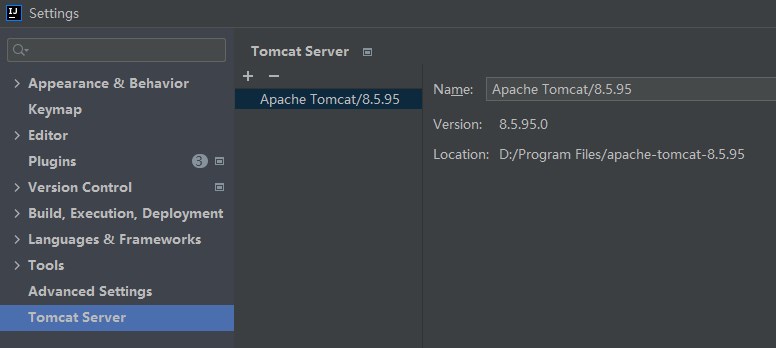
    Tomcat server

  3. Create a Tomcat run configuration.

    In the top toolbar of IntelliJ IDEA, choose Run > Edit Configurations. In the Run/Debug Configurations window, click + and select Tomcat Server. Specify the server name Name in the dialog box that appears. In the Configuration drop-down list, select Tomcat sever for the installed version. Modify the value of Context path to /. Specify 8080 for the value of SSL port. In the Before launch section, click + and select Launch Web Browser. Click Edit and specify the URL as http://localhost:8080/hello/getData. Click Apply and then OK.
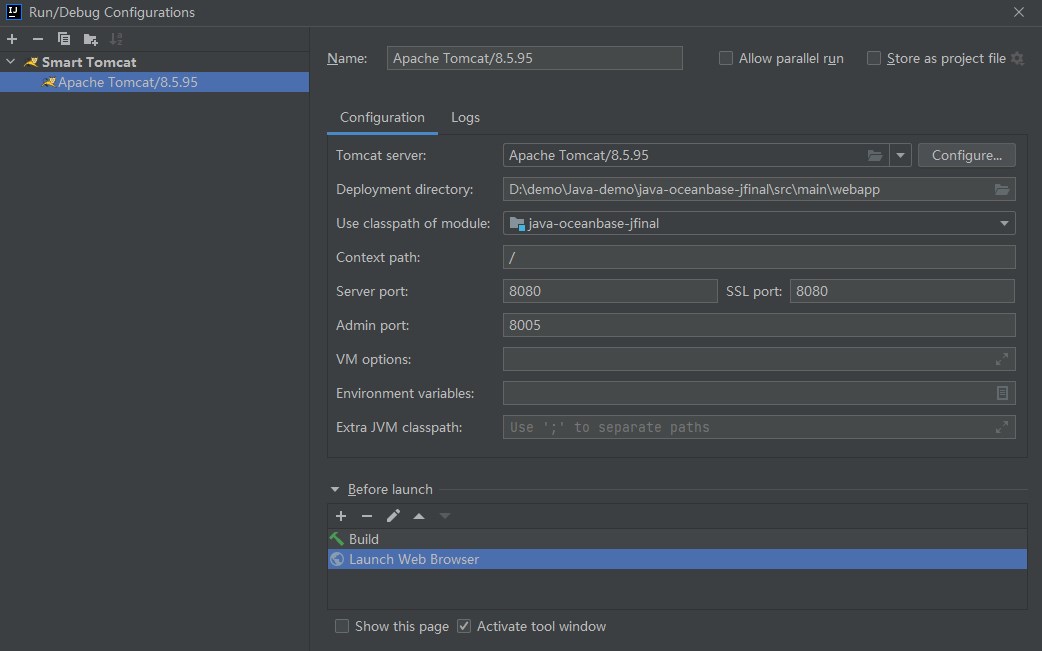
    apache tomcat8.5.95

  4. Run the Tomcat server.

    In the top toolbar of IntelliJ IDEA, select the Tomcat run configuration that you created and click the run buttongreen triangle to start the Tomcat server. You can view the startup log of the Tomcat server in the Run window of IntelliJ IDEA.

Step 5: Run the tomcat-mysql-client project

  1. Determine the running path.

    In the top toolbar of IDEA, select the Tomcat run configuration that you created earlier. Click the green triangle to start the Tomcat server. In the Chrome or IE browser, open the http://localhost:8080/hello/getData path to view the running result.

  2. View the running result.

    In the console window of IDEA, view the log information and output results of the project.

    • The result after data is inserted.

      tomcat connection pool test0
      tomcat connection pool test1
      tomcat connection pool test2
      tomcat connection pool test3
      tomcat connection pool test4
      tomcat connection pool test5
      tomcat connection pool test6
      tomcat connection pool test7
      tomcat connection pool test8
      tomcat connection pool test9
      
    • The result after data is modified.

      -----After modification-----
      POOl connection pool test0
      POOl connection pool test1
      POOl connection pool test2
      POOl connection pool test3
      POOl connection pool test4
      POOl connection pool test5
      POOl connection pool test6
      POOl connection pool test7
      POOl connection pool test8
      POOl connection pool test9
      
    • The result returned to the web interface.
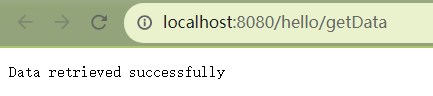
      Web

Project code introduction

Click tomcat-mysql-client to download the project code, which is a compressed file named tomcat-mysql-client.

After decompressing it, you will find a folder named tomcat-mysql-client. The directory structure is as follows:

│--pom.xml
│
├─.idea
│
├─src
│  ├─main
│  │  ├─java
│  │  │  └─com
│  │  │      └─oceanbase
│  │  │          └─testtomcat
│  │  │              ├─config
│  │  │              │   └─UserConfig.java
│  │  │              │
│  │  │              ├─controller
│  │  │              │   └─UserController.java
│  │  │              │
│  │  │              └─pojo
│  │  │                  └─User.java
│  │  │
│  │  ├─resources
│  │  │    └─application.properties
│  │  │    
│  │  └─webapp    
│  │      └─WEB-INF
│  │          └─web.xml
│  │             
│  │                
│  │
│  └─test
│      └─java
│         
│
└─target

Here is a breakdown of the files and directories:

  • pom.xml: the configuration file of the Maven project, which contains the dependencies, plug-ins, and build details of the project.
  • .idea: the directory for storing project-related configuration information used in the Integrated Development Environment (IDE).
  • src: the directory for storing the source code in the project.
  • main: the directory for storing the main source code and resource files.
  • java: the directory for storing the Java source code.
  • com: the root directory for storing the Java package.
  • oceanbase: the root directory for storing the project.
  • testtomcat: the directory for storing code of the JFinal framework.
  • config: the directory for storing configuration files, including the configuration classes of the application.
  • UserConfig.java: the user configuration file.
  • controller: the controller directory for storing the controller classes of the application.
  • UserController.java: the controller class file.
  • pojo: the directory for storing JavaBean or entity classes.
  • User.java: a file for storing user entity classes.
  • resources: the directory for storing resource files, such as configuration files and SQL files.
  • application.properties: the configuration file for storing database connection information.
  • webapp: the directory for storing the static resources and configuration file of the web application.
  • WEB-INF: the directory for storing the configuration file and other protected resource files of the web application.
  • web.xml: the deployment descriptor file of the web application.
  • test: the directory for storing the test code and resource files.
  • target: the directory for storing compiled class files and .jar packages.

Code in the pom.xml file

Note

If you only want to verify the example, use the default code without making any modifications. Alternatively, you can follow the instructions below to customize the pom.xml file to suit your specific requirements.

The pom.xml configuration file is as follows:

  1. The file declaration statement.

    Declare this file to be an XML file that uses XML standard 1.0 and character encoding UTF-8.

    **The sample code is as follows: **

    <?xml version="1.0" encoding="UTF-8"?>
    
  2. Configure the namespaces and the POM model version in the POM.

    1. Use xmlns to set the POM namespace to http://maven.apache.org/POM/4.0.0.
    2. Use xmlns:xsi to set the XML namespace to http://www.w3.org/2001/XMLSchema-instance.
    3. Use xsi:schemaLocation to set the POM namespace to http://maven.apache.org/POM/4.0.0, and the URI of the corresponding XSD file to http://maven.apache.org/xsd/maven-4.0.0.xsd.
    4. Use the <modelVersion> element to set the POM model version used by the POM file to 4.0.0.

    The sample code is as follows:

    <project xmlns="http://maven.apache.org/POM/4.0.0"
          xmlns:xsi="http://www.w3.org/2001/XMLSchema-instance"
          xsi:schemaLocation="http://maven.apache.org/POM/4.0.0 http://maven.apache.org/xsd/maven-4.0.0.xsd">
     <modelVersion>4.0.0</modelVersion>
    </project>
    
  3. Configure basic information.

    1. Set the project group ID to com.oceanbase by using <groupId>.
    2. Set the project dependency to tomcat-mysql-client by using <artifactId>.
    3. Set the project version to 1.0-SNAPSHOT by using <version>.
    4. Set the packaging mode of the project to WAR file (Web application archive) by using <packaging>.

    **The sample code is as follows: **

     <groupId>com.oceanbase</groupId>
     <artifactId>tomcat-mysql-client</artifactId>
     <version>1.0-SNAPSHOT</version>
     <!-- Packaging method (default to jar) -->
     <packaging>war</packaging>
    
  4. Configure the Maven version.

    The <maven.compiler.source> and <maven.compiler.target> parameters are set to Java 8, which specifies both the source code version and target code version of the compiler.

    **The sample code is as follows: **

     <properties>
         <maven.compiler.source>8</maven.compiler.source>
         <maven.compiler.target>8</maven.compiler.target>
     </properties>
    
  5. Configure core dependencies.

    1. Specify the dependency group as com.jfinal, name as jfinal, and version as 5.0.6. With this dependency, you can use the features of the JFinal framework.

      **The sample code is as follows: **

      <dependency>
          <groupId>com.jfinal</groupId>
          <artifactId>jfinal</artifactId>
          <version>5.0.6</version>
      </dependency>
      
    2. Specify the dependency group as com.alibaba, the dependency name as druid, and the dependency version as 1.2.8. With this dependency, you can use the Druid library to manage and optimize the establishment and release of database connections.

      The sample code is as follows:

      <dependency>
          <groupId>com.alibaba</groupId>
          <artifactId>druid</artifactId>
          <version>1.2.8</version>
      </dependency>
      
    3. Specify the dependency group as org.apache.commons, the dependency name as commons-dbcp2, and the dependency version as 2.9.0. With this dependency, you can use the Apache Commons DBCP2 library to manage and optimize the establishment and release of database connections.

      **The sample code is as follows: **

      <dependency>
          <groupId>org.apache.commons</groupId>
          <artifactId>commons-dbcp2</artifactId>
          <version>2.9.0</version>
      </dependency>
      
    4. Specify the dependency group as mysql, the dependency name as mysql-connector-java, and the dependency version as 5.1.40. With this dependency, you can use the client features, such as connections, queries, and transactions, provided by OceanBase Database.

      The sample code is as follows:

      <dependency>
          <groupId>mysql</groupId>
          <artifactId>mysql-connector-java</artifactId>
          <version>5.1.40</version>
      </dependency>
      

application.properties

The application.properties file configures the connection information for connecting to OceanBase Database. The configuration parameters include the class name of the database driver, the connection URL, the username, the password, and the connection pool parameters. These parameters are used to obtain and manage database connections in applications for database operations.

  • Set the database driver to com.mysql.jdbc.Driver by specifying db.app.pool.driverClassName so as to connect to OceanBase Database.

  • Specify the URL of connecting to the database by using db.app.pool.url.

  • Specify the username of connecting to the database by using db.app.pool.username.

  • Specify the password of connecting to the database by using db.app.pool.password.

  • Set the initial size of the connection pool to 3 by specifying db.app.pool.initialSize.

  • Set the maximum size of the connection pool to 10 by specifying db.app.pool.maxTotal.

  • Set the maximum number of idle connections in the connection pool to 20.

  • Set the minimum number of idle connections in the connection pool to 5.

  • Set the timeout period for obtaining a database connection to 5000ms by specifying db.app.pool.maxWaitMillis. If no connection is available in the pool after 5000ms, a timeout exception is thrown.

  • Specify the SQL verification statement for validating a database connection by using db.app.pool.validationQuery. The statement format is select 1.

    The sample code is as follows:

      #Apache Commons DBCP2 Connection Pool
      #Database Connection Pool Driver Class Name
      db.app.pool.driverClassName=com.mysql.jdbc.Driver
      #Database URL
      db.app.pool.url=jdbc:mysql:////host:port/schema_name?characterEncoding=UTF-8
      #Database username
      db.app.pool.username=user_name
      #Database password
      db.app.pool.password=******
      #Initial size of connection pool
      db.app.pool.initialSize=3
      #Maximum number of connections in the connection pool
      db.app.pool.maxTotal=10
      #Maximum number of idle connections in the connection pool
      db.app.pool.maxIdle=20
      #Minimum number of idle connections in the connection pool
      db.app.pool.minIdle=5
      #Maximum wait time for obtaining connections (in milliseconds)
      db.app.pool.maxWaitMillis=5000
      #Verify the connection's query statement
      db.app.pool.validationQuery=select 1 
    

Common configurations for the DBCP connection pool in Tomcat:

Notice

The specific attribute (parameter) configurations depend on the project requirements and database characteristics. We recommend that you customize the configurations according to the actual situation.

Attribute
Default value
Description
username N/A The username for connecting to the database.
password N/A The password for connecting to the database.
url N/A The URL for connecting to the database.
driverClassName N/A The standard Java class name of the database driver.
connectionProperties N/A The connection properties that are sent to the JDBC driver when establishing a new connection. The properties are in the [propertyName=property;] format.
defaultAutoCommit driver default The default auto-commit status of connections created by the connection pool. If this attribute is not set, the setAutoCommit method is not called.
defaultReadOnly driver default The default read-only status of connections created by the connection pool. If this attribute is not set, the setReadOnly method is not called.
defaultTransactionIsolation driver default The default transaction isolation level of connections created by the connection pool.
defaultCatalog N/A The default connection catalog created by the connection pool.
cacheState true Specifies whether to cache the readOnly and autoCommit settings of connections. If set to True, the readOnly and autoCommit settings of connections are cached after the first read or write operation and before all subsequent write operations on the connections. This eliminates the need for additional database queries when calling getter methods.
defaultQueryTimeout null The query timeout period in seconds for statements created by connections in the connection pool. If the value is a non-null positive integer, this attribute specifies the query timeout period in seconds for managing connections in the pool; if the value is null, the default value of the JDBC driver is used.
enableAutoCommitOnReturn true Specifies whether to check and configure the auto-commit status of a connection after it is returned to the pool.
rollbackOnReturn true Specifies whether to roll back a non-read-only connection that has auto-commit disabled when it is returned to the pool. If set to True, a connection will be rolled back when it is returned to the pool if the connection is not read-only and auto-commit is disabled.
initialSize 0 The initial number of connections created when the connection pool is started.
maxTotal 8 The maximum number of active connections allocated from the connection pool.
maxIdle 8 The maximum number of idle connections retained in the connection pool. A negative value indicates no limit.
minIdle 0 The minimum number of idle connections retained in the connection pool. The value 0 indicates no connections.
maxWaitMillis indefinitely The maximum milliseconds to wait for a connection to be returned from the pool when no available connection is available. The value -1 indicates indefinite waiting.
validationQuery N/A The SQL verification statement. If this attribute is specified, the SQL statement must be an SQL SELECT statement that returns at least one row; otherwise, the connection is verified by calling the isValid method.
validationQueryTimeout no timeout The timeout period in seconds for a verification query to fail. The unit is seconds. If set to a positive value, the setQueryTimeout method of the driver Statement is called with the specified value as the parameter.
testOnCreate false Specifies whether to verify an object after it is created. If the object cannot be verified, the attempt that triggers the object creation fails.
testOnBorrow true Specifies whether to verify an object before it is borrowed from the pool. If the object cannot be verified, the object is removed from the pool and another object is borrowed.
testOnReturn false Specifies whether to verify an object before it is returned to the pool.
testWhileIdle false Specifies whether to verify an object that is idle in the pool. If the object cannot be verified, it is removed from the pool.
timeBetweenEvictionRunsMillis -1 The idle time in milliseconds between runs of the thread that runs the idle object eviction task. When the value is a non-positive number, the idle object eviction thread is not run.
numTestsPerEvictionRun 3 The number of objects checked during each run of the idle object eviction thread.
minEvictableIdleTimeMillis 1000 * 60 * 30 The minimum idle time in milliseconds for an object in the connection pool.
softMinEvictableIdleTimeMillis -1 The minimum idle time in milliseconds for an object in the pool, including the time required to establish a minimum number of connections. The value -1 indicates no minimum idle time.
logExpiredConnections true Specifies whether to log connections that are closed by the pool after exceeding their maximum lifetime. A value of False indicates that logging of expired connections is disabled.
logExpiredConnections true Specifies whether to record connections that are closed due to reaching the maximum lifetime. The value false indicates to disable logging of expired connections.
connectionInitSqls null The SQL statements that initialize the connection when it is first created. These statements are executed only when the connection is established by the configured connection factory.
lifo true Specifies whether the borrowObject method returns the most recently used connection in the pool. The value true means that the borrowObject method returns the last in connection (if any idle connections are available) in the pool; the value false means that the connections are returned in the order of their return to the pool, namely, the first-in-first-out (FIFO) order.
poolPreparedStatements false Specifies whether to enable the prepared statement pool.
maxOpenPreparedStatements unlimited The maximum number of open statements allocated from the connection pool. A negative value indicates no limit.
accessToUnderlyingConnectionAllowed false Specifies whether to allow access to underlying database connections.
removeAbandonedOnMaintenance false Specifies whether to disconnect abandoned connections during pool maintenance. If set to true, abandoned connections are disconnected at the end of the maintenance period. If maintenance is not enabled (timeBetweenEvictionRunsMillis is set to a positive value), this attribute is ignored.
removeAbandonedOnBorrow false Specifies whether to disconnect abandoned connections when a connection is borrowed from the pool. If set to true, an abandoned connection is disconnected each time it is borrowed from the pool. In addition, the following requirements must be met:
  • getNumActive() > getMaxTotal() - 3
  • getNumIdle() < 2
removeAbandonedTimeout 300 The timeout period in seconds for disconnecting an abandoned connection. The unit is seconds. This attribute specifies the longest idle time of a connection before it is considered abandoned and can be disconnected.
logAbandoned false Specifies whether to record stack traces of application code that causes the disconnection of abandoned connections. Stack traces must be generated, and therefore the recording of abandoned statements and connections increases the overhead of opening each connection or executing each statement.
abandonedUsageTracking false Specifies whether to record stack traces of abandoned connections. The value true means that stack traces of connections are recorded each time the connections are called in the pool, and the most recent stack trace is retained to help debug abandoned connections. This setting increases a great deal of overhead.
fastFailValidation false Specifies whether to quickly fail the validation for connections that throw fatal SQLExceptions. The value true means that a request to disconnect a connection will fail immediately, without calling the isValid method of the driver or attempting to execute a verification query. By default, the following SQL_STATE codes are considered fatal error signals:
  • 57P01 (shutdown by administrator)
  • 57P02 (crash shutdown)
  • 57P03 (cannot connect now)
  • 01002 (SQL92 disconnect error)
  • JZ0C0 (Sybase disconnect error)
  • JZ0C1 (Sybase disconnect error)
  • Any SQL_STATE code that starts with 08
To override the default set of disconnect codes, set the disconnectionSqlCodes attribute.
disconnectionSqlCodes null A comma-separated list of SQL_STATE codes. These codes are considered fatal disconnect error signals. When the fastFailValidation attribute is set to true, the disconnectionSqlCodes attribute takes effect.

Code in web.xml

The web.xml file is used to configure filters for web applications.

The content of the web.xml configuration file is as follows:

  1. The declaration statement.

    Declare this file to be an XML file that uses XML standard 1.0 and character encoding UTF-8.

    The sample code is as follows:

    <?xml version="1.0" encoding="UTF-8"?>
    
  2. The configuration of the XML namespace and the XML model version.

    1. Use xmlns:xsi to set the XML namespace to http://www.w3.org/2001/XMLSchema-instance.
    2. Use xmlns to set the XML namespace to http://java.sun.com/xml/ns/javaee.
    3. Use xsi:schemaLocation to set the XML namespace to http://java.sun.com/xml/ns/javaee, and the URI of the corresponding XSD file to http://java.sun.com/xml/ns/javaee/web-app_3_0.xsd.
    4. Use <id> and <version> to set the ID of the web application to WebApp_ID and the version number to 3.0.

    The sample code is as follows:

     <web-app xmlns:xsi="http://www.w3.org/2001/XMLSchema-instance" 
              xmlns="http://java.sun.com/xml/ns/javaee" 
              xsi:schemaLocation="http://java.sun.com/xml/ns/javaee http://java.sun.com/xml/ns/javaee/web-app_3_0.xsd" 
              id="WebApp_ID" 
              version="3.0">
    
  3. The configuration of a JFinal filter.

    Configure a filter named jfinal for the web application to use the JFinal framework. Set the class of the filter to com.jfinal.core.JFinalFilter. Use the initialization parameter configClass to set the location of the configuration class of the JFinal framework to com.oceanbase.testtomcat.config.UserConfig. The JFinal filter allows you to use the JFinal framework in the web application and configure the behavior of the JFinal framework based on the specified configuration class.

    The sample code is as follows:

     <filter>
         <filter-name>jfinal</filter-name>
         <filter-class>com.jfinal.core.JFinalFilter</filter-class>
         <init-param>
             <param-name>configClass</param-name>
             <!-- your jfinal configuration location -->
             <param-value>com.oceanbase.testtomcat.config.UserConfig</param-value>
         </init-param>
     </filter>
    
  4. The configuration of mappings for the JFinal filter.

    Apply the jfinal filter to all request paths, namely, to all requests in the application.

    The sample code is as follows:

     <filter-mapping>
         <filter-name>jfinal</filter-name>
         <url-pattern>/*</url-pattern>
     </filter-mapping>
    

Introduction to the UserConfig.java file

The UserConfig.java file is used to configure the routing, plug-ins, database connections, and other related information of an application.

The code in the UserConfig.java file mainly includes the following parts:

  1. Reference other classes and APIs.

    Declare the current file to contain the following APIs and classes:

    • StatFilter class: used to statistics the performance of database access.
    • JdbcConstants class: used to define constant values of database types.
    • WallFilter class: used to prevent SQL injection attacks.
    • PropKit class: used to read configuration files.
    • ActiveRecordPlugin class: used to operate databases.
    • Db class: used to execute database operations.
    • MysqlDialect class: used to specify the dialect of the database.
    • DruidPlugin class: used to connect to databases.
    • Engine class: used to configure the template engine.
    • UserController class: used to process requests related to users.
    • User class: used to transmit and store user data.

    The sample code is as follows:

    import com.alibaba.druid.filter.stat.StatFilter;
    import com.alibaba.druid.util.JdbcConstants;
    import com.alibaba.druid.wall.WallFilter;
    import com.jfinal.config.*;
    import com.jfinal.kit.PropKit;
    import com.jfinal.plugin.activerecord.ActiveRecordPlugin;
    import com.jfinal.plugin.activerecord.Db;
    import com.jfinal.plugin.activerecord.dialect.MysqlDialect;
    import com.jfinal.plugin.druid.DruidPlugin;
    import com.jfinal.template.Engine;
    import com.oceanbase.testjfinal.controller.UserController;
    import com.oceanbase.testjfinal.pojo.User;
    
  2. Define the UserConfig class.

    You can rewrite the JFinalConfig class methods to configure the constants, routing, plug-ins, and database connections.

    1. Define the configConstant method.

      Use this method to configure the constants of the JFinal framework and read the configuration values from the configuration file by using PropKit.

      The sample code is as follows:

      @Override
      public void configConstant(Constants constants) {
          PropKit.use("application.properties");
      }
      
    2. Define the configRoute method.

      Use this method to configure the routing mappings. Use the routes.add method to map the "/hello" path to the default access page of the UserController class.

      The sample code is as follows:

      @Override
      public void configRoute(Routes routes) {
          routes.add("/hello", UserController.class, "/");
      }
      
    3. Define the configEngine method.

      Use this method to configure the template engine.

      The sample code is as follows:

      @Override
      public void configEngine(Engine engine) {
      }
      
    4. Define the configPlugin method.

      Use this method to configure plug-ins of the application. Call the init method to initialize the database connection and table structure, create the DruidPlugin and ActiveRecordPlugin plug-ins, and add them to the plugins collection. Additionally, call the addMapping method of the activeRecordPlugin to add mappings between database tables and entity classes. In this way, the TEST_USER table is mapped to the User class.

      The sample code is as follows:

      @Override
      public void configPlugin(Plugins plugins) {
          init();
          DruidPlugin druidPlugin = createDruidPlugin();
          plugins.add(druidPlugin);
      
          ActiveRecordPlugin activeRecordPlugin = createActiveRecordPlugin(druidPlugin);
          activeRecordPlugin.addMapping("TOMCAT_TEST", User.class);
          plugins.add(activeRecordPlugin);
      }
      
    5. Define the createDruidPlugin method.

      Use this method to create a DruidPlugin plug-in and configure the relevant parameters, including the size of the connection pool, SQL firewall, and error handling for connections.

      • Use the get method of PropKit to obtain the database connection-related attribute values from the configuration file. These attributes include the URL, username, password, and driver class. Then create a DruidPlugin object and initialize it with these attribute values.

      • Use the addFilter method to add a StatFilter instance to the DruidPlugin for performance statistics of database access. Create a WallFilter instance, set the database type to OceanBase by using the setDbType method, and add the WallFilter instance to the DruidPlugin for SQL firewall filtering.

      • Use the setInitialSize method to set the initial size of the connection pool; the setMaxPoolPreparedStatementPerConnectionSize method to set the maximum number of preprocessed statements per connection in the pool; the setTimeBetweenConnectErrorMillis method to set the time interval between two connection errors; and the setValidationQuery method to set the validation query statement for connections. Finally, return the created DruidPlugin instance.

        The sample code is as follows:

        private DruidPlugin createDruidPlugin() {
            DruidPlugin druidPlugin = new DruidPlugin(
                PropKit.get("db.app.pool.url"),
                PropKit.get("db.app.pool.username"),
                PropKit.get("db.app.pool.password"),
                PropKit.get("db.app.pool.driverClassName")
            );
        
            druidPlugin.addFilter(new StatFilter());
            WallFilter wallFilter = new WallFilter();
            wallFilter.setDbType(JdbcConstants.OCEANBASE);
            druidPlugin.addFilter(wallFilter);
        
            druidPlugin.setInitialSize(PropKit.getInt("db.app.pool.initialSize"));
            druidPlugin.setMaxPoolPreparedStatementPerConnectionSize(PropKit.getInt("db.app.pool.maxTotal"));
            druidPlugin.setTimeBetweenConnectErrorMillis(PropKit.getInt("db.app.pool.maxWaitMillis"));
            druidPlugin.setValidationQuery("select 1");
        
            return druidPlugin;
        }
        
    6. Define the init method.

      Use this method to initialize the database connection and create a database table. Call the initDbConnection method to initialize the database connection and return an ActiveRecordPlugin instance. Then execute an SQL statement to check whether the user table named TOMCAT_TEST exists. If the TOMCAT_TEST table exists, execute the SQL statement DROP TABLE TOMCAT_TEST to drop the table. After that, execute the CREATE TABLE statement to create a database table named TOMCAT_TEST. This table contains the ID and USERNAME fields. Finally, disconnect from the ActiveRecordPlugin plug-in and release the database connection.

      The sample code is as follows:

      public void init() {
          ActiveRecordPlugin arp = initDbConnection();
      
          // Check if table exists
          boolean tableExists = Db.queryInt("SELECT COUNT(*) FROM information_schema.TABLES WHERE TABLE_SCHEMA = 'TEST' AND TABLE_NAME = 'TOMCAT_TEST'") > 0;
      
          // Drop table if it exists
          if (tableExists) {
              Db.update("DROP TABLE TOMCAT_TEST");
          }
      
          // Create table
          String sql = "CREATE TABLE TOMCAT_TEST (ID int, USERNAME varchar(50))";
          Db.update(sql);
      
          arp.stop();
      }
      
    7. Define the initDbConnection method.

      Use this method to initialize the database connection. First, call the createDruidPlugin method to create a DruidPlugin object and assign it to the druidPlugin variable. The createDruidPlugin method is responsible for creating and configuring the DruidPlugin for managing the database connection pool. Then call the createActiveRecordPlugin method to create an ActiveRecordPlugin object and pass the druidPlugin object as a parameter to this method. The createActiveRecordPlugin method is responsible for creating and configuring the ActiveRecordPlugin for managing database operations. After that, call the druidPlugin.start method to start the DruidPlugin and initialize the database connection pool. Finally, call the activeRecordPlugin.start method to start the ActiveRecordPlugin, which will initialize the relevant database operation settings based on the configuration.

      The sample code is as follows:

      private ActiveRecordPlugin initDbConnection() {
          DruidPlugin druidPlugin = createDruidPlugin();
          ActiveRecordPlugin activeRecordPlugin = createActiveRecordPlugin(druidPlugin);
      
          druidPlugin.start();
          activeRecordPlugin.start();
      
          return activeRecordPlugin;
      }
      
    8. Define the ConfigInterceptor and ConfigHandler methods.

      Use these methods to perform global configurations during system initialization.

      The sample code is as follows:

      @Override
      public void configInterceptor(Interceptors interceptors) {
      }
      
      @Override
      public void configHandler(Handlers handlers) {
      }
      

UserController.java

The UserController.java file uses the getData method to insert data into the database, query data from the database, and return the query result to the client in the JSON format. Use the Db class of the JFinal framework for database operations, and use the custom User class for data mappings so as to return data.

The code in the UserController.java file mainly includes the following parts:

  1. Reference other classes and APIs.

    Declare this file to contain the following APIs and classes:

    • Controller class: processes requests and responses.
    • Db class: executes database operations.
    • Record class: performs database operations, such as querying, inserting, updating, and deleting data.
    • ArrayList class: creates an empty list.
    • User class: maps database tables.
    • List API: operates the query result set.

    The sample code is as follows:

    import com.jfinal.core.Controller;
    import com.jfinal.plugin.activerecord.Db;
    import com.jfinal.plugin.activerecord.Record;
    
    import java.util.ArrayList;
    import java.util.List;
    
  2. Define the UserController class.

    Use this class to provide a controller for the JFinal framework, and use the getData method to insert data into and query data from the database.

    1. Insert data. Create a dataList list that contains 10 Record objects. Each Record object has unique ID and USERNAME values. Use the Db.batchSave method to save the records in the dataList list to a database table named TOMCAT_TEST.

      The sample code is as follows:

              for (int i = 0; i < 10; i++) {
                  Record record = new Record().set("ID", i).set("USERNAME", "Tomcat connection pool test" + i);
                  dataList.add(record);
              }
              Db.batchSave("TOMCAT_TEST", dataList, dataList.size());
      
    2. Query data. Use the Db.find method to execute an SQL query and store the query result in the resultList list. Use an enhanced FOR loop to traverse each Record object in the resultList list. Use the getStr method to obtain values of specified fields in a Record object and use the System.out.println method to return these values.

      The sample code is as follows:

          List<Record> resultList = Db.find("SELECT * FROM TOMCAT_TEST");
          for (Record result : resultList) {
              System.out.println(result.getStr("USERNAME"));
          }
      
    3. Modify data. Use a loop to perform 10 rounds of iterations and execute an update statement in each iteration. Call the Db.update method to update records in the TOMCAT_TEST table based on specified conditions.

      The sample code is as follows:

          for (int i = 0; i < 10; i++) {
              Db.update("UPDATE TOMCAT_TEST SET USERNAME = 'Connection pool test" + i + "' WHERE ID = " + i);
          }
      
    4. Query the modified data. Query the TOMCAT_TEST table and save the query result in modifiedList. Return the information in the -----After modification----- section. Traverse modifiedList and return the USERNAME value of each record. Use the renderJson method to render the response message Data retrieved successfully into the JSON format and return it to the client.

      The sample code is as follows:

              List<Record> modifiedList = Db.find("SELECT * FROM TOMCAT_TEST");
              System.out.println("-----After modification-----");
              for (Record modified : modifiedList) {
                  System.out.println(modified.getStr("USERNAME"));
              }
              renderJson("Data retrieved successfully");
      

Introduction to the User.java file

The User.java file is used to map database tables and Java objects.

The code in the User.java file mainly includes the following parts:

  1. Reference the Model class.

    Use the Model class to map database tables and operate data.

  2. Define the User class.

    Use the User class to inherit the methods provided in the Model class for database operations.

    The sample code is as follows:

    import com.jfinal.plugin.activerecord.Model;
    
    
        public class User extends Model<User> {
            public static final User dao = new User();
    }
    

Full code

pom.xml
application.properties
web.xml
UserConfig.java
UserController.java
User.java
<?xml version="1.0" encoding="UTF-8"?>
<project xmlns="http://maven.apache.org/POM/4.0.0"
         xmlns:xsi="http://www.w3.org/2001/XMLSchema-instance"
         xsi:schemaLocation="http://maven.apache.org/POM/4.0.0 http://maven.apache.org/xsd/maven-4.0.0.xsd">
    <modelVersion>4.0.0</modelVersion>

    <groupId>com.oceanbase</groupId>
    <artifactId>tomcat-mysql-client</artifactId>
    <version>1.0-SNAPSHOT</version>
    <!-- Packaging method (default to jar) -->
    <packaging>war</packaging>

    <properties>
        <maven.compiler.source>8</maven.compiler.source>
        <maven.compiler.target>8</maven.compiler.target>
    </properties>
    <dependencies>
        <dependency>
            <groupId>com.jfinal</groupId>
            <artifactId>jfinal</artifactId>
            <version>5.0.6</version>
        </dependency>


        <dependency>
            <groupId>com.alibaba</groupId>
            <artifactId>druid</artifactId>
            <version>1.2.8</version>
        </dependency>

        <dependency>
            <groupId>org.apache.commons</groupId>
            <artifactId>commons-dbcp2</artifactId>
            <version>2.9.0</version>
        </dependency>
            <dependency>
                <groupId>mysql</groupId>
                <artifactId>mysql-connector-java</artifactId>
                <version>5.1.40</version>
            </dependency>

    </dependencies>
</project>
    #Apache Commons DBCP2 Connection Pool
    #Database Connection Pool Driver Class Name
    db.app.pool.driverClassName=com.mysql.jdbc.Driver
    #Database URL
    db.app.pool.url=jdbc:mysql:////host:port/schema_name?characterEncoding=UTF-8
    #Database username
    db.app.pool.username=user_name
    #Database password
    db.app.pool.password=******
    #Initial size of connection pool
    db.app.pool.initialSize=3
    #Maximum number of connections in the connection pool
    db.app.pool.maxTotal=10
    #Maximum number of idle connections in the connection pool
    db.app.pool.maxIdle=20
    #Minimum number of idle connections in the connection pool
    db.app.pool.minIdle=5
    #Maximum wait time for obtaining connections (in milliseconds)
    db.app.pool.maxWaitMillis=5000
    #Verify the connection's query statement
    db.app.pool.validationQuery=select 1
<?xml version="1.0" encoding="UTF-8"?>
<web-app xmlns:xsi="http://www.w3.org/2001/XMLSchema-instance" xmlns="http://java.sun.com/xml/ns/javaee" xsi:schemaLocation="http://java.sun.com/xml/ns/javaee http://java.sun.com/xml/ns/javaee/web-app_3_0.xsd" id="WebApp_ID" version="3.0">
    <filter>
        <filter-name>jfinal</filter-name>
        <filter-class>com.jfinal.core.JFinalFilter</filter-class>
        <init-param>
            <param-name>configClass</param-name>
            <!-- your jfinal configuration location -->
            <param-value>com.oceanbase.testjfinal.config.UserConfig</param-value>
        </init-param>
    </filter>

    <filter-mapping>
        <filter-name>jfinal</filter-name>
        <url-pattern>/*</url-pattern>
    </filter-mapping>
</web-app>
package com.oceanbase.testtomcat.config;

import com.alibaba.druid.filter.stat.StatFilter;
import com.alibaba.druid.util.JdbcConstants;
import com.alibaba.druid.wall.WallFilter;
import com.jfinal.config.*;
import com.jfinal.kit.PropKit;
import com.jfinal.plugin.activerecord.ActiveRecordPlugin;
import com.jfinal.plugin.activerecord.Db;
import com.jfinal.plugin.activerecord.dialect.MysqlDialect;
import com.jfinal.plugin.druid.DruidPlugin;
import com.jfinal.template.Engine;
import com.oceanbase.testtomcat.controller.UserController;
import com.oceanbase.testtomcat.pojo.User;

public class UserConfig extends JFinalConfig {
    @Override
    public void configConstant(Constants constants) {
        // Read properties configuration
        PropKit.use("application.properties");
    }

    @Override
    public void configRoute(Routes routes) {
        // Set the default access page for project startup, which does not need to be set in the web.
        routes.add("/hello", UserController.class);

    }

    @Override
    public void configEngine(Engine engine) {
    }

    @Override
    public void configPlugin(Plugins plugins) {
        init();
        DruidPlugin druidPlugin = createDruidPlugin();
        plugins.add(druidPlugin);

        ActiveRecordPlugin activeRecordPlugin = createActiveRecordPlugin(druidPlugin);
        activeRecordPlugin.addMapping("TOMCAT_TEST", User.class);
        plugins.add(activeRecordPlugin);
    }

    private DruidPlugin createDruidPlugin() {
        DruidPlugin druidPlugin = new DruidPlugin(
                PropKit.get("db.app.pool.url"),
                PropKit.get("db.app.pool.username"),
                PropKit.get("db.app.pool.password"),
                PropKit.get("db.app.pool.driverClassName")
        );

        druidPlugin.addFilter(new StatFilter());
        WallFilter wallFilter = new WallFilter();
        wallFilter.setDbType(JdbcConstants.OCEANBASE);
        druidPlugin.addFilter(wallFilter);

        druidPlugin.setInitialSize(PropKit.getInt("db.app.pool.initialSize"));
        druidPlugin.setMaxPoolPreparedStatementPerConnectionSize(PropKit.getInt("db.app.pool.maxTotal"));
        druidPlugin.setTimeBetweenConnectErrorMillis(PropKit.getInt("db.app.pool.maxWaitMillis"));
        druidPlugin.setValidationQuery("select 1 from dual");

        return druidPlugin;
    }

    private ActiveRecordPlugin createActiveRecordPlugin(DruidPlugin druidPlugin) {
        ActiveRecordPlugin activeRecordPlugin = new ActiveRecordPlugin(druidPlugin);
        activeRecordPlugin.setDialect(new MysqlDialect());

        return activeRecordPlugin;
    }

    public void init() {
        ActiveRecordPlugin arp = initDbConnection();

        // Check if table exists
        boolean tableExists = Db.queryInt("SELECT COUNT(*) FROM information_schema.TABLES WHERE TABLE_SCHEMA = 'TEST' AND TABLE_NAME = 'TOMCAT_TEST'") > 0;

        // Drop table if it exists
        if (tableExists) {
            Db.update("DROP TABLE TOMCAT_TEST");
        }

        // Create table
        String sql = "CREATE TABLE TOMCAT_TEST (ID int, USERNAME varchar(50))";
        Db.update(sql);

        arp.stop();
    }
    private ActiveRecordPlugin initDbConnection() {
        DruidPlugin druidPlugin = createDruidPlugin();
        ActiveRecordPlugin activeRecordPlugin = createActiveRecordPlugin(druidPlugin);

        druidPlugin.start();
        activeRecordPlugin.start();

        return activeRecordPlugin;
    }

    @Override
    public void configInterceptor(Interceptors interceptors) {
    }

    @Override
    public void configHandler(Handlers handlers) {
    }
}
package com.oceanbase.testtomcat.controller;

import com.jfinal.core.Controller;
import com.jfinal.plugin.activerecord.Db;
import com.jfinal.plugin.activerecord.Record;

import java.util.ArrayList;
import java.util.List;

public class UserController extends Controller {

    public void getData() {
        try {
            List<Record> dataList = new ArrayList<>();
            // Insert data
            for (int i = 0; i < 10; i++) {
                Record record = new Record().set("ID", i).set("USERNAME", "Tomcat connection pool test" + i);
                dataList.add(record);
            }
            Db.batchSave("TOMCAT_TEST", dataList, dataList.size());
            // Query data
            List<Record> resultList = Db.find("SELECT * FROM TOMCAT_TEST");
            for (Record result : resultList) {
                System.out.println(result.getStr("USERNAME"));
            }
            // Modify data
            for (int i = 0; i < 10; i++) {
                Db.update("UPDATE TOMCAT_TEST SET USERNAME = 'Connection pool test" + i + "' WHERE ID = " + i);
            }
            // Query the modified data
            List<Record> modifiedList = Db.find("SELECT * FROM TOMCAT_TEST");
            System.out.println("-----After modification-----");
            for (Record modified : modifiedList) {
                System.out.println(modified.getStr("USERNAME"));
            }
            renderJson("Data retrieved successfully");
        } catch (Exception e) {
            e.printStackTrace();
            renderJson("Error occurred");
        }
    }
}
package com.oceanbase.testtomcat.pojo;

import com.jfinal.plugin.activerecord.Model;


    public class User extends Model<User> {
        public static final User dao = new User();

}

References

For more information about OceanBase Connector/J, see OceanBase JDBC driver.

Previous topic

Database connection pool configuration
Last

Next topic

c3p0
Next
on this page
Prerequisites
Procedure
Step 1: Import the tomcat-mysql-client project into IntelliJ IDEA
Step 2: Obtain the connection information of OceanBase Database
Step 3: Modify the database connection information in the tomcat-mysql-client project
Step 4: Set up the Tomcat runtime environment of the tomcat-mysql-client project
Step 5: Run the tomcat-mysql-client project
Project code introduction
Code in the pom.xml file
application.properties
Code in web.xml
Introduction to the UserConfig.java file
UserController.java
Introduction to the User.java file
Full code
References