
The rich client feature integrates the overall routing and forwarding capabilities of OceanBase Database Proxy (ODP) into OceanBase Connector/J. In this way, ODP nodes do not need to be separately deployed or managed for application systems. The rich client feature is applicable to scenarios in which the application server and the database server are interconnected over network, the application server has sufficient resources, and the customer does not use or want to use a load balancer, or the customer demands a lower access latency.
Workflow
The following figure shows how to use a rich client to access OceanBase Database. 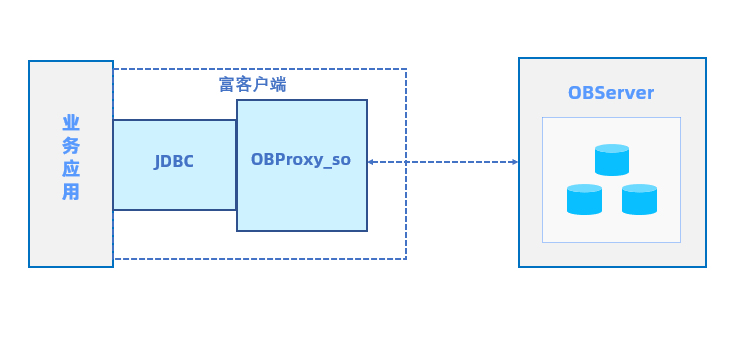
Rich client components of OceanBase Connector/J are as follows:
- JDBC-ObProxySocket: the JDBC driver for the rich client feature. It implements multiple Java Native Interfaces (JNIs) and starts the backend worker threads of ODP for interactions with the backend database.
- OBProxy_so: the dynamic library of overall capabilities of ODP. It provides interfaces for starting worker threads at the backend and processes and forwards all database requests.
You can use your ODP account to log in to a rich client and adjust related ODP parameters. However, to use this login method, you must specify a domain name socket on the local server. The dynamic library of the rich client has all log capabilities of ODP. By default, a hidden directory named .obproxy is created in the current directory on the application server. This hidden directory contains a log directory where the files of ODP running logs are stored. The dynamic library logs generated by the rich client can be automatically cleared. The log_dir_size_threshold parameter specifies the maximum disk usage that triggers the automatic clearing of these logs. After the application system is restarted, the log clearing will resume.
Enable the rich client feature
Note
At present, the rich client feature can be used only on Linux systems and is not supported on Windows systems.
Download the JAR installation package of OceanBase Connector/J and RPM installation package of ODP of the corresponding versions.
Install ODP. The installation command for Linux systems is as follows:
rpm -ivh obproxy-x.x.x-x.x.x.rpm;Note
At present, the rich client feature is supported in ODP V3.3.0, V3.3.1, V4.0.0, and later.
Create a soft link to the dynamic library in the
/u01/obproxy/lib/libobproxy_so.sodirectory. If this directory does not exist, search for the directory oflibobproxy_so.soby using-Djava.library.path.Enable the rich client feature by using the URL connection setting attribute
obProxySocketof OceanBase Connector/J. You can specify the log output level for ODP when you start the rich client or during the running of the client. Here is an example:# Start the rich client based on the RootService list: &obProxySocket={\"proxy_config\":\"rootservice_cluster_name=***,rootservice_list=10.XXX.XXX.XXX:2727,proxy_mem_limited=1G,work_thread_num=8,syslog_level=INFO,enable_client_ip_checkout=false,check_tenant_locality_change=false,enable_async_pull_location_cache=false,enable_compression_protocol=true,enable_async_log=true,syslog_level=INFO\"} # Start the rich client based on OCP_CONFIG_URL: &obProxySocket={\"proxy_config\":\"rootservice_cluster_name=***,obproxy_config_server_url=***,proxy_mem_limited=1G,work_thread_num=8,syslog_level=INFO,enable_client_ip_checkout=false,check_tenant_locality_change=false,enable_async_pull_location_cache=false,enable_compression_protocol=true,enable_async_log=true,syslog_level=INFO\"}The value of
obProxySocketis in the JSON format. At present, only one key-value pair is supported, in whichkeyisproxy_config, andvalueis an ODP parameter. For more information, see ODP parameters.To use the rich client feature, you must set the cluster information in either of the following ways:
- Method 1: Set
obproxy_config_server_url, which specifies the access URL of OceanBase Cloud Platform (OCP). - Method 2: Set the RootService list by using the
rootservice_listandrootservice_cluster_nameparameters.
The following table describes the recommended parameter configurations for the rich client feature.
ParameterDefault valueRecommended valueDescriptionautomatic_match_work_thread true false If this parameter is set to true, the number of threads for the rich client ismin(work_thread_num, number of CPU cores), wherework_thread_numis a parameter.work_thread_num 128 8 The number of threads, which is affected by automatic_match_work_thread.proxy_mem_limited 2G 16G The maximum memory for the rich client. When the memory used by the rich client exceeds the value of proxy_mem_limited, the threads of the rich client automatically exit.enable_strict_kernel_release true false Specifies whether to check the kernel version. The rich client cannot be started if the check fails. log_dir_size_threshold 64G 1G The maximum disk space for log files. When this value is exceeded, logs are automatically cleared. syslog_level INFO INFO/ERROR The log output level. We recommend that you set the log output level to INFOin a production system. If logs do not need to be output, you can set the log level toERROR.- Method 1: Set
After the rich client feature is enabled, you can use OceanBase Connector/J to interact with the database.
Examples
The following example illustrates how to use a rich client in an environment in which OceanBase Connector/J V2.3.0 and ODP V3.3.0 are installed.
Create a test case named
TestOBClientVC.java.import java.io.*; import java.sql.*; import static java.lang.Thread.sleep; public class TestOBClientVC { public static int useVC = 0; public static final String obproxyConfig = "&obProxySocket={\"app_name\":\"mytest\",\"proxy_config\":\"rootservice_cluster_name=***,rootservice_list=10.XXX.XXX.XXX:2727,proxy_mem_limited=2G,work_thread_num=8,syslog_level=DEBUG\"}"; public static Connection getObConnection() throws Exception { // Set the connection information. final String DRIVER_NAME = "com.alipay.oceanbase.jdbc.Driver"; final String URL = "jdbc:oceanbase://10.XXX.XXX.XXX:20211/test?useSSL=false&useServerPrepStmts=true&log=true"; final String USER_NAME = "root@***"; final String PASSWORD = ""; // Load the driver class of MySQL. Class.forName(DRIVER_NAME); // Obtain a database connection. if (useVC != 0) { return (Connection) DriverManager.getConnection(URL + obproxyConfig, USER_NAME, PASSWORD); // clientVC } else { return (Connection) DriverManager.getConnection(URL, USER_NAME, PASSWORD); // tcp socket } } public static void test_text_protocol() { Connection conn = null; try { conn = getObConnection(); System.out.println("get connection succ"); ResultSet rs = conn.createStatement().executeQuery("select 'hello obproxy!' from dual"); if (rs.next()) { System.out.println("text:" + rs.getString(1)); } } catch (Exception e) { e.printStackTrace(); } } public static void test_binary_protocol() { Connection conn = null; try { conn = getObConnection(); PreparedStatement pstmt = conn.prepareStatement("select ? from dual"); pstmt.setString(1, "hello obproxy!"); pstmt.execute(); ResultSet rs = pstmt.getResultSet(); if (rs.next()) { System.out.println("text:" + rs.getString(1)); } } catch (Exception e) { e.printStackTrace(); } } public static void main(String args[]) { try { // test_text_protocol(); useVC = 1; test_text_protocol(); test_binary_protocol(); System.out.println("jdbc test pass"); // sleep(600000); } catch (Exception e) { e.printStackTrace(); } } }Compile
TestOBClientVC.javac -cp ./oceanbase-client-2.4.1.jar TestOBClientVC.javaExecute
TestOBClientVC.java -cp $CLASSPATH:oceanbase-client-2.4.1.jar TestOBClientVC