OceanBase
English日本語简体中文
Docs Home
Products
Integrations
Release Notes

Databases

OceanBase DatabaseOceanBase Cloud OceanBase Best Practices

Tools

OceanBase Cloud PlatformOceanBase Migration ServiceOceanBase Developer CenterOceanBase Migration AssessmentOceanBase Admin ToolOceanBase Loader and DumperOceanBase DeployerKubernetes operator for OceanBaseOceanBase Diagnostic Tool OceanBase Binlog Service

Connectors and Middleware

OceanBase Database Proxy OceanBase Connector/C OceanBase Connector/J OceanBase Connector/ODBC OceanBase Connector/NETOceanBase Command-Line Client

Databases

OceanBase DatabaseOceanBase Cloud OceanBase Best Practices

Connectors and Middleware

OceanBase Database Proxy OceanBase Connector/C OceanBase Connector/J OceanBase Connector/ODBC OceanBase Connector/NETOceanBase Command-Line Client

Tools

OceanBase Cloud PlatformOceanBase Migration ServiceOceanBase Developer CenterOceanBase Migration AssessmentOceanBase Admin ToolOceanBase Loader and DumperOceanBase DeployerKubernetes operator for OceanBaseOceanBase Diagnostic Tool OceanBase Binlog Service
OceanBase DatabaseOceanBase Cloud ToolsConnectors and MiddlewareLifecycle Support Policy

OceanBase Database Proxy

V4.3.4
  • What is ODP?
  • Installation and deployment
    • Overview
    • Deploy ODP by using obd
    • Deploy ODP by using OCP
    • Deploy ODP by using the CLI
    • Deployment modes
  • Basic operations
  • Configuration parameter
    • View and modify parameters
    • Parameter summary
    • Global parameters
      • automatic_match_work_thread
      • block_thread_num
      • cache_cleaner_clean_interval
      • check_tenant_locality_change
      • client_max_connections
      • client_max_memory_size
      • client_session_id_version
      • client_sock_option_flag_out
      • client_tcp_keepcnt
      • client_tcp_keepidle
      • client_tcp_keepintvl
      • client_tcp_user_timeout
      • cluster_count_high_water_mark
      • cluster_expire_time
      • config_server_refresh_interval
      • congestion_fail_window
      • congestion_failure_threshold
      • congestion_retry_interval
      • connection_diagnosis_option
      • connect_observer_max_retries
      • current_local_config_version
      • default_buffer_water_mark
      • default_inactivity_timeout
      • delay_exit_time
      • delay_update_entry_interval
      • detect_server_timeout
      • digest_sql_length
      • enable_abort_conn_info
      • enable_async_log
      • enable_async_pull_location_cache
      • enable_bad_route_reject
      • enable_binlog_service
      • enable_cached_server
      • enable_causal_order_read
      • enable_client_connection_lru_disconnect
      • enable_client_ip_checkout
      • enable_cluster_checkout
      • enable_compression_protocol
      • enable_congestion
      • enable_connection_diagnosis
      • enable_cpu_isolate
      • enable_cpu_topology
      • enable_extra_prometheus_metric
      • enable_flow_control
      • enable_full_link_trace
      • enable_full_username
      • enable_get_rslist_remote
      • enable_global_ps_cache
      • enable_index_route
      • enable_monitor_stat
      • enable_ob_protocol_v2
      • enable_ob_protocol_v2_with_client
      • enable_obproxy_rpc_service
      • enable_partition_table_route
      • enable_performance_mode
      • enable_pl_route
      • enable_primary_zone
      • enable_prometheus
      • enable_proxy_scramble
      • enable_qa_mode
      • enable_qos
      • enable_report_session_stats
      • enable_reroute
      • enable_sequence_prefetch
      • enable_sharding
      • enable_single_leader_node_routing
      • enable_standby
      • enable_stat
      • enable_strict_kernel_release
      • enable_strict_stat_time
      • enable_sync_all_stats
      • enable_syslog_file_compress
      • enable_syslog_wf
      • enable_trace
      • enable_trace_stats
      • enable_trans_detail_stats
      • enable_transaction_internal_routing
      • enable_xa_route
      • fetch_proxy_bin_random_time
      • fetch_proxy_bin_timeout
      • flow_consumer_reenable_threshold
      • flow_event_queue_threshold
      • flow_high_water_mark
      • flow_low_water_mark
      • grpc_client_num
      • grpc_thread_num
      • hot_upgrade_exit_timeout
      • hot_upgrade_failure_retries
      • hot_upgrade_rollback_timeout
      • idc_list_refresh_interval
      • ignore_local_config
      • internal_cmd_mem_limited
      • ip_listen_mode
      • ldg_info_refresh_interval
      • listen_port
      • local_bound_ip
      • local_bound_ipv6_ip
      • log_cleanup_interval
      • log_dir_size_threshold
      • log_file_percentage
      • long_async_task_timeout
      • max_log_file_size
      • max_syslog_file_count
      • max_syslog_file_time
      • mem_leak_check_class_name
      • mem_leak_check_mod_name
      • metadb_server_state_refresh_interval
      • min_congested_connect_timeout
      • min_keep_congestion_interval
      • monitor_cost_ms_unit
      • monitor_item_limit
      • monitor_item_max_idle_period
      • monitor_log_level
      • monitor_stat_dump_interval
      • monitor_stat_high_threshold
      • monitor_stat_low_threshold
      • monitor_stat_middle_threshold
      • need_convert_vip_to_tname
      • net_accept_threads
      • net_config_poll_timeout
      • normal_pl_update_threshold
      • obproxy_config_server_url
      • obproxy_sys_password
      • partition_location_expire_relative_time
      • prometheus_cost_ms_unit
      • prometheus_listen_port
      • prometheus_sync_interval
      • protocol_diagnosis_level
      • proxy_hot_upgrade_check_interval
      • proxy_id
      • proxy_info_check_interval
      • proxy_local_cmd
      • proxy_mem_limited
      • qa_mode_mock_public_cloud_slb_addr
      • qos_stat_clean_interval
      • qos_stat_item_limit
      • refresh_idc_list
      • refresh_json_config
      • refresh_rslist
      • request_buffer_length
      • rootservice_list
      • rpc_client_net_write_timeout
      • routing_cache_mem_limited
      • rpc_async_task_thread_num
      • rpc_client_net_read_timeout
      • rpc_enable_direct_expire_route_entry
      • rpc_enable_congestion
      • rpc_enable_force_srv_black_list
      • rpc_enable_global_index
      • rpc_enable_parallel_handler
      • rpc_enable_reroute
      • rpc_enable_retry_request_info_log
      • rpc_force_srv_black_list
      • rpc_max_response_batch_size
      • rpc_listen_port
      • rpc_max_request_batch_size
      • rpc_max_server_table_entry_num
      • rpc_net_timeout_base
      • rpc_redis_operation_timeout
      • rpc_redis_default_user_name
      • rpc_request_timeout
      • rpc_redis_default_database_name
      • rpc_period_task_interval
      • rpc_request_timeout_delta
      • rpc_server_entry_expire_time
      • rpc_server_net_invalid_time_us
      • rpc_server_net_handler_expire_time
      • rpc_service_mode
      • rpc_server_net_max_pending_request
      • rpc_srv_session_pool_inactive_timeout
      • rpc_sub_request_isolation_mode
      • rpc_support_key_partition_shard_request
      • rpc_sub_request_weight
      • sequence_entry_expire_time
      • sequence_fail_retry_count
      • sequence_prefetch_threshold
      • server_detect_fail_threshold
      • server_detect_mode
      • server_detect_refresh_interval
      • server_protocol
      • server_routing_mode
      • server_state_refresh_interval
      • server_tcp_init_cwnd
      • server_tcp_keepcnt
      • server_tcp_keepidle
      • server_tcp_keepintvl
      • server_tcp_user_timeout
      • shard_scan_thread_num
      • short_async_task_timeout
      • skip_proxy_sys_private_check
      • skip_proxyro_check
      • slow_proxy_process_time_threshold
      • slow_transaction_time_threshold
      • sock_option_flag_out
      • sock_packet_mark_out
      • sock_packet_tos_out
      • sock_recv_buffer_size_out
      • sock_send_buffer_size_out
      • sql_table_cache_expire_relative_time
      • sql_table_cache_mem_limited
      • sqlaudit_mem_limited
      • stack_size
      • stat_dump_interval
      • stat_table_sync_interval
      • syslog_io_bandwidth_limit
      • syslog_level
      • task_thread_num
      • tenant_location_valid_time
      • tunnel_request_size_threshold
      • username_separator
      • work_thread_num
      • xflush_log_level
    • Multi-level parameters
      • binlog_service_ip
      • compression_algorithm
      • enable_check_cluster_name
      • enable_client_ssl
      • enable_cloud_full_username
      • enable_read_write_split
      • enable_rpc_throttle
      • enable_server_ssl
      • enable_standby_read_write_split
      • enable_transaction_split
      • enable_weak_reroute
      • mysql_version
      • ob_max_read_stale_time
      • obproxy_force_parallel_query_dop
      • obproxy_read_consistency
      • obproxy_read_only
      • observer_query_timeout_delta
      • observer_sys_password
      • observer_sys_password1
      • proxy_idc_name
      • proxy_primary_zone_name
      • proxy_route_policy
      • proxy_tenant_name
      • query_digest_time_threshold
      • read_stale_retry_interval
      • rootservice_cluster_name
      • route_diagnosis_level
      • rpc_request_throttle_waiting_time
      • rpc_throttle_limit_qps_qa
      • route_target_replica_type
      • rpc_throttle_trigger_percentage
      • slow_query_time_threshold
      • sql_firewall_config
      • ssl_attributes
      • target_db_server
      • weakread_weight_zone
  • Connection management
    • Principles
    • Session status synchronization
    • Configure a globally unique client session ID
    • Client session
    • Server session
    • Network connection
  • Data routing
    • Factors affecting data routing
    • ODP routing
    • Intra-tenant routing
      • Overview
      • IP address-based routing
      • Partitioned table-based routing for strong-consistency reads
      • Global index table-based routing for strong-consistency reads
      • Replicated table-based routing for strong-consistency reads
      • Primary zone-based routing for strong-consistency reads
      • Strategy-based routing
      • Distributed transaction routing
      • Rerouting
      • Forcible routing
      • Weight-based load-balanced routing
    • Automatic routing to the primary/standby tenants
    • Read/Write separation
    • Follower latency threshold
    • Function partition key routing
      • Overview
      • String functions
      • Numeric calculation functions
      • Date calculation functions
      • FAQ
    • Character set-based routing
    • Partitioning key types supported for routing by ODP
  • Logs
    • Overview
    • obproxy_diagnosis.log
    • obproxy_digest.log
    • obproxy_error.log
    • obproxy_slow.log
    • obproxy_stat.log
    • obproxy.log
  • Commands
    • Overview
    • Dedicated ODP commands
      • ALTER
      • KILL
      • ping
      • SHOW
        • SHOW
        • SHOW PROXYPS
    • Compatible MySQL commands
      • BINLOG
      • KILL
      • SHOW PROCESSLIST
      • SHOW RELAYLOG EVENTS
      • SHOW SLAVE HOSTS
  • High availability mechanism
    • Overview
    • High availability of ODP services
    • High availability of OceanBase Database
    • High availability testing
  • OBKV
    • RPC service port
    • Throttling
  • Security and protocols
  • Operation and maintenance
    • Troubleshooting logic
    • Performance analysis
    • Show Trace
    • Routing diagnostics
      • Overview
      • Obtain diagnostic information
      • Diagnostic point troubleshooting
        • Overview
        • SQL_PARSE
        • ROUTE_INFO
        • LOCATION_CACHE_LOOKUP
        • ROUTINE_ENTRY_LOOKUP_DONE
        • FETCH_TABLE_RELATED_DATA
        • TABLE_ENTRY_LOOKUP_DONE
        • EXPR_PARSE
        • CALC_ROWID
        • RESOLVE_TOKEN
        • RESOLVE_EXPR
        • CALC_PARTITION_ID
        • PARTITION_ID_CALC_DONE
        • PARTITION_ENTRY_LOOKUP_DONE
        • ROUTE_POLICY
        • CONGESTION_CONTROL
        • RETRY
        • HANDLE_RESPONSE
      • Examples
    • Memory leak diagnostics
    • Connection diagnostics
    • Prometheus monitoring
    • SQL firewall
  • Release Notes
    • Versioning rules
    • Enterprise Edition
      • V4.3
        • ODP Enterprise Edition V4.3.4
        • ODP Enterprise Edition V4.3.3
        • ODP Enterprise Edition V4.3.2
        • ODP Enterprise Edition V4.3.1
        • ODP Enterprise Edition V4.3.0
      • V4.2
        • ODP Enterprise Edition V4.2.3
        • ODP Enterprise Edition V4.2.2
        • ODP Enterprise Edition V4.2.1
      • V4.1
        • ODP Enterprise Edition V4.1.0
      • V4.0
        • ODP Enterprise Edition V4.0.0
      • V3.2
        • ODP Enterprise Edition V3.2.11
        • ODP Enterprise Edition V3.2.3.5
    • Community Edition
      • V4.3
        • ODP Enterprise Edition V4.3.4
        • ODP Community Edition V4.3.3
        • ODP Community Edition V4.3.2
        • ODP Community Edition V4.3.1
      • V4.2
        • ODP Community Edition V4.2.3
        • ODP Community Edition V4.2.1
        • ODP Community Edition V4.2.0
      • V4.1
        • ODP Community Edition V4.1.0
      • V4.0
        • ODP Community Edition V4.0.0

Download PDF

Document Feedback
  1. Documentation Center
  2. OceanBase Database Proxy
  3. V4.3.4

Security and protocols

Last Updated:2026-09-04 08:23:04

Security capabilities
Password protection
SSL
Whitelist
Protocols
Features

Security capabilities

Security means to meet the compliance requirements and defend against attacks. From the perspective of the entire system and access link, the concept of security covers platform security, OceanBase Database Proxy (ODP) security, and OceanBase Database security.

ODP security refers to the security of connections, access control, and middleware and the security of ODP itself.

Password protection

ODP has two special accounts: root@proxysys and proxyro@sys. root@proxysys is the administrator account of ODP and proxyro@sys is the account used by ODP to access OceanBase Database. You can change the passwords of the two accounts. The password of the root@proxysys account is specified by the obproxy_sys_password parameter, and that of the proxyro@sys account is specified by the observer_sys_password parameter. The observer_sys_password1 parameter is added in V3.x for the smooth password change for the proxyro account. With this parameter, the new password can directly take effect without a restart.

Notice

  • If you log on with the root@proxysys account, for example, by running the mysql -h127.1 -P2883 -uroot@proxysys -pxxx command, use the alter proxyconfig set obproxy_sys_password = 'xxx'; statement to set a password. In this statement, xxx indicates the password.

  • If you set a password by using the -o option, the value is a SHA1-hashed value. This method is not recommended.

SSL

Requirements for using Secure Sockets Layer (SSL):

  • Certificate system: Customers may have their own key distribution systems. Adaptation is required in this case.

  • Peripheral products: On the access link, the driver, ODP, and OBServer must all support SSL. For a Multipath TCP (MTCP) link, SSL can be enabled as needed.

From the perspective of full link, a link exists between the client and the ODP, and a link exists between the ODP and the OBServer. ODP supports SSL encryption for the two links. You can determine the link for which SSL is to be enabled based on the overall architecture. For example, in a public cloud scenario, SSL is used as follows:
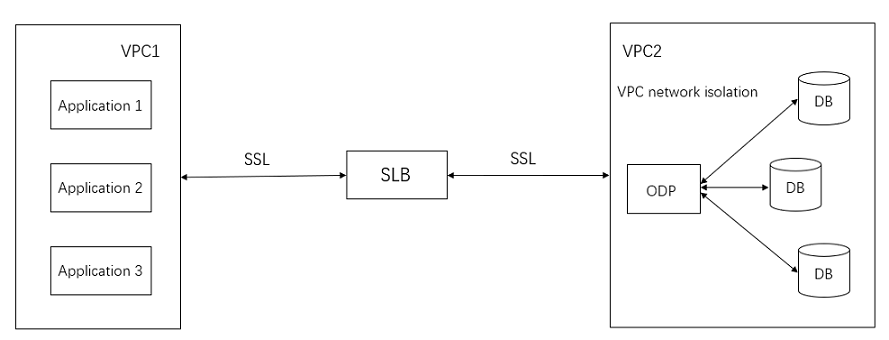
SSL

Data between VPCs is encrypted by using SSL, and the security within each VPC is ensured by using network isolation. SSL compromises less than 5% the overall performance.

Key settings

To enable the SSL capability of ODP, you must first set the keys. Log on to ODP with the root@proxysys account and set the certificates, a public key, and a private key by using files. Example:

replace into ssl_config(cluster_name, tenant_name, name, value) values("cluster1", "tenant1", "key_info", "xxx");
update proxyconfig.security_config set CONFIG_VAL= '{"sourceType" : "FILE", "CA" : "certs/ca.pem", "publicKey" : "certs/server-cert.pem", "privateKey" : "certs/server-key.pem"}' where APP_NAME = 'obproxy' and VERSION = '1';

In this example:

  • The sourceType field must be set to FILE.

  • The CA field specifies the storage location of the CA certificate.

  • The publicKey field specifies the storage location of the public key certificate.

  • The privateKey field specifies the storage location of the private key certificate.

SSL parameters

ODP has two SSL parameters. The enable_client_ssl parameter specifies whether to enable SSL for the link between the client and the ODP. The enable_server_ssl parameter specifies whether to enable SSL for the link between the ODP and the OBServer.

The settings are as follows:

# V1.x series
alter proxyconfig set enable_client_ssl = xxx;
alter proxyconfig set enable_server_ssl = xxx;

# Tenant-level settings in the V3.x series
replace into proxy_config(cluster_name, tenant_name, name, value) values("cluster1", "tenant1", "enable_client_ssl", "true");
replace into proxy_config(cluster_name, tenant_name, name, value) values("cluster1", "tenant1", "enable_server_ssl", "false");

View the SSL status

To view the SSL status of the link between the client and the ODP, run the show proxysession command and view the value of the using_ssl field. Query the SSL status of the link between the ODP and the OBServer from the OBServer. In practice, you can flexibly enable SSL for the links.

For ODP, the SSL setting takes effect at the tenant level, cluster level, and global level. The components negotiate whether to enable SSL. To use the SSL capability, you must enable SSL for both the driver and the database.

Whitelist

ODP can control the access whitelist of the client. You can set an access whitelist for each tenant. ODP provides an internal table white_list under the root@proxysys account. This internal table stores the whitelist information. ODP supports IP addresses or IP addresses and network IDs in the whitelist. The whitelist feature has been widely applied in public clouds.

replace into white_list(cluster_name, tenant_name, name, value) values('cluster1', 'tenant1', 'ip_list', '127.0.0.1,168.xxx.0.0/16');

Protocols

ODP supports three protocols.

  • MySQL protocol: consistent with the native MySQL protocol.

  • Compression protocol: compresses the content of the MySQL protocol to ensure data transmission correctness.

  • OceanBase 2.0 protocol: a proprietary protocol that supports more features.

    Notice

    You must not allowed to disable the OceanBase 2.0 protocol in ODP V4.x and OceanBase database 4.x. Otherwise, some features may not take effect.

The following two parameters are used to control the use of protocols.

  • server_protocol: specifies the type of the protocol used between OceanBase Database Proxy (ODP) and OceanBase Database. For more information, see the server_protocol.

  • compression_algorithm: specifies the compression protocol and compression level of the OceanBase 2.0 protocol. For more information, see the compression_algorithm.

Both the compression protocol and the OB 2.0 protocol verify data to ensure data correctness.

Features

New features are developed based on the OceanBase 2.0 protocol. Format of the OceanBase 2.0 protocol:

OceanBase 2.0 Protocol Format:

   0       1         2           3          4        Byte
   +-----------------+----------------------+
   |    Magic Num    |       Version        |
   +-----------------+----------------------+
   |            Connection Id               |
   +-----------------------------+----------+
   |         Request Id          |   Seq    |
   +-----------------------------+----------+
   |            PayLoad Length              |
   +----------------------------------------+
   |                Flag                    |
   +-----------------+----------------------+
   |    Reserved     |Header Checksum(CRC16)|
   +-----------------+----------------------+
   |        ... PayLoad  Data ...           |----------+
   +----------------------------------------+          |
   |    Tailer PayLoad Checksum (CRC32)     |          |
   +----------------------------------------+          |
                                                       |
                                                       |
                            +--------------------------+
                            |
                            |
                            v
   +-------------------+-------------------+-------------------------------------+
   | Extra Len(4Byte)  |  Extra Info(K/V)  |  Basic Info(Standard MySQL Packet)  |
   +-------------------+-------------------+-------------------------------------+

Header Format:
(1)Magic Num:
The protocol magic number, which is 2 bytes long. The value is 0x20AB. It is used for quick detection and attack defense, and is different from the zlib compression algorithm.

(2)version
The protocol version, which is 1 byte long. At present, the version number is 0x20.

(3)Connection Id:
The server session ID, which is 4 bytes long. It is unique within the cluster. After successful authentication, the server passes this connection ID in an OK packet to the client for
bi-directional verification at the client or server session level. The JAVA client and OBProxy verify
the cluster name when a connection is established. Therefore, this connection ID is unique in multiple clusters.
The following table describes the composition of a server connection ID.

 |<---------------------------------32bit---------------------------->|
 0b   1b                             15b                              16b
 +----+------------------------------+--------------------------------+
 |Mask|          Server Id           |           Local Seq            |
 +----+------------------------------+--------------------------------+

MASK: The value 1 indicates that the connection ID is generated by the server. The value 0 indicates that the connection ID is generated by ODP, but this connection ID is no longer used.
Server Id: In a cluster, the server IDs are allocated by RootService and are unique within the cluster.
Local Seq: the number of connections for a server. The maximum value is INT16_MAX.

(4)Request Id:
The request ID, which is 3 bytes long. The value increments each time the client sends a request. When the server returns a response, the request ID in the response must be the same as that in the request.
The request ID is used for request-level verification. The initial value is random and the request ID starts from 0 again when the maximum value UINT24_MAX is reached.

(5)Packet Seq:
The packet sequence number, which is 1 byte long. The value increments each time the client sends a packet. The sequence number in the response must be the value of Packet Seq plus 1.
It is used for sequence verification among packets inside a request.

(6)Payload Length:
The length of payload data, which is 4 bytes long.

(7)Flag:
The status of the request and response, which is 4 bytes long. Each bit indicates one state.
+---------------+-----------------+---------------------------------------------+
| Flag & 0x0001 | ExtraInfoExist  |    0: doesn't exist; 1: exist               |
+---------------+-----------------+---------------------------------------------+
| Flag & 0x0002 | DataFlowEnd     |    1: data flow end; 0: data flow continue  |
+---------------+-----------------+---------------------------------------------+
|  other bits wait for extrend                                                  |
+-------------------------------------------------------------------------------+

(8)Reserved:
A reserved field, which is 2 bytes long.

(9)Header Checksum(CRC16):
The header checksum, which is 2 bytes long and is used for CRC16 check. It contains 7 bytes of the header of the MySQL compression protocol. Note that the value 0 indicates not to perform a check.

Payload Format:
(1)Extra Info
The extra information, which is used for extension. It takes effect only when ExtraInfoExist is set to 1. Its length is specified by Extra Len. The value is a 2-tuple of
[key, value]. The type of the 2-tuple corresponds to the ObObj type. The serialization and deserialization methods are the same as those of ObObj.
The key in the 2-tuple is fixedly of the type specified by ObVarcharType and is serialized and deserialized based on this type.
The type of the value in the 2-tuple is determined by the type field. The value is serialized and deserialized based on the specified type.
Each 2-tuple is stored in binary format.
Example of Extra Info:
When full-link monitoring is enabled, the JAVA client and ODP can use the Extra Info field to pass the trace ID to the server.

(2)MySQL Protocol Data
The MySQL protocol data, which can be considered as a byte stream. It may contain a part of a MySQL protocol package, or one or multiple protocol packages.

Tailer Format:
(1)Tailer PayLoad Checksum (CRC32)
The checksum of the entire payload. It contains Extra Info (if any) and MySQL Protocol Data and is used for CRC32 check. The value 0 indicates not to perform a check.

Previous topic

Throttling
Last

Next topic

Troubleshooting logic
Next
on this page
Security capabilities
Password protection
SSL
Whitelist
Protocols
Features