OceanBase
English日本語简体中文
Docs Home
Products
Integrations
Release Notes

Databases

OceanBase DatabaseOceanBase Cloud OceanBase Best Practices

Tools

OceanBase Cloud PlatformOceanBase Migration ServiceOceanBase Developer CenterOceanBase Migration AssessmentOceanBase Admin ToolOceanBase Loader and DumperOceanBase DeployerKubernetes operator for OceanBaseOceanBase Diagnostic Tool OceanBase Binlog Service

Connectors and Middleware

OceanBase Database Proxy OceanBase Connector/C OceanBase Connector/J OceanBase Connector/ODBC OceanBase Connector/NETOceanBase Command-Line Client

Databases

OceanBase DatabaseOceanBase Cloud OceanBase Best Practices

Connectors and Middleware

OceanBase Database Proxy OceanBase Connector/C OceanBase Connector/J OceanBase Connector/ODBC OceanBase Connector/NETOceanBase Command-Line Client

Tools

OceanBase Cloud PlatformOceanBase Migration ServiceOceanBase Developer CenterOceanBase Migration AssessmentOceanBase Admin ToolOceanBase Loader and DumperOceanBase DeployerKubernetes operator for OceanBaseOceanBase Diagnostic Tool OceanBase Binlog Service
OceanBase DatabaseOceanBase Cloud ToolsConnectors and MiddlewareLifecycle Support Policy

OceanBase Database Proxy

V4.2.3
  • What is ODP?
  • Installation and deployment
    • Overview
    • Use OBD to deploy ODP
    • Deploy ODP by using OCP
    • Deploy ODP by using the CLI
    • Deployment modes
  • Basic operations
  • Configuration parameter
    • View and modify parameters
    • Parameter summary
    • Parameters that take effect dynamically
      • binlog_service_ip
      • cache_cleaner_clean_interval
      • check_tenant_locality_change
      • client_max_connections
      • client_max_memory_size
      • client_session_id_version
      • client_sock_option_flag_out
      • client_tcp_keepcnt
      • client_tcp_keepidle
      • client_tcp_keepintvl
      • client_tcp_user_timeout
      • cluster_count_high_water_mark
      • cluster_expire_time
      • compression_algorithm
      • config_server_refresh_interval
      • congestion_fail_window
      • congestion_failure_threshold
      • congestion_retry_interval
      • connection_diagnosis_option
      • connect_observer_max_retries
      • current_local_config_version
      • default_buffer_water_mark
      • default_inactivity_timeout
      • delay_exit_time
      • delay_update_entry_interval
      • detect_server_timeout
      • digest_sql_length
      • enable_abort_conn_info
      • enable_async_log
      • enable_async_pull_location_cache
      • enable_bad_route_reject
      • enable_binlog_service
      • enable_cached_server
      • enable_causal_order_read
      • enable_client_connection_lru_disconnect
      • enable_client_ip_checkout
      • enable_client_ssl
      • enable_cloud_full_username
      • enable_cluster_checkout
      • enable_compression_protocol
      • enable_congestion
      • enable_connection_diagnosis
      • enable_extra_prometheus_metric
      • enable_flow_control
      • enable_full_username
      • enable_get_rslist_remote
      • enable_index_route
      • enable_monitor_stat
      • enable_ob_protocol_v2
      • enable_ob_protocol_v2_with_client
      • enable_partition_table_route
      • enable_performance_mode
      • enable_pl_route
      • enable_primary_zone
      • enable_prometheus
      • enable_proxy_scramble
      • enable_qa_mode
      • enable_qos
      • enable_read_write_split
      • enable_report_session_stats
      • enable_reroute
      • enable_sequence_prefetch
      • enable_server_ssl
      • enable_standby
      • enable_stat
      • enable_strict_stat_time
      • enable_sync_all_stats
      • enable_syslog_file_compress
      • enable_syslog_wf
      • enable_trace
      • enable_trace_stats
      • enable_trans_detail_stats
      • enable_transaction_internal_routing
      • enable_transaction_split
      • enable_weak_reroute
      • enable_xa_route
      • fetch_proxy_bin_random_time
      • fetch_proxy_bin_timeout
      • flow_consumer_reenable_threshold
      • flow_event_queue_threshold
      • flow_high_water_mark
      • flow_low_water_mark
      • hot_upgrade_exit_timeout
      • hot_upgrade_failure_retries
      • hot_upgrade_rollback_timeout
      • idc_list_refresh_interval
      • ignore_local_config
      • internal_cmd_mem_limited
      • ldg_info_refresh_interval
      • log_cleanup_interval
      • log_dir_size_threshold
      • log_file_percentage
      • long_async_task_timeout
      • max_log_file_size
      • max_syslog_file_count
      • max_syslog_file_time
      • mem_leak_check_class_name
      • mem_leak_check_mod_name
      • metadb_server_state_refresh_interval
      • min_congested_connect_timeout
      • min_keep_congestion_interval
      • monitor_cost_ms_unit
      • monitor_item_limit
      • monitor_item_max_idle_period
      • monitor_log_level
      • monitor_stat_dump_interval
      • monitor_stat_high_threshold
      • monitor_stat_low_threshold
      • monitor_stat_middle_threshold
      • mysql_version
      • need_convert_vip_to_tname
      • net_config_poll_timeout
      • normal_pl_update_threshold
      • ob_max_read_stale_time
      • obproxy_force_parallel_query_dop
      • obproxy_read_consistency
      • obproxy_read_only
      • obproxy_sys_password
      • observer_query_timeout_delta
      • observer_sys_password
      • observer_sys_password1
      • partition_location_expire_relative_time
      • prometheus_sync_interval
      • protocol_diagnosis_level
      • proxy_hot_upgrade_check_interval
      • proxy_id
      • proxy_idc_name
      • proxy_info_check_interval
      • proxy_local_cmd
      • proxy_mem_limited
      • proxy_primary_zone_name
      • proxy_route_policy
      • proxy_tenant_name
      • qa_mode_mock_public_cloud_slb_addr
      • qos_stat_clean_interval
      • qos_stat_item_limit
      • query_digest_time_threshold
      • read_stale_retry_interval
      • refresh_idc_list
      • refresh_json_config
      • refresh_rslist
      • request_buffer_length
      • route_diagnosis_level
      • routing_cache_mem_limited
      • sequence_entry_expire_time
      • sequence_fail_retry_count
      • sequence_prefetch_threshold
      • server_detect_fail_threshold
      • server_detect_mode
      • server_detect_refresh_interval
      • server_routing_mode
      • server_state_refresh_interval
      • server_tcp_init_cwnd
      • server_tcp_keepcnt
      • server_tcp_keepidle
      • server_tcp_keepintvl
      • server_tcp_user_timeout
      • short_async_task_timeout
      • skip_proxy_sys_private_check
      • skip_proxyro_check
      • slow_proxy_process_time_threshold
      • slow_query_time_threshold
      • slow_transaction_time_threshold
      • sock_option_flag_out
      • sock_packet_mark_out
      • sock_packet_tos_out
      • sock_recv_buffer_size_out
      • sock_send_buffer_size_out
      • sql_table_cache_expire_relative_time
      • sql_table_cache_mem_limited
      • sqlaudit_mem_limited
      • ssl_attributes
      • stat_dump_interval
      • stat_table_sync_interval
      • syslog_io_bandwidth_limit
      • syslog_level
      • target_db_server
      • tenant_location_valid_time
      • tunnel_request_size_threshold
      • username_separator
      • xflush_log_level
    • Parameters that take effect after a restart
      • automatic_match_work_thread
      • block_thread_num
      • enable_cpu_isolate
      • enable_cpu_topology
      • enable_global_ps_cache
      • enable_sharding
      • enable_strict_kernel_release
      • grpc_client_num
      • grpc_thread_num
      • ip_listen_mode
      • listen_port
      • local_bound_ip
      • local_bound_ipv6_ip
      • net_accept_threads
      • obproxy_config_server_url
      • prometheus_cost_ms_unit
      • prometheus_listen_port
      • rootservice_cluster_name
      • rootservice_list
      • shard_scan_thread_num
      • stack_size
      • task_thread_num
      • work_thread_num
  • Connection management
    • Principles
    • Session status synchronization
    • Client session
    • Server session
    • Network connection
    • Connection diagnostics
  • Data routing
    • Factors affecting data routing
    • ODP routing
    • Intra-tenant routing
      • Overview
      • IP address-based routing
      • Partitioned table-based routing for strong-consistency reads
      • Global index table-based routing for strong-consistency reads
      • Replication table-based routing for strong-consistency reads
      • Primary zone-based routing for strong-consistency reads
      • Strategy-based routing
      • Distributed transaction routing
      • Rerouting
      • Forcible routing
    • Read/Write separation
    • Follower latency threshold
    • Function partition key routing
      • Overview
      • String functions
      • Numeric calculation functions
      • Date calculation functions
      • FAQ
  • Logs
    • Overview
    • obproxy_diagnosis.log
    • obproxy_digest.log
    • obproxy_error.log
    • obproxy_slow.log
    • obproxy_stat.log
    • obproxy.log
  • High availability mechanism
    • Overview
    • High availability of ODP services
    • High availability of OceanBase Database
    • High availability testing
  • Security and protocols
  • Operation and maintenance
    • Troubleshooting logic
    • Performance analysis
    • Show Trace
    • Routing diagnostics
      • Overview
      • Obtain diagnostic information
      • Diagnostic point troubleshooting
        • Overview
        • SQL_PARSE
        • ROUTE_INFO
        • LOCATION_CACHE_LOOKUP
        • ROUTINE_ENTRY_LOOKUP_DONE
        • FETCH_TABLE_RELATED_DATA
        • TABLE_ENTRY_LOOKUP_DONE
        • EXPR_PARSE
        • CALC_ROWID
        • RESOLVE_TOKEN
        • RESOLVE_EXPR
        • CALC_PARTITION_ID
        • PARTITION_ID_CALC_DONE
        • PARTITION_ENTRY_LOOKUP_DONE
        • ROUTE_POLICY
        • CONGESTION_CONTROL
        • RETRY
        • HANDLE_RESPONSE
      • Examples
    • Memory leak diagnostics
  • Release Notes
    • Versioning rules
    • Enterprise Edition
      • V4.2
        • ODP Enterprise Edition V4.2.3
        • ODP Enterprise Edition V4.2.2
        • ODP Enterprise Edition V4.2.1
      • V4.1
        • ODP Enterprise Edition V4.1.0
      • V4.0
        • ODP Enterprise Edition V4.0.0
      • V3.2
        • ODP Enterprise Edition V3.2.11
        • ODP Enterprise Edition V3.2.3.5
    • Community Edition
      • V4.2
        • ODP Community Edition V4.2.3
        • ODP Community Edition V4.2.1
        • ODP Community Edition V4.2.0
      • V4.1
        • ODP Community Edition V4.1.0
      • V4.0
        • ODP Community Edition V4.0.0

Download PDF

Document Feedback
  1. Documentation Center
  2. OceanBase Database Proxy
  3. V4.2.3

Principles

Last Updated:2026-09-04 08:23:04

Background information
Features
Connection mapping
Connection feature

Background information

OceanBase Database Proxy (ODP) offers users a range of features including database access and routing. By connecting directly to ODP, users can seamlessly utilize the OceanBase database. During the usage of database features, ODP interacts with OBServer nodes, ensuring a transparent and streamlined interaction process. Notably, connection management plays a crucial role in facilitating this process.

Features

ODP's connection management provides the following features:

  1. Proxy feature: ODP functions as both a client and a server. It ensures that the interaction behavior conforms to the MySQL protocol.

  2. Connection feature: ODP implements many connection functionalities, including accessing different clusters and tenants, and supporting primary and backup databases, prepared statements in distributed architecture, and commands like kill and show processlist.

  3. High availability feature: ODP can handle issues such as timeouts and changes in server or network status, which shields users from backend exceptions.

Connection mapping

When you establish a connection between a client and a standalone database, there is only one physical connection between them, as shown in the following figure.

Standalone database

However, when you use ODP to establish a connection between a client and an OceanBase database, the situation is different. As shown in the following figure, there is one physical connection between the client and ODP, while there may be multiple physical connections between ODP and OBServer nodes. The connection between the client and ODP is referred to as a client connection, and the connection between ODP and an OBServer node is referred to as a server connection.
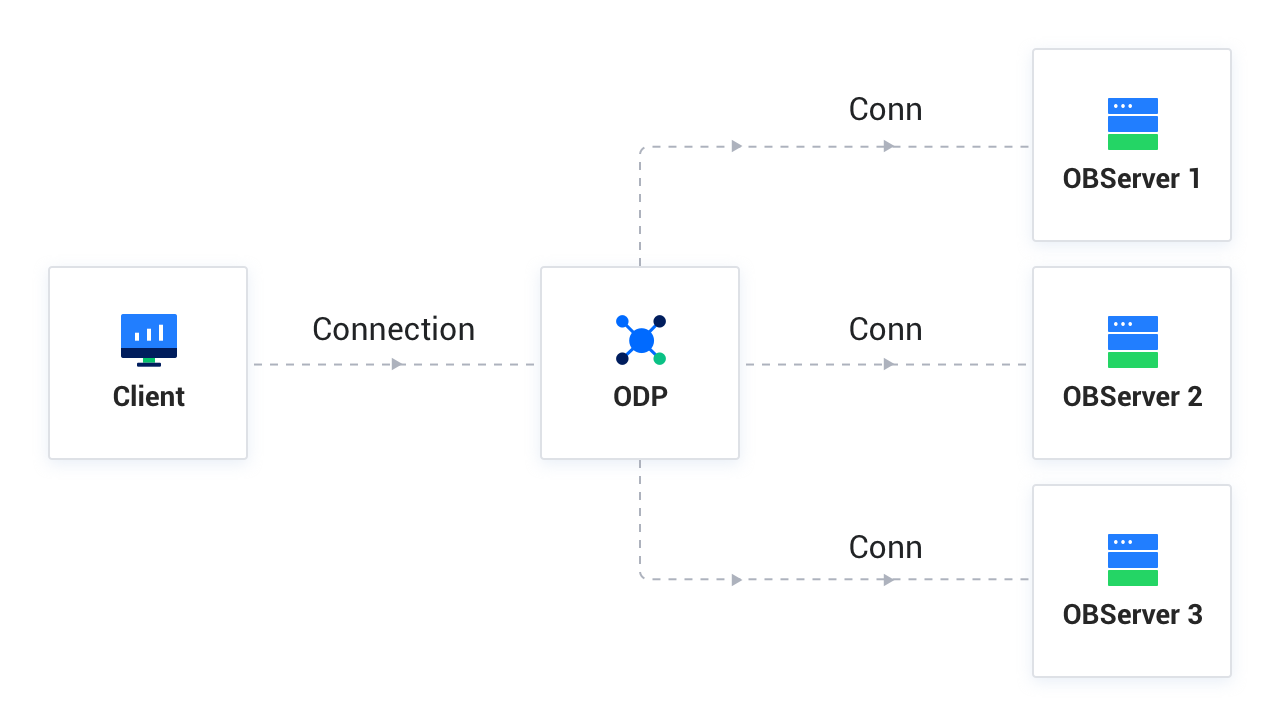
Distributed database

If the data accessed by the client is stored on different OBServer nodes, ODP will establish multiple physical connections with these OBServer nodes. It will also manage and reuse these connections, presenting only one logical connection from the client's perspective. Based on this, ODP can provide a wide range of features, such as primary/standby database splitting, read/write splitting, data access request routing for partitioned tables, prepared statements in distributed architecture, and backend exception shielding.

Connection feature

ODP changes the mapping mode of database connections to M:N. Therefore, some connection functionalities require additional handling. For example, when using the show processlist command to query the number of connections, users want to query the number of connections between the client and ODP, rather than the number of connections between ODP and OBServer nodes.

The following describes several common connection functionalities:

  • Connection stickiness

    ODP has not yet implemented status synchronization for all functionalities, such as transaction status, temporary table status, and cursor status. For these functionalities, ODP will only forward subsequent requests to the node where the status starts, eliminating the need for status synchronization. However, the drawback is that the advantages of a distributed system cannot be fully leveraged. Therefore, ODP will gradually support status synchronization for related functionalities in the order of significance.

  • Combined use of show processlist and kill

    The show processlist command is used to display the connections between the client and the server. For ODP, this command displays only the connection between the client and ODP, not the connections between ODP and OBServer nodes.

    The kill command is used to terminate a client connection. When a client connection is closed, ODP will also close the corresponding server connections. Before using kill to terminate a client connection, you must first obtain the connection ID by using show processlist.

  • Impact on load balancing

    Because ODP handles show processlist and kill, both commands must be sent to the same ODP node to work properly.

    In scenarios that require load balancing, such as a public cloud, multiple ODP nodes are mounted to a load balancer. In this case, if show processlist and kill are sent over two different connections, the load balancer may forward the requests to different ODP nodes. Therefore, we recommend that you do not use these commands in such scenarios.

Previous topic

work_thread_num
Last

Next topic

Session status synchronization
Next
on this page
Background information
Features
Connection mapping
Connection feature