OceanBase
English日本語简体中文
Docs Home
Products
Integrations
Release Notes

Databases

OceanBase DatabaseOceanBase Cloud OceanBase Best Practices

Tools

OceanBase Cloud PlatformOceanBase Migration ServiceOceanBase Developer CenterOceanBase Migration AssessmentOceanBase Admin ToolOceanBase Loader and DumperOceanBase DeployerKubernetes operator for OceanBaseOceanBase Diagnostic Tool OceanBase Binlog Service

Connectors and Middleware

OceanBase Database Proxy OceanBase Connector/C OceanBase Connector/J OceanBase Connector/ODBC OceanBase Connector/NETOceanBase Command-Line Client

Databases

OceanBase DatabaseOceanBase Cloud OceanBase Best Practices

Connectors and Middleware

OceanBase Database Proxy OceanBase Connector/C OceanBase Connector/J OceanBase Connector/ODBC OceanBase Connector/NETOceanBase Command-Line Client

Tools

OceanBase Cloud PlatformOceanBase Migration ServiceOceanBase Developer CenterOceanBase Migration AssessmentOceanBase Admin ToolOceanBase Loader and DumperOceanBase DeployerKubernetes operator for OceanBaseOceanBase Diagnostic Tool OceanBase Binlog Service
OceanBase DatabaseOceanBase Cloud ToolsConnectors and MiddlewareLifecycle Support Policy

OceanBase Cloud Platform

V4.3.6
  • What's New
    • Product Updates
  • Product Introduction
    • What is OceanBase Cloud Platform
    • Differences between Enterprise Edition and Community Edition
    • System architecture
    • Features
    • Limits
      • System requirements
      • Dependencies
  • Deploy OceanBase Cloud Platform (OCP)
    • Deploy OceanBase Cloud Platform (OCP) Enterprise Edition
      • Deployment overview
        • Deploy OCP cluster in the Single-node
        • Deploy OCP cluster in the High-availability
      • Prepare the deployment environment
        • Install OAT
        • Add a server
        • Check the environment
      • Deploy OCP
        • Plan resources
          • Planning resources of a single node OCP
            • OCP-Server specifications
            • MetaDB resources
            • MonitorDB resources
            • Host resources
          • Planning resources of a high availability OCP
            • OCP-Server specifications
            • MetaDB resources
            • MonitorDB resources
            • Host resources
        • Deploy OCP
          • Deploying a single point of OCP
            • Prepare installation media
            • Create MetaDB
            • Install OCP
            • Initialize system parameters
          • Deploying a high availability of OCP
            • Prepare installation media
            • Create MetaDB
            • Install OCP
            • Register an OCP cluster
            • Initialize system parameters
        • Check after deployment
      • Deployment FAQ
        • Optimize MonitorDB parameters
        • F5 Big-IP LTM and alert configuration
          • Connect OBProxy to F5 Big-IP LTM
          • Connect OCP-Console to F5 Big-IP LTM
          • Monitor the OCP service health
        • Ubuntu deployment FAQ
        • EulerOS deployment FAQ
        • Client requirements
        • Start and stop OCP
      • Appendix
        • Uninstall OCP
        • Check the NTP offset
    • Deploy OceanBase Cloud Platform (OCP) Community Edition
      • Overview
      • Installation process
      • Installation planning
        • User planning
        • Host planning
        • Disk and directory planning
        • Port planning
      • Prepare for the installation
      • Deploy OCP on the GUI
      • Use Docker to deploy OCP
      • Post-deployment check
      • Appendix
        • Install Docker
        • Uninstall OCP
        • Restart OCP
        • FAQ about deployment
  • Upgrade OceanBase Cloud Platform (OCP)
    • Upgrade OceanBase Cloud Platform (OCP) Enterprise Edition
      • Overview
      • Considerations
      • Preparations
      • Upgrade OCP
        • Take over OCP
        • Upgrade OCP
      • Verify after upgrade
        • Verify the cluster feature
        • Verify the tenant feature
        • Verify the host feature
        • Verify the software package feature
        • Verify the OBProxy feature
        • Verify the backup and restore feature
        • Verify alerts
        • Verify the task feature
        • Verify the password box feature
      • Appendix
        • Change a user's password
        • Version mapping
    • Upgrade OceanBase Cloud Platform (OCP) Community Edition
      • Upgrade OCP on the GUI
      • Upgrade OCP using Docker containers
      • Post-upgrade check
  • Quick Start
    • OCP operations
    • Log on to the OCP console
    • Upload a software package
    • Add hosts
    • Create a cluster
    • Create a primary tenant
    • Create a user
    • Create an OBProxy cluster
  • Cluster Management
    • Overview
    • Create a cluster
      • Create a distributed cluster
      • Create a standalone deployment
    • Manage clusters
      • Create a standby cluster
      • View details of a cluster
      • Scale a standalone system to a distributed cluster
      • Take over a cluster
      • Restart a cluster
      • Stop a cluster
      • Move out a cluster
      • Delete a cluster
      • Change the password
      • Manage Arbitration Service of a cluster
        • Add an arbitration service
        • Add an arbitration service group
        • Replace the arbitration service for a cluster
        • Remove an arbitration service
      • Enable automatic detection of deadlocks
      • Disable automatic detection of deadlocks
      • Manage O&M configuration
        • Overview
        • Manage parameters
        • View the parameter modification history
        • Configure resources for OCP Agent
      • Manage CPU binding configurations
      • Import a license
      • View the license
    • Manage zones of a cluster
      • Add a zone
      • Edit a zone
      • Restart a zone
      • Stop a zone
      • Delete a zone
    • Manage OBServers of a cluster
      • Add an OBServer node
      • Restart a faulty OBServer node
      • Stop an OBServer service
      • Stop an observer process
      • Replace an OBServer node
      • Reinstall an OBServer
      • Delete an OBServer
    • Upgrade version
    • View the topology of a cluster
    • Overview of cluster tenant management
    • Manage cluster resource
      • View the unit distribution
      • View resource usage
    • Manage major compaction of a cluster
      • Modify the major compaction settings of a cluster
      • Perform a major compaction
      • View details of a major compaction
      • View statistics of a major compaction
      • View the major compaction records
    • Manage security configurations
      • Manage SSL link encryption
      • Manage Transparent Data Encryption (TDE)
    • Manage cluster parameters
      • Parameter types
      • View parameters
      • Modify parameters
      • View the history of parameter changes
    • Manage Arbitration Services
      • Arbitration service Overview
      • Create an arbitration service
      • Take over an arbitration service
      • Stop an arbitration service
      • Start an arbitration service
      • Upgrade an arbitration service
      • Restart an arbitration service
      • Migrate an arbitration service
      • Replace an arbitration service
      • Associate a cluster
      • Dissociate an arbitration service
      • Delete an arbitration service
    • Manage Service Groups
      • Overview
      • Create an arbitration service group
      • Upgrade an arbitration service group
      • Edit an arbitration service group
      • Delete an arbitration service group
    • Manage cluster parameter templates
  • Tenant Management
    • Tenant and resource management
    • View tenant overview information
    • Create a primary tenant
    • Manage tenants
      • Overview
      • Create a standby tenant
      • Copy a tenant
      • Rename a tenant
      • Lock a tenant
      • Clone a tenant
      • Delete a tenant
      • Change the password of the sys tenant
      • Configure full link tracking for a tenant
      • Modify the allowlist of a tenant
      • Modify the zone priority
      • Manage the binlog service for a tenant
      • Manage service names
    • Manage topulogy of a tenant
      • View tenant topology
      • View the topology of the primary/standby relationships of a tenant
    • Manage replicas of a tenant
      • Add a replica
      • Edit tenant replicas in a zone
      • Delete a tenant replica from a zone
      • Modify units
    • Manage databases
    • Manage users and permissions under a tenant
      • Manage users in a MySQL tenant
      • Manage user under an Oracle tenant
        • User overview under an Oracle tenant
        • Create a user under an Oracle tenant
        • Lock an Oracle tenant user
        • Change the password of a user under an Oracle tenant
        • Delete a user under an Oracle tenant
        • Create a role under an Oracle tenant
        • Manage users
        • Manage roles
      • System permissions
    • Manage resource isolation
      • Overview
      • Create a resource group
      • Create a resource isolation plan
      • Enable or disable a resource isolation plan
      • Modify a resource isolation plan
      • Delete a resource isolation plan
      • Modify a resource group
      • Delete a resource group
    • Manage the resources of a tenant
    • Manage major compaction under a tenant
      • Modify major compaction settings of a tenant
      • View details of tenant major compaction
      • Perform a major compaction
      • View the major compaction records
    • Manage statistical information
      • Overview
      • Collect statistics
      • Manage statistics collection tasks
    • Manage tenant parameters
      • View the parameters
      • Modify a parameter
      • View the parameter modification history
    • Manage unit specifications
    • View OCP resource unit specifications
    • Manage tenant parameter templates
  • OBProxy Management
    • OBProxy management overview
    • View details on the OBProxy page
    • Create an OBProxy cluster
    • Manage OBProxy Clusters
      • View details on the Overview page of an OBProxy cluster
      • Add a connectable OceanBase cluster
      • Manage load balancing
      • Change the password of the proxysys user
      • Change the password of the proxyro user
      • Move out an OBProxy cluster
      • Delete an OBProxy cluster
      • Upgrade an OBProxy cluster
      • Manage CPU core binding configurations
      • Stop or start an ODP cluster
      • Restart an ODP cluster
      • Delete a connected OceanBase cluster
      • Manage the proxyro account
    • Manage OBProxy Servers
      • Add an OBProxy
      • Take over OBProxy
      • Delete an OBProxy
      • Restart an OBProxy
      • Stop or start an OBProxy
      • Remove an OBProxy
      • Launch an OBProxy
      • Upgrade an OBProxy
      • Refresh OBProxy configurations
    • Request analysis
    • Manage SSL link encryption
    • Manage OBProxy cluster parameters
    • Client configuration
    • Manage OBProxy parameter templates
    • OBProxy parameters descpription
  • Binlog Service Management
    • Overview of Binlog service
    • Create a binlog cluster
    • Manage Binlog Clusters
      • View information about a binlog cluster
      • Upgrade a binlog cluster
      • Start and stop a binlog cluster
      • Restart a binlog cluster
      • Delete a binlog cluster
      • Manage binlog cluster parameters
    • Manage Binlog Instance
      • View a binlog instance
      • Add an instance replica
      • Configure throttling
      • Start and stop a binlog instance
      • Restart a binlog instance
      • Switch primary and standby instances
      • Delete a Binlog instance
      • Manage binlog instance parameters
    • Manage Binlog Server
      • Add a binlog node
      • Start and stop a binlog server
      • Delete a binlog server
      • Clear binlog instances on a host
    • Manage binlog parameter templates
  • Host Management
    • Manage hosts
      • Host management operations
      • View host details
      • Add a host
      • View the details of tasks on a host
      • Modify a host
      • Restart OCP-Agent
      • Reinstall OCP Agent
      • Remove a host
      • Check host standardization
      • Host standardization checks
      • OCP-Agent processes
      • OCP-Agent O&M Script Instructions
  • Alert Management
    • Overview
    • Alert-related concepts
    • Manage alert rules
      • Create an alert rule
      • View an alert rule
      • Copy an alert rule
      • Edit an alert rule
      • Delete an alert rule
      • Alert rule groups
      • Export alert rule configurations
    • Manage alert templates
      • Create an alert template
      • Set alert objects
      • Export alert templates
      • View an alert template
      • Copy an alert template
      • Edit an alert template
      • Delete an alert template
    • Manage alert channels
      • Create an alert channel
      • View an alert channel
      • Edit an alert channel
      • Copy an alert channel
      • Delete an alert channel
      • Examples of alert channel configuration
      • Examples of alert channel configuration
    • Manage alert push
      • Create an alert push
      • View an alert push
      • Edit an alert push
      • Delete an alert push
    • View alert events
    • Manage blocking conditions
      • Create a blocking condition
      • Edit an alert blocking condition
      • Delete an alert blocking condition
    • OCP alert template tag
    • Optional monitoring metrics for custom alerts
  • Dashboard Management
    • Monitoring dashboard overview
    • Manage dashboards
    • Manage groups
    • Manage charts
  • Performance Monitoring
    • Manage monitoring
      • Overview
      • View database performance
      • View host performance monitoring data
      • View OBServer node performance monitoring data
      • View performance and SQL monitoring data
      • View transaction performance monitoring data
      • View storage and cache monitoring data
      • View database object monitoring data
      • View OBKV-Table monitoring data
      • View OBKV-HBase monitoring data
      • View OBKV-Redis monitoring data
      • View subscription connection monitoring charts
      • View performance monitoring data of a binlog instance
      • View resource monitoring data of a binlog instance
      • View host resource monitoring data
      • View host process monitoring data
      • View service monitoring data
      • View system monitoring data
      • View performance monitoring
      • Drill-down monitoring
      • Integrate monitoring data to an external time-series system
    • Use the custom monitoring feature
      • Overview
      • View collection items
      • Manage indicator items
        • Create a metric
        • Manage metrics
      • Manage charts
        • Create a chart
        • Manage charts
      • OCP metrics
  • Diagnostics and Tuning
    • SQL Diagnostics
      • SQL Diagnostics Introduction
        • SQL diagnostics overview
        • SQL statement execution statistics
        • SQL execution plans
      • View the OceanBase Autonomy Service page
      • Diagnose suspicious SQL statements
      • Diagnose top SQL statements
      • View Comparison of Top SQL Statements
      • Diagnose slow SQL statements
      • Diagnose parallel SQL statements
      • Diagnose high-risk SQL statements
      • Diagnose new SQL statements
      • View the details of an SQL statement
      • View outlines
      • View the SQL collection enabling/disabling history
      • View SQL request analysis data
      • Parameters related to SQL performance diagnostics
    • Transaction Diagnostics
      • Transaction overview
      • Diagnose transactions
      • Diagnose XA transactions and suspended transactions
    • Manage sessions
      • Manage the sessions of a tenant
      • View session statistics
      • View the deadlock history
      • View row lock analytics
    • View the Optimization Center page
    • View the capacity center
    • View diagnostics reports
      • Manage ASH reports
      • Manage performance reports
  • O&M Management
    • Manage Information Collection
      • Overview
      • Configure information collection items
      • Create an information collection task
      • View information collection details
      • Download an information collection report
    • Manage Plans
      • Overview
      • Manage plans
      • View plan execution details
    • Manage Inspection
      • Overview
      • Configure inspection items
      • Configure Scheduling Rules
        • Configure a scheduling rule for a single inspection object
        • Configure global scheduling rules
      • Initiate Inspection
        • Initiate an inspection for a single object
        • Initiate a global inspection
      • View an inspection task
      • Manage Inspection reports
        • View an inspection report
        • Download an inspection report
    • Manage the report center
  • AI Assistant
    • Overview
    • Enable AI-powered intelligent conversation
    • Manage an AI intelligent conversation
  • Backup and Recovery
    • Overview
    • Backup and restore guide
    • Overview
    • Backup now
      • Back up a cluster now
      • Perform tenant backup immediately
    • Regular backup
      • Manage cluster-level backup strategy
        • Create a cluster-level backup strategy
        • Modify a cluster-level backup strategy
        • Delete a cluster-level backup strategy
        • Pause backup scheduling
        • View a cluster-level backup stategy
      • Manage tenant-level backup strategy
        • Create a tenant-level backup strategy
        • Modify a tenant-level backup strategy
        • Delete a tenant-level backup strategy
        • Pause backup scheduling
        • View a tenant-level backup stategy
    • Manage backup tasks
      • View backup tasks
      • View second backup tasks
    • Initiate a restore task
    • Regular recovery
      • Create a sampling strategy for recovery
      • View sampling strategies
      • View sampling tasks
    • View restore task information
    • Copy a restore task
    • Manage backup and recovery service
      • View services
      • Install a service
      • Add a node
      • Upgrade the version of a service
      • Update service configurations
      • Copy a service
      • Delete a service
      • Stop a service on a node
      • Restart a service on a node
      • View O\&M tasks
      • Uninstall a service on a node
  • Disaster Recovery
    • Switching primary and standby tenants
      • Switchover
      • Failover
      • Decouple a standby tenant from its primary tenant
      • Create primary and standby tenants across OCP clusters
    • Switching primary and standby databases
      • Routine primary/standby cluster switchover
      • Primary/Standby cluster switchover for disaster recovery
      • Decouple a standby cluster from the primary cluster
      • Start the original primary cluster in read-only mode after a failover
    • OCP Manage OCP clusters in the multi-cluster mode
      • OCP multi-cluster mode overview
      • Register an OCP cluster
      • View Leader \& Follower Details
      • Manage OCP cluster parameters
      • Switch an OCP cluster in daily maintenance
      • Switch an OCP cluster in a failover
      • Delete a faulty follower OCP cluster
      • Unbind a leader and a follower OCP cluster
      • Enable the OCP multi-cluster mode
  • Log Management
    • Query logs
    • Download logs
    • Configure trace query parameters
    • Trace query
    • About OpenSearch
    • Configure log retention strategies
  • Software Package Management
    • Upload a software package
    • Download a software package
    • Delete a software package
  • System Management
    • Manage password box
      • Create a credential
      • Export a credential
      • Import a credential
      • Verify a credential
      • Edit a credential
      • Delete a credential
      • Batch operations on credentials
    • 150.manage-certificates
      • Overview
      • Upload certificates
      • Delete a certificate
    • Manage users and permissions
      • Overview
      • Manage a organization
        • Create an organization
        • View the resources of an organization
        • Rename an organization
        • Share resource configurations
        • Delete an organization
      • Manage a role
        • Create a role
        • View a role
        • Edit a role
        • Copy a role
        • Delete a role
        • Default OCP roles
      • Manage a user
        • Create a user
        • View a user
        • Edit a user
        • Copy a user
        • Change the password of a user
        • Delete a user
        • View the login history
    • Manage tags
      • Overview
      • Create a tag
      • Modify objects bound to a tag
      • Edit a tag
      • Delete a tag
    • View operation records
    • Manage external integration
      • Manage AI models
        • Connect to an AI model vendor
        • Add a model
        • Set a system model
        • Delete a model
      • Create an SSO integration task
      • 200.manage-sso-integration
        • Overview
        • Create an SSO integration
        • Enable or disable SSO integration
        • Edit an SSO integration
        • Delete an SSO integration
      • Enable/Disable an SSO integration task
      • Edit an SSO integration task
      • Delete an SSO integration task
    • Manage system parameters
      • View system parameters
      • Modify system parameters
      • OCP configuration parameters
    • Manage tasks
    • User center management
      • Configure personal information
      • Change your logon password
      • Log off the OCP console
  • SQL Tuning Practices
    • Locate General Abnormal SQL Statements
      • How can I locate SQL statements with high CPU load in a tenant?
      • How can I locate slow SQL statements that take a long time in a tenant?
      • How can I locate SQL statements for full-table scans in a tenant?
      • How can I locate distributed SQL statements in a tenant?
      • How can I locate remote SQL statements in a tenant?
      • How can I locate slow hard-parsed SQL statements in a tenant?
      • How can I locate erroneous SQL statements in a tenant?
    • Customize Abnormal SQL Statement Determining Rules
      • Conditions
      • Custom column rules
    • General SQL Performance Tuning Scenarios
      • Execution Plan Optimization
        • SQL statement performance deterioration caused by plan changes
      • Index Optimization
        • No suitable indexes
        • Inappropriate index of an SQL statement
        • Invalid index of an SQL statement
  • O&M Best practices
    • Upgrade an OceanBase cluster
    • Migrate a resource unit from an OceanBase Database tenant
    • Expand the high availability of OceanBase clusters and tenants
    • Reduce the high availability of OceanBase clusters and tenants
    • Scale out an OceanBase cluster and scale up an OceanBase Database tenant
    • Scale in an OceanBase cluster and scale down an OceanBase Database tenant
    • Troubleshoot host issues in an OceanBase cluster
    • Migrate a cluster between IDCs in OCP
    • Migrate an OceanBase cluster to another IDC
    • Perform a failover between primary and standby OceanBase clusters for disaster recovery in a scenario with two IDCs
    • Perform a switchover between primary and standby OceanBase Database tenants in a scenario with two IDCs
    • Use the arbitration service of OceanBase Database to achieve HA in a scenario with two IDCs
    • Achieve high availability by using arbitration service groups
    • Scale out an OBProxy cluster
    • Scale in an OBProxy cluster
    • Replace an OBProxy
    • Move out an OBProxy cluster
    • Take over OBProxies
    • Delete an OBProxy
    • SSL Link Encryption
    • Perform a failover
    • Decouple a standby tenant from the primary tenant
    • Automatic routing to the new primary tenant after a switchover
    • Back up an OceanBase cluster
    • Restore lost data by using backup and restore
    • Monitor the business load of OceanBase Database
    • Integrate OCP monitoring with Prometheus
    • Import a monitoring dashboard to Grafana
    • Configure custom monitoring
    • Perform an inspection in OCP to detect potential risks in an OceanBase cluster
    • Check clog synchronization
    • Check the NIC rate
    • Check the availability of an auto-increment column
    • Send alert messages to a DingTalk group
    • Send alert messages to a Feishu group
    • Send alert messages to a WeChat Enterprise group
    • Send alert messages through email
    • Push alert messages through HTTP
    • Organization and permission management
  • Reference Guide
    • Alarm reference
      • Overview
      • OceanBase alerts
        • ob_cannot_connected OceanBase server cannot be connected
        • ob_cluster_rs_not_same
        • ob_cluster_status_check_failed
        • ob_cluster_exists_inactive_server OceanBase cluster has an inactive OBServer node
        • ob_cluster_exists_index_fail_table
        • ob_cluster_frozen_version_delta_over_threshold OceanBase cluster frozen version and baseline version delta exceeds threshold
        • ob_cluster_merge_error OceanBase cluster merge error
        • ob_cluster_merge_timeout OceanBase cluster merge timeout
        • ob_cluster_no_frozen OceanBase cluster not frozen for a long time
        • ob_cluster_no_merge OceanBase cluster with no major compactions for a long time
        • ob_cluster_operation_info
        • ob_cluster_sync_failed
        • ob_cpu_assigned_percent_over_threshold OceanBase has allocated more CPU resources to the tenant than allowed
        • ob_cpu_percent_over_threshold Average tenant thread usage rate exceeds the threshold on OceanBase server
        • ob_host_connection_percent_over_threshold OceanBase server connection percentage over threshold
        • ob_host_disk_readonly OceanBase server disk read-only
        • ob_host_load1_per_cpu_over_threshold OceanBase server CPU average load1 exceeds threshold
        • ob_host_partition_count_over_threshold OceanBase server partition count exceeds the threshold
        • OceanBase log alerts
        • ob_mem_assigned_percent_over_threshold OceanBase has exceeded the threshold for memory allocated to tenants.
        • ob_server_sstable_percent_over_threshold OceanBase server data disk usage over threshold
        • ob_tenant_operation_info
        • ob_tenant500_mem_hold_over_threshold OceanBase 500 tenant memory usage exceeds the threshold
        • ob_tenant500_mem_hold_percent_over_threshold OceanBase 500 tenant memory usage over threshold
        • tenant_active_memstore_percent_over_threshold OceanBase tenant active MemStore percentage over threshold
        • tenant_cpu_percent_over_threshold OceanBase tenant CPU usage exceeds threshold
        • tenant_memstore_percent_over_threshold OceanBase tenant MemStore usage percentage exceeding the threshold
        • obproxy_process_dead The OBProxy process does not exist.
        • obproxyd_process_dead
        • obproxy_cannot_connected
        • ob_cluster_sync_delay_time_too_long OceanBase cluster synchronization delay is too long
        • ob_host_data_disk_percent_over_threshold OceanBase host data disk usage over threshold
        • ob_host_log_disk_percent_over_threshold OceanBase server log directory disk usage exceeds the threshold
        • ob_host_install_disk_percent_over_threshold OceanBase server installation directory disk usage exceeds the threshold
        • ob_tenant_exists_expired_xa_trans OceanBase tenant has expired XA transactions
        • ob_cluster_active_session_count_over_threshold
        • ob_tenant_active_session_count_over_threshold
        • ob_host_active_session_count_over_threshold
        • ob_tenant_slow_sql_exists OceanBase tenant has slow SQL
        • ob_tenant_large_trans_exist OceanBase tenant has large transactions
        • same_alarm_rule_detect_too_many_targets
        • ob_tenant_expired_trans_exist OceanBase tenant has expired transactions
        • ob_tenant_long_trans_exist
        • ob_tenant_task_timeout OceanBase tenant task timeout
        • ob_host_task_timeout
        • ob_tenant_log_disk_usage_high OceanBase tenant log disk usage exceeded the limit
        • ob_tenant_no_compaction OceanBase tenant has not performed major compaction for a long time
        • ob_tenant_no_frozen OceanBase tenant has not been frozen for a long time
        • ob_tenant_compaction_error OceanBase tenant compaction error
        • host_operation
        • obproxy_host_operation
        • obproxy_cluster_operation
        • ob_host_operation
        • refresh_location_cache_failed
        • ob_tenant_log_stream_degraded OceanBase tenant has degraded log streams
        • arbitration_service_unavailable
        • observer_process_stop OBServer process stop
        • obproxyd_process_stop OBProxy daemon process stop
        • obproxy_process_stop Stop OBProxy Process
        • standby_tenant_sync_delay_too_long
        • standby_tenant_sync_status_error
        • obproxy_client_connections_usage_over_threshold OBProxy client connection usage exceeds threshold
        • ob_tenant_request_queue_over_threshold
        • oas_anomaly_sql_from_anomaly_event_analysis_cpu_percent_high
        • oas_anomaly_sql_from_anomaly_event_analysis_perf_degradation
        • oas_anomaly_sql_from_anomaly_event_analysis_plan_changed
        • oas_anomaly_sql_from_sql_inspection_perf_degradation
        • oas_anomaly_sql_from_sql_inspection_plan_changed
        • os_observer_not_exist OceanBase server process does not exist
        • refresh_location_cache_failed_by_metric
        • ob_tenant_cpu_usage_over_threshold
        • ob_tenant_partition_replica_absent OceanBase tenant partition replica absent
        • ob_tenant_partition_leader_absent
        • ob_tenant500_storage_short_meta_mem_hold_high OceanBase 500 tenant STORAGE_SHORT_TERM module memory usage exceeds the threshold
        • obproxy_core_dump OBProxy server Core Dump
        • ob_server_cannot_connect_arbitration OceanBase cluster has nodes that cannot communicate with the arbitration service
        • agent_process_count_abnormal
        • arbitration_auto_replace_operation_info
        • arbitration_group_auto_replace_failed
      • Application alerts
        • ob_cluster_inspection_not_passed
        • ob_host_ssd_wear_indicator_over_threshold
        • ob_host_mem_percent_over_threshold Host memory usage exceeds the threshold
        • ob_host_net_recv_percent_over_threshold Host network receive bandwidth usage exceeds threshold
        • ob_host_net_send_percent_over_threshold The server's network send bandwidth usage exceeds the threshold.
        • ob_host_tcp_retrans_percent_over_threshold The percentage of TCP retransmissions exceeding the threshold on the server
        • ob_host_cpu_percent_over_threshold CPU usage on the server exceeds the threshold
        • inc_backup_delay
        • base_backup_fail
        • base_backup_too_long_time_no_one_success_task
        • backup_process_dead
        • backup_storage_capacity_over_threshold
        • backup_storage_capacity_retry_times_exceeded The maximum number of retries to obtain backup storage capacity has been exceeded.
        • backup_storage_capacity_timeout_or_interrupted Backup restore directory capacity retrieval timeout or thread interrupted
        • ocp_remote_server_time_diff_too_large
        • monitor_exporter_unavaliable A monitoring exporter is unavailable on the server.
        • system_obproxy_unavailable
        • host_unavailable
        • host_ntp_offset_too_large The offset between the host and the NTP server is too large.
        • host_ntp_service_not_exist The NTP service does not exist on the server.
        • host_agent_res_memory_over_threshold Server Agent Memory Over Threshold
        • host_agent_open_fd_count_over_threshold The number of open file descriptors for the server agent exceeds the threshold.
        • host_agent_goroutine_count_over_threshold The number of goroutines for the server agent exceeds the threshold.
        • partition_create_failed
        • obagent_dead Agent service unavailable
        • host_disk_readonly
        • ic_server_connect_failed Inter-Connector server connection failed
        • vpc_connect_failed VPC connection failed
        • node_load1_peak
        • Host log alerts
        • base_backup_timeout
        • base_secondary_backup_fail
        • ocp_meta_db_disconnected OCP Meta Database Disconnected
        • ocp_http_request_timeout
        • ocp_http_request_too_many_errors_occur
        • ocp_alarm_detect_timeout
        • odp_instance_compress_failed
        • odp_instance_expanse_failed
        • odp_sql_execute_failed
        • odp_sql_query_slow
        • agentd_process_stop
        • mgragent_process_stop ocp_mgragent process stop
        • monagent_process_stop
        • ocp_contingency_failed
        • ob_host_invalid_disk_exists OBServer has a bad disk
        • ob_cluster_recyclebin_disk_used_over_threshold
        • ob_host_monitordb_disconnected OCP-Agent cannot connect to monitordb
        • upgrade_ocp_agent_failed
        • host_agent_version_not_same
        • ocp_collect_metric_failure_rate_high OCP-Server collects metrics with a high failure rate
        • ssl_certificate_is_expired SSL certificate expiration alert
        • message_hardware_error
        • ob_license_expired
      • OAS alerts
        • os_cpu_irq_error Server CPU soft interrupt not scattered
        • os_tsar_cpu_sys_abnormal
        • os_observer_fd_usage OceanBase server has too many open handles
        • os_tsar_cpu_util_full
        • os_tsar_cpu_util_hwm
        • os_kernel_io_hang OceanBase server I/O Hangs
        • os_tsar_sda_ioawait OceanBase server high I/Oawait on disk SDA
        • os_tsar_nvme_ioawait OceanBase server node NVMe disk ioawait high
        • os_tsar_traffic_drop
        • os_tsar_traffic_error
        • os_observer_core_dump OceanBase server Core Dump
        • os_nic_1000m_full
        • os_nic_1000m_hwm
        • os_tsar_traffic_overload
        • node_file_root_usage High root directory usage on the server
        • node_file_inode_usage High inode usage on the server
        • os_kernel_ntp_down
        • os_kernel_ntp_delay
        • node_memory_peak
        • os_home_file_usage
        • node_file_data1_usage
        • node_file_datalog1_usage
        • sql_audit_collect_lost_percent_over_threshold
      • Appendix
        • Exception handling for OceanBase cluster compaction
        • Apply throttling to an OceanBase cluster
        • Network troubleshooting
        • Handling alert responses
    • API Reference
      • Overview
      • API call description
      • Rules for generating AK/SK signatures
      • Task return structure
      • Cluster management
        • Query the list of OceanBase clusters
        • Create an OceanBase cluster
        • Delete an OceanBase cluster
        • Stop an OceanBase cluster
        • Start an OceanBase cluster
        • Restart an OceanBase cluster
        • Upgrade an OceanBase cluster
        • Move out an OceanBase cluster
        • Perform a takeover precheck on an OceanBase cluster
        • Take over an OceanBase cluster
        • Query zones of an OceanBase cluster
        • Create a zone for an OceanBase cluster
        • Delete a zone from an OceanBase cluster
        • Stop a zone in an OceanBase cluster
        • Start a zone in an OceanBase cluster
        • Restart a zone in an OceanBase cluster
        • Add an OBServer node
        • Delete multiple OBServers at a time
        • Stop an OBServer node
        • Start an OBServer node
        • Restart an OBServer node
        • Replace an OBServer node
        • Change the password of an OceanBase cluster
        • Query the parameter metadata of OceanBase clusters
        • Query parameters of an OceanBase cluster
        • Modify parameters of an OceanBase cluster
        • Query OBServer nodes of an OceanBase cluster
        • Query OBServer nodes in a zone
        • Perform a switchover pre-check
        • Perform a failover pre-check
        • Perform a switchover
        • Perform a failover
        • Query resource statistics of an OceanBase cluster
        • Query resource statistics of all OBServer nodes in an OceanBase cluster
        • Query units of an OceanBase cluster
        • Create an arbitration service
        • Query details of an arbitration service
        • Query the list of arbitration services
        • Stop an arbitration service
        • Start an arbitration service
        • Restart an arbitration service
        • Upgrade an arbitration service
        • Delete an arbitration service
        • Query arbitration service parameters
        • Bind/Unbind tags to/from an arbitration service
        • Perform an arbitration service takeover precheck
        • Take over an arbitration service
        • Migrate an arbitration service
        • Perform a precheck on batch arbitration service replacement
        • Replace the arbitration service for multiple clusters
        • Perform an association precheck on multiple OceanBase clusters
        • Associate an arbitration service with multiple OceanBase clusters
        • Dissociate an arbitration service from multiple clusters
        • Create an arbitration service group
        • Update an arbitration service group
        • Query information of an arbitration service group
        • Query the list of arbitration service groups
        • Delete an arbitration service group
        • Upgrade an arbitration service group
      • Tenant management
        • Query tenants of a cluster
        • Query all tenants
        • Query details about a tenant
        • Create a tenant
        • Create a standby tenant
        • Delete a tenant
        • Lock a tenant
        • Unlock a tenant
        • Query units of a tenant
        • Delete a unit from a tenant
        • Add a replica for a tenant
        • Delete a replica of a tenant
        • Modify a replica of a tenant
        • Modify zone priorities of a tenant
        • Change the administrator password of a tenant
        • Modify the allowlist of a tenant
        • Query parameters of a tenant
        • Modify parameters of a tenant
        • Obtain a list of unit specifications
        • Create a resource unit specification
        • Delete a resource unit specification
        • Perform a switchover precheck
        • Routine Switchover
        • Perform a batch switchover precheck
        • Perform a batch switchover
        • Perform a failover precheck
        • Perform a failover
        • Perform a batch failover precheck
        • Perform a batch failover
      • OBProxy management
        • Create an OBProxy cluster
        • Delete an OBProxy cluster
        • Query OBProxy clusters
        • Query details about an OBProxy cluster
        • Update configurations of an OBProxy cluster
        • Add an OBProxy
        • Take over an OBProxy
        • Delete an OBProxy
        • Delete an OBProxy (not recommended)
        • Restart an OBProxy
        • Restart an OBProxy
        • Upgrade an OBProxy
        • Upgrade an OBProxy
        • Add a connectable OceanBase cluster to an OBProxy cluster
        • Remove a connectable OceanBase cluster from an OBProxy cluster
        • Query the description information of the OBProxy parameters
        • Query parameters of an OBProxy cluster
        • Stop an OBProxy
        • Start an OBProxy
      • Database management
        • Query databases
        • Create a database
        • Modify a database
        • Delete a database
        • Query the list of database users
        • Query database user details
        • Create a database user
        • Delete a database user
        • Change the password of a database user
        • Lock a database user
        • Unlock a database user
        • Query the list of database roles
        • Query database role details
        • Create a database role
        • Delete a database role
        • Query database objects
        • Grant global privileges to a user
        • Revoke global privileges of a user
        • Change global privileges of a user
        • Grant global privileges to a role
        • Revoke global privileges of a role
        • Change global privileges of a role
        • Grant roles to a user
        • Revoke roles of a user
        • Change roles of a user
        • Grant roles to a role
        • Revoke roles of a role
        • Change roles of a role
        • Grant database privileges to a user
        • Revoke database privileges of a user
        • Change database privileges of a user
        • Grant object privileges to a user
        • Revoke object privileges of a user
        • Change object privileges of a user
        • Grant object privileges to a role
        • Revoke object privileges of a role
        • Change object privileges of a role
      • Monitoring
        • Query the description of a monitoring metric
        • Query monitoring data
        • Query monitoring data by tag
      • Alerts
        • Call an alert API
        • Get the current alert
        • Alert events
          • Query the alert event list
          • Query alert events
        • Get an alert history
        • Alert notifications
          • Query alert notifications
        • Query an alert event
      • Inspection
        • Query all inspection tasks
        • Query inspection objects
        • View the details of an inspection report
        • Initiate an inspection
        • Query the last inspection result of an inspection item
        • Query the last inspection result of an inspection object
      • SQL performance
        • Query performance metrics of an SQL statement
        • Query the performance indicator trend of an SQL statement
        • Query SQL text
        • Query the performance indicator trend of an execution plan
        • Query the operator structure of an execution plan
        • Query the list of slow SQL statements
        • Query snapshots
        • Generate a performance report
        • Query a performance report
      • Backup and recovery
        • Query backup capabilities of a cluster
        • Create a backup strategy for a cluster
        • Modify the backup strategy of a cluster
        • Delete the backup strategy of a cluster
        • Query the backup strategy of a cluster
        • Query the backup overview of a cluster
        • Query data backup tasks of a cluster
        • Query log backup tasks of a cluster
        • Query recovery tasks of a cluster
        • Immediately back up a cluster
        • Parse cluster backup data
        • Start backup scheduling for a cluster
        • Stop backup scheduling for a cluster
        • Initiate tenant recovery
        • Preview a restore task
        • Add restore resources
        • Clear added restore resources
        • Initiate a data backup for a tenant
        • Create a backup strategy for a tenant
        • Delete the backup strategy of a tenant
        • View the data backup tasks of a tenant
        • View the log backup tasks of a tenant
        • View restore tasks
        • Parse the backup information of a tenant
        • Query the backup strategy of a tenant
        • Modify the backup strategy of a tenant
        • Start backup scheduling for a tenant
        • Stop backup scheduling for a tenant
      • Host management
        • Query regions
        • Query details about a region
        • Add region information
        • Delete a region
        • Query IDCs
        • Query details about an IDC
        • Add IDC information
        • Delete an IDC
        • Query host types
        • Query details about a host type
        • Add host type information
        • Delete a host type
        • Query hosts
        • Query details about a host
        • Add multiple hosts at a time
        • Delete a host
        • Delete multiple hosts at a time
      • Software packages
        • Query software packages
        • Upload a software package
        • Delete a software package
      • O&M tasks management
        • Query tasks
        • Query details about a task
        • Retry a task
        • Roll back a task
        • Query subtask logs
        • Retry a subtask
        • Skip a subtask
        • Cancel a subtask
      • System management
        • Health examination
          • Query the basic information of an OCP application
          • Query OCP server time
          • Query OCP application status
        • Operation Audit
          • Query historical events
        • Agent management
          • Query OCP Agent details on a host
          • Stop the OCP Agent process on a host
          • Batch stop the OCP Agent processes on hosts
          • Restart the OCP Agent process on a host
          • Batch restart the OCP Agent processes on hosts
          • Query OCP Agent processes on a host
          • Restart the OCP Agent process on a host
          • Stop the OCP Agent process on a host
    • Metric reference
      • Overview of metrics
      • Monitoring metrics list
      • OceanBase cluster
        • Database performance
          • QPS
          • Query response time
          • TPS
          • Transaction response time
          • Number of sessions
          • Request queue time
          • Number of transaction logs
          • Transaction log volume
          • Time consumed by transaction logs
          • IOPS
          • IO time-consuming
          • I/O Throughput
          • TPS
        • OBServer performance
          • Process memory
          • Process CPU utilization
          • Process file descriptors
          • Number of process threads
          • sys500 memory occupation
          • Error logs
      • OceanBase Database tenant
        • Performance and SQL
          • QPS
          • Response time (SQL mode)
          • SQL execution plan category
          • SQL execution plan time
          • Sessions
          • Wait events
          • Metrics related to time consumption of wait events
          • Request waiting queue
          • Request waiting queue time consuming
          • Request queue size
          • Tenant CPU cost
          • Tenant thread usage
          • memroy usage pecent
          • MemStore usage
          • Rpc package rt
          • RPC packet throughput
          • Cursors
          • Clog synchronization delay
          • DB time metrics
          • SQL execution phase
          • Frontend workload
          • Background workload metrics
          • PX worker thread usage
        • Transaction
          • TPS
          • Transaction response time
          • Transaction response time details
          • Number of transaction logs
          • Transaction log volume
          • Time consumed by transaction logs
          • Lock waits
          • Time consumed by lock waits
          • TPS
          • Transaction table read request hits
          • Partition
          • XA Transactions
          • XA Statement Count
          • Average execution duration of XA statements
        • Storage and Cache
          • MemStore
          • IOPS
          • IO time-consuming
          • I/O Throughput
          • Cache size
          • Cache hit rates
          • Number of cache requests
          • Frozen MEMStore
          • # Log disk
          • # Data disk
        • Database objects
          • Objects
        • OBKV_Table
          • QPS (OBKV-Table)
          • Response time (OBKV-Table)
          • Average number of statement lines processed (OBKV-Table)
        • OBKV_HBase
          • QPS (OBKV_Hbase)
          • Response time (OBKV-HBase)
          • Average number of statement lines processed (OBKV-HBase)
        • OBKV_Redis
          • QPS (OBKV-Redis)
          • Response time (OBKV-Redis)
      • Binlog Service
        • Subscription Connection Monitoring
          • Sending Delay
          • Associate RPS
          • Network Traffic
        • Binlog Performance Monitoring
          • Binlog Delay
          • Binlog RPS
        • Binlog Resource Monitoring
          • CPU
          • memory used
          • memory
          • disk used
          • Binlog Disk Write Rate
          • disk ratio
          • FD count
          • network bytes
      • OBProxy cluster
        • TPS
        • QPS
        • Client connections
        • Server connections
        • Average response time for each SQL statement
        • Memory for the obproxy process
        • OBProxy CPU usage
        • Number of file descriptors for the obproxy process
        • Number of threads in the obproxy process
        • Log error
        • Route table queries
        • Net bytes
        • RPC sessions
        • RPC requests
        • RPC request time consumption
      • Host
        • Host Performance
          • Linux system load
          • CPU Utilization
          • I/O usage
          • I/O queue length
          • IOPS
          • Time consumed by I/O operations
          • I/O throughput
          • Network throughput
          • TCP retransmission rate
          • Packet forwarding
          • NTP clock offset
          • Inode usage
        • Host Resources
          • Memory
          • Memory usage
          • Disk
        • Host Processes
          • Process resident memory
          • Process CPU utilization
          • Number of process file descriptors
          • Number of process threads
          • Number of OCP-Agent process goroutines
    • Information Collection Reference
      • Major Compaction Exceptions
        • Collect information about the major compaction status of zones of a cluster
        • Collect information about the ongoing major compaction in a cluster
        • Collect suggestions provided based on historical major compactions
        • Collect diagnostic information about major compactions
        • Collect information about DAG warnings in OceanBase Database
        • Collect RootService task records
        • Collect the last-one-day records of major compaction events scheduled by RootService
        • Collect the checksum information about tablets
        • Collect the checksum information about columns
        • Collect major compaction parameter settings
        • Collect the major compaction time
      • OCP Agent Exceptions
        • Collect panic logs of the mgragent process
        • Collect panic logs of the monagent process
        • Collect information about goroutines of the agent processes
      • Cluster Exceptions
        • Collect information about bad disks
        • Collect information about OBServer nodes in a cluster
        • Collect obstack information on a cluster node
        • Collect information about the core dump file of the observer process
        • Collect host logs containing the CRASH ERROR keyword
        • Collect connectivity information of the sys tenant
      • CPU Exceptions
        • Collect information about processes with high CPU utilization on a cluster node
        • Collect information about threads with high CPU utilization in an observer process
      • Data Disk Full
        • Collect the data disk usage information of nodes in a cluster
        • Collect incremental data generated during cluster compactions
        • Collect information about the disk space occupied by temporary files of a tenant
        • Collect information about sizes of data of different versions in major SSTables
        • Collect information about the macroblock utilization of nodes
      • Memory Exceptions
        • Collect information about modules with highest memory usage
        • Collect memory allocation sampling data of OBServer nodes
        • Collect KV cache information of a tenant
        • Collect memory leakage detection information
        • Collect MemStore information of a tenant
      • Host Exceptions
        • Collect logs from the /var/log/messages directory of a host
        • Collect host information by running the df -h command
      • Other Tenants Exceptions
        • Collect host logs containing the dump tenant info keyword
        • Collect host logs containing the dump tenant disk usage keyword
        • Collect host logs containing the dump tenant info keyword
    • Error codes reference
      • OCP error codes
      • OBServer error codes
        • MySQL mode
          • Overview
          • 0001 to 3999
          • 4000 to 4499
          • 4500 to 4999
          • 5000 to 5999
          • 6000 to 6999
          • 7000 to 7999
          • 8000 to 8999
          • 9000 to 9499
          • 9500 to 9999
          • 10000 to 12000
          • 22998, 30926, 38104, and 38105
        • Oracle mode
          • Overview
          • OBE-00000 to OBE-00999
          • OBE-01000 to OBE-01499
          • OBE-01500 to OBE-01999
          • OBE-02000 to OBE-04999
          • OBE-05000 to OBE-10000
          • OBE-10000 to OBE-19999
          • OBE-20000 to OBE-29999
          • OBE-30000 to OBE-49999
          • OBE-50000 to OBE-99999
          • PLS-00000 to PLS-00999
  • FAQ
    • FAQ about deployment
    • FAQ on upgrade
    • FAQ on O&M
      • FAQ on accounts and passwords
      • FAQ on host management
      • FAQ about OceanBase clusters
      • FAQ about OceanBase tenants
      • FAQ on OBProxy
      • FAQ on the OCP software package
      • FAQ on backup and recovery
    • FAQ on monitoring
      • FAQ on monitoring metrics
      • FAQ on SQL monitoring
      • FAQ about resource usage
      • Use OCP-Agent to pull time-series monitoring data
    • FAQ on alerts
    • FAQ on the OCP system
    • OCP multi-cluster FAQ
  • Appendix
    • OCP background tasks
    • Tables managed by the daemon
    • Component listening port list
    • Processes
    • Install and configure OCI
    • Modify the log stream downgrade control time
    • AWS S3 protocol
    • Grafana dashboard
  • Release Notes
    • Version number rules
    • V4.3
      • OCP V4.3.6
      • OCP V4.3.5
      • OCP V4.3.4
      • OCP V4.3.3
      • OCP V4.3.2
      • OCP V4.3.1
      • OCP V4.3.0
    • 99.rn-42x
      • OCP V4.2.2
      • OCP V4.2.1
      • OCP V4.2.0
    • 100.rn-41x
      • OCP V4.1.0
    • V4.0
      • OCP V4.0.3
      • OCP V4.0.2
      • OCP V4.0.1
      • OCP V4.0.0
    • 300.rn-33x
      • OCP V3.3.5
      • OCP V3.3.4
      • OCP V3.3.3
      • OCP V3.3.1
      • OCP V3.3.0
    • 400.rn-32x
      • OCP V3.2.3
    • 500.rn-31x
      • OCP V3.1.2

Download PDF

Document Feedback
  1. Documentation Center
  2. OceanBase Cloud Platform
  3. V4.3.6

OCP V3.3.0

Last Updated:2026-09-04 02:16:36

Version information
Supported OceanBase Database versions
New features
Diagnostics
Primary and standby databases
Alerts
Capacity management
Backup and restore
Feature enhancements
Fixed issues
Known issues
Limitations
Hardware requirements
Operating system requirements
Client requirements

OceanBase Cloud Platform (OCP) is upgraded to support SQL diagnostics and introduces new features such as decoupling of primary and standby databases. Other features are also optimized.

Version information

  • Version: V3.3.0

  • Previous version: V3.2.3

  • Version release date: April 27, 2022

  • Supported upgrade path: You can directly upgrade OCP V2.3.x and later versions to this version. If you want to upgrade an OCP version earlier than V2.3.0, you must first upgrade it to V2.3.x and then upgrade it to this version.

Supported OceanBase Database versions

OCP V3.3.0 supports the following OceanBase Database versions:

  • OceanBase V1.4.x

  • OceanBase V2.1.x

  • OceanBase V2.2.x

  • OceanBase V3.1.x

  • OceanBase V3.2.x

New features

Diagnostics

  • Transaction diagnostics

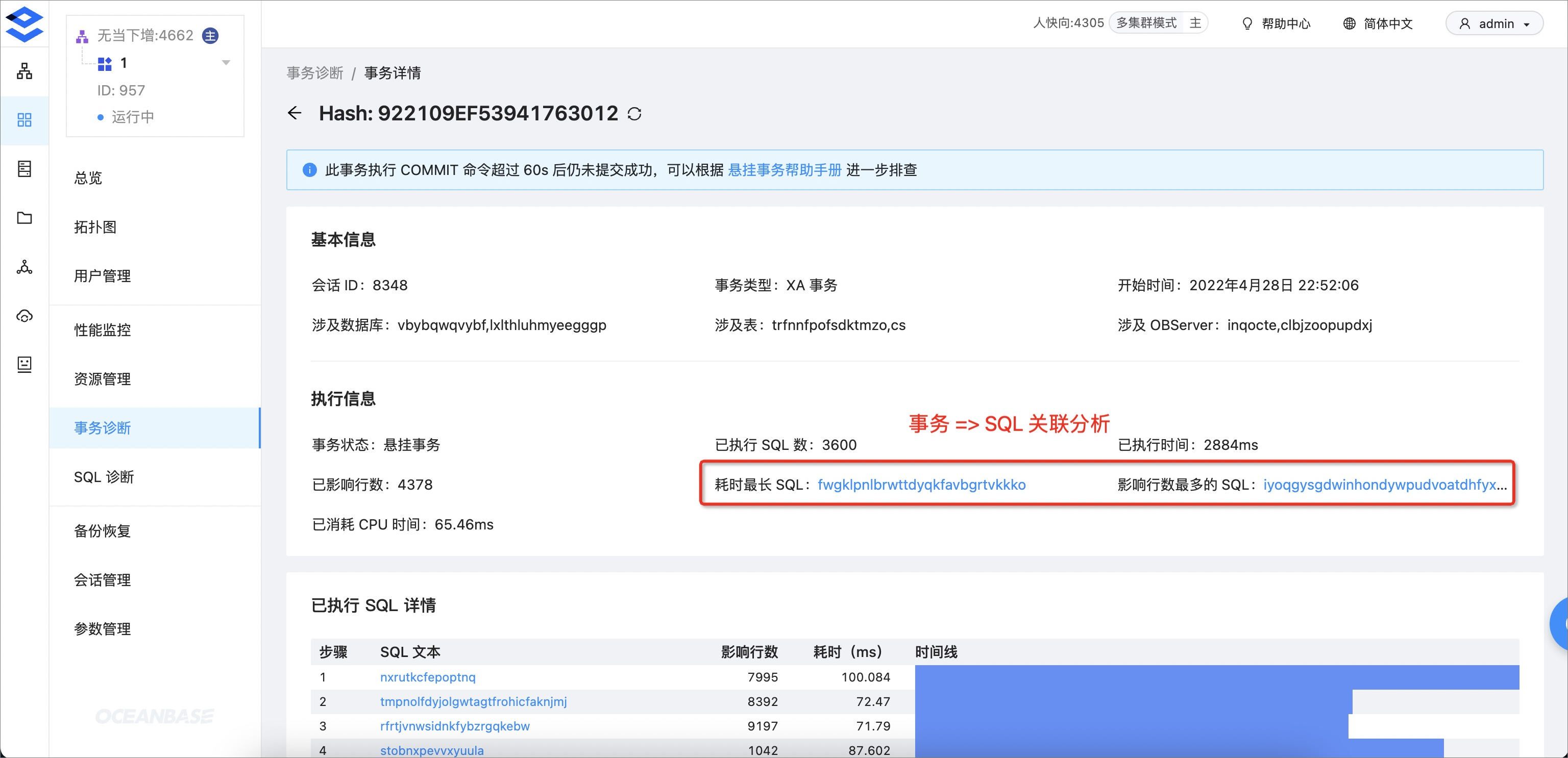
    Long-running or hanging transactions in a call chain can occupy resources for a long time, leading to an unstable system state and affecting the system's ability to provide efficient services. Transaction diagnostics provides monitoring and analysis of transactions, along with Execution Information and Details About Executed SQL Statements to identify the root causes of resource consumption or performance issues.

    OCP also provides an emergency response by allowing you to disable problematic transactions with a single click, helping the system quickly return to a stable state.
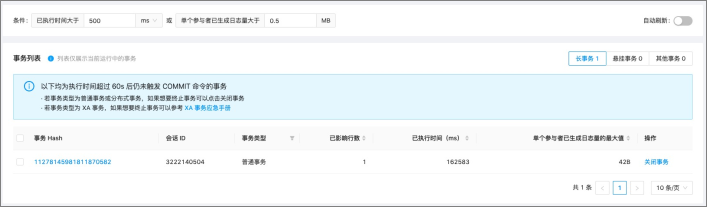
    1

  • Correlation analysis

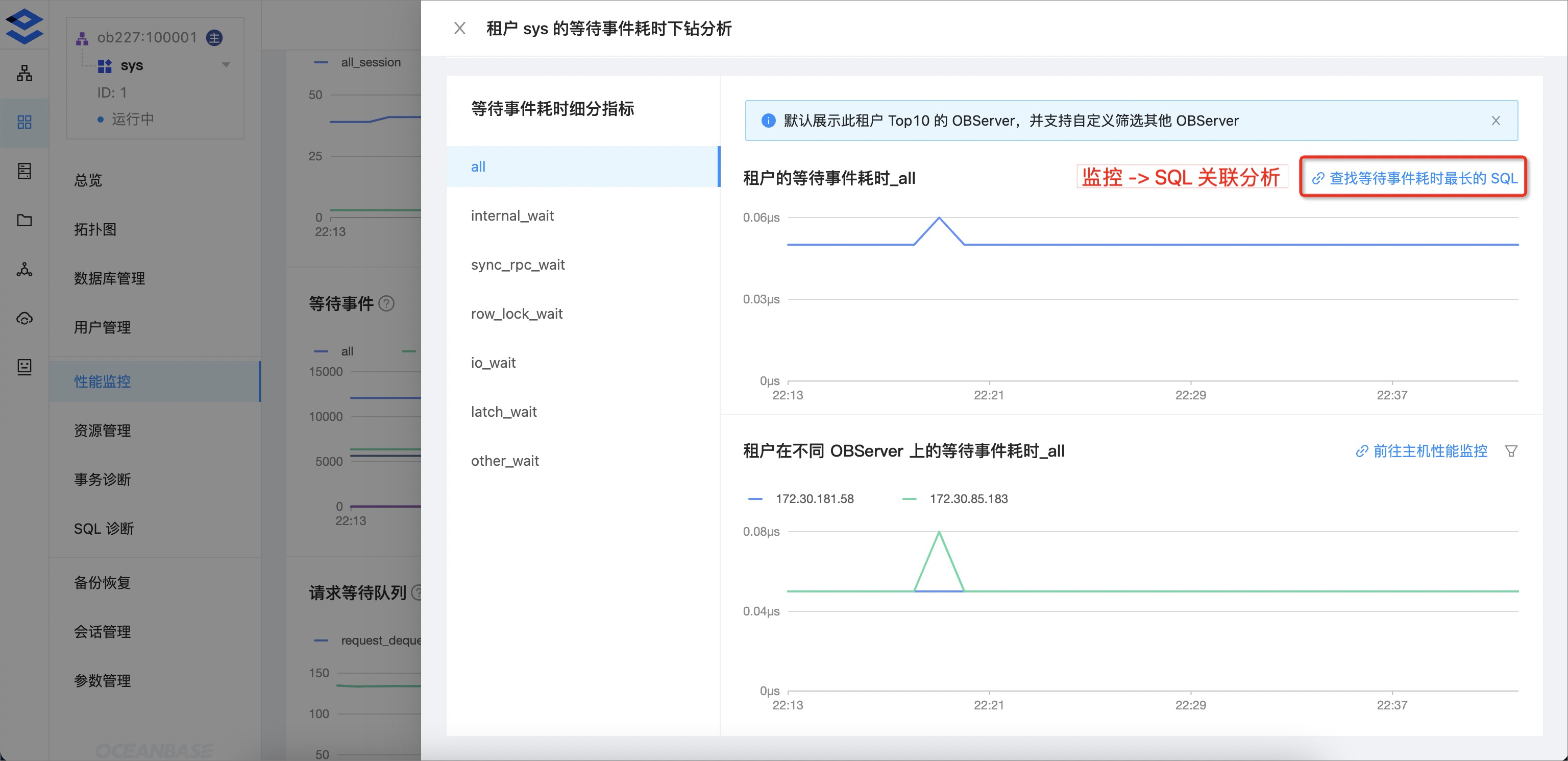
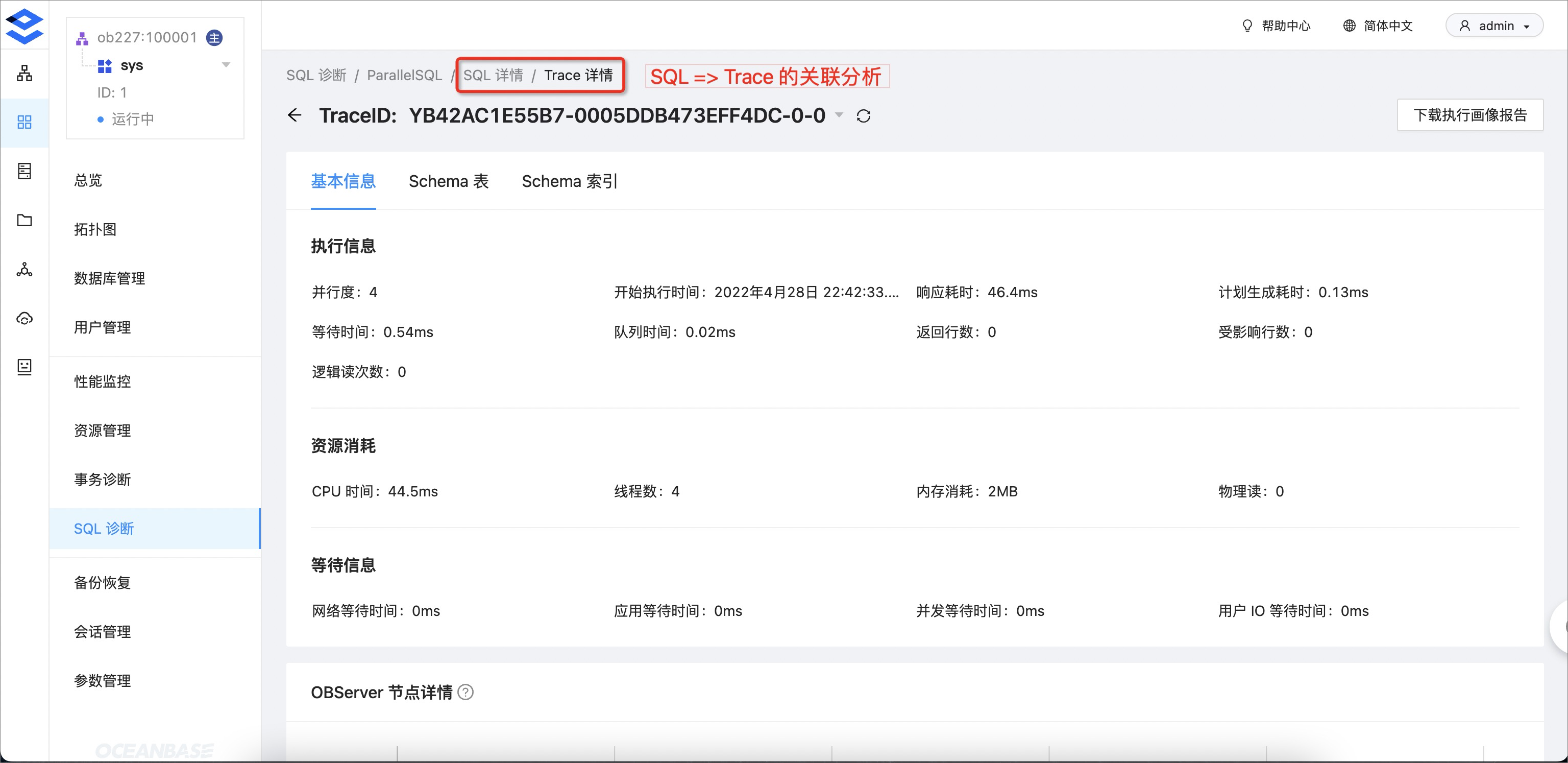
    In addition to transaction diagnostics, AP SQL diagnostics, and SQL request analysis, OCP now supports correlation analysis between alerts, monitoring data, transactions, SQL statements, and traces.
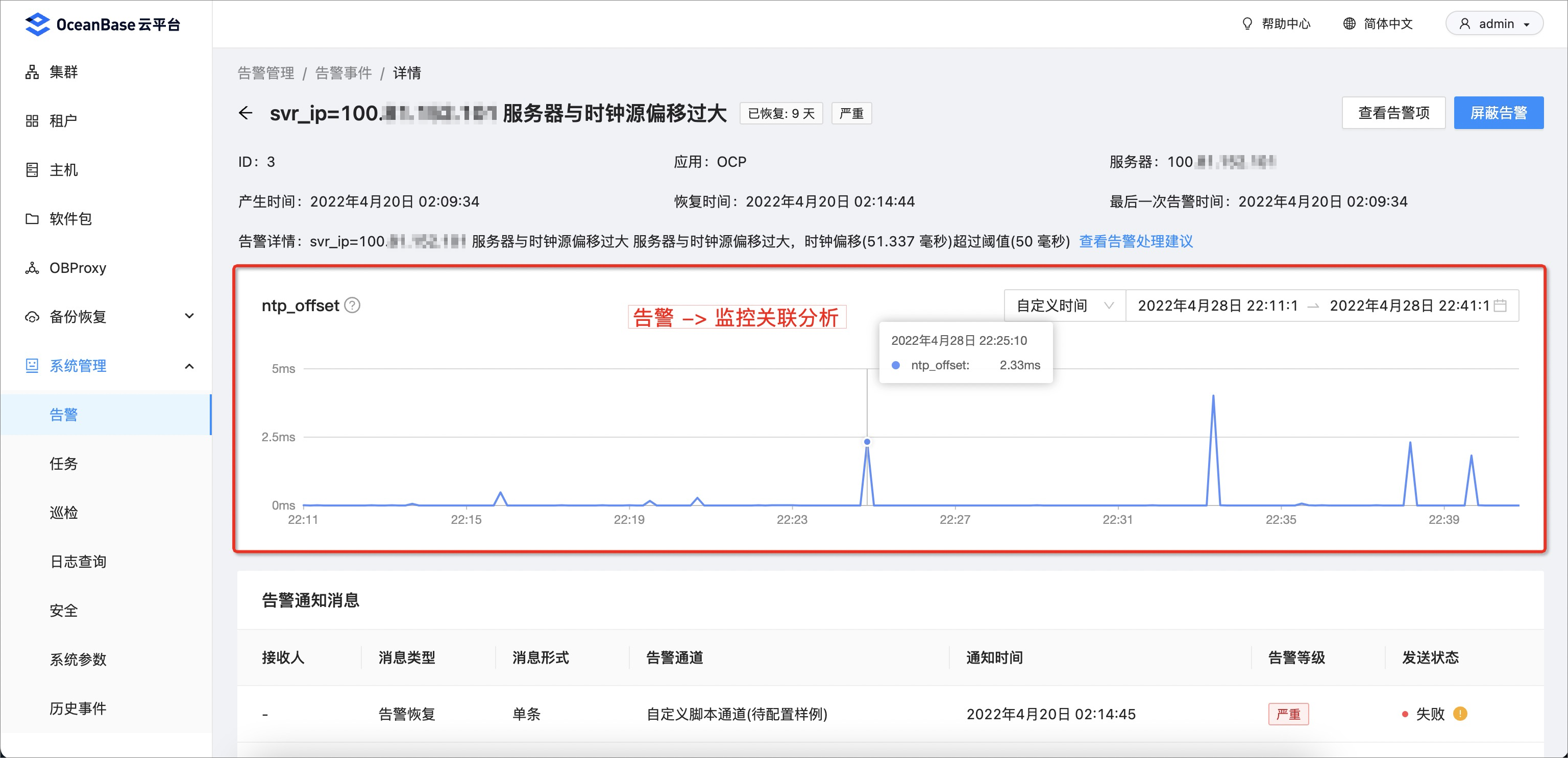
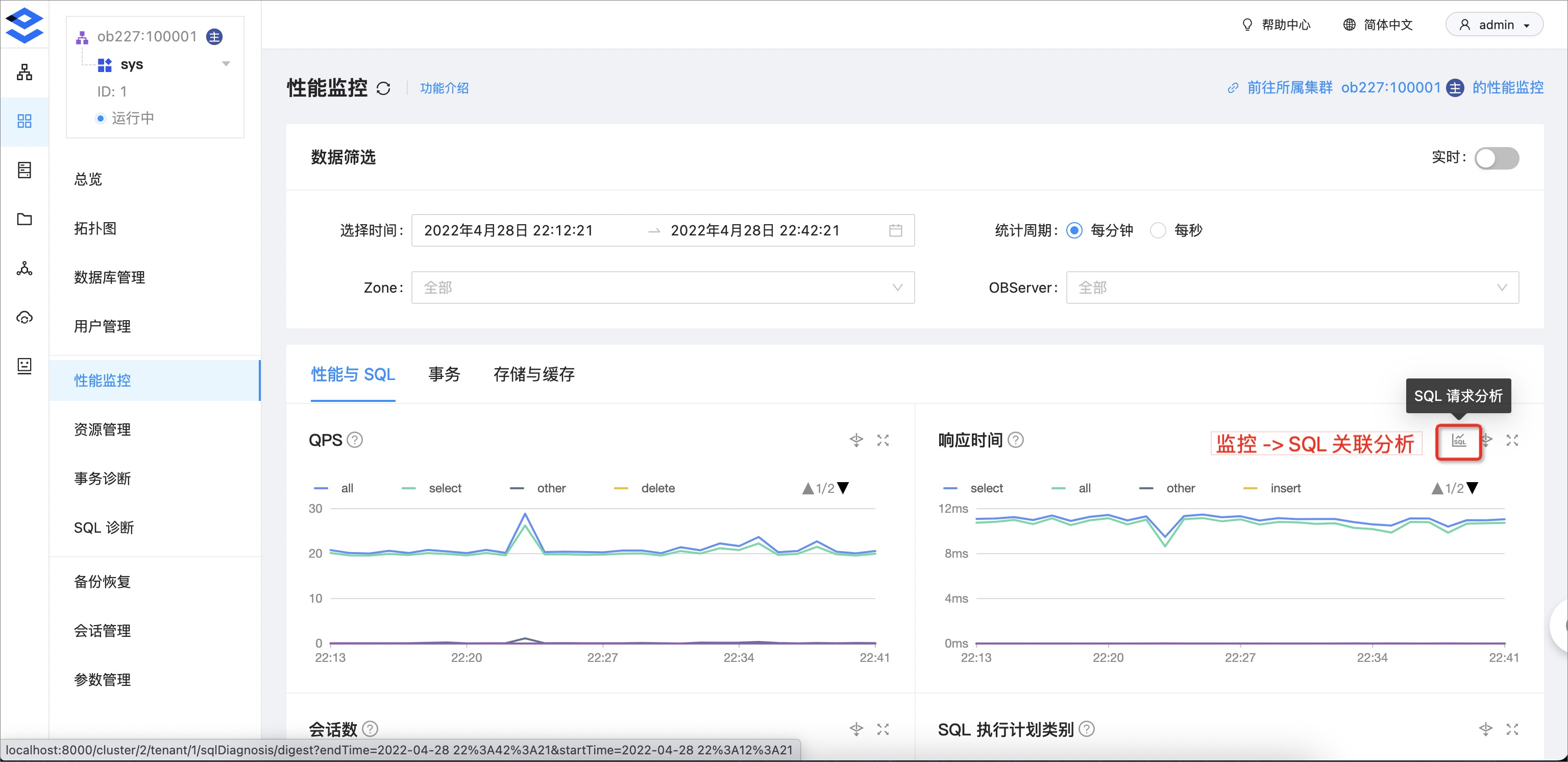
    1 2 3 4 5

  • SQL request analysis

    SQL request analysis provides insights into all database requests from the Execution Information perspective, including execution time distribution, SQL type distribution, and execution trends. This helps you comprehensively understand SQL execution and quickly identify any anomalies during execution.
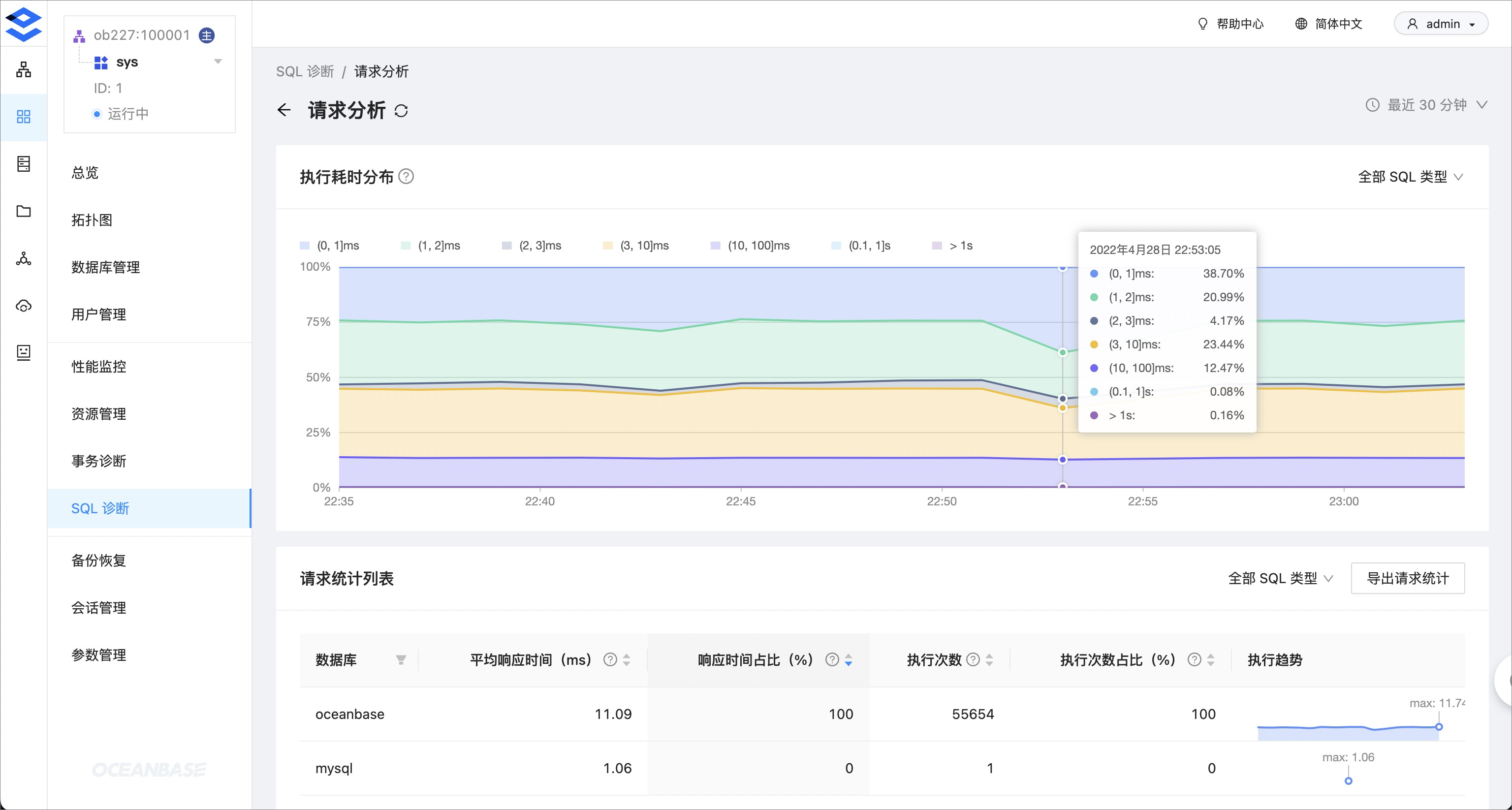
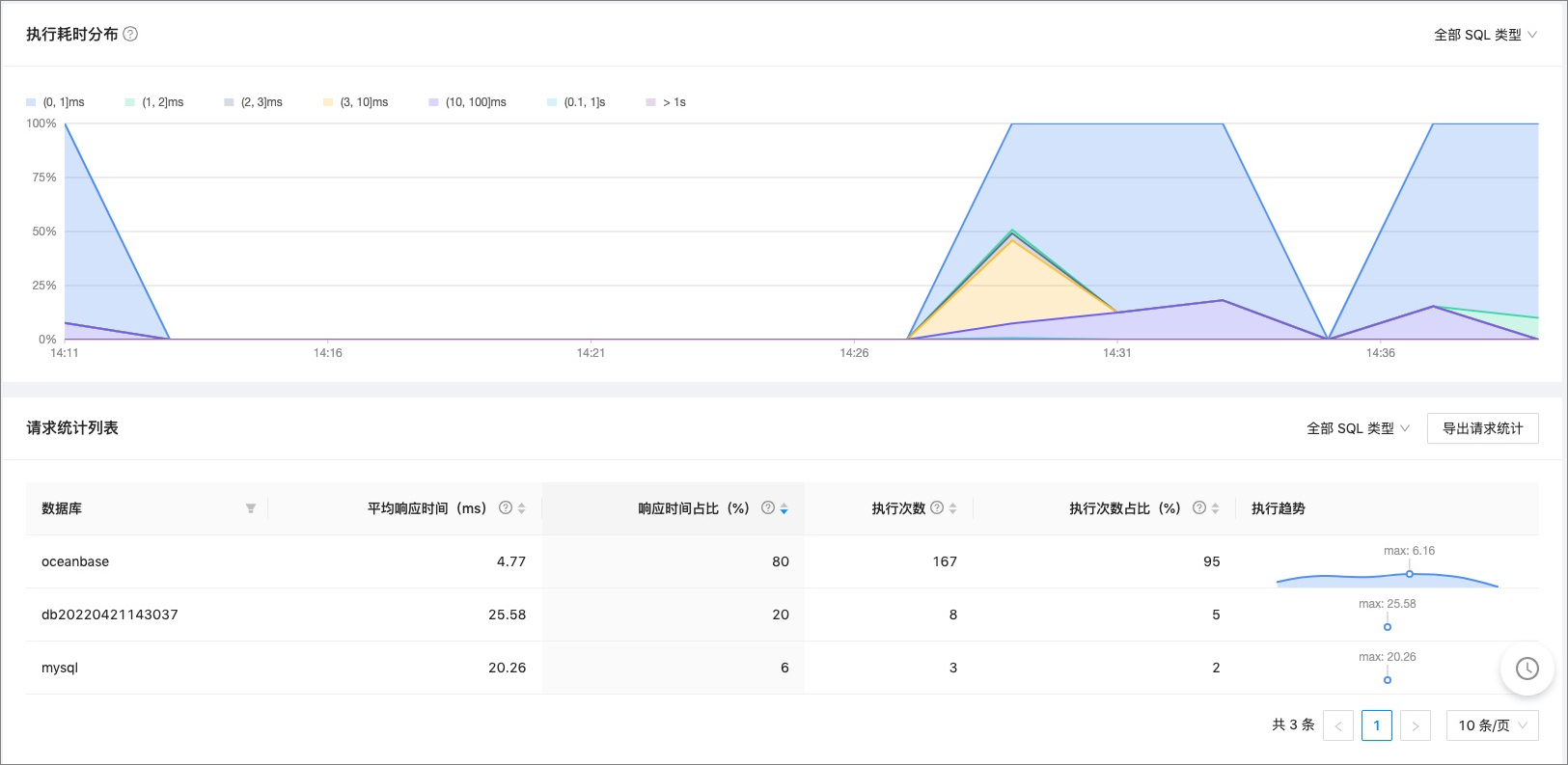
    6 7

  • Parallel SQL execution profiling

    OCP enhances SQL diagnostics for OLAP-type SQL, enabling you to identify slow operators or steps in complex SQL scenarios such as distributed queries, parallel queries, multi-table joins, and AP queries. This accelerates SQL optimization.
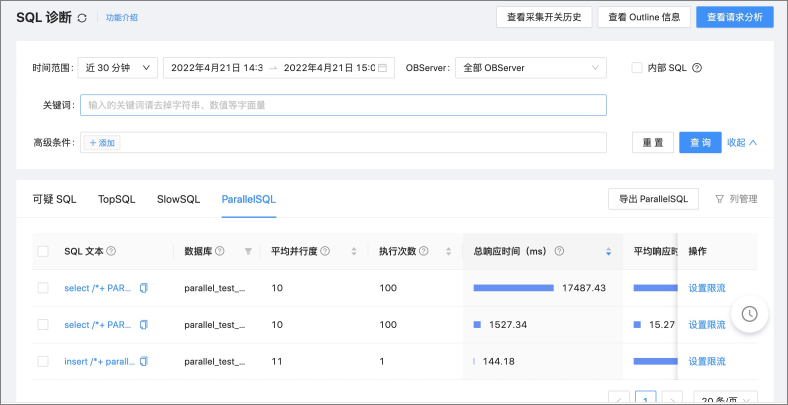
    8

    • Offline parallel SQL execution profiling:
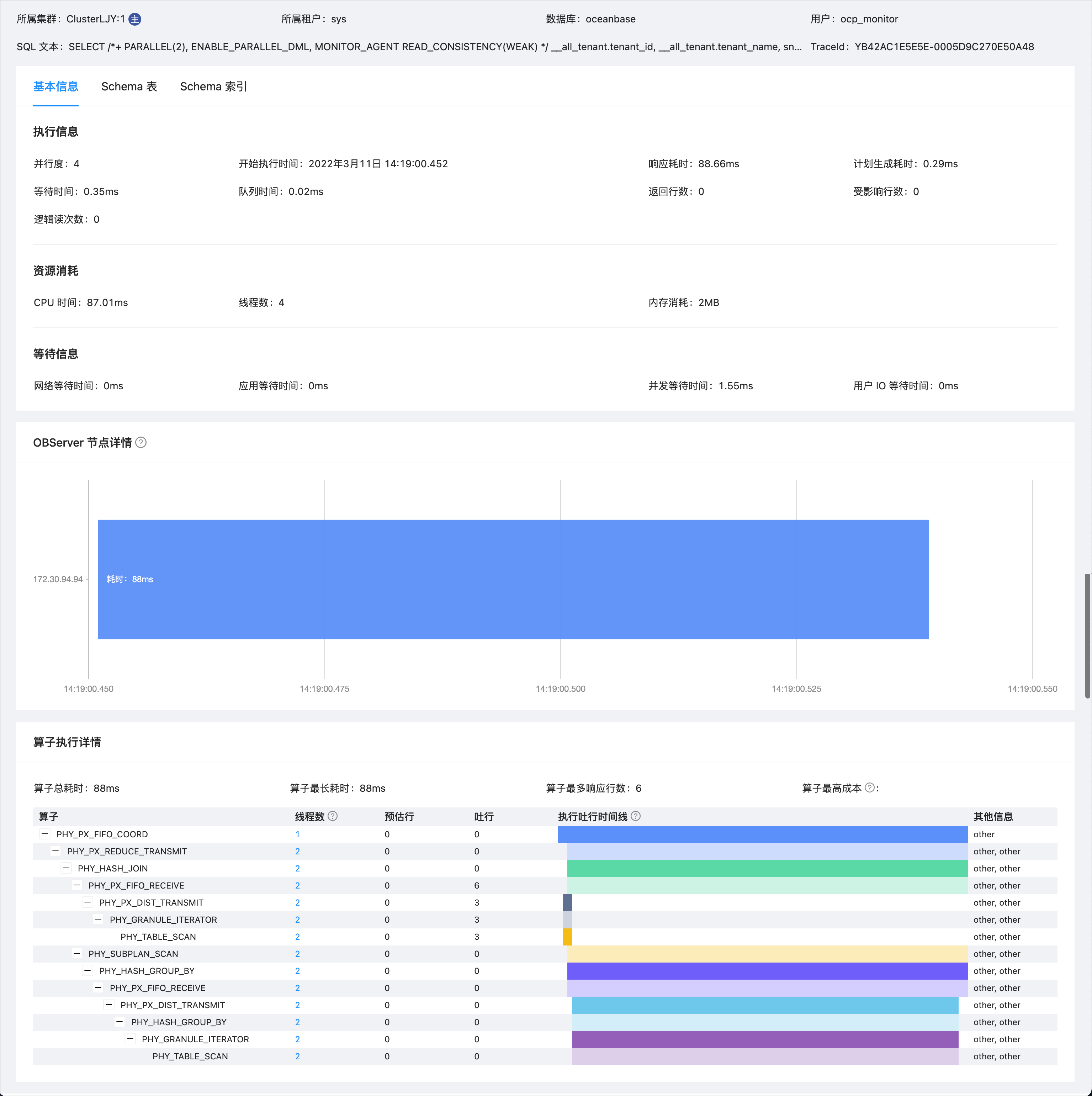
      9

    • Online parallel SQL execution profiling:
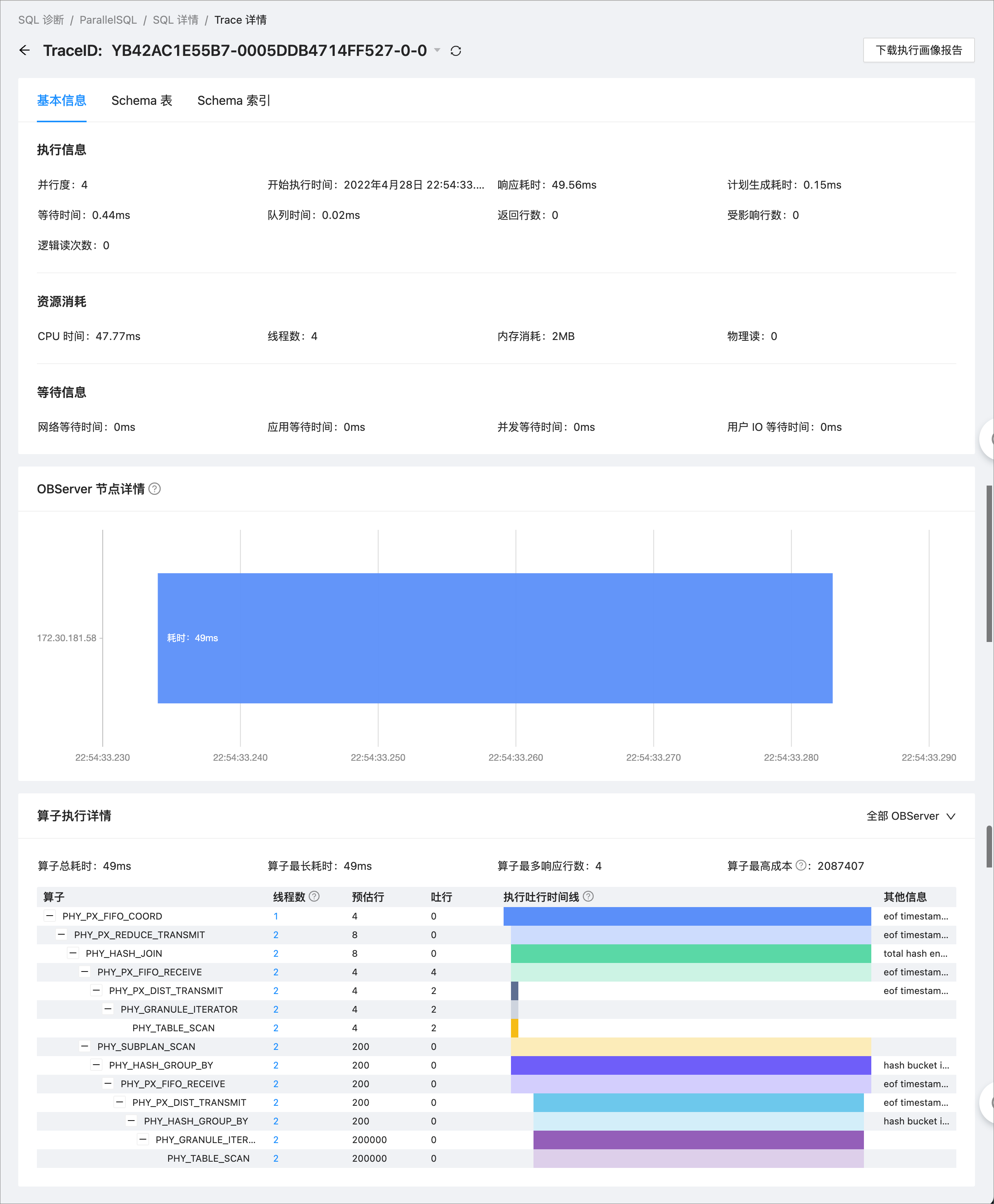
      10

  • Custom columns

    SQL diagnostics now supports custom columns and advanced condition filtering.
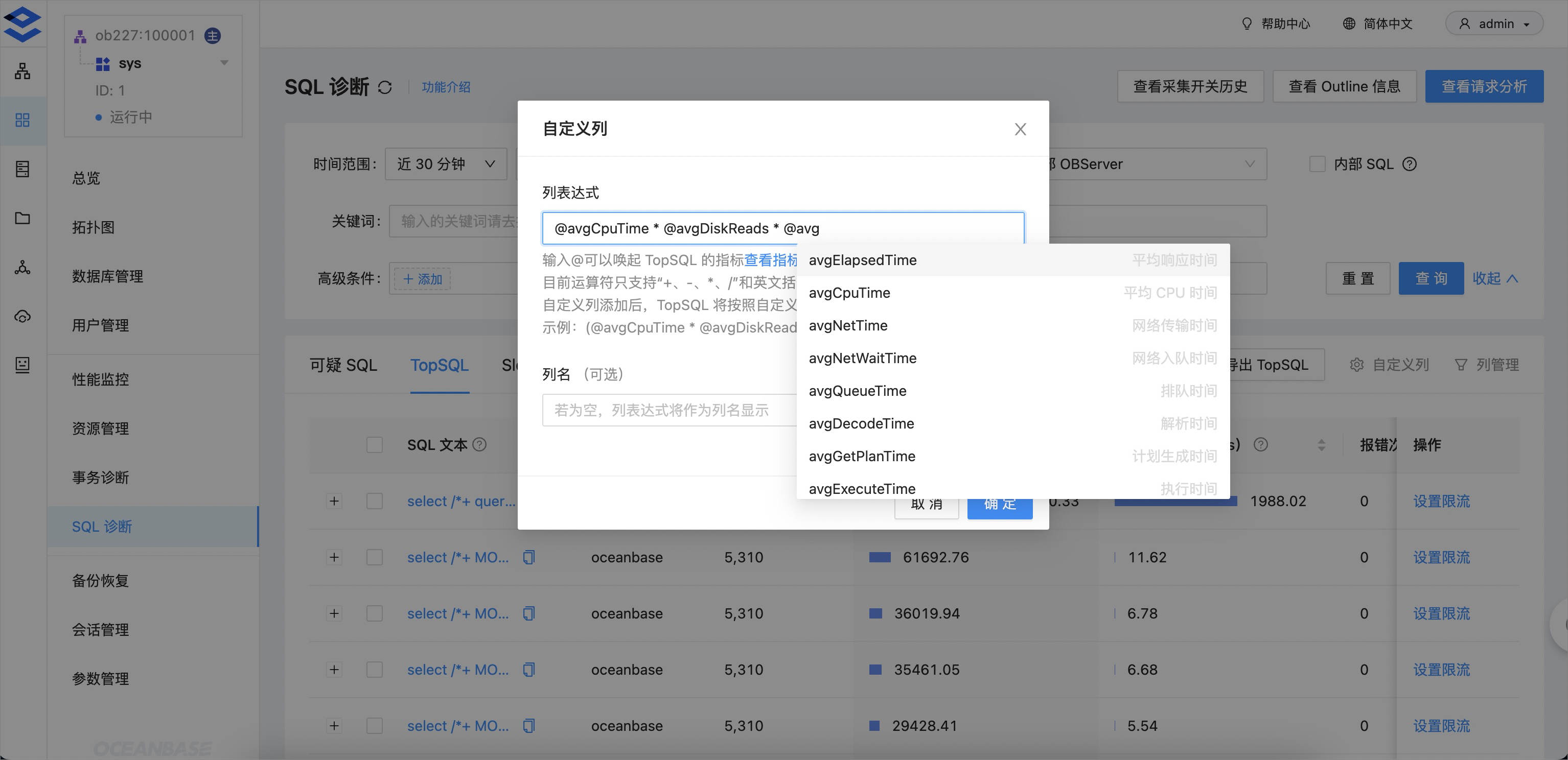
    11

  • SQL optimization suggestions

    SQL diagnostics can detect SlowSQL and suspicious SQL based on expert experience. It also provides emergency response measures such as SQL throttling and plan/index binding. However, you need to determine how to handle the detected SQL. SQL optimization suggestions guide you on how to optimize SQL.

    OCP now supports recommendations for optimal index creation, historical execution plan recommendations, and tenant CPU expansion recommendations to help you quickly resolve SQL issues.
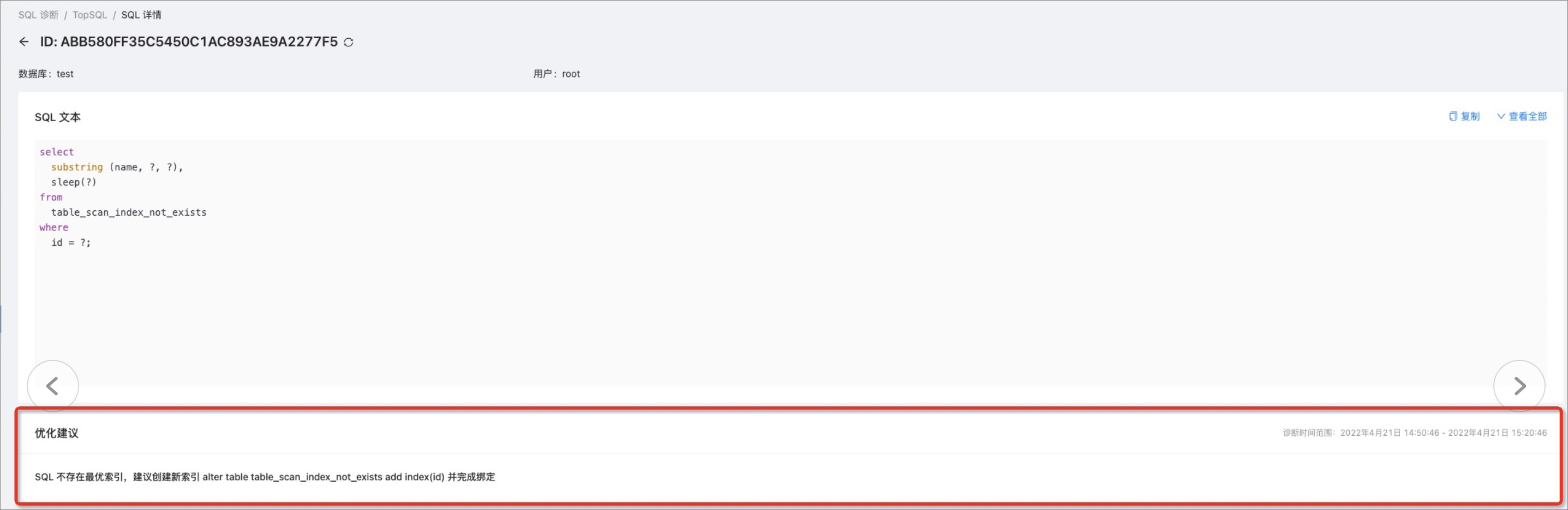
    12

  • Deadlock detection

    Deadlock detection provides detailed information about deadlocks, including the roles of the participants, the execution order, and the SQL statements involved. This helps you analyze the root causes of deadlocks and resolve them by analyzing and addressing cyclic dependencies.
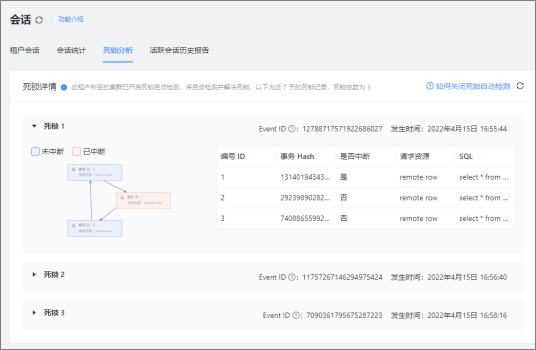
    13

  • Emergency response

    In addition to binding execution plans, OCP now supports emergency response measures such as throttling individual or batch SQL statements.

Primary and standby databases

  • Decoupling of primary and standby databases

    OCP allows you to physically split primary and standby databases, promoting the standby database to a primary database. This facilitates production environment testing and load testing.
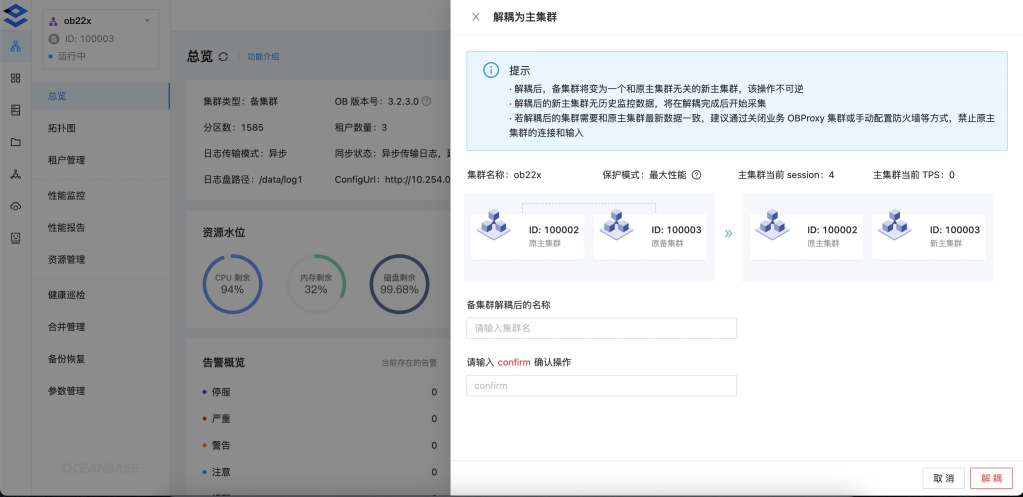
    14

  • Read-only mode for the original primary database after failover

    OCP supports starting the original primary database in read-only mode after a failover. This allows you to verify and migrate data from the new primary database to the original primary database.

Alerts

You can now customize alerts and convert simple monitoring metrics into alert information.

Capacity management

The Resource Management page of a cluster now includes a replica view, allowing you to view the distribution of replicas.
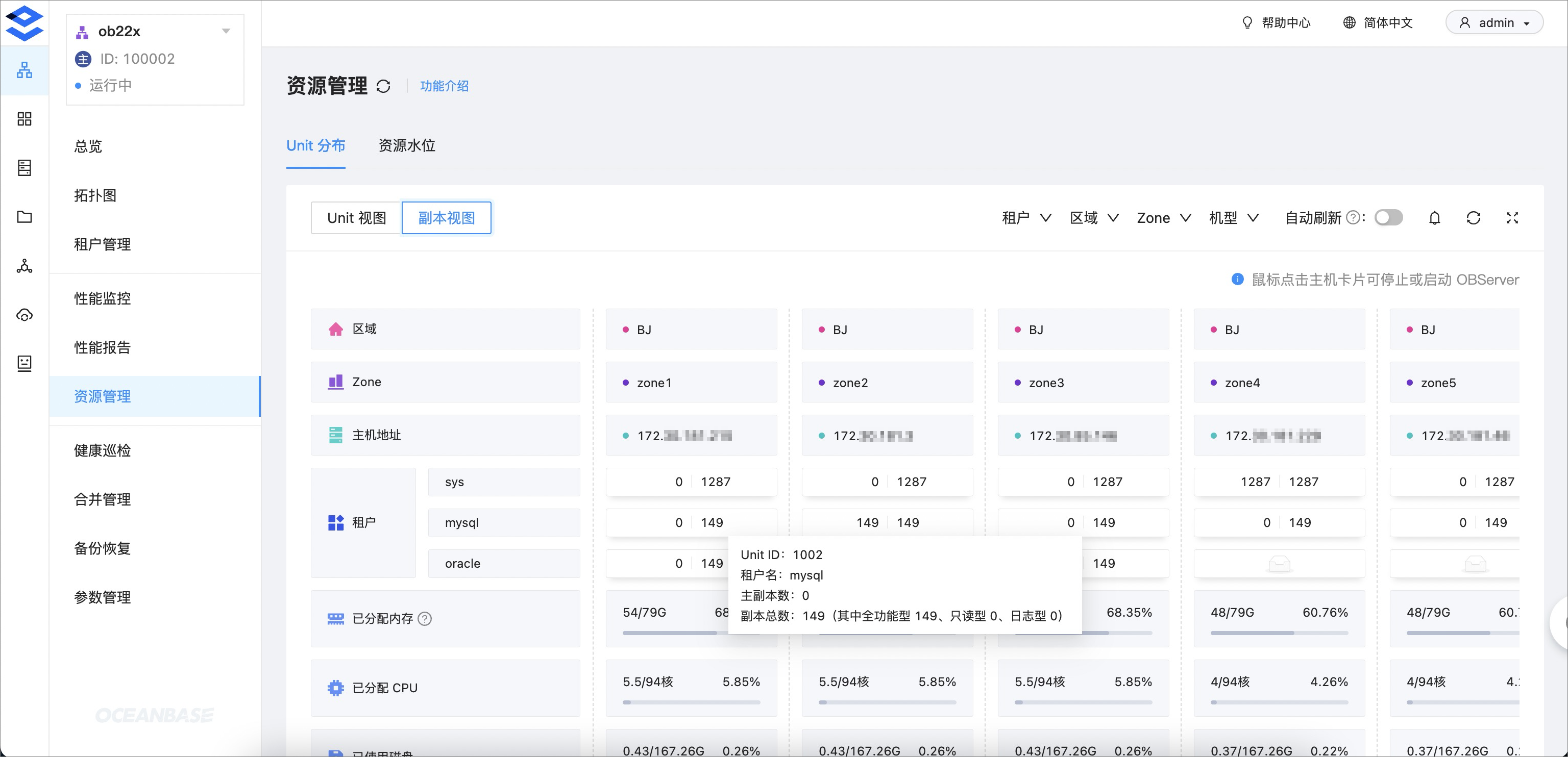
15

Backup and restore

OCP now supports tenant-level backups, allowing you to create snapshots of tenants.
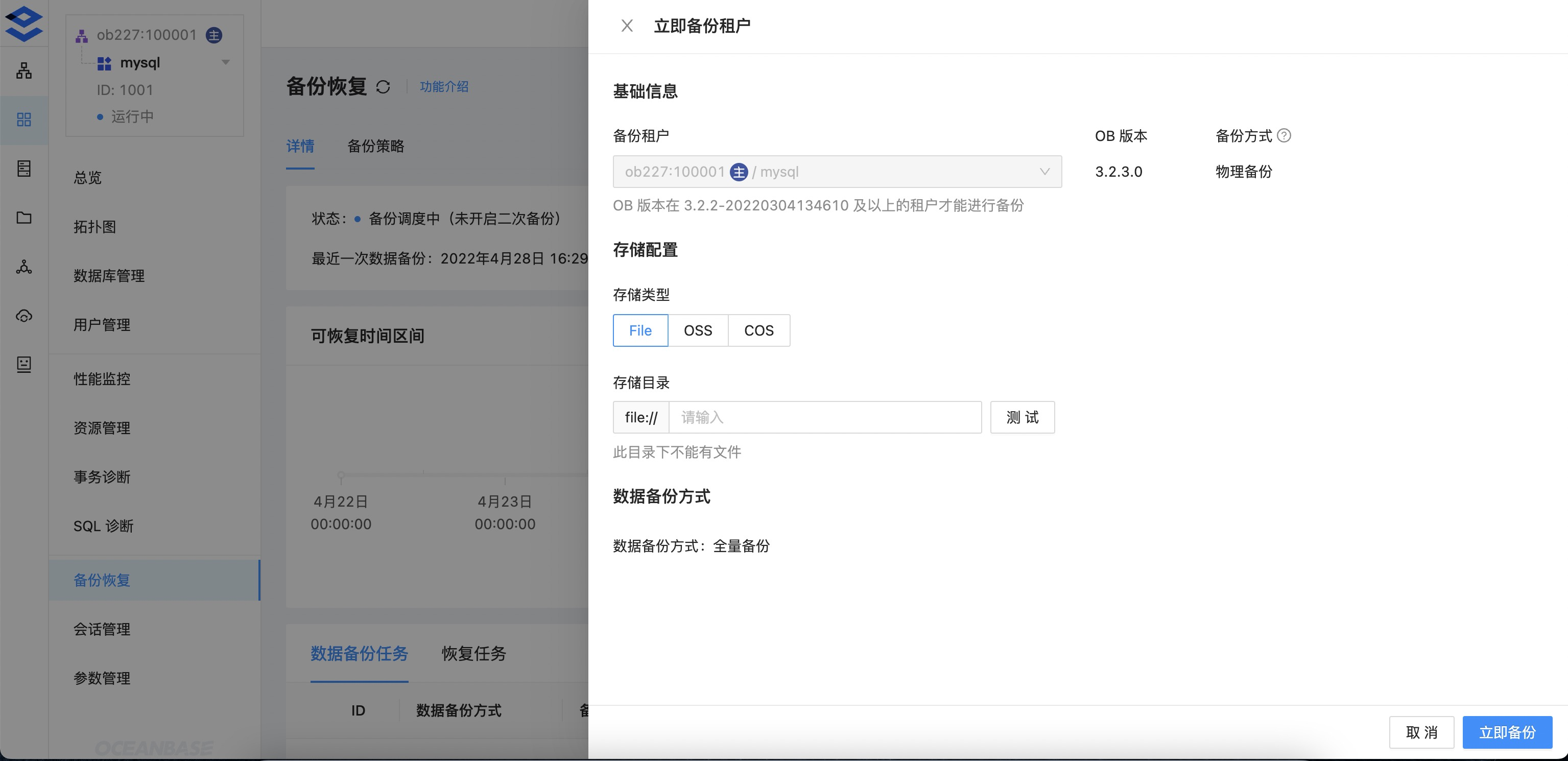
16

Feature enhancements

  • Enhanced alerting capabilities: You can now customize alert metrics and convert simple monitoring metrics into alert information. You can also configure alerts for slow SQL.

  • Enhanced organization management: You can now organize all resources into a single organization for easier management and identification.

  • Enhanced cluster Performance Monitoring: Performance monitoring now includes statistics on Block Cache Size, Cache Hit Rate, Number of Cache Requests, and Number of Open Cursors.

  • Enhanced data middleware: OCP-agent now collects logs from OBServer nodes and OBProxy and writes them to storage platforms such as ES and SLS. This provides comprehensive log query capabilities and lays the foundation for advanced log analysis.

Fixed issues

OCP V3.3.0 fixes the following issues:

  • The issue where agent fails to reinstall in specific scenarios.

  • The issue where tenant data may be deleted during rollback or retry during OceanBase upgrade.

  • The issue where the OBProxy configuration page displays "The parameter version of OBProxy does not match that of the cluster. Please refresh the configuration" in specific scenarios.

  • The issue where OBProxy processes are restarted repeatedly in specific scenarios.

  • The issue where the host status is displayed incorrectly in specific scenarios.

  • The issue where an error is returned when sorting software packages.

  • The issue where the tenant name is displayed incorrectly in specific scenarios in the cluster performance report.

  • The issue where a large number of tmp log files are left behind due to a bug in the logback component.

  • The issue where SQL diagnostics cannot query data in specific scenarios.

  • The issue where the OCP frontend responds extremely slowly and the CPU usage of the ocp-server container remains high.

Known issues

No.
Known issue
Workaround
1 The sys tenant has a long-term SlowSQL alert. This does not affect business operations, so no workaround is needed.
2 The alert table lacks an index, making it impossible to handle a large amount of alert history data. We recommend that you upgrade OCP to V3.3.0 or manually update the OCP alert internal table when you deploy OCP V3.3.0 from scratch to improve alert query performance.
3 In OCP V3.3.0, the SQL diagnostics feature is incompatible with low versions of OceanBase (ob1479). OCP has some compatibility issues with ob1479. We recommend that you do not manage ob1479 clusters.
4 A newly created role has all permissions for the cluster and tenants, but cannot create a tenant in the cluster. When you create a new role, you need to manually add the Host Read-Only permission. Otherwise, you cannot fully manage the cluster.

Limitations

Hardware requirements

OCP-Server can be installed on a physical server or in a Docker container. OCP-Server supports multi-node high availability deployment.

The minimum hardware requirements for OCP-Server nodes are as follows:

Hardware
Requirements
CPU
  • X86_64, 8 cores
  • ARM aarch 64 architecture, 8 cores
  • Memory 16 GB of available memory
    NIC 10 GbE

    OCP-Agent consumes very few resources and has no special requirements for the hardware resources of the installation node.

    Operating system requirements

    The following table lists the operating system requirements for installing OCP services (including OCP-Agent).

    Server type
    Operating system
    Supported versions
    x86_64 RHEL 7.2 and later
    x86_64 CentOS 7.2 and later
    x86_64 AliOS 7.2 and later
    x86_64 openSUSE 12 SP3 and later
    ARM aarch64 AliOS 7.2 and later
    ARM aarch64 NeoKylin 7.6
    ARM aarch64 Huawei EulerOS 2.0 SP8

    Client requirements

    General users access OCP services through web browsers. The following table lists the client requirements.

    Browser
    Minimum version
    Chrome 81
    Firefox 64
    Safari 10
    Edge 13

    If you want to access OCP services on an iOS device, the operating system requirements are as follows:

    Operating system
    Minimum version
    iOS 10

    For the best user experience, we recommend that you use a display with a resolution greater than 1440 x 810.

    Previous topic

    OCP V3.3.1
    Last

    Next topic

    OCP V3.2.3
    Next
    on this page
    Version information
    Supported OceanBase Database versions
    New features
    Diagnostics
    Primary and standby databases
    Alerts
    Capacity management
    Backup and restore
    Feature enhancements
    Fixed issues
    Known issues
    Limitations
    Hardware requirements
    Operating system requirements
    Client requirements