OceanBase
English日本語简体中文
Docs Home
Products
Integrations
Release Notes

Databases

OceanBase DatabaseOceanBase Cloud OceanBase Best Practices

Tools

OceanBase Cloud PlatformOceanBase Migration ServiceOceanBase Developer CenterOceanBase Migration AssessmentOceanBase Admin ToolOceanBase Loader and DumperOceanBase DeployerKubernetes operator for OceanBaseOceanBase Diagnostic Tool OceanBase Binlog Service

Connectors and Middleware

OceanBase Database Proxy OceanBase Connector/C OceanBase Connector/J OceanBase Connector/ODBC OceanBase Connector/NETOceanBase Command-Line Client

Databases

OceanBase DatabaseOceanBase Cloud OceanBase Best Practices

Connectors and Middleware

OceanBase Database Proxy OceanBase Connector/C OceanBase Connector/J OceanBase Connector/ODBC OceanBase Connector/NETOceanBase Command-Line Client

Tools

OceanBase Cloud PlatformOceanBase Migration ServiceOceanBase Developer CenterOceanBase Migration AssessmentOceanBase Admin ToolOceanBase Loader and DumperOceanBase DeployerKubernetes operator for OceanBaseOceanBase Diagnostic Tool OceanBase Binlog Service
OceanBase DatabaseOceanBase Cloud ToolsConnectors and MiddlewareLifecycle Support Policy

OceanBase Cloud Platform

V3.1.1Community Edition
  • Document Overview
  • Product Introduction
    • What is OceanBase Cloud Platform?
    • System architecture
    • Features
    • Limits
      • System requirements
      • Dependencies
  • Deployment Guide
    • Overview
    • Installation process
    • Installation planning
      • User planning
      • Host planning
      • Disk and directory planning
      • Port planning
    • Prepare for the installation
    • Prepare MetaDB and MonitorDB
      • Deploy OBD
      • Deploy OceanBase Database
      • Create tenants
    • Deploy OCP
    • Check after installation
    • Appendix
      • Install Docker
      • \*-example.yaml
      • Restart OCP
  • User Guide
    • OCP overview
    • Log on to the OceanBase Cloud Platform console
    • Features
      • Clusters
        • Cluster management
        • Cluster overview
        • Overview of the Cluster Details page
      • Tenants
        • Tenant and resource management
        • Tenant overview
        • Overview of the Tenant Details page
      • Hosts
        • Host overview
        • Host details
      • Packages
      • OBProxy
        • OBProxy management overview
        • OBProxy overview
        • OBProxy cluster overview
      • System management
        • Alert overview
        • View tasks
        • Security overview
        • View system parameters
      • Personal center
        • Specify personal information
        • Change the logon password
        • Configure alert subscription
        • Password box
          • Manage connection credentials of an OceanBase cluster
          • Manage connection credentials of an OBProxy
          • Manage connection credentials of a host
        • Log off the OCP console
    • Manage clusters
      • Cluster management operations
      • Basic cluster operations
        • Take over a cluster
        • Create a cluster
        • Delete a cluster
        • Stop a cluster
        • Restart a cluster
        • Manage zones of a cluster
          • Create a zone
          • Restart a zone
          • Stop a zone
          • Delete a zone
        • Manage OBServers of a cluster
          • Add an OBServer
          • Restart an OBServer
          • Stop an OBServer
          • Replace an OBServer
          • Delete an OBServer
        • Create a tenant
        • Upgrade the version of an OceanBase cluster
        • Change a password
        • Download logs
        • Disable SQL collection
        • View the SQL collection history
      • View the topology of a cluster
      • Cluster tenant management overview
      • Performance monitoring
      • Cluster resource management
      • Major compaction management
        • Modify major freeze configurations
        • Major compaction details
        • Major freeze statistics
        • Perform a major compaction
      • Manage parameters
        • View parameters
        • Modify parameters
        • Parameter types
        • View the history of parameter changes
    • Manage tenants
      • Tenant management operations
      • Basic tenant operations
        • Create a tenant
        • Manage unit types
        • Lock a tenant
        • Copy a tenant
        • Delete a tenant
        • Add a replica
        • Change the password of the sys tenant
        • Edit a tenant replica of a zone
        • Delete a tenant replica from a zone
        • Modify zone priorities
        • Modify the whitelist
      • View a tenant topology
      • Database management
      • User management under a MySQL tenant
      • Performance monitoring
      • Tenant resource management
      • SQL diagnostics
        • TopSQL diagnosis
        • Slow SQL diagnosis
      • Manage sessions
        • View tenant sessions
        • View session statistics
      • Manage parameters
        • View the parameters
        • Modify a parameter
        • View the parameter modification history
    • Manage hosts
      • Host management operations
      • Add a host
      • Modify a host
      • Restart OCP Agent
      • Stop OCP Agent
      • Reinstall OCP Agent
    • Manage software packages
      • Upload a software package
      • Download a software package
      • Delete a software package
    • Manage OBProxies
      • Create an OBProxy cluster
      • Take over an OBProxy
      • Delete an OBProxy
      • Restart an OBProxy
      • Upgrade an OBProxy
      • Add an OBProxy
      • Refresh OBProxy configurations
      • Monitor OBProxy cluster performance
      • OBProxy cluster parameter management
      • Add a connectable OceanBase cluster
      • Delete an OBProxy cluster
      • Upgrade all OBProxies in an OBProxy cluster
      • Restart all OBProxies in an OBProxy cluster
      • Delete a connected OceanBase cluster
    • Manage alerts
      • Alert-related concepts
      • Create an alert item
      • View alert items
      • Copy an alert item
      • Edit an alert item
      • Delete an alert item
      • Alert groups
      • Create an alert channel
      • View alert channels
      • Edit an alert channel
      • Delete an alert channel
      • View an alert event
      • View the alert notification history
      • Create a blocking condition
      • Edit alert blocking conditions
      • Delete a blocking condition
      • Add a filtering keyword
      • Modify the expiration time of a filtering keyword
      • Delete a filtering keyword
      • Create an alert subscription
      • Manage alert subscriptions
    • Use system management
      • Role overview
      • Create a role
      • Manage roles
      • Copy a role
      • Create a user
      • View users
      • Edit a user
      • Copy a user
      • Change a user password
      • Delete a user
      • Logon history
      • Manage system parameters
      • Manage tasks
    • FAQ
    • Appendix
      • OCP configuration parameters
      • SQL performance module
      • OCP resource unit specifications
      • OCP error table
      • OCP alert template variables
      • Call an alert API
      • OCP background tasks
      • Monitoring metrics
      • Examples of alert channel configuration
      • OBProxy startup parameters
      • System privileges in a MySQL tenant
      • Component listening port list
      • OCP-Agent processes
      • Enable the OCP multi-cluster mode
      • Log error PAM Permission Denied
      • Failed to upload the software package
      • Check the sudo permissions of a user
      • Default OCP roles
      • FAQ about multi-zone mode
      • FAQ about OBProxy takeover
      • Install dependent software
  • Alert Reference
    • Overview
    • OceanBase alerts
      • ob_cannot_connected
      • ob_cluster_status_check_failed
      • ob_cluster_exists_inactive_server
      • ob_cluster_exists_index_fail_table
      • ob_cluster_frozen_version_delta_over_threshold
      • ob_cluster_merge_error
      • ob_cluster_merge_timeout
      • ob_cluster_no_frozen
      • ob_cluster_no_merge
      • ob_cluster_operation_info
      • ob_cluster_sync_failed
      • ob_cpu_assigned_percent_over_threshold
      • ob_cpu_percent_over_threshold
      • ob_host_connection_percent_over_threshold
      • ob_host_cpu_percent_over_threshold
      • ob_host_disk_percent_over_threshold
      • ob_host_disk_readonly
      • ob_host_exists_expired_trans
      • ob_host_load1_per_cpu_over_threshold
      • ob_host_mem_percent_over_threshold
      • ob_host_net_recv_percent_over_threshold
      • ob_host_net_send_percent_over_threshold
      • ob_host_partition_count_over_threshold
      • ob_host_tcp_retrans_percent_over_threshold
      • ob_log_alarm
      • ob_mem_assigned_percent_over_threshold
      • ob_server_sstable_percent_over_threshold
      • ob_server_exists_long_lived_trans
      • ob_tenant_operation_info
      • ob_tenant500_mem_hold_over_threshold
      • ob_tenant500_mem_hold_percent_over_threshold
      • ob_zone_sstable_percent_over_threshold
      • tenant_active_memstore_percent_over_threshold
      • tenant_connection_percent_over_threshold
      • tenant_cpu_percent_over_threshold
      • tenant_memstore_percent_over_threshold
      • obproxy_process_dead
      • obproxyd_process_dead
      • obproxy_cannot_connected
      • ob_cluster_sync_delay_time_too_long
      • ob_host_data_disk_percent_over_threshold
      • ob_host_log_disk_percent_over_threshold
      • ob_host_install_disk_percent_over_threshold
    • Application alerts
      • no_enough_exporter
      • no_port_mapping_for_exporter
      • host_unavailable
      • backup_schedule_fail
      • inc_backup_delay
      • base_backup_fail
      • base_backup_too_long_time_no_one_success_task
      • backup_process_dead
      • backup_storage_capacity_over_threshold
      • backup_storage_capacity_retry_times_exceeded
      • backup_storage_capacity_timeout_or_interrupted
      • ocp_remote_server_time_diff_too_large
      • monitor_exporter_unavaliable
      • system_obproxy_unavailable
      • host_ntp_service_not_exist
      • partition_create_failed
      • obagent_dead
      • host_ntp_offset_too_large
    • Appendix
      • Set an alert-blocking condition
      • Modify alert thresholds
      • Exception handling for OceanBase cluster compaction
      • OCP-Agent script
      • Apply throttling to an OceanBase cluster
      • Network troubleshooting
  • API Reference
    • Overview
    • API call description
    • Cluster information
      • Query clusters
      • Create an OceanBase cluster
      • Delete an OceanBase cluster
      • Stop an OceanBase cluster
      • Start an OceanBase cluster
      • Restart an OceanBase cluster
      • Upgrade an OceanBase cluster
      • Query zones of an OceanBase cluster
      • Create a zone for an OceanBase cluster
      • Delete a zone from an OceanBase cluster
      • Stop a zone in an OceanBase cluster
      • Start a zone in an OceanBase cluster
      • Restart a zone in an OceanBase cluster
      • Add an OBServer
      • Delete multiple OBServers at a time
      • Stop an OBServer
      • Start an OBServer
      • Restart an OBServer
      • Replace an OBServer
      • Change the password of an OceanBase cluster
      • Query the parameter metadata of an OceanBase cluster
      • Query parameters of an OceanBase cluster
      • Modify parameters of an OceanBase cluster
      • Query servers
      • Query servers in a zone
    • Tenant information
      • Query tenants of a cluster
      • Query all tenants
      • Query details about a tenant
      • Create a tenant
      • Delete a tenant
      • Lock a tenant
      • Unlock a tenant
      • Query units of a tenant
      • Delete a unit from a tenant
      • Add a replica for a tenant
      • Delete a replica of a tenant
      • Modify a replica of a tenant
      • Modify zone priorities of a tenant
      • Change the administrator password of a tenant
      • Modify the whitelist of a tenant
      • Query parameters of a tenant
      • Modify parameters of a tenant
      • OceanBase database management
        • Query databases
        • Create a database
        • Modify a database
        • Delete a database
    • Hosts
      • Query regions
      • Query details about a region
      • Add a region
      • Delete a region
      • Query IDCs
      • Query details about an IDC
      • Add an IDC
      • Delete an IDC
      • Query host types
      • Query details about a host type
      • Add a host type
      • Delete a host type
      • Query hosts
      • Query details about a host
      • Add multiple hosts at a time
      • Delete a host
      • Delete multiple hosts at a time
    • Software packages
      • Query software packages
      • Upload a software package
      • Delete a software package
    • OBProxy management
      • Create an OBProxy cluster
      • Delete an OBProxy cluster
      • Query OBProxy clusters
      • Query details about an OBProxy cluster
      • Update configurations of an OBProxy cluster
      • Add an OBProxy
      • Take over an OBProxy
      • Delete an OBProxy
      • Restart an OBProxy
      • Upgrade an OBProxy
      • Add a connectable OceanBase cluster for an OBProxy cluster
      • Remove a connectable OceanBase cluster from an OBProxy cluster
      • Query the parameter metadata of an OBProxy
      • Query parameters of an OBProxy cluster
    • Monitoring
      • Query the metadata of a monitoring metric
      • Query monitoring data
      • Query monitoring data and attach a tag to the data
    • Alerts
      • Alert events
        • Query the alert event list
        • Query alert events
      • Alert notifications
        • Query alert notifications
    • Task management
      • Query tasks
      • Query details about a task
      • Retry a task
      • Roll back a task
      • Query logs of a subtask instance
      • Retry a subtask
      • Skip a subtask
      • Cancel a subtask
    • OceanBase user and privilege management
      • Query database user details
      • Query database user details
      • Create a database user
      • Delete a database user
      • Change the password of a database user
      • Lock a database user
      • Unlock a database user
      • Query the database role details
      • Query database role details
      • Create a database role
      • Delete a database role
      • Query database objects
      • Grant global privileges to a user
      • Revoke global privileges of a user
      • Change global privileges of a user
      • Grant global privileges to a role
      • Revoke global privileges of a role
      • Change global privileges of a role
      • Grant roles to a user
      • Revoke roles of a user
      • Change roles of a user
      • Grant roles to a role
      • Revoke roles of a role
      • Change roles of a role
      • Grant database privileges to a user
      • Revoke database privileges of a user
      • Change database privileges of a user
      • Grant object privileges to a user
      • Revoke object privileges of a user
      • Change object privileges of a user
      • Grant object privileges to a role
      • Revoke object privileges of a role
      • Change object privileges of a role
    • OCP Agent management
      • Query OCP Agent details on a host
      • Stop basic OCP Agent processes on a host
      • Batch stop basic OCP Agent processes on a host
      • Restart basic OCP Agent processes on a host
      • Batch restart basic OCP Agent processes on a host
      • Query OCP Agent processes on a host
      • Restart OCP Agent processes on a host
      • Stop OCP Agent processes on a host
    • SQL performance
      • Query performance indicators of an SQL statement
      • Query the performance indicator trend of an SQL statement
      • Query SQL text
      • Query performance indicators of an execution plan
      • Query the performance indicator trend of an execution plan
      • Query the operator structure of an execution plan
    • Others
      • Query the basic information of an OCP application
      • Query OCP server time
      • Query OCP application status
    • Appendix
      • Task information

Download PDF

Document Feedback
  1. Documentation Center
  2. OceanBase Cloud Platform
  3. V3.1.1

Configure alert subscription

Last Updated:2026-09-04 10:28:16

View the alert subscriptions.
Create an alert
Settings for receiving notifications

By default, you can view alerts only on the Alerts page. Users can subscribe to alerts only after the administrator successfully configure the alert channels.

The following two requirements must be met to enable users to receive alert notifications:

  1. The administrator configures the alert channels.

  2. The user subscribes to the alerts.

You can perform the following steps to configure alert notifications:

  1. Configure an alert channel. The administrator configures an alert channel.

  2. Create a subscription. Users can configure a subscription.

  3. Settings for receiving notifications. Users can specify whether to receive notifications and the receiving limit.

View the alert subscriptions.

Log on to OCP. Click the user name in the upper-right corner, and select Alert Subscription from the drop-down list. On the Subscriptions tab, you can filter alerts by specifying Source and Cluster .

By default, the tab displays the Source, Cluster, Alert Item Group, Subscribers , and Subscription Time .1

Create an alert

  1. Log on to OCP.

  2. Click the user name in the upper-right corner, and select Alert Subscription from the drop-down list.

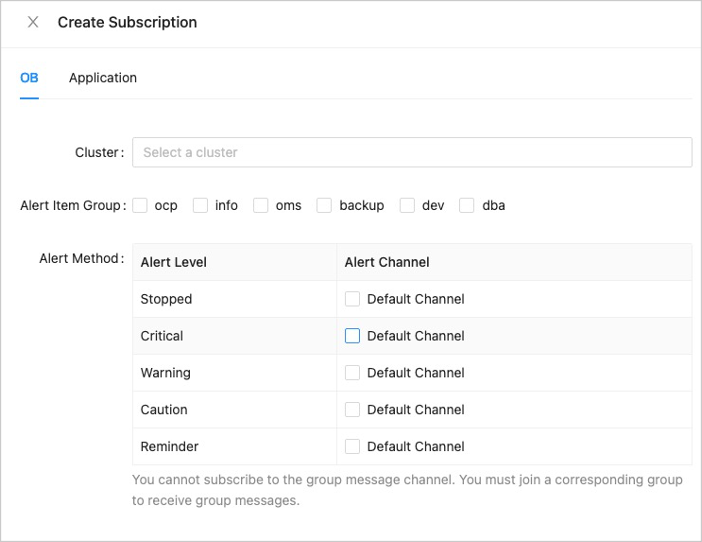
  3. Click Create Subscription .

  4. Click the OB or Application tab based on your business requirements, and then select a cluster or a specified application.

  5. Select an alert item group that you subscribe to.

  6. Configure the Alert Method . Select an alert channel for each alert level. You can select multiple channels for each alert level at a time. You must configure at least one channel for each alert level.1

  7. Click OK . After you configure the alert subscription, you can view, edit, or delete the subscription on the Subscriptions tab.2

Note

When you configure an alert subscription, you can select only clusters with the read permission. If the read permission of the logon user on the cluster is revoked after the alert subscription is configured, the subscription remain unchanged. However, the subscriber cannot receive alert notifications of the cluster.

Settings for receiving notifications

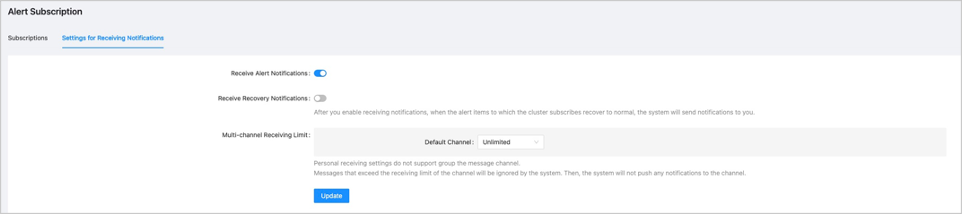
Users can configure a notification.

The system will send recovery notifications to you and the recovery messages will not be aggregated. The number of messages may be relatively large and we recommend that you disable it. You can customize the following items based on your business needs.3
Previous topic

Change the logon password
Last

Next topic

Manage connection credentials of an OceanBase cluster
Next
on this page
View the alert subscriptions.
Create an alert
Settings for receiving notifications