
OAgent is divided into the client layer, control platform, core service layer (agent base), OceanBase component access layer, and model inference layer from top to bottom. The knowledge base, as an independent knowledge supply unit, provides retrieval capabilities for the core service layer.
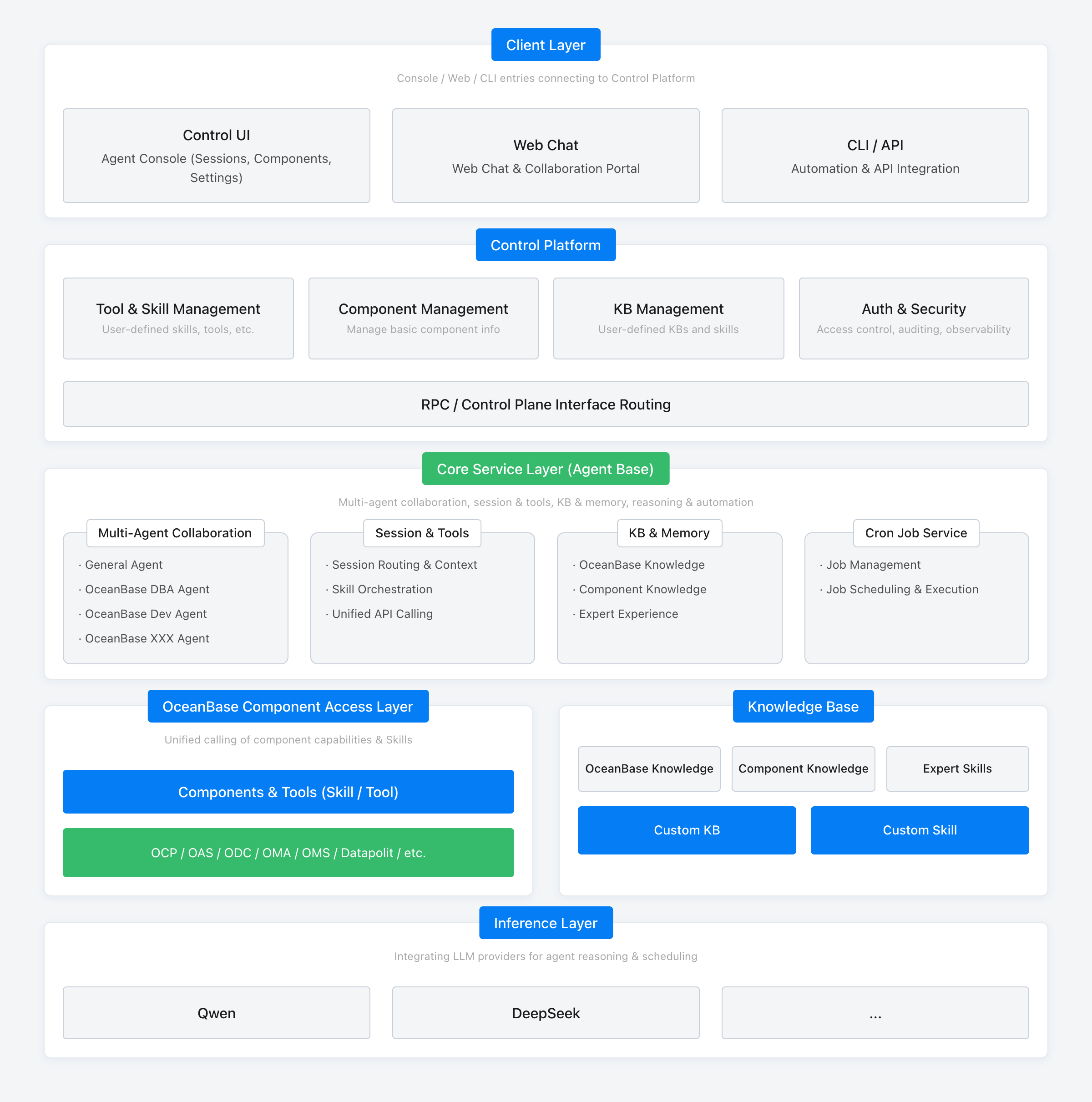
The system mainly consists of the following parts:
Client Layer
Provides various entry points such as the console, web chat, CLI, and API to uniformly connect to the control platform. Among them, Control UI is the agent console for managing sessions, components, and system settings; Web Chat is the entry point for web-based dialogue and collaboration; CLI/API are aimed at automated and integrated invocation scenarios.
Control Platform
Handles four types of management capabilities: tool and skill management (user-defined skills, tools, etc.), component management (managing basic component information), knowledge base management (user-defined knowledge bases and skills), and authentication security (access control, audit logging, observability). It routes requests to the core service layer via RPC/control plane interfaces.
Core Service Layer (Agent Base)
Responsible for multi-agent collaboration, session and tools, knowledge and memory, model inference, and automated scheduling. Specifically includes:
Multi-agent Collaboration: General collaborative agents, OceanBase DBA agents, OceanBase Dev agents, etc., collaborate based on role division.
Session and Tools: Session routing and context management, skill and Skill orchestration, unified invocation of component capabilities and interfaces.
Knowledge and Memory: Manages OceanBase knowledge, component knowledge, and expert experience.
Scheduled Task Service: Manages scheduled tasks, schedules, and executes them.
OceanBase Component Access Layer
Unifies the invocation of component capabilities and Skills through the control platform. It encapsulates the capabilities of components like OCP, OAS, and ODC into a unified component and tool (Skill/Tool) interface for the core service layer to call.
Knowledge Base
Provides built-in knowledge such as OceanBase knowledge, component knowledge, and expert skills. It also supports integrating custom knowledge bases and custom skills, which are preferentially retrieved by the Agent before answering technical questions.
Model and Inference Layer
Connects with various model providers (such as Qwen, DeepSeek, etc.) to provide model capabilities for agent inference and tool scheduling. OAgent does not have a built-in large language model; its inference capability is provided by external large language model APIs that you connect to. It supports the OpenAI-compatible Chat Completions interface and the OpenAI Responses API protocol. Model service providers and model lists are maintained on the Model Configuration page. For details, see Manage model services.
Data Flow Process
A user initiates a natural language request in the client layer.
The control platform completes authentication and routing, forwarding the request to the core service layer.
The core service layer matches the appropriate agent and skill based on the request, orchestrates the required tool invocation, and retrieves knowledge from the knowledge base if needed.
The component access layer accesses systems such as OCP, OAS, and ODC through REST APIs or the MCP (Model Context Protocol) interface to obtain cluster status and diagnostic data, or to perform change operations.
The core service layer feeds the collected data and knowledge into model inference to generate user-oriented analysis conclusions and operational recommendations. It then returns the tool invocation process and results to the client for display.