
OceanBase Database can handle scenarios with mixed workloads. Based on a distributed architecture of peer nodes, it is capable of supporting high-concurrency, scalable OLTP tasks, while also performing parallel computing for OLAP tasks within the same data engine using the MPP architecture, eliminating the need to maintain two separate data sets.
In OceanBase Database, you can not only perform parallel analysis directly on large volumes of online business data, but also leverage its parallel DML (PDML) capability to quickly and securely execute large batch-write transactions concurrently. All of this is achieved while strictly guaranteeing transaction consistency.
Below, we will manually run the TPC-H benchmark to demonstrate the features and usage of OceanBase Database in operational OLAP scenarios. TPC-H is an industry-standard benchmark for decision support business. It evaluates the analytical and decision support capabilities of a database system through a series of complex queries executed on large datasets. For more information, visit the official TPC website.
Note
On May 20, 2021, OceanBase Database set a new world record in TPC-H with a score of 15.26 million QphH. It is also the only database to have broken both the TPC-C and TPC-H records, proving its ability to handle both online transaction and real-time analytics business scenarios simultaneously. For details, see TPC-H Result.
Manually run the TPC-H benchmark
The following content describes how to manually run the TPC-H benchmark step by step with the official TPC-H tool. Manual testing helps you better understand OceanBase Database, especially the parameter configurations.
Step 1: Create a test tenant
Note
The OceanBase cluster environment for this test is deployed in a 1:1:1 mode.
Execute the following commands under the sys tenant to create a test tenant:
Create a resource unit named
mysql_box.CREATE RESOURCE UNIT mysql_box MAX_CPU 28, MEMORY_SIZE '200G', MIN_IOPS 200000, MAX_IOPS 12800000, LOG_DISK_SIZE '300G';Create a resource pool named
mysql_pool.CREATE RESOURCE POOL mysql_pool UNIT = 'mysql_box', UNIT_NUM = 1, ZONE_LIST = ('z1','z2','z3');Create a MySQL-compatible tenant named
mysql_tenant.CREATE TENANT mysql_tenant RESOURCE_POOL_LIST = ('mysql_pool'), PRIMARY_ZONE = RANDOM, LOCALITY = 'F@z1,F@z2,F@z3' SET VARIABLES ob_compatibility_mode='mysql', ob_tcp_invited_nodes='%', secure_file_priv = "/";
Step 2: Optimize the environment
Optimize OceanBase Database.
Execute the following statements under the sys tenant to configure the relevant parameters.
ALTER SYSTEM FLUSH PLAN CACHE GLOBAL; ALTER SYSTEM SET enable_sql_audit = false; SELECT sleep(5); ALTER SYSTEM SET enable_perf_event = false; ALTER SYSTEM SET syslog_level = 'PERF'; ALTER SYSTEM SET enable_record_trace_log = false; ALTER SYSTEM SET data_storage_warning_tolerance_time = '300s'; ALTER SYSTEM SET _data_storage_io_timeout = '600s'; ALTER SYSTEM SET trace_log_slow_query_watermark = '7d'; ALTER SYSTEM SET large_query_threshold = '0ms'; ALTER SYSTEM SET enable_syslog_recycle = 1; ALTER SYSTEM SET max_syslog_file_count = 300;Optimize the tenant.
Execute the following statements under the test tenant (user tenant) to configure the relevant parameters.
SET GLOBAL NLS_DATE_FORMAT = 'YYYY-MM-DD HH24:MI:SS'; SET GLOBAL NLS_TIMESTAMP_FORMAT = 'YYYY-MM-DD HH24:MI:SS.FF'; SET GLOBAL NLS_TIMESTAMP_TZ_FORMAT = 'YYYY-MM-DD HH24:MI:SS.FF TZR TZD'; SET GLOBAL ob_query_timeout = 10800000000; SET GLOBAL ob_trx_timeout = 10000000000; SET GLOBAL ob_sql_work_area_percentage = 50; ALTER SYSTEM SET default_table_store_format = 'column' ; ALTER SYSTEM SET ob_enable_batched_multi_statement = 'true'; ALTER SYSTEM SET _io_read_batch_size = '128k'; ALTER SYSTEM SET _io_read_redundant_limit_percentage = 50; SET GLOBAL parallel_degree_policy = AUTO; SET GLOBAL parallel_servers_target = 10000; SET GLOBAL collation_connection = utf8mb4_bin; SET GLOBAL collation_database = utf8mb4_bin; SET GLOBAL collation_server = utf8mb4_bin; SET GLOBAL autocommit = 1; ALTER SYSTEM SET ob_enable_batched_multi_statement = 'true';
Step 3: Install the TPC-H tool
Download the TPC-H tool. For more information, see TPC-H Tool download page.
After downloading, extract the files and navigate to the extracted TPC-H directory.
[wieck@localhost ~] $ unzip 7e965ead-8844-4efa-a275-34e35f8ab89b-tpc-h-tool.zip [wieck@localhost ~] $ cd TPC-H_Tools_v3.0.0Copy
Makefile.suite.[wieck@localhost TPC-H_Tools_v3.0.0] $ cd dbgen/ [wieck@localhost dbgen] $ cp Makefile.suite MakefileModify the definitions of parameters such as
CC,DATABASE,MACHINE, andWORKLOADin theMakefile.[wieck@localhost dbgen] $ vim MakefileCC = gcc # Current values for DATABASE are: INFORMIX, DB2, TDAT (Teradata) # SQLSERVER, SYBASE, ORACLE, VECTORWISE # Current values for MACHINE are: ATT, DOS, HP, IBM, ICL, MVS, # SGI, SUN, U2200, VMS, LINUX, WIN32 # Current values for WORKLOAD are: TPCH DATABASE= MYSQL MACHINE = LINUX WORKLOAD = TPCHModify the
tpcd.hfile and add new macro definitions.[wieck@localhost dbgen] $ vim tpcd.h#ifdef MYSQL #define GEN_QUERY_PLAN "" #define START_TRAN "START TRANSACTION" #define END_TRAN "COMMIT" #define SET_OUTPUT "" #define SET_ROWCOUNT "limit %d;\n" #define SET_DBASE "use %s;\n" #endifCompile the files.
makeThe result is as follows:
gcc -g -DDBNAME=\"dss\" -DLINUX -DMYSQL -DTPCH -DRNG_TEST -D_FILE_OFFSET_BITS=64 -c -o build.o build.c gcc -g -DDBNAME=\"dss\" -DLINUX -DMYSQL -DTPCH -DRNG_TEST -D_FILE_OFFSET_BITS=64 -c -o driver.o driver.c gcc -g -DDBNAME=\"dss\" -DLINUX -DMYSQL -DTPCH -DRNG_TEST -D_FILE_OFFSET_BITS=64 -c -o bm_utils.o bm_utils.c gcc -g -DDBNAME=\"dss\" -DLINUX -DMYSQL -DTPCH -DRNG_TEST -D_FILE_OFFSET_BITS=64 -c -o rnd.o rnd.c gcc -g -DDBNAME=\"dss\" -DLINUX -DMYSQL -DTPCH -DRNG_TEST -D_FILE_OFFSET_BITS=64 -c -o print.o print.c gcc -g -DDBNAME=\"dss\" -DLINUX -DMYSQL -DTPCH -DRNG_TEST -D_FILE_OFFSET_BITS=64 -c -o load_stub.o load_stub.c gcc -g -DDBNAME=\"dss\" -DLINUX -DMYSQL -DTPCH -DRNG_TEST -D_FILE_OFFSET_BITS=64 -c -o bcd2.o bcd2.c gcc -g -DDBNAME=\"dss\" -DLINUX -DMYSQL -DTPCH -DRNG_TEST -D_FILE_OFFSET_BITS=64 -c -o speed_seed.o speed_seed.c gcc -g -DDBNAME=\"dss\" -DLINUX -DMYSQL -DTPCH -DRNG_TEST -D_FILE_OFFSET_BITS=64 -c -o text.o text.c gcc -g -DDBNAME=\"dss\" -DLINUX -DMYSQL -DTPCH -DRNG_TEST -D_FILE_OFFSET_BITS=64 -c -o permute.o permute.c gcc -g -DDBNAME=\"dss\" -DLINUX -DMYSQL -DTPCH -DRNG_TEST -D_FILE_OFFSET_BITS=64 -c -o rng64.o rng64.c gcc -g -DDBNAME=\"dss\" -DLINUX -DMYSQL -DTPCH -DRNG_TEST -D_FILE_OFFSET_BITS=64 -O -o dbgen build.o driver.o bm_utils.o rnd.o print.o load_stub.o bcd2.o speed_seed.o text.o permute.o rng64.o -lm gcc -g -DDBNAME=\"dss\" -DLINUX -DMYSQL -DTPCH -DRNG_TEST -D_FILE_OFFSET_BITS=64 -c -o qgen.o qgen.c gcc -g -DDBNAME=\"dss\" -DLINUX -DMYSQL -DTPCH -DRNG_TEST -D_FILE_OFFSET_BITS=64 -c -o varsub.o varsub.c gcc -g -DDBNAME=\"dss\" -DLINUX -DMYSQL -DTPCH -DRNG_TEST -D_FILE_OFFSET_BITS=64 -O -o qgen build.o bm_utils.o qgen.o rnd.o varsub.o text.o bcd2.o permute.o speed_seed.o rng64.o -lmThis will generate the
dbgenfile for data generation and theqgenanddists.dssfiles for SQL generation.
Step 4: Generate data
You can generate TPC-H 10G, 100G, or 1T data based on your actual environment. This example shows how to generate 100G of data.
./dbgen -s 100
mkdir tpch100
mv *.tbl tpch100
When generating 1T of data with multiple threads, OceanBase supports direct load, allowing you to import data from multiple files into a table simultaneously:
#!/bin/bash
SCALE_FACTOR=1000
CHUNK_COUNT=20
for ((i=1; i<=CHUNK_COUNT; i++))
do
CMD="./dbgen -s ${SCALE_FACTOR} -C ${CHUNK_COUNT} -S ${i} -vf"
$CMD &
done
wait
echo "All data generation tasks completed."
Step 5: Generate query SQL
Note
You can follow the steps below in this section to generate query SQL and then adjust it, or directly use the query SQL provided on GitHub. If you choose to use the SQL from GitHub, you need to modify the cpu_num in the SQL statements to the actual degree of parallelism.
Generate it using the tools provided with tpch. The steps are as follows:
Copy
dbgen/qgenanddbgen/dists.dssto themysql_sqlfolder.Create a
gen.shscript in themysql_sqlfolder to generate the query SQL.vim gen.sh#!/usr/bin/bash export DSS_QUERY=dists.dss for i in {1..22} do ./qgen -d $i -s 100 > db"$i".sql doneModify the query SQL according to the actual degree of parallelism.
You can use the following command in the
systenant to view the total number of available CPUs for a tenant.select sum(max_cpu) from DBA_OB_UNITS;Taking
Q1as an example, the modified SQL statement is as follows:SELECT /*+ parallel(96) */ ---Add parallel concurrent execution l_returnflag, l_linestatus, sum(l_quantity) as sum_qty, sum(l_extendedprice) as sum_base_price, sum(l_extendedprice * (1 - l_discount)) as sum_disc_price, sum(l_extendedprice * (1 - l_discount) * (1 + l_tax)) as sum_charge, avg(l_quantity) as avg_qty, avg(l_extendedprice) as avg_price, avg(l_discount) as avg_disc, count(*) as count_order FROM lineitem WHERE l_shipdate <= date '1998-12-01' - interval '90' day GROUP BY l_returnflag, l_linestatus ORDER BY l_returnflag, l_linestatus;
Step 6: Create tables
For 100 GB of data, create the table schema file
create_tpch_mysql_table_part.ddl.drop tablegroup IF EXISTS tpch_tg_SF_TPC_USER_lineitem_order_group; drop tablegroup IF EXISTS tpch_tg_SF_TPC_USER_partsupp_part; create tablegroup tpch_tg_SF_TPC_USER_lineitem_order_group binding true partition by key 1 partitions 256; create tablegroup tpch_tg_SF_TPC_USER_partsupp_part binding true partition by key 1 partitions 256; DROP TABLE IF EXISTS LINEITEM; CREATE TABLE lineitem ( l_orderkey int(11) NOT NULL, l_partkey int(11) NOT NULL, l_suppkey int(11) NOT NULL, l_linenumber int(11) NOT NULL, l_quantity decimal(15,2) NOT NULL, l_extendedprice decimal(15,2) NOT NULL, l_discount decimal(15,2) NOT NULL, l_tax decimal(15,2) NOT NULL, l_returnflag char(1) DEFAULT NULL, l_linestatus char(1) DEFAULT NULL, l_shipdate date NOT NULL, l_commitdate date DEFAULT NULL, l_receiptdate date DEFAULT NULL, l_shipinstruct varchar(25) DEFAULT NULL, l_shipmode varchar(10) DEFAULT NULL, l_comment varchar(44) DEFAULT NULL, primary key(l_shipdate, l_orderkey, l_linenumber) )row_format = condensed tablegroup = tpch_tg_SF_TPC_USER_lineitem_order_group partition by key (l_orderkey) partitions 256 with column group(each column); alter table lineitem CONVERT TO CHARACTER SET utf8mb4 COLLATE utf8mb4_bin; DROP TABLE IF EXISTS ORDERS; CREATE TABLE orders ( o_orderkey int(11) NOT NULL, o_custkey int(11) NOT NULL, o_orderstatus varchar(1) DEFAULT NULL, o_totalprice decimal(15,2) DEFAULT NULL, o_orderdate date NOT NULL, o_orderpriority varchar(15) DEFAULT NULL, o_clerk varchar(15) DEFAULT NULL, o_shippriority int(11) DEFAULT NULL, o_comment varchar(79) DEFAULT NULL, PRIMARY KEY (o_orderkey, o_orderdate) ) row_format = condensed tablegroup = tpch_tg_SF_TPC_USER_lineitem_order_group partition by key(o_orderkey) partitions 256 with column group(each column); alter table orders CONVERT TO CHARACTER SET utf8mb4 COLLATE utf8mb4_bin; DROP TABLE IF EXISTS PARTSUPP; CREATE TABLE partsupp ( ps_partkey int(11) NOT NULL, ps_suppkey int(11) NOT NULL, ps_availqty int(11) DEFAULT NULL, ps_supplycost decimal(15,2) DEFAULT NULL, ps_comment varchar(199) DEFAULT NULL, PRIMARY KEY (ps_partkey, ps_suppkey)) row_format = condensed tablegroup tpch_tg_SF_TPC_USER_partsupp_part partition by key(ps_partkey) partitions 256 with column group(each column); alter table partsupp CONVERT TO CHARACTER SET utf8mb4 COLLATE utf8mb4_bin; DROP TABLE IF EXISTS PART; CREATE TABLE part ( p_partkey int(11) NOT NULL, p_name varchar(55) DEFAULT NULL, p_mfgr varchar(25) DEFAULT NULL, p_brand varchar(10) DEFAULT NULL, p_type varchar(25) DEFAULT NULL, p_size int(11) DEFAULT NULL, p_container varchar(10) DEFAULT NULL, p_retailprice decimal(12,2) DEFAULT NULL, p_comment varchar(23) DEFAULT NULL, PRIMARY KEY (p_partkey)) row_format = condensed tablegroup tpch_tg_SF_TPC_USER_partsupp_part partition by key(p_partkey) partitions 256 with column group(each column); alter table part CONVERT TO CHARACTER SET utf8mb4 COLLATE utf8mb4_bin; DROP TABLE IF EXISTS CUSTOMER; CREATE TABLE customer ( c_custkey int(11) NOT NULL, c_name varchar(25) DEFAULT NULL, c_address varchar(40) DEFAULT NULL, c_nationkey int(11) DEFAULT NULL, c_phone varchar(15) DEFAULT NULL, c_acctbal decimal(15,2) DEFAULT NULL, c_mktsegment char(10) DEFAULT NULL, c_comment varchar(117) DEFAULT NULL, PRIMARY KEY (c_custkey)) row_format = condensed partition by key(c_custkey) partitions 256 with column group(each column); alter table customer CONVERT TO CHARACTER SET utf8mb4 COLLATE utf8mb4_bin; DROP TABLE IF EXISTS SUPPLIER; CREATE TABLE supplier ( s_suppkey int(11) NOT NULL, s_name varchar(25) DEFAULT NULL, s_address varchar(40) DEFAULT NULL, s_nationkey int(11) DEFAULT NULL, s_phone varchar(15) DEFAULT NULL, s_acctbal decimal(15,2) DEFAULT NULL, s_comment varchar(101) DEFAULT NULL, PRIMARY KEY (s_suppkey) ) row_format = condensed partition by key(s_suppkey) partitions 256 with column group(each column); alter table supplier CONVERT TO CHARACTER SET utf8mb4 COLLATE utf8mb4_bin; DROP TABLE IF EXISTS NATION; CREATE TABLE nation ( n_nationkey int(11) NOT NULL, n_name varchar(25) DEFAULT NULL, n_regionkey int(11) DEFAULT NULL, n_comment varchar(152) DEFAULT NULL, PRIMARY KEY (n_nationkey) ) row_format = condensed with column group(each column); alter table nation CONVERT TO CHARACTER SET utf8mb4 COLLATE utf8mb4_bin; DROP TABLE IF EXISTS REGION; CREATE TABLE region ( r_regionkey int(11) NOT NULL, r_name varchar(25) DEFAULT NULL, r_comment varchar(152) DEFAULT NULL, PRIMARY KEY (r_regionkey) ) row_format = condensed with column group(each column); alter table region CONVERT TO CHARACTER SET utf8mb4 COLLATE utf8mb4_bin; CREATE VIEW revenue0 AS SELECT l_suppkey as supplier_no, SUM(l_extendedprice * ( 1 - l_discount )) as total_revenue FROM lineitem WHERE l_shipdate >= DATE '1996-01-01' AND l_shipdate < DATE '1996-04-01' GROUP BY l_suppkey;For 1 TB of data, create the table schema file
create_tpch_mysql_table_part_1000G.ddl.drop tablegroup IF EXISTS tpch_tg_SF_TPC_USER_lineitem_order_group_1000; drop tablegroup IF EXISTS tpch_tg_SF_TPC_USER_partsupp_part_1000; create tablegroup tpch_tg_SF_TPC_USER_lineitem_order_group_1000 binding true partition by key 1 partitions 256; create tablegroup tpch_tg_SF_TPC_USER_partsupp_part_1000 binding true partition by key 1 partitions 256; DROP TABLE IF EXISTS LINEITEM; CREATE TABLE lineitem ( l_orderkey bigint NOT NULL, l_partkey int(32) NOT NULL, l_suppkey int(32) NOT NULL, l_linenumber int(32) NOT NULL, l_quantity decimal(32,2) NOT NULL, l_extendedprice decimal(32,2) NOT NULL, l_discount decimal(15,2) NOT NULL, l_tax decimal(15,2) NOT NULL, l_returnflag varchar(64) DEFAULT NULL, l_linestatus varchar(64) DEFAULT NULL, l_shipdate date NOT NULL, l_commitdate date DEFAULT NULL, l_receiptdate date DEFAULT NULL, l_shipinstruct varchar(64) DEFAULT NULL, l_shipmode varchar(64) DEFAULT NULL, l_comment varchar(64) DEFAULT NULL, primary key(l_shipdate, l_orderkey, l_linenumber) )row_format = condensed tablegroup = tpch_tg_SF_TPC_USER_lineitem_order_group_1000 partition by key (l_orderkey) partitions 256 with column group(each column); alter table lineitem CONVERT TO CHARACTER SET utf8mb4 COLLATE utf8mb4_bin; DROP TABLE IF EXISTS ORDERS; CREATE TABLE orders ( o_orderkey bigint NOT NULL, o_custkey int(32) NOT NULL, o_orderstatus varchar(64) DEFAULT NULL, o_totalprice decimal(15,2) DEFAULT NULL, o_orderdate date NOT NULL, o_orderpriority varchar(15) DEFAULT NULL, o_clerk varchar(15) DEFAULT NULL, o_shippriority int(32) DEFAULT NULL, o_comment varchar(128) DEFAULT NULL, PRIMARY KEY (o_orderkey, o_orderdate) ) row_format = condensed tablegroup = tpch_tg_SF_TPC_USER_lineitem_order_group_1000 partition by key(o_orderkey) partitions 256 with column group(each column); alter table orders CONVERT TO CHARACTER SET utf8mb4 COLLATE utf8mb4_bin; DROP TABLE IF EXISTS PARTSUPP; CREATE TABLE partsupp ( ps_partkey int(11) NOT NULL, ps_suppkey int(11) NOT NULL, ps_availqty int(11) DEFAULT NULL, ps_supplycost decimal(15,2) DEFAULT NULL, ps_comment varchar(199) DEFAULT NULL, PRIMARY KEY (ps_partkey, ps_suppkey)) row_format = condensed tablegroup tpch_tg_SF_TPC_USER_partsupp_part_1000 partition by key(ps_partkey) partitions 256 with column group(each column); alter table partsupp CONVERT TO CHARACTER SET utf8mb4 COLLATE utf8mb4_bin; DROP TABLE IF EXISTS PART; CREATE TABLE part ( p_partkey int(11) NOT NULL, p_name varchar(55) DEFAULT NULL, p_mfgr varchar(25) DEFAULT NULL, p_brand varchar(10) DEFAULT NULL, p_type varchar(25) DEFAULT NULL, p_size int(11) DEFAULT NULL, p_container varchar(10) DEFAULT NULL, p_retailprice decimal(12,2) DEFAULT NULL, p_comment varchar(23) DEFAULT NULL, PRIMARY KEY (p_partkey)) row_format = condensed tablegroup tpch_tg_SF_TPC_USER_partsupp_part_1000 partition by key(p_partkey) partitions 256 with column group(each column); alter table part CONVERT TO CHARACTER SET utf8mb4 COLLATE utf8mb4_bin; DROP TABLE IF EXISTS CUSTOMER; CREATE TABLE customer ( c_custkey int(11) NOT NULL, c_name varchar(25) DEFAULT NULL, c_address varchar(40) DEFAULT NULL, c_nationkey int(11) DEFAULT NULL, c_phone varchar(15) DEFAULT NULL, c_acctbal decimal(15,2) DEFAULT NULL, c_mktsegment char(10) DEFAULT NULL, c_comment varchar(117) DEFAULT NULL, PRIMARY KEY (c_custkey)) row_format = condensed partition by key(c_custkey) partitions 256 with column group(each column); alter table customer CONVERT TO CHARACTER SET utf8mb4 COLLATE utf8mb4_bin; DROP TABLE IF EXISTS SUPPLIER; CREATE TABLE supplier ( s_suppkey int(11) NOT NULL, s_name varchar(25) DEFAULT NULL, s_address varchar(40) DEFAULT NULL, s_nationkey int(11) DEFAULT NULL, s_phone varchar(15) DEFAULT NULL, s_acctbal decimal(15,2) DEFAULT NULL, s_comment varchar(101) DEFAULT NULL, PRIMARY KEY (s_suppkey) ) row_format = condensed partition by key(s_suppkey) partitions 256 with column group(each column); alter table supplier CONVERT TO CHARACTER SET utf8mb4 COLLATE utf8mb4_bin; DROP TABLE IF EXISTS NATION; CREATE TABLE nation ( n_nationkey int(11) NOT NULL, n_name varchar(25) DEFAULT NULL, n_regionkey int(11) DEFAULT NULL, n_comment varchar(152) DEFAULT NULL, PRIMARY KEY (n_nationkey) ) row_format = condensed with column group(each column); alter table nation CONVERT TO CHARACTER SET utf8mb4 COLLATE utf8mb4_bin; DROP TABLE IF EXISTS REGION; CREATE TABLE region ( r_regionkey int(11) NOT NULL, r_name varchar(25) DEFAULT NULL, r_comment varchar(152) DEFAULT NULL, PRIMARY KEY (r_regionkey) ) row_format = condensed with column group(each column); alter table region CONVERT TO CHARACTER SET utf8mb4 COLLATE utf8mb4_bin; CREATE VIEW revenue0 AS SELECT l_suppkey as supplier_no, SUM(l_extendedprice * ( 1 - l_discount )) as total_revenue FROM lineitem WHERE l_shipdate >= DATE '1996-01-01' AND l_shipdate < DATE '1996-04-01' GROUP BY l_suppkey;
Step 7: Load data
You can write your own script based on the data and SQL generated in the previous steps. A sample data loading operation is as follows:
Create a script for loading data named
load_data.sh.#!/bin/bash host='$host_ip' # Note: Please enter the IP address of a server where an observer, such as observer A, resides. It is recommended to place the data files on this server as well. port='$host_port' # The port number of observer A. user='$user' # Username tenant='$tenant_name' # Tenant name password='$password' # Password database='$db_name' # The name of the database. data_path='$data_file' # Note: Please specify the path of the .tbl data file generated in the data generation step on an observer, such as observer A. function load_data { remote_user="$user" # The username of the observer node that stores data. table_name=${1} if [[ ${password} == "" ]];then obclient_conn="obclient -h${host} -P${port} -u${user} -D${database} -A -c" else obclient_conn="obclient -h${host} -P${port} -u${user} -D${database} -p${password} -A -c" fi table_list=$(ssh "${remote_user}@${host}" "ls ${data_path}/${table_name}.tbl* 2>/dev/null") echo "$table_list" IFS=$'\n' read -d '' -r -a table_files <<< "$table_list" table_files_comma_separated=$(IFS=,; echo "${table_files[*]}") echo "${table_files_comma_separated}" echo `date "+[%Y-%m-%d %H:%M:%S]"`"----------------------Importing data file for table ${table_name}----------------------" # You can import data using the direct load method, or modify it to use other methods. echo "load data /*+ parallel(80) direct(true,0) */ infile '${table_files_comma_separated}' into table ${table_name} fields terminated by '|';" | ${obclient_conn} } starttime=`date +%s%N` for table in "nation" "region" "customer" "lineitem" "orders" "partsupp" "part" "supplier" do load_data "${table}" done end_time=`date +%s%N` totaltime=`echo ${end_time} ${starttime} | awk '{printf "%0.2f\n", ($1 - $2) / 1000000000}'` echo `date "+[%Y-%m-%d %H:%M:%S]"` "load data cost ${totaltime}s"After loading the data, you need to perform a major compaction and collect statistics.
Perform a major compaction.
Execute the following statement in the test tenant to perform a major compaction.
ALTER SYSTEM MAJOR FREEZE;Check whether the major compaction is complete.
In the
systenant, you can check whether the major compaction is complete.SELECT dt.TENANT_NAME, cc.FROZEN_SCN, cc.LAST_SCN FROM oceanbase.DBA_OB_TENANTS dt, oceanbase.CDB_OB_MAJOR_COMPACTION cc WHERE dt.TENANT_ID = cc.TENANT_ID AND dt.TENANT_NAME = 'mysql_tenant';Note
The major compaction is complete when all
FROZEN_SCNvalues are equal to their correspondingLAST_SCNvalues.Collect statistics.
Create a file named
analyze_table.sqlfor collecting statistics.call dbms_stats.gather_table_stats(NULL, 'part', degree=>128, granularity=>'AUTO', method_opt=>'FOR ALL COLUMNS SIZE 128'); call dbms_stats.gather_table_stats(NULL, 'lineitem', degree=>128, granularity=>'AUTO', method_opt=>'FOR ALL COLUMNS SIZE 128'); call dbms_stats.gather_table_stats(NULL, 'customer', degree=>128, granularity=>'AUTO', method_opt=>'FOR ALL COLUMNS SIZE 128'); call dbms_stats.gather_table_stats(NULL, 'orders', degree=>128, granularity=>'AUTO', method_opt=>'FOR ALL COLUMNS SIZE 128'); call dbms_stats.gather_table_stats(NULL, 'partsupp', degree=>128, granularity=>'AUTO', method_opt=>'FOR ALL COLUMNS SIZE 128'); call dbms_stats.gather_table_stats(NULL, 'supplier', degree=>128, granularity=>'AUTO', method_opt=>'FOR ALL COLUMNS SIZE 128');Log in to the test tenant and execute the following statement to collect statistics:
source analyze_table.sql
Step 8: Execute the test
You can write your own script based on the data and SQL generated in the previous steps. The following example shows how to perform the test:
Write a test script named
tpch.sh.#!/bin/bash host='$host_ip' # Note: Please enter the IP address of a server where an observer, such as observer A, resides. port='$host_port' # The port number of observer A. user='$user' # Username tenant='$tenant_name' # Tenant name password='$password' # Password database='$db_name' # The name of the database. if [[ ${password} == "" ]];then TPCH_TEST="obclient -h${host} -P${port} -u${user}@{$tenant} -D${database} -A -c" else TPCH_TEST="obclient -h${host} -P${port} -p${password} -u${user}@{$tenant} -D${database} -A -c" fi function clear_kvcache { if [[ ${password_sys} == "" ]];then obclient_sys="obclient -h${host} -P${port} -uroot@sys -Doceanbase -A -c" else obclient_sys="obclient -h${host} -P${port} -uroot@sys -Doceanbase -p${password_sys} -A -c" fi tenant_name=${user#*@} echo "alter system flush kvcache ;" | ${obclient_sys} echo "alter system flush kvcache tenant '${tenant_name}' cache 'user_row_cache';" | ${obclient_sys} sleep 3s } function do_explain { #execution plan echo `date '+[%Y-%m-%d %H:%M:%S]'` "BEGIN EXPLAIN ALL TPCH PLAN" for i in {1..22} do sql_explain="source explain_mysql/${i}.sql" echo `date '+[%Y-%m-%d %H:%M:%S]'` "BEGIN EXPLAIN Q${i}:" echo ${sql_explain} | ${TPCH_TEST} | sed 's/\\n/\n/g' |tee explain_log/${i}.exp echo `date '+[%Y-%m-%d %H:%M:%S]'` "Q${i} END" done } function do_warmup { #warmup totaltime=0 for i in {1..22} do starttime=`date +%s%N` echo `date '+[%Y-%m-%d %H:%M:%S]'` "BEGIN prewarm Q${i}" sql1="source mysql_sql/${i}.sql" echo ${sql1}| ${TPCH_TEST} > mysql_log/${i}_prewarm.log || ret=1 stoptime=`date +%s%N` costtime=`echo ${stoptime} ${starttime} | awk '{printf "%0.2f\n", ($1 - $2) / 1000000000}'` first_array[$i]=$(echo "scale=2; ${first_array[$i]} + $costtime" | bc) echo `date '+[%Y-%m-%d %H:%M:%S]'` "END,COST ${costtime}s" totaltime=`echo ${totaltime} ${costtime} | awk '{printf "%0.2f\n", ($1 + $2)}'` done echo "total cost:${totaltime}s" } function hot_run { #Formally Execute for j in {1..10} do totaltime=0 for i in {1..22} do starttime=`date +%s%N` echo `date '+[%Y-%m-%d %H:%M:%S]'` "BEGIN BEST Q${i} (hot run)" sql1="source mysql_sql/${i}.sql" echo ${sql1}| ${TPCH_TEST} > mysql_log/${i}.log || ret=1 stoptime=`date +%s%N` costtime=`echo ${stoptime} ${starttime} | awk '{printf "%0.2f\n", ($1 - $2) / 1000000000}'` hot_array[$i]=$(echo "scale=2; ${hot_array[$i]} + $costtime" | bc) echo `date '+[%Y-%m-%d %H:%M:%S]'` "END,COST ${costtime}s" totaltime=`echo ${totaltime} ${costtime} | awk '{printf "%0.2f\n", ($1 + $2)}'` done echo "total cost:${totaltime}s" done } function cold_run { #Formally Execute for j in {1..3} do totaltime=0 for i in {1..22} do clear_kvcache starttime=`date +%s%N` echo `date '+[%Y-%m-%d %H:%M:%S]'` "BEGIN BEST Q${i} (cold run)" sql1="source mysql_sql/${i}.sql" echo $sql1| $TPCH_TEST > mysql_log/${i}_cold.log || ret=1 stoptime=`date +%s%N` costtime=`echo $stoptime $starttime | awk '{printf "%0.2f\n", ($1 - $2) / 1000000000}'` cold_array[$i]=$(echo "scale=2; ${cold_array[$i]} + $costtime" | bc) echo `date '+[%Y-%m-%d %H:%M:%S]'` "END,COST ${costtime}s" totaltime=`echo ${totaltime} ${costtime} | awk '{printf "%0.2f\n", ($1 + $2)}'` done echo "total cost:${totaltime}s" done } do_explain do_warmup hot_run cold_runExecute the test script.
sh tpch.sh
FAQ
Data import failed. The error message is as follows:
ERROR 1017 (HY000) at line 1: File not existThe
tblfile must be placed in a directory on the same machine as the OceanBase Database you are connected to, because data can only be imported locally.An error occurred while viewing data. The error message is as follows:
ERROR 4624 (HY000):No memory or reach tenant memory limitInsufficient memory. We recommend that you increase the tenant memory.
An error occurred during data import. The error message is as follows:
ERROR 1227 (42501) at line 1: Access deniedYou need to grant access permissions to the user. Run the following command to grant the permissions:
grant file on *.* to tpch_100g_part;
Manually experience operational OLAP
Through the previous steps, we have obtained a TPCH test environment. Now, let's manually execute queries to see the capabilities and features of OceanBase Database in OLAP. First, log in to the database using OBClient. If you have not installed OBClient, you can also use the mysql client.
obclient -h127.0.0.1 -P2881 -uroot@test -Dtest -A -p -c
Before you begin, you need to set the degree of parallelism based on the configuration of your OceanBase cluster and tenant. It is recommended that the specific value does not exceed twice the number of CPU cores configured for the current tenant. For example, if your tenant's maximum CPU configuration is 8, we recommend setting the degree of parallelism here to 16:
MySQL [test]> SET GLOBAL parallel_servers_target=16;
Query OK, 0 rows affected
MySQL [test]> SET GLOBAL parallel_max_servers=16;
Query OK, 0 rows affected
OceanBase Database is compatible with most internal MySQL views. We can use the following query to view the size of tables in the current environment:
MySQL [test]> SELECT table_name, table_rows, CONCAT(ROUND(data_length/(1024*1024*1024),2),' GB') table_size FROM information_schema.TABLES WHERE table_schema = 'test' order by table_rows desc;
+------------+------------+------------+
| table_name | table_rows | table_size |
+------------+------------+------------+
| lineitem | 6001215 | 0.37 GB |
| orders | 1500000 | 0.08 GB |
| partsupp | 800000 | 0.04 GB |
| part | 200000 | 0.01 GB |
| customer | 150000 | 0.01 GB |
| supplier | 10000 | 0.00 GB |
| nation | 25 | 0.00 GB |
| region | 5 | 0.00 GB |
+------------+------------+------------+
8 rows in set
Next, we will use Q1 from the TPC-H test to experience the query capability of OceanBase Database. The Q1 query summarizes and analyzes information such as prices, discounts, shipments, and quantities for various goods within a specified time period on the largest lineitem table. This query reads all table data and performs calculations such as partitioning, sorting, and aggregation.
Execute the query without enabling concurrent execution
First, execute the query with concurrent execution disabled by default:
select
l_returnflag,
l_linestatus,
sum(l_quantity) as sum_qty,
sum(l_extendedprice) as sum_base_price,
sum(l_extendedprice * (1 - l_discount)) as sum_disc_price,
sum(l_extendedprice * (1 - l_discount) * (1 + l_tax)) as sum_charge,
avg(l_quantity) as avg_qty,
avg(l_extendedprice) as avg_price,
avg(l_discount) as avg_disc,
count(*) as count_order
from
lineitem
where
l_shipdate <= date '1998-12-01' - interval '90' day
group by
l_returnflag,
l_linestatus
order by
l_returnflag,
l_linestatus;
In the test environment of this example, the execution result is as follows:
+--------------+--------------+----------+----------------+----------------+--------------+---------+------------+----------+-------------+
| l_returnflag | l_linestatus | sum_qty | sum_base_price | sum_disc_price | sum_charge | avg_qty | avg_price | avg_disc | count_order |
+--------------+--------------+----------+----------------+----------------+--------------+---------+------------+----------+-------------+
| A | F | 37734107 | 56586577106 | 56586577106 | 56586577106 | 25.5220 | 38273.1451 | 0.0000 | 1478493 |
| N | F | 991417 | 1487505208 | 1487505208 | 1487505208 | 25.5165 | 38284.4806 | 0.0000 | 38854 |
| N | O | 74476040 | 111701776272 | 111701776272 | 111701776272 | 25.5022 | 38249.1339 | 0.0000 | 2920374 |
| R | F | 37719753 | 56568064200 | 56568064200 | 56568064200 | 25.5058 | 38250.8701 | 0.0000 | 1478870 |
+--------------+--------------+----------+----------------+----------------+--------------+---------+------------+----------+-------------+
4 rows in set (6.791 sec)
Enable concurrent execution
The operational OLAP capability of OceanBase Database is based on a single set of data and an execution engine, eliminating the need for heterogeneous data synchronization and maintenance. Next, we will add a parallel hint and execute the statement again with a degree of parallelism of 8:
select /*+parallel(8) */
l_returnflag,
l_linestatus,
sum(l_quantity) as sum_qty,
sum(l_extendedprice) as sum_base_price,
sum(l_extendedprice * (1 - l_discount)) as sum_disc_price,
sum(l_extendedprice * (1 - l_discount) * (1 + l_tax)) as sum_charge,
avg(l_quantity) as avg_qty,
avg(l_extendedprice) as avg_price,
avg(l_discount) as avg_disc,
count(*) as count_order
from
lineitem
where
l_shipdate <= date '1998-12-01' - interval '90' day
group by
l_returnflag,
l_linestatus
order by
l_returnflag,
l_linestatus;
In the same environment and dataset, the execution result is as follows:
+--------------+--------------+----------+----------------+----------------+--------------+---------+------------+----------+-------------+
| l_returnflag | l_linestatus | sum_qty | sum_base_price | sum_disc_price | sum_charge | avg_qty | avg_price | avg_disc | count_order |
+--------------+--------------+----------+----------------+----------------+--------------+---------+------------+----------+-------------+
| A | F | 37734107 | 56586577106 | 56586577106 | 56586577106 | 25.5220 | 38273.1451 | 0.0000 | 1478493 |
| N | F | 991417 | 1487505208 | 1487505208 | 1487505208 | 25.5165 | 38284.4806 | 0.0000 | 38854 |
| N | O | 74476040 | 111701776272 | 111701776272 | 111701776272 | 25.5022 | 38249.1339 | 0.0000 | 2920374 |
| R | F | 37719753 | 56568064200 | 56568064200 | 56568064200 | 25.5058 | 38250.8701 | 0.0000 | 1478870 |
+--------------+--------------+----------+----------------+----------------+--------------+---------+------------+----------+-------------+
4 rows in set (1.197 sec)
As you can see, compared to the default execution without concurrency, parallel execution makes the query nearly 6 times faster. If we use the EXPLAIN command to view the execution plan, we can also see the degree of parallelism displayed (line 18, operator 1, dop=8):
===============================================================
|ID|OPERATOR |NAME |EST. ROWS|COST |
---------------------------------------------------------------
|0 |PX COORDINATOR MERGE SORT | |6 |13507125|
|1 | EXCHANGE OUT DISTR |:EX10001|6 |13507124|
|2 | SORT | |6 |13507124|
|3 | HASH GROUP BY | |6 |13507107|
|4 | EXCHANGE IN DISTR | |6 |8379337 |
|5 | EXCHANGE OUT DISTR (HASH)|:EX10000|6 |8379335 |
|6 | HASH GROUP BY | |6 |8379335 |
|7 | PX BLOCK ITERATOR | |5939712 |3251565 |
|8 | TABLE SCAN |lineitem|5939712 |3251565 |
===============================================================
Outputs & filters:
-------------------------------------
0 - output([lineitem.l_returnflag], [lineitem.l_linestatus], [T_FUN_SUM(T_FUN_SUM(lineitem.l_quantity))], [T_FUN_SUM(T_FUN_SUM(lineitem.l_extendedprice))], [T_FUN_SUM(T_FUN_SUM(lineitem.l_extendedprice * 1 - lineitem.l_discount))], [T_FUN_SUM(T_FUN_SUM(lineitem.l_extendedprice * 1 - lineitem.l_discount * 1 + lineitem.l_tax))], [T_FUN_SUM(T_FUN_SUM(lineitem.l_quantity)) / cast(T_FUN_COUNT_SUM(T_FUN_COUNT(lineitem.l_quantity)), DECIMAL(20, 0))], [T_FUN_SUM(T_FUN_SUM(lineitem.l_extendedprice)) / cast(T_FUN_COUNT_SUM(T_FUN_COUNT(lineitem.l_extendedprice)), DECIMAL(20, 0))], [T_FUN_SUM(T_FUN_SUM(lineitem.l_discount)) / cast(T_FUN_COUNT_SUM(T_FUN_COUNT(lineitem.l_discount)), DECIMAL(20, 0))], [T_FUN_COUNT_SUM(T_FUN_COUNT(*))]), filter(nil), sort_keys([lineitem.l_returnflag, ASC], [lineitem.l_linestatus, ASC])
1 - output([lineitem.l_returnflag], [lineitem.l_linestatus], [T_FUN_SUM(T_FUN_SUM(lineitem.l_quantity))], [T_FUN_SUM(T_FUN_SUM(lineitem.l_extendedprice))], [T_FUN_SUM(T_FUN_SUM(lineitem.l_extendedprice * 1 - lineitem.l_discount))], [T_FUN_SUM(T_FUN_SUM(lineitem.l_extendedprice * 1 - lineitem.l_discount * 1 + lineitem.l_tax))], [T_FUN_COUNT_SUM(T_FUN_COUNT(*))], [T_FUN_SUM(T_FUN_SUM(lineitem.l_quantity)) / cast(T_FUN_COUNT_SUM(T_FUN_COUNT(lineitem.l_quantity)), DECIMAL(20, 0))], [T_FUN_SUM(T_FUN_SUM(lineitem.l_extendedprice)) / cast(T_FUN_COUNT_SUM(T_FUN_COUNT(lineitem.l_extendedprice)), DECIMAL(20, 0))], [T_FUN_SUM(T_FUN_SUM(lineitem.l_discount)) / cast(T_FUN_COUNT_SUM(T_FUN_COUNT(lineitem.l_discount)), DECIMAL(20, 0))]), filter(nil), dop=8
2 - output([lineitem.l_returnflag], [lineitem.l_linestatus], [T_FUN_SUM(T_FUN_SUM(lineitem.l_quantity))], [T_FUN_SUM(T_FUN_SUM(lineitem.l_extendedprice))], [T_FUN_SUM(T_FUN_SUM(lineitem.l_extendedprice * 1 - lineitem.l_discount))], [T_FUN_SUM(T_FUN_SUM(lineitem.l_extendedprice * 1 - lineitem.l_discount * 1 + lineitem.l_tax))], [T_FUN_COUNT_SUM(T_FUN_COUNT(*))], [T_FUN_SUM(T_FUN_SUM(lineitem.l_quantity)) / cast(T_FUN_COUNT_SUM(T_FUN_COUNT(lineitem.l_quantity)), DECIMAL(20, 0))], [T_FUN_SUM(T_FUN_SUM(lineitem.l_extendedprice)) / cast(T_FUN_COUNT_SUM(T_FUN_COUNT(lineitem.l_extendedprice)), DECIMAL(20, 0))], [T_FUN_SUM(T_FUN_SUM(lineitem.l_discount)) / cast(T_FUN_COUNT_SUM(T_FUN_COUNT(lineitem.l_discount)), DECIMAL(20, 0))]), filter(nil), sort_keys([lineitem.l_returnflag, ASC], [lineitem.l_linestatus, ASC])
3 - output([lineitem.l_returnflag], [lineitem.l_linestatus], [T_FUN_SUM(T_FUN_SUM(lineitem.l_quantity))], [T_FUN_SUM(T_FUN_SUM(lineitem.l_extendedprice))], [T_FUN_SUM(T_FUN_SUM(lineitem.l_extendedprice * 1 - lineitem.l_discount))], [T_FUN_SUM(T_FUN_SUM(lineitem.l_extendedprice * 1 - lineitem.l_discount * 1 + lineitem.l_tax))], [T_FUN_COUNT_SUM(T_FUN_COUNT(lineitem.l_quantity))], [T_FUN_COUNT_SUM(T_FUN_COUNT(lineitem.l_extendedprice))], [T_FUN_SUM(T_FUN_SUM(lineitem.l_discount))], [T_FUN_COUNT_SUM(T_FUN_COUNT(lineitem.l_discount))], [T_FUN_COUNT_SUM(T_FUN_COUNT(*))]), filter(nil),
group([lineitem.l_returnflag], [lineitem.l_linestatus]), agg_func([T_FUN_SUM(T_FUN_SUM(lineitem.l_quantity))], [T_FUN_SUM(T_FUN_SUM(lineitem.l_extendedprice))], [T_FUN_SUM(T_FUN_SUM(lineitem.l_extendedprice * 1 - lineitem.l_discount))], [T_FUN_SUM(T_FUN_SUM(lineitem.l_extendedprice * 1 - lineitem.l_discount * 1 + lineitem.l_tax))], [T_FUN_COUNT_SUM(T_FUN_COUNT(*))], [T_FUN_COUNT_SUM(T_FUN_COUNT(lineitem.l_quantity))], [T_FUN_COUNT_SUM(T_FUN_COUNT(lineitem.l_extendedprice))], [T_FUN_SUM(T_FUN_SUM(lineitem.l_discount))], [T_FUN_COUNT_SUM(T_FUN_COUNT(lineitem.l_discount))])
4 - output([lineitem.l_returnflag], [lineitem.l_linestatus], [T_FUN_SUM(lineitem.l_quantity)], [T_FUN_SUM(lineitem.l_extendedprice)], [T_FUN_SUM(lineitem.l_extendedprice * 1 - lineitem.l_discount)], [T_FUN_SUM(lineitem.l_extendedprice * 1 - lineitem.l_discount * 1 + lineitem.l_tax)], [T_FUN_COUNT(lineitem.l_quantity)], [T_FUN_COUNT(lineitem.l_extendedprice)], [T_FUN_SUM(lineitem.l_discount)], [T_FUN_COUNT(lineitem.l_discount)], [T_FUN_COUNT(*)]), filter(nil)
5 - (#keys=2, [lineitem.l_returnflag], [lineitem.l_linestatus]), output([lineitem.l_returnflag], [lineitem.l_linestatus], [T_FUN_SUM(lineitem.l_quantity)], [T_FUN_SUM(lineitem.l_extendedprice)], [T_FUN_SUM(lineitem.l_extendedprice * 1 - lineitem.l_discount)], [T_FUN_SUM(lineitem.l_extendedprice * 1 - lineitem.l_discount * 1 + lineitem.l_tax)], [T_FUN_COUNT(lineitem.l_quantity)], [T_FUN_COUNT(lineitem.l_extendedprice)], [T_FUN_SUM(lineitem.l_discount)], [T_FUN_COUNT(lineitem.l_discount)], [T_FUN_COUNT(*)]), filter(nil), dop=8
6 - output([lineitem.l_returnflag], [lineitem.l_linestatus], [T_FUN_SUM(lineitem.l_quantity)], [T_FUN_SUM(lineitem.l_extendedprice)], [T_FUN_SUM(lineitem.l_extendedprice * 1 - lineitem.l_discount)], [T_FUN_SUM(lineitem.l_extendedprice * 1 - lineitem.l_discount * 1 + lineitem.l_tax)], [T_FUN_COUNT(lineitem.l_quantity)], [T_FUN_COUNT(lineitem.l_extendedprice)], [T_FUN_SUM(lineitem.l_discount)], [T_FUN_COUNT(lineitem.l_discount)], [T_FUN_COUNT(*)]), filter(nil),
group([lineitem.l_returnflag], [lineitem.l_linestatus]), agg_func([T_FUN_SUM(lineitem.l_quantity)], [T_FUN_SUM(lineitem.l_extendedprice)], [T_FUN_SUM(lineitem.l_extendedprice * 1 - lineitem.l_discount)], [T_FUN_SUM(lineitem.l_extendedprice * 1 - lineitem.l_discount * 1 + lineitem.l_tax)], [T_FUN_COUNT(*)], [T_FUN_COUNT(lineitem.l_quantity)], [T_FUN_COUNT(lineitem.l_extendedprice)], [T_FUN_SUM(lineitem.l_discount)], [T_FUN_COUNT(lineitem.l_discount)])
7 - output([lineitem.l_returnflag], [lineitem.l_linestatus], [lineitem.l_quantity], [lineitem.l_extendedprice], [lineitem.l_discount], [lineitem.l_extendedprice * 1 - lineitem.l_discount], [lineitem.l_extendedprice * 1 - lineitem.l_discount * 1 + lineitem.l_tax]), filter(nil)
8 - output([lineitem.l_returnflag], [lineitem.l_linestatus], [lineitem.l_quantity], [lineitem.l_extendedprice], [lineitem.l_discount], [lineitem.l_extendedprice * 1 - lineitem.l_discount], [lineitem.l_extendedprice * 1 - lineitem.l_discount * 1 + lineitem.l_tax]), filter([lineitem.l_shipdate <= ?]),
access([lineitem.l_shipdate], [lineitem.l_returnflag], [lineitem.l_linestatus], [lineitem.l_quantity], [lineitem.l_extendedprice], [lineitem.l_discount], [lineitem.l_tax]), partitions(p[0-15])
The examples in this document use a single-node deployment. It is worth noting that the most significant feature of OceanBase Database's parallel execution framework is its ability to perform analytical queries on large datasets through multi-node concurrent execution. For example, a table containing hundreds of millions of rows distributed across multiple OceanBase Database nodes can be analyzed using a distributed parallel execution plan generated by OceanBase Database's distributed execution framework, leveraging resources from multiple nodes. Therefore, it offers excellent scalability, and parallel settings can also be configured at multiple levels, including the SQL, session, and table levels.
Automatically perform TPCH testing using the obd tool
Applicability
This content applies only to OceanBase Database Community Edition. OceanBase Database Enterprise Edition does not currently support the use of obd.
In addition to using the dataset generation tool provided on the official TPC website for TPC-H testing, you can also use OBD to conveniently perform tasks such as dataset generation, table creation, and data import, while automatically executing the 22 SQL statements. Before using OBD for TPC-H testing, you need to install the obtpch component on the node where OceanBase and OBD are deployed:
sudo yum install obtpch
After the installation is complete, you can start a TPC-H test with a dataset size of 1 GB using the following command. The entire process includes dataset generation, schema import, and automatic test execution. This topic assumes that your test environment is deployed in the same way as described in Quickly experience OceanBase Database. If there are differences, such as cluster name, password, or installation directory, please adjust accordingly.
Notice
Ensure your disk space is sufficient to accommodate the dataset files to prevent system exceptions due to full disk space.
In this example, we use the /tmp directory for testing.
cd /tmp
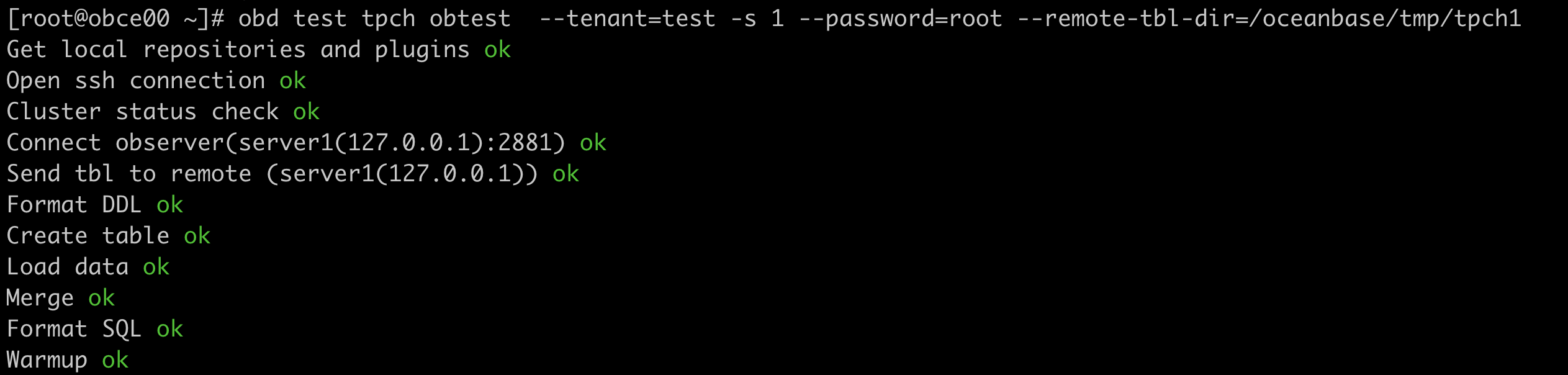
obd test tpch obtest --tenant=test -s 1 --password='******' --remote-tbl-dir=/tmp/tpch1
After executing the above command, OBD starts the process, and you can see the progress of each step:

After data import is complete, OBD automatically executes the 22 SQL statements and prints the execution time for each statement along with the total time.