
Install OceanBase Connector/ODBC
After you obtain the installation packages of OceanBase Connector/ODBC for Windows, perform the following operations to install and configure OceanBase Connector/ODBC.
Configure a data source
- Follow the default instructions to install OceanBase Connector/ODBC for Windows.
- Choose Control Panel > System and Security > Administrative Tools > ODBC Data Sources > Drivers. The OceanBase Connector/ODBC driver is displayed on this tab.

- Double-click the driver. Choose User DSN > Add. Select the driver, and click Finish.

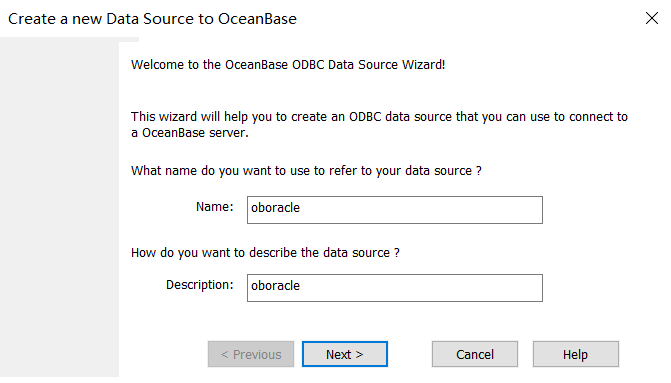
- In the dialog box that appears, specify Name and Description, and click Next.
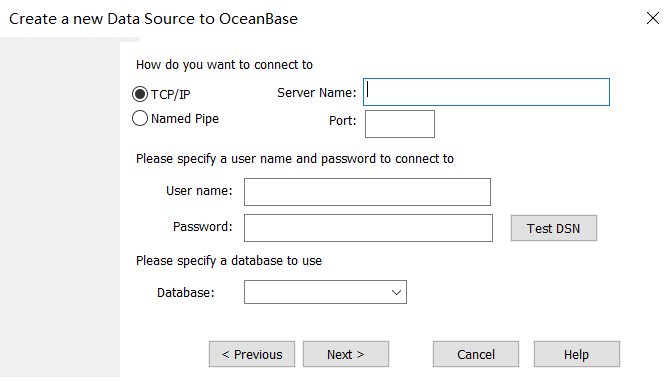
- Specify database connection information, and click Next. In the dialog box that appears, specify the initialization statement, TLS, cursor, and result set as needed.
- Click Finish. The data source is added. Then click OK.

Connection examples
Example 1: Add a data source (for OceanBase Database in Oracle mode)
#include<stdio.h>
#include<assert.h>
#include<windows.h>
#include<sql.h>
#include<sqlext.h>

static void odbc_print_error(SQLSMALLINT HandleType, SQLHANDLE Handle)
{
  SQLCHAR SQLState[6];
  SQLINTEGER NativeError;
  SQLCHAR SQLMessage[SQL_MAX_MESSAGE_LENGTH] = { 0 };
  SQLSMALLINT TextLengthPtr;

  SQLGetDiagRec(HandleType, Handle, 1, SQLState, &NativeError, SQLMessage, SQL_MAX_MESSAGE_LENGTH, &TextLengthPtr);
  fprintf(stdout, "[%s] (%d) %s\n", SQLState, NativeError, SQLMessage);
}

static void ASSERT_CHECK(SQLSMALLINT HandleType, SQLHANDLE Handle, SQLRETURN rcode)
{
  if(rcode != SQL_SUCCESS && rcode != SQL_SUCCESS_WITH_INFO){
    odbc_print_error(HandleType, Handle);
    assert(0);
  }
}

int main()
{
  HENV henv;
  SQLCHAR OutConnStr[255];
  SQLSMALLINT OutConnStrLen;

  // Apply for an environment handle.
  SQLRETURN rcode = SQLAllocHandle(SQL_HANDLE_ENV, SQL_NULL_HANDLE, &henv);
  ASSERT_CHECK(SQL_HANDLE_ENV, henv, rcode);

  // Set the environment attributes of the ODBC version.
  rcode = SQLSetEnvAttr(henv, SQL_ATTR_ODBC_VERSION, (void *)SQL_OV_ODBC3, 0);
  ASSERT_CHECK(SQL_HANDLE_ENV, henv, rcode);

  // Allocate a connection handle.
  SQLHDBC hdbc; rcode = SQLAllocHandle(SQL_HANDLE_DBC, henv, &hdbc);
  ASSERT_CHECK(SQL_HANDLE_DBC, hdbc, rcode);

  // Connect to the data source.
  //char* mydriver = (char*)"Driver={OceanBase ODBC 2.0 Driver};Server=xxx.xxx.xxx.xxx;Port=38884;Database=test;User=xxx@oracle;Password=xxx;Option=3;";
  //rcode = SQLDriverConnect(hdbc, NULL, (SQLCHAR*)mydriver, strlen((char*)mydriver) + 1, OutConnStr, 255, &OutConnStrLen, SQL_DRIVER_NOPROMPT);
  rcode = SQLConnect(hdbc, (SQLCHAR *)"oboracle", SQL_NTS, (SQLCHAR *)"test@oracle", SQL_NTS, (SQLCHAR *)"test", SQL_NTS);
  ASSERT_CHECK(SQL_HANDLE_DBC, hdbc, rcode);

  // Create an SQL statement handle.
  SQLHSTMT stmt;
  rcode = SQLAllocHandle(SQL_HANDLE_STMT, hdbc, &stmt);
  ASSERT_CHECK(SQL_HANDLE_STMT, stmt, rcode);

  // Execute the SQL statement.
  rcode = SQLExecDirect(stmt, (SQLCHAR*)"select 1, 'obodbc', 88 from dual", SQL_NTS);
  ASSERT_CHECK(SQL_HANDLE_STMT, stmt, rcode);

  // Bind and obtain data items.
  SQLINTEGER res = SQL_NTS;
  SQLCHAR name[128];
  SQLINTEGER age;
  SQLBindCol(stmt, 2, SQL_C_CHAR, name, sizeof(name), &res);
  SQLBindCol(stmt, 3, SQL_C_SLONG, &age, sizeof(age), &res);
  while ((rcode = SQLFetch(stmt)) != SQL_NO_DATA_FOUND)
  {
    if (rcode == SQL_ERROR) {
      printf("sql error!\n");
    } else {
      printf("name:%s, age:%ld\n", name, age);
    }
  }

  // Release resource handles.
  SQLFreeHandle(SQL_HANDLE_STMT, stmt);
  SQLDisconnect(hdbc);
  SQLFreeHandle(SQL_HANDLE_DBC, hdbc);
  SQLFreeHandle(SQL_HANDLE_ENV, henv);
  return 0;
}
Example 2: Install OceanBase Connector/ODBC without adding a data source (which will be specified in the code)
#include<stdio.h>
#include<assert.h>
#include<windows.h>
#include<sql.h>
#include<sqlext.h>

static void odbc_print_error(SQLSMALLINT HandleType, SQLHANDLE Handle)
{
  SQLCHAR SQLState[6];
  SQLINTEGER NativeError;
  SQLCHAR SQLMessage[SQL_MAX_MESSAGE_LENGTH] = { 0 };
  SQLSMALLINT TextLengthPtr;

  SQLGetDiagRec(HandleType, Handle, 1, SQLState, &NativeError, SQLMessage, SQL_MAX_MESSAGE_LENGTH, &TextLengthPtr);
  fprintf(stdout, "[%s] (%d) %s\n", SQLState, NativeError, SQLMessage);
}

static void ASSERT_CHECK(SQLSMALLINT HandleType, SQLHANDLE Handle, SQLRETURN rcode)
{
  if(rcode != SQL_SUCCESS && rcode != SQL_SUCCESS_WITH_INFO){
    odbc_print_error(HandleType, Handle);
    assert(0);
  }
}

int main()
{
  HENV henv;
  SQLCHAR OutConnStr[255];
  SQLSMALLINT OutConnStrLen;

  // Apply for an environment handle.
  SQLRETURN rcode = SQLAllocHandle(SQL_HANDLE_ENV, SQL_NULL_HANDLE, &henv);
  ASSERT_CHECK(SQL_HANDLE_ENV, henv, rcode);

  // Set the environment attributes of the ODBC version.
  rcode = SQLSetEnvAttr(henv, SQL_ATTR_ODBC_VERSION, (void *)SQL_OV_ODBC3, 0);
  ASSERT_CHECK(SQL_HANDLE_ENV, henv, rcode);

  // Allocate a connection handle.
  SQLHDBC hdbc; rcode = SQLAllocHandle(SQL_HANDLE_DBC, henv, &hdbc);
  ASSERT_CHECK(SQL_HANDLE_DBC, hdbc, rcode);

  // Connect to the data source.
  char* mydriver = (char*)"Driver={OceanBase ODBC 2.0 Driver};Server=xxx.xxx.xxx.xxx;Port=38884;Database=test;User=xxx@oracle;Password=xxx;Option=3;";
  rcode = SQLDriverConnect(hdbc, NULL, (SQLCHAR*)mydriver, strlen((char*)mydriver) + 1, OutConnStr, 255, &OutConnStrLen, SQL_DRIVER_NOPROMPT);
  //rcode = SQLConnect(hdbc, (SQLCHAR *)"oboracle", SQL_NTS, (SQLCHAR *)"test@oracle", SQL_NTS, (SQLCHAR *)"test", SQL_NTS);
  ASSERT_CHECK(SQL_HANDLE_DBC, hdbc, rcode);

  // Create an SQL statement handle.
  SQLHSTMT stmt;
  rcode = SQLAllocHandle(SQL_HANDLE_STMT, hdbc, &stmt);
  ASSERT_CHECK(SQL_HANDLE_STMT, stmt, rcode);

  // Execute the SQL statement.
  rcode = SQLExecDirect(stmt, (SQLCHAR*)"select 1, 'obodbc', 88 from dual", SQL_NTS);
  ASSERT_CHECK(SQL_HANDLE_STMT, stmt, rcode);

  // Bind and obtain data items.
  SQLINTEGER res = SQL_NTS;
  SQLCHAR name[128];
  SQLINTEGER age;
  SQLBindCol(stmt, 2, SQL_C_CHAR, name, sizeof(name), &res);
  SQLBindCol(stmt, 3, SQL_C_SLONG, &age, sizeof(age), &res);
  while ((rcode = SQLFetch(stmt)) != SQL_NO_DATA_FOUND)
  {
    if (rcode == SQL_ERROR) {
      printf("sql error!\n");
    } else {
      printf("name:%s, age:%ld\n", name, age);
    }
  }

  // Release resource handles.
  SQLFreeHandle(SQL_HANDLE_STMT, stmt);
  SQLDisconnect(hdbc);
  SQLFreeHandle(SQL_HANDLE_DBC, hdbc);
  SQLFreeHandle(SQL_HANDLE_ENV, henv);
  return 0;
}