
Before you run OBLOADER & OBDUMPER, make sure that you have the appropriate operating environment and privileges.
Operating environment configurations
Configuration item |
Requirements |
|---|---|
| OS | Linux, macOS, and Windows 7 or later |
| Java environment | Install Oracle JDK 1.8.0_3xx, and configure the JAVA_HOME environment variable. |
| Character sets | We recommend that you use UTF-8 as the file character set. |
| Java virtual machine (JVM) parameters | Modify the JVM memory parameter in the bin/obloader and bin/obdumper scripts to avoid JVM memory insufficiency. |
Note
Some minor versions of OpenJDK 1.8 have serious garbage collection (GC) bugs. OBLOADER & OBDUMPER may run out of memory or hang. Therefore, you need to install the latest minor version of OpenJDK 1.8.
Configure the HDFS dependency
OBLOADER and OBDUMPER V4.3.1 depend on Hadoop components. Before you use this version on Windows, configure the HDFS dependency as follows. Otherwise, the error HADOOP_HOME and hadoop.home.dir are unset. occurs.
Go to the Code page. Choose Code > Download ZIP in the upper-right corner to download the .zip package.
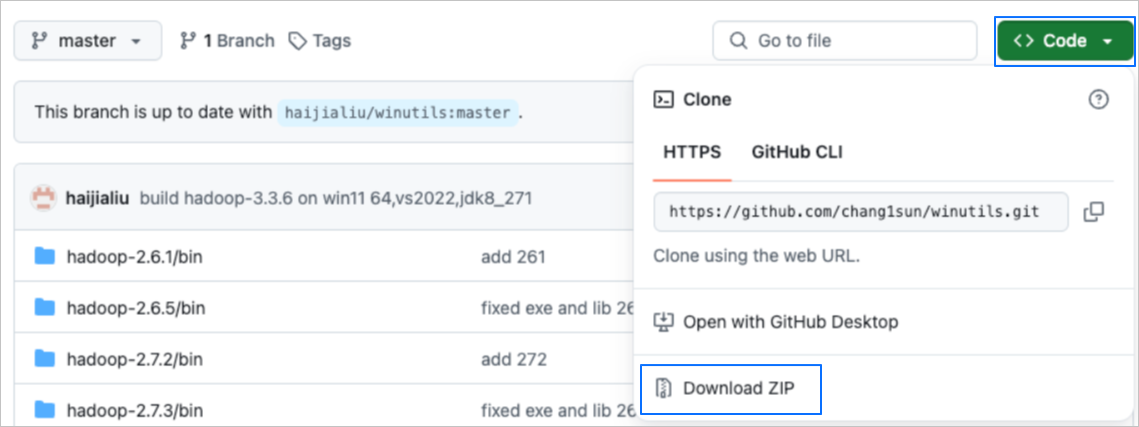
Decompress the package and copy the current path.
The following steps use
C:\User\chang\winutilsas an example. Replace it with the actual path.Configure the settings by using either of the following methods:
Method 1: Directly set the system environment variable:
HADOOP_HOME = C:\User\chang\winutils\hadoop-3.3.6. Then, add%HADOOP_HOME%\binto the value of the user variablePath.Method 2: Use Notepad to open the
obdumper.batfile in the<Root directory of the tool>\bin\windows\directory and find the following line:SET PROGRAM_OPTS=%PROGRAM_OPTS% "-Dtool.base.dir=%PARENT_PATH%"Add the following command before or after this line, save the file, and then exit.
SET PROGRAM_OPTS=%PROGRAM_OPTS% "-Dhadoop.home.dir=C:\User\chang\winutils\hadoop-3.3.6"
Run OBLOADER & OBDUMPER again.
Privileges
OBLOADER
When you use OBLOADER to import data to an OceanBase database, the account used to connect to the database must have the privileges to execute the CREATE, SELECT, INSERT, and UPDATE statements. You can view the privileges granted to a user by using the SHOW GRANTS statement. Sample code:
obclient> SHOW GRANTS FOR user1;
+------------------------------------------+
| Grants for user1@%                       |
+------------------------------------------+
| GRANT CREATE ON *.* TO 'user1'           |
| GRANT SELECT ON `db1`.* TO 'user1'       |
| GRANT INSERT ON `db1`.* TO 'user1'       |
| GRANT UPDATE ON `db1`.* TO 'user1'       |
| GRANT SELECT ON `oceanbase`.* TO 'user1' |
+------------------------------------------+
2 rows in set
OBDUMPER
When you use OBDUMPER to export data from an OceanBase database, the account used to connect to the database must have the privileges to execute the CREATE and SELECT statements. You can view the privileges granted to a user by using the SHOW GRANTS statement. Sample code:
obclient> SHOW GRANTS FOR user1;
+------------------------------------------+
| Grants for user1@%                       |
+------------------------------------------+
| GRANT CREATE ON *.* TO 'user1'           |
| GRANT SELECT ON `db1`.* TO 'user1'       |
| GRANT SELECT ON `oceanbase`.* TO 'user1' |
+------------------------------------------+
2 rows in set
Note
For OceanBase Database of a version earlier than V4.0.0, the
--sys-userand--sys-passwordoptions must be specified on the command lines of OBLOADER and OBDUMPER.For more information, see Scenarios and examples in the "OBLOADER" chapter and Scenarios and examples in the "OBDUMPER" chapter.
The
--sys-userand--sys-passwordoptions must be set to the username and password of a user with system table and view query privileges in the sys tenant.For more information about the privileges, see View user privileges, Users and privileges, and Modify user privileges.