OBLOADER & OBDUMPER V4.2.5 released in August 2023 allows you to import data in bypass mode and import files containing duplicate data in Oracle mode of OceanBase Database, and provides preprocessing functions.
Version information
Current version: V4.2.5
Previous version: V4.2.4
Release date: August 9, 2023
Supported OceanBase Database versions
The following table lists the OceanBase Database versions supported by OBLOADER & OBDUMPER V4.2.5.
OceanBase Database mode |
Supported versions |
|---|---|
| Oracle mode | V2.0.x, V2.1.x, V2.2.20, V2.2.30, V2.2.50, V2.2.70, V2.2.71, V2.2.72, V2.2.76, V3.1.x, V3.2.x, V4.0.0, and V4.1.0 |
| MySQL mode | V1.4.70, V1.4.72, V1.4.75, V1.4.78, V1.4.79, V2.2.30, V2.2.50, V2.2.70, V2.2.71, V2.2.72, V2.2.76, V3.1.x, V3.2.x, V4.0.0, and V4.1.0 |
Feature updates
OBLOADER:
- The
--directand--rpc-portoptions are added. You can use these options to specify the RPC port of an OBServer node for bypass import. For more information, see Command-line options of OBLOADER.
- The
When you use OBLOADER to import data in Oracle mode of OceanBase Database, you can specify the
--replace-dataoption to process files that contain duplicate data.OBDUMPER:
- The
--enable-hidden-pkoption is added. It specifies to use a hidden primary key for a table without a primary key to accelerate export. For more information, see Command-line options of OBDUMPER.
- The
OBLOADER and OBDUMPER:
The
ob.sql.modesession variable is added. It allows you to modify thesql_modevariable of a session in MySQL mode of OceanBase Database during import. For more information, see Connection settings.You can access an Amazon Simple Storage Service (S3) bucket from an endpoint.
Preprocessing functions are added, including CHR, NCHR, ASCII, RAWTOHEX, HEXTORAW, and TRUNC. For more information, see Preprocessing functions.
Bug fixes
Fixed an issue that when you use OBLOADER to import a CSV file, empty strings in
enumfields are displayed asNULLvalues.Fixed an issue that when you use OBLOADER to import a DDL definition file, the parsing fails if the
defaultorcommentfield contains comment characters.Fixed an issue that when you use OBLOADER to import a DDL definition file, the import fails if the
--exclude-tableoption is specified.Fixed an issue that when you use OBLOADER to import a PL file, multi-line comments that are empty cannot be processed.
Fixed an issue that when you use OBLOADER to import logs with duplicate primary keys, the imported logs are inaccurate.
Fixed an issue that when you use OBDUMPER to export a data file in the Parquet format, an error is returned if the path contains Hadoop verification files.
Fixed an issue that when you use OBDUMPER to export a file, the
--max-file-sizeoption cannot take effect globally.
Known issues
The exported database object definitions may contain the name of the database to which the object belongs.
OBDUMPER cannot export PL object definitions from OceanBase Database of versions earlier than V2.2.30 in MySQL mode.
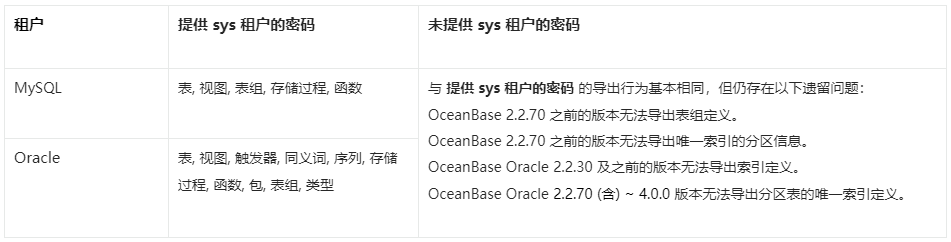
If you do not specify the password of the
systenant on the command line, OBDUMPER cannot export table group definitions from OceanBase Database of versions earlier than V2.2.70.If you do not specify the password of the
systenant on the command line, OBDUMPER cannot export index definitions from OceanBase Database of versions earlier than V2.2.50 in Oracle mode.If you do not specify the password of the
systenant on the command line, OBDUMPER cannot export partition information of unique indexes from OceanBase Database of versions earlier than V2.2.70 in Oracle mode.If you do not specify the password of the
systenant on the command line, OBDUMPER cannot export unique index definitions of partitioned tables from OceanBase Database V2.2.70 and later versions in Oracle mode.When you use OBLOADER to import data, if the specified file format, such as
--sqland--csv, does not match the actual file format, an error occurs.In MySQL mode of OceanBase Database, when you explicitly specify object names, such as the names of tables and views, in a case-sensitive manner to import or export only objects of the case-sensitive names, objects are imported or exported in a case-insensitive manner.
If you forcibly terminate the OBLOADER process during bypass import, tables may be locked.
Considerations
In a CUT file, each data record is stored in an entire line. When you specify the
--cutoption on the OBDUMPER command line, if the exported data contains a single-character field separator, OBDUMPER escapes special characters in the data, such as separators, carriage returns, and line breaks. For example, if the data isabc|defand the separator is|, the exported data isabc\|def.When you specify the
--cutoption on the OBLOADER command line, do not use the--trail-delimiteroption if no field separator or separator string exists at the end of the data line in the file. Otherwise, a serious error occurs on OBLOADER.If you specify the
--logical-databaseoption on the command line, the definition of a random physical database shard is exported and the shard cannot be directly imported into the database. You need to manually convert the exported physical shard to a logical one before you import it to the database for business use.When you specify the
--partitionoption on the command line to export data in a partition, you need to specify the name of the subpartition for a composite partitioned table. OBDUMPER cannot export data in a partition of a composite partitioned table. If the specified partition name does not exist, OBDUMPER returns an error.If you specify the
--add-extra-messageoption on the command line to export table definitions, OBDUMPER exports the name of the table group to which each table belongs. This option depends on privileges of thesystenant. If OBDUMPER does not have privileges of thesystenant, do not specify this option.Before you use OBDUMPER & OBLOADER on OceanBase Database V3.2.4 or later, set the system parameter
open_cursorsto a large value. Otherwise, an error may occur during the import or export. After the data is imported or exported, reset the system parameter to the initial value, for example,ALTER SYSTEM SET open_cursors = 65535;.If the schema of a table has been changed in OceanBase Database V4.0.0 or later, you cannot use OBDUMPER to export the baseline data, namely the consistent snapshot data, obtained after the last major compaction. You can manually initiate a major compaction and then re-export the most recent baseline data.
When you use OBDUMPER of a version earlier than V4.2.0 to export data from a MySQL tenant of OceanBase Database, the Java Database Connectivity (JDBC) driver converts the zero date and time values in the database into NULL. If a column has a NOT NULL constraint, an error is reported during the export. OBDUMPER V4.2.0 can export zero date and time values, but cannot identify whether the original data is NULL or zero values during export and forcibly converts the data into zero values by default. In addition, exported zero values of the DATETIME and TIMESTAMP data types may be distorted into non-zero approximate values. If the
sql_modevariable in the database is specified with the NO_ZERO_DATE or NO_ZERO_IN_DATE constraint, an error is reported when zero-value data is exported. In a MySQL tenant of OceanBase Database, data types that involve the preceding zero-value issues include DATE, DATETIME, TIME, YEAR, and TIMESTAMP.Feature differences in schema export, which are shown in the following figure.