
Features
OBDUMPER provides the following features:
Allows you to export database object definitions and table data to local disks, Alibaba Cloud Object Storage Service (OSS), and Amazon Simple Storage Service (S3).
Allows you to export table data to files in the CSV, INSERT SQL, ORC, or Parquet format.
Allows you to specify a partition name to export only the data in the specified table partition.
Allows you to specify global filters to export only the data that meets the specified conditions.
Allows you to configure data preprocessing rules to convert and desensitize data before export.
Allows you to specify system change numbers (SCNs) or timestamps to export only the historical snapshot data of desired transaction points or time points.
Allows you to export data from a follower replica, which is different from a standby cluster, of an OceanBase cluster.
Allows you to specify a custom query statement to export only the result set of the query statement.
Allows you to use the latest snapshot version to export globally consistent data without locking tables.
Supports encryption of sensitive parameters specified in commands, such as the database account and password and cloud storage account and password.
Considerations
For more information about the standard CSV format, see the RFC 4180 specifications. We recommend that you export data in strict accordance with the RFC 4180 specifications.
You need to modify the VM memory parameter in the script when you try to export a large amount of data.
The object names, data file names, and control file names specified by command-line options must be capitalized in the same way. By default, uppercase letters are used in Oracle mode, and lowercase letters are used in MySQL mode. If table names are case-sensitive, enclose them in brackets ([ ]). For example,
--table '[test]'indicates the table namedtest, and the file name is in the format oftest.group.sequence.suffix.--table '[TEST]'indicates the table namedTEST, and the file name is in the format ofTEST.group.sequence.suffix.All exported data files are named in the
table.group.sequence.suffixformat.If a foreign key contains several columns, the order of the columns might change after the export. Example: FOREIGN KEY(c1,c2) REFERENCE (c1,c2).
OceanBase Database V1.4.72 in MySQL mode does not allow you to export the definitions of unique prefix indexes, for example, UNIQUE(c1(10)).
OceanBase Database V1.4.x in MySQL mode does not allow you to export the definitions of generated columns. For example, columns generated by using the GENERATED ALWAYS AS (expr) statement cannot be exported.
OceanBase Database V2.2.7x in MySQL mode does not allow you to export vertical partitions. For example, partitions created by using the PARTITION BY COLUMN statement cannot be exported.
OceanBase Database V2.2.7x in MySQL mode does not allow you to export the definitions of SYNONYM objects.
OceanBase Database V2.2.7x in MySQL mode does not allow you to export columns that store index data. For example, columns in STORING(COLUMN_LIST) cannot be exported.
OceanBase Database in Oracle mode does not allow you to export data of the INTERVAL DAY(2) TO SECOND(0) type.
On the Windows OS, the exclamation point (!) cannot be used as a separator. An object name in the database cannot contain the following special characters: \ / : * ? " < > |. Otherwise, neither the database object definitions nor the table data can be exported.
By default, when the table data to be exported contains a generated column, the data of the generated column is exported. You can use the
--exclude-virtual-columnsoption to specify not to export the data of the generated column.When you use the
--date-value-format,--time-value-format,--datetime-value-format,--timestamp-value-format,--timestamp-tz-value-format, or--timestamp-ltz-value-formatoption, specify the time value in the correct format. Otherwise, an error will be reported during data export.When you export a CUT file, if a field contains the specified field separator, the separator character in the field is escaped. For example, if the content of a field is
abc|defand | is the field separator (--column-splitter "|"), the exported field is converted toabc\|def.When you specify the
--logical-databaseoption on the command line, the definition of a random physical database shard is exported and the shard cannot be directly imported into the database. You need to manually convert the exported physical shard to a logical one before you import it to the database for business use.When you specify the
--partitionoption on the command line to export data in a partition, you need to specify the name of the subpartition for a composite partitioned table. OBDUMPER cannot export data in a partition of a composite partitioned table. If the specified partition name does not exist, OBDUMPER returns an error.When you specify the
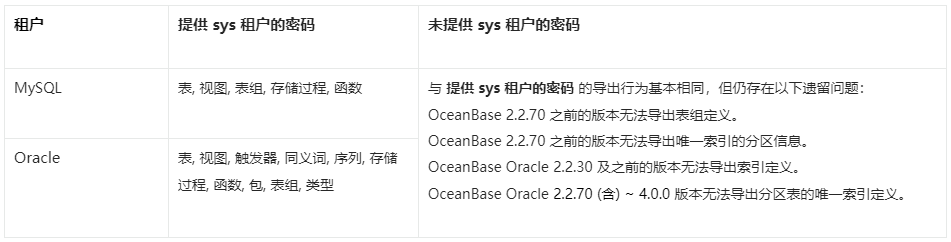
--add-extra-messageoption on the command line to export table definitions, OBDUMPER exports the name of the table group to which each table belongs. This option depends on privileges of the sys tenant. If OBDUMPER does not have privileges of the sys tenant, do not specify this option.The
--no-sysoption indicates that you cannot provide the password of the sys tenant in a private cloud environment. In OBLOADER & OBDUMPER V3.3.0 and later versions, public cloud environments and private cloud environments are treated differently. The--public-cloudoption is used only for public cloud environments, and the--no-sysoption is used only for private cloud environments.Before you use OBDUMPER to export data from OceanBase Database V3.2.4 or later, set the system parameter
open_cursorsto a large value. Otherwise, an error may occur during the export. After the data is exported, reset the system parameter to the initial value, for example,ALTER SYSTEM SET open_cursors = 65535;.If the schema of a table has been changed in OceanBase Database V4.0.0 or later, you cannot use OBDUMPER to export the baseline data, namely the consistent snapshot data, obtained after the last major compaction. You can manually initiate a major compaction and then re-export the most recent baseline data.
When you import DDL statements, use the
--mixoption instead of the--ddloption if-fis set to a non-standard directory structure (a directory structure not generated by OBDUMPER). When the--sqloption is specified, for data in the file data format, ensure that one statement inserts only one record. Otherwise, specify--mixinstead of--sqlto import the data.When you use OBDUMPER of a version earlier than V4.2.0 to export data from a MySQL tenant of OceanBase Database, the Java Database Connectivity (JDBC) driver converts the zero date and time values in the database to NULL. If a column has a NOT NULL constraint, an error is reported during the export. OBDUMPER V4.2.0 can export zero date and time values, but cannot identify whether the original data is NULL or zero values during export and forcibly converts the data to zero values by default. In addition, exported zero values of the DATETIME and TIMESTAMP data types may be distorted into non-zero approximate values. If the
sql_modevariable in the database is specified with the NO_ZERO_DATE or NO_ZERO_IN_DATE constraint, an error is reported when zero-value data is exported. In a MySQL tenant of OceanBase Database, data types that involve the preceding zero-value issues include DATE, DATETIME, TIME, YEAR, and TIMESTAMP.Feature differences in schema export
Flashback export
To use the flashback export feature, you need to set the system variable undo_retention to an appropriate value.
Assume that t1 is the point in time of the Undo operation, and t2 = t1 + 900s. You can find data within the [t1, t2] range when you execute a query at t2. After you set undo_retention, the current session takes effect only on the data that is generated after t1. The default value of this system variable is 0, in seconds. Sample statement for setting the undo_retention variable:
SET global undo_retention=900;
Currently, you can only query the
v$ob_timestamp_serviceview in the sys tenant to obtain the valid OceanBase SCN.You can query data after the latest major compaction at a specific point in time. For example, if you started a major compaction at t1, the earliest data that you can query is the data at t1.
If the table that you want to query has been deleted and is in the recycle bin, you must restore it from the recycle bin.
Flashback queries are affected by minor compactions. If a minor compaction has been performed and the
undo_retentionvariable is not specified, flashback queries cannot be performed.After the
undo_retentionvariable is set, you can query data within the time range of [t1, t1 +undo_retention], where t1 is the point in time when the minor compaction occurs.