
OceanBase Cloud supports creating primary instances on Alibaba Cloud and standby instances on Huawei Cloud to implement primary and standby databases across clouds. This ensures that businesses can quickly switch to other cloud environments when a single cloud service provider or region fails, thereby ensuring high reliability and business continuity.
Overview
A cross-cloud primary-standby database allows you to create a standby instance of a database instance (primary database) in another cloud service provider and synchronize data to the standby instance.
A cross-cloud primary-standby database has the following characteristics:
Strong disaster recovery capability: Deploying the primary and standby databases in geographically separated regions can effectively mitigate regional disasters (such as natural disasters and data center failures). Even if the primary instance deployed in one cloud service provider fails, the standby instance deployed in another cloud service provider can quickly take over, reducing the impact on business continuity.
High service availability: Cross-cloud deployment reduces the risk of service interruptions caused by internal issues within a single cloud service provider, ensuring that you can quickly switch to a standby database in another cloud platform when a failure occurs, maintaining business continuity.
Compliance and data governance: For enterprises with specific regulatory requirements, cross-cloud deployment offers greater flexibility, helping them meet data sovereignty and compliance requirements in different countries or regions.
Cost-effectiveness: While cross-cloud deployment may increase management complexity and data synchronization costs, you can flexibly allocate resources across cloud service providers, achieving a better balance between cost and service quality.
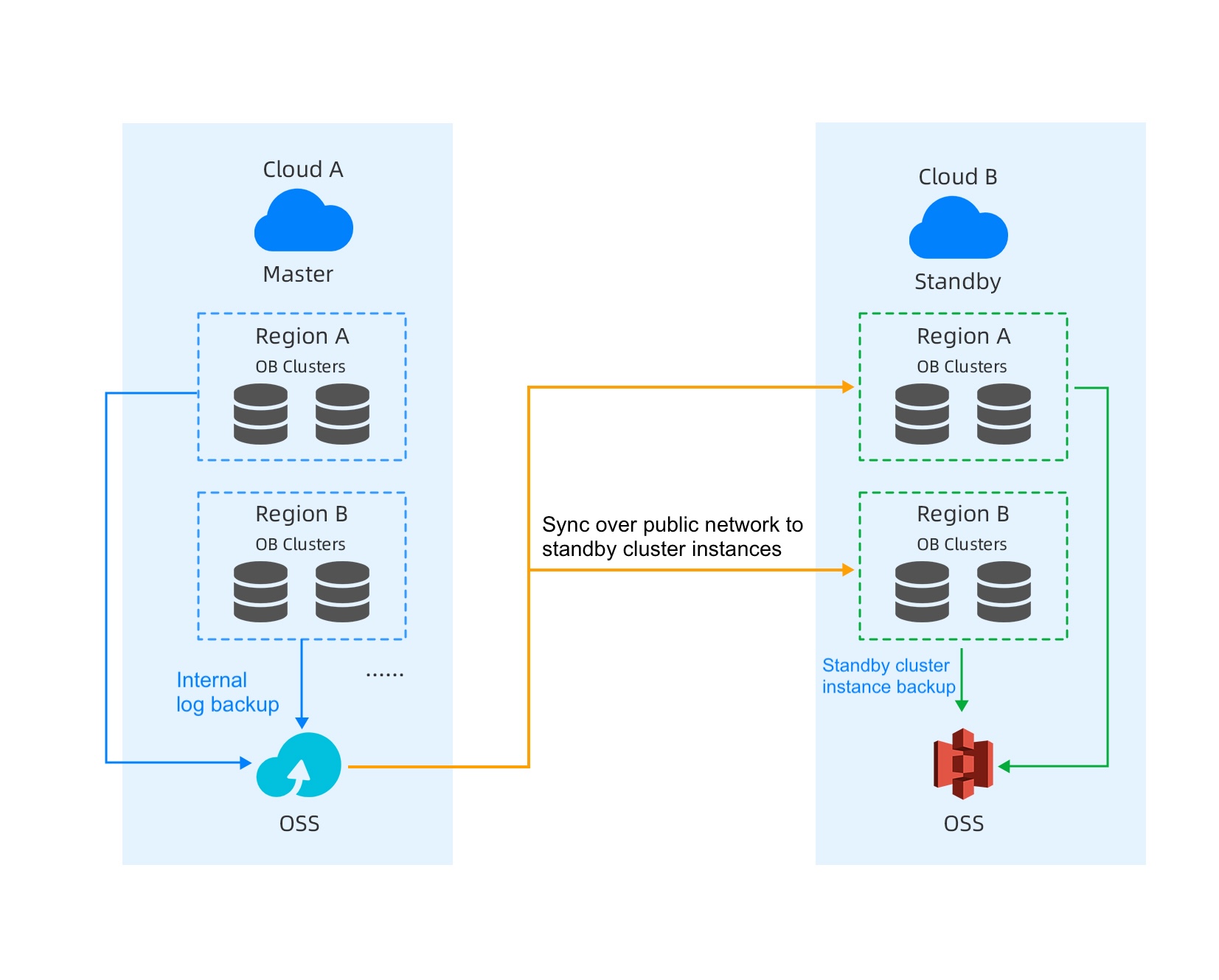
Scenarios
A company is an internet retailer whose core business systems are based on databases, such as order management, customer management, and product inventory. To ensure high availability of business and address risks such as downtime and network failures on a single cloud platform, the company plans to build a cross-cloud primary-standby database architecture to meet high-reliability and low-latency business requirements. It also needs to support fast switching and strong data consistency to ensure that business operations can continue uninterrupted after a failure.
Prerequisites
At present, only instances purchased on the Alibaba Cloud console can be primary instances, and instances on Huawei Cloud can be standby instances.
At present, only transactional instances support cross-cloud primary-standby databases.
Only one standby instance can be created for a primary instance.
You have the project admin and instance admin permissions.
Procedure
Create an Alibaba Cloud instance on the Alibaba Cloud console. For more information, see Purchase an instance.
Log in to the OceanBase Cloud console. If you are creating an instance for the first time, click Go To Create.
In the left-side navigation pane, click Instances.
In the upper-right corner of the page, click Create Database Instance.
Select the required information, such as the service type and instance type, and click Buy Now. Then, select Service Agreement and click Proceed to Checkout. After the payment is successful, view the instance in the instance list.
Grant access permissions to the Alibaba Cloud account.
Log in to the OceanBase Cloud console, and click the icon in the pop-up window to grant access permissions to the Alibaba Cloud account.
Click Log in to Alibaba Cloud console to obtain the main account ID.
Log in to the RAM console, and use an existing or newly created AccessKey. Save your AccessKey ID and AccessKey Secret, and enter them in the corresponding fields on the OceanBase Cloud console.
Enter the AccessKey ID and AccessKey Secret in the pop-up window of the OceanBase Cloud console, and click OK.
Create a Huawei Cloud standby instance. You can create a standby instance in the OceanBase Cloud console or through Huawei Cloud Market. This topic describes how to create a standby instance in the OceanBase Cloud console. For more information, see Create a standby instance for an Alibaba Cloud primary instance.
Click Create Alibaba Cloud Standby Instance. In the pop-up window, select the primary instance for which you want to create a standby instance.
Click Create Standby Instance. The Create Instance page appears. The system automatically selects the same database version, deployment mode, and computing specification for the standby instance as for the primary instance.
The standby instance must have the same instance type, payment method, database version, and deployment mode as the primary instance.
The standby instance can have a different computing specification from the primary instance. The minimum node specification for the standby instance cannot be less than 0.33 times the node specification of the primary instance.
The storage specification for the standby instance cannot be less than that of the primary instance.
Check whether your parameter configurations and purchase quantity are correct. After the check, select the service agreement and click Confirm Order. The instance list page appears, where you can view your instance.
After the primary and standby instances are created, create a tenant in the primary instance and import data into the tenant. The standby instance automatically synchronizes data from the primary instance.