
This topic describes how to view the path of web ODC logs.
View the log path and file of web ODC
Log path
Log in to the host and run the following command to go to the ODC Docker container.
# View the name of the ODC Docker image. docker ps -a --format "{{.Names}}" | grep odc # Go to the ODC Docker container. Assume that the Docker image name is odc. IMAGE_NAME=odc && docker exec -it ${IMAGE_NAME} sh/opt/odc/log/in the Docker container is the log path of web ODC.
Log files
cd /opt/odc/log

sh-4.2# ls -l
total 540
-rw-r--r-- 1 root root   9062 May 13 15:23 gc.log.0.current
-rw-r--r-- 1 root root 523802 May 13 15:23 odc.log
The parameters are described in the following table.
Parameter |
Description |
|---|---|
| odc.log | The application log of odc-server. |
| gc.log | The JVM GC log of odc-server. |
Locate backend logs based on HTTP requests
Step 1: Enable the debugging mode on the browser
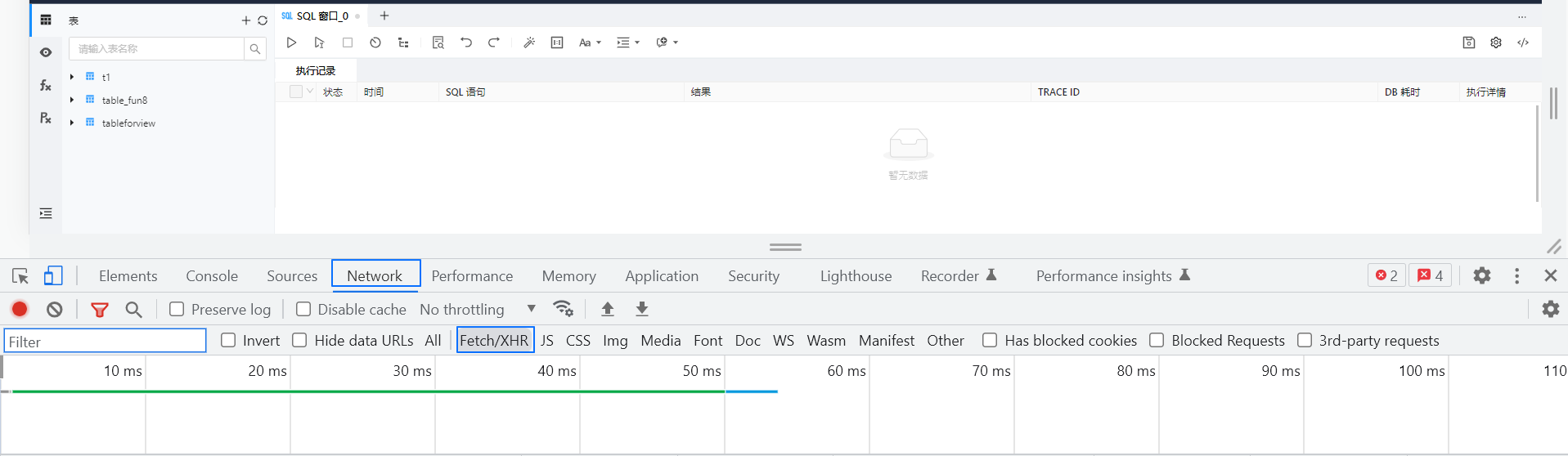
Take Chrome as an example. Press the shortcut key F12, click Network. Click on the XHR link at the bottom of the list to filter the results to only AJAX requests.
Note
ODC adopts an architecture that separates the frontend and the backend. That is, pages and data are separated. Therefore, the interaction between the frontend and backend is carried out by using AJAX requests.
Step 2: Perform operations in ODC and check request responses
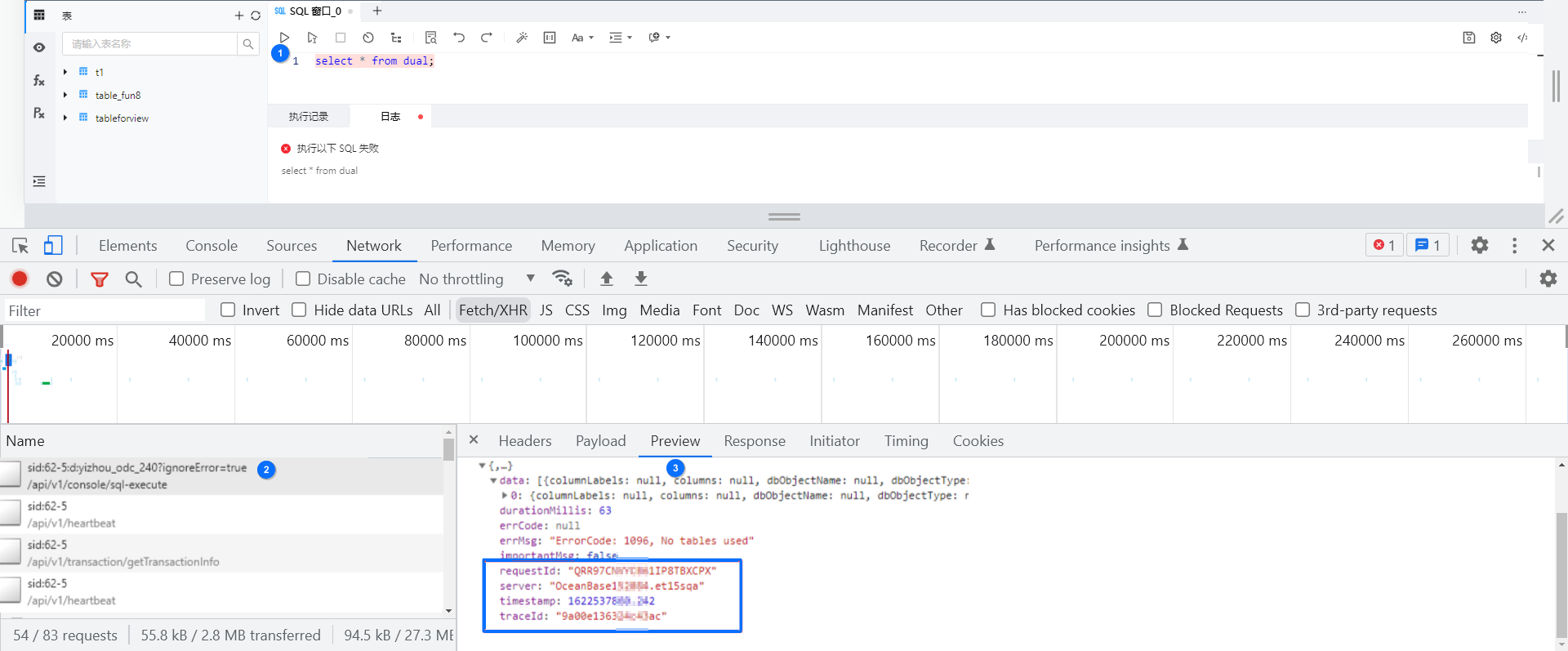
Parameters that exist in responses of all API requests are described in the following table.
Parameter |
Description |
|---|---|
| requestId | The ID generated by the frontend, which is included in the backend log. |
| server | The server name returned by the backend. In multi-node deployment scenarios, this field identifies the server that processes the current request. |
| timestamp | The timestamp when the backend processed the current request. |
| traceId | The random string generated by the backend. Each request corresponds to a unique traceId. |
Step 3: Retrieve backend log files based on the traceId
Retrieve logs from the corresponding server. As shown in the screenshot of Step 2, the hostname is OceanBase*****.et15sqa.
Search for the keyword 9a00e136******ac.
Here is the sample result:
grep 9a00e136324c43ac /opt/odc/log/odc.log
[2021-06-01 16:57:40.305][http-nio-8989-exec-15][9a00e136324c43ac,,QRR97CNVYCB61IP8TBXCPX][INFO][com.alipay.odc.service.OdcConsoleService][56]: sql is executed completely. executeSql=select * from dual;,duration=62(ms)
[2021-06-01 16:57:40.305][http-nio-8989-exec-15][9a00e136324c43ac,,QRR97CNVYCB61IP8TBXCPX][INFO][com.oceanbase.odc.web.trace.TraceOdcResultResponseAdvice][71]: ODC_REQUEST_TRACE, method=POST, URI=http://xxx.xx.xxx.xx:xxxx/api/v1/console/sql-execute/sid:62-5:d:yizhou_odc_240?ignoreError=true, client=xx.xx.xxx.xxx, userId=1000100, result=OdcResult(errCode=null, errMsg=ErrorCode: 1096, No tables used, isImportantMsg=false, timestamp=2021-06-01T16:57:40.242+08:00, durationMillis=63, traceId=9a00e136324c43ac, server=OceanBase152084.et15sqa, requestId=QRR97CNVYCB61IP8TBXCPX), userAgent=Mozilla/5.0 (Windows NT 10.0; Win64; x64) AppleWebKit/537.36 (KHTML, like Gecko) Chrome/90.0.4430.212 Safari/537.36
Example: Retrieve logs that contain the error message
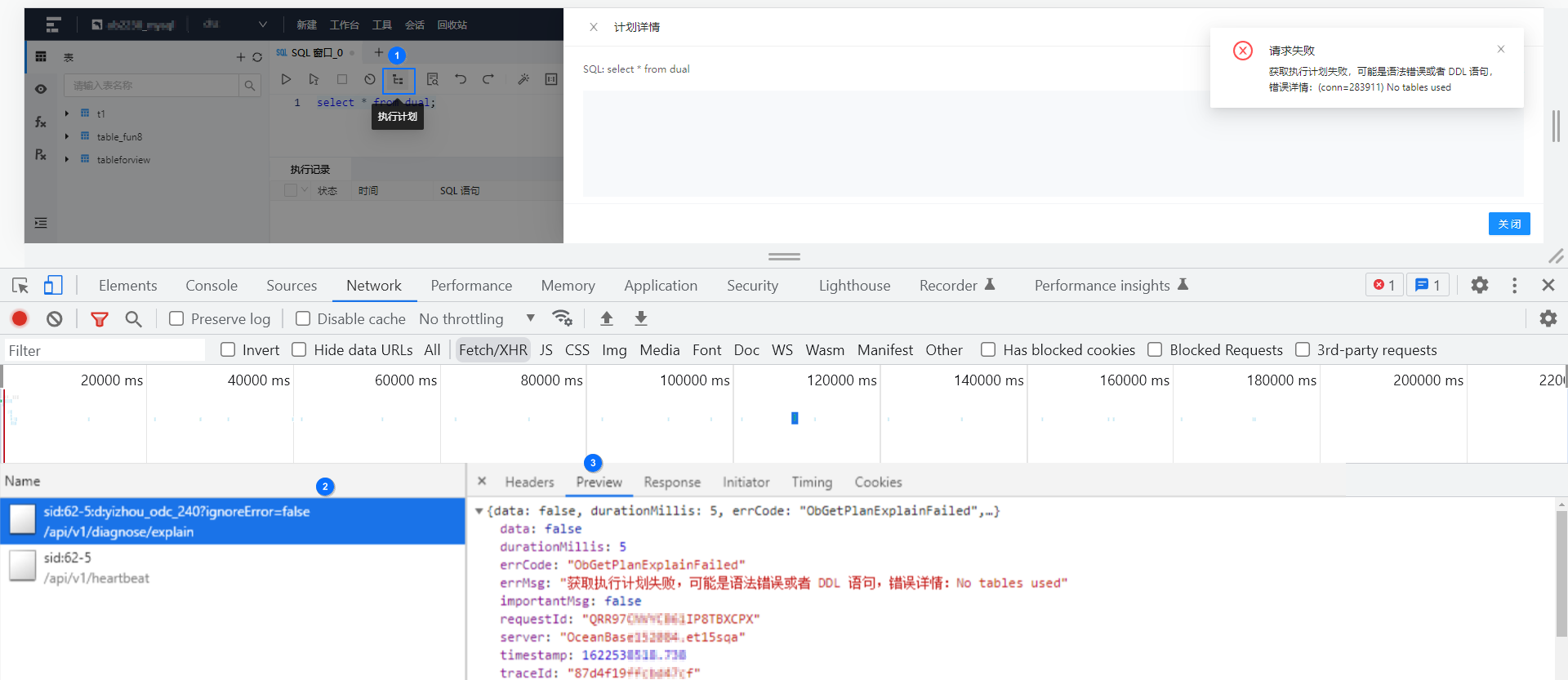
Scenario: The execution plan of an invalid statement cannot be obtained.
Error log:
$grep 87d4f19ffcbd47cf /opt/odc/log/odc.log | grep ODC_FAILED_REQUEST | grep rootReason
[2021-06-01 17:08:38.743][http-nio-8989-exec-17][87d4f19ffcbd47cf,,QRR97CNVYCB61IP8TBXCPX][INFO][com.alipay.odc.controller.GlobalExceptionHandler][180]: ODC_FAILED_REQUEST, requestURI=/api/v1/diagnose/explain/sid:62-5:d:yizhou_odc_240, remoteHost=xx.xx.xxx.xxx, clientAddress=xx.xx.xxx.xxx, result=OdcResult(errCode=ObGetPlanExplainFailed, errMsg=Failed to obtain the execution plan. The syntax or DDL statement may be wrong. Error details: No tables used, isImportantMsg=false, timestamp=2021-06-01T17:08:38.738+08:00, durationMillis=4, traceId=87d4f19ffcbd47cf, server=OceanBase152084.et15sqa, requestId=null), exceptionType=ObException, message=No tables used, rootReason=com.alipay.odc.odcsdk.sdk.resourcedialect.exception.ObException: Failed to obtain the execution plan. The syntax or DDL statement may be wrong. Error details: No tables used at com.alipay.odc.odcsdk.sdk.resourcedialect.exception.ObException.executeFailed(ObException.java:51)
Notice
The log line containing the ODC_FAILED_REQUEST keyword provides the rootReason information (including abnormal code lines), which helps you locate the issue. Root reason information in the error log: rootReason =com.alipay.odc.odcsdk.sdk.resourcedialect.exception.ObException: Failed to obtain the execution plan. The syntax or DDL statement may be wrong. Error details: No tables used at com.alipay.odc.odcsdk.sdk.resourcedialect.exception.ObException.executeFailed(ObException.java:51)
For an unexpected exception, ODC also logs the complete exception stack, as shown in the following example:
[2021-03-08 17:05:42.675][http-nio-8989-exec-4][ERROR][com.alipay.odc.odcsdk.sdk.resourcedialect.command.sql.ExecuteSqlOneByOneCommand][139]:fail to recognize sql type, sql = flashback table odc_myapp20183253223_238930.__recycle_$_3_1613445194315049880 to before drop
com.alibaba.druid.sql.parser.ParserException: syntax error, error in :'back table odc_myapp20183253223_238', expect IDENTIFIER, actual IDENTIFIER pos 9, line 1, column 10, token IDENTIFIER null
        at com.alibaba.druid.sql.parser.SQLParser.printError(SQLParser.java:344) ~[druid-1.1.23.jar!/:1.1.23]
        at com.alibaba.druid.sql.parser.SQLStatementParser.parseStatementList(SQLStatementParser.java:532) ~[druid-1.1.23.jar!/:1.1.23]
        at com.alibaba.druid.sql.parser.SQLStatementParser.parseStatementList(SQLStatementParser.java:171) ~[druid-1.1.23.jar!/:1.1.23]
        at com.alipay.odc.odcsdk.sql.OdcSqlParser.parseStatements(OdcSqlParser.java:99) ~[ob-odc-sdk-2.4.0-SNAPSHOT.jar!/:?]
        at com.alipay.odc.odcsdk.sql.OdcSqlParser.<init>(OdcSqlParser.java:36) ~[ob-odc-sdk-2.4.0-SNAPSHOT.jar!/:?]
        at com.alipay.odc.odcsdk.sdk.resourcedialect.command.sql.ExecuteSqlOneByOneCommand.recognizeSqlType(ExecuteSqlOneByOneCommand.java:130) [ob-odc-sdk-2.4.0-SNAPSHOT.jar!/:?]
        at com.alipay.odc.odcsdk.sdk.resourcedialect.command.sql.ExecuteSqlOneByOneCommand.doExecute(ExecuteSqlOneByOneCommand.java:109) [ob-odc-sdk-2.4.0-SNAPSHOT.jar!/:?]
        at com.alipay.odc.odcsdk.sdk.resourcedialect.command.sql.ExecuteSqlOneByOneCommand.doObMysql(ExecuteSqlOneByOneCommand.java:114) [ob-odc-sdk-2.4.0-SNAPSHOT.jar!/:?]
        at com.alipay.odc.odcsdk.sdk.resourcedialect.command.sql.ExecuteSqlOneByOneCommand.doObMysql(ExecuteSqlOneByOneCommand.java:27) [ob-odc-sdk-2.4.0-SNAPSHOT.jar!/:?]
Common commands for log viewing and analysis
# View the last 10 error requests
grep ODC_FAILED_REQUEST /opt/odc/log/odc.log | tail -10

# View the error log context based on the traceId, including five lines before and after the error
#  -B, --before-context=NUM  print NUM lines of leading context
#  -A, --after-context=NUM   print NUM lines of trailing context
grep 87d4f19ffcbd47cf /opt/odc/log/odc.log -A 5 -B 5