
OceanBase Migration Service (OMS) allows the admin user to modify system parameters and regular users to view system parameters.
Procedure
Log in to the OMS console.
In the left-side navigation pane, choose System Management > System Parameters.
The table on the System Parameters page contains the following columns: Parameter Name, Value, Module, Description, and Modified At.
ParameterDescriptionDefault valueoms.oceanbase.logproxy.pool The configurations of oblogproxy. OMS automatically identifies this parameter. For more information, see oblogproxy parameters. {"default":""} operation_audit_log.enable Specifies whether to enable operation audit. For more information about the operation audit feature, see Operation audit. false operation_audit_log.retention_time The retention period of operation audit records. We recommend that you specify a value in the range of 1to1095, in days.7 oms.captcha.enable Specifies whether to enable the verification code feature. After you change the value to true, an image verification code appears on the login page. The image verification code will time out in 10 minutes. You must enter the image verification code to log in to OMS. A timeout or input error will cause a login failure.false oms.user.password.expiration.date.config The expiration strategy for different user passwords. {"rootRolePasswordValidityDays":90,"rootViewerRolePasswordValidityDays":90,"adminRolePasswordValidityDays":90,"adminViewerRolePasswordValidityDays":90,"userRolePasswordValidityDays":90,"userViewerRolePasswordValidityDays":90,"userPasswordValidityDaysTipsThreshold":30} precheck.timeout.seconds The timeout period of a precheck task, in seconds. 600 mysql.store.metabuilder.filter Specifies whether the MySQL store filters metadata based on the allowlist. Valid values: true: indicates that metadata is filtered based on the allowlist.false: indicates that all metadata is pulled without filtering.
RENAME TABLEstatement, we recommend that you set this parameter totrueto save the time for obtaining metadata. If online DDL statements are used, set this parameter tofalse. Otherwise, subsequent data cannot be consumed after an online DDL statement is executed.false mysql_to_obmysql.charset.mapping The conversion rules for unsupported encodings in the data migration task from MySQL database to OceanBase database MySQL compatible mode. []
For example, [{"charset":"utf16le","mappedCharset":"utf16"},{"charset":"*","mappedCharset":"utf8mb4"}]mysql_to_obmysql.collation.mapping The conversion rule for unsupported collations in the data migration task from MySQL database to OceanBase database MySQL compatible mode. []
For example, [{"collation":"utf16le_general_ci","mappedCollation":"utf16_general_ci"},{"collation":"*","mappedCollation":"utf8mb4_general_ci"}]obmysql41_to_obmysql40_and_earlier.collation.mapping When migrating data from OceanBase Database MySQL compatible mode V4.1.0 to earlier versions of OceanBase Database MySQL compatible mode, this is the conversion rule for unsupported collations in the data migration task. [{"collation":"latin1_swedish_ci","mappedCollation":"utf8mb4_general_ci"}] obmysql41_to_obmysql40_and_earlier.charset.mapping When migrating data from OceanBase Database MySQL compatible mode V4.1.0 to earlier versions of OceanBase Database MySQL compatible mode, this is the conversion rule for unsupported encodings in the data migration task. [{"charset":"latin1","mappedCharset":"utf8mb4"}] alarm.thresholds The alert thresholds. failedLengthOfTimeThreshold: the threshold that triggers a task failure alert when the task execution time exceeds it.syncDelayThreshold: the threshold that triggers an alert when a synchronization task remains in the delayed state longer than this period.syncFailedLengthOfTimeThreshold: the threshold that triggers an alert when a synchronization task remains in the failed state longer than this period.migrateDelayThreshold: the threshold that triggers an alert when a migration task remains in the delayed state longer than this period.migrateFailedLengthOfTimeThreshold: the threshold that triggers an alert when a migration task remains in the failed state longer than this period.alarmRestrainTimeOfMin: the alert suppression time by alert level.HIGH: the high protection level.MEDIUM: the medium protection level.LOW: the low protection level.IGNORE: the no protection level.
{"delayThreshold":{"HIGH":30,"MEDIUM":300,"LOW":900},"failedLengthOfTimeThreshold":{"HIGH":30,"MEDIUM":300,"LOW":900},"alarmRestrainTimeOfMin":{"HIGH":3,"MEDIUM":3,"LOW":3,"IGNORE":100},"rule":"OMS_CONFIG_RULE_ALARM_THRESHOLDS"} ha.config Specifies whether to enable high availability (HA). For more information, see Modify HA configurations. {"enable":false,"enableHost":false,"enableStore":true,"perceiveStoreClientCheckpoint":false,"enableConnector":true,"enableJdbcWriter":true,"subtopicStoreNumberThreshold":5,"checkRequestIntervalSec":600,"checkJdbcWriterIntervalSec":600,"checkHostDownIntervalSec":540,"checkModuleExceptionIntervalSec":240,"clearAbnormalResourceHours":72} migration.db.support_versions The source database versions supported in data migration. The key is the database type, and the value is a regular expression containing supported database versions. "MYSQL": "(5.5\|5.6\|5.7\|8.0).*": indicates that OMS supports MySQL 5.5, 5.6, 5.7, and 8.0."MARIADB": "10.[123456].*": indicates that OMS supports MariaDB 10.1.0 to 10.6.x."ORACLE": "1[01289].*": indicates that OMS supports Oracle 10g, 11g, 12c, 18c, and 19c."DB2": "(9.7\|10.1\|10.5\|11.1\|11.5).*": indicates that OMS supports DB2 LUW for Linux or AIX 9.7, 10.1, 10.5, 11.1, and 11.5."POSTGRESQL": "(10\|11\|12\|13).*": indicates that OMS supports PostgreSQL 10.x, 11.x, 12.x, and 13.x.
{ "MYSQL": "(5.5|5.6|5.7|8.0).*", "MARIADB": "10.[123456].*", "ORACLE": "1[01289].*", "DB2": "(9.7|10.1|10.5|11.1|11.5).*", "POSTGRESQL": "(10|11|12|13).*"} migration.mysql.support_collations The allowlist of collations supported by the source MySQL database in data migration. ["binary","gbk","gb18030","utf8mb4","utf16","utf8"] migration.mysql.support_charsets The allowlist of character sets supported by the source MySQL database in data migration. The value is an array of character sets supported by MySQL. Each element is one MySQL character set. ["binary","gbk","gb18030","utf8mb4","utf16","utf8"] migration.mysql.support_datatypes The allowlist of data types supported by the source MySQL database in data migration. The value is an array of data types supported by MySQL. Each element is one MySQL data type. [] migration.oracle.unsupport_datatypes The blocklist of data types unsupported by the source Oracle database in data migration. The value is an array of data types unsupported by Oracle. Each element is one Oracle data type. ["LONG","LONG RAW","XMLTYPE","UNDEFINED","BFILE","ROWID","UROWID"] ops.dms.logic_name.suffix.pattern The prefix of the DMS-based logical table in the synchronization task. Empty ops.store.max_count_per_subtopic The maximum number of active store processes allowed under a subtopic. The value indicates the maximum number of active store processes allowed. 6 precheck.skippable_flags Specifies whether to skip the precheck. In the case of failed precheck items, if you confirm that they have no impact on the database service, you can set their values to truein theprecheck.skippable_flagsparameter. The value of this parameter is of the JSON type. Example:{ "DB_ACCOUNT_FULL_READ_PRIVILEGE": true, "DB_ACCOUNT_INCR_READ_PRIVILEGE":true, "DB_SERVICE_STATUS":true }
For more information about the key values of different precheck items, see the "Precheck items" section in this topic.{} sync.unified.config The general parameter for an OMS synchronization task. It has the following three parameters: enableHeartBeatRecordToDataHub: specifies whether to deliver the heartbeats.enableHadoopVendorsKafkaServer: specifies whether the Kafka server supports Hadoop.disableIdentificationAlgorithm: specifies whether to disable hostname (domain name) verification for the address of the created Kafka data source that requires SSL authentication. If the SSL root certificate provided does not contain the address of this Kafka data source, you can set this parameter totrueto disable host name verification.checkStoreStartedMinSyncProcess: the minimum synchronization progress to verify whether the store starts. The default value is 3 seconds. You can change the value and the change takes effect immediately.
The full migration starts only when the store is running and the synchronization progress exceeds the specified minimum value.fullJvmMem: the initial memory of the Full-Import component. Default value: 4096 MB.incrJvmMem: the initial memory of the Incr-Sync component. Default value: 2048 MB.
{"enableHeartBeatRecordToDataHub":false,"enableHadoopVendorsKafkaServer":false,"disableIdentificationAlgorithm":false,"checkStoreStartedMinSyncProcess":3,"fullJvmMem":4096,"incrJvmMem":2048} store.topic.mode.config Used to control the construction rules for the Store Subtopic whitelist in OMS data synchronization tasks. - OceanBase Store Subtopic supports non-shared mode and shared mode, where shared mode includes cluster sharing and tenant sharing.
Under theoceanbasefield,modeincludesUN_SHARE(non-shared),OCEANBASE_TENANT(tenant-level), andOCEANBASE_CLUSTER(cluster-level), whilemode_numindicates the maximum subscription granularity under the specified mode.- Cluster Sharing: In this case, Stores under the same cluster are reused, and configurations at the tenant level are ignored; the first created Store will be reused. A new Store is created only when the position of the current Store does not meet requirements.
- Tenant Sharing:
Whenmode_numequals 1, different tenants will create separate Stores.
Whenmode_numis greater than 1, multiple tenants may share a single Store. The number of affected tenants equals the value ofmode_numminus 1, reusing the first created Store. A new Store is created only when the position of the current Store does not meet requirements.
- MySQL Store Subtopic currently only supports subscription by service instance granularity.
Under themysqlfield,modecurrently supportsINSTANCE(instance-level) andUN_SHARE(non-shared). - Oracle Store Subtopic currently only supports subscription by database granularity.
Under theoraclefield,modecurrently supportsDATABASE(database-level) andUN_SHARE(non-shared).
{"oceanbase":{"mode":"OCEANBASE_TENANT","modeNum":1},"mysql":{"mode":"INSTANCE","modeNum":1},"oracle":{"mode":"DATABASE","modeNum":1}} sync.connnector.max.size The maximum number of concurrent data synchronization tasks. 2 sync.ddl.supported The DDL operations supported for data synchronization tasks. {"supportConfigs":{"ADB_SINK":["ALTER_TABLE","ALTER_TABLE_ADD_COLUMN","ALTER_TABLE_MODIFY_COLUMN"],"DATAFLOW_SINK":["ALTER_TABLE","ALTER_TABLE_ADD_COLUMN","ALTER_TABLE_MODIFY_COLUMN"]}} store.logic.config.url.config If the ConfigUrl of OceanBase Database Proxy (ODP) logical tables cannot be directly obtained, you must manually specify it by using this parameter. The key of configUrlMapis{ip}:{port}-{cluster}, and the value is the correct ConfigUrl.{"enabled":false,"configUrlMap":{}} migration.timeout The timeout configuration for the migration object. {"ddl.timeout.in.private.cloud": 120000, "ddl.timeout.in.public.cloud": 600000} migration.db.dest.support_versions The target database versions supported in data migration. {"POLARDB_X_1": {"OB_MYSQL": "(1|2|3).*"}} migration.record.init.batch_size The initial batch size of schema migration objects. 100 is.show.polardb.public Specifies whether to display PolarDB-X 1.0 data sources. false oms.user.task.allocate.count.switch The maximum number of tasks that the admin user can allocate. {"allocateSwitch":false,"totalCount":0} datasource.multi_version.driver.config The supported versions of database drivers. {"MYSQL":{"com.mysql.cj.jdbc.Driver":[],"shade.com.mysql.jdbc.Driver":[]},"POLARDB_X_1":{"com.mysql.cj.jdbc.Driver":[],"shade.com.mysql.jdbc.Driver":[]}} datasource.mysql.driver.should_switch_prompts The prompts displayed when you switch the driver of the MySQL data source. ["CLIENT_PLUGIN_AUTH is required","Unknown system variable 'performance_schema'"] supervisor.config The configuration of the Supervisor component. {"configMap":{}} store.jvm.config.default The default JVM configuration delivered by the store. {"MYSQL_STORE":{"memory":2048,"enable":true},"PG_STORE":{"memory":2048,"enable":true},"enable":true} project.transfer.object.modify.config The configuration of the feature that dynamically adds or removes table objects. {"incrSyncRealtimeThreshold":60,"storeRealtimeThreshold":60,"storePullBackDuration":60,"inheritableStoreConfigKeys":[],"inheritableConnectorConfigKeys":[]} dataflow.query.batch.size The number of objects queried by the Dataflow component at a time. {"POLARDB_X_1":999,"OB_ORACLE":999,"OB_MYSQL":999,"POLARDB_X_2":999,"ORACLE":999,"DEFAULT":10000} struct.transfer.retry.config The parameters related to the retry of a schema migration task. {"enabled":true,"max.attempts":5,"skippable.errors":["Duplicate key name","name is already used by an existing object","already exists"],"non.retryable.errors":["Out of resource","execute ddl while there are some long running ddl on foreign key related table not allowed","fulltext index is disabled by default not supported","out of disk space"],"retryable.errors":{"Ignore":"OMS","Cannot do an operation on a closed statement":"OMS","supervisor restart":"OMS","oms inner service network error":"OMS","Failed to invoke":"OMS","Timeout":"DB","Add index failed":"DB","Entry not exist":"DB","unexpected end of stream":"DB","could not load system variables":"DB","No memory or reach tenant memory limit":"DB"}} struct.transfer.config The parameters related to the execution of a schema migration task. {"dbcat.ob.query.timeout": 15,"ob.parallel": 2,"independent.obj.convert.batch.size": 50,"independent.obj.convert.partition.size": 10,"independent.obj.execute.batch.size": 50,"independent.obj.execute.partition.size": 2,"independent.core.pool.size": 256,"independent.max.pool.size": 256,"independent.queue.capacity": 16,"execute.ob.query.timeout": 15,"execute.ob4x.index.parallel": 2,"global.max.parallel": 300,"project.fetch.max.parallel": 4,"project.fetch.queue.size": 1,"project.execute.max.parallel": 4,"project.execute.queue.size": 1,"project.fetch.idle.interval.ms": 1000,"project.fetch.scan.batch.size": 64,"project.fetch.group.size": 16,"project.fetch.cache.size": 128,"project.execute.idle.interval.ms": 1000,"project.execute.scan.batch.size": 4,"project.execute.group.size": 1,"project.execute.cache.size": 8,"project.async.action.watcher.idle.interval.ms": 1000} oms.auth.saml2.entity-id The entity ID of OMS used in the Security Assertion Markup Language (SAML) 2.0-based authentication service. Empty oms.auth.saml2.metadata-provider The metadata URL of the SAML 2.0-based authentication service. Empty oms.auth.saml2.certificate The certificate used by OMS to verify the information returned by the SAML 2.0-based authentication service. Empty oms.auth.sso-login-url The single sign-on (SSO) URL of OMS used in the SAML 2.0-based authentication service. Empty oms.auth.saml2.redirect-url The OMS URL to which the user is redirected after its identity is authenticated by the SAML 2.0-based authentication service. Empty connector.conflict.log.config The conflict log download configuration for full migration, incremental synchronization, or reverse incremental migration in a data migration task. appendErrorMsgToConflictLog: specifies whether to append the original error information to the conflict log. The default value istrue.maxConflictRecordSizeInKiB: specifies the maximum size of each record in kilobytes (KB). The default value is 1024.maxConflictLogFileSizeInMiB: specifies the maximum size of each log file in mebibytes (MiB). The default value is 100.maxConflictLogFilesToRetain: specifies the maximum number of log files to retain for full migration or incremental migration. The default value is 5.maxDownloadRate: specifies the maximum download rate in megabits per second (MBps). The default value is 1.0.maxDownloadRequestNum: specifies the maximum number of concurrent download requests. The default value is 10.
{"appendErrorMsgToConflictLog":true,"maxConflictRecordSizeInKiB":1024,"maxConflictLogFileSizeInMiB":100,"maxConflictLogFilesToRetain":5,"maxDownloadRate":1.0,"maxDownloadRequestNum":10} invisible_column_uk_enabled.with_pk_or_not_null_uk Specifies whether to add a hidden column for a table with a non-null unique key during data migration from an Oracle database to the Oracle compatible mode of OceanBase Database. falseClick the edit icon in the Value column of the parameter that you want to modify.
In the Modify Value dialog box, set Value or click Reset to Default.
Click OK.
Precheck items
The following table describes precheck items that are controlled by the precheck.skippable_flags parameter. The value true indicates that the key can be skipped, and the value false indicates that the key cannot be skipped. For example, if the precheck of the unique key and foreign key can be skipped, you can specify the following statements to configure the precheck.skippable_flags parameter:
{
  "DB_UK_INDEX": true,
  "DB_FOREIGN_REFERENCE":true,
}
You can log in to the OMS console, go to the details page of a data migration task, and view the names of the precheck items on the Pre-check tab, which are prefixed with "Source-" or "Target-".
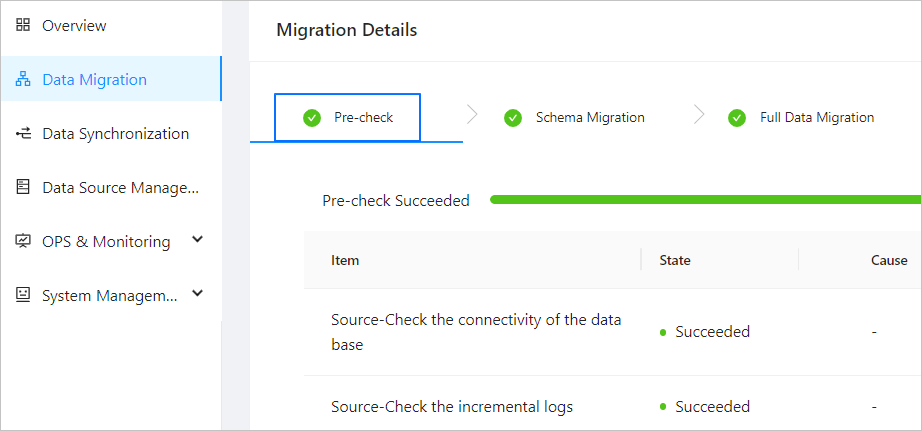
Precheck item |
Enumeration name |
|---|---|
| Check whether the LOB field exceeds 48 MB in length | DB_TABLE_LOB_SIZE |
Check the ROW_MOVEMENT parameter |
ROW_MOVEMENT |
| Check the time zone of the database | DB_TIMEZONE |
| Check the privilege of the account to create a table | DB_ACCOUNT_CREATE_PRIVILEGE |
| Check the minimum privileges for an Oracle account | DB_ORACLE_MIN_PRIVILEGE |
| Check the table type | DB_TABLE_TYPE |
| Check the connectivity of the database | RDB_CONNECT |
| Check the connectivity of the message queue | MQ_CONNECT |
| Check the connectivity of the logical table | LOGIC_DB_CONNECT |
| Check the existence of logical tables | LOGIC_TABLE_EXIST |
| Check the privilege to obtain ConfigUrl | LOGIC_DB_ACCOUNT_INCR_DRC_READ_PRIVILEGE |
| Check the existence of message queue topics | MQ_TOPIC_EXIST |
| Check the existence of TiCDC Kafka topics | TIDB_KAFKA_TOPIC_EXIST |
| Check the existence of DataHub topics for schema synchronization | DATAHUB_TOPIC_NOT_EXIST |
| Check the existence of databases | RDB_SCHEMA_EXIST |
| Check the case-sensitivity for database names | DB_CASE_SENSITIVE |
| Check the database version | DB_VERSION |
Check the wal_level parameter of the database |
DB_WAL_LEVEL |
| Check the SQL mode of the database | DB_SQL_MODE |
| Check the incremental logs | DB_INCR_LOG |
| Check the clock synchronization of the database | DB_TIME_SYNC |
| Check the primary/standby database | DB_MASTER_SLAVE |
| Check the maximum packet size allowed | DB_MAX_ALLOWED_PACKET |
Check the read privilege of the account on oceanbase.memstore |
DB_MEMSTORE_READ_PRIVILEGE |
Check the CREATE privilege of the MySQL account |
DB_MYSQL_CREATE_PRIVILEGE |
| Check whether the MySQL account has authorized OMS to maintain heartbeat data | DB_MYSQL_UPDATE_HEARTBEAT_PRIVILEGE |
Check the privilege of the drc_user user to read the oceanbase database in the sys tenant |
DB_STRUCT_OB_SYSTEM_VIEW_READ_PRIVILEGE |
| Check the connectivity of OceanBase cluster nodes | DB_NODE_CONNECT |
| Check the uniqueness of the table name | DB_TABLE_NAME_UNIQUE |
| Check the existence of tables | RDB_TABLE_EXIST |
| Verify that no LOB field exists | LOB_FIELD_NOT_EXIST |
| Check the schema consistency of logical tables | LOGIC_TABLE_SCHEMA_CONSISTENCY |
| Verify that same target databases and source databases do not constitute a circular replication | LOGIC_TABLE_SAME_SOURCE_AND_DEST |
| Check the schema migration privilege | DB_STRUCT_PRIVILEGE |
| Check the write privilege of the account | DB_ACCOUNT_WRITER_PRIVILEGE |
| Check the full read privilege of the account | DB_ACCOUNT_FULL_READ_PRIVILEGE |
| Check the incremental read privilege of the account | DB_ACCOUNT_INCR_READ_PRIVILEGE |
| Check the character set of the database | DB_CHARSET |
| Check the maximum number of fields in table migration | DB_COLUMN_COUNT |
| Check the database constraints | DB_CONSTRAINT |
| Check the data type of the primary key | DB_DATA_TYPE_INDEX |
| Check the database engine | DB_ENGINE |
| Check the integrity of foreign key dependencies between objects | DB_FOREIGN_REFERENCE |
| Check the function-based unique index table | DB_FUNCTION_BASED |
| Check the full read privilege of the internal accounts | DB_INNER_ACCOUNT_FULL_READ_PRIVILEGE |
| Check the existence of foreign key tables | DB_NO_FOREIGN_KEY |
| Check whether the foreign key constraints of Oracle databases are supported | DB_ORACLE_FK_SUPPORT_CHECK |
| Verify that no pseudocolumn exists | DB_PSEUDO_COLUMN_CHECK |
| Check the data type of the database | DB_DATA_TYPE |
| Check whether the allowlist exceeds 64 KB in length | DB_WHITE_LIST_LENGTH |
| Check the consistency of case-sensitivity configurations for database and table names | DB_LOWER_CASE_TABLE_NAMES |
Check the read privilege on the OceanBase Database system view gv$sysstat |
OB_SYS_STAT_VIEW_READ_PRIV |
| Check the integrity of dependencies between objects | RDB_OBJECT_DEPENDENCY_INTEGRITY |
| Check the limitations on reverse increment from Oracle databases | DB_ORACLE_REVERSE_LIMIT |
| Check the limitations on reverse increment | DB_REVERSE_LIMIT |
| Check whether the same table is used as the source and target | DB_TABLE_CYCLICALLY |
| Check the unique key | DB_UK_INDEX |
Check the ROW_MOVEMENT parameter of the database |
DB_ROW_MOVEMENT |
| Check the unique key of the logical table | LOGIC_TABLE_UK_INDEX |
| Check the full read privilege of the account on logical tables | LOGIC_DB_ACCOUNT_FULL_READ_PRIVILEGE |
| Check the incremental read privilege of the account on logical tables | LOGIC_DB_ACCOUNT_INCR_READ_PRIVILEGE |
| Check the schema consistency | SYNC_SCHEMA_CONSISTENCY |
| Check whether column-level supplemental logging is enabled | DB_COL_LEVEL_SUPPLEMENTAL_LOG |
| Check the read privilege on OceanBase Database system views for full migration or verification | OB_MYSQL_SYS_VIEW_READ_PRIV |
| Check the read privilege on system views | STRUCT_SYS_VIEW_READ_PRIV |
Check the SHOW VIEW privilege of MySQL accounts |
DB_MYSQL_SHOW_VIEW_PRIVILEGE |
Check whether log archiving is enabled for OceanBase Database V4.x
NoticeThis precheck item is available only for physical data sources of OceanBase Database. |
OB_ARCHIVE_LOG |