
This topic describes how to use OceanBase Migration Service (OMS) to migrate data from a PolarDB-X 1.0 database to a MySQL-compatible tenant of OceanBase Database.
Background information
PolarDB-X 1.0 is a cloud-native distributed database independently developed by Alibaba Group. It is compatible with MySQL interaction protocols and supports core capabilities and features of distributed databases, such as database and table sharding, smooth scaling, service upgrading and downgrading, and transparent read/write splitting.
After a task that migrates data from a PolarDB-X 1.0 database to a MySQL-compatible tenant of OceanBase Database is successfully started, the task is automatically deleted. OMS automatically creates tasks to migrate data from the MySQL databases mounted to the PolarDB-X 1.0 database to the MySQL-compatible tenant of OceanBase Database. The number of tasks depends on the number of underlying MySQL instances in the PolarDB-X 1.0 database. OMS supports a maximum of 512 instances.
We recommend that you filter the tasks by tag or task name for operations such as batch start, batch pause, and batch start forward switchover. For more information about batch operations, see Perform batch operations on data migration tasks.
Prerequisites
Ensure that the OMS and the physical instance of RDS are connected to each other.
You have created dedicated database users for data migration in the source PolarDB-X 1.0 database and the target MySQL-compatible tenant of OceanBase Database and granted the corresponding privileges to the users. For more information, see Create a database user.
Limitations
Limitations on the source database:
Do not perform DDL operations for database or schema changes during full migration. Otherwise, data migration tasks may be interrupted.
You can migrate data from a PolarDB-X 1.0 database to a MySQL-compatible tenant of OceanBase Database only in Apsara Stack scenarios.
OMS supports PolarDB-X 1.0 databases of versions 5.2.8, 5.4.2, 5.4.9, and 5.4.12, as well as MySQL databases of versions 5.5, 5.6, 5.7, and 8.0 mounted to PolarDB-X 1.0 databases.
OMS supports the migration of only objects whose database name, table name, and column name are ASCII-encoded and do not contain special characters. The special characters are line breaks, spaces, and the following characters:
. | " ' ` ( ) = ; / & \.When you migrate data from a PolarDB-X 1.0 database to a MySQL-compatible tenant of OceanBase Database, OMS does not support the following cases:
Schema migration or reverse increment
View migration
Inconsistency of the username or password of the MySQL database instance mounted to the source PolarDB-X 1.0 database
OceanBase Database supports the UTF8MB4, GBK, GB18030, binary, and UTF-16 character sets.
Considerations
For the migration of tables without unique keys (tables with primary keys or NOT NULL unique keys), when you restart or resume full migration, OMS automatically truncates the target tables that have been synchronized before a restart or a resumption. However, for the migration of tables without unique keys in a data migration task from a MySQL database mounted to the PolarDB-X 1.0 database to a MySQL-compatible tenant of OceanBase Database, OMS does not automatically truncate the target tables when you restart or resume full migration.
If you do not specify mappings for objects of the PolarDB-X 1.0 database, all data of physical tables is synchronized to physical tables with the same names in the target database. The number of physical tables in the source database is the same as that in the target database.
A difference between the source and target table schemas may result in data consistency. Some known scenarios are described as follows:
When you manually create a table schema in the target database, if the data types of any columns are not supported by OMS, implicit data type conversion may occur in the target database, which causes inconsistent column types between the source and target databases.
If the length of a column in the target database is shorter than that in the source database, the data of this column may be automatically truncated, which causes data inconsistency between the source and target databases.
If you select only Incremental Synchronization when you create the data migration task, OMS requires that the archive logs in the source database be retained for more than 48 hours.
If you select Full Migration and Incremental Synchronization when you create the data migration task, OMS requires that the archive logs in the source database be retained for at least seven days. Otherwise, the data migration task may fail or the data in the source and target databases may be inconsistent because OMS cannot obtain incremental logs.
If the source and target table objects differ only in capitalization of their names, the data migration result may not be as expected because the object names in the source or target database are case-insensitive.
At present, the data migration task does not support tables without a non-null unique key. To avoid duplicate data in case of task restart and other exceptions, we recommend that you configure a non-null unique key for each table.
If you perform incremental synchronization with OceanBase Database as the source or reverse incremental synchronization with OceanBase Database as the target and the database table objects contain UDT columns, the incremental synchronization task may fail due to unsupported UDT columns.
Procedure
Create a data migration task.
Log in to the OMS console.
In the left-side navigation pane, click Data Migration.
On the Data Migration page, click Create Task in the upper-right corner.
On the Create Task page, specify the name of the migration task.
We recommend that you set it to a combination of digits and letters. It must not contain any spaces and cannot exceed 64 characters in length.
Notice
The task name must be a unique identifier in the OMS system.
In the Select Source and Target step, configure the parameters.
 ParameterDescription
Source If you have created a PolarDB-X 1.0 data source, select it from the drop-down list. If not, click New Data Source in the drop-down list and create one in the dialog box that appears on the right. For more information about the parameters, see Create a PolarDB-X 1.0 data source. Target If you have created a physical data source for OceanBase Database in the MySQL compatible mode, select it from the drop-down list. If not, click New Data Source in the drop-down list and create one in the dialog box that appears on the right. For more information, see Create a physical OceanBase data source. Tag Click the text box and select a tag from the drop-down list. You can also click Manage Tags to create, modify, and delete tags. For more information, see Use tags to manage data migration tasks. Note
After the task that migrates data from a PolarDB-X 1.0 database to OceanBase Database in the MySQL compatible mode is successfully started, the task is automatically deleted. You need to add a proper tag to the task.
Click Next. In the Select Migration Type step, specify the migration types for the migration task.
Options for Migration Type are Full Migration and Incremental Synchronization.
Migration typeLimitationsFull migration After a full migration task is started, OMS migrates existing data of tables in the source database to corresponding tables in the target database. Incremental synchronization Changed data in the source database is synchronized to the corresponding tables in the target database after an incremental synchronization task starts. Supported data changes are data addition, modification, and deletion.
Options for DML Synchronization in the Incremental Synchronization section includeINSERT,DELETE, andUPDATE. Select the options as needed. For more information, see Configure DDL/DML synchronization.Click Next. In the Select Migration Objects step, specify the migration objects for the migration task.
At present, you can select migration objects only by using the Specify Objects option. Select the objects to be migrated on the left, and click > to add them to the list on the right. You can select tables of one or more databases as the migration objects.
OMS allows you to import objects by using text, rename objects in the target database, configure row filters, select columns, and remove one or all migration objects.
OperationStepsImport objects - In the Target Object(s) list, click Import Objects in the upper-right corner.
- In the dialog box that appears, click OK.
Notice
This operation will overwrite previous selections. Proceed with caution. - In the Import Objects dialog box, import the objects to be migrated.
You can import CSV files to rename databases/tables and set row filtering conditions. For more information, see Download and import the settings of migration objects. - Click Validate.
- After the validation succeeds, click OK.
Rename objects OMS allows you to rename migration objects. For more information, see Rename a migration or synchronization object. Configure settings OMS allows you to configure row filters and specify columns to be migrated. - Hover the pointer over the target object in the right-side list of the selection area.
- Click Settings that appears.
- In the Settings dialog box, you can perform the following operations:
-
In the Row Filters section, configure row filters by entering WHERE clauses of standard SQL statements. For more information, see Filter data by using SQL conditions.
- In the Select Columns section, select the columns to be migrated. For more information, see Column filtering.
Remove one or all objects OMS allows you to remove one or all objects to be migrated to the target database during data mapping. - To remove one migration object:
In the Target Object(s) list, move the pointer over the target object and click Remove. - To remove all migration objects:
In the Target Object(s) list, click Remove All in the upper-right corner. In the dialog box that appears, click OK.
Click Next. On the Migration Options page, configure the parameters.
Full migration
The following parameters are displayed only if you have selected Full Migration in the Select Migration Type step.
ParameterDescriptionFull Migration Rate Limit You can choose whether to limit the full migration rate as needed. If you choose to limit it, you must specify the RPS and BPS. The RPS specifies the maximum rows of data migrated to the target database per second during full migration, and the BPS specifies the maximum amount of data in bytes migrated to the target database per second during full migration. Note
The RPS and BPS values specified here are only for throttling. The actual full migration performance is subject to factors such as the settings of the source and target databases and the instance specifications.
Full Migration Resource Configuration You can select Small, Medium, or Large to use the corresponding default values of Read Concurrency, Write Concurrency, and Memory. You can also customize the resource configurations for full migration. By setting the resource configuration for the Full-Import component, you can limit the resource consumption of a task in the full migration phase. Notice
In the case of custom configurations, the minimum value is
1, and only integers are supported.Handle Non-empty Tables in Target Database Valid values: Ignore and Stop Migration. - If you select Ignore, when the data to be inserted conflicts with the existing data of a target table, OMS retains the existing data and records the conflict data.
Notice
If you select Ignore, data is pulled in IN mode for full verification. In this case, the scenario where the target table contains more data than the source table cannot be verified, and the verification efficiency will be decreased.
- If you select Stop Migration and a target table contains data, an error is returned during full migration, indicating that the migration is not allowed. In this case, you must clear the data in the target table before you can continue with the migration.
Notice
After an error is returned, if you click Resume in the dialog box, OMS ignores this error and continues to migrate data. Proceed with caution.
- If you select Ignore, when the data to be inserted conflicts with the existing data of a target table, OMS retains the existing data and records the conflict data.
Incremental synchronization
The following parameters are displayed only if you have selected Incremental Synchronization in the Select Migration Type step.
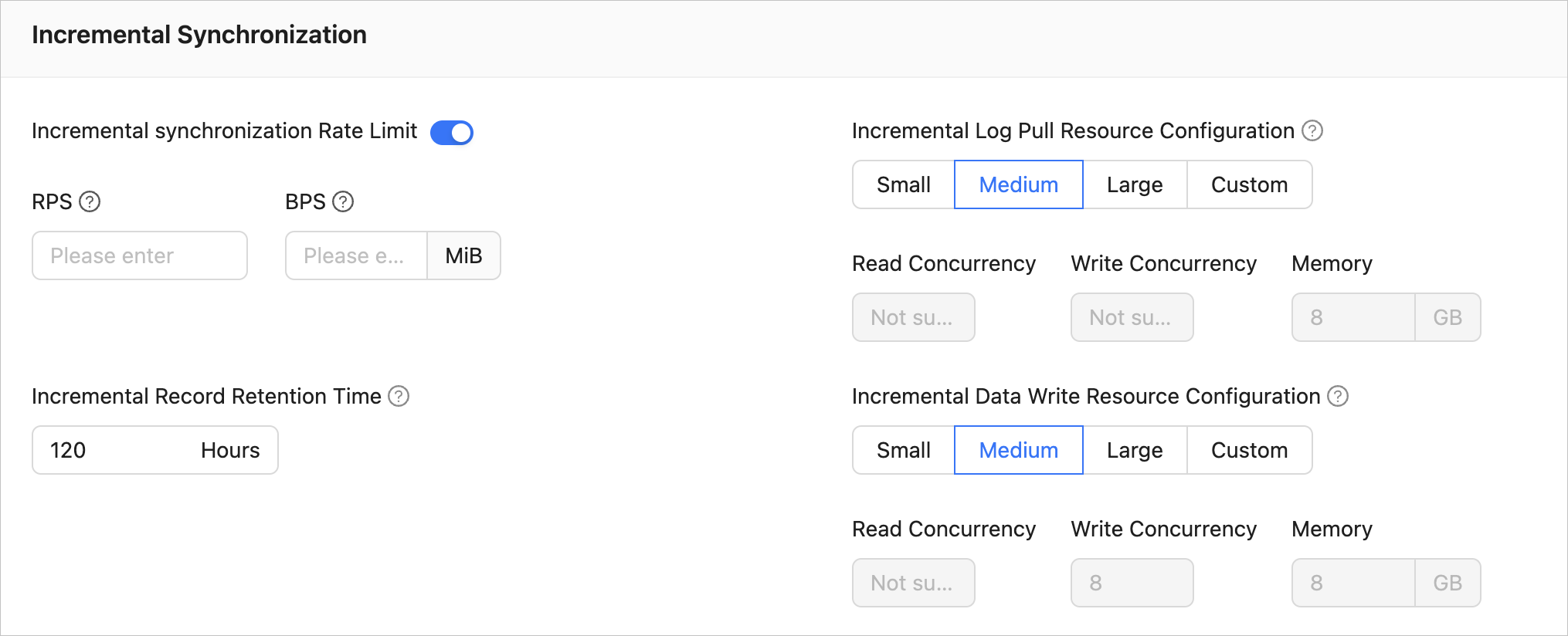 ParameterDescription
Incremental Synchronization Rate Limit You can choose whether to limit the incremental synchronization rate as needed. If you choose to limit it, you must specify the RPS and BPS. The RPS specifies the maximum rows of data synchronized to the target database per second during incremental synchronization, and the BPS specifies the maximum amount of data in bytes synchronized to the target database per second during incremental synchronization. Note
The RPS and BPS values specified here are only for throttling. The actual incremental synchronization performance is subject to factors such as the settings of the source and target databases and the instance specifications.
Incremental Log Pull Resource Configuration You can select Small, Medium, or Large to use the corresponding default value of Memory. You can also customize the resource configurations for incremental log pull. By setting the resource configuration for the Store component, you can limit the resource consumption of a task in log pull in the incremental synchronization stage. Notice
In the case of custom configurations, the minimum value is
1, and only integers are supported.Incremental Data Write Resource Configuration You can select Small, Medium, or Large to use the corresponding default values of Write Concurrency and Memory. You can also customize the resource configurations for incremental data writes. By setting the resource configuration for the Incr-Sync component, you can limit the resource consumption of a task in data writes in the incremental synchronization stage. Notice
In the case of custom configurations, the minimum value is
1, and only integers are supported.Incremental Record Retention Duration The duration that incremental parsed files are cached in OMS. A longer retention duration results in more disk space occupied by the Store component. Incremental Synchronization Start Timestamp - If you have selected Full Migration as the migration type, this parameter is not displayed.
- If you have selected Incremental Synchronization but not Full Migration, specify a point in time after which the data is to be synchronized. The default value is the current system time. For more information, see Set an incremental synchronization timestamp.
If the parameter settings on the page cannot meet your requirements, you can click Parameter Configuration in the lower part of the page to configure more specific settings. You can also reference an existing task or component template.
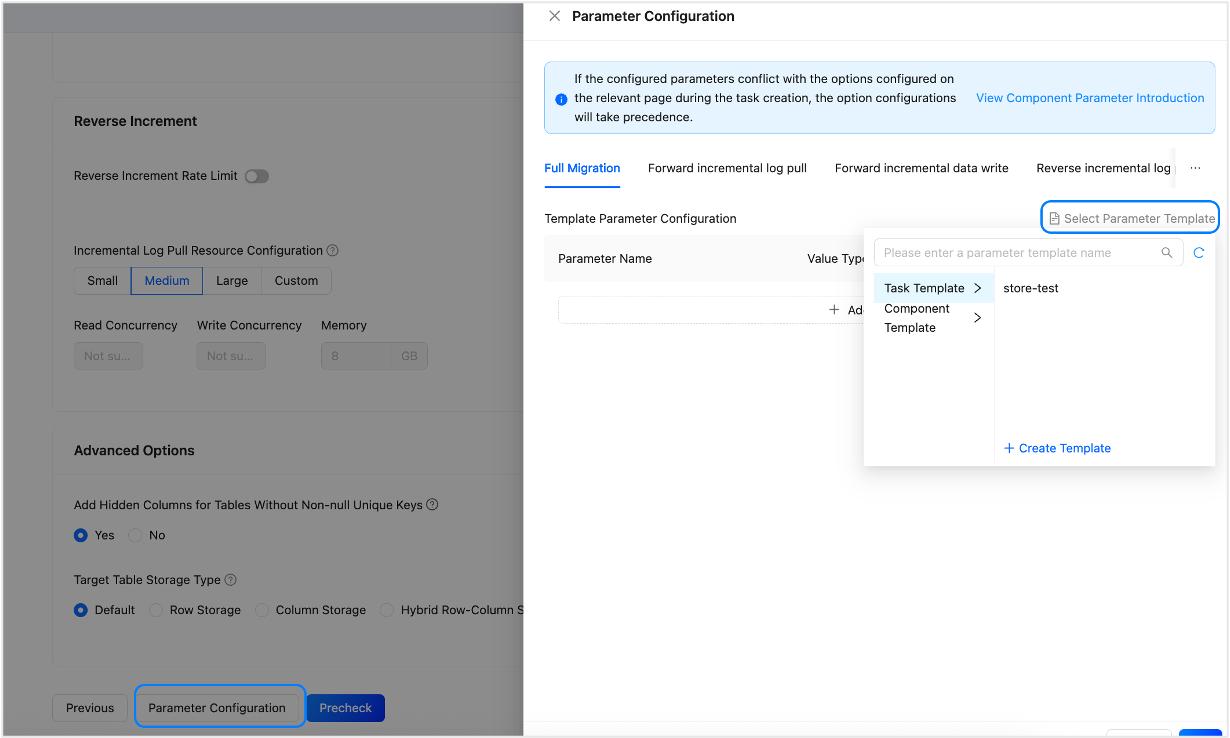
Click Precheck to start a precheck on the data migration task.
During the precheck, OMS checks the read and write privileges of the database users and the network connectivity of the databases. A data migration task can be started only after it passes all check items. If an error is returned during the precheck, you can perform the following operations:
Identify and troubleshoot the issue and then perform the precheck again.
Click Skip in the Actions column of a failed precheck item. In the dialog box that prompts the consequences of the operation, click OK.
After the precheck succeeds, click Start Task.
If you do not need to start the task now, click Save. After that, you can only manually start the task or start it in a batch operation on the Migration Tasks page. For more information about batch operations, see Perform batch operations on data migration tasks.
After the task is started, the task for data migration from the PolarDB-X 1.0 database to the MySQL-compatible tenant of OceanBase Database is automatically deleted. OMS retains the tasks for data migration from the databases mounted to the PolarDB-X 1.0 database to the MySQL-compatible tenant of OceanBase Database and automatically creates the corresponding data sources. In the dialog box that appears, you can click Export CSV to save the related information as a CSV file.
Then, click OK. On the Migration Tasks page, you can start one or more tasks for data migration from a MySQL database to the MySQL-compatible tenant of OceanBase Database.
You can click Configure Validation Task in the upper-right corner of the data migration details page to compare the data between the source and target databases. For more information, see Create a data validation task.
OMS allows you to modify the migration objects when the data migration task is running. For more information, see View and modify migration objects. After the data migration task is started, it is executed based on the selected migration types. For more information, see the View migration details section in View details of a data migration task.