
OceanBase Migration Service (OMS) must support the OpenID Connect (OIDC) protocol to adapt to the OAuth 2.0 authentication center. Currently, only the authorization-code grant type is supported. This topic describes the configurations to be updated to integrate the OIDC protocol into OMS to implement third-party single sign-on (SSO).
Obtain parameters from the authentication center
You must add your application to the third-party SSO service to obtain parameters required by OIDC, such as the application ID and key.
Parameter |
Description |
|---|---|
| clientId | The client ID of the third-party application. |
| clientSecret | The client secret of the third-party application. |
| scope | The authorization scope. The value is a list of permission IDs separated with commas (,). openid must be included in the value, for example, openid,profile. |
| ClientAuthenticationMethod | The authentication method. Valid values: client_secret_basic (recommended) and basic. |
| jwk_set_uri | The endpoint used to retrieve the public key of the JSON web key (JWK) for decoding the JWK. |
| authorization_uri | The authorization endpoint. |
| token_uri | The endpoint used to obtain a token. |
Configure a callback URL
If the third-party SSO system has a login callback URL allowlist, you must configure the allowlist.
Set the login callback URL to http://{serverDomain}/login/oauth2/code/oms, in which serverDomain is the domain name of the server where OMS is deployed.
Deploy OMS
This section describes how to log in to OMS deployed on a single node. If you want to deploy OMS on multiple nodes in a single region or on multiple nodes in multiple regions, see the "Deployment procedure with a configuration file" section in Deploy OMS on multiple nodes in a single region or Deploy OMS on multiple nodes in multiple regions.
Prerequisites
The installation environment meets the system and network requirements. For more information, see System and network requirements.
You have created a resource manager (RM) database, a cluster manager (CM) database, and a heartbeat database for the MetaDB of OMS. If you have not prepared them in advance, OMS will automatically create them.
You have obtained the installation package of OMS, which is generally a
tar.gzfile whose name starts withoms.You have loaded the installation package of OMS to the local image repository of the Docker container.
docker load -i <OMS installation package>You have prepared a directory for mounting the OMS container. In the mount directory, OMS will create the
/home/admin/logs,/home/ds/store, and/home/ds/rundirectories for storing the component information and logs generated during the running of OMS.(Optional) You have prepared a time-series database for storing performance monitoring data and DDL/DML statistics of OMS.
Procedure
Log in to the server where OMS is to be deployed.
(Optional) Deploy a time-series database.
If you need to collect and display OMS monitoring data, deploy a time-series database. Otherwise, you can skip this step. For more information, see Deploy a time-series database.
Run the following command to obtain the deployment script from the loaded image:
sudo docker run --name oms-config-tool <OMS_IMAGE> bash && sudo docker cp oms-config-tool:/root/docker_remote_deploy.sh . && sudo docker rm -f oms-config-tool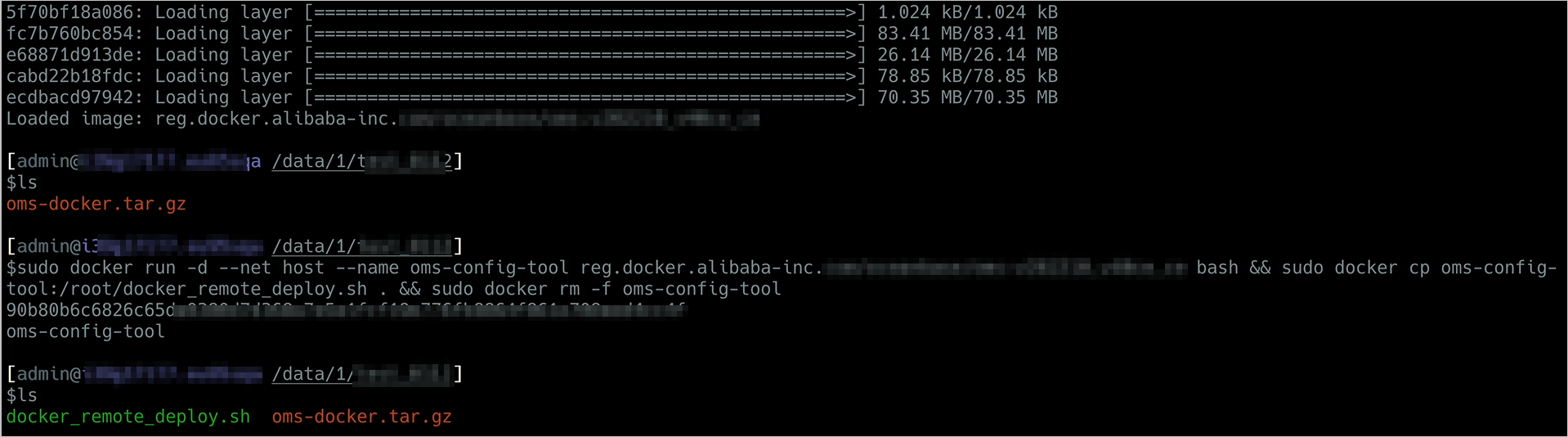
Use the deployment script to start the deployment tool.
sh docker_remote_deploy.sh -o <Mount directory of the OMS container> -c <Directory of the existing config.yaml file> -i <IP address of the host> -d <OMS_IMAGE>Note
For more information about settings of the
config.yamlfile, see the "Template and example of a configuration file" section.Complete the deployment as prompted. After you set each parameter, press Enter to move on to the next parameter.
Select a deployment mode.
Select Single Node in Single Region.
Select a task.
Select Use Configuration File Uploaded with Script Option [-c].
If the system displays The specified database names already exist in the MetaDB. Are you sure that you want to continue?, it indicates that the database names you specified already exist in the RM database and CM database of the MetaDB in the original configuration file. This may be caused by repeated deployment or upgrade of OMS. You can enter
yand press Enter to proceed, or enternand press Enter to modify the settings.If the configuration file passes the check, all the settings are displayed. If the settings are correct, enter
nand press Enter to proceed. Otherwise, enteryand press Enter to modify the settings.If the configuration file fails the check, modify the settings as prompted.
Specify the directory to which the OMS container is mounted on the node.
Specify a directory with a large capacity.
Confirm whether the OMS image file can be named <OMS_IMAGE>.
If yes, enter
yand press Enter to proceed. Otherwise, enternand press Enter to modify the settings.Determine whether to mount an SSL certificate to the OMS container.
If yes, enter
y, press Enter, and specify thehttps_keyandhttps_crtdirectories as prompted. Otherwise, enternand press Enter.Start the deployment.
To modify the configuration after deployment, perform the following steps:
Log in to the OMS container.
Modify the
config.yamlfile in the/home/admin/conf/directory as needed.Initialize the metadata.
sh /root/docker_init.sh
Template and example of a configuration file
Configuration file template
Notice
You must replace the sample values of required parameters based on your actual deployment environment. Both the required and optional parameters are described in the following table. You can specify the optional parameters as needed.
In the
config.yamlfile, you must specify the parameters in the key: value format, with a space after the colon (:).
# Information about the RM database and CM database
oms_cm_meta_host: ${oms_cm_meta_host}
oms_cm_meta_password: ${oms_cm_meta_password}
oms_cm_meta_port: ${oms_cm_meta_port}
oms_cm_meta_user: ${oms_cm_meta_user}
oms_rm_meta_host: ${oms_rm_meta_host}
oms_rm_meta_password: ${oms_rm_meta_password}
oms_rm_meta_port: ${oms_rm_meta_port}
oms_rm_meta_user: ${oms_rm_meta_user}

# You can customize the names of the following three databases, which are created in the MetaDB when you deploy OMS.
drc_rm_db: ${drc_rm_db}
drc_cm_db: ${drc_cm_db}
drc_cm_heartbeat_db: ${drc_cm_heartbeat_db}

# Configurations of the OMS cluster
# In single-node deployment mode, the IP address of the server where OMS is to be deployed is used. We recommend that you use an internal IP address.
cm_url: ${cm_url}
cm_location: ${cm_location}
# The cm_region parameter is not required in single-node deployment mode.
# cm_region: ${cm_region}
# The cm_region_cn parameter is not required in single-node deployment mode.
# cm_region_cn: ${cm_region_cn}
cm_nodes:
 - ${cm_nodes}

# Configurations of the time-series database
# The default value of `tsdb_enabled`, which specifies whether to configure a time-series database, is `false`. To enable metric reporting, set the parameter to `true`.
# tsdb_enabled: false
# If the `tsdb_enabled` parameter is set to `true`, delete comments for the following parameters and specify the values based on your actual configurations.
# tsdb_service: 'INFLUXDB'
# tsdb_url: '${tsdb_url}'
# tsdb_username: ${tsdb_user}
# tsdb_password: ${tsdb_password}

# The following table describes the parameters that need to be added when you log in to OMS by using SSO.
oms_iam_auth: OAUTH2
oms_oauth2_user_account_name_field: nickname
oms_oauth2_sso_login_url: http://oms.example/org:8090/omsp/oauth2/authorization/oms?oms_back_url=http://oms.example.org:8090
spring_security_oauth2_client_registration_oms_client_id: xxx
spring_security_oauth2_client_registration_oms_client_secret: xxx
spring_security_oauth2_client_registration_oms_redirect_uri: http://oms.example.org:8090/omsp/login/oauth2/code/{registrationId}
spring_security_oauth2_client_registration_oms_authorization_grant_type: authorization_code
spring_security_oauth2_client_registration_oms_scope: openid,profile
spring_security_oauth2_client_registration_oms_clientAuthenticationMethod: client_secret_basic
spring_security_oauth2_client_registration_oms_provider: oms
spring_security_oauth2_client_provider_jwk_set_uri: https:xxx.com
spring_security_oauth2_client_provider_authorization_uri: https://xxxx/api/auth
spring_security_oauth2_client_provider_token_uri: https://xxx/api/token
Parameter |
Description |
Required? |
|---|---|---|
| oms_cm_meta_host | The IP address of the CM database. It can only be a MySQL-compatible tenant of OceanBase Database V2.0 or later. | Yes |
| oms_cm_meta_password | The password for connecting to the CM database. | Yes |
| oms_cm_meta_port | The port number for connecting to the CM database. | Yes |
| oms_cm_meta_user | The username for connecting to the CM database. | Yes |
| oms_rm_meta_host | The IP address of the RM database. It can only be a MySQL-compatible tenant of OceanBase Database V2.0 or later. | Yes |
| oms_rm_meta_password | The password for connecting to the RM database. | Yes |
| oms_rm_meta_port | The port number for connecting to the RM database. | Yes |
| oms_rm_meta_user | The username for connecting to the RM database. | Yes |
| drc_rm_db | The name of the database for the OMS console. | Yes |
| drc_cm_db | The name of the MetaDB for the CM service. | Yes |
| drc_cm_heartbeat_db | The name of the heartbeat database for the CM service. | Yes |
| cm_url | The URL of the OMS CM service, for example, http://xxx.xxx.xxx.xxx:8088. Note In single-node deployment mode, the IP address of the server where OMS is to be deployed is used. We recommend that you do not set it to http://127.0.0.1:8088. The access URL of the OMS console is in the following format: IP address of the host where OMS is deployed:8089, for example, http://xxx.xxx.xxx.xxx:8089 or https://xxx.xxx.xxx.xxx:8089. Port 8088 is used for program calls, and Port 8089 is used for web page access. You must specify port 8088. |
Yes |
| cm_location | The code of the region. Value range: [0,127]. You can select one number for each region. | Yes |
| cm_region | The name of the region, for example, cn-jiangsu. Notice If you use OMS with the Alibaba Cloud Multi-Site High Availability (MSHA) service in an active-active disaster recovery scenario, use the region configured for the Alibaba Cloud service. The active-active disaster recovery feature is deprecated in OMS V4.3.1. |
No |
| cm_region_cn | The value here is the same as the value of cm_region. | No |
| cm_nodes | The IP addresses of servers on which the OMS CM service is deployed. | Yes |
| tsdb_enabled | Specifies whether metric reporting is enabled for monitoring. Valid values: true and false. |
No. Default value: false. |
| tsdb_service | The type of the time-series database. Valid values: INFLUXDB and CERESDB. |
No. Default value: INFLUXDB. |
| tsdb_url | The IP address of the server where InfluxDB is deployed. You need to modify this parameter based on the actual environment if you set the tsdb_enabled parameter to true. |
No |
| tsdb_username | The username used to connect to the time-series database. You need to modify this parameter based on the actual environment if you set the tsdb_enabled parameter to true. After you deploy a time-series database, manually create a user and specify the username and password. |
No |
| tsdb_password | The password used to connect to the time-series database. You need to modify this parameter based on the actual environment if you set the tsdb_enabled parameter to true. |
No |
| oms_iam_auth | The login method. Valid values: OAUTH2 and LOCAL. OAUTH2 is compatible with the password-based login method. |
Yes |
| oms_oauth2_user_account_name_field | The field used to obtain the username from IdToken. Example: nick or nickname. |
Yes |
| oms_oauth2_sso_login_url | The redirection URL for SSO based on the OIDC protocol. The value is in the format of http://{serverDomain}/omsp/oauth2/authorization/oms?oms_back_url={serverDomain}. {serverDomain} is the domain name and oms_back_url is the page of OMS displayed after the login succeeds. |
Yes |
| spring_security_oauth2_client_registration_oms_client_id | The client ID of the third-party application. | Yes |
| spring_security_oauth2_client_registration_oms_client_secret | The client secret of the third-party application. | Yes |
| spring_security_oauth2_client_registration_oms_redirect_uri | The callback URL in the http://{serverDomain}/login/oauth2/code/{registrationId} format, which is specified by redirectUrl. {serverDomain} is the domain name and {registrationId} does not need to be specified. |
Yes |
| spring_security_oauth2_client_registration_oms_authorization_grant_type | The grant type used by OMS to obtain access tokens from the OAuth2 authorization server. At present, only the authorization-code grant type is supported. |
Yes |
| spring_security_oauth2_client_registration_oms_scope | The authorization scope. The value is a list of permission IDs separated with commas (,). openid must be included in the value. |
Yes |
| spring_security_oauth2_client_registration_oms_provider | The name of the authorization service provider. You can define the value. Example: oidc. | Yes |
| spring_security_oauth2_client_provider_jwk_set_uri | The endpoint used to retrieve the public key of the JSON web key (JWK) for decoding the JWK. | Yes |
| spring_security_oauth2_client_provider_authorization_uri | The authorization endpoint. | Yes |
| spring_security_oauth2_client_provider_token_uri | The endpoint used to obtain a token. | Yes |
Sample configuration file
Replace related parameters with the actual values in the target deployment environment.
oms_cm_meta_host: xxx.xxx.xxx.xxx
oms_cm_meta_password: **********
oms_cm_meta_port: 2883
oms_cm_meta_user: oms_cm_meta_user
oms_rm_meta_host: xxx.xxx.xxx.xxx
oms_rm_meta_password: **********
oms_rm_meta_port: 2883
oms_rm_meta_user: oms_rm_meta_user
drc_rm_db: oms_rm
drc_cm_db: oms_cm
drc_cm_heartbeat_db: oms_cm_heartbeat
cm_url: http://xxx.xxx.xxx.xxx:8088
cm_location: 100
cm_region: cn-anhui
cm_region_cn: cn-anhui
cm_nodes:
  - xxx.xxx.xxx.xxx
tsdb_service: 'INFLUXDB'
tsdb_enabled: true
tsdb_url: 'xxx.xxx.xxx.xxx:8086'
tsdb_username: username
tsdb_password: *************
oms_iam_auth: OAUTH2
oms_oauth2_user_account_name_field: nickname
oms_oauth2_sso_login_url: http://oms.example/org:8090/omsp/oauth2/authorization/oms?oms_back_url=http://oms.example.org:8090
spring_security_oauth2_client_registration_oms_client_id: xxx
spring_security_oauth2_client_registration_oms_client_secret: xxx
spring_security_oauth2_client_registration_oms_redirect_uri: http://oms.example.org:8090/omsp/login/oauth2/code/{registrationId}
spring_security_oauth2_client_registration_oms_authorization_grant_type: authorization_code
spring_security_oauth2_client_registration_oms_scope: openid,profile
spring_security_oauth2_client_registration_oms_clientAuthenticationMethod: client_secret_basic
spring_security_oauth2_client_registration_oms_provider: oms
spring_security_oauth2_client_provider_jwk_set_uri: https:xxx.com
spring_security_oauth2_client_provider_authorization_uri: https://xxxx/api/auth
spring_security_oauth2_client_provider_token_uri: https://xxx/api/token