OceanBase
English日本語简体中文
ドキュメントホーム
製品
エコシステム
リリース

データベース

OceanBase CloudOceanBaseデータベース

ツール

OceanBase Cloud PlatformOceanBase移行サービス(OMS)OceanBaseデベロッパーセンターOceanBase Admin Tool

データベース

OceanBase CloudOceanBaseデータベース

ツール

OceanBase Cloud PlatformOceanBase移行サービス(OMS)OceanBaseデベロッパーセンターOceanBase Admin Tool
OceanBase CloudOceanBaseデータベース

OceanBase移行サービス(OMS)

V4.3.3Enterprise Edition
  • OMSドキュメント
  • OMSの概要
    • OMSの概要
    • 用語解説
    • OMS高可用性(HA)の紹介
    • Storeの原理
    • Full-Import/Incr-Syncデータ転送の原理
    • データ検証の原理について
    • システムアーキテクチャ
      • アーキテクチャ概要
      • 機能アーキテクチャ
      • コンポーネントの基本原理
    • OMS Oracle 全量移行の設計原理と影響
    • 制限事項
  • クイックスタート
    • データ移行プロセス
    • データ同期プロセス
  • OMSのデプロイ
    • デプロイメントタイプ
    • システムとネットワーク要件
    • メモリとディスク要件
    • 環境の準備
    • シングルノードデプロイ
    • 単一リージョン・マルチノード構成
    • 複数リージョン・複数ノードへのデプロイ
    • スケールアウトデプロイメント
    • スケールインのデプロイ
    • デプロイ状態の確認
    • (オプション)時系列データベースのデプロイ
  • 管理コンソール
    • OMSコンソールへのログイン
    • マネジメントコンソールの紹介
    • 個人設定
      • 個人情報の設定
      • ログインパスワードの変更
      • ログアウト
  • データ移行
    • データ移行の概要
    • MySQLデータベースのデータをOceanBaseデータベースのMySQL互換モードに移行する
    • OceanBaseデータベースのMySQL互換モードのデータをMySQLデータベースに移行する
    • OracleデータベースのデータをOceanBaseデータベースのMySQL互換モードに移行する
    • OceanBaseデータベースのOracle互換モードのデータをOracleデータベースに移行する
    • OracleデータベースのデータをOceanBaseデータベースのOracle互換モードに移行する
    • DB2 LUWデータベースのデータをOceanBaseデータベースのOracle互換モードに移行する
    • OceanBaseデータベースのOracle互換モードのデータをDB2 LUWデータベースに移行する
    • DB2 LUWデータベースのデータをOceanBaseデータベースのMySQL互換モードに移行する
    • OceanBaseデータベースのMySQL互換モードのデータをDB2 LUWデータベースに移行する
    • OceanBaseデータベース間のデータ移行
    • 双方向同期タスクの設定
    • TiDBデータベースのデータをOceanBaseデータベースのMySQL互換モードに移行する
    • PostgreSQLデータベースのデータをOceanBaseデータベースのOracle互換モードに移行する
    • PostgreSQLデータベースのデータをOceanBaseデータベースのMySQL互換モードに移行する
    • PolarDB-X 1.0データベースのデータをOceanBaseデータベースのMySQL互換モードに移行する
    • MilvusデータベースのデータをOceanBaseデータベースのMySQL互換モードに移行する
    • OBShardingデータベースのデータをOceanBaseデータベースのMySQL互換モードに移行する
    • OceanBaseデータベースのOracle互換モードからMySQLデータベースへの増分データ移行
    • データ移行タスクの管理
      • データ移行タスクの詳細を表示する
      • データ移行タスクの名前を変更する
      • 移行対象オブジェクトの表示と変更
      • タグを使用したデータ移行タスクの管理
      • データ移行タスクの一括操作
      • 移行対象オブジェクト設定のダウンロードとインポート
      • 移行パラメータ設定の確認と変更
      • 競合ログファイルのダウンロード
      • データ移行タスクの開始と一時停止
      • データ移行タスクの終了と削除
    • DDL同期のサポート範囲と制限事項
      • MySQLデータベースからOceanBaseデータベースのMySQL互換モードへのDDL同期
        • MySQLデータベースからOceanBaseデータベースのMySQL互換モードへのDDL同期の概要
        • テーブルの作成 CREATE TABLE
          • テーブルの作成
          • 列の作成
          • インデックスまたは制約の作成
          • パーティションの作成
        • データ型の変換
        • テーブルの変更 ALTER TABLE
          • テーブルの変更
          • フィールド操作
          • 制約とインデックスの操作
          • パーティション操作
        • テーブルの全行削除 TRUNCATE TABLE
        • テーブルの名前変更 RENAME TABLE
        • テーブルの削除 DROP TABLE
        • インデックスの作成 CREATE INDEX
        • インデックスの削除 DROP INDEX
        • MySQLデータベースとOceanBaseデータベースのMySQL互換モード間のDDLの非互換点
          • 非互換点の概要
          • CREATE TABLEの非互換点
            • CREATE TABLEの非互換点
            • インデックスまたは制約でサポートされるフィールドタイプ
          • ALTER TABLEの非互換点
            • ALTER TABLEの非互換点
            • 制約のある列の型の変更
            • 制約のない列の型の変更
            • 制約のある列の長さの変更
            • 制約のない列の長さの変更
            • 制約を持つ列の削除
          • インデックスの削除DROP INDEXの非互換点
      • OceanBaseデータベースのMySQL互換モードからMySQLデータベースへのDDL同期
      • OracleデータベースからOceanBaseデータベースのOracle互換モードへのDDL同期
        • OracleデータベースからOceanBaseデータベースのOracle互換モードへのDDL同期の概要
        • テーブルの作成 CREATE TABLE
          • テーブル作成の概要
          • リレーショナルテーブルの作成
            • リレーショナルテーブルの作成
            • リレーショナルテーブルの列定義
          • 仮想列
          • 通常列
          • パーティションの作成
            • パーティションの概要
            • パーティション
            • サブパーティション
            • 複合パーティション
            • カスタムパーティション
            • サブパーティションテンプレート
          • 制約
            • 制約の概要
            • 行内制約
            • 行外制約
        • インデックスの作成 CREATE INDEX
          • インデックス作成の概要
          • 通常のテーブルインデックス
        • テーブルの変更 ALTER TABLE
          • テーブル変更の概要
          • テーブル属性の変更、削除、追加
          • 列属性の管理
            • 列属性の変更、削除、追加
            • 列名の変更
            • 列と列属性の追加
            • 列属性の変更
            • 列の削除操作
          • 制約の変更、削除、追加
          • パーティションの管理
            • パーティションの変更、削除、追加
            • パーティションの削除
            • サブパーティションの削除
            • パーティションとサブパーティションの追加
            • パーティションの変更
            • パーティションデータの削除
        • テーブルの削除 DROP TABLE
        • 名前の変更 RENAME OBJECT
        • テーブルの全行削除 TRUNCATE TABLE
        • インデックスの削除 DROP INDEX
        • OracleデータベースとOceanBaseデータベースのOracle互換モード間のDDLの非互換点
          • 非互換点の概要
          • CREATE TABLEの非互換点
          • ALTER TABLEの非互換点
            • ALTER TABLEの非互換点
            • 制約のある列の型の変更
            • 制約のない列の型の変更
            • 制約のある列の長さの変更
            • 制約のない列の長さの変更
      • OceanBaseデータベースのOracle互換モードからOracleデータベースへのDDL同期
      • DB2 LUWデータベースからOceanBaseデータベースのOracle互換モードへのDDL同期
      • OceanBaseデータベースのOracle互換モードからDB2 LUWデータベースへのDDL同期
      • DB2 LUWデータベースからOceanBaseデータベースのMySQL互換モードへのDDL同期
      • OceanBaseデータベースのMySQL互換モードからDB2 LUWデータベースへのDDL同期
      • OceanBaseデータベースのMySQL互換モード間でのDDL同期
      • OceanBaseデータベースのOracle互換モード間でのDDL同期
      • PostgreSQLデータベースからOceanBaseデータベースのMySQL互換モードへのDDL同期
      • PostgreSQLデータベースからOceanBaseデータベースのOracle互換モードへのDDL同期
      • OBShardingデータベースからOceanBaseデータベースのMySQL互換モードへのDDL同期
  • データ同期
    • データ同期の概要
    • OceanBaseデータベースのデータをKafkaに同期する
    • OceanBaseデータベースのデータをRocketMQに同期する
    • OceanBaseデータベースのデータをDataHubに同期する
    • OceanBaseデータベースのデータをSwiftに同期する
    • ODPの論理テーブルデータをOceanBaseデータベースのMySQL互換モードの物理テーブルに同期する
    • ODPの論理テーブルデータをDataHubに同期する
    • IDBの論理テーブルデータをOceanBaseデータベースのMySQL互換モードに同期する
    • IDBの論理テーブルデータをDataHubに同期する
    • MySQLデータベースのデータをDataHubに同期する
    • OracleデータベースのデータをDataHubに同期する
    • OBShardingデータベースのデータをKafkaに同期する
    • データ同期タスクの管理
      • データ同期タスクの詳細を表示する
      • データ同期タスクの名前を変更する
      • 同期オブジェクトの表示と変更
      • タグを使用したデータ同期タスクの管理
      • データ同期タスクの一括操作
      • 同期対象設定のダウンロードとインポート
      • 同期パラメータ設定の確認と変更
      • データ同期タスクの開始と一時停止
      • データ同期タスクの終了と削除
  • データ検証
    • データ検証の概要
    • データ検証タスクの新規作成
    • データ検証タスクの管理
      • データ検証タスクの詳細を表示する
      • データ検証タスクの名前を変更する
      • 検証オブジェクトの表示と変更
      • 検証パラメータの確認と変更
      • タグを使用したデータ検証タスクの管理
      • 検証オブジェクトのインポート
      • データ検証タスクの開始、一時停止、および再開
      • データ検証タスクのクローン
      • データ検証タスクの削除
  • データソースの作成と管理
    • データソースの作成
      • OceanBaseデータソースの作成
        • OceanBase物理データソースの作成
        • ODPデータソースの作成
        • IDBデータソースの作成
        • OceanBaseパブリッククラウドデータソースの作成
        • OceanBase単一マシンデータソースの作成
      • MySQLデータソースの作成
      • Oracleデータソースの作成
      • TiDBデータソースの新規作成
      • Milvusデータソースの新規作成
      • Kafkaデータソースの作成
      • RocketMQデータソースの作成
      • DataHubデータソースの新規作成
      • Swiftデータソースの作成
      • DB2 LUWデータソースの作成
      • PostgreSQLデータソースの作成
      • PolarDB-X 1.0データソースの新規作成
      • OBShardingデータソースの作成
    • データソースの管理
      • データソース情報の表示
      • データソースのコピー
      • データソースの編集
      • データソースの削除
    • データベースユーザーの作成
    • ユーザー権限の説明
    • MySQLデータベースでBinlogを有効にする
    • ソース側Oracleデータベースの最小権限
  • 運用監視
    • 運用概要
    • 概要ページにアクセスする
    • マシン
      • マシン情報の表示
      • マシンの追加
      • マシンの削除
      • Quotaの更新
      • マシンのログを表示する
      • リソースグループの管理
    • コンポーネント
      • Store
        • Storeの追加
        • Storeコンポーネントの詳細を表示する
        • Storeコンポーネントの更新
        • Storeコンポーネントの起動と一時停止
        • Storeコンポーネントの削除
      • Incr-Sync
        • Incr-Syncコンポーネントの詳細を表示する
        • Incr-Syncコンポーネントの起動と一時停止
        • Incr-Syncコンポーネントの移行
        • Incr-Syncコンポーネントの更新
        • バッチ運用保守
        • Incr-Syncコンポーネントの削除
      • Full-Import
        • Full-Importコンポーネントの詳細を表示する
        • Full-Importコンポーネントの一時停止
        • Full-Importコンポーネントの再実行と再開
        • Full-Importコンポーネントの更新
        • Full-Importコンポーネントの削除
      • Full-Verification
        • Full-Verificationコンポーネントの詳細を表示する
        • Full-Verificationコンポーネントの一時停止
        • Full-Verificationコンポーネントの再実行と再開
        • Full-Verificationコンポーネントの更新
      • Incr-Verification
        • Incr-Verificationコンポーネントの詳細を表示する
        • Incr-Verificationコンポーネントの一時停止
        • Incr-Verificationコンポーネントの再実行と再開
        • Incr-Verificationコンポーネントの更新
      • Row-Verification
        • Row-Verificationコンポーネントの詳細を表示する
    • 運用管理タスク
      • オペレーションタスクの表示
      • タスクまたはサブタスクのスキップ
      • タスクまたはサブタスクの再試行
    • パラメータテンプレート
      • 概要
      • タスクテンプレート
        • タスクテンプレートの作成
        • タスクテンプレートの表示と編集
        • タスクテンプレートのコピーとエクスポート
        • タスクテンプレートの削除
      • コンポーネントテンプレート
        • コンポーネントテンプレートの作成
        • コンポーネントテンプレートの表示と編集
        • コンポーネントテンプレートのコピーとエクスポート
        • コンポーネントテンプレートの削除
      • コンポーネントパラメータの説明
        • Storeコンポーネントのパラメータ説明
        • Incr-Syncコンポーネントのパラメータ説明
        • Full-Importコンポーネントのパラメータ説明
        • Full-Verificationコンポーネントのパラメータ説明
        • Incr-Verificationコンポーネントのパラメータ説明
        • Row-Verificationコンポーネントのパラメータ説明
        • CMコンポーネントパラメータ説明
        • Supervisorコンポーネントのパラメータ説明
  • システム管理
    • 権限管理
      • 権限管理の概要
      • ユーザー管理
      • 部門管理
    • アラート管理
      • タスクのアラート情報を表示する
      • システムアラート情報の表示
      • アラート設定
    • OCPの関連付け
    • システムパラメータ
      • システムパラメータの変更
      • 高可用性機能の設定を変更する
      • oblogproxyパラメータの説明
    • キーの管理
    • 操作監査
  • トラブルシューティングガイド
    • OMSサービスの管理
    • OMSログのトラブルシューティング
    • コンポーネントの運用
      • Supervisorコンポーネントの運用
      • Connectorのコマンドライン操作インターフェース
      • Storeコンポーネントの運用
    • コンポーネントのチューニング
      • Incr-Sync/Full-Importのチューニング
      • Oracle Storeのチューニング
    • スロットリングとレート制限の設定方法
    • Storeコンポーネントのパフォーマンス診断について
  • リファレンスガイド
    • 機能紹介
      • DDL/DMLのカスタム設定
      • DDL同期範囲
      • データベース・テーブルの名前変更
      • SQL条件によるデータのフィルタリング
      • 増分同期の開始タイムスタンプの設定
      • 移行または同期オブジェクトのマッチングルールの設定
      • 検証対象のマッチングルールを設定する
      • ワイルドカード規則の説明
      • データ移行サービスの隠し列メカニズムについて
      • 構造移行操作の説明
      • ハートビートテーブルの作成と更新
      • Topicの変更
      • 列フィルタリングと列マッピング
      • データ形式の説明
    • APIリファレンス
      • 概要
      • タスクの作成
      • タスクの開始
      • タスクの一時停止
      • タスクの再開
      • タスクの解放
      • タスクの削除
      • タスクリストのページ単位の取得
      • タスクの詳細を照会する
      • タスクのステップの詳細を照会する
      • タスクのステップメトリクスの照会
      • タスクの進捗状況を照会する
      • タスクのコンポーネント情報を照会する
      • タスクの全量検証結果を照会する
      • 指定したラベルが付いた開始されていないすべてのタスクを開始する
      • 指定したラベルが付いた実行中のすべてのタスクを一時停止する
      • MySQLデータソースの作成
      • OceanBaseデータソースの作成
      • ODPデータソースの作成
      • PolarDB-X 1.0データソースの作成
      • Milvusデータソースの作成
      • データソースリストの取得
      • ラベルの作成
      • ラベルリストの取得
      • データソースの削除
      • 転送オブジェクトの変更
      • タスクの変更履歴を照会する
      • 変更操作の中止
      • 変更操作の再試行
      • 変更のキャンセル
      • タスクの事前チェック
      • 事前チェック結果の取得
      • タスク設定の更新
      • テーブル構造変換情報のダウンロード
      • 競合ログファイルのダウンロード
      • 競合ログファイルリストの取得
      • 正逆方向の増分同期の同期ポイントを変更する
      • タスクの実行を進める
      • リージョンリストの取得
      • ユーザーの作成
      • ユーザーの削除
      • ユーザー詳細の取得
      • 部門リストの取得
      • Kafka認証ファイルのアップロード
      • Kafkaデータソースの作成
      • DB2 LUWデータソースの作成
    • アラートリファレンス
      • oms_host_down OMSマシンダウンアラート
      • oms_host_down_migrate_resource OMSマシンダウン時の移行アラート
      • oms_host_threshold OMSマシンのしきい値アラート
      • oms_migration_failed 移行タスク失敗
      • oms_migration_delay 移行タスクの遅延
      • oms_sync_failed 同期タスクの失敗
      • oms_sync_status_inconsistent 同期タスクの状態が一致しない
      • oms_sync_delay 同期タスクの遅延
    • シングルサインオン
      • OMSにOIDCプロトコルを接続してシングルサインオンを実現する
      • OMSがSAML 2.0プロトコルに接続してシングルサインオンを実装する
      • OMS SAML 2.0によるMicrosoft Entra IDへのアクセス
    • OMSエラーコード
    • データベースオブジェクトのクエリ
    • トリガーの作成
    • PostgreSQLデータベースインスタンスのログレベルを変更する
    • Online DDLツールへの対応について
    • Oracleデータベースの補足ログに関する説明
    • Milvusトピックの設定
  • アップグレードガイド
    • 概要
    • シングルノードでのアップグレード
    • 複数ノードでのアップグレード
    • よくある質問
  • リリースノート
    • リリースノート
      • バージョン番号ルール
      • V4.3
        • OMS V4.3.3
        • OMS V4.3.2
        • OMS V4.3.1
        • OMS V4.3.0
      • V4.2
        • OMS V4.2.5
        • OMS V4.2.4
        • OMS V4.2.3
        • OMS V4.2.2
        • OMS V4.2.1
        • OMS V4.2.0
      • V4.1
        • OMS V4.1.0
      • V4.0
        • OMS V4.0.2
        • OMS V4.0.1
      • V3.4
        • OMS V3.4.0
      • V3.3
        • OMS V3.3.1
        • OMS V3.3.0
      • V3.2
        • OMS V3.2.2
        • OMS V3.2.1
      • V3.1
        • OMS V3.1.0
      • V2.1
        • OMS V2.1.2
        • OMS V2.1.0

PDF をダウンロード

このページには現在中国語/日本語版がなく、英語版を表示しています。
ドキュメントフィードバック
  1. ドキュメントセンター
  2. OceanBase移行サービス(OMS)
  3. V4.3.3

How do I perform performance tuning for Oracle Store?

最終更新:2026-09-04 08:13:48

Metrics in connector.log
Check whether garbage collection occurs in Oracle Store
Check garbage collection in connector.log
Use the jstat command to check garbage collection in real time
Adjust the JVM memory of Oracle Store
Adjust the JVM memory for a specified Oracle store
Adjust the JVM memory for all Oracle stores
Configure store parameters

This topic describes the performance metrics of Oracle Store and when and how to adjust these metrics.

Metrics in connector.log

Oracle Store prints monitoring logs in connector.log once every 10s to monitor the data backlog in each queue, which helps you troubleshoot processing bottlenecks. You can run the grep command to search for the corresponding queue information by using the following keywords and check the changes over a period of time. The default size of each queue is 20000.
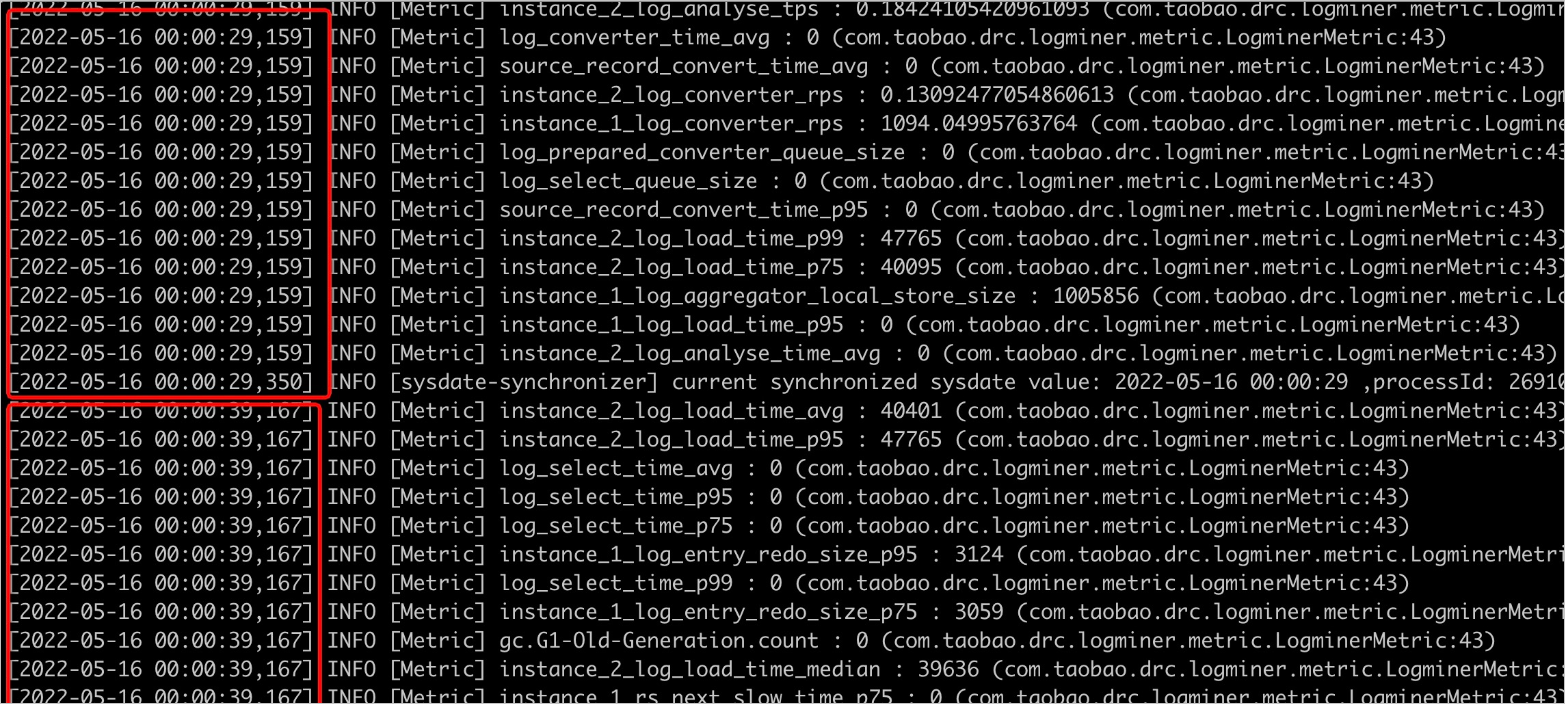
Metric

  • log_entry_queue_size: The data obtained from LogMiner is directly pushed to the queue. If the value remains at 0, OMS is bottlenecked when it pulls incremental data from the Oracle database. This may be caused by the following issues:

    • The load on the Oracle server is too large, resulting in slow operation of LogMiner.

    • The network between the OMS server and the Oracle server is unstable, or the two servers are not in the same region, resulting in slow data transmission.

    • If neither is the case, search for start loading log entries from log file in the connector.log file to check whether the log file being analyzed is an archive file. If the file is an archive file, the single logminer thread may have reached its performance limit. You need to configure concurrent logminer threads by using the following metrics: deliver2store.logminer.fetch_arch_logs_max_parallelism_per_instance and deliver2store.logminer.max_actively_staged_arch_logs_per_instance. Set deliver2store.logminer.max_actively_staged_arch_logs_per_instance to 2 * deliver2store.logminer.fetch_arch_logs_max_parallelism_per_instance.

    For example, you can set deliver2store.logminer.fetch_arch_logs_max_parallelism_per_instance=3,deliver2store.logminer.max_actively_staged_arch_logs_per_instance=6. Concurrent pulling takes up more memory. Therefore, when you adjust these two metrics, you must increase the JVM memory of the corresponding Oracle Store as well.

  • log_analyse_queue_size: The length of the data output queue after the Oracle Store parses the result returned by the LogMiner. If the queue is empty, OMS is bottlenecked in log parsing.

  • log_aggregator_queue_size: The number of records being assembled. This metric alone does not assist in troubleshooting. It must be used along with the log_converter_queue_size metric.

  • log_converter_queue_size: The length of the output queue of data conversion. If the value this metric is 0, OMS is bottlenecked on the converter and aggregator. If the value of the log_aggregator_queue_size metric is close to 20000, you need to increase the number of converter threads, specified by the deliver2store.logminer.converter_thread_num metric. The default value is 8.

  • log_select_queue_size: The length of the entry queue of flashback queries. If the queue size is close to 20000, OMS is bottlenecked in flashback queries. In this case, increase the number of flashback query threads, which is specified by the deliver2store.logminer.selector_thread_num metric. The default value is 32.

  • connect_task_queue_size: The length of the output queue of the LogMiner reader. If the value is 0, no bottleneck exists in the downstream. If the value is not 0, a bottleneck occurs in the Store framework.

  • log_aggregator_local_store_size: The number of uncommitted transactions cached by Oracle Store. A larger value of this metric indicates more records of uncommitted transactions in Oracle. You can collect values of this metric over a period of time. If the metric remains at a large value and suddenly drops, a large transaction exists in Oracle. Oracle Store will start processing only after the large transaction is committed, which causes a certain delay. You can check whether the large transaction can be broken into small ones from the business perspective, so that Oracle Store can process and output data in time.

  • log_aggregator_in_disk_transaction_num: The number of transactions cached to the disk. When the number of records for a transaction exceeds the value of the deliver2store.logminer.max_num_in_memory_one_transaction metric (default value: 1000), the transaction is cached to the disk. When a large transaction exists and the JVM memory can be increased, you can increase the value of deliver2store.logminer.max_num_in_memory_one_transaction to cache the transaction in memory as much as possible to improve processing efficiency.

Check whether garbage collection occurs in Oracle Store

When the efficiency is low, check whether garbage collection occurs in the Oracle store. Garbage collection may slow down data processing in the Oracle store. Eventually, all processing queues are jammed, resulting a stuck process.

Check garbage collection in connector.log

Search for the gc.G1-Old-Generation.count and gc.G1-Young-Generation.count metrics in the connector.log file. Check whether the values of these two metrics, especially the value of gc.G1-Old-Generation.count, are continuously increasing. Then, you can determine whether garbage collection occurs in the process, and whether the JVM memory needs to be increased.

Use the jstat command to check garbage collection in real time

Log in to the OMS container and run the following command to view the real-time garbage collection of the corresponding Oracle store. Before you execute the command, replace storexxxx with the ID of the corresponding Oracle store. After the command is executed, information about real-time garbage collection is printed every 3s. Focus on the FGC and FGCT metrics, which respectively indicate the number of full garbage collections and the time consumed since the process was started. When the FGC value increases continuously or the FGCT value accounts for over 10% the total running time of the process, you need to increase the JVM memory of the Oracle store.

jstat -gcutil `ps -ef | grep storexxxx | grep java | awk '{print $2}'` 3000

GC

Adjust the JVM memory of Oracle Store

Adjust the JVM memory for a specified Oracle store

  1. Stop the store.

    1. Log in to the OMS console.

    2. In the left-side navigation pane, choose OPS & Monitoring > Component. The Store tab automatically appears.

    3. On the Store tab, click in the Actions column of the target store, which must be in the Running state.

      • For single-region deployment, the region information is displayed on the right of Store.

      • For multi-region deployment, you can filter stores by region and pause the stores that are not running in the target region.

    4. In the dialog box that appears, click OK.

  2. Go to the /home/ds/store/storeXXX/kafka/bin directory on the OMS server, and modify the value of KAFKA_HEAP_OPTS in the connect-drcdeliver.sh file to modify the JVM memory. For example, change the value to -Xms32g -Xmx32g -Xmn8g. Generally, the three values in the string is in the 4:4:1 ratio. You can set them to reasonable values based on the total memory on the server.

  3. On the OMS console, choose OPS & Monitoring > Component > Store, and start the store.

Adjust the JVM memory for all Oracle stores

On the OMS server, go to the /home/ds//kafka/bin directory to modify the JVM memory. For more information, see Step 2. After the modification is completed, the new JVM configuration takes effect on all newly started Oracle stores.

Configure store parameters

  1. Log in to the OMS console.

  2. In the left-side navigation pane, click Data Migration.

  3. In the Migration Tasks list, click the name of the target task to go to its details page.

  4. Click View Component Monitoring in the upper-right corner.

  5. In the View Component Monitoring dialog box, click Update in the Actions column of the target component.

  6. In the Update Configuration dialog box, hover the pointer over the parameter to be modified and click the edit icon that appears.

  7. Modify the value in the text box and then click the confirm icon.

    You can also hover the pointer over the blank area after root and click the add icon to add a key-value pair.

  8. After you modify the YAML configuration as required, click Update.

    After the update is completed, Oracle Store automatically restarts to make the parameter changes take effect.

次のトピック

OMSドキュメント
次へ
このページの内容
Metrics in connector.log
Check whether garbage collection occurs in Oracle Store
Check garbage collection in connector.log
Use the jstat command to check garbage collection in real time
Adjust the JVM memory of Oracle Store
Adjust the JVM memory for a specified Oracle store
Adjust the JVM memory for all Oracle stores
Configure store parameters