
This topic describes the performance-related parameters of the Oracle store and how to troubleshoot performance issues.
Check whether the Oracle store frequently performs FGC
When the Oracle store checkpoint proceeds slowly, first check whether the Oracle store frequently performs full garbage collection (FGC). Frequent FGC will slow down the processing of the Oracle store.
View FGC information in the connector.log file
Search for gc.G1-Old-Generation.count in the connector.log file. If the value increases all the time, the process is performing FGC. In this case, you must increase the JVM memory.
View real-time GC information by using the jstat command
Log in to the container where OMS is located. Run the following command to view the real-time GC information of the corresponding Oracle store:
jstat -gcutil `ps -ef | grep storeXXXX | grep java | awk '{print $2}'` 3000
Note
Before you run the preceding command, you must replace storeXXXX with the Oracle store to be viewed. Example: store7100.
After this command is executed, real-time GC information is printed every 3 seconds. Pay attention to the number of times that FGC is performed and the full garbage collection time (FGCT) since the process is started. If the number of FGC times increases constantly or the proportion of the FGC time to the runtime of the process exceeds 10%, increase the JVM memory of the Oracle store.
Adjust the JVM memory of Oracle stores
Adjust the JVM memory of the specified Oracle store
Perform the following steps to adjust the JVM memory of the specified Oracle store:
In the OMS console, choose O&M and Monitoring > Component > Store. Stop the target store.
Go to the
/home/ds/store/storeXXXX/kafka/bindirectory of the OMS server and modify the JVM memory.Change the value of
KAFKA_HEAP_OPTSin theconnect-drcdeliver.shfile. For example, you can change the value to-Xms32g -Xmx32g -Xmn8g. Generally, the ratio of the sizes of the three values is4:4:1. You can adjust the values based on the memory of the server.In the OMS console, choose > Component > Store. Start the target store.
Adjust the JVM memory of all Oracle stores
Perform the following steps to adjust the JVM memory of all Oracle stores:
Go to the
/home/ds/kafka/bindirectory of the OMS server and modify the JVM memory.Change the value of
KAFKA_HEAP_OPTSin theconnect-drcdeliver.shfile. For example, you can change the value to-Xms32g -Xmx32g -Xmn8g. Generally, the ratio of the sizes of the three values is4:4:1. You can adjust the values based on the memory of the server.The Oracle stores started after the change will apply the new JVM configuration.
Upgrade components related to the Oracle store
If the total amount of archived data (the total amount of data in multiple instances of an RAC) in the Oracle database to be migrated exceeds 500 GB per day, or the log generation speed on a single Oracle instance exceeds 6 MB/s in peak hours and the log generation lasts a long period but a low latency of the Oracle store is demanded, you must upgrade components related to the Oracle store. For detailed version information, contact Technical Support.
Performance tuning for Oracle store
You can adjust the performance-related parameters of the Oracle store in advance based on the amount of archived data. Example:
alter session set nls_date_format='yyyy-mm-dd hh24:mi:ss';
-- The log amount per hour in the last 3 days
select THREAD#,logtime,count(*),round(sum(blocks * block_size) / 1024 / 1024 / 1024) GBSIZE from (select a.THREAD#,trunc(first_time, 'hh') as logtime,a.BLOCKS,a.BLOCK_SIZE from v$archived_log a where a.DEST_ID = 1 and a.FIRST_TIME > trunc(sysdate - 2)) group by THREAD#, logtime order by THREAD#, logtime;
-- The log amount per day in the last 3 days
select THREAD#,logtime,count(*),round(sum(blocks * block_size) / 1024 / 1024 / 1024) GBSIZE from (select a.THREAD#,trunc(first_time, 'dd') as logtime,a.BLOCKS,a.BLOCK_SIZE from v$archived_log a where a.DEST_ID = 1 and a.FIRST_TIME > trunc(sysdate - 2)) group by THREAD#, logtime order by THREAD#, logtime;
You can execute the preceding SQL statements to query the amount of archived data that is generated every hour and every day in the Oracle database in the last 3 days. In a real application cluster (RAC), THREAD# has different values. You must identify different nodes. To change the query range, modify the sysdate - 2 parameter in the SQL statement.
If the Oracle database contains multiple RAC instances, instruct the customer to configure load balancing for each Oracle instance. In this way, the number of logs on the Oracle instances will be balanced and the processing of the Oracle store will be faster.
If the size of a single archived file in the Oracle database is far greater than 2 GB, instruct the customer to adjust the size of each archived file to 1 to 2 GB. In this way, the processing of the Oracle store will be faster and less memory is required.
If the amount of archived data of a single Oracle instance exceeds 500 GB per day, or the log generation speed of a single Oracle instance exceeds 6 MB/s in peak hours and the log generation lasts for a long time but a low latency of the Oracle store is demanded, you can adjust parameters based on the amount of archived data, such as the degree of parallelism (DOP) for log pulling. By default, concurrency is disabled during log pulling.
Set the DOP for log-pulling on the basis that 500 GB of logs on a single instance can be handled per day in each concurrent operation. You must also pay attention to the configuration and load of the Oracle database. One log-pulling concurrent operation consumes N logical cores in the Oracle database. Here N is the number of Oracle instances. The higher the log pull concurrency, the larger the overhead of the Oracle database. If the concurrency exceeds the processing capability of the Oracle database, the database performance decreases. In addition, the data write may be affected, and the Oracle service may be interrupted due to highly concurrent LogMiner tasks. If multiple links are created for an Oracle database and multiple stores are created for each link, you must set the log pull concurrency and Oracle database load for these links and stores in a unified manner. Adjust the following parameters:
Adjust the DOP for log pulling as follows:
deliver2store.logminer.fetch_arch_logs_max_parallelism_per_instance = Daily log amount of the instance with a large data amount / 500 GB + 1. The default value is1.Adjust the number of archived files saved for each Oracle instance after log pulling as follows: Change the value of
deliver2store.logminer.max_actively_staged_arch_logs_per_instanceto twice the value ofdeliver2store.logminer.fetch_arch_logs_max_parallelism_per_instance.Change the value of the
deliver2store.logminer.staged_arch_logs_in_memoryparameter, which indicates whether to save pulled logs to the memory, to true. The default value isfalse, which indicates saving pulled logs to the disk. When this parameter is set totrue, you must also adjust the JVM memory as follows:Size of a single archived file × Log amplification times 4 × Number of Oracle instances × Number of archived files saved for a single instance + 8 GB. If the logs on multiple Oracle instances are seriously unbalanced, when you calculate the JVM memory size, use the number of archived files saved for the instance with a large log amount. Example:An Oracle RAC contains two instances, the size of a single archived file is 1 GB, logs are balanced between the two instances, and 1.25 TB of logs are generated per day for each instance (2.5 TB of logs are generated per day for the two instances). You can set the DOP for log pulling to 3, the number of archived files saved for a single instance to 6, and the JVM memory to
1 GB × 4 × 2 × 6 + 8 = 56 GB.An Oracle RAC contains two instances. The size of a single archived file is 1 GB. Logs are seriously unbalanced between the two instances and are mainly generated on one instance. An instance can generate 2.5 TB of logs per day. Assume that you have 1 Oracle instance, the DOP for log pulling is set to 6 and the number of archived files saved for a single instance is set to 12, then you can set the JVM memory to
1 GB × 4 × 1 × 12 + 8 = 56 GB.A larger amount of logs and a higher DOP in the Oracle database result in a higher overhead of the Oracle database. Accordingly, the memory and CPU overheads of the Oracle store are higher.
Determine the tuning method based on the Oracle store metrics
An Oracle store records a metric log in the connector.log file every 10 seconds to monitor the data accumulation conditions of each queue and help resolve processing bottlenecks. You can use the grep command to search for a queue by keyword and find the information of this queue. The changes within a specified period are recorded. The default size of a queue is 20000.
An Oracle store uses the pipeline model for processing, as shown in the following figure.
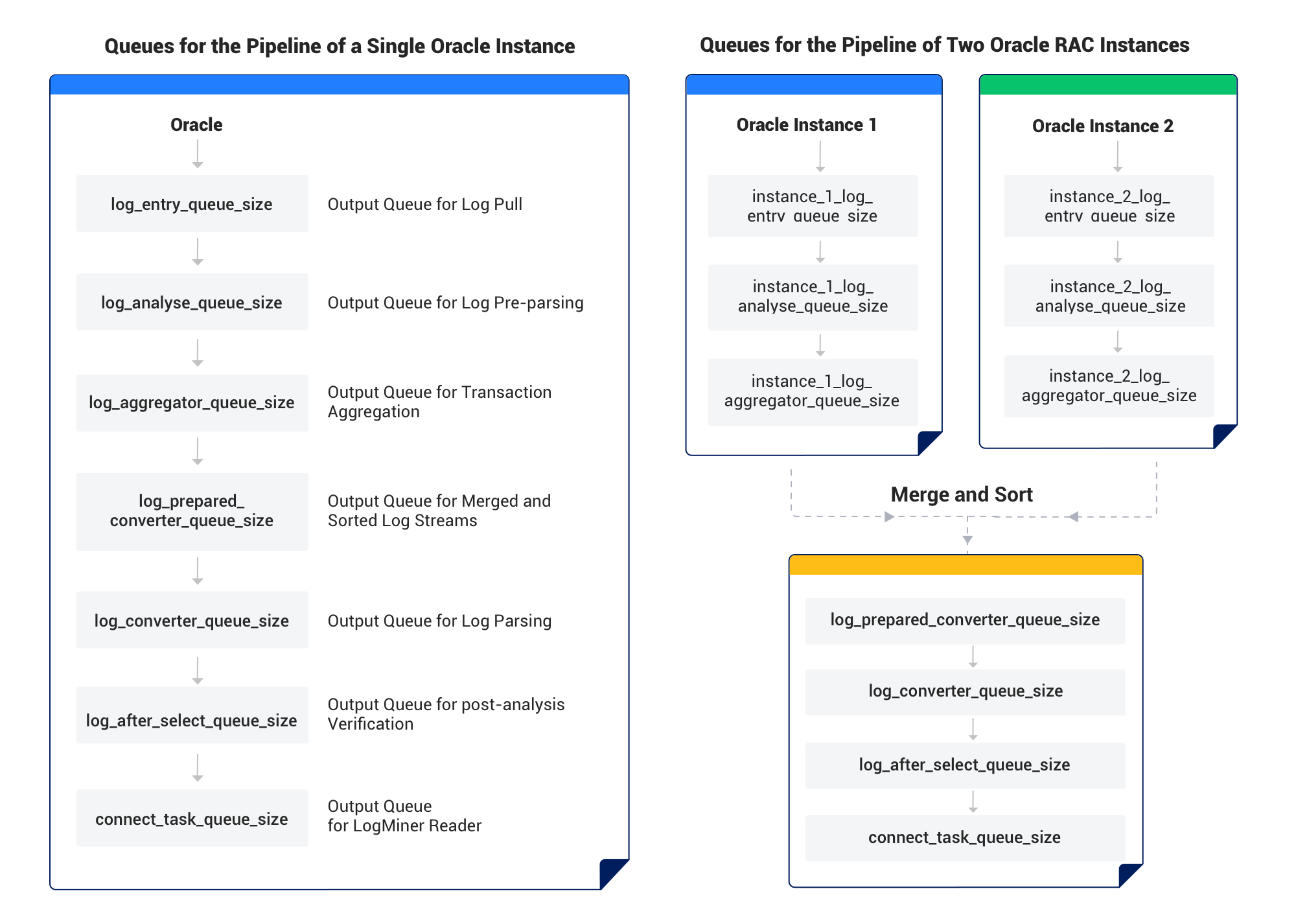
General troubleshooting method: Analyze the size of each queue within a period, such as 1 hour. Check the queues from the top down and the first empty queue is the bottleneck. If the size of a queue is close to 0 for a long time, it is considered empty.
If the Oracle database is an RAC with multiple instances, the name of each queue is prefixed instance_${instance_num}_. In this case, you must separately analyze the former three queues for each instance. For example, you can separately run the grep 'instance_1_log_entry_queue_size' connector.log and grep 'instance_2_log_entry_queue_size' connector.log commands. After you finish analyzing log_entry_queue for all instances and find that this phase has no bottlenecks, you can analyze the next phase, log_analyse_queue.
The following table describes the queues.
Queue |
Description |
|---|---|
log_entry_queue_size |
The output queue of Oracle logs pulled by using LogMiner. |
log_analyse_queue_size |
The output queue for log pre-parsing. |
log_aggregator_queue_size |
The output queue after transaction aggregation. Transactions that are rolled back are excluded. Only committed transactions are recorded in this queue. |
log_prepared_converter_queue_size |
The number of pre-converted records from the log_aggregator_queue. This metric is meaningless for a single-node Oracle cluster. If the Oracle database is an RAC, the records in multiple log_aggregator_queues are merged and sorted. If the log_aggregator_queue on each log stream has an unhandled commit record, the records are merged and sorted based on the commit sequence in each log stream. Assume that in a two-node RAC, the log_aggregator_queue_size of one node is full and the log_aggregator_queue_size of the other node is empty. The log_prepared_converter_queue_size will also be empty. This is because records will be merged and sorted only when the queue on the other node has commit records. In this case, you must analyze the bottleneck based on the former three queues of the instance whose log_prepared_converter_queue_size is empty. |
log_converter_queue_size |
The output queue for log parsing. |
log_after_select_queue_size |
The output queue for flashback queries. |
connect_task_queue_size |
The output queue for LogMiner Reader. |
The following table describes the tuning method for an empty queue and the tuning effect observation method.
Queue |
Tuning method for an empty queue |
Tuning effect observation method |
|---|---|---|
log_entry_queue_size |
Possible causes: The load on the Oracle server is heavy, which slows down the processing of LogMiner. The network between the OMS server and the Oracle server is unstable, or the two servers are not in the same region, which slows down data transmission. Search for start loading log entries from log file in the connector.log file and check whether the log file being analyzed is archived. If yes, LogMiner of a single process reaches its performance bottleneck. In this case, you must configure concurrency for pulling archived files. |
log_entry_tps: the TPS (actually RPS) of LogMiner pulling entries. You can calculate the pulling throughput based on log_entry_redo_size_avg. log_entry_redo_size_avg: the average size of each log entry pulled by using LogMiner, in bytes. log entries from: You can view the pulling condition of each archived file or REDO file. |
log_analyse_queue_size |
Increase the value of deliver2store.logminer.analyser_thread_num. Default value: 4. |
log_entry_analyse_tps: the TPS (RPS in fact) in the log analysis phase.long_analyse_tps: the TPS (RPS in fact) of records generated in the log analysis phase. This value will be smaller than that of log_entry_analyse_tps. This is because some tables not in the allowlist are filtered and sometimes multiple log entries form a single record. |
log_aggregator_queue_size |
log_aggregator_local_store_size: the number of uncommitted transactions cached by the Oracle store. More uncommitted transactions in the Oracle database result in a larger value of this parameter. If the value becomes very large, large transactions exist in the Oracle database.The Oracle store will process large transactions only after they are committed. This causes latency. In this case, you must check whether the large transactions can be split up so that the Oracle store can promptly process data. log_aggregator_in_disk_transaction_num: the number of transactions cached to the disk. When the number of records of a single transaction exceeds the value (which is 1000 by default) of deliver2store.logminer.max_num_in_memory_one_transaction, the transaction will be cached to the disk. When large transactions exist and the JVM memory can be increased, you can increase the value of deliver2store.logminer.max_num_in_memory_one_transaction so that the transactions are saved in the memory, which improves the processing efficiency. You can also check whether the large transactions can be split up. |
log_aggregator_local_store_size log_aggregator_in_disk_transaction_num |
log_converter_queue_size |
Increase the value of deliver2store.logminer.converter_thread_num. Default value: 8. |
log_converter_tps: the TPS in the log conversion phase.log_converter_rps: the RPS in the log conversion phase. |
log_after_select_queue_size |
Increase the value of deliver2store.logminer.selector_thread_num. Default value: 32. |
log_select_tps: the TPS (RPS in fact) in the log flashback query phase. |
connect_task_queue_size |
Increase the value of deliver2store.logminer.max_landing_message_num. Default value: 40000.Adjust the value of deliver2store.logminer.flush_threshold_bytes. Default value: 12288. |
connect_record_poll_tps: the output TPS (RPS in fact) of LogMiner Reader. |
Adjust Oracle store parameters
Log in to the OMS console.
In the left-side navigation pane, click Data Migration.
On the Data Migration page, click More > View Component Monitoring of the target task.
In the View Component Monitoring dialog box, click Update after the target component.
In the Update Configuration dialog box, hover your mouse over the target configuration and click the edit icon to update the configuration.
If there is no parameter for configuration, you need to hover your mouse over the blank space next to the root parameter and click the add icon to configure the Key Name and the corresponding value.
Click OK.
After the update, Oracle store will automatically restart for the parameter configuration to take effect.