
This topic describes the background information, limitations, procedure, scenarios, and troubleshooting tips for configuring matching rules for migration or synchronization objects.
Background information
When you create a data migration or synchronization task, you must specify the objects to migrate or synchronize. To do so, OceanBase Migration Service (OMS) allows you to specify the names of objects, import objects, and specify matching rules for objects. You can configure wildcard-based matching rules to specify migration or synchronization objects. You can also configure object mapping logic between the source and target databases. This allows you to specify a large number of objects to be migrated or synchronized in a simple and efficient manner. If a new source table meets a matching rule, the DDL statement that created the table can be automatically synchronized to the target database. For more information, see Supported DDL operations for synchronization and limitations.
Wildcard patterns for data migration or synchronization between databases
The following table describes the wildcard patterns supported by OMS for data migration or synchronization between databases.
Note
In the following table, an asterisk (*) indicates a wildcard.
Category |
Supported rule |
Example |
Description |
|---|---|---|---|
| Direct migration | *.* | kd_test*.person* | All tables whose names start with person in all databases whose names start with kd_test are migrated from the source to the target. The source database names and table names remain unchanged. |
| Direct migration | *.<source table> | kd_test*.person | All tables named person in all databases whose names start with kd_test are migrated from the source to the target. The source database names and table names remain unchanged. |
| Direct migration | <source database>.* | kd_test.person* | All tables whose names start with person in the database named kd_test are migrated from the source to the target. The source database name and table names remain unchanged. |
| Direct migration | <source database>.<source table> | kd_test.person | The table named person in the database named kd_test is migrated from the source database to the target database. The source database name and table name remain unchanged. |
| Migration object renaming | <source database>.<source table>=<target database>.<target table> | kd_test.person=kd_test_new.person_new | The table named person in the database named kd_test is migrated from the source database to the target database. The kd_test database is renamed as kd_test_new, and the person table is renamed as person_new. |
| Migration object renaming | <source database>.*=<target database>.* | kd_test.person*=kd_test_new.person* | All tables whose names start with person in the database named kd_test are migrated from the source to the target. The kd_test database is renamed as kd_test_new, and the source table names remain unchanged. |
| Migration object renaming | *.<source table>=*.<target table> | kd_test*.person=kd_test*.person_new | All tables named person in all databases whose names start with kd_test are migrated from the source to the target. The tables are renamed as person_new, and the source database names remain unchanged. |
| Database or table aggregation | <source database>.*=<target database>.<target table> | kd_test.person*=kd_test.person_all | All tables whose names start with person in the source database named kd_test are aggregated to the person_all table in the target kd_test database. |
| Database or table aggregation | *.<source table>=<target database>.<target table> | kd_test*.person=kd_test_all.person | All tables named person in all source databases whose names start with kd_test are aggregated to the person table in the target kd_test_all database. |
| Database or table aggregation | *.*=<target database>.<target table> | kd_test*.person*=kd_test_all.person_all | All tables whose names start with person in all source databases whose names start with kd_test are aggregated to the person_all table in the target kd_test_all database. |
| Data aggregation migration | *.*=<target database>.* | kd_test*.person*=kd_test_all.person* | All tables whose names start with person in all source databases whose names start with kd_test are aggregated to the target kd_test_all database. The source table names remain unchanged. |
| Database or table aggregation | *.*=*.<target table> | kd_test*.person*=kd_test*.person_all | All tables whose names start with person in all source databases whose names start with kd_test are aggregated to the person_all table in the target databases whose names start with kd_test. The source database names remain unchanged. |
The requirements for matching rules are as follows:
You cannot use wildcards for both database and table names of the source database, such as
kd_test*.person*=kd_test*.person*.If you use wildcards for both the source and target databases, the database expression must be the same for the source and target databases, indicating direct migration between databases.
If you use wildcards for both the source and target tables, the table expression must be the same for the source and target tables, indicating direct migration between tables.
If you use a wildcard for target databases, you must also use a wildcard for source databases.
If you use a wildcard for target tables, you must also use a wildcard for source tables.
Wildcard patterns for data migration or synchronization between a database and a message queue instance
The following table describes the wildcard patterns supported by OMS for data migration or synchronization between a database and a message queue instance.
Note
In the following table, an asterisk (*) indicates a wildcard.
Supported rule |
Example |
Description |
|---|---|---|
| *.*= |
*.*=topic | Multiple tables in multiple databases are mapped to one topic. |
| *. |
*.b=topic | The tables named b in multiple databases are mapped to one topic. |
| a.*=topic | Multiple tables in database a are mapped to one topic. | |
| a.b=topic | Table b in database a is mapped to a topic. |
Limitations
OMS allows you to specify multiple rules. Each rule occupies a single row, and spaces are not allowed before or after a rule.
Matching rules for migration or synchronization objects must not be empty. Object exclusion rules can be empty.
OMS does not support DDL modifications during schema migration or full migration.
When you configure matching rules to select migration or synchronization objects, table names cannot contain line breaks, spaces, or the following special characters:
. | " ' ` () = ; / & * ? [] [!].OMS does not allow you to configure multiple matching rules to map different tables in the same source database to different target databases, such as
a.a* = b.a* & a.b* = c.b*.In a scenario of database or table aggregation, reverse increment is not supported.
Note
OMS checks whether database or table aggregation exists only when a data migration or synchronization task is saved or started. OMS does not block reverse increment if database or table aggregation occurs during the running of a task. In this case, data quality may be compromised because reverse increment may fail to identify mappings between the source and target databases or tables.
At present, OMS does not support the DDL statement
CREATE DATABASE. If a new source database meets the object matching rules, you must manually create a corresponding target database to continue with the data synchronization of the new database.
Considerations
After you configure object matching rules and exclusion rules, objects that are within the difference set of the object matching and exclusion rules can be selected.
Note
A difference set between two sets contains all elements that exist in one set but do not exist in the other set.
After DDL synchronization is enabled, when you use a DDL statement to create a new table or modify the schema of a table in the source database, if the table is within the difference set of the object matching and exclusion rules, OMS can synchronize this DDL statement to the target database.
Take note of the following considerations in a scenario where database or table aggregation is enabled:
We recommend that you configure the mappings between the source and target databases by specifying matching rules.
We recommend that you manually create schemas in the target database. If you use OMS to create schemas, skip failed objects in the schema migration step.
If you select DDL Synchronization, databases or tables may be deleted by mistake. For example, when multiple source databases or tables are aggregated to a single target database or table, if a source database or table is dropped, the target aggregated database or table may be dropped.
When you create a data migration task, click Full Migration and select Ignore for Handle Non-empty Tables in Target Database.
Note
If you select Ignore, data is pulled in
INmode for full verification. In this case, the scenario where the target table contains more data than the source table cannot be verified, and the verification efficiency will be decreased.
If a renaming mapping rule is configured for tables, the renaming mapping rule takes precedence. For example, if the rules
a.b[0-3]anda.b[3-5]=a.care configured, thea.b3table is renamed asa.c.When you execute the
RENAME TABLEDDL statement, if the new table name falls out of the original match rules or exclusion rules, unexpected synchronization errors may occur. Proceed with caution.
Configure matching rules between databases
Create a data migration task and proceed to the Select Migration Objects step.
For more information, see the topics about data migration tasks of the corresponding data source types.
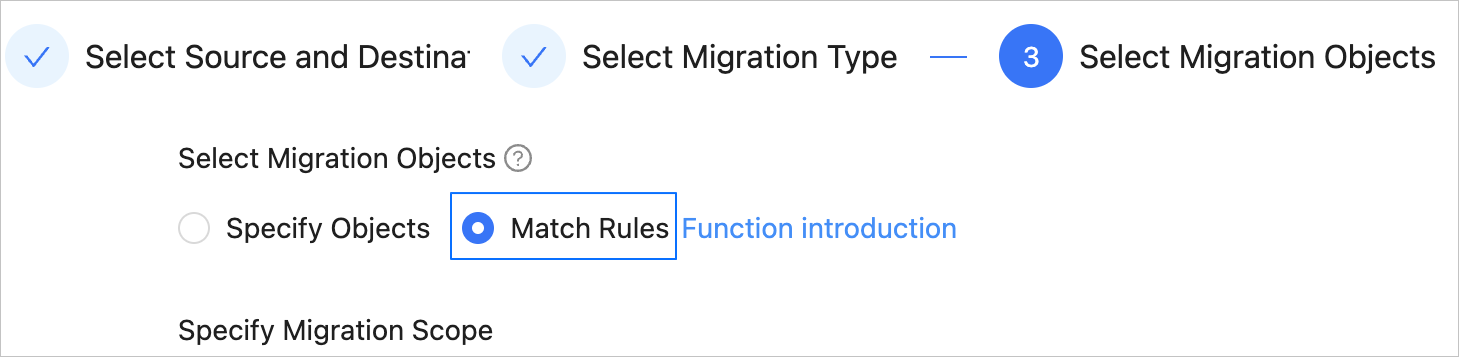
In the Select Migration Objects section, select Match Rules.
In the Specify Migration Scope section, specify object migration rules in the Object Migration Rules field and object exclusion rules in the Object Exclusion Rules field. The Object Exclusion Rule field is optional. For more information, see Wildcard patterns supported for matching rules.
Note
If the configured rule contains spaces, the object migration task may fail.
Click Verify.
To view the matching results, click Preview Objects after the verification succeeds. The wildcard-based matching rules and exclusion rules apply to tables and views. The matching results are displayed on the Final, Added, and Reduced tabs on the Matching Results page.
ObjectDescriptionFinal Displays the migration objects that are hit by the specified matching rules. Added Displays the migration objects that are not in the result of the previous matching. Reduced Displays the migration objects that are only in the result of the previous matching. After you configure matching rules for selecting migration objects, you can set filter conditions.
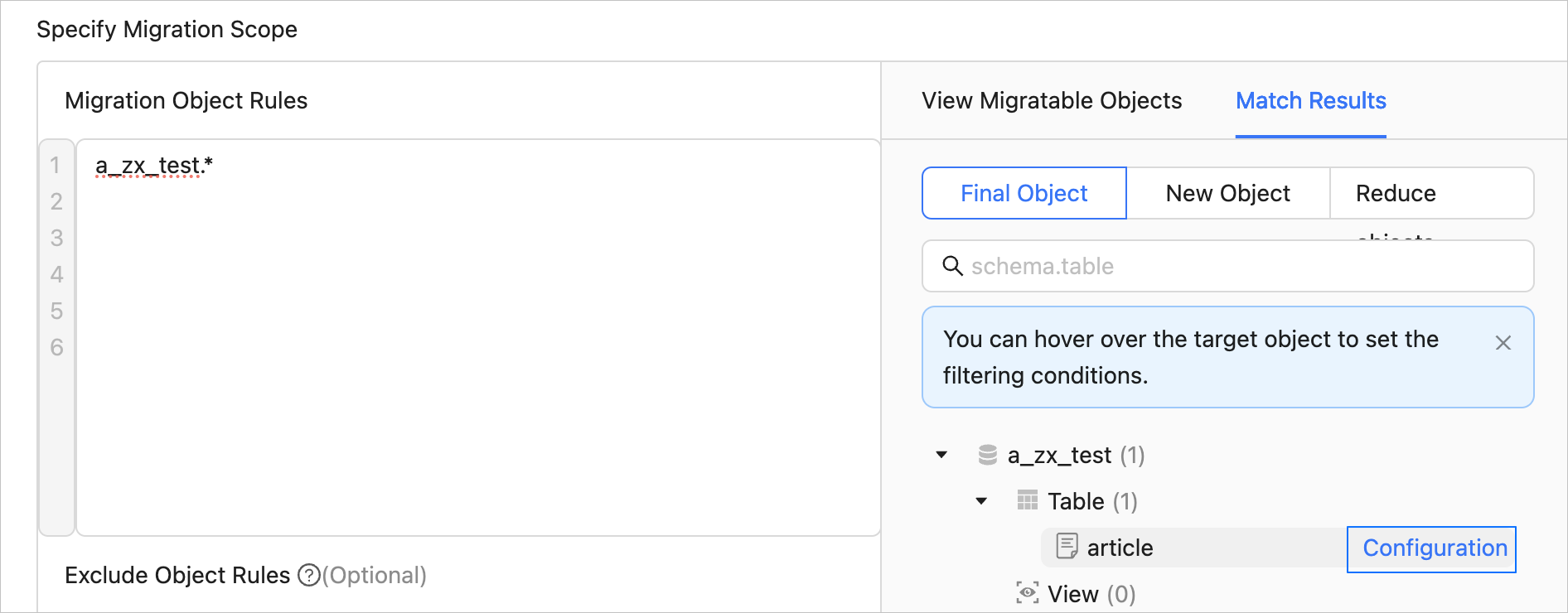
Choose Matching Results > Final and move the pointer over the target table object.
Click Settings.
In the Settings dialog box, specify a standard SQL
WHEREclause to filter data by row. Then, click Validate Syntax. For more information, see Use SQL conditions to filter data.After the syntax validation is passed, click OK.
You can also view column information of the migration objects in the View Column section.
Complete subsequent task settings as prompted.
Sample scenarios
Direct migration
Migrate all tables whose names start with
testin all source databases whose names start withjenkins_apito the target, and retain the original database and table names. Configure the matching rules as shown in the following figure.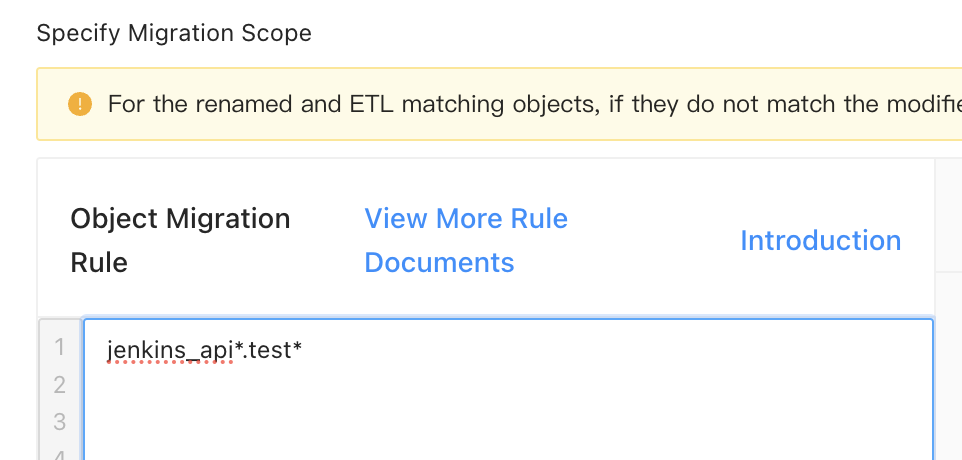
Migration object renaming
Migrate all tables whose names start with
testin the source database namedjenkins_my2dh_oneto the target, rename thejenkins_my2dh_onedatabase asjenkins_my2dh_one_new, and retain the original table names. Configure the matching rules as shown in the following figure.
Database or table aggregation
Aggregate all tables whose names start with
orderin all source databases whose names start withjenkins_apito theordertable in the targetjenkins_api_alldatabase. Configure the matching rules as shown in the following figure.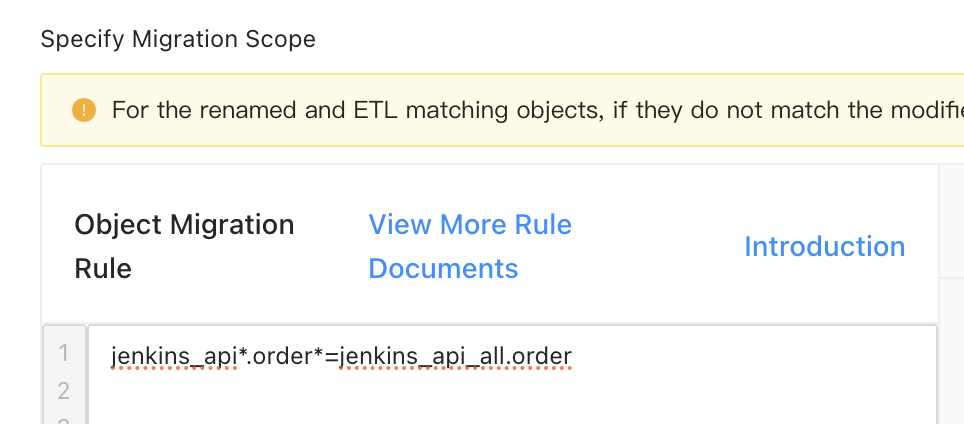
Configuration of object exclusion rules
Exclude historical tables whose names start with
history_and log tables whose names end withlogin the sourcejenkins_api_mysql56database from migration. Configure the matching rules as shown in the following figure.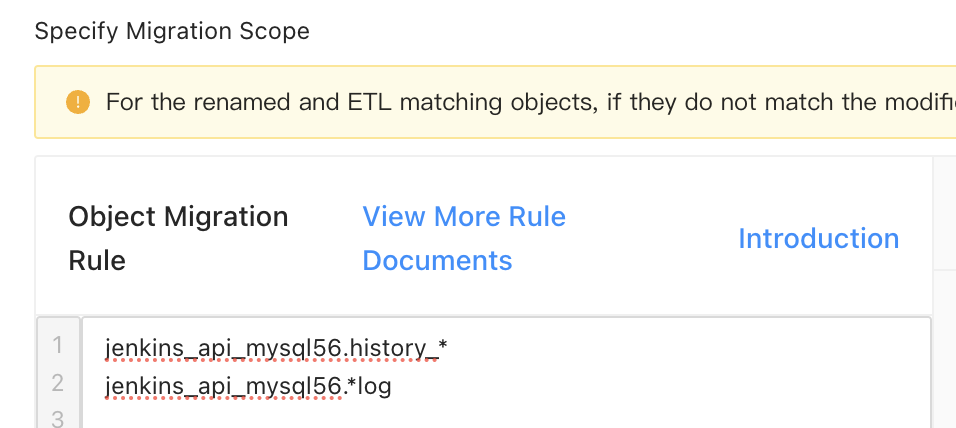
Configure matching rules for data migration or synchronization from a database to a message queue instance
When you synchronize data from OceanBase Database to a DataHub, Kafka, or RocketMQ instance, you can configure matching rules to select the objects to synchronize.
Create a data synchronization task and proceed to the Select Synchronization Objects step.
For more information, see the topics about data synchronization tasks of the corresponding data source types.
In the Select Synchronization Objects section, select Match Rules.
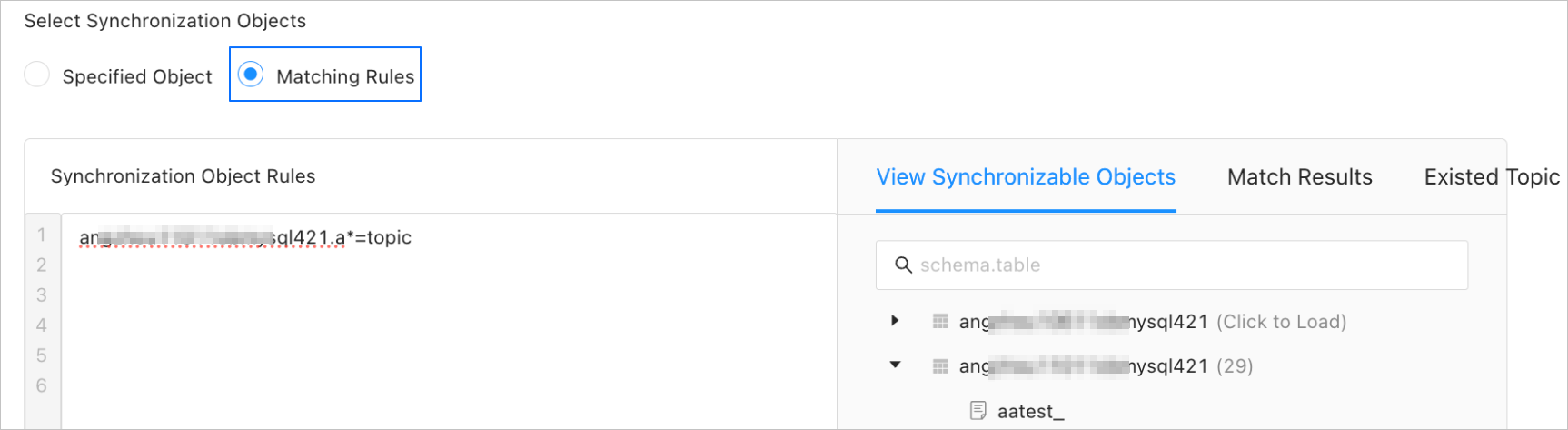
Specify object synchronization rules in the Object Synchronization Rule field and object exclusion rules in the Object Exclusion Rule field. The Object Exclusion Rule field is optional. For more information, see Wildcard patterns supported for matching rules.
When you configure matching rules, the business logic depends on the types of data synchronization tasks.
If the target is a DataHub instance, the topic type can be Tuple or BLOB.
For the Tuple type, you can enter only existing topic names without wildcards or spaces. After you select tables, they are mapped to topics in a one-to-one manner.
For the BLOB type, many-to-one and one-to-one mapping methods are supported, and no spaces are allowed.
If you have selected Schema Synchronization when you specified the synchronization types, you can choose to enter the name of an existing topic or create a new topic. You can select only one mapping method to create or select a topic. If you did not select Schema Synchronization when you specified the synchronization types, you can enter only the name of an existing topic.
If the target is a Kafka or RocketMQ instance, many-to-one and one-to-one mapping methods are supported, and no spaces are allowed.
If you have selected Schema Synchronization when you specified the synchronization types, you can choose to enter the name of an existing topic or create a topic. If you did not select Schema Synchronization when you specified the synchronization types, you can enter only the name of an existing topic.
Click Verify.
To view the matching results, click Preview Objects after the verification succeeds. The matching results are displayed on the Final, Added, and Reduced tabs on the Matching Results page.
After you configure matching rules to select synchronization objects, you can set filter conditions and sharding columns.
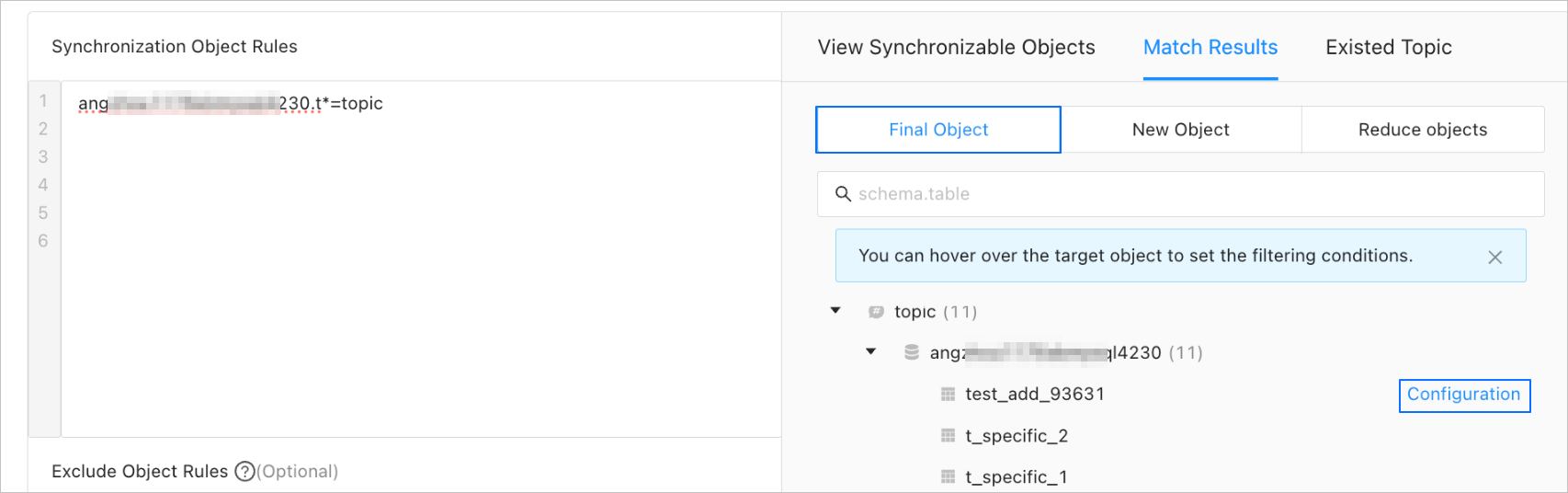
Choose Matching Results > Final and move the pointer over the target table object.
Click Settings.
In the Settings dialog box, you can perform the following operations:
When you synchronize objects from OceanBase Database, in the Row Filters section, specify a standard SQL
WHEREclause to filter data by row. Then, click Validate Syntax. For more information, see Use SQL conditions to filter data.Select the sharding columns that you want to use from the Sharding Columns drop-down list. You can select multiple fields as sharding columns. This parameter is optional.
Unless otherwise specified, select the primary key as sharding columns. If the primary keys are not load-balanced, select load-balanced fields with unique identifiers as sharding columns to avoid potential performance issues. Sharding columns can be used for the following purposes:
Load balancing: Threads used for sending messages can be recognized based on the sharding columns if the target table supports concurrent writes.
Orderliness: OMS ensures that messages are received in order if the values of the sharding columns are the same. The orderliness specifies the sequence of executing DML statements for a column.
Click OK.
FAQ
What can I do if I do not have the required privileges?
Pay attention to the privilege settings of the source database user. If you do not grant all required privileges to the migration user, some objects are not displayed in the frontend by OMS, and you cannot properly configure matching rules. In this case, you must add these objects to Object Exclusion Rules to prevent the data migration or synchronization task from being interrupted because OMS cannot find the target objects.
What can I do if DML filtering is not supported?
If DDL synchronization is not enabled, OMS allows you to set the migration object selection mode to Match Rules. If a table created during incremental synchronization meets a matching rule, the related DDL statements will be ignored but OMS will continue to synchronize DML statements. As a result, the data migration or synchronization task will be interrupted because objects cannot be migrated or synchronized to the target database. Therefore, you must create the table in the target database or add the table to the blocklist.